
Prompt Engineering course · lesson 6 of 26
- 1What Is Prompt Engineering? A Practical Beginner's Guide
- 2How a Model Reads Your Prompt: Tokens and Context
- 3Choosing a Model and Reading Its Documentation
- 4Controlling Model Output: Sampling and Limits
- 5Your First Prompt Workflow: Test One Change at a Time
- 6Be Clear and Direct: Give the Model a Usable Task
- 7System, Role, and Context Prompts: Give Instructions Their Place
- 8Zero-Shot, One-Shot, and Few-Shot Prompting
- 9Structure Prompts with Delimiters, Tags, and Templates
- 10Structured Output: Get Answers You Can Parse and Check
- 11Prompting with Long Documents and Large Context
- 12Prompt Recipes for Ten Common Jobs
- 13Chain-of-Thought Prompts and Thinking Models
- 14Step-Back Prompting and Prompt Chaining
- 15Self-Consistency, Tree of Thoughts, and ReAct
- 16Self-Evaluation and Reliability Checks
- 17Define Success and Build Test Cases
- 18Compare Prompts with Graders
- 19Debug a Failing Prompt
- 20Automatic Prompt Engineering
- 21Version and Document Your Prompts
- 22Hallucinations and Grounding
- 23Bias and Debiasing Prompts
- 24Prompt Injection and Safe Prompting
- 25Prompts in Production
- 26Capstone: Build and Test a Prompt Library
A prompt does not need to sound technical to work well. It needs to make the task understandable. When a request leaves out its audience, purpose, or required details, the model has to fill those gaps with guesses. A clearer instruction gives it fewer gaps to fill and gives you a better way to judge the answer.
This lesson turns vague requests into instructions that a new teammate could follow. We will make five practical rewrites, then look at how to choose a useful level of detail without making every prompt long.
Name the task plainly
Start by describing the action you want. “Help with this” could mean summarize, rewrite, classify, explain, or suggest. If the output matters, name the action and the source material.
For example, “Do something with these meeting notes” gives no clear destination. “Summarize these meeting notes for teammates who missed the call” names both an action and a reader. It still may need more detail, such as which decisions to preserve, but it gives the model a useful starting point.
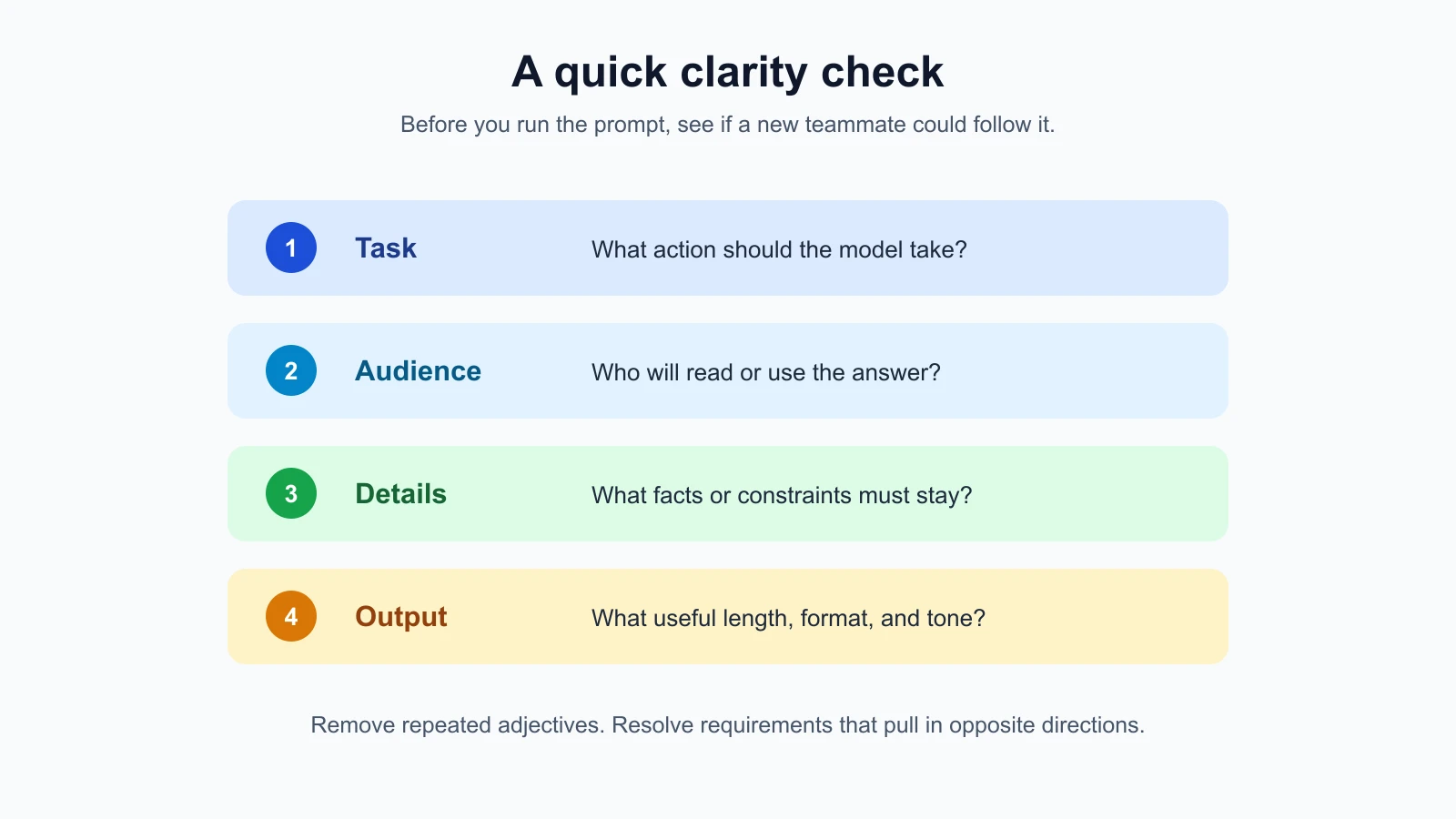
A simple way to make a task concrete is to ask yourself:
- What should the model do with the input?
- Who will use or read the answer?
- Which information must be preserved?
- What should the answer look or sound like?
You will not need to spell out every answer every time. Add details when they affect whether the result is useful. If you only need a quick list of ideas, a short request may be enough. If the result will be sent to a customer, specify the audience and tone so you can review it against a real purpose.
Give a positive direction, then add important boundaries
Instructions are often easier to follow when they say what to do. “Write a warm, two-sentence reply that confirms the booking date” sets a destination. “Don’t be cold, don’t ramble, and don’t forget the date” gives several warnings without clearly describing the desired response.
Negative instructions still have a place. They are useful for setting a boundary: “Do not include the customer’s account number” or “Do not invent a reason for the delay.” Use them alongside a clear task. “Summarize this note in one sentence. Include the scheduled and actual times. Do not guess why they differ” gives both the requested action and the limit.
Avoid stacking prohibitions that overlap or conflict. A request like “Don’t be too long, don’t leave anything out, don’t use jargon, don’t sound robotic” leaves the model to decide what each phrase means. Replace it with observable requirements: “Write three short bullets for a new customer. Explain the one required action in plain language.” You can test those requirements against the response.
Clear wording improves the instruction; it does not ensure the model will obey it every time. Check the answer, especially when a missed boundary could matter. For sensitive information or consequential decisions, use safeguards and review appropriate to the task rather than relying on wording alone.
Tell it who the answer is for
Audience affects vocabulary, background detail, and what counts as a useful explanation. “Explain two-factor authentication” could be a definition for a child, a note for a software engineer, or a customer help article. If you know the reader, say so.
A useful audience description is specific enough to guide the writing and short enough to stay relevant. “For a first-time user who has never changed an account setting” gives more direction than “for everyone.” If the reader needs to take an action, include that purpose too: “For a first-time user who needs to turn on alerts, explain where to find the setting.”
Do not confuse an audience description with a guarantee about behavior. “Act as an expert” may influence the style, but it cannot make a model qualified or correct. Say what expertise or perspective should shape the output, then verify factual or professional claims as needed. The lesson on system, role and context prompts looks more closely at roles and background context.
Choose a useful level of detail
A request for a “short and concise” answer sounds clear, but the two words largely ask for the same thing. Repeating similar adjectives does not set a measurable boundary. Use a length or shape that fits the job: “one sentence,” “four bullets,” “a paragraph under 100 words,” or “a detailed explanation with a short example.”
Short answers are useful when a reader needs the main point quickly. They can omit context, caveats, or steps that matter. Complete answers are useful when the reader needs to act or learn, but extra detail can bury the key information. Neither length is automatically better. Choose based on what the reader needs to do next.
If you ask for a word count, treat it as guidance to check, not a reliable hard limit. Models can overshoot or undershoot. If exact length matters, inspect the output or enforce it with code and revise as needed. A simpler structural limit, such as “three bullets,” may be easier to judge than an exact number of words.
A tone word can also be vague. “Professional” means different things in a legal update, a friendly support reply, and a note to a close teammate. Add one short description of the effect you want: “calm and reassuring,” “direct but courteous,” or “friendly without jokes.” Where tone matters, look at examples of writing your audience already responds well to.
It can help to decide what the reader should do after reading. A status note might need only the changed date and one next step. A setup guide may need the reason for each step and what to expect if it fails. You can state that purpose directly: “Help a new employee complete the setup without assistance” or “Give the team enough context to choose the next review date.” The purpose helps you decide whether a brief answer is enough. It also makes review easier: ask whether the answer leaves the reader ready for the action you named.
Five rewrites from vague to usable
The following examples are illustrative prompts. They show how to add the missing information. They are not reports of live model outputs.
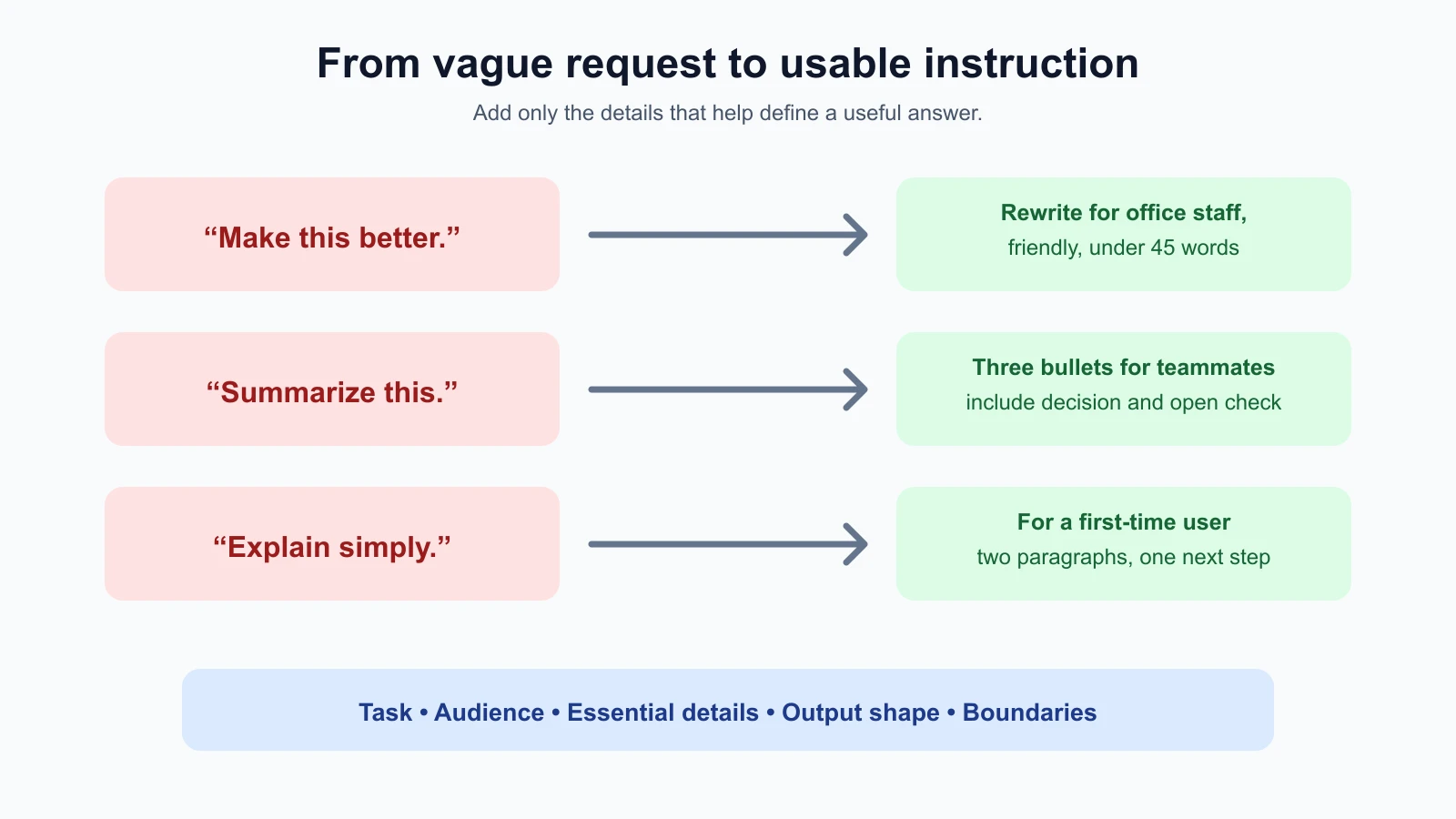
1. “Make this better”
Vague:
1Make this better:
2The office will close early on Friday and I need to tell everyone.
“Better” could mean more persuasive, more formal, shorter, or clearer. The message does not say who “everyone” is or whether a time should be included.
Clearer:
1Rewrite this as a clear, friendly message for office staff. Say that the office closes at 3 p.m. on Friday. Keep it under 45 words and do not add a reason.
2
3Draft:
4The office will close early on Friday and I need to tell everyone.
This request names the action, reader, essential fact, length, and a boundary. If the closing time were not provided, the prompt should ask for a placeholder or request the missing detail instead of inviting the model to guess.
2. “Summarize this”
Vague:
1Summarize this:
2The design review moved from Tuesday to Thursday. The team agreed to keep the existing layout, but the mobile menu still needs another accessibility check.
A summary could omit the decision or the unfinished work. The intended reader is also unclear.
Clearer:
1Write a three-bullet update for teammates who missed the design review. Include the new meeting day, the layout decision, and the remaining accessibility check. Use only details in the notes.
2
3Notes:
4The design review moved from Tuesday to Thursday. The team agreed to keep the existing layout, but the mobile menu still needs another accessibility check.
The bullets give a predictable shape. The list of details tells the model what must survive compression. “Use only details in the notes” reinforces the source boundary, though you should still check whether the answer added anything.
3. “Write something professional”
Vague:
1Write something professional about the late invoice.There is no recipient, purpose, or known fact. The model may invent a due date or make the message more severe than you intend.
Clearer:
1Draft a polite email to a supplier asking when invoice 4821 will be ready. We have not received it yet. Do not claim that it is overdue. Keep the message to one short paragraph.The revised request supplies the relationship, purpose, available fact, and an important boundary. Before sending the draft, a person should confirm the invoice number and any other details.
4. “Explain this simply”
Vague:
1Explain password managers simply.“Simply” could mean one sentence or a full beginner guide. It does not say who needs the explanation or what they should understand afterward.
Clearer:
1Explain password managers to someone who has never used one. In two short paragraphs, say what the tool stores, how it helps with unique passwords, and one practical step to get started. Avoid technical terms or define them when needed.This version uses a reader, length, and a small list of points. If the person is deciding whether to use a particular product, the prompt would also need trustworthy product information and a careful fact check.
5. “Give me ideas”
Vague:
1Give me ideas for our newsletter.The topic, audience, and useful range are missing. A long list of generic suggestions might not help the editor.
Clearer:
1Suggest six newsletter topics for local gardeners in early spring. For each topic, add one sentence explaining why it would be useful this month. Keep the ideas varied and avoid product promotions.The topic, audience, timing, count, and purpose now give you a way to assess the list. “Keep the ideas varied” is still subjective, so inspect the suggestions for repetition rather than assuming the instruction guarantees variety.
Make the instruction easy to scan
For a straightforward request, one sentence may be enough. For a task with several requirements, separate them into short lines or bullets. This helps you spot missing details and conflicting rules before you run the prompt.
For example:
1Task: Summarize the notes for the project team.
2Include: the decision, the owner, and the due date if stated.
3Format: three bullets, one sentence each.
4Boundary: use only facts from the notes; mark missing details as “not stated.”
5
6Notes:
7[Paste notes here]
Labels like “Task” and “Format” are just a way to organize your own instructions. You do not need a special syntax for every prompt. Add structure when it makes the requirements easier to find, and keep the input clearly separated when that helps prevent confusion.
Read your prompt once as if you had never seen the task before. Could you tell what action to take? Would you know which details must stay? Would you know when the response is done? If not, add the missing information in plain words.
Keep instructions compatible
A prompt can contain clear individual directions that clash when combined. “Use exactly one sentence” and “explain every step in detail” may not fit together. “Be comprehensive” and “use no more than 20 words” may pull in opposite directions. Before running a prompt, decide which requirement matters more or change the output shape.
Try replacing broad demands with priorities. For instance: “Give the answer in one sentence. Include the decision and next action; leave out background detail.” That tells the model what to preserve when space is limited. If the result still misses the priority, adjust the request and test again using the workflow in Your First Prompt Workflow.
Mistakes beginners make
- Using adjectives as the whole instruction. “Good,” “professional,” and “simple” need context or observable details.
- Repeating near-synonyms. “Short and concise” does not say how much detail to include.
- Listing only what to avoid. Add a clear positive description of the result you want.
- Assuming a role makes the model an expert. A role can shape the response; it cannot verify the facts.
- Overloading a simple task with rules. Every added requirement is another thing to inspect. Keep only what changes the result.
- Treating a word limit as exact. Check the response if length is important.
- Leaving two requirements in conflict. Set a priority or choose a format that can satisfy both.
Recap and try it yourself
Clear prompts name the action and add the reader, essential details, tone, or output shape when those details affect the answer. Positive directions describe the result; boundaries can prevent a specific mistake. Keep wording plain, remove repeated adjectives, and resolve conflicting requirements. A concise prompt can be enough for a simple task, while a consequential or multi-step task may need more context and explicit checks.
Try it: take one prompt you have used recently. Underline the task, audience, details that must stay, and the desired output shape. Rewrite any vague adjectives as something you can inspect. Then test the old and new versions on the same inputs using the comparison workflow from the previous lesson. In the next lesson, we will separate stable instructions from the immediate request using system, role, and context.