
Prompt Engineering course · lesson 8 of 26
- 1What Is Prompt Engineering? A Practical Beginner's Guide
- 2How a Model Reads Your Prompt: Tokens and Context
- 3Choosing a Model and Reading Its Documentation
- 4Controlling Model Output: Sampling and Limits
- 5Your First Prompt Workflow: Test One Change at a Time
- 6Be Clear and Direct: Give the Model a Usable Task
- 7System, Role, and Context Prompts: Give Instructions Their Place
- 8Zero-Shot, One-Shot, and Few-Shot Prompting
- 9Structure Prompts with Delimiters, Tags, and Templates
- 10Structured Output: Get Answers You Can Parse and Check
- 11Prompting with Long Documents and Large Context
- 12Prompt Recipes for Ten Common Jobs
- 13Chain-of-Thought Prompts and Thinking Models
- 14Step-Back Prompting and Prompt Chaining
- 15Self-Consistency, Tree of Thoughts, and ReAct
- 16Self-Evaluation and Reliability Checks
- 17Define Success and Build Test Cases
- 18Compare Prompts with Graders
- 19Debug a Failing Prompt
- 20Automatic Prompt Engineering
- 21Version and Document Your Prompts
- 22Hallucinations and Grounding
- 23Bias and Debiasing Prompts
- 24Prompt Injection and Safe Prompting
- 25Prompts in Production
- 26Capstone: Build and Test a Prompt Library
Sometimes an instruction is enough. Other times, a model understands the task but keeps missing the format, tone, or boundary you care about. In those cases, a few examples can show what a good response looks like.
A prompt with no examples is called zero-shot. A prompt with one example is one-shot. A prompt with several examples is few-shot. The names describe the prompt, not a special model or a training process. The examples are included in the request so the model can use them while responding. They do not change the model’s underlying weights.
This lesson explains when to try examples, how to choose them, and what can go wrong when an example is ambiguous or unrepresentative. The central habit from your first prompt workflow still applies: compare versions against the same inputs and checks.
Start with zero-shot
A zero-shot prompt gives the model an instruction and the current input, without a demonstration of an input and its desired answer. For example:
1Classify the message as Urgent or Routine.
2Return only the label.
3
4Message: The projector in room 2 is not turning on, and the presentation starts in ten minutes.
The task, labels, and output shape are stated directly. If the answer is consistently useful, you may not need examples. Start simple so you have a baseline and do not add example text without a reason.
Zero-shot works well when the task is familiar, the instructions are clear, and the categories are easy to distinguish. It can also be a good first choice when prompt length matters. An example takes up space and may add a pattern you did not intend.
A zero-shot prompt can still fail when a label is ambiguous. Is a broken projector urgent if the presentation starts tomorrow? What if the equipment is only needed for an optional meeting? If people on your team answer these cases differently, the model may do the same. You may need clearer rules, examples, or both.
Add one example when a pattern needs showing
A one-shot prompt includes one demonstration of an input and its expected output. The example can clarify a format or illustrate a simple decision:
1Classify the message as Urgent or Routine.
2Return only the label.
3
4Example
5Message: The meeting room has no whiteboard markers. The training starts in an hour.
6Label: Urgent
7
8Now classify this message.
9Message: The projector in room 2 is not turning on, and the presentation starts in ten minutes.
10Label:
This example gives a clue about the urgency boundary, but it may not be enough to define it. “Urgent” could mean that an event is starting soon, that an issue affects many people, or that a safety problem exists. One example can accidentally suggest that only time pressure matters.
Use one example when a single clear demonstration is likely to resolve the confusion. For instance, showing the exact date format you want may be enough. If the task has several categories, exceptions, or edge cases, one example can leave too much open to interpretation.
Use a few examples to show meaningful variation
A few-shot prompt contains multiple demonstrations. Each should pair an input with the expected output. Consider this expanded version:
1Classify each message as Urgent or Routine.
2Urgent means an event or essential service is disrupted soon.
3Return only the label.
4
5Example 1
6Message: The meeting room has no whiteboard markers. The training starts in an hour.
7Label: Urgent
8
9Example 2
10Message: Please add a new shelf label for next month’s display.
11Label: Routine
12
13Example 3
14Message: The branch entrance sensor is not working and the building opens in five minutes.
15Label: Urgent
16
17Now classify this message.
18Message: The projector in room 2 is not turning on, and the presentation starts in ten minutes.
19Label:
The examples illustrate both labels and show more than one urgent situation. The short definition supplies the rule in words, while the examples make the pattern concrete. This is useful when an instruction alone is being interpreted inconsistently or when a team has a format it wants repeated.
Examples do not automatically make a prompt more accurate. They can help a model follow a pattern, but a weak or misleading example can steer it toward the wrong pattern. Try examples when you can explain what behavior they are meant to teach, then evaluate whether they actually improve your checks.
Pick examples that represent the task
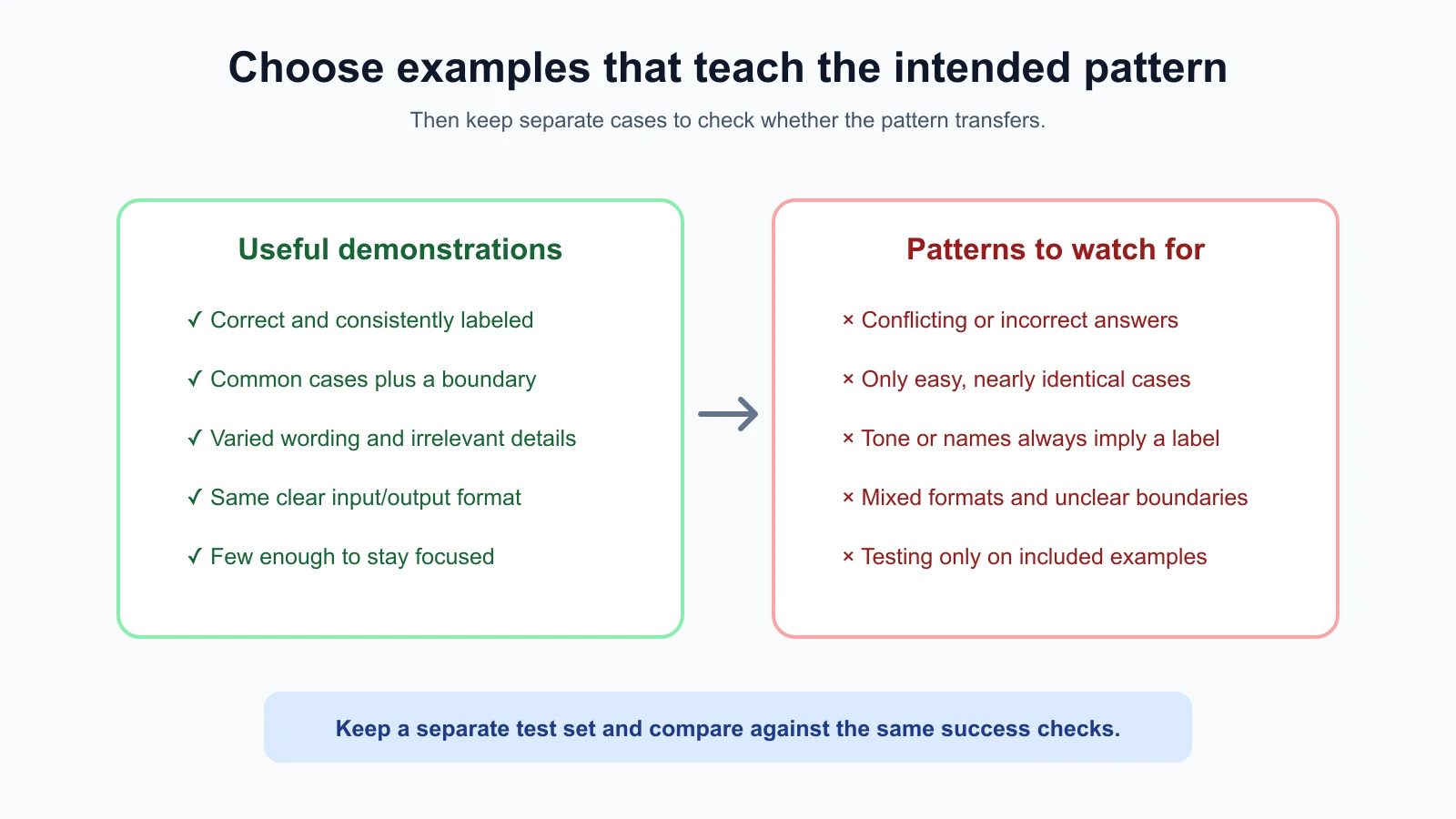
An example is representative when it resembles the real inputs and decisions the prompt will encounter. A polished, easy example may show the ideal format but fail to reveal where the task is ambiguous. Choose examples with the variety your task needs.
For a message classifier, useful variety might include:
- Clear examples of each label.
- A common case that is close to the boundary between labels.
- Different wording for the same kind of situation.
- Missing information, if the task must handle it.
Do not include every strange exception in the first prompt. Start with a small set that covers common patterns and important boundaries. Keep separate test inputs that you use to evaluate the prompt; do not judge it only on examples already included in the prompt. Otherwise, you are checking whether it can repeat what it has just seen, not whether it handles new cases.
For a subjective task such as rewriting a message, define what the example demonstrates. Is it the warm tone, sentence length, amount of detail, or format? A concise before-and-after example may show several features at once, which can make the result difficult to diagnose. Add instructions to make priorities clear and test the output on new inputs.
Keep each example easy to interpret
A useful example has a clear input and a clear expected output. If the example contains two requests but only one answer, the model may not know which details mattered. If an output has extra explanation while your instruction says “return only a label,” the demonstration and instruction conflict.
Use a consistent structure so the model can tell where examples begin and end. Plain labels such as Example, Input, and Output are often enough. Some providers support or recommend stronger delimiters such as XML tags for complex prompts. The exact format is optional; consistency and clarity matter more than decorative syntax.
Examples should match the output you want. If your application expects one label per line, do not show a Markdown table in one example and a sentence in another. If a number should always have two decimal places, include examples with that format. Check that every example follows the rules before you reuse it.
The example output should be correct according to your task’s own rules. If people disagree about the right answer, first resolve the task definition or label guidelines. Few-shot prompting cannot repair inconsistent labels. It can instead make the inconsistency harder to notice by presenting it as an intended pattern.
Watch for patterns you did not mean to teach
A model may notice details in examples that you did not intend as rules. If all urgent messages mention a projector, it might associate that object with urgency. If every routine example is politely worded and every urgent example is angry, it may use tone instead of the actual urgency criteria. This is a form of accidental patterning: the model picks up correlations present in your demonstrations.
Vary irrelevant details. If urgency depends on how soon an essential event begins, include examples with different equipment, people, and writing styles. Keep the relevant factor visible. Avoid letting names, spelling, length, or tone always line up with one label unless that relationship is truly part of the task.
Examples can also be too similar to the exact inputs you want answered. That can make the prompt look successful on familiar cases while failing on new ones. Use examples to teach a general rule, then check that rule against separate examples you did not include in the prompt.
A counterexample is a case that looks similar but should receive a different answer. A counterexample can clarify a boundary. For example, “The projector request is for next month” might be Routine even though it mentions a projector. Add it when the distinction is important and the prompt remains understandable.
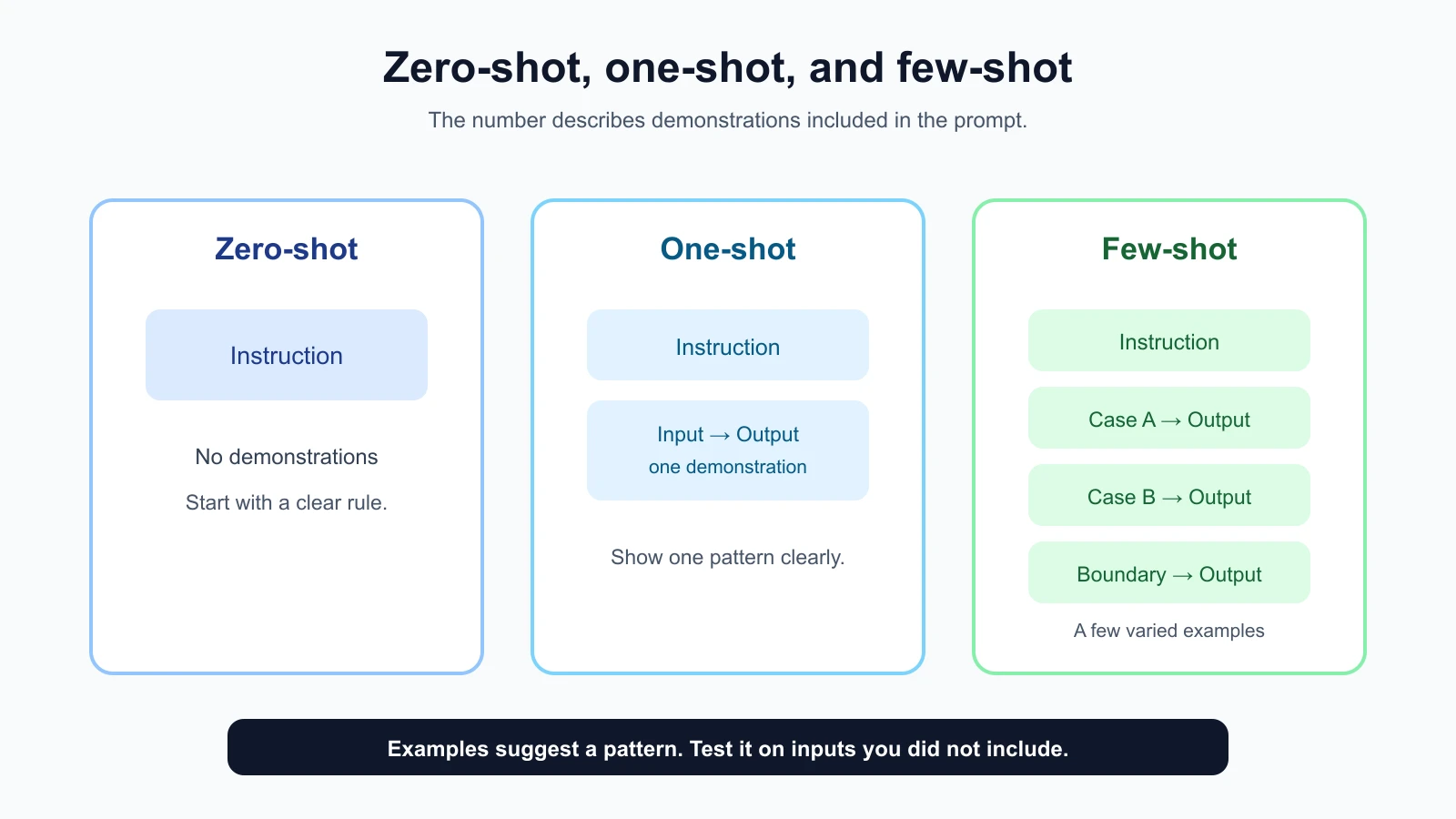
How many examples should you use?
There is no fixed number that works for every task. Start with zero examples, then add one or a small number when you can point to a specific gap. Use examples that cover different cases rather than repeating the same case with tiny wording changes. Provider advice can differ: Google’s Gemini prompt guide recommends examples broadly, while the practical value and number still depend on your task and model. OpenAI and Anthropic also emphasize useful, varied examples. Treat provider guidance as a starting point, then compare versions on your own test cases and follow the current guide for the model you use. See Google’s Gemini prompting strategies, OpenAI’s prompt engineering guide, and Anthropic’s prompting best practices.
More examples can take up more of the model’s context and make a prompt harder to update. A large set may also overwhelm the core instructions or overemphasize rare cases. If examples are long, use a few short, representative ones and keep a separate evaluation set for broader testing.
Compare versions using the same test inputs and success checks. For example, try the zero-shot and few-shot prompts on messages that are not present in either prompt. Record the mistakes as well as the correct answers. If examples help the common cases but create a new error on a boundary case, revise the examples or the written rule and test again.
Avoid treating one improvement as proof that the model learned the task generally. Your examples and test set may be small, and outputs can vary. Repeat runs when appropriate and continue adding cases as real use reveals new patterns.
A simple way to build a few-shot prompt
Use this sequence when an instruction alone is not giving a predictable result:
- Write the rule in plain language. Define the task and output format before drafting demonstrations.
- Collect real or realistic examples. Remove private details and use invented replacements where needed.
- Check the expected outputs. Confirm each one follows the same rule and format.
- Choose varied cases. Cover common inputs and a meaningful boundary, not just repeated examples of one pattern.
- Label the parts. Separate each input and output so the demonstration is easy to read.
- Test on examples you kept out. Compare the prompt with and without demonstrations using the same evaluation inputs.
- Remove examples that do not help. A shorter, clearer prompt is easier to maintain.
If you cannot explain what an example is meant to teach, do not include it yet. You may need a clearer rule, a better label guide, or a narrower task. Examples are a tool for communicating a pattern, not a substitute for deciding what the pattern should be.
When examples are not the right fix
If a model lacks a fact, examples may not provide the current information needed. Supply trusted context or connect an appropriate source instead. If the task requires exact output structure, use the provider’s structured output feature when appropriate, and validate the result in your application. A few examples can demonstrate the shape, but they do not guarantee valid data.
If the model regularly confuses two labels, the rule may be underspecified. Add a definition and a boundary example, then test. If the underlying model cannot perform the task reliably, adding more demonstrations may not solve the limitation. Revisit the task, model choice, or human review process.
Mistakes beginners make
- Adding examples by default. Begin with a clear instruction and add demonstrations to solve an observed problem.
- Showing only easy cases. Include meaningful variation and important boundaries.
- Using examples with inconsistent answers. Resolve the labeling rule before teaching it.
- Letting irrelevant traits track the label. Vary names, tone, length, and wording when they should not affect the result.
- Testing only on examples in the prompt. Keep separate inputs to see whether the pattern transfers.
- Adding too many demonstrations. Every example costs space and creates another pattern the model may copy.
- Mixing formats or contradicting instructions. Make every demonstration match the requested output.
Recap and try it yourself
Zero-shot means instructions without demonstrations, one-shot adds one example, and few-shot includes several. Examples can clarify format, tone, scope, and decision boundaries. Choose correct, representative examples, keep their structure consistent, and test the prompt on separate inputs. Add examples only when they improve an observed gap, and keep checking for patterns you did not intend.
Try it: choose a simple categorization or rewriting task. Write a zero-shot prompt and prepare four test inputs. Add one example, then two more varied examples. Compare all versions on the same inputs, mark the results against your checks, and note any new mistake. In the next lesson, we will organize input text and source material with delimiters and structured prompts.