
Prompt Engineering course · lesson 21 of 26
- 1What Is Prompt Engineering? A Practical Beginner's Guide
- 2How a Model Reads Your Prompt: Tokens and Context
- 3Choosing a Model and Reading Its Documentation
- 4Controlling Model Output: Sampling and Limits
- 5Your First Prompt Workflow: Test One Change at a Time
- 6Be Clear and Direct: Give the Model a Usable Task
- 7System, Role, and Context Prompts: Give Instructions Their Place
- 8Zero-Shot, One-Shot, and Few-Shot Prompting
- 9Structure Prompts with Delimiters, Tags, and Templates
- 10Structured Output: Get Answers You Can Parse and Check
- 11Prompting with Long Documents and Large Context
- 12Prompt Recipes for Ten Common Jobs
- 13Chain-of-Thought Prompts and Thinking Models
- 14Step-Back Prompting and Prompt Chaining
- 15Self-Consistency, Tree of Thoughts, and ReAct
- 16Self-Evaluation and Reliability Checks
- 17Define Success and Build Test Cases
- 18Compare Prompts with Graders
- 19Debug a Failing Prompt
- 20Automatic Prompt Engineering
- 21Version and Document Your Prompts
- 22Hallucinations and Grounding
- 23Bias and Debiasing Prompts
- 24Prompt Injection and Safe Prompting
- 25Prompts in Production
- 26Capstone: Build and Test a Prompt Library
A prompt that works today can be changed tomorrow by someone who does not know why a rule exists. If the text is hidden inside application code or a dashboard with no history, it becomes hard to tell what changed, which tests passed, or how to restore the earlier behavior.
Treat prompts that matter as reviewable project files. Give each change a reason, compare it with the previous version, rerun the test cases, and record who approved and released it. This lesson adds a small versioned prompt store to the course’s prompt lab. It keeps history and supports a reviewed rollback without a model API.
Keep the source of truth somewhere reviewable
Avoid scattering the same instruction across a source file, a dashboard, a spreadsheet, and a team wiki. Choose one source of truth. It can be a plain text or Markdown file in your application repository, a versioned configuration store, or a managed prompt system with review history. Make sure the running application uses the version you can inspect and test.
Store the instruction separately from the code when that makes it easier to review. A prompt file might include the text plus a small metadata header:
1name: delivery-summary
2version: v1.2
3owner: support-platform
4task: Summarize delivery notes for customer updates
5input: Delivery note text
6output: One neutral sentence, no more than 25 words
7success_criteria:
8  - Preserve stated predicted and actual times
9  - Do not infer a cause
10  - State when a time is missing
11tests: prompt-lab/cases.json
12status: approved
The prompt body follows this header. Keep metadata useful rather than exhaustive. Record the task, input and output expectations, owner, criteria, test set, and any dependencies the prompt relies on. If the prompt is tied to a particular model or setting, record that too because behavior can vary across models and configurations.
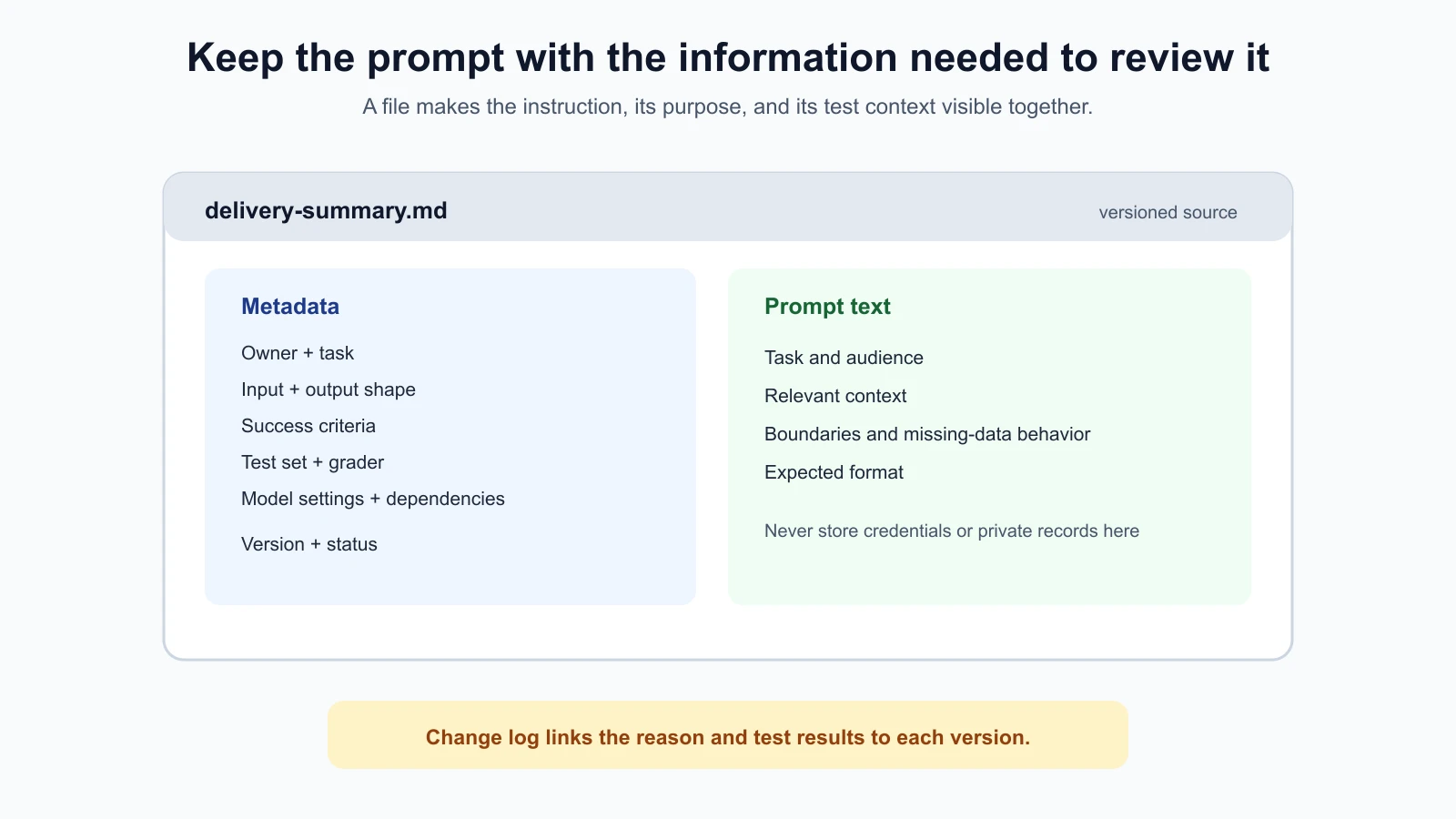
For a small team, one clear file and a change log may be enough. A larger system may need a store that supports permissions, review records, and deployment history. Avoid placing secrets or private user data in prompt files. Store references to approved data sources or tools, not credentials.
Give every change a reason
Use version names that help a teammate identify revisions, such as v1.0, v1.1, or a commit hash. The exact naming pattern matters less than using it consistently and making each version recoverable. Do not overwrite the old prompt text when changing it.
For each edit, record:
- What changed: a short description or a text diff.
- Why it changed: the failure, requirement, or measured result that led to the edit.
- Who changed it and when: enough to follow up later.
- What was tested: case set, graders, number of trials, and notable failures.
- Review status: draft, approved, rejected, or active.
A change log entry could read: “v1.2 clarifies the response when the predicted time is absent. It was added after delivery-002 returned an invented estimate. Development cases pass; holdout check pending.” This is more useful than “improve prompt,” because it tells the next reviewer what risk to look for.
Keep the prompt’s purpose separate from the history of its edits. Metadata answers stable questions such as who owns the task and which cases define success. The change log answers what changed in a particular version and what happened when you tested it. If a prompt affects several teams, record a contact or owning group so future reviewers know who can explain a policy or requirement. If an old rule is intentionally removed, state why it no longer applies instead of letting the deletion speak for itself.
The prompt lab store records the prompt text, author, reason, base version, timestamp, status, and review information. It can show a diff between two versions. A diff helps reviewers focus on the changed words instead of rereading the whole prompt and guessing what moved.
Run regression checks on every revision
A regression is a failure introduced by a change to something that used to work. A new rule might fix missing predictions but cause the prompt to omit predictions that are present. Run the full development test set after each meaningful edit, not just the case that inspired it.
Keep the same graders and success criteria when comparing the old and new versions. Record the results next to the change. The previous lessons cover how to define test cases, compare prompts with graders, and debug failures. Versioning connects those practices: each result should identify the exact prompt version that produced it.
Before release, run the holdout cases if the change is important enough to warrant them. If a holdout case exposed a problem and then guided a revision, it has become a development case. Save a fresh unseen set for a later check. Keep the test-set version or commit identifier so someone can reproduce the comparison.
Do not record only one combined score. Keep the failures by case and criterion, especially for safety or missing-information behavior. A higher average can hide a serious regression in one category. Save enough information to investigate, while following your privacy and retention rules for user inputs and outputs.
Use a review and release path
Changing a production prompt can change what users see or what an application does. Decide who may propose a change, who reviews it, and who can release it. In a small project, one person may handle several roles, but high-impact prompts benefit from a reviewer who did not write the edit.
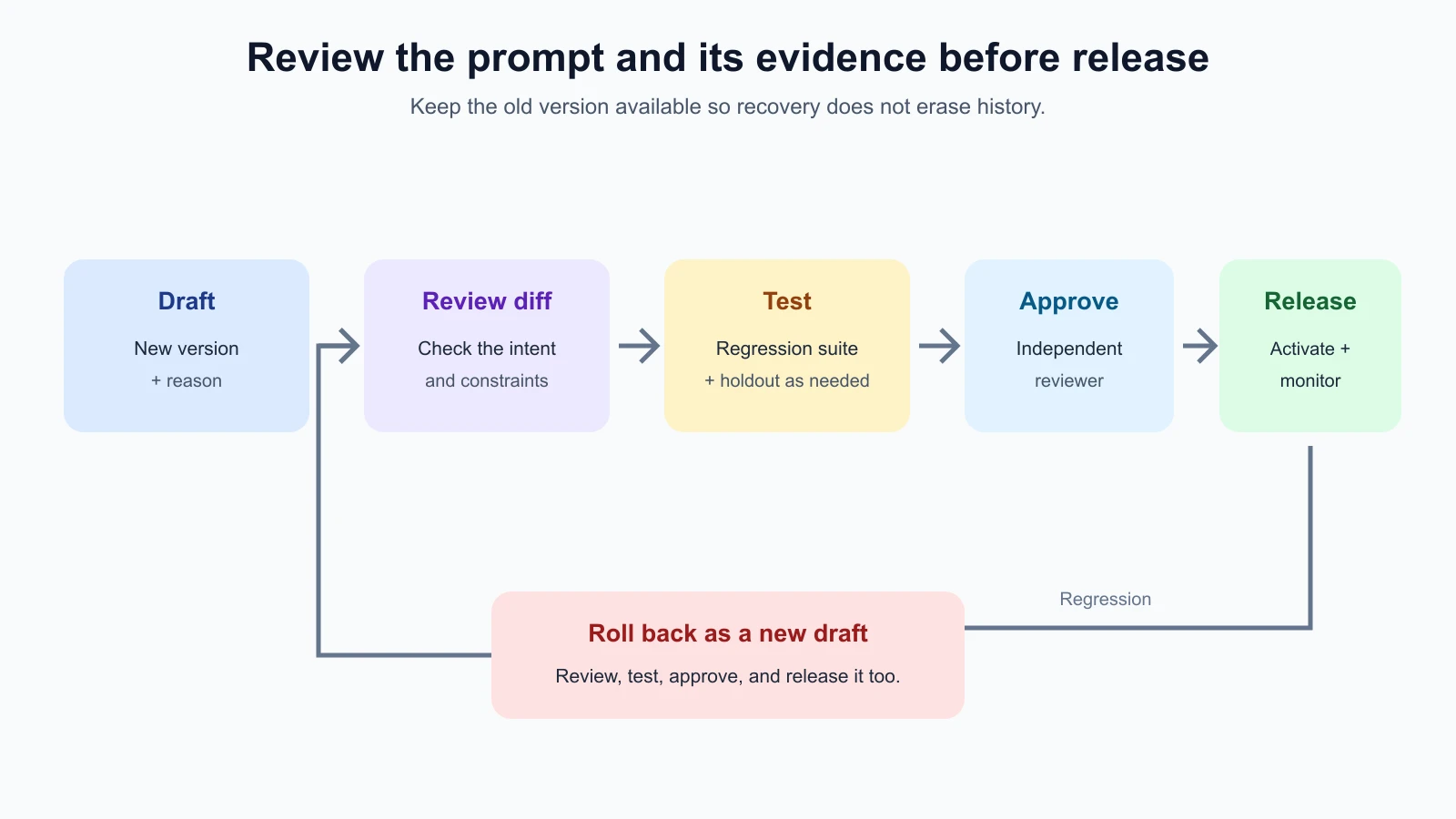
A practical release path is:
- Draft: create a new version from the current approved prompt and explain the reason.
- Review the diff: check that the edit addresses the documented issue and does not remove an important rule.
- Run regression tests: use the same cases and graders, then inspect failures and unknowns.
- Review the evidence: compare results with the baseline and check holdout cases when appropriate.
- Approve and release: record an approver and activate the version through the normal deployment process.
- Monitor and recover: watch for new failures and restore a known version if the change causes unacceptable behavior.
The prompt lab’s PromptStore requires a separate reviewer to approve a draft before activation. Its activate method records who activated the prompt. This is a teaching aid, not a security boundary. A local JSON file cannot enforce organization-level permissions or protect a production service from direct edits. Real access control belongs in your code review, deployment system, or prompt management service.
The versioned prompt store
Save the code below as prompt_store.py in your prompt-lab folder. It stores versions in a JSON file, preserves previous text, and refuses to overwrite an existing version name. A new entry includes the text, author, reason, base version, creation time, status, and review record.
prompt_store.py
1"""Small append-only prompt version store with review and rollback support."""
2
3from datetime import datetime, timezone
4import difflib
5import json
6from pathlib import Path
7from typing import Any
8
9
10def _now() -> str:
11    return datetime.now(timezone.utc).isoformat(timespec="seconds")
12
13
14class PromptStore:
15    def __init__(self, path: str | Path):
16        self.path = Path(path)
17        if self.path.exists():
18            self.data = json.loads(self.path.read_text(encoding="utf-8"))
19            if self.data.get("schema_version") != 1 or not isinstance(
20                self.data.get("versions"), dict
21            ):
22                raise ValueError("Unsupported or invalid prompt store format")
23        else:
24            self.data: dict[str, Any] = {
25                "schema_version": 1,
26                "active": None,
27                "versions": {},
28            }
29
30    def _save(self) -> None:
31        self.path.parent.mkdir(parents=True, exist_ok=True)
32        temporary = self.path.with_suffix(self.path.suffix + ".tmp")
33        temporary.write_text(
34            json.dumps(self.data, indent=2, ensure_ascii=False) + "\n",
35            encoding="utf-8",
36        )
37        temporary.replace(self.path)
38
39    def add(
40        self,
41        version: str,
42        text: str,
43        *,
44        author: str,
45        reason: str,
46        based_on: str | None = None,
47    ) -> dict[str, Any]:
48        if not version.strip() or version in self.data["versions"]:
49            raise ValueError("Version name must be non-empty and unique")
50        if not text.strip() or not author.strip() or not reason.strip():
51            raise ValueError("Prompt text, author, and reason are required")
52        if based_on is not None and based_on not in self.data["versions"]:
53            raise ValueError(f"Unknown base version: {based_on}")
54        entry = {
55            "text": text,
56            "author": author,
57            "reason": reason,
58            "based_on": based_on,
59            "created_at": _now(),
60            "status": "draft",
61            "review": None,
62        }
63        self.data["versions"][version] = entry
64        self._save()
65        return entry.copy()
66
67    def diff(self, first: str, second: str) -> str:
68        versions = self.data["versions"]
69        if first not in versions or second not in versions:
70            raise ValueError("Both versions must exist")
71        return "".join(
72            difflib.unified_diff(
73                versions[first]["text"].splitlines(keepends=True),
74                versions[second]["text"].splitlines(keepends=True),
75                fromfile=first,
76                tofile=second,
77            )
78        )
79
80    def review(self, version: str, reviewer: str, *, approved: bool) -> None:
81        entry = self._entry(version)
82        if entry["status"] != "draft":
83            raise ValueError("Only draft versions can be reviewed")
84        if not reviewer.strip():
85            raise ValueError("Reviewer is required")
86        if approved and reviewer == entry["author"]:
87            raise ValueError("The author cannot approve their own prompt")
88        entry["review"] = {"reviewer": reviewer, "approved": approved, "at": _now()}
89        entry["status"] = "approved" if approved else "rejected"
90        self._save()
91
92    def activate(self, version: str, actor: str) -> None:
93        entry = self._entry(version)
94        if entry["status"] != "approved":
95            raise ValueError("Only an approved version can be activated")
96        if not actor.strip():
97            raise ValueError("Activation actor is required")
98        previous = self.data["active"]
99        if previous is not None:
100            self.data["versions"][previous]["status"] = "superseded"
101        entry["status"] = "active"
102        entry["activated_by"] = actor
103        entry["activated_at"] = _now()
104        self.data["active"] = version
105        self._save()
106
107    def rollback(self, target: str, new_version: str, *, author: str, reason: str) -> None:
108        """Copy an old prompt into a new draft; history is never overwritten."""
109        old = self._entry(target)
110        self.add(
111            new_version,
112            old["text"],
113            author=author,
114            reason=reason,
115            based_on=target,
116        )
117
118    def active_text(self) -> str:
119        version = self.data["active"]
120        if version is None:
121            raise ValueError("No active prompt version")
122        return self._entry(version)["text"]
123
124    def _entry(self, version: str) -> dict[str, Any]:
125        try:
126            return self.data["versions"][version]
127        except KeyError as error:
128            raise ValueError(f"Unknown prompt version: {version}") from error
Here is how you might add a version and inspect the change:
1from prompt_store import PromptStore
2
3store = PromptStore("prompts/delivery-summary.json")
4
5store.add(
6    "v1.1",
7    "Summarize the delivery note in one neutral sentence.",
8    author="Mina",
9    reason="Initial approved delivery summary",
10)
11store.review("v1.1", "Devon", approved=True)
12store.activate("v1.1", "release-job-103")
13
14store.add(
15    "v1.2",
16    "Summarize in one sentence. Use only facts in the note. "
17    "If a time is missing, say it was not provided.",
18    author="Mina",
19    reason="Fix invented predictions in delivery-002",
20    based_on="v1.1",
21)
22
23print(store.diff("v1.1", "v1.2"))
The diff is plain text, so it can be reviewed in a terminal or saved with the test results. After tests pass, a different reviewer can approve it and the release actor can activate it:
1store.review("v1.2", "Devon", approved=True)
2store.activate("v1.2", "release-job-104")
The store rejects self-approval and will not activate a draft or rejected version. These checks reduce accidental release in the example workflow. They do not replace your organization’s authorization rules. In particular, the Python process that can write the JSON file can also bypass this helper, so keep production permissions outside the helper. This small JSON file is suitable for a local, single-process exercise, not a multi-writer production service. A real shared store needs transactional writes, backups, and access controls.
Roll back without erasing history
If a released prompt creates a regression, restore a known good prompt as a new version. Do not delete the faulty version or move the old version pointer without recording the decision. Preserving history lets you understand what went wrong and prevents confusion about which text was active.
The store’s rollback method copies an earlier prompt’s text into a new draft and records which version it came from. That draft still goes through review and activation. This avoids assuming that an old prompt is automatically safe under today’s inputs, model, and application settings.
For example, if v1.2 causes a regression and v1.1 is the known baseline, you can create v1.3 from v1.1 with a reason such as “Restore v1.1 wording after v1.2 omitted stated predictions.” Then rerun the required tests, approve v1.3, and release it through your normal process. The active history now shows both the failed revision and the recovery.
Test the store itself
Versioning code needs tests too. The prompt lab tests that diffs show changed lines, that authors cannot approve their own drafts, that unapproved or rejected prompts cannot be activated, and that rollback creates a new draft while preserving the previous active version.
Save the tests as prompt_store_test.py in your prompt-lab folder:
prompt_store_test.py
1"""Offline tests for prompt version history, review, diff, and rollback."""
2
3from pathlib import Path
4import tempfile
5import unittest
6
7from prompt_store import PromptStore
8
9
10class PromptStoreTests(unittest.TestCase):
11    def setUp(self):
12        self.temporary = tempfile.TemporaryDirectory()
13        self.store = PromptStore(Path(self.temporary.name) / "store.json")
14
15    def tearDown(self):
16        self.temporary.cleanup()
17
18    def add_draft(self, version="v1", text="Summarize the note.", author="Ava"):
19        return self.store.add(version, text, author=author, reason="Initial version")
20
21    def approve_and_activate(self, version="v1"):
22        self.store.review(version, "Ravi", approved=True)
23        self.store.activate(version, "release-bot")
24
25    def test_diff_shows_prompt_text_changes(self):
26        self.add_draft()
27        self.store.add("v2", "Summarize in one sentence.", author="Ava",
28                       reason="Clarify output length", based_on="v1")
29        diff = self.store.diff("v1", "v2")
30        self.assertIn("-Summarize the note.", diff)
31        self.assertIn("+Summarize in one sentence.", diff)
32
33    def test_author_cannot_approve_own_prompt(self):
34        self.add_draft()
35        with self.assertRaisesRegex(ValueError, "cannot approve"):
36            self.store.review("v1", "Ava", approved=True)
37
38    def test_unapproved_prompt_cannot_be_activated(self):
39        self.add_draft()
40        with self.assertRaisesRegex(ValueError, "approved"):
41            self.store.activate("v1", "release-bot")
42
43    def test_rejected_prompt_cannot_be_activated(self):
44        self.add_draft()
45        self.store.review("v1", "Ravi", approved=False)
46        with self.assertRaisesRegex(ValueError, "approved"):
47            self.store.activate("v1", "release-bot")
48
49    def test_rollback_copies_old_text_into_a_new_version(self):
50        self.add_draft()
51        self.approve_and_activate()
52        self.store.add("v2", "Summarize in one sentence.", author="Ava",
53                       reason="Clarify output length", based_on="v1")
54        self.store.review("v2", "Ravi", approved=True)
55        self.store.activate("v2", "release-bot")
56        self.store.rollback("v1", "v3", author="Ava", reason="Restore known wording")
57        self.assertEqual(self.store.active_text(), "Summarize in one sentence.")
58        self.assertEqual(self.store.data["versions"]["v3"]["text"], "Summarize the note.")
59        self.assertEqual(self.store.data["versions"]["v3"]["status"], "draft")
60        self.assertEqual(self.store.data["versions"]["v1"]["status"], "superseded")
61
62    def test_activation_requires_review_by_someone_other_than_author(self):
63        self.add_draft()
64        self.store.review("v1", "Ravi", approved=True)
65        self.store.activate("v1", "release-bot")
66        reopened = PromptStore(self.store.path)
67        self.assertEqual(reopened.active_text(), "Summarize the note.")
68        self.assertEqual(reopened.data["versions"]["v1"]["review"]["reviewer"], "Ravi")
69
70
71if __name__ == "__main__":
72    unittest.main()
From inside the prompt-lab folder, run all the lab's tests:
1python3 -m unittest discover -p '*_test.py'These tests verify the example store’s behavior. They do not evaluate the quality of a prompt, enforce production permissions, or prove that a rollback is safe. Keep those responsibilities in your evaluation and release workflow.
Mistakes beginners make
- Editing the only copy of a prompt. Save each revision as a new version so you can compare and recover.
- Recording “improve prompt” as the reason. Name the failure, requirement, or measured result that led to the change.
- Testing only the case that failed. Rerun the regression set to catch new problems.
- Keeping only an aggregate score. Record failure cases and criteria so the reason for a score is visible.
- Treating an approval field as access control. Enforce who can write or release through the production system.
- Overwriting history during rollback. Create a new recovery version that points to the earlier text.
- Leaving prompt changes unreviewed in production. Define who may propose, review, and activate important prompt versions.
- Storing sensitive data in the prompt repository. Keep user records out of prompt text and test fixtures unless approved and necessary.
Recap and try it yourself
Keep important prompts in a reviewable source of truth. Give versions clear names, preserve every revision, and record what changed, why, who changed it, and which tests ran. Review a diff, run regression cases, and require approval before production release. If a prompt needs to be rolled back, copy the known text into a new version and keep the failed change in history.
Try this with a prompt you already use:
- Save its current text and record its task, owner, inputs, outputs, criteria, and test set.
- Make one small change based on a real failure and explain the reason.
- Review the diff and run the full development test set against both versions.
- Ask someone else to review the change and test results before release.
- Practice creating a rollback version in the prompt store. Confirm that the earlier history remains visible and that the rollback still needs approval.
Good version history makes prompt changes understandable and reversible. It also gives the next person evidence to continue improving the prompt instead of starting over.