
Prompt Engineering course · lesson 19 of 26
- 1What Is Prompt Engineering? A Practical Beginner's Guide
- 2How a Model Reads Your Prompt: Tokens and Context
- 3Choosing a Model and Reading Its Documentation
- 4Controlling Model Output: Sampling and Limits
- 5Your First Prompt Workflow: Test One Change at a Time
- 6Be Clear and Direct: Give the Model a Usable Task
- 7System, Role, and Context Prompts: Give Instructions Their Place
- 8Zero-Shot, One-Shot, and Few-Shot Prompting
- 9Structure Prompts with Delimiters, Tags, and Templates
- 10Structured Output: Get Answers You Can Parse and Check
- 11Prompting with Long Documents and Large Context
- 12Prompt Recipes for Ten Common Jobs
- 13Chain-of-Thought Prompts and Thinking Models
- 14Step-Back Prompting and Prompt Chaining
- 15Self-Consistency, Tree of Thoughts, and ReAct
- 16Self-Evaluation and Reliability Checks
- 17Define Success and Build Test Cases
- 18Compare Prompts with Graders
- 19Debug a Failing Prompt
- 20Automatic Prompt Engineering
- 21Version and Document Your Prompts
- 22Hallucinations and Grounding
- 23Bias and Debiasing Prompts
- 24Prompt Injection and Safe Prompting
- 25Prompts in Production
- 26Capstone: Build and Test a Prompt Library
A prompt fails when its answer misses a requirement you care about. The quickest way to improve it is not to rewrite everything. First find what went wrong, then test the smallest change that could address it. A prompt can be unclear, lack needed context, contain conflicting instructions, ask for too much at once, or expect something the model cannot reliably do.
This lesson gives you a diagnosis process and works through a delivery-note example. All sample model outputs are illustrative. I have not run the example through a live model.
Preserve the failure before fixing it
When you spot a bad answer, save the exact prompt version, input, output, and failed check. If you edited the prompt after the answer, the saved copy lets you reproduce what actually happened. Record whether the failure appeared once or in several repeated runs. A single output is useful evidence of a possible problem, but it may not explain the cause.
Then describe the failure in plain language. “The answer was bad” is hard to investigate. “It stated a predicted arrival time even though the note did not contain one” names an observable behavior. If you used graders, keep each grader’s result and inspect the output yourself. A grader can also be wrong, especially if it only checks whether a word appears.
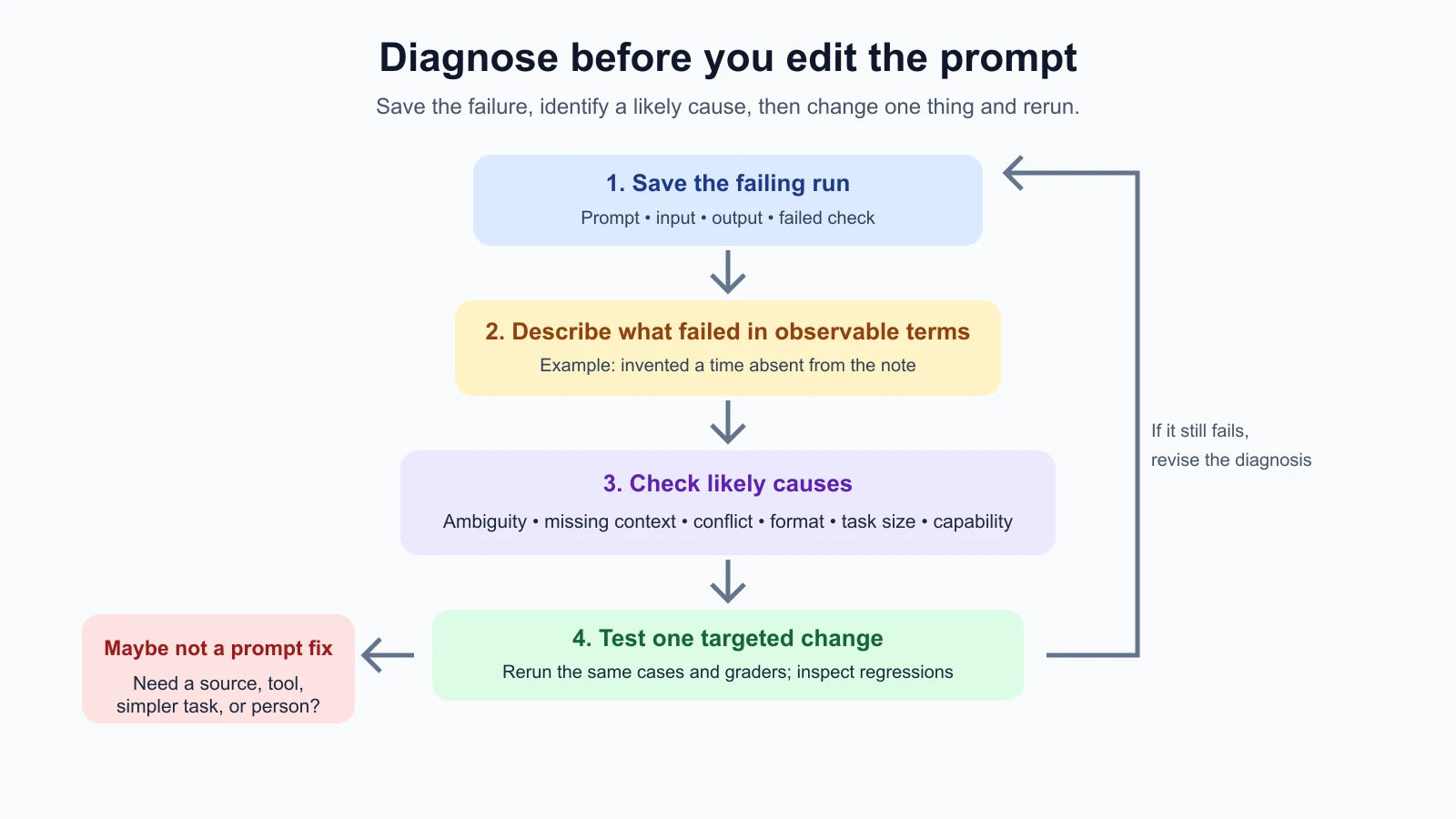
The previous lesson on comparing prompts with graders explains how to preserve the inputs and checks. Use its report to find which examples failed, then read those outputs before choosing a fix.
Look for the cause in the task and prompt
Use the symptom to form a hypothesis. One failure can have more than one plausible cause, so test your idea rather than assuming it is right.
| Symptom | Possible cause | A targeted change to try |
|---|---|---|
| Similar inputs get very different answers | Vague or underspecified instruction | Define the output, audience, or required detail more precisely |
| The answer invents a detail absent from the input | Missing source context or no rule for missing information | Supply the source and say to mark absent facts as unknown |
| It follows one instruction and ignores another | Conflicting or competing requirements | Remove the conflict or state which rule takes priority |
| Content is right but the format changes | Format instructions are weak or unvalidated | Show a compact schema or example, then validate the result |
| It handles one stage but drops later requirements | Too many jobs are bundled together | Split the task and check the intermediate result |
| It fails only on long, unusual, or incomplete inputs | The prompt never covered that input variation | Add representative cases and define what to do for them |
| It consistently fails despite clear instructions and useful context | The task may exceed the model’s capability | Reduce the task, add a reliable tool, choose another model, or use human review |
These are clues, not a guaranteed mapping. A format problem might come from a conflicting request. A hallucinated fact might come from missing context, unclear wording, or a limitation in the model. Start with the evidence in the answer and input.
Ambiguity and missing context are different
Ambiguity means the instruction can reasonably be read in more than one way. “Make this suitable for a customer” leaves tone, length, and purpose open. State what kind of customer, what the message needs to accomplish, and how long it should be.
Missing context means the instruction is clear but the model does not have information it needs. If you ask whether a parcel will arrive on Friday without providing a carrier estimate or a way to look it up, adding “be accurate” does not supply the missing date. Provide a trusted source or make the correct response “the note does not say.”
The fix should fit the cause. More examples can help clarify a repeated format, but examples cannot provide current order status if that status was never included. A tool or retrieval step may be needed for fresh facts. See long documents and context for how to place source material and keep answers grounded.
Check for instructions that compete
Two instructions may not be literally contradictory and still compete in practice. “Include every detail” and “reply in one short sentence” pull in different directions. “Do not guess” and “always provide a complete answer” may conflict when information is missing.
Rewrite the requirements so their priority is clear. For example: “Use one or two sentences. Include the predicted and actual times when present. If either time is missing, say that it is not provided rather than guessing.” This describes what to do at the boundary instead of leaving the model to choose between completeness and caution.
If two goals really cannot both be met, decide which matters more or ask for clarification. Adding another paragraph of instructions without resolving the conflict may make the prompt longer and still leave it unclear.
Trace one failure to a targeted fix
Suppose your task is to summarize delivery notes in a short customer update. The criteria say to preserve times, avoid inventing a cause, and mention when a time is missing. An illustrative note reads:
The bus arrived at 8:32. The app did not show a prediction.
An illustrative failing answer might say:
The app predicted 8:10, but the bus arrived at 8:32 because of traffic.
Two facts were invented: a predicted time and a reason. Before editing, inspect the input and instruction. The input clearly says no prediction was shown, and the task has a rule about missing information. So the likely issue may not be absent context or vague success criteria. Perhaps the main prompt’s wording is less explicit than the test case’s criterion, or it asks for a complete summary without clearly forbidding inference.
Try one targeted revision:
1Summarize the delivery note in one neutral sentence of no more than 25 words.
2Include predicted and actual arrival times only when they appear in the note.
3Do not infer a cause. If a time is missing, state that it was not provided.
4
5Delivery note:
6The bus arrived at 8:32. The app did not show a prediction.
The expected kind of answer is “The bus arrived at 8:32; no prediction was available.” This is an illustrative target, not a live model result. The change directly names the risky behavior and gives a rule for missing information. It does not add unrelated examples or rewrite the whole prompt in a new style.
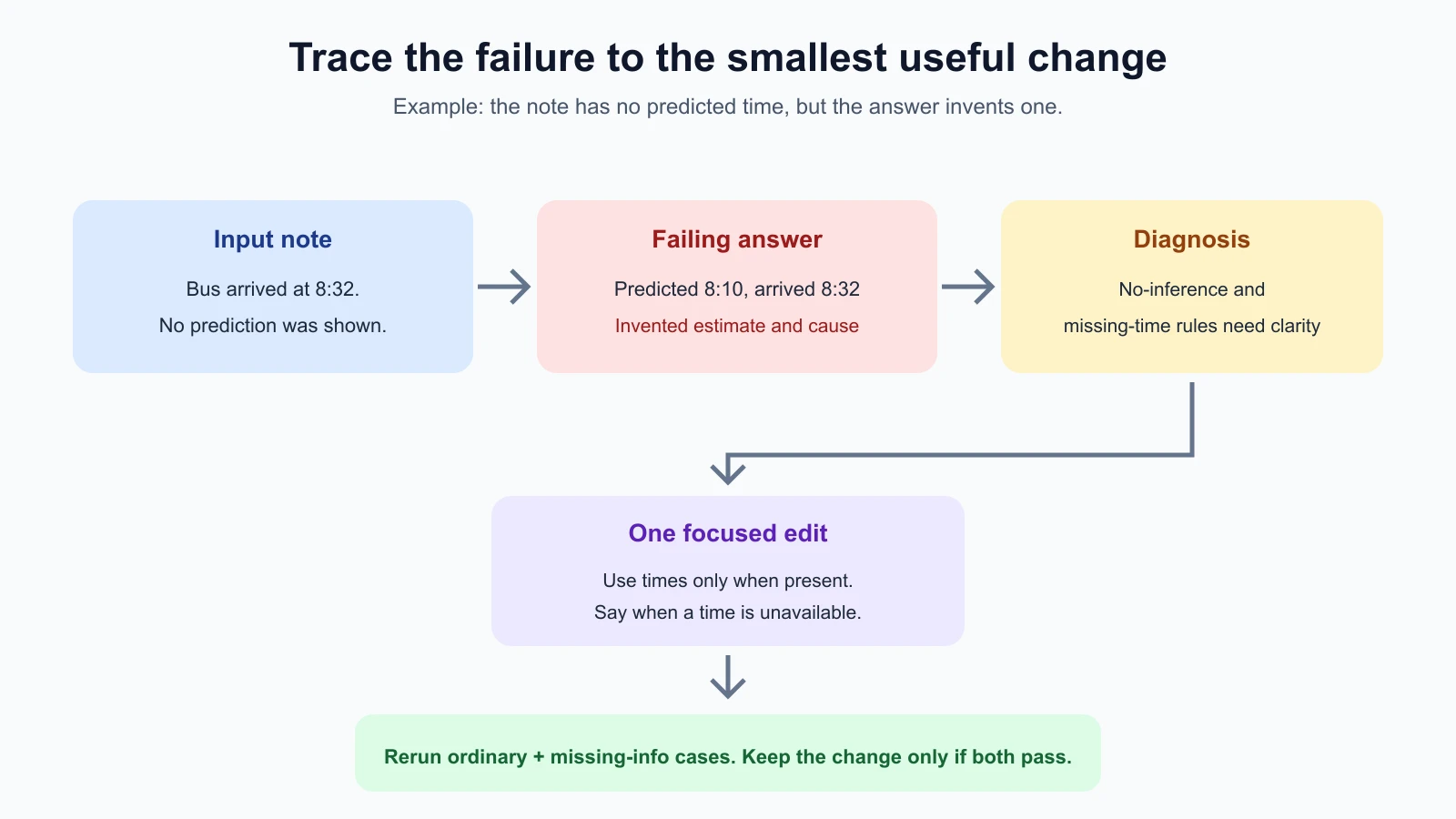
Run both prompt versions on the same development cases from your test case set. Check that the revised prompt fixes the missing-prediction case and still preserves both times on the ordinary case. Keep the held-out examples separate until you are ready for a later check. If the change fixes one example but breaks several others, do not keep it just because the one visible failure is gone.
Change one thing at a time
If you simultaneously change the role, add examples, rewrite the output format, and switch models, you will not know which change mattered. Make one change that follows from a diagnosis. Then run the same cases and graders again. The first prompt workflow introduces this controlled comparison; here you use it to test a specific repair.
Sometimes one edit cannot address all failures. Make a separate version for each hypothesis: one version clarifies the missing-information rule, another changes the output schema. Compare each against the same baseline. That takes more trials but teaches you which change helped. Keep version names and notes small and descriptive, such as v03_missing-time-rule.
Do not change a prompt solely because one phrase in one failure feels awkward. Check whether the same behavior appears in other cases. If the issue is rare but costly, add a test case for it and include a must-pass rule. If it is a harmless variation in wording, a stricter prompt or exact grader may not be worth the trade-off.
Decide when the model is the limit
Prompt changes cannot solve every failure. If the task requires current facts, attach a source or connect an appropriate retrieval or tool workflow. If the output requires exact arithmetic, calculate it with code and ask the model to explain the result. If the task is too broad, split it into manageable stages, as in step-back prompting and prompt chaining.
Sometimes the model still cannot reliably follow a rule, distinguish subtle categories, or reason through a complex input. Try a simpler task, clearer labels, a representative example, or a model better suited to the job. If a qualified person must make the decision, route uncertain cases to that person rather than adding more prompt instructions.
The chain-of-thought lesson discusses the limits of asking for more visible reasoning. A longer explanation can make the answer easier to inspect, but it is not a guarantee that the model can solve the underlying task. Use an external check where possible. A model grader (see comparing prompts with graders) can also be mistaken, so do not diagnose every failure from its verdict alone.
Keep the smallest repair that passes the checks
After trying a change, compare the original and revised outputs side by side. Ask:
- Did the targeted failure disappear?
- Did the revised prompt create a new failure on an ordinary or boundary case?
- Did it pass the same criteria, under the same grader, on the development cases?
- Did the edit make the prompt harder to understand or unnecessarily longer?
- Is the cause actually prompt wording, or does the task need better context, code, a tool, another model, or a person?
Keep the smallest change that improves the checks without causing unacceptable regressions. If neither version works, record what you learned and revise the task or approach. A failed experiment still helps if it narrows down the cause.
Mistakes beginners make
- Rewriting the entire prompt after one bad output. Save the failure, form a cause, and test one focused change.
- Confusing missing context with unclear wording. Better wording cannot provide facts the model never received.
- Adding rules without fixing a conflict. Decide priorities and boundary behavior before adding more instructions.
- Changing several variables at once. You will not know which change helped or caused a regression.
- Tuning to one case and skipping the others. Rerun the same representative set and inspect regressions.
- Trusting the grader without reading the answer. The grader can mislabel a failure or miss an important one.
- Assuming more reasoning will solve a capability gap. Use evidence, tools, simpler subtasks, a different model, or human review.
- Discarding a useful failure. Add recurring or costly failure types to the test set so they remain visible.
Recap and try it yourself
Debugging starts with a saved prompt, input, output, and failed criterion. Use the symptom to form a hypothesis about ambiguity, missing context, competing rules, format drift, task size, unexpected inputs, or model capability. Change one thing at a time and rerun the same checks. Keep the change only if it fixes the target without unacceptable regressions.
Try this with one development case from your own task:
- Save the exact prompt, input, output, and criterion that failed.
- Describe the failure in one sentence without guessing at its cause.
- Write two possible causes, then choose the one best supported by the input and output.
- Make one small change aimed at that cause and run the full development set again.
- Read both fixed and newly failing outputs. Keep, revise, or revert the change based on the evidence.
If the prompt remains unreliable after clear instructions and appropriate context, the lesson may be that the task needs another method. That is a useful diagnosis too.