
Prompt Engineering course · lesson 11 of 26
- 1What Is Prompt Engineering? A Practical Beginner's Guide
- 2How a Model Reads Your Prompt: Tokens and Context
- 3Choosing a Model and Reading Its Documentation
- 4Controlling Model Output: Sampling and Limits
- 5Your First Prompt Workflow: Test One Change at a Time
- 6Be Clear and Direct: Give the Model a Usable Task
- 7System, Role, and Context Prompts: Give Instructions Their Place
- 8Zero-Shot, One-Shot, and Few-Shot Prompting
- 9Structure Prompts with Delimiters, Tags, and Templates
- 10Structured Output: Get Answers You Can Parse and Check
- 11Prompting with Long Documents and Large Context
- 12Prompt Recipes for Ten Common Jobs
- 13Chain-of-Thought Prompts and Thinking Models
- 14Step-Back Prompting and Prompt Chaining
- 15Self-Consistency, Tree of Thoughts, and ReAct
- 16Self-Evaluation and Reliability Checks
- 17Define Success and Build Test Cases
- 18Compare Prompts with Graders
- 19Debug a Failing Prompt
- 20Automatic Prompt Engineering
- 21Version and Document Your Prompts
- 22Hallucinations and Grounding
- 23Bias and Debiasing Prompts
- 24Prompt Injection and Safe Prompting
- 25Prompts in Production
- 26Capstone: Build and Test a Prompt Library
A long document can contain the answer you need and still be difficult to work with. The model may overlook a detail, mix up two sources, or give a confident answer without clear evidence. A few prompt choices can make the task easier to inspect: label each source, place the question where the model can find it, and ask for evidence before drawing a conclusion.
This lesson covers pasting documents into a prompt, working with several sources, summarizing in stages, and using retrieval when the material is too large or changes often. A context window is the amount of input and generated content a model can handle in a request or conversation. Its size varies by model, and a larger window does not guarantee that every detail will be used correctly.
Prepare the documents before asking a question
Start by deciding what the answer needs to use. If you have a single short policy excerpt, paste the relevant part. If you have several documents, label each source so claims can be traced back to the right one. Include the title, date, section, or page number when that information matters.
For example, if you compare two versions of a refund policy, label them with their dates and say which one is current. Without that direction, a model may combine the old and new rules. If sources conflict and you do not know which is authoritative, ask the model to identify the conflict rather than choose silently.
Remove material that has no bearing on the task. Extra text consumes context and can distract from the useful passages. Keep enough surrounding text to preserve meaning, though. A sentence copied without its heading, exception, or definition may seem to say something different from the full section.
Before sharing a document with a model provider, consider whether it contains private or confidential information and whether you are allowed to send it. Use an approved tool and remove personal details that are not necessary for the task. Prompt organization does not replace access control or privacy review.
Put the question after the source material
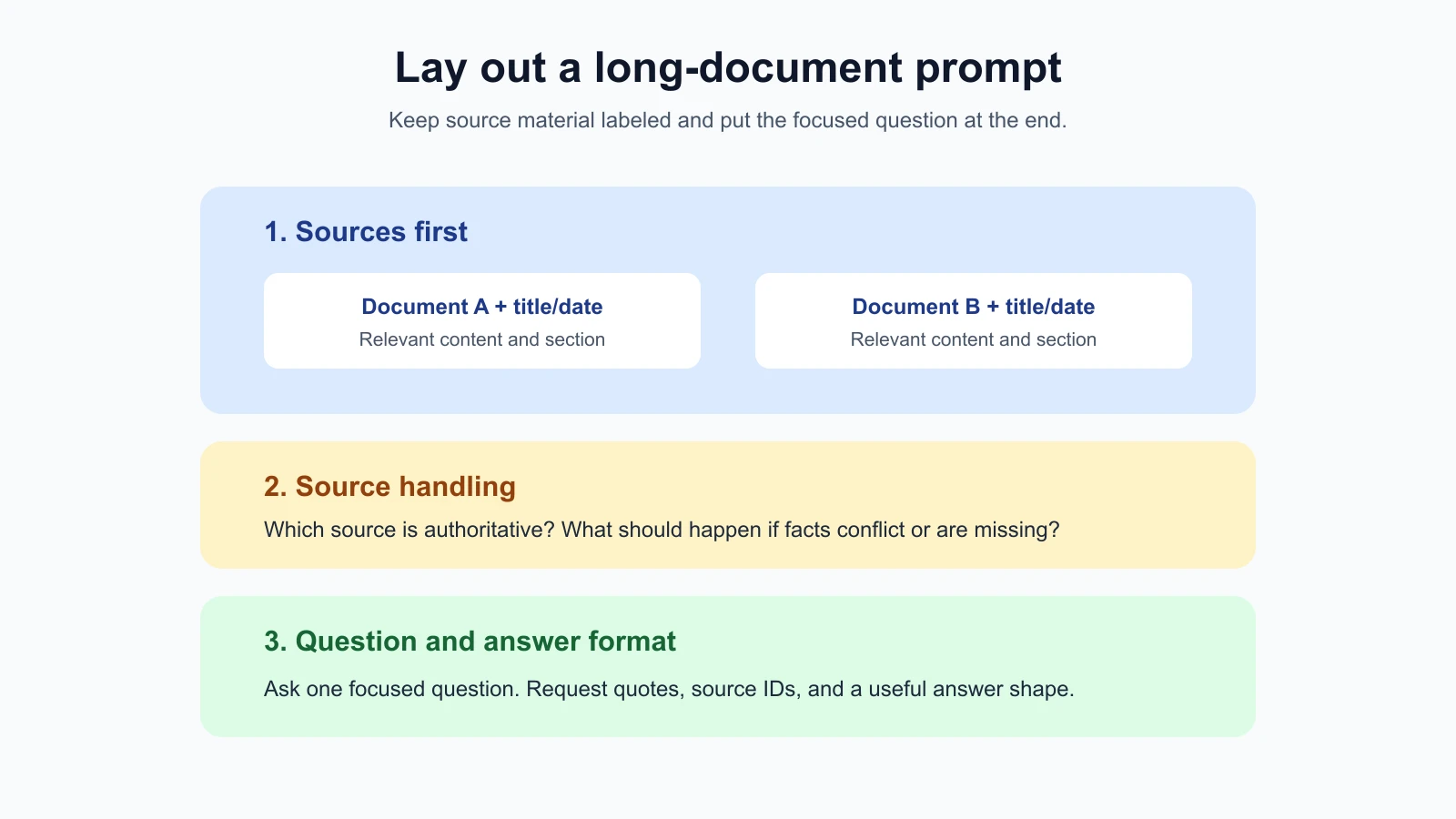
For a long-context prompt, a practical layout is:
- The documents, with clear labels and source details.
- Any instructions about how to treat or compare those sources.
- The specific question and the required answer format.
Placing the question after the documents gives it a clear transition from reference material to task. Anthropic’s current long-context guidance recommends placing long-form data near the top and the query after it. Google’s long-context guide also says performance is usually better when the query comes at the end of the prompt. Exact behavior can still vary across models, so check the guide for the model you use and test the prompt on representative questions.
A prompt might look like this:
1<documents>
2  <document id="policy-2026-04">
3    <source>Refund policy, updated 4 April 2026</source>
4    <content>
5      Customers may request a refund within 30 days of purchase.
6      Opened software is not eligible unless it is defective.
7    </content>
8  </document>
9</documents>
10
11Use the supplied policy as the source. If it does not answer the question, say so.
12Question: Can a customer return opened software that is not defective?
13Answer in two sentences and quote the policy sentence that supports your answer.
The document appears first, and the question comes last. The source label identifies the version. The instruction tells the model how to handle missing information. The requested quote gives a reader a way to check the conclusion.
Anthropic’s guidance for reducing hallucinations recommends extracting direct quotes first for tasks involving documents over 20,000 tokens. Treat that as a technique to test, not a universal rule. If you need an exact date or exception, directly request the supporting passage and source section so you can check whether it answers the question.
Label multiple documents consistently
When a prompt contains several documents, give each a stable identifier and useful metadata. For example:
1<documents>
2  <document id="A">
3    <source>Project brief, version 2, 12 May</source>
4    <content>{{BRIEF}}</content>
5  </document>
6  <document id="B">
7    <source>Customer interview notes, 14 May</source>
8    <content>{{INTERVIEW}}</content>
9  </document>
10</documents>
11
12Compare the project brief with the interview notes. Separate stated requirements from customer suggestions. Cite the document ID for each point.
Use the same label each time you refer to a source. If you ask for evidence, request a short direct quote and the document ID or section. This helps reveal when a response attributes a point to the wrong source or makes a claim that appears nowhere in the supplied material.
Do not ask for a quote merely as decoration. Check that the quote actually supports the claim. A passage can mention the same topic without proving the conclusion. For decisions involving contracts, policies, safety, or rights, a person should review the original source and the model’s interpretation.
If sources disagree, name the rule for handling that situation. For instance: “Treat the policy dated 12 May as current. If the interview notes conflict with the policy, report the conflict separately.” When no source is clearly authoritative, ask for the disagreement and do not let the model invent a priority rule.
Ask for evidence before a conclusion
A useful document workflow separates locating evidence from interpreting it. First ask the model to find the relevant statement or quote. Then ask it to answer using that evidence. This can make unsupported leaps easier to notice, especially when a document is long or contains similar sections.
For example:
1Using document A, find the sentence that describes the refund deadline.
2Return the exact quote and its section heading. If none exists, say “No deadline found.”
3
4Then state the deadline in one plain sentence. Do not infer a deadline from another policy.
Exact quotes are not proof that the conclusion is correct. The model may copy a nearby sentence that does not answer the question, omit a key exception, or make an error in the explanation. Compare the quote with the source and check that it supports the answer.
For each important conclusion, ask for the source ID and section or page. If the document has stable line numbers, those can be useful too. Citation format depends on how your documents are prepared; a model cannot reliably invent page references that were not supplied or preserved by the tool.
Summarize in stages when a single pass is unwieldy
If a document is too long to analyze comfortably in one request, summarize it in sections. A staged workflow might be:
- Split the source into meaningful sections, such as chapters or policy headings.
- Extract key claims, dates, exceptions, and open questions from each section.
- Keep the section name and source reference beside each note.
- Combine the notes to answer the final question.
- Check important claims against the original passages.
This resembles a map and reduce process: create smaller summaries, then combine them into a wider view. The approach can reduce the amount of text in a later prompt, but information can be lost at each summary step. A short summary may omit a qualification that matters to the final answer.
Do not summarize every source by default. If the question depends on an exact clause, date, number, or exception, retrieve that passage and inspect the original. Summaries are useful for orientation and broad comparisons; source passages are better for checking precise details.
When you create intermediate notes, preserve provenance: which source and section each note came from. Keep quotations distinct from paraphrases. Do not combine uncertain claims into one confident summary. If an intermediate summary will be reused, review it and keep a link to the original document.
Decide whether to paste, summarize, or retrieve
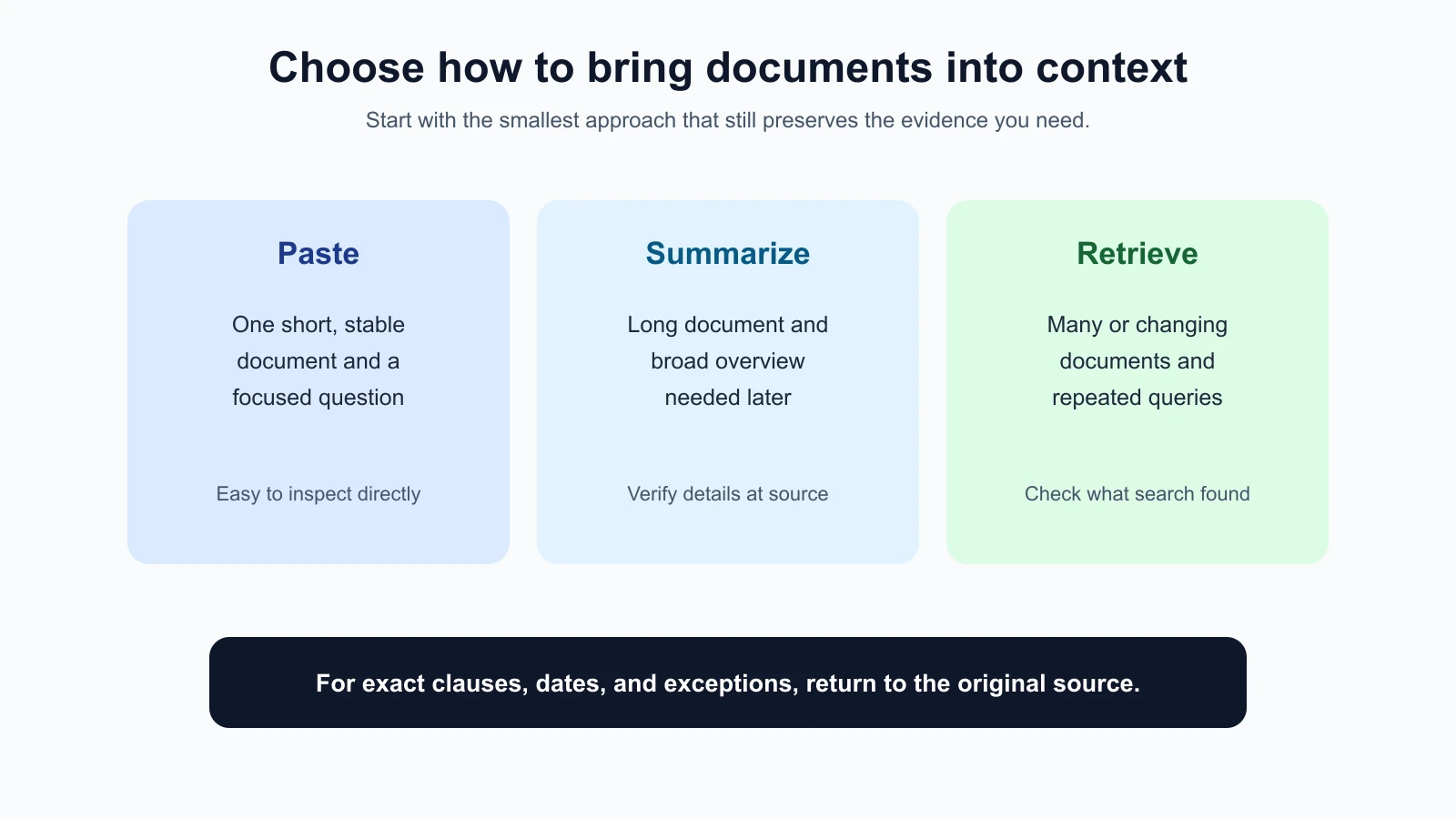
Pasting is often simplest when you have one short, stable document and the relevant section is clear. You can include the text directly and ask a focused question. It is easy to inspect exactly what the model received.
Summarizing first can help when a document is long but will be used for a broad overview. It works best when details can be compressed without losing what the later task needs. Keep the original available for verification.
Retrieval means searching a collection for relevant passages and adding selected results to the model’s prompt. A common approach called retrieval-augmented generation (RAG) searches documents at question time, then asks the model to answer using the retrieved excerpts. This is useful when you have many documents, sources that change, or different user questions that need different passages.
Retrieval has its own failure modes. Search may miss the right passage, return a partial excerpt, or retrieve similar but irrelevant text. The answer is only as grounded as the passages supplied. Keep source IDs with retrieved chunks, inspect retrieval quality, and tell the model how to handle an empty or conflicting result.
A simple guide:
| Situation | A reasonable starting point |
|---|---|
| One short document with a specific question | Paste the relevant source and ask directly. |
| One long report and a broad overview | Summarize sections, then combine and verify key points. |
| Many changing documents or repeated questions | Consider retrieval, with source labels and relevance checks. |
| Exact clause, date, or exception | Retrieve or paste the original passage and verify it directly. |
This is a starting point, not a fixed rule. The AI Agents lessons on context engineering and RAG and vector databases explain the retrieval architecture and context management in more depth.
Check what the model actually received
Documents passed through an application can be transformed before they reach the model. A PDF may lose headings, a table may be flattened into confusing text, or a retrieval tool may return only part of a section. When an answer seems wrong, inspect the actual extracted text and the retrieved passages rather than only the original file.
Large context capacity does not make every placement or question equally effective. The model may miss details in a long input, particularly if facts are buried or repeated. Use source labels, focused questions, explicit output expectations, and checks against the original material. If the task is important, test it on cases with exceptions, conflicting sources, and missing answers.
Keep prompts concise around the documents. Long introductions and repeated rules use space that could hold relevant context. Put stable behavior in the appropriate instruction field for your API, and place the specific question with the document request. Provider APIs and model guidance change, so consult their current documentation before relying on a particular context limit or technique.
Mistakes beginners make
- Pasting everything without a focused question. Give the model a clear task and say what kind of answer you need.
- Leaving sources unlabeled. Use titles, dates, IDs, or section names so the answer can point back to the right material.
- Putting the question before a large document by habit. Try placing long context first and the specific query at the end, then evaluate on your model.
- Treating a quote as proof by itself. Check that it supports the claim and includes necessary qualifications.
- Summarizing away the important exception. Return to the original for exact clauses, dates, and numbers.
- Assuming retrieval found everything relevant. Inspect retrieved passages and test queries that might expose gaps.
- Ignoring extraction quality. Confirm that tables, headings, and page structure survived file processing.
- Treating a large context window as a guarantee. Capacity does not ensure careful use of every detail.
Recap and try it yourself
For long inputs, label documents and metadata, place the specific question after the source material, and ask for evidence when details matter. Summarize in stages when a broad view is useful, but verify precise claims against the original. Paste a small relevant source directly; consider retrieval for many changing documents, and evaluate whether it returns the passages the question needs.
Try it: choose a public report or a document you are allowed to share. Ask one focused question and request a supporting quote with a section label. Then add a second source with a different date and ask the model to compare them without merging conflicting claims. Check both answers against the original pages. In the next lesson, we will use tested prompt recipes for common jobs.