
Prompt Engineering course · lesson 10 of 26
- 1What Is Prompt Engineering? A Practical Beginner's Guide
- 2How a Model Reads Your Prompt: Tokens and Context
- 3Choosing a Model and Reading Its Documentation
- 4Controlling Model Output: Sampling and Limits
- 5Your First Prompt Workflow: Test One Change at a Time
- 6Be Clear and Direct: Give the Model a Usable Task
- 7System, Role, and Context Prompts: Give Instructions Their Place
- 8Zero-Shot, One-Shot, and Few-Shot Prompting
- 9Structure Prompts with Delimiters, Tags, and Templates
- 10Structured Output: Get Answers You Can Parse and Check
- 11Prompting with Long Documents and Large Context
- 12Prompt Recipes for Ten Common Jobs
- 13Chain-of-Thought Prompts and Thinking Models
- 14Step-Back Prompting and Prompt Chaining
- 15Self-Consistency, Tree of Thoughts, and ReAct
- 16Self-Evaluation and Reliability Checks
- 17Define Success and Build Test Cases
- 18Compare Prompts with Graders
- 19Debug a Failing Prompt
- 20Automatic Prompt Engineering
- 21Version and Document Your Prompts
- 22Hallucinations and Grounding
- 23Bias and Debiasing Prompts
- 24Prompt Injection and Safe Prompting
- 25Prompts in Production
- 26Capstone: Build and Test a Prompt Library
A paragraph is easy for a person to read. It is harder for an application to use reliably. If your code needs a category, date, or list of extracted details, a predictable structure makes the response easier to handle.
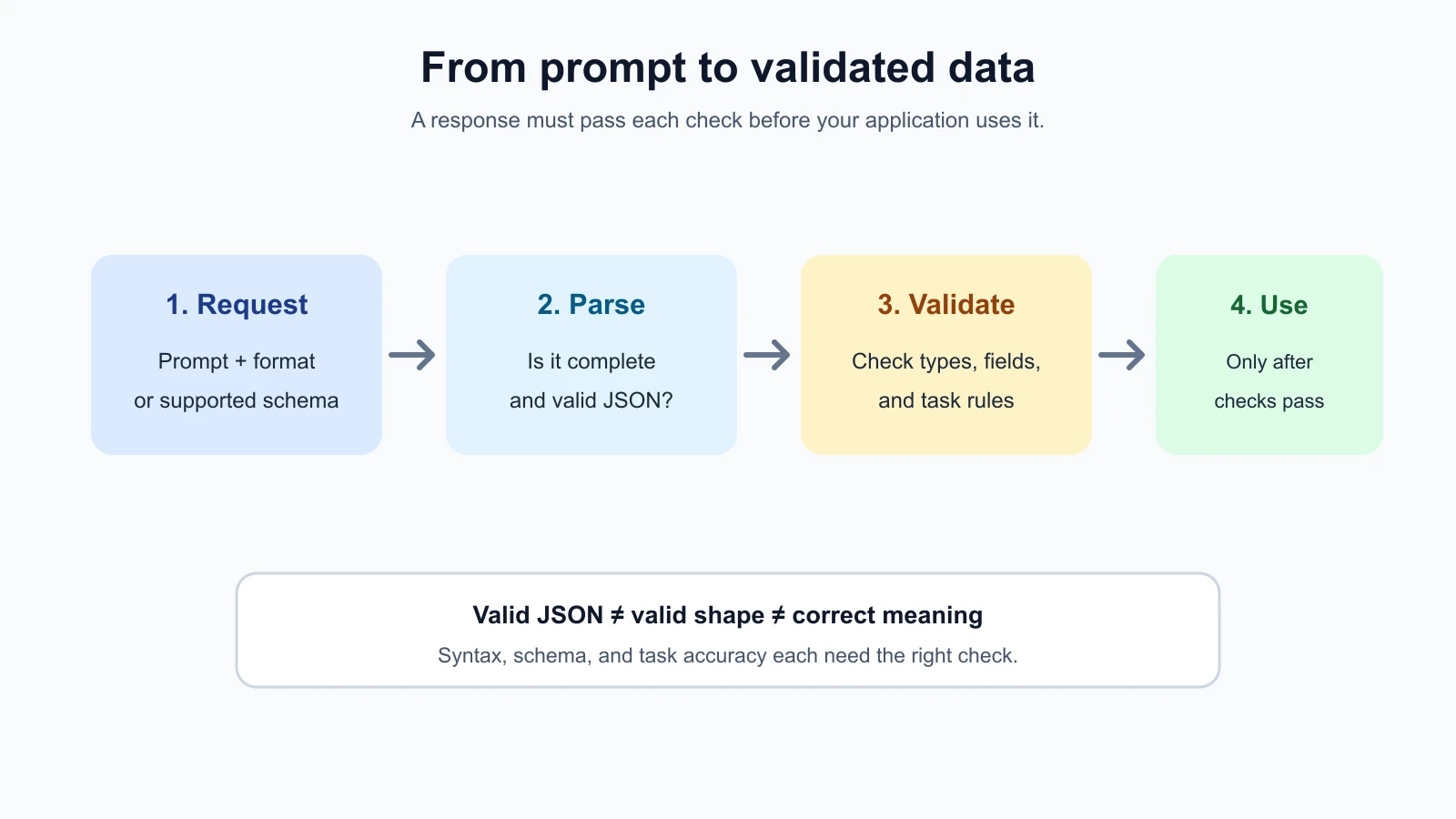
A model can be asked to return JSON, XML, CSV, or Markdown. The right format depends on who or what will use the answer. Whatever you choose, separate three questions: Is the response syntactically valid? Does it have the required shape? Are its values correct for the task? Passing one check does not guarantee the others.
Choose a format for the next step
Use plain text when a person will read the response and your application does not need to pull out individual fields. Use Markdown when a human benefits from headings, bullets, or a simple table. Use JSON when software needs named fields, arrays, or values with different data types. XML can be useful in systems that already work with tagged documents or when you want clear nested sections in text.
CSV is useful for simple rows and columns, especially when people will open the result in a spreadsheet. But delimiters, quotation marks, and line breaks inside a value need correct escaping. If the output might contain nested data or optional fields, JSON is often easier to represent and parse.
Do not request a machine-readable format just because it looks technical. If a teammate only needs to read a short explanation, ordinary prose may be clearer. Use a structure when another program needs to process the answer or when consistent fields make review easier.
Ask for JSON with clear fields
JSON is a text format for representing values such as strings, numbers, booleans, lists, and objects. An object holds named fields. A list holds an ordered sequence of values. JSON has strict syntax: field names and text values use double quotes, commas separate items, and comments are not allowed.
Suppose you need a support message classified and summarized. A basic instruction might say:
1Read the support message. Return one JSON object with these fields:
2- category: one of "billing", "delivery", or "account"
3- summary: a neutral summary in one sentence
4- needs_human: true if the message needs staff review, otherwise false
5Use null only if the category cannot be determined from the message.
6Do not include Markdown fences or extra commentary.
This describes the desired keys and values, but an instruction alone does not ensure the response will be valid JSON. The model might include an introduction, use a different field name, or return "true" as text instead of the boolean true. You can test simple cases this way, but a production application should parse and validate the response before using it.
A schema describes the expected shape
A schema is a description of the data structure you expect. A JSON Schema can specify field names, types, required fields, allowed values, and other constraints. Here is a small illustrative schema for a support summary:
1{
2  "type": "object",
3  "properties": {
4    "category": {
5      "type": ["string", "null"],
6      "enum": ["billing", "delivery", "account", null]
7    },
8    "summary": { "type": "string" },
9    "needs_human": { "type": "boolean" }
10  },
11  "required": ["category", "summary", "needs_human"],
12  "additionalProperties": false
13}
The schema says the response must contain three fields and no others. The category value must match one of the listed labels or be null; the other two fields have fixed types. A field that can be absent is not always the same as a field whose value is null. Pick one convention and document it so your application knows what to expect.
Schemas can help control the structure, but provider implementations support different subsets of JSON Schema. Some features may be rejected, and support can vary by endpoint and model. Check the current reference for the exact API you use. Keep schemas as simple as the task allows, and provide useful descriptions for fields whose meaning may not be obvious.
Prompted JSON and constrained output are different
There are two broad ways to request JSON. You can ask for it in ordinary instructions, or use a provider’s API feature that constrains the response format. The second can provide stronger format guarantees when available.
A JSON mode may ensure that the response parses as JSON without ensuring that it has the fields or values your application expects. A schema-constrained output feature asks the model to follow a particular schema. The terminology differs: OpenAI offers Structured Outputs with JSON Schema, Anthropic offers structured JSON outputs, and Gemini supports structured output with a subset of JSON Schema. Their request fields, supported models, schema subsets, and handling of edge cases are not identical.
OpenAI distinguishes JSON mode from schema adherence and recommends Structured Outputs where supported. Anthropic and Gemini also document schema-based output features. These can reduce format errors, but they do not make the information in the fields true. A schema can require category to be a string from three options; it cannot verify that the model selected the right category from a complicated message. This summary reflects the official guides checked on 4 November 2026: OpenAI Structured Outputs, Anthropic structured outputs, and Gemini structured output. Each guide documents its own supported schema subset and edge cases.
Do not confuse a structured response with a tool call. A structured response is data the model returns for your application or a person to inspect. A tool call asks the model to select and invoke an application capability. If the model needs to choose an action such as looking up an order, use the provider’s tool or function calling feature and enforce authorization in your code. The AI Agents lesson on tool definitions and structured output covers that distinction in an agent workflow.
Parse, validate, then use
Parsing means turning the response text into data your program can inspect. Validation means checking that the parsed data meets the requirements of your application. A robust flow does not skip either step:
- Check the API result for refusal, errors, or an incomplete response.
- Parse the JSON.
- Validate required keys, types, and allowed values.
- Apply task-specific checks that a schema cannot express.
- Only then pass the data to the next part of your application.
For example, valid JSON might contain "needs_human": "false". It parses successfully, but the value is a string instead of a boolean. A structural validator should reject it. A response can also be structurally valid while its summary invents a fact. That requires checking the content against the source or asking a person to review it.
Think of validation in layers. A parser can check that the text follows JSON syntax. A schema validator can check field names and data types. Additional application rules can check facts such as whether a date is within an allowed range or whether the source text actually mentions the extracted order number. These checks answer different questions, so one cannot replace the others.
Here is a small TypeScript example that parses a support summary and checks its shape. Save it as support-summary.ts:
1export type SupportSummary = {
2  category: "billing" | "delivery" | "account" | null;
3  summary: string;
4  needs_human: boolean;
5};
6
7function isSupportSummary(value: unknown): value is SupportSummary {
8  if (typeof value !== "object" || value === null) return false;
9  const item = value as Record<string, unknown>;
10  const validCategory = item.category === null ||
11    item.category === "billing" ||
12    item.category === "delivery" ||
13    item.category === "account";
14  return validCategory &&
15    typeof item.summary === "string" &&
16    typeof item.needs_human === "boolean" &&
17    Object.keys(item).every((key) => ["category", "summary", "needs_human"].includes(key));
18}
19
20export function parseSupportSummary(text: string): SupportSummary {
21  const value: unknown = JSON.parse(text);
22  if (!isSupportSummary(value)) throw new Error("Response does not match SupportSummary");
23  return value;
24}
A real application may use a schema validation library or SDK helper instead of hand-written checks. Define the schema and TypeScript type from one source when possible so they do not drift apart. This example checks structure and types; it does not verify whether the summary accurately reflects the message.
Handle failures with a limited retry
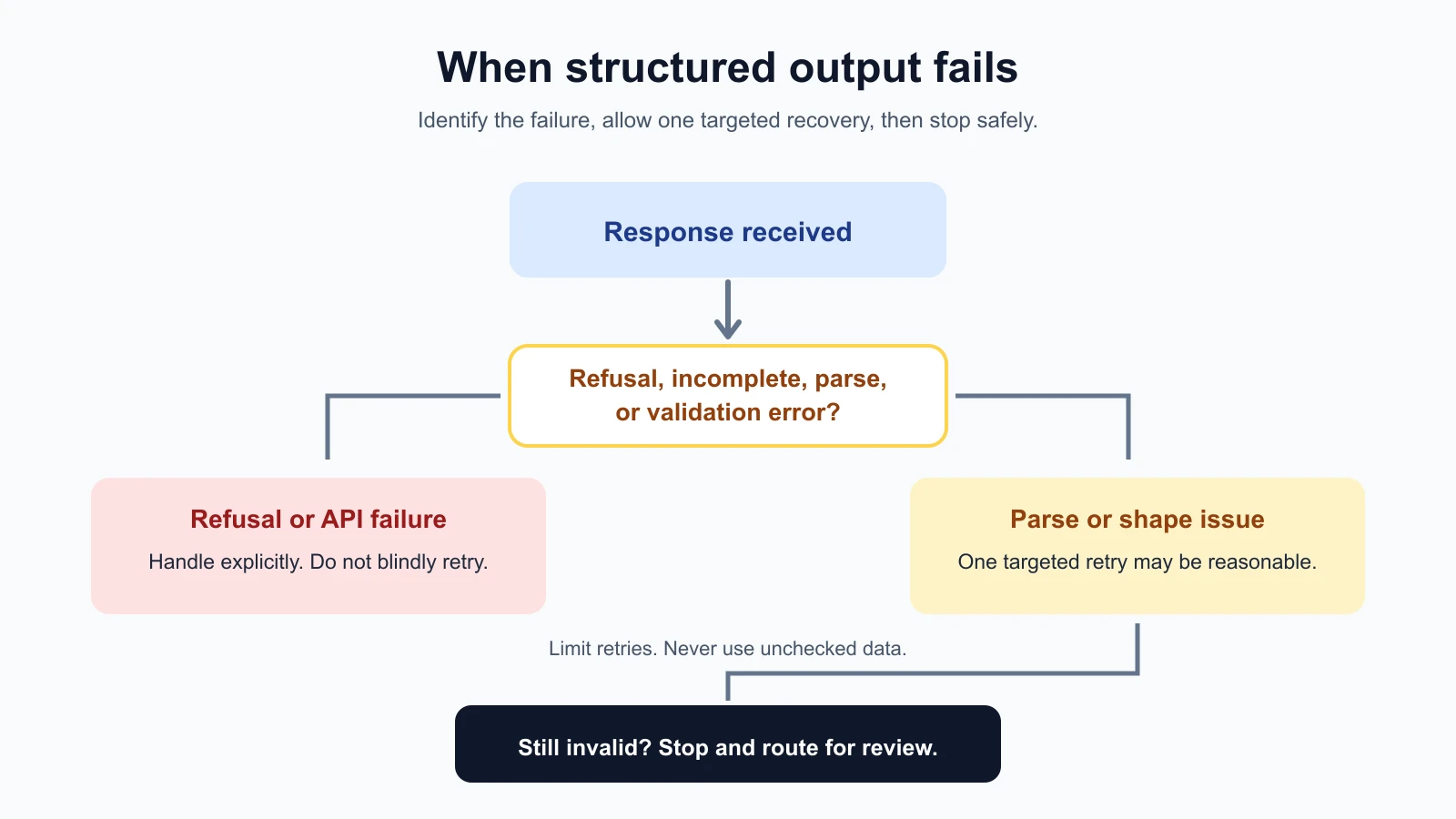
A request can fail for several reasons. The model may refuse, the output may be cut off by a token limit, JSON parsing may fail, or a value may not pass your validator. Handle those cases deliberately. Do not assume every failure can be fixed by asking the model again.
A retry rule defines whether and how often the application will request another response after a recoverable failure. Keep retries limited. Repeatedly asking without changing anything can spend more money and return the same problem. For a parse or shape error, a single retry can include a short, specific correction. If the second response still fails, stop and surface a clear error for review.
Add the retry function below to the same support-summary.ts file, under the code above:
1export async function requestSummary(
2  callModel: (correction?: string) => Promise<string>,
3): Promise<SupportSummary> {
4  for (let attempt = 0; attempt < 2; attempt++) {
5    const correction = attempt === 0
6      ? undefined
7      : "Return one JSON object with the required keys and value types. No extra text.";
8    const text = await callModel(correction);
9    try {
10      return parseSupportSummary(text);
11    } catch {
12      if (attempt === 1) throw new Error("Could not get a valid support summary");
13    }
14  }
15  throw new Error("Could not get a valid support summary");
16}
This function tries at most twice and stops if the response remains invalid. In production, distinguish a refusal or API error from a parse error, and do not blindly retry either. Log enough information to diagnose the failure while protecting personal data. If the task requires a correct answer, route uncertain or invalid cases to a person rather than silently accepting a fallback.
Test the parser and the retry rule
The tests below use a fake callModel function, so they need no API key. They check that a valid reply passes, a boolean written as the string "false" is rejected, an unknown category and an extra key are rejected, plain text is rejected, a valid first reply makes exactly one call, a bad first reply makes exactly one correction call, and two bad replies stop the loop with an error. Save them as support-summary.test.ts next to support-summary.ts:
support-summary.test.ts
1import assert from "node:assert/strict";
2import { test } from "node:test";
3
4import { parseSupportSummary, requestSummary } from "./support-summary";
5
6const valid = JSON.stringify({ category: "delivery", summary: "Bus arrived at 8:32.", needs_human: false });
7
8test("accepts a valid summary", () => {
9  assert.equal(parseSupportSummary(valid).category, "delivery");
10});
11
12test("rejects a boolean written as a string", () => {
13  const text = JSON.stringify({ category: null, summary: "x", needs_human: "false" });
14  assert.throws(() => parseSupportSummary(text), /does not match/);
15});
16
17test("rejects an unknown category and an extra key", () => {
18  assert.throws(() => parseSupportSummary(JSON.stringify({ category: "refund", summary: "x", needs_human: true })));
19  assert.throws(() => parseSupportSummary(JSON.stringify({ category: null, summary: "x", needs_human: true, note: 1 })));
20});
21
22test("rejects text that is not JSON", () => {
23  assert.throws(() => parseSupportSummary("Sure! Here it is: {}"));
24});
25
26test("returns on the first valid reply without a correction", async () => {
27  const calls: Array<string | undefined> = [];
28  const result = await requestSummary(async (correction) => {
29    calls.push(correction);
30    return valid;
31  });
32  assert.equal(result.needs_human, false);
33  assert.deepEqual(calls, [undefined]);
34});
35
36test("retries once with a correction, then succeeds", async () => {
37  const calls: Array<string | undefined> = [];
38  const result = await requestSummary(async (correction) => {
39    calls.push(correction);
40    return calls.length === 1 ? "not json" : valid;
41  });
42  assert.equal(result.category, "delivery");
43  assert.equal(calls.length, 2);
44  assert.match(calls[1] ?? "", /JSON object/);
45});
46
47test("stops after two invalid replies", async () => {
48  let count = 0;
49  await assert.rejects(
50    requestSummary(async () => {
51      count += 1;
52      return "still not json";
53    }),
54    /Could not get a valid support summary/,
55  );
56  assert.equal(count, 2);
57});
Run them with Node.js 20 or newer:
1npx tsx --test support-summary.test.tsTry breaking the code to see the tests work. Remove the needs_human boolean check from isSupportSummary and one test fails. Change both numbers that limit the loop (attempt < 2 and attempt === 1) to allow more attempts and the "stops after two invalid replies" test fails. Tests that cannot fail are not checking anything.
Match the format to the cost of failure
For a quick internal note, you may decide that a readable Markdown list is enough. For a system that updates a customer record, you need checks before using extracted fields. The more a response can affect, the more carefully you should validate it and plan for errors.
A good schema is narrow and purposeful. Avoid asking for fields your application does not use. Use enums for a fixed set of labels and decide how to represent uncertainty. If a date is unknown, choose a clear representation such as null or a separate status field. Do not make the model guess a value simply to fill a required field.
Use examples when they clarify a field or boundary. For instance, a short example can show what should go in summary or when needs_human should be true. Keep examples consistent with the schema. The lesson on examples and few-shot prompting covers choosing representative examples and checking them against separate test inputs.
A schema-constrained response may still be refused or incomplete. OpenAI documents refusal handling and truncation edge cases for structured outputs. Other providers also have provider-specific limitations. Check the response status or finish reason where available, and handle these outcomes outside the parsed data path.
Mistakes beginners make
- Assuming JSON mode means schema compliance. Valid JSON can still have missing or wrongly typed fields.
- Using a schema without validating at the application boundary. Check what your code receives before relying on it.
- Treating valid structure as true content. A well-formed summary can still invent a detail.
- Copying a schema feature across providers. Support differs by model and endpoint.
- Making every field required without an uncertainty plan. Decide how unknown values should be represented.
- Retrying forever. Set a small retry limit and provide a human path for persistent failures.
- Ignoring refusal or truncation states. A response may not contain a complete object at all.
- Using JSON when a person only needs prose. Choose the format that fits the next step.
Recap and try it yourself
Choose an output format based on how the answer will be used. A JSON schema can define fields, types, and allowed values, while provider constrained-output features can improve adherence to a supported schema. Still parse and validate the result, check the meaning when it matters, and handle refusals, incomplete responses, or invalid data with a limited recovery rule.
Try it: choose a low-stakes extraction task and define a three-field JSON shape. Write down how to represent an unknown value. Then create one valid response and one response with a wrong type, and make sure your validator accepts the first and rejects the second. In the next lesson, we will work with long documents and context.