
Prompt Engineering course · lesson 26 of 26
- 1What Is Prompt Engineering? A Practical Beginner's Guide
- 2How a Model Reads Your Prompt: Tokens and Context
- 3Choosing a Model and Reading Its Documentation
- 4Controlling Model Output: Sampling and Limits
- 5Your First Prompt Workflow: Test One Change at a Time
- 6Be Clear and Direct: Give the Model a Usable Task
- 7System, Role, and Context Prompts: Give Instructions Their Place
- 8Zero-Shot, One-Shot, and Few-Shot Prompting
- 9Structure Prompts with Delimiters, Tags, and Templates
- 10Structured Output: Get Answers You Can Parse and Check
- 11Prompting with Long Documents and Large Context
- 12Prompt Recipes for Ten Common Jobs
- 13Chain-of-Thought Prompts and Thinking Models
- 14Step-Back Prompting and Prompt Chaining
- 15Self-Consistency, Tree of Thoughts, and ReAct
- 16Self-Evaluation and Reliability Checks
- 17Define Success and Build Test Cases
- 18Compare Prompts with Graders
- 19Debug a Failing Prompt
- 20Automatic Prompt Engineering
- 21Version and Document Your Prompts
- 22Hallucinations and Grounding
- 23Bias and Debiasing Prompts
- 24Prompt Injection and Safe Prompting
- 25Prompts in Production
- 26Capstone: Build and Test a Prompt Library
This capstone brings the course workflow together around one small task: writing a customer update from a delivery note. You will define what a good update must do, build a few test cases, compare two prompt versions, inspect a failure, check the revised version against separate release cases, and save the prompts with their history.
The included prompt lab uses deterministic stub functions, so the code can be tested without an API key or live model call. Those fixed outputs demonstrate how the evaluation and versioning tools work. They do not show what a real language model would answer. To evaluate your own prompt on a model, connect an adapter for your chosen provider and run the tests under an explicit budget.
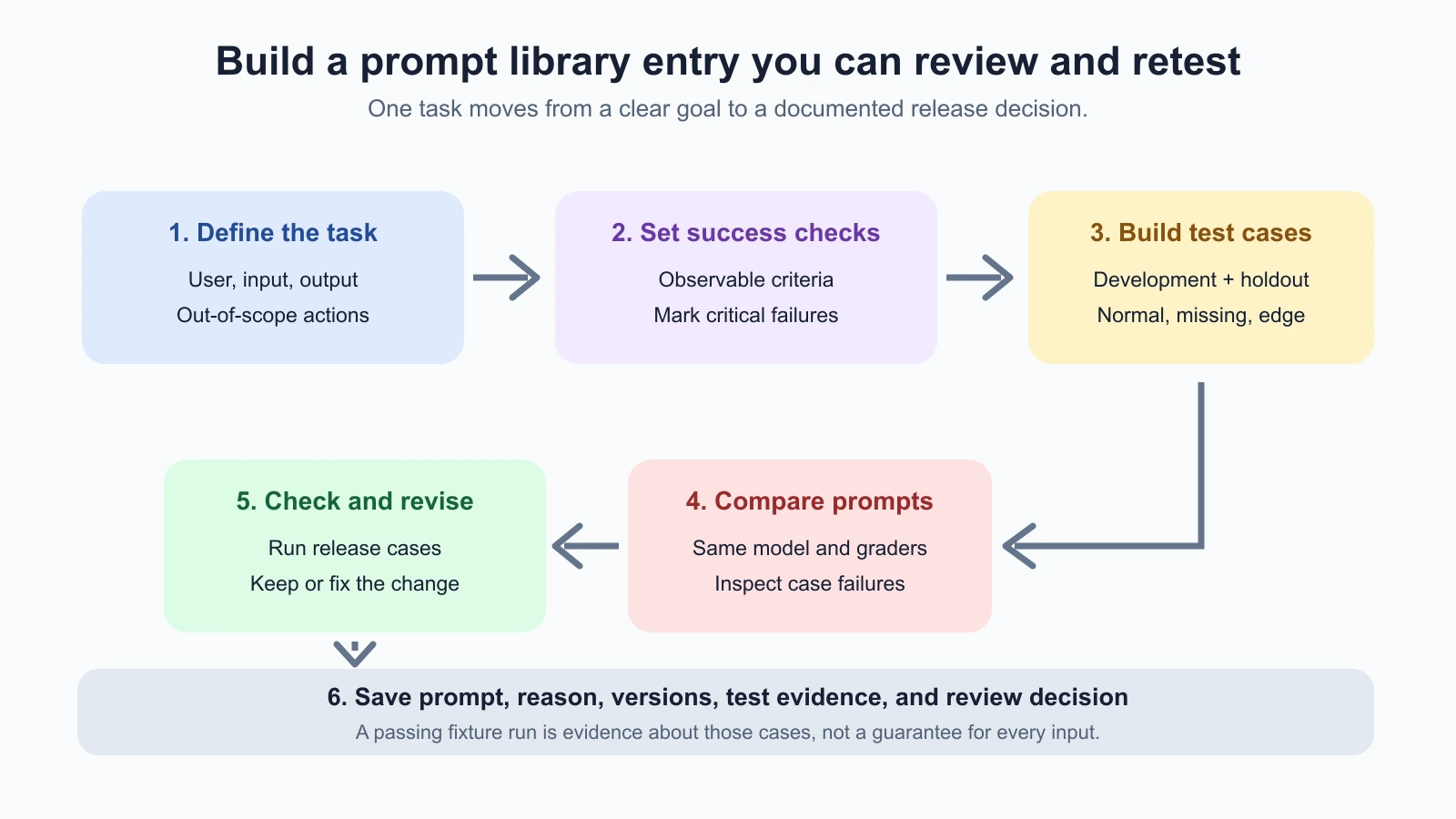
Step 1: Choose a task with a clear boundary
Pick a repeated task that is small enough to evaluate. A good first choice has an input you can describe, an output you can inspect, and a consequence you understand. Avoid starting with a broad goal such as “help support customers.” That could include many different requests and decisions.
For this walkthrough, the task is:
Turn a short delivery note into a neutral customer update that preserves the stated times and does not invent missing details.
The boundary matters. The prompt drafts text. It does not send a message, promise a refund, or change an order. If this task later connects to a mail tool or customer account, that is a new system design with permission and review requirements, as covered in Prompt Injection and Safe Prompting.
Write down the user, the input, the output, and the out-of-scope actions before writing the prompt. For example:
| Field | This capstone |
|---|---|
| User | A support teammate preparing an update |
| Input | A short delivery note with known or missing times |
| Output | One concise, neutral draft |
| The prompt may do | Preserve stated facts and flag missing information |
| The prompt may not do | Guess a time, invent a reason, send the update, or make a promise |
If you cannot explain where the task starts and stops, split it into smaller jobs first. A model can help draft a task spec, but a person who understands the work should approve the criteria and examples.
Step 2: Define what success means
Turn “write a good update” into checks another person can apply. For this task, start with four:
- Preserve any predicted and actual times, and label them correctly.
- If the note does not contain a time, say it is unavailable instead of guessing.
- Do not invent a cause, a delivery promise, or an action that has not happened.
- Keep the update neutral and at most 25 words.
The first three can be checked partly with code or a source comparison. Neutrality needs a human judgment or a carefully reviewed rubric. Mark the “do not guess” requirement as critical: a prompt that sounds polished but invents a time should not pass. Lessons 17 and 18 explain how to build cases and use graders; the capstone uses those same habits rather than inventing a new scoring method.
Success criteria should match what a reader needs, not what is easiest to count. A contains check can confirm that “8:32” appears, but it cannot tell whether the model labeled it as a predicted time instead of the actual arrival. A short exact-match check can work for fixed examples, but becomes brittle when several natural phrasings are valid. Use code for mechanical requirements and a person for context-sensitive ones.
Step 3: Build a small case set
Use cases that cover different ways the task can succeed or fail. The existing prompt-lab/cases.json has two development examples and one holdout example:
| Case | Note | What it checks |
|---|---|---|
delivery-001 | The app predicted 8:10. The bus arrived at 8:32. | Preserve and distinguish both times |
delivery-002 | The bus arrived at 8:32. The app did not show a prediction. | Do not guess the missing prediction |
delivery-003 | The parcel status changed today. No delivery time is listed. | Say the source does not provide a time |
The first two are development cases. You can inspect them while revising. The third is held back as an initial check on whether the revised wording handles a new no-answer example. Three cases are enough to demonstrate the workflow, not enough to establish production reliability. Add cases for longer notes, corrected estimates, unrelated times, unclear wording, and the formats your team really receives. Keep personal details fictional or remove them.
Store the prompt, input, expected facts, criteria, and split together. The case loader validates the file’s structure, unique IDs, and allowed split names. It cannot decide whether the expected answer is right or whether the case set represents your users. Have someone familiar with the task review the cases before you treat a score as evidence.
Step 4: Write a baseline and a revision
Start with a plausible baseline. Do not make it deliberately absurd; you want to learn whether a reasonable prompt leaves gaps:
1Turn this delivery note into a concise customer update.
2Include the likely arrival time and explain the delay.
3
4Note: [note]
The words “likely” and “explain” can invite an inference that the note may not support. The output length and missing-information behavior are also unspecified. Based on the criteria, revise the prompt:
1Write a neutral customer update in no more than 25 words.
2Use only facts stated in the delivery note. Distinguish a predicted time from
3an actual arrival time. If a time is missing, say it is not provided. Do not
4guess a cause or promise an action.
5
6Note: [note]
This revision names the audience-facing task, limits the source of facts, defines the missing-value path, and blocks unsupported causes and promises. It is not guaranteed to work. That is what the comparison is for. Change one meaningful element at a time when you debug a failure so you can see which change appears to matter.
These prompt texts are provider-neutral. The current APIs place instructions and input differently: Anthropic’s Messages API accepts a system instruction and message content; OpenAI’s Responses API supports instructions and input; Gemini’s API uses its own content and system-instruction fields. The test runner takes a plain Python function, so your adapter translates the prompt and note into your chosen provider’s request. Check current Anthropic Messages documentation, OpenAI text generation documentation, or Gemini text generation documentation for current request and response formats.
Keep that adapter small. Its job is to accept the case input, send the intended prompt to the selected model, and return the text that should be graded. Keep provider-specific message formatting, model selection, generation settings, and error handling there. Do not let the adapter quietly change the prompt, omit an instruction, or use a different model for one candidate. Otherwise, you would be comparing multiple changes at once. If the provider response contains several blocks or non-text output, extract the relevant text deliberately and record a failed or unsupported response instead of passing an empty string as if the model answered normally.
Before a real comparison, use an authorized set and decide how many trials you can afford. Confirm where credentials come from, set a spend or call limit, and avoid committing secrets into the prompt library. Preserve request IDs and usage metadata when the provider makes them available, but do not retain raw customer material without a reason and a retention rule. The fixture stays offline so you can practice the evaluation mechanics without setting up this infrastructure.
Step 5: Compare the versions fairly
The prompt lab’s run_comparison runs every selected case against each named prompt function, applies the same checks, and returns case-level records and a summary. For this capstone, save the file below as capstone_walkthrough.py in your prompt-lab folder. It includes two adapter stubs and ties the loader, runner, release gate and prompt store together:
capstone_walkthrough.py
1"""Offline capstone tying comparison, regression, and prompt versioning together."""
2
3from pathlib import Path
4import tempfile
5from typing import Any
6
7from production_release_gate import evaluate_release
8from prompt_lab_runner import run_comparison
9from prompt_store import PromptStore
10from test_case_loader import TestCase, load_cases
11
12
13BASELINE_PROMPT = """Turn this delivery note into a concise customer update.
14Include the likely arrival time and explain the delay.
15
16Note: [note]"""
17
18REVISED_PROMPT = """Write a neutral customer update in no more than 25 words.
19Use only facts stated in the delivery note. Distinguish a predicted time from
20an actual arrival time. If a time is missing, say it is not provided. Do not
21guess a cause or promise an action.
22
23Note: [note]"""
24
25
26def simulated_response(note: str, *, revised: bool) -> str:
27    """Prewritten outputs for exercising the offline lab, not a model call."""
28    if "did not show a prediction" in note:
29        if revised:
30            return "The bus arrived at 8:32; no prediction was available."
31        return "The bus arrived at 8:32 after an expected 8:10 arrival."
32    if "No delivery time is listed" in note:
33        if revised:
34            return "The note does not provide a delivery time."
35        return "The parcel should arrive tomorrow morning."
36    return "The app predicted 8:10; the bus arrived at 8:32."
37
38
39def baseline_adapter(note: str) -> str:
40    return simulated_response(note, revised=False)
41
42
43def revised_adapter(note: str) -> str:
44    return simulated_response(note, revised=True)
45
46
47DEV_CHECKS = {
48    "delivery-001": [
49        {"type": "exact", "value": "The app predicted 8:10; the bus arrived at 8:32."}
50    ],
51    "delivery-002": [
52        {"type": "exact", "value": "The bus arrived at 8:32; no prediction was available."}
53    ],
54}
55
56RELEASE_CHECKS = {
57    "release-001": [
58        {"type": "contains", "value": "8:10"},
59        {"type": "contains", "value": "8:32"},
60    ],
61    "release-002": [
62        {"type": "contains", "value": "8:32"},
63        {"type": "contains", "value": "no prediction was available"},
64    ],
65    "release-003": [
66        {"type": "contains", "value": "The note does not provide a delivery time"}
67    ],
68}
69
70
71def run_capstone(
72    prompt_lab_dir: str | Path,
73    store_path: str | Path,
74) -> dict[str, Any]:
75    """Compare two versions, check holdout cases, and save both prompt versions."""
76    root = Path(prompt_lab_dir)
77    cases = load_cases(root / "cases.json")
78    development = run_comparison(
79        cases,
80        {"baseline-v1": baseline_adapter, "revised-v2": revised_adapter},
81        DEV_CHECKS,
82        trials=1,
83        split="development",
84    )
85    release_cases = load_cases(root / "production-cases.json")
86    release = evaluate_release(
87        release_cases,
88        baseline_adapter,
89        revised_adapter,
90        RELEASE_CHECKS,
91        model_id="offline-stub-v1",
92        prompt_version="delivery-summary-v2",
93        test_set_version="production-cases-v1",
94        critical_case_ids={"release-003"},
95        minimum_pass_rate=1.0,
96        trials=1,
97    )
98
99    store = PromptStore(store_path)
100    if "v1" not in store.data["versions"]:
101        store.add("v1", BASELINE_PROMPT, author="course-demo", reason="Initial baseline")
102    if "v2" not in store.data["versions"]:
103        store.add(
104            "v2",
105            REVISED_PROMPT,
106            author="course-demo",
107            reason="Clarify missing-time behavior after a guessed prediction",
108            based_on="v1",
109        )
110    if store.data["active"] is None:
111        store.review("v1", "baseline-reviewer", approved=True)
112        store.activate("v1", "course-demo")
113    return {
114        "development": development,
115        "release": release,
116        "diff": store.diff("v1", "v2"),
117        "store": store,
118    }
119
120
121def approve_and_activate(
122    store: PromptStore,
123    version: str,
124    *,
125    release_decision: str,
126    reviewer: str,
127    actor: str,
128) -> None:
129    """Record a separate human approval after the technical gate is ready."""
130    if release_decision != "ready":
131        raise ValueError("Prompt cannot be approved before release checks are ready")
132    store.review(version, reviewer, approved=True)
133    store.activate(version, actor)
134
135
136def temporary_demo() -> dict[str, Any]:
137    """Run the capstone with a temporary store for a quick offline demonstration."""
138    root = Path(__file__).parent
139    with tempfile.TemporaryDirectory() as directory:
140        return run_capstone(root, Path(directory) / "prompts.json")
Then run it with this script:
1from pathlib import Path
2
3from capstone_walkthrough import run_capstone
4from prompt_lab_runner import format_report
5
6result = run_capstone(
7    prompt_lab_dir=Path("."),
8    store_path=Path("delivery-prompt-store.json"),
9)
10
11print(format_report(result["development"]))
12print(result["release"]["decision"], result["release"]["reason"])
13print(result["diff"])
Save that script as run_capstone_demo.py in the prompt-lab folder and run it from there with python3 run_capstone_demo.py. The adapters return prewritten strings selected by the input, so this script exercises the loader, graders, comparison report, release check, and prompt store without contacting a model. It is a test of the lab plumbing. It is not evidence that the revised natural-language prompt will cause a real model to behave the same way.
In the local fixture, the baseline stub returns a guessed prediction for delivery-002, while the revised stub says the prediction was unavailable. The exact check therefore catches a failure in the baseline and passes the revised fixture output. The report helps you find the failing case instead of hiding it inside an average. These fixed results are illustrative stub data, not model output.
When you connect a real model, keep the evaluation fair: both versions should use the same cases, model configuration, graders, and trial count. Record the model identifier, prompt version, settings, and test-set version. Run multiple trials if output variation matters. If a grader returns unknown, send the case for review rather than counting it as a pass.
Step 6: Inspect the failure and revise
The baseline miss is useful because it exposes a gap: the prompt asks for a “likely” time even when the note says no prediction was shown. Do not simply add “be accurate” or “be careful.” State the exact behavior required when information is missing: say that the prediction is unavailable and do not infer one.
Then look at the actual model response when using a live adapter. Ask:
- Which criterion failed?
- Did the prompt omit a rule, or did the model ignore a clear rule?
- Is the note ambiguous or formatted differently from the examples?
- Would a source check, parser, or application rule be more reliable than another prompt instruction?
- Did the revision fix the case without breaking one that already passed?
Keep the original result and change one important instruction at a time. Rerun all development cases after each change. If the problem concerns an exact time, validate it against the source text. If a prompt keeps failing despite clearer wording, narrow the task, add a deterministic check, use a better-supported model, or route the case to a person. The lesson on debugging a failing prompt gives a fuller diagnostic workflow.
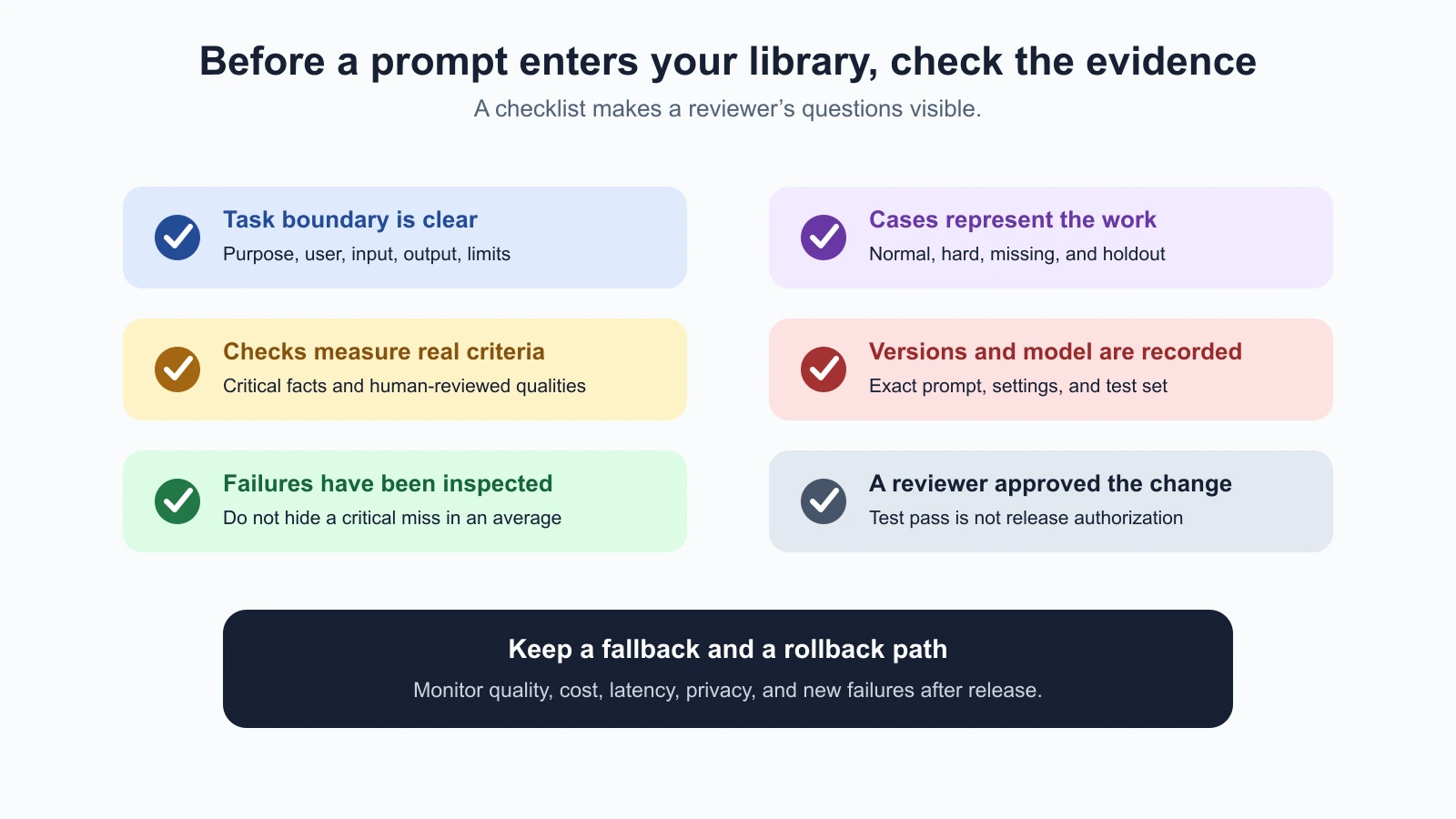
Step 7: Check a separate release set
Passing the development cases is a reason to examine the revision, not to release it automatically. The capstone also calls the production release gate with a separate saved set in production-cases.json. That set checks the normal time pair, the missing prediction, and a note with no delivery time. The no-answer case is marked critical.
The gate compares the baseline and candidate on identical cases. It returns blocked when the critical case fails, hold when the pass-rate threshold is missed, and ready when the configured checks pass. The included local stubs produce ready for the revision. A ready result means only that these specific deterministic checks passed. It does not certify prompt quality, fairness, privacy, or production safety.
For a real task, expand the release set, use graders that were reviewed by a person, and keep some cases unseen while tuning. With a tiny set, percentages are coarse: one case can move a score by a large amount. Do not tune repeatedly against a holdout set and continue calling it unseen. Once a holdout case guides a prompt change, move it into development and create a fresh holdout example.
Step 8: Save the prompt and its reason
run_capstone saves both prompt texts in a PromptStore. The record includes version, author, reason, timestamp, and review status. Its diff shows what changed. The new prompt remains a draft after the automated checks; the code does not silently activate it.
In a review process, a different person checks the diff, criteria, failed records, and release-gate summary. If the review is approved, the store can record the reviewer and activate the version:
1from capstone_walkthrough import approve_and_activate
2
3if result["release"]["decision"] == "ready":
4    approve_and_activate(
5        result["store"],
6        "v2",
7        release_decision=result["release"]["decision"],
8        reviewer="reviewer-name",
9        actor="release-process",
10    )
Save the walkthrough's tests as capstone_walkthrough_test.py and run the whole lab's tests from inside the prompt-lab folder. They check that the baseline fails the missing-prediction case, that the revision passes, that the release gate returns ready, and that nothing is activated without an approved review:
capstone_walkthrough_test.py
1"""Offline integration tests for the Prompt Engineering capstone."""
2
3from pathlib import Path
4import tempfile
5import unittest
6
7from capstone_walkthrough import approve_and_activate, run_capstone
8
9
10ROOT = Path(__file__).parent
11
12
13class CapstoneWalkthroughTests(unittest.TestCase):
14    def test_capstone_compares_versions_checks_holdout_and_saves_diff(self):
15        with tempfile.TemporaryDirectory() as directory:
16            result = run_capstone(ROOT, Path(directory) / "prompts.json")
17            self.assertEqual(result["development"]["summary"]["baseline-v1"]["pass_rate"], 0.5)
18            self.assertEqual(result["development"]["summary"]["revised-v2"]["pass_rate"], 1.0)
19            self.assertEqual(result["release"]["decision"], "ready")
20            self.assertIn("not provided", result["diff"])
21            self.assertEqual(result["store"].data["active"], "v1")
22
23    def test_model_or_prompt_failure_cannot_be_approved_as_ready(self):
24        with tempfile.TemporaryDirectory() as directory:
25            result = run_capstone(ROOT, Path(directory) / "prompts.json")
26            with self.assertRaisesRegex(ValueError, "before release checks"):
27                approve_and_activate(
28                    result["store"], "v2", release_decision="blocked",
29                    reviewer="Ravi", actor="release-bot",
30                )
31
32    def test_review_and_activation_are_separate_and_recorded(self):
33        with tempfile.TemporaryDirectory() as directory:
34            result = run_capstone(ROOT, Path(directory) / "prompts.json")
35            approve_and_activate(
36                result["store"], "v2", release_decision=result["release"]["decision"],
37                reviewer="Ravi", actor="release-bot",
38            )
39            self.assertEqual(result["store"].active_text(), result["store"].data["versions"]["v2"]["text"])
40            self.assertEqual(result["store"].data["versions"]["v2"]["review"]["reviewer"], "Ravi")
41
42
43if __name__ == "__main__":
44 unittest.main()1python3 -m unittest discover -p '*_test.py'The names in this local exercise are placeholders. In a real service, derive reviewer and actor identity from authenticated access controls. The JSON prompt store is a teaching tool, not a secure production database or a deployment system. Keep the approved prompt in the real source of truth your team reviews and releases. The lesson on versioning and documenting prompts explains the versioning rules and rollback approach.
Step 9: Release, watch, and learn
For a production release, start with the normal review path: test in staging, use a limited rollout when feasible, and monitor task quality, failure rate, latency, and cost. Keep a way to restore the prior prompt and compatible model configuration. If user inputs or model behavior shift, add reviewed examples to the test set and repeat the comparison.
The capstone examples contain fictional delivery notes. A real deployment needs privacy-reviewed cases, access controls, bounded retries, and a fallback. Do not store every user conversation merely to build a bigger evaluation set. Minimize or redact information, control who can view it, and follow the application’s retention rules. If the prompt can affect user accounts or send messages, add permission checks and human approval for consequential actions.
The techniques in this course transfer to many tasks, but the validation depends on the job. A Claude Code prompting pattern can help frame a coding request; a Vibe Coding build prompt needs acceptance checks against the application. For multi-step systems that use tools, see Evaluating AI Agents. Keep the habit from this capstone: define success, test representative cases, inspect failures, and record the version you actually use.
Mistakes beginners make
- Choosing a task that is too broad. Start with one input and one inspectable output.
- Writing a prompt before defining success. Make the criteria and failure behavior explicit first.
- Using only easy examples. Include missing details, edge cases, and valid no-answer inputs.
- Changing the grader while comparing prompts. Keep cases and checks fixed for a fair comparison.
- Treating stub results as model evidence. Replace the stubs with a real adapter and rerun the evaluation before making quality claims.
- Ignoring a failure because the average improved. Inspect every critical case and retain case-level results.
- Activating a prompt as soon as the script says
ready. Keep human review and the normal release process. - Keeping every real input forever. Use privacy-minimized examples and a clear retention policy.
Recap and try it yourself
The capstone connects the core workflow: define a narrow task, translate success into checks, build development and holdout cases, compare two prompts fairly, fix a real failure, run a separate release check, and save the prompt with its reason and review history. The offline prompt lab verifies the mechanics with stubs; evaluating actual model behavior requires an adapter and appropriate real-model runs.
Choose a repeated task of your own and make a small prompt library entry:
- State the task, user, output, and actions that are out of scope.
- Write three to five observable success criteria and mark any critical failure.
- Create at least five fictional or privacy-approved cases, with development and holdout splits.
- Save a baseline and revised prompt, then compare them with the same model and graders.
- Inspect the case-level failures, change one instruction, and rerun the suite.
- Record the selected prompt’s version, reason, test-set version, reviewer, and release decision.
If no candidate passes, keep it in draft and revise the task, prompt, or checks. A small prompt library is useful when each entry explains what it is for, what evidence supports it, and how to tell when it needs another review.