
Prompt Engineering course · lesson 25 of 26
- 1What Is Prompt Engineering? A Practical Beginner's Guide
- 2How a Model Reads Your Prompt: Tokens and Context
- 3Choosing a Model and Reading Its Documentation
- 4Controlling Model Output: Sampling and Limits
- 5Your First Prompt Workflow: Test One Change at a Time
- 6Be Clear and Direct: Give the Model a Usable Task
- 7System, Role, and Context Prompts: Give Instructions Their Place
- 8Zero-Shot, One-Shot, and Few-Shot Prompting
- 9Structure Prompts with Delimiters, Tags, and Templates
- 10Structured Output: Get Answers You Can Parse and Check
- 11Prompting with Long Documents and Large Context
- 12Prompt Recipes for Ten Common Jobs
- 13Chain-of-Thought Prompts and Thinking Models
- 14Step-Back Prompting and Prompt Chaining
- 15Self-Consistency, Tree of Thoughts, and ReAct
- 16Self-Evaluation and Reliability Checks
- 17Define Success and Build Test Cases
- 18Compare Prompts with Graders
- 19Debug a Failing Prompt
- 20Automatic Prompt Engineering
- 21Version and Document Your Prompts
- 22Hallucinations and Grounding
- 23Bias and Debiasing Prompts
- 24Prompt Injection and Safe Prompting
- 25Prompts in Production
- 26Capstone: Build and Test a Prompt Library
A prompt that works in a playground is only the start. In production, many users may send different inputs, API calls can slow down or fail, and a model or prompt update can change the results. You will learn how to measure quality, latency, and cost together; prepare safe fallbacks; and gate a prompt or model change with regression checks. The lesson also extends the course prompt lab with an offline release gate. Its examples use stub functions, so no model API is required.
What changes when a prompt goes live
In a test, you can rerun a prompt by hand. In an application, a prompt becomes one part of a service that handles traffic, errors, privacy rules, model settings, and user expectations. A small instruction change might make answers shorter but omit a required fact. A provider may update a model behind an alias. A sudden spike in long inputs can increase cost or push requests over rate limits.
That means production quality has several parts:
- Task quality: Does the answer meet the criteria you defined for the job?
- Reliability: Does the task complete at an acceptable rate, including ordinary errors and edge cases?
- Latency: How long does the user wait for the result?
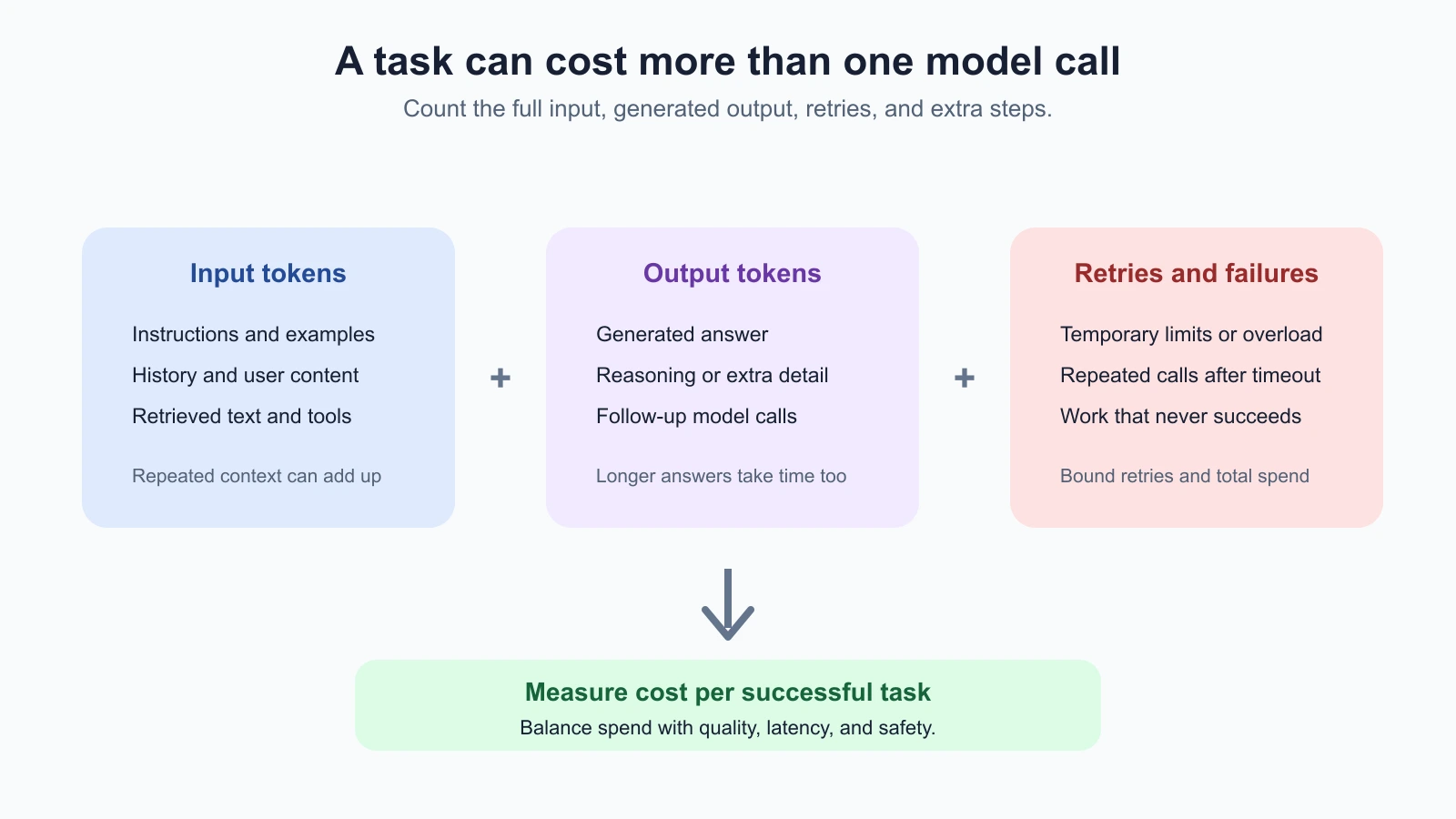
- Cost: What does a successful task cost after retries, output, caching, and any extra calls?
- Safety and privacy: Does the system keep data within its rules and avoid unintended actions?
Optimizing one number in isolation can make the service worse. For example, a shorter output may be faster and cheaper, but it may leave out the caveat a user needs. Compare quality and operating measures together, and judge them against the actual task. Agent cost and latency goes deeper into multi-step agent runs; this lesson focuses on prompts used by production applications.
Measure the whole task
Start with the test cases and success criteria from earlier lessons. Each prompt version should be traceable to a test run, a model identifier, and the settings used. Track enough information to understand a change, without keeping more user data than you need.
A useful per-request record may include:
- request or trace ID, timestamp, and task type
- prompt version and model identifier, plus relevant generation settings
- response status, retry count, and failure category
- input and output token counts, and cached-token counts if the API reports them
- latency, such as time to first output and total completion time
- grader results or a link to a privacy-reviewed evaluation record
For ongoing dashboards, track both percentiles and averages. Median latency can look healthy while a small set of users waits a long time. The 95th percentile, often written p95, is the time within which 95 percent of requests finished. Track cost per request and cost per successful task. If a cheap model fails often and triggers retries or human review, its cost per success may be higher than a more capable option.
Do not log every raw prompt and answer by default. Inputs may contain customer data, health details, credentials, or other private information. Prefer counts, categories, version IDs, and redacted samples. Decide who can access detailed traces, how long you keep them, and how to remove them. For a test set, use synthetic or approved, minimized examples where possible.
Understand prompt cost
Most model APIs account for input and output tokens separately. The exact rates vary by provider, model, region, and feature, so check the current pricing and usage fields for the API you use. A practical estimate for a single request is:
1request cost = input-token cost + output-token cost + feature charges
2task cost = all request costs + retries + extra model calls
The prompt contributes more than the visible instruction. Input may include system and developer messages, conversation history, retrieved passages, examples, images, tool definitions, and the current user request. If a prompt repeats a large policy or set of examples on every call, that stable prefix may be a candidate for prompt caching.
Prompt caching lets a supported API reuse processing for a matching part of a prompt. It can reduce input cost or time for repeated prefixes, depending on the provider’s rules. It does not remove the input from the request, guarantee a cache hit, reduce generated output, or make the answer more accurate. Cache eligibility, minimum lengths, breakpoints, storage, expiry, and pricing are provider and model specific. Check the provider’s current OpenAI prompt caching guide or Anthropic prompt caching guide, then measure the usage returned by your own calls.
To make caching more likely where the API supports it, keep stable instructions and reference material together near the beginning and put changing user data later. Avoid rearranging shared content on every call. Still, do not distort the prompt or put personal data into a shared prefix just to chase a cache hit. Check data-handling terms and report actual cached input, cache writes, cache reads, cost, and latency before deciding it helped.
Other cost controls include removing irrelevant context, retrieving only the passages needed, keeping output limits appropriate for the task, and avoiding unnecessary follow-up calls. Test each reduction against the same quality cases. Trimming context that contains an exception might lower token use while making the answer wrong.
Keep latency and failures under control
Latency has several sources: request queuing, model processing, a long input, generated output, network time, and any retries or extra calls. Measure the components your application can observe. If users need an immediate response, streaming can display output as it arrives, though it does not necessarily reduce total generation time. If a task takes a long time and can run in the background, show that it is processing and provide a way to retrieve the completed result.
Rate limits can be based on requests, tokens, or other provider-specific measures. Check the current limits for your account and API. If you hit a temporary limit or service overload, slow down and retry with a bounded policy. The OpenAI rate-limit guide recommends respecting Retry-After when provided and using a delay that grows between attempts with some randomness when it is not. Apply the same general care with other APIs, following their current documentation.
Bound retries by both attempt count and total time. Avoid retrying invalid requests, missing permissions, or quota errors that need a configuration change. Also avoid stacking application retries on top of SDK retries without accounting for them, because nested retry loops can multiply requests and cost. For tasks that may trigger an action, check whether an earlier attempt already completed before you repeat it.
Define a fallback before an incident occurs. Depending on the task, the fallback could be a short message explaining that the service is temporarily unavailable, a queued request, a simpler approved model, or a human review. A fallback is part of the product behavior, so test it too. Do not quietly switch to a model or prompt that has not passed the needed quality and privacy checks.
Set limits at more than one level. A per-request token limit keeps one unusually large input from consuming the whole context window. A maximum number of attempts prevents an error loop. A per-user or per-workspace quota can limit automated overuse, while an overall budget can alert the team before a billing period becomes expensive. For a task with a strict response deadline, stop trying when the remaining time is too short for a useful result and use the tested fallback.
Estimate expected spend from observed usage, not just the prompt’s character count. A rough planning estimate is:
1expected monthly model spend ≈ monthly task volume × observed cost per taskUse a range that accounts for long inputs, output variation, retries, and additional calls. Include human review or fallback costs if they are part of completing the task. Set an alert before the budget is exhausted, and decide what the service should do when it reaches a hard limit. For example, it might queue non-urgent work or temporarily disable a feature while keeping a clear status message. A cost limit that silently drops important user work is a product failure, even if it protects the bill.
Monitor behavior as inputs change
Production inputs will not match your original test set exactly. Monitor for shifts in failure categories, user corrections, empty or malformed outputs, increased refusal or abstention, and changes in the amount of context being sent. If your task can be graded automatically, use code checks for exact requirements and sample human review for qualities that code cannot judge reliably. A model grader may help triage examples, but should not be treated as an unquestioned source of truth. The lesson on comparing prompts with graders covers those trade-offs.
Set a review threshold for meaningful changes. For instance, investigate a sustained increase in missing required fields, a jump in p95 latency, or cost per successful summary above your budget. The threshold should fit your product and user expectations; a single universal number is not useful. Consider alerts for sudden spikes as well as gradual drift.
Do not treat user feedback as a complete quality measure. Some users do not report mistakes, and a thumbs-up cannot tell you whether an important fact was omitted. Pair feedback with a reviewed sample of outputs and test cases designed around known risks. Store enough context to investigate, but use data minimization and retention limits when collecting examples from real use.
Test prompt and model changes before release
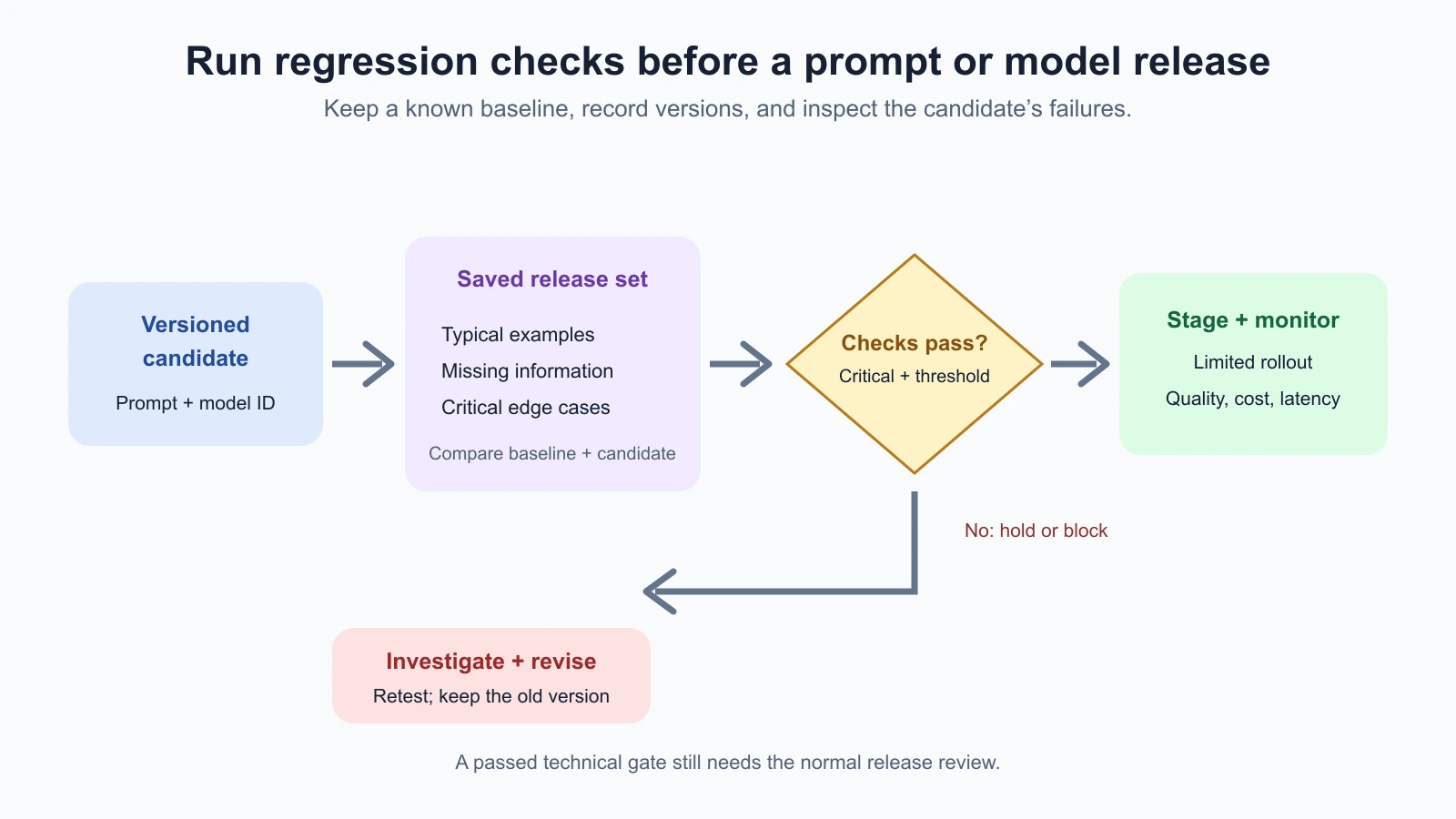
A prompt change, model change, new retrieval source, or new output schema can shift behavior. Treat each as a versioned change. Record the exact prompt version, model identifier, generation settings, and evaluation set. Then run the saved cases against the candidate and compare its results with the current baseline. If the model provider uses a moving alias, record the alias and the date, and check the provider’s release notes or model documentation when behavior changes.
The prompt lab now includes an offline release gate. Save the code below as production_release_gate.py in your prompt-lab folder. It runs both the current baseline and candidate adapter on the same saved holdout cases. Deterministic graders check required facts, a named critical case must pass, and the candidate must meet a pass-rate threshold. The result records the model, prompt, and test-set versions. This example uses the course’s fictional delivery summaries and local stub functions, not a live API.
production_release_gate.py
1"""Run an offline release gate for a new prompt or model adapter."""
2
3from collections.abc import Callable
4from typing import Any
5
6from prompt_lab_runner import run_comparison
7from test_case_loader import TestCase
8
9PromptAdapter = Callable[[str], str]
10
11
12def evaluate_release(
13    cases: list[TestCase],
14    baseline: PromptAdapter,
15    candidate: PromptAdapter,
16    checks: dict[str, list[dict[str, Any]]],
17    *,
18    model_id: str,
19    prompt_version: str,
20    test_set_version: str,
21    critical_case_ids: set[str],
22    minimum_pass_rate: float = 1.0,
23    allowed_regression: float = 0.0,
24    trials: int = 1,
25) -> dict[str, Any]:
26    """Compare baseline and candidate on the saved release split.
27
28    A ``ready`` result means this technical check passed; it is not deployment
29    authorization. Candidate adapters can wrap a local stub or a real API client.
30    """
31    if not model_id or not prompt_version or not test_set_version:
32        raise ValueError("model, prompt, and test-set versions are required")
33    if not 0 <= minimum_pass_rate <= 1:
34        raise ValueError("minimum_pass_rate must be between 0 and 1")
35    if not 0 <= allowed_regression <= 1:
36        raise ValueError("allowed_regression must be between 0 and 1")
37
38    release_cases = [case for case in cases if case.split == "holdout"]
39    release_ids = {case.id for case in release_cases}
40    if not release_cases:
41        raise ValueError("No cases in holdout split")
42    if not critical_case_ids <= release_ids:
43        missing = sorted(critical_case_ids - release_ids)
44        raise ValueError(f"Critical cases missing from release split: {missing}")
45    if not critical_case_ids:
46        raise ValueError("At least one critical case is required")
47
48    result = run_comparison(
49        release_cases,
50        {"baseline": baseline, "candidate": candidate},
51        checks,
52        trials=trials,
53        split="holdout",
54    )
55    candidate_records = [r for r in result["records"] if r["prompt"] == "candidate"]
56    critical_failures = sorted({
57        r["case_id"] for r in candidate_records
58        if r["case_id"] in critical_case_ids and r["verdict"] == "fail"
59    })
60    unknowns = sorted({r["case_id"] for r in candidate_records if r["verdict"] == "unknown"})
61    baseline_rate = result["summary"]["baseline"]["pass_rate"]
62    candidate_rate = result["summary"]["candidate"]["pass_rate"]
63
64    if critical_failures:
65        decision = "blocked"
66        reason = "A critical release case failed."
67    elif unknowns:
68        decision = "hold"
69        reason = "At least one candidate result is unknown and needs review."
70    elif candidate_rate < minimum_pass_rate:
71        decision = "hold"
72        reason = "The candidate is below the required pass rate."
73    elif candidate_rate < baseline_rate - allowed_regression:
74        decision = "hold"
75        reason = "The candidate regressed beyond the allowed margin."
76    else:
77        decision = "ready"
78        reason = "The configured release checks passed; human release review is still required."
79
80    return {
81        "decision": decision,
82        "reason": reason,
83        "model_id": model_id,
84        "prompt_version": prompt_version,
85        "test_set_version": test_set_version,
86        "critical_case_ids": sorted(critical_case_ids),
87        "baseline_pass_rate": baseline_rate,
88        "candidate_pass_rate": candidate_rate,
89        "minimum_pass_rate": minimum_pass_rate,
90        "allowed_regression": allowed_regression,
91        "critical_failures": critical_failures,
92        "unknowns": unknowns,
93        "comparison": result,
94    }
The release set is a separate file of cases. Save it as production-cases.json in the same folder:
production-cases.json
1[
2  {
3    "id": "release-001",
4    "split": "holdout",
5    "category": "typical",
6    "input": "The app predicted 8:10. The bus arrived at 8:32.",
7    "expected": {"predicted_time": "8:10", "actual_time": "8:32"},
8    "criteria": ["Preserve both times and label them correctly.", "Do not invent a cause."]
9  },
10  {
11    "id": "release-002",
12    "split": "holdout",
13    "category": "missing-information",
14    "input": "The bus arrived at 8:32. The app did not show a prediction.",
15    "expected": {"predicted_time": null, "actual_time": "8:32"},
16    "criteria": ["Do not invent a predicted time.", "State that no prediction was available."]
17  },
18  {
19    "id": "release-003",
20    "split": "holdout",
21    "category": "no-answer",
22    "input": "The parcel status changed today. No delivery time is listed.",
23    "expected": {"predicted_time": null, "actual_time": null},
24    "criteria": ["Do not guess a delivery time.", "Say no delivery time is provided."]
25  }
26]
Save the example below as demo_release.py in the prompt-lab folder. Here is the shape of the check configuration and call, with local stub adapters so it runs without a model:
1from pathlib import Path
2
3from production_release_gate import evaluate_release
4from test_case_loader import load_cases
5
6
7def known_good_prompt_adapter(text: str) -> str:
8    if "8:10" in text:
9        return "Predicted 8:10; arrived 8:32."
10    if "8:32" in text:
11        return "Arrived 8:32; no prediction was available."
12    return "No delivery time is provided."
13
14
15prompt_v2_adapter = known_good_prompt_adapter
16
17cases = load_cases(Path("production-cases.json"))
18checks = {
19    "release-001": [
20        {"type": "contains", "value": "8:10"},
21        {"type": "contains", "value": "8:32"},
22    ],
23    "release-002": [
24        {"type": "contains", "value": "8:32"},
25        {"type": "contains", "value": "no prediction was available"},
26    ],
27    "release-003": [
28        {"type": "contains", "value": "No delivery time is provided"},
29    ],
30}
31
32result = evaluate_release(
33    cases,
34    baseline=known_good_prompt_adapter,
35    candidate=prompt_v2_adapter,
36    checks=checks,
37    model_id="local-stub-v1",
38    prompt_version="delivery-summary-v2",
39    test_set_version="production-cases-v1",
40    critical_case_ids={"release-003"},
41    minimum_pass_rate=1.0,
42    allowed_regression=0.0,
43    trials=2,
44)
45
46print(result["decision"], result["reason"])
Run it with python3 demo_release.py; with identical stubs it prints ready. Replace prompt_v2_adapter with a stub that invents a delivery time for the no-answer case and it prints blocked.
The adapters are functions that receive the case text and return an answer. In a real application, an adapter would make the API request and return its text. The release gate itself does not call a provider. That separation makes the decision logic testable offline and helps keep an evaluation from unexpectedly spending money.
The gate has three outcomes:
readymeans the configured checks passed. It is not deployment approval; follow the normal review and release process.holdmeans a threshold was missed or a result is unknown. Investigate before continuing.blockedmeans at least one named critical case failed.
The included tests cover a passing candidate, a mutation that invents a delivery time on the critical no-answer case, a lower overall pass rate, missing critical cases, and missing version metadata. Save the tests as production_release_gate_test.py:
production_release_gate_test.py
1"""Offline tests for release decisions and regression detection."""
2
3from pathlib import Path
4import unittest
5
6from production_release_gate import evaluate_release
7from test_case_loader import load_cases
8
9
10ROOT = Path(__file__).parent
11CASES = load_cases(ROOT / "production-cases.json")
12CHECKS = {
13    "release-001": [
14        {"type": "contains", "value": "8:10"},
15        {"type": "contains", "value": "8:32"},
16    ],
17    "release-002": [
18        {"type": "contains", "value": "8:32"},
19        {"type": "contains", "value": "no prediction was available"},
20    ],
21    "release-003": [{"type": "contains", "value": "No delivery time is provided"}],
22}
23
24
25def good_summary(note: str) -> str:
26    if "did not show" in note:
27        return "The bus arrived at 8:32; no prediction was available."
28    if "No delivery time" in note:
29        return "No delivery time is provided in the note."
30    return "The app predicted 8:10; the bus arrived at 8:32."
31
32
33def mutated_summary(note: str) -> str:
34    if "No delivery time" in note:
35        return "The parcel should arrive at 9:00."
36    return good_summary(note)
37
38
39def gate(candidate=good_summary, **overrides):
40    args = {
41        "cases": CASES,
42        "baseline": good_summary,
43        "candidate": candidate,
44        "checks": CHECKS,
45        "model_id": "stub-model-1",
46        "prompt_version": "summary-v2",
47        "test_set_version": "release-cases-1",
48        "critical_case_ids": {"release-003"},
49        "minimum_pass_rate": 1.0,
50        "allowed_regression": 0.0,
51        "trials": 2,
52    }
53    args.update(overrides)
54    return evaluate_release(**args)
55
56
57class ProductionReleaseGateTests(unittest.TestCase):
58    def test_ready_requires_candidate_to_pass_and_records_versions(self):
59        result = gate()
60        self.assertEqual(result["decision"], "ready")
61        self.assertEqual(result["candidate_pass_rate"], 1.0)
62        self.assertEqual(result["model_id"], "stub-model-1")
63        self.assertEqual(result["prompt_version"], "summary-v2")
64        self.assertEqual(result["test_set_version"], "release-cases-1")
65
66    def test_critical_case_mutation_blocks_release(self):
67        result = gate(candidate=mutated_summary)
68        self.assertEqual(result["decision"], "blocked")
69        self.assertEqual(result["critical_failures"], ["release-003"])
70
71    def test_candidate_below_minimum_pass_rate_is_held(self):
72        result = gate(candidate=mutated_summary, critical_case_ids={"release-001"}, minimum_pass_rate=1.0)
73        self.assertEqual(result["decision"], "hold")
74        self.assertLess(result["candidate_pass_rate"], 1.0)
75
76    def test_missing_critical_case_fails_closed(self):
77        with self.assertRaisesRegex(ValueError, "Critical cases missing"):
78            gate(critical_case_ids={"not-in-release-set"})
79
80    def test_requires_version_metadata(self):
81        with self.assertRaisesRegex(ValueError, "versions are required"):
82            gate(model_id="")
83
84
85if __name__ == "__main__":
86    unittest.main()
From inside the prompt-lab folder, run:
1python3 -m unittest discover -p '*_test.py'The release set here is intentionally small for teaching. A real task needs cases that represent its normal inputs, edge cases, and important safety conditions. A few passing examples cannot prove quality for every user. Keep holdout cases separate while tuning, inspect the failing records, and have a reviewer consider whether the graders capture the actual task. The lesson on versioning and documenting prompts explains how to preserve the version history behind that decision.
Prepare for model updates and rollback
Model names, aliases, features, and provider behavior can change over time. Keep an eye on model documentation and release notices, and do not assume that a prompt that passed months ago still behaves the same way. Before a planned change, run the same evaluation set against the current and candidate versions. For a higher-risk change, start with a limited rollout or a shadow evaluation, where candidate outputs are reviewed without being shown to users or triggering actions.
Have a rollback path that is concrete: retain the last approved prompt and model configuration, know who can restore it, and monitor after release. A rollback may require returning both the prompt and model selection to a compatible pair. If you cannot use an older model, a fallback might be a simpler workflow or a clear service message rather than pretending the old version is available.
When you see a quality change, compare traces by version and failure category. Check whether the prompt changed, the model changed, inputs shifted, a retrieval source changed, or an API setting moved. Avoid “fixing” an incident by adding a broad instruction without reproducing the failure and rerunning regression checks. That can hide one symptom and introduce another.
Mistakes beginners make
- Optimizing for cost alone. Compare cost per successful task with quality and safety checks.
- Assuming caching always helps. Measure cache reads, writes, actual rates, and latency for your provider.
- Retrying every error. Classify failures, cap retries, and fix quota or input errors instead of repeating them.
- Watching average latency only. Track percentiles so a slow tail does not disappear in the average.
- Logging full conversations by default. Minimize sensitive data and define access and retention limits.
- Releasing a prompt edit after one example passes. Run the saved regression set and inspect failures.
- Treating a passing gate as approval to deploy. Keep human review and your normal release controls.
- Having no fallback or rollback plan. Decide what users see and how to restore a known version before an incident.
Recap and try it yourself
Production prompts need quality, reliability, cost, latency, privacy, and safety checks. Measure whole tasks rather than isolated calls, inspect actual token and cache usage, bound retries, and choose a fallback that has been tested. Before changing a prompt or model, run a saved regression set against both the baseline and candidate. Record the versions, review failures, and keep an explicit release and rollback path.
Try the offline prompt lab:
- Read
production-cases.jsonand identify which case is most important to get right. - Run the release gate with the included good and mutated stub adapters.
- Confirm that the good candidate is marked
readyand the mutation is blocked. - Add a case for a missing time format or an unexpected note and define a check for it.
- Change one adapter, rerun the gate, and record which case changed and why.
Before using the same approach with a real model, add representative and privacy-approved cases, confirm the grader rules with a person, and run the API adapter under an explicit budget. A release check is evidence about the cases you ran. Keep monitoring after the change reaches users.