
Prompt Engineering course · lesson 5 of 26
- 1What Is Prompt Engineering? A Practical Beginner's Guide
- 2How a Model Reads Your Prompt: Tokens and Context
- 3Choosing a Model and Reading Its Documentation
- 4Controlling Model Output: Sampling and Limits
- 5Your First Prompt Workflow: Test One Change at a Time
- 6Be Clear and Direct: Give the Model a Usable Task
- 7System, Role, and Context Prompts: Give Instructions Their Place
- 8Zero-Shot, One-Shot, and Few-Shot Prompting
- 9Structure Prompts with Delimiters, Tags, and Templates
- 10Structured Output: Get Answers You Can Parse and Check
- 11Prompting with Long Documents and Large Context
- 12Prompt Recipes for Ten Common Jobs
- 13Chain-of-Thought Prompts and Thinking Models
- 14Step-Back Prompting and Prompt Chaining
- 15Self-Consistency, Tree of Thoughts, and ReAct
- 16Self-Evaluation and Reliability Checks
- 17Define Success and Build Test Cases
- 18Compare Prompts with Graders
- 19Debug a Failing Prompt
- 20Automatic Prompt Engineering
- 21Version and Document Your Prompts
- 22Hallucinations and Grounding
- 23Bias and Debiasing Prompts
- 24Prompt Injection and Safe Prompting
- 25Prompts in Production
- 26Capstone: Build and Test a Prompt Library
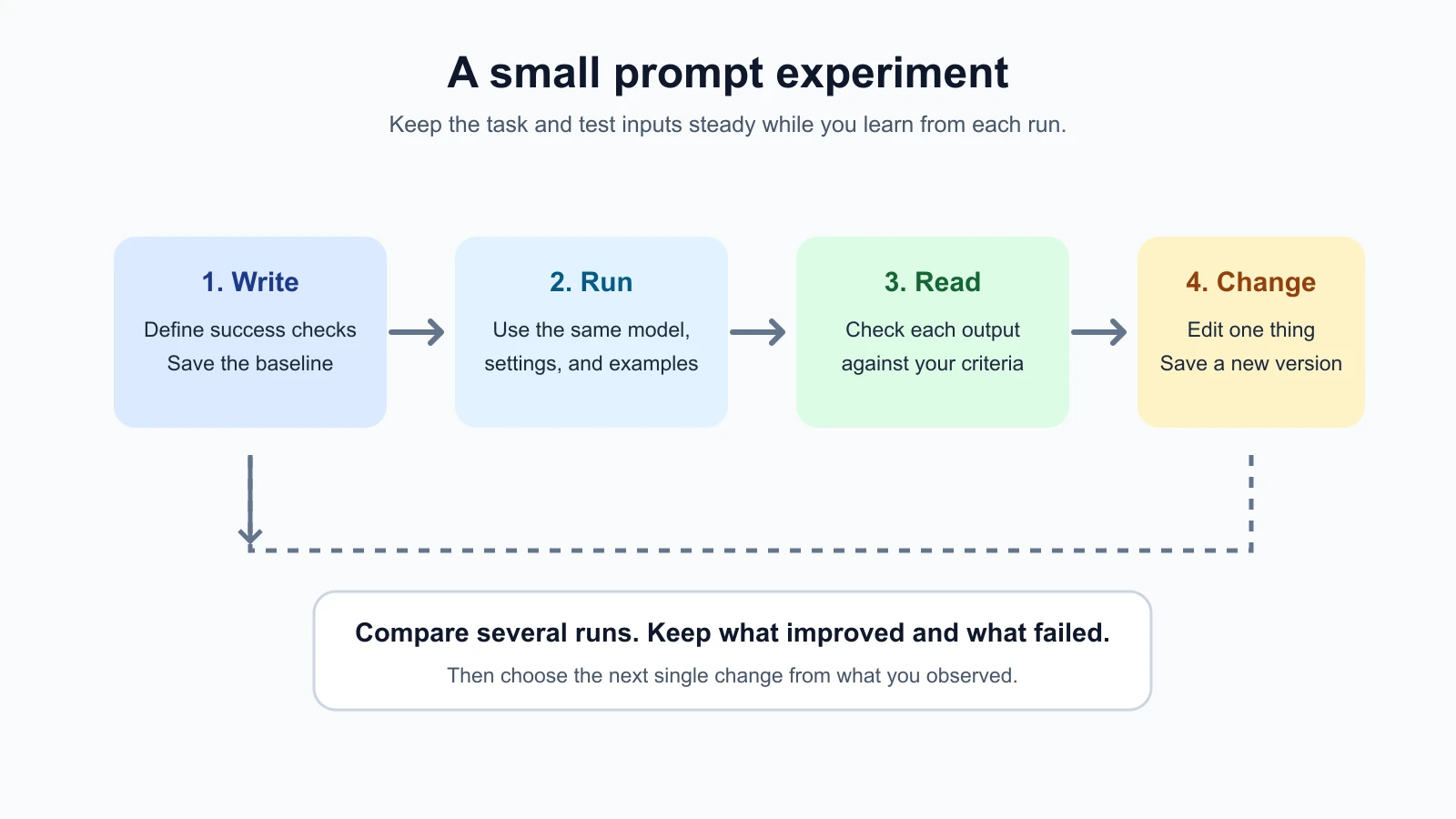
A prompt can look clear and still miss what you need. The dependable way to improve it is to try it on real examples, look at the answers, make one deliberate change, and compare again. This lesson gives you a small workflow you can use in a model playground today and carry into an API-backed feature later.
A playground is an interactive page from a model provider where you can enter instructions, choose a model, and inspect a response. An API is a way for software to send a structured request to a model and receive its response. A playground is convenient for hands-on exploration; an API is useful when you need to repeat the task from your own application. The ideas in this lesson apply to both.
Start with one specific task
Pick a task that you do more than once and can judge without specialist knowledge. Examples include shortening a routine update, extracting a date from a note, or turning feedback into a neutral summary. Keep the first experiment low stakes. A prompt that helps draft text is easier to inspect than one that makes a decision about someone's account or health.
Write down what goes in and what should come out. “Make this better” is hard to test because “better” has no clear boundary. “Turn this delivery note into one neutral sentence that preserves the promised and actual arrival times” is much easier to assess.
Before opening a playground, define a few success checks. A success check is something you can look for in each answer. Keep it short. For the delivery note example, checks could be:
- The sentence includes both the predicted and actual arrival times.
- It does not invent a reason for the delay.
- It is no longer than 25 words.
These checks keep you from judging an answer only by whether it sounds polished. A fluent sentence can still omit a time or add an unsupported explanation. If you cannot tell whether an answer passed, make the check more concrete or narrow the task.
Choose a small set of test inputs. Include ordinary examples you expect often and one example that could expose a weakness, such as a note with no predicted time. Three to five inputs are enough for a first manual pass. Remove names, account numbers, addresses, or other sensitive details before using an external service. You can substitute invented details and still learn whether the prompt follows the requested format.
Save a baseline before changing anything
Start with a plain prompt that describes the task. For example:
1Summarize this delivery note in one sentence:
2
3The app said the bus would arrive at 8:10. It arrived at 8:32. The app refreshed at 8:25.
This is your baseline, the first version you will use as a point of comparison. Save the exact wording before you start tuning. Also record the model name or ID, date, and any settings you changed from the provider’s defaults. The word “exact” matters: small wording differences make it difficult to tell whether you are comparing the same experiment.
Do not change the model, temperature, prompt, and input all at once. If the answer changes, you will not know which difference mattered. For the first pass, keep the same model, settings, and input set. If you do not have a reason to adjust a setting, leave it at the documented default. The lesson on sampling and output limits explains how generation controls work and why they vary by model.
Run each input and save the response beside it. A provider’s playground may keep recent history, but do not rely on that as your only record. The page can be reset, the model can change, or you may switch providers. A small text file or table is enough. Include a version label such as baseline-01 and copy the full prompt with it.
Use a playground and an API for different parts of the job
The playground is a comfortable place to explore: paste an input, make a careful edit, and see the response. Many providers offer controls for selecting a model or changing settings there. Those controls and interface details can move, so use the current provider documentation when you need exact setup steps. Your goal here is to learn the experiment, not memorize a particular page layout.
When you move the task into an application, the API request becomes the version that matters in practice. The application may add a system instruction, wrap the user’s text in a template, or set parameters that were not visible in your playground. Check the full request your code sends. A prompt copied from a playground is not necessarily the whole instruction your app uses.
You can begin in a playground and later repeat the same test through an API. Keep the model, instructions, settings, and inputs aligned as closely as the provider allows. Note any differences. If the playground and API use different message roles or defaults, record that too. Treat a difference in the request as a possible explanation for a difference in response.
An API test does not have to begin with a large test framework. If you already have a small script or application that sends requests, run the same few saved inputs through it and save the outputs. If you do not, the playground is enough for this first exercise. You will learn more from a careful manual comparison than from wiring up infrastructure before you know what to measure.
Change one thing and compare again
After the baseline, choose one improvement that follows from what you observed. If the answer omitted a required detail, add a precise instruction about that detail. If it added an explanation that was not in the note, state that it must not infer a cause. If it became too long, set a length boundary. Make one change to the prompt and label the new version prompt-02.
For our delivery note, the updated prompt might say:
1Summarize this delivery note in one neutral sentence of no more than 25 words.
2Include the predicted and actual arrival times when they are present.
3Do not infer why the times differ.
4
5Delivery note:
6The app said the bus would arrive at 8:10. It arrived at 8:32. The app refreshed at 8:25.
This version adds boundaries that map directly to the checks. It also says “when they are present,” which matters for an input that has no predicted arrival time. The example is an illustrative prompt, not a report of a live model result.
Run the baseline and new version on the same inputs. When possible, run each version more than once. Models generate responses, and the same request can produce different wording across runs. Three runs per input is a manageable starting point for a small task, not a guarantee that you have captured every possible response. If you see a failure in one run, save it. Do not hide it because another run looked better.
Use the same success checks for every output. Mark each check pass, fail, or unclear. You can also write one short note about what changed. A compact table keeps the comparison honest:
| Input | Version | Run | Times preserved? | No invented cause? | Under 25 words? | Note |
|---|---|---|---|---|---|---|
| note-01 | baseline-01 | 1 | ||||
| note-01 | prompt-02 | 1 | ||||
| note-02 | baseline-01 | 1 | ||||
| note-02 | prompt-02 | 1 |
The empty cells are deliberate. Fill them with outputs you actually observed. If you are showing a result to someone else, keep the input and response with the row so they can see why you marked a check as failed.
Read the comparison before making another edit
Look for patterns across inputs and runs. Did the added instruction help on the case it targeted? Did it introduce a new problem elsewhere? Did the output get shorter but drop information? Did all versions fail on a missing value? These questions are more useful than asking which prompt “feels best.”
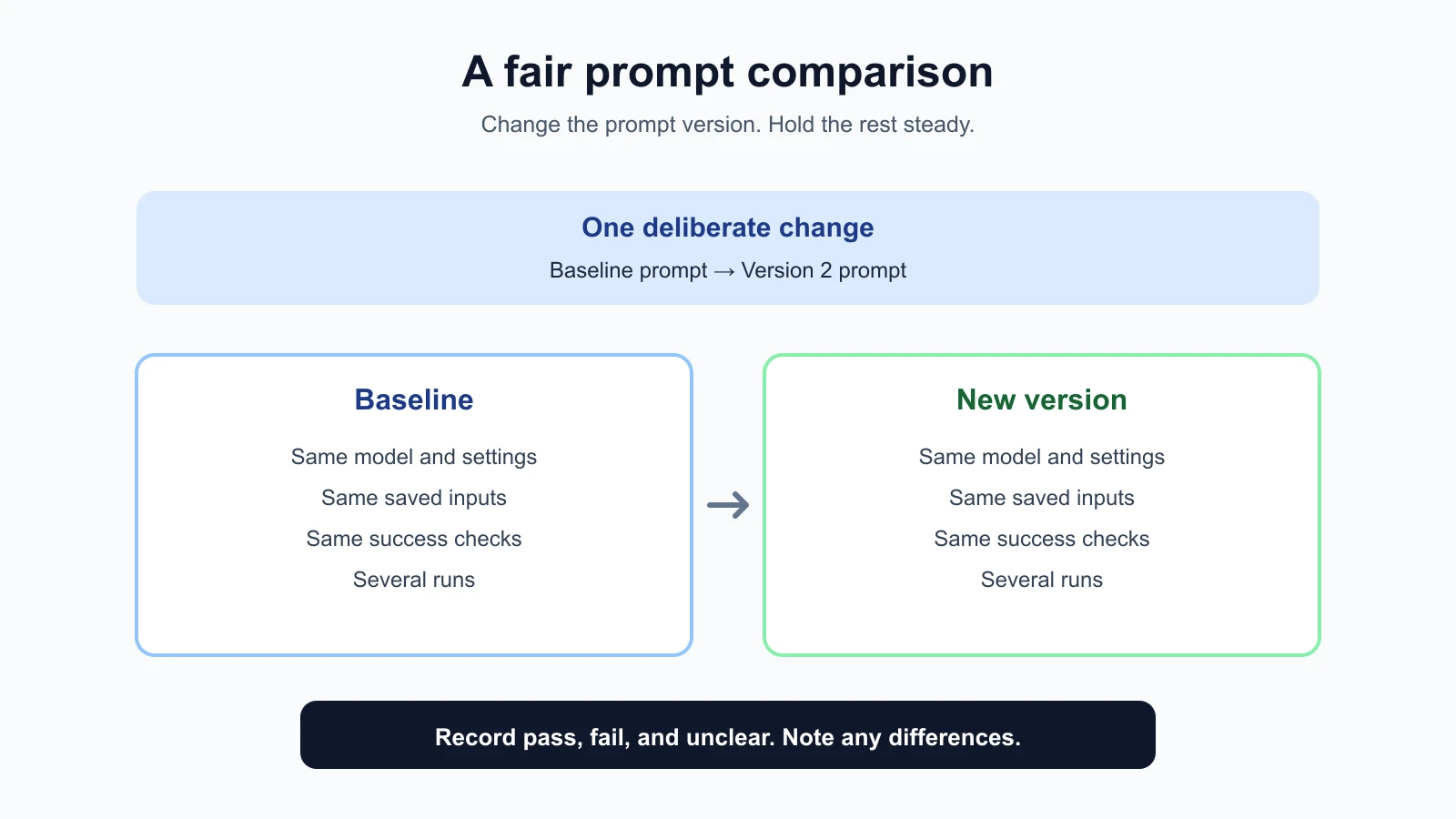
When you compare, keep these pieces aligned:
| Keep consistent | Why it matters |
|---|---|
| Input examples | Different inputs can change the response for reasons unrelated to the prompt edit. |
| Model and model version | Models can behave differently, even when the prompt is identical. |
| Settings | A sampling or output-limit change is another variable in the experiment. |
| Success checks | Changing the grading rule mid-comparison can make a weak version look stronger. |
| Number of runs, where practical | More runs help you notice variation that a single response hides. |
If you cannot keep one of these aligned, record the difference. Your notes do not need to prove the prompt caused every change. They should make the comparison understandable and reveal what to test next.
A small manual test is useful, but it has limits. A few examples may not represent the full range of real inputs. A provider can update a model behind a name or change its behavior. Human ratings can vary, especially for tone or quality. For these reasons, treat a first comparison as a clue, then add representative cases as the task becomes important. If a prompt supports a consequential decision, use a careful review and evaluation process appropriate to that risk.
Keep a prompt record you can reuse
For each version, save a brief record with:
- Purpose: What task should the prompt perform?
- Prompt version: The exact text and a simple label.
- Model and settings: Include the model ID if the provider shows one, and note defaults when known.
- Test inputs: The examples you used, with sensitive details removed.
- Checks: What counts as a pass for this task?
- Observed results: Which cases passed, failed, or need another look?
- Next change: The single thing you plan to try next.
This record prevents the familiar loop of tweaking a prompt, forgetting what changed, and starting over. It also gives a teammate enough context to repeat your comparison. A version history does not need fancy tooling; a dated document or a small spreadsheet works.
Once you have an improvement, keep both versions. The earlier prompt is useful if a later edit causes a regression. A regression is when a change improves one behavior but makes something that previously worked fail. Re-run a small set of saved examples whenever you revise a prompt that your application depends on.
A tiny comparison from start to finish
Imagine you are helping a team turn delivery notes into short summaries. You choose three fictional notes: one with both times, one with only an actual time, and one with a note about a changed estimate. You agree that a good summary preserves the times supplied, avoids guessing about causes, and stays under 25 words.
You save a baseline prompt and run each note twice. In your record, one output leaves out the original estimate, and another says the bus was “delayed by traffic.” Your prompt did not provide a cause, so that second response fails the no-inference check. These are example observations for demonstrating the method; they are not outputs from a model run.
You make one change: ask for the supplied times and explicitly say not to infer a cause. Then you run the same six input/run combinations again, using the same model and settings. If the revised version preserves the times on more runs and avoids adding a cause, it looks promising. If it still misses a time on the input with only an actual time, you may need to clarify how to handle missing values. You would test that as the next edit, keeping the rest fixed.
Notice what this comparison can and cannot tell you. It can show that the new instruction helped on the small examples you tested. It cannot establish that every future note will be handled correctly. That is why you keep the examples and record, then expand them when real use reveals new cases.
Mistakes beginners make
- Editing before writing down success checks. Without a target, it is easy to choose the answer that sounds nicest while overlooking missing details.
- Changing several variables together. If you revise the prompt and switch models at once, you cannot tell which change explains the difference.
- Judging from one output. One response may be unusually good or bad. Save variation across repeated runs.
- Using different inputs for each version. Keep the test set the same so the comparison has a fair basis.
- Forgetting to save the exact prompt. A paraphrase is not enough to reproduce what you tried.
- Treating a handful of examples as proof. A small test is a useful start. Add examples as you learn more about the task.
- Copying a playground prompt into an app without checking the request. Your code may add instructions or settings that change the behavior.
Recap and try it yourself
A useful first prompt workflow is small: choose a repeatable task, define visible success checks, save a baseline, run the same inputs, change one thing, and compare several outputs. Keep the model, settings, examples, and checks steady when you can. Record differences when you cannot. A playground is enough for the first manual pass; repeat the test through your API when you need to understand the behavior of an application.
Try it: choose a low-stakes task you can judge. Write three checks and prepare three example inputs. Save a baseline prompt, run each input, then change one instruction based on an observed gap. Run both versions on the same inputs again and note what improved and what still needs work. In the next lesson, we will work on making instructions clear and direct.