
Prompt Engineering course · lesson 17 of 26
- 1What Is Prompt Engineering? A Practical Beginner's Guide
- 2How a Model Reads Your Prompt: Tokens and Context
- 3Choosing a Model and Reading Its Documentation
- 4Controlling Model Output: Sampling and Limits
- 5Your First Prompt Workflow: Test One Change at a Time
- 6Be Clear and Direct: Give the Model a Usable Task
- 7System, Role, and Context Prompts: Give Instructions Their Place
- 8Zero-Shot, One-Shot, and Few-Shot Prompting
- 9Structure Prompts with Delimiters, Tags, and Templates
- 10Structured Output: Get Answers You Can Parse and Check
- 11Prompting with Long Documents and Large Context
- 12Prompt Recipes for Ten Common Jobs
- 13Chain-of-Thought Prompts and Thinking Models
- 14Step-Back Prompting and Prompt Chaining
- 15Self-Consistency, Tree of Thoughts, and ReAct
- 16Self-Evaluation and Reliability Checks
- 17Define Success and Build Test Cases
- 18Compare Prompts with Graders
- 19Debug a Failing Prompt
- 20Automatic Prompt Engineering
- 21Version and Document Your Prompts
- 22Hallucinations and Grounding
- 23Bias and Debiasing Prompts
- 24Prompt Injection and Safe Prompting
- 25Prompts in Production
- 26Capstone: Build and Test a Prompt Library
A prompt is not successful just because one answer looks good. You need to know what the answer should do, which mistakes matter, and how you will recognize both. This lesson shows you how to write those success criteria and collect a small set of examples to test them. You will also build a simple JSON case file and a Python loader that checks its structure.
The goal is not to create a perfect benchmark. It is to make your next prompt change answerable: did the change fix a real failure without breaking something that used to work?
Turn “good” into observable criteria
Start with one task that happens repeatedly. For example, a support team may want to turn a delivery note into a short customer update. “Write helpful updates” does not tell you how to grade one. A more useful description might be:
- Preserve the predicted and actual arrival times when they appear in the note.
- Do not invent a reason for a delay.
- Use a neutral, considerate tone.
- Keep the reply at or below 25 words.
- If one of the requested times is missing, say which information is unavailable instead of guessing.
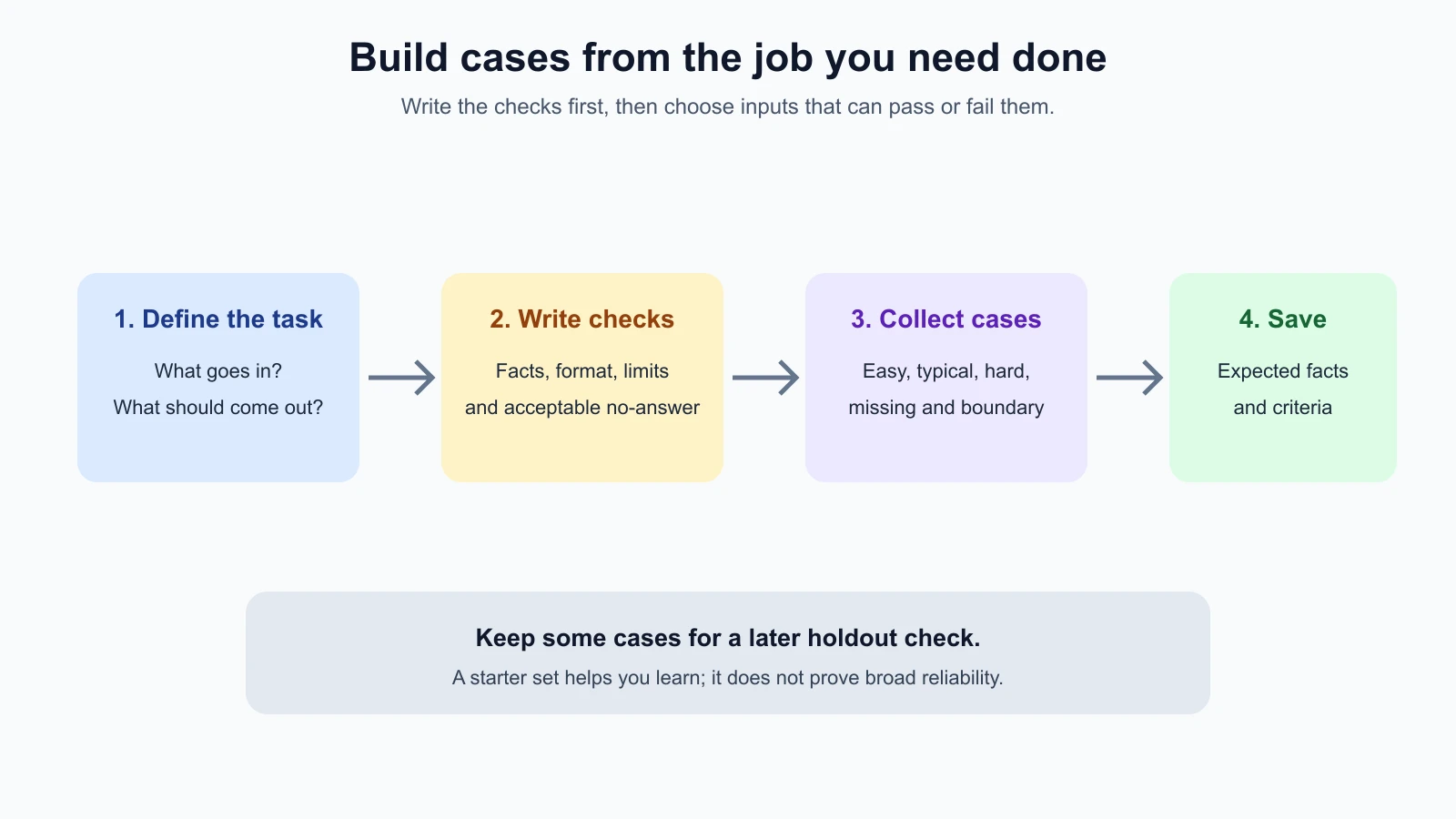
Each point gives you something to look for. Some can be checked by code, such as word count. Others need a person or a rubric, such as whether the tone sounds considerate. A factual requirement may need comparison with the original note.
Anthropic’s guide to defining success criteria and building evaluations recommends defining specific, measurable criteria before evaluating a prompt. It also describes evaluation as part of the prompt engineering cycle. This is useful advice across providers: if you have not decided what success means, a prompt comparison can reward whichever answer sounds more polished rather than whichever works better.
Write criteria that someone else can apply
Try this test for each criterion: could a teammate read it and make the same pass/fail decision on the same answer? “Be accurate” is too broad unless you name which facts must match. “Do not state an arrival time that is absent from the delivery note” gives the reviewer something concrete to inspect.
Avoid combining unrelated requirements. “Be short, accurate, warm, and complete” is hard to score as one item. Split it into checks, so you can tell which part failed. Keep the set short enough to use. A small task may need three to six criteria, not a long catalog of every possible preference.
Separate must-pass requirements from preferences. If an answer invents a delivery promise, that may be unacceptable even if it is friendly. If the answer is slightly less warm than ideal, it may still be useful. Record which failures block acceptance and which are opportunities to improve.
Also say what should happen when the input lacks information. Sometimes the correct output is “I cannot tell from the note.” A valid abstention or refusal should be a test case, not a failure by default. This is especially important when guessing would mislead a reader.
Build a small set that covers the task
A test case is one input paired with the expected result or the criteria used to judge a result. Start with real, representative inputs when you can use them safely. Remove private details and replace identifying information with fictional values. If real examples are not available, write plausible examples and mark that they are synthetic so you do not mistake them for production evidence.
For the delivery update task, a starter set might include:
| Case type | Input example | What it checks |
|---|---|---|
| Easy | Note has predicted and actual times, both clear | Basic preservation of facts |
| Typical | Several sentences, times embedded in prose | Extraction from normal wording |
| Hard | Multiple updates with a corrected estimate | Choosing the latest relevant details without mixing them up |
| Missing information | Note has actual arrival but no prediction | Saying what is unknown instead of guessing |
| Valid no-answer | Note does not identify the delivery | Refusing to invent details |
| Boundary | Note includes a time that is not the arrival estimate | Not confusing unrelated times |
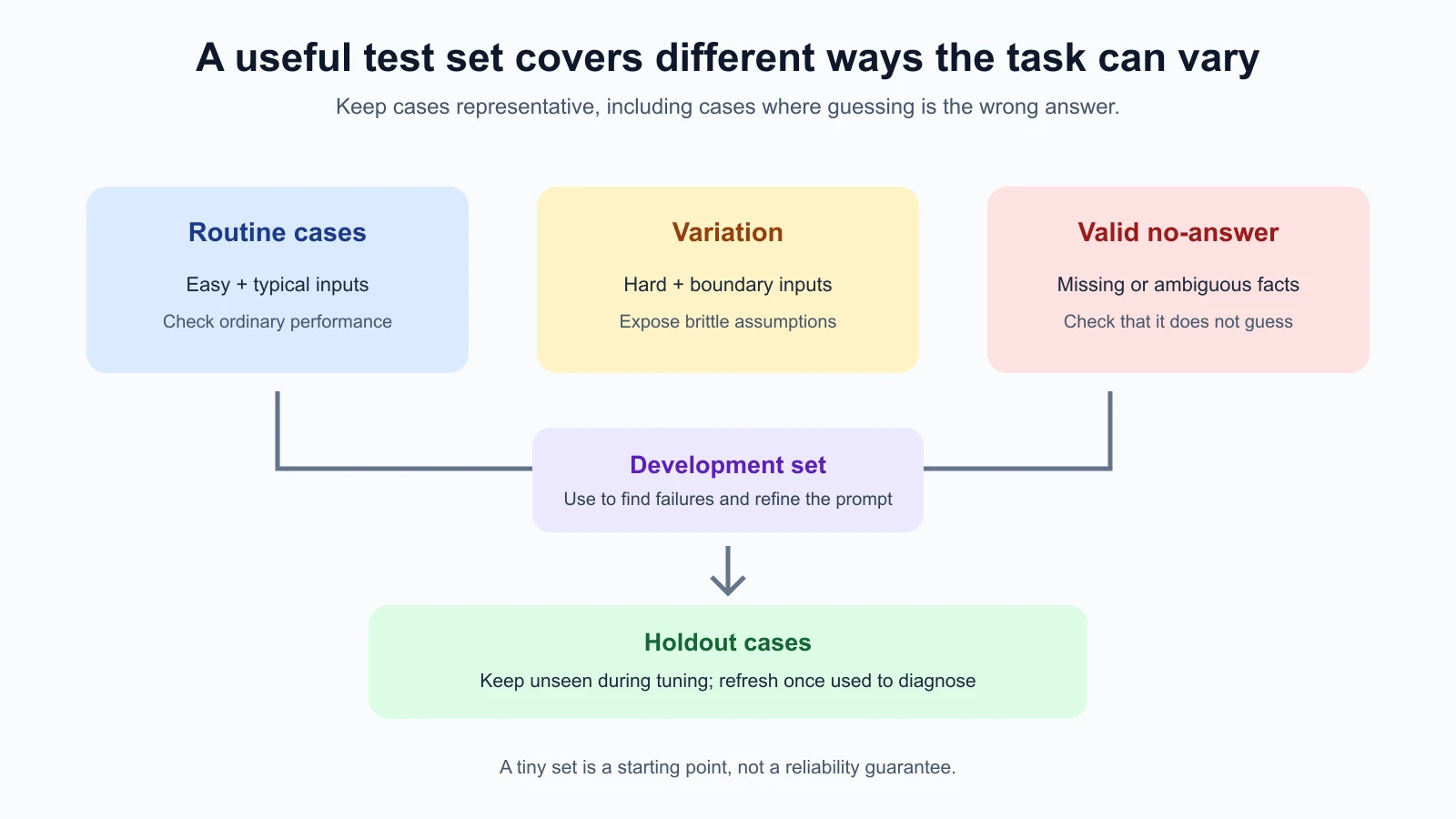
Do not make every example a clean, obvious request. Models often pass the simplest inputs while failing when a field is absent, a phrase is ambiguous, or the note contains distracting details. Hard cases should reflect realistic variations, not puzzles designed only to trick a model.
You do not need hundreds of examples to begin. Five to ten carefully chosen cases can expose early gaps and help you refine the criteria. That is a starting set for learning, not enough evidence to claim that a prompt is reliable in every setting. As you see new failures, add them. For high-impact tasks or high-volume use, you will need a larger and more representative set.
Keep development cases and holdout cases separate
You will likely revise your prompt after seeing test results. If you repeatedly tune it against the same examples, it can learn their quirks without handling new inputs well. Reserve some examples as a holdout set: keep them out of routine prompt editing and use them to check whether an apparent improvement carries over.
For a small first experiment, you might keep most cases in a development group and a few in a holdout group. The exact split depends on how many examples you have. With only five cases, a split leaves very little evidence on either side, so do not overinterpret a percentage. Keep adding examples over time and rotate in cases from real, reviewed failures.
Do not repeatedly inspect holdout outputs while making changes. Once you use a case to diagnose a failure and tune the prompt, it has become part of your development data. Find or create new holdout examples for a later check. This helps reduce overfitting, which happens when a prompt is adjusted to pass known examples but fails on unseen inputs.
Keep cases from representing one narrow source or writing style only. If every sample is a short note from one department, you may miss the language used by another team or customer. Track useful categories such as input length, missing fields, source type, or ambiguity. You do not need a complicated spreadsheet. Even a category field makes gaps easier to notice.
Put cases in a file you can reuse
Once you have more than a couple of cases, store them in a file rather than copying them into each experiment by hand. That reduces accidental differences between prompt versions and gives your future runner one stable input format. The prompt lab in this course uses JSON Lines or JSON arrays with named fields; here we will use an array for readability.
Each case below has an ID, a split, a category, the input note, an expected reference, and criteria. The expected reference is not always an exact string. In a classification task it could be a label; in this example it is a set of facts that must be preserved. Criteria describe what a grader or reviewer should check.
cases.json
1[
2  {
3    "id": "delivery-001",
4    "split": "development",
5    "category": "typical",
6    "input": "The app predicted 8:10. The bus arrived at 8:32.",
7    "expected": {
8      "predicted_time": "8:10",
9      "actual_time": "8:32"
10    },
11    "criteria": [
12      "Preserve both times and identify which is predicted and actual.",
13      "Do not invent a reason for the difference.",
14      "Use no more than 25 words."
15    ]
16  },
17  {
18    "id": "delivery-002",
19    "split": "development",
20    "category": "missing-information",
21    "input": "The bus arrived at 8:32. The app did not show a prediction.",
22    "expected": {
23      "predicted_time": null,
24      "actual_time": "8:32"
25    },
26    "criteria": [
27      "Do not supply a predicted time.",
28      "State that the prediction was unavailable."
29    ]
30  },
31  {
32    "id": "delivery-003",
33    "split": "holdout",
34    "category": "no-answer",
35    "input": "The parcel status changed today. No delivery time is listed.",
36    "expected": {
37      "predicted_time": null,
38      "actual_time": null
39    },
40    "criteria": [
41      "Do not guess either time.",
42      "Say that the note does not provide a delivery time."
43    ]
44  }
45]
The case IDs should stay stable so you can compare results across prompt versions. Keep the original input and expected reference together. If you change what the task should do, update the criteria deliberately and note why; otherwise you may change the test while claiming the prompt improved.
Validate the file before using it
A typo in a case file can quietly weaken an experiment. A loader checks the structure before a prompt runner uses the data. The small Python example below validates required fields, field types, allowed split names, unique IDs, and the criteria list. It uses only Python’s standard library.
Create a new folder named prompt-lab. Every file the course asks you to save goes in this one folder, so the modules can import each other. Save the JSON above as cases.json in it. The loader below needs Python 3.10 or newer; check with python3 --version. Save it as test_case_loader.py. It rejects malformed input early with a useful error instead of passing a broken case into later evaluation.
test_case_loader.py
1"""Validate and load the prompt lab's small JSON test-case format."""
2
3from dataclasses import dataclass
4import json
5from pathlib import Path
6from typing import Any
7
8
9@dataclass(frozen=True)
10class TestCase:
11    id: str
12    split: str
13    category: str
14    input: str
15    expected: dict[str, Any]
16    criteria: tuple[str, ...]
17
18
19def load_cases(path: str | Path) -> list[TestCase]:
20    raw = json.loads(Path(path).read_text(encoding="utf-8"))
21    if not isinstance(raw, list):
22        raise ValueError("The case file must contain a JSON array.")
23
24    cases: list[TestCase] = []
25    seen_ids: set[str] = set()
26    required = {"id", "split", "category", "input", "expected", "criteria"}
27
28    for index, item in enumerate(raw):
29        label = f"Case at index {index}"
30        if not isinstance(item, dict):
31            raise ValueError(f"{label} must be an object.")
32        missing = required - item.keys()
33        if missing:
34            raise ValueError(f"{label} is missing: {', '.join(sorted(missing))}.")
35        if not all(
36            isinstance(item[key], str) and item[key].strip()
37            for key in ("id", "split", "category", "input")
38        ):
39            raise ValueError(f"{label} needs non-empty text fields.")
40        if item["split"] not in {"development", "holdout"}:
41            raise ValueError(f"{label} has an invalid split.")
42        if item["id"] in seen_ids:
43            raise ValueError(f"Duplicate case id: {item['id']}.")
44        if not isinstance(item["expected"], dict):
45            raise ValueError(f"{label} expected must be an object.")
46        criteria = item["criteria"]
47        if (
48            not isinstance(criteria, list)
49            or not criteria
50            or not all(isinstance(value, str) and value.strip() for value in criteria)
51        ):
52            raise ValueError(f"{label} needs one or more non-empty criteria.")
53
54        seen_ids.add(item["id"])
55        cases.append(
56            TestCase(
57                id=item["id"],
58                split=item["split"],
59                category=item["category"],
60                input=item["input"],
61                expected=item["expected"],
62                criteria=tuple(criteria),
63            )
64        )
65    return cases
The tests for the loader use a temporary folder to write good and bad files, so they do not change your data. Save them as test_case_loader_test.py:
test_case_loader_test.py
1"""Offline tests for the case-file loader; no model or API key is needed."""
2
3import json
4from pathlib import Path
5import tempfile
6import unittest
7
8from test_case_loader import load_cases
9
10
11ROOT = Path(__file__).parent
12
13
14class LoadCasesTests(unittest.TestCase):
15    def test_loads_the_course_fixture_and_preserves_holdout(self):
16        cases = load_cases(ROOT / "cases.json")
17        self.assertEqual([case.id for case in cases], [
18            "delivery-001", "delivery-002", "delivery-003"
19        ])
20        self.assertEqual(cases[-1].split, "holdout")
21        self.assertIsNone(cases[1].expected["predicted_time"])
22
23    def test_rejects_a_non_array_file(self):
24        with tempfile.TemporaryDirectory() as directory:
25            path = Path(directory) / "cases.json"
26            path.write_text(json.dumps({"id": "not-an-array"}), encoding="utf-8")
27            with self.assertRaisesRegex(ValueError, "JSON array"):
28                load_cases(path)
29
30    def test_rejects_duplicate_ids(self):
31        with tempfile.TemporaryDirectory() as directory:
32            path = Path(directory) / "cases.json"
33            case = {
34                "id": "same", "split": "development", "category": "easy",
35                "input": "Note", "expected": {}, "criteria": ["Check it."],
36            }
37            path.write_text(json.dumps([case, case]), encoding="utf-8")
38            with self.assertRaisesRegex(ValueError, "Duplicate case id"):
39                load_cases(path)
40
41    def test_rejects_empty_criteria(self):
42        with tempfile.TemporaryDirectory() as directory:
43            path = Path(directory) / "cases.json"
44            case = {
45                "id": "one", "split": "development", "category": "easy",
46                "input": "Note", "expected": {}, "criteria": [],
47            }
48            path.write_text(json.dumps([case]), encoding="utf-8")
49            with self.assertRaisesRegex(ValueError, "criteria"):
50                load_cases(path)
51
52
53if __name__ == "__main__":
54    unittest.main()
From inside the prompt-lab folder, run all tests in the folder (you will add more files in later lessons, and the same command keeps working):
1python3 -m unittest discover -p '*_test.py'The loader checks shape, not whether the examples are good. It cannot tell if a criterion is meaningful, if the expected time is correct, or if your cases represent real use. A valid file can still describe a poor evaluation. That is why file validation and case review are separate jobs.
How many cases are enough to start?
There is no single number that guarantees coverage. Begin with enough examples to show the basic task, a common variation, at least one difficult case, and an input where the system should not guess. Five to ten can be a useful first working set for a low-risk experiment. Add cases when you find repeated formats, new failure types, or inputs from a different group.
The useful question is not “Do I have 100 cases?” but “What important way of succeeding or failing have I not represented?” A hundred nearly identical examples may tell you less than a dozen examples that cover missing fields, ambiguous wording, long input, and a valid no-answer case. For important tasks, collect cases systematically and use more than one reviewer to confirm expected results where interpretation is involved.
The AI Agents lesson on evaluating AI agents discusses task suites, graders, repeated trials, and interpreting results for multi-step systems. The same discipline applies to simple prompts, although this lesson’s file format focuses on individual inputs and expected criteria.
Keep the examples honest and useful
Use real examples only when you are allowed to handle them. Remove names, account numbers, addresses, and other private details if they are not needed to test behavior. If you fabricate a case, label it as synthetic in your notes. Synthetic examples are useful for exploring a gap but do not prove how often that gap occurs in production.
Avoid writing cases from the prompt’s current wording alone. You want to test the actual work, including awkward inputs people send, not just clean examples that resemble your instructions. Ask the people who handle the task what they see regularly and what mistakes would matter most.
Keep the set stable while comparing prompt versions. If you add a new case, run the old cases as well and record which set was used. The next lesson will cover how to grade outputs and compare versions. For now, the essential habit is to define the criteria and collect the cases before making changes.
Mistakes beginners make
- Using “sounds good” as the only criterion. Write down observable requirements that another person can apply.
- Testing only easy examples. Include routine, hard, missing-information, and valid no-answer cases.
- Treating a handful of examples as proof of reliability. Small sets help you learn; they do not establish broad performance.
- Putting every case in the development set. Keep holdout cases unseen while tuning, then refresh them once they influence changes.
- Using only synthetic examples. They can miss real formats and priorities. Add safe, representative inputs where possible.
- Changing the criteria without recording it. A modified answer key can make a weak prompt appear better.
- Assuming valid JSON means a useful test. A loader can catch formatting errors but cannot judge the quality of your cases.
- Forgetting the correct answer may be “unknown.” Test whether the model admits missing information instead of inventing it.
Recap and try it yourself
Write success criteria before comparing prompts. Make them specific enough to apply, separate must-pass requirements from preferences, and state what the system should do when information is missing. Build a balanced starter set with easy, typical, hard, and valid no-answer examples. Keep development and holdout cases separate, and remember that a small set is a learning tool, not a guarantee.
Try this with a repeated task you can judge:
- Write three to five checks for a successful result.
- Find or create five cases: an easy one, a typical one, a hard one, one with missing information, and one where the correct behavior is to say “I do not know.”
- Write the expected facts or labels for each case and explain what should pass.
- Put the cases in the JSON format above. From inside the
prompt-labfolder, runpython3 -m unittest discover -p '*_test.py'to check that the sample loader accepts good cases and rejects malformed ones. - Keep at least one case aside for a first holdout check. Do not use it to tune the prompt yet.
You now have a definition of success and a reusable set of examples. In the next lesson, you will run candidate prompts against the same cases and use graders to compare their results.