
AI Product Builders course · lesson 2 of 25
- 1The AI Product-Building Loop: From Idea to Improvement
- 2Define the Problem Before You Choose a Solution
- 3Check the Idea Before You Build
- 4App Anatomy for Non-Engineers: What Happens Behind a Screen
- 5Scope the First Version: Choose What to Build Now
- 6Choose a Tech Stack That Fits Your Constraints
- 7Choose a Prototype Tool for Your Product and Team
- 8Build a Clickable Prototype in One Focused Flow
- 9Test a Prototype with Real People
- 10Decide Whether to Keep, Change, or Stop
- 11Move from a Prototype to Real Code
- 12Work with an AI Coding Tool on One Clear Task
- 13Learn the Web Basics Behind Your App
- 14Connect a Database Without Losing Control of Your Data
- 15Tell a Small Fix from a Structural Change
- 16Run a Refinement Loop That Keeps the Product Useful
- 17Make an AI-Built Product Easier to Use
- 18Review and Check Changes Before They Reach the Team
- 19Test an AI-Built Product in Layers
- 20Work with a Team and Stakeholders
- 21Choose Where to Deploy Your Product
- 22Go Live: A Launch Checklist for Your Product
- 23Measure and Improve Your Product After Launch
- 24Add an AI Feature to Your Product Carefully
- 25Capstone: Take a Product Idea to Launch
After this lesson, you will be able to turn a broad app idea into a short problem statement and a one-page brief that another person can understand and help test. We will use ToolShelf, the fictional neighbourhood tool-sharing service from the product-building loop. Its details are examples for practicing the method, not findings from real interviews.
Start with the problem, not the app
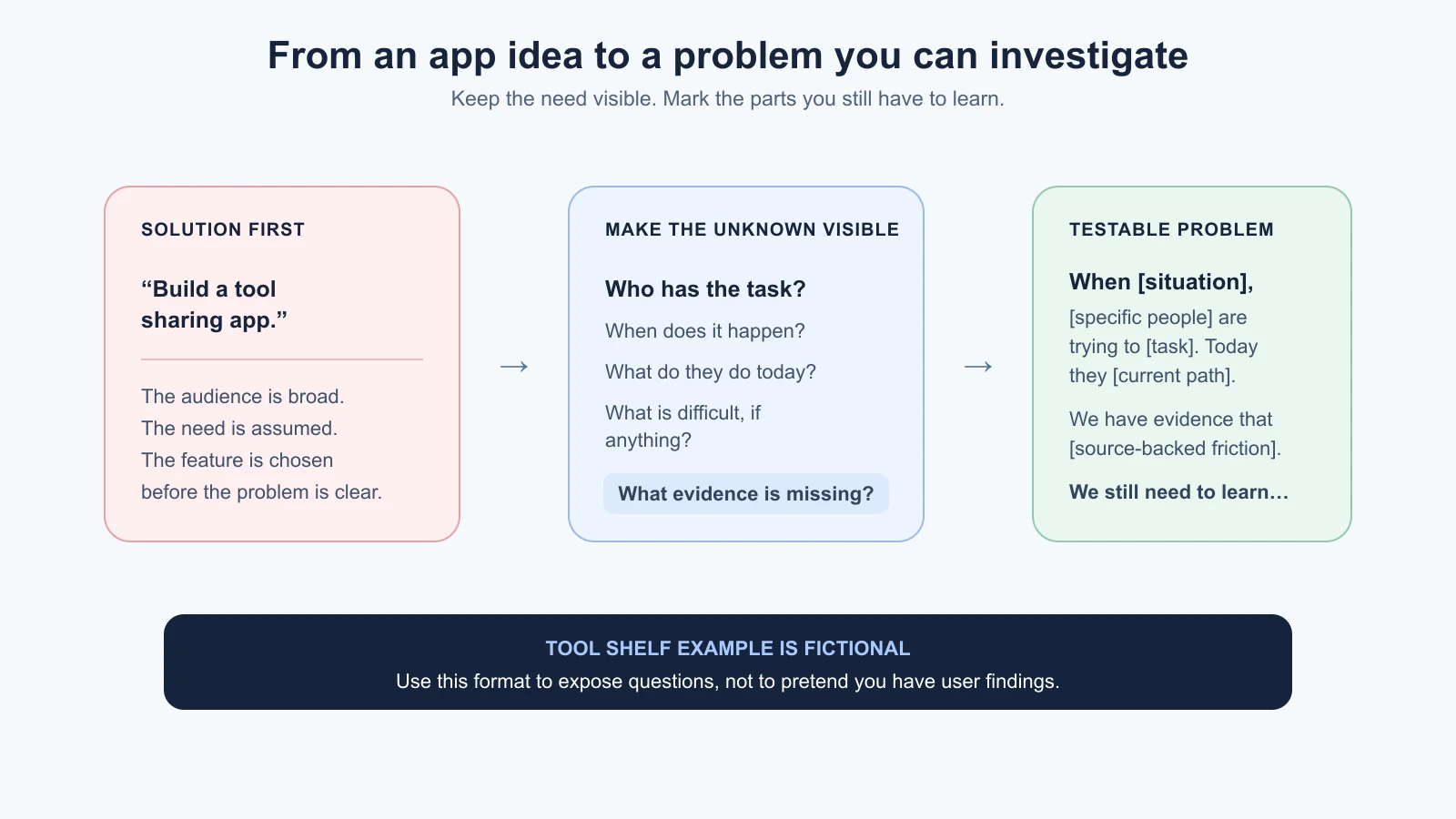
Many product ideas arrive as solutions: “I should build an app for neighbours to share tools.” That sentence tells us a possible product, but it leaves out the people, the situation, and the reason a new service would help. If you start building from it, you may spend time polishing an idea that solves the wrong problem.
A problem statement describes a person’s difficulty or unmet need in a specific situation. It gives a team a shared starting point for learning. It is not a feature list, a slogan, or proof that the idea will succeed.
The UK Government Service Manual recommends understanding the user and the problem before settling on a solution. It also says user needs should come from research rather than assumptions, and should focus on the person’s problem rather than a chosen feature. That guidance is written for government services, but the distinction is useful when you are shaping any product idea. See Understand users and their needs and Learning about users and their needs.
For example, “people need a tool-sharing app” already assumes the answer is an app. A person might instead need to find a local repair service, borrow equipment through a community group, or plan a project with tools they own. The problem brief keeps those possibilities open until you have enough evidence to choose among them.
Name the people and the moment
“Everyone” is not a useful first audience. It makes it hard to decide who to learn from or what a useful result would look like. Start with a group you can describe in ordinary words. You do not need a demographic profile. You need enough detail to recognize whether someone is likely to encounter the situation you care about.
For ToolShelf, a first hypothesis might be “people who live in one neighbourhood and occasionally need a tool for a short home project.” This is still an assumption. It is more useful than “everyone who owns a home” because it points to a situation you can ask about: the last time someone needed a tool, what they did, and what happened next.
Describe the moment when the need appears. “People need tools” is broad. “A person starts a small home repair and realizes they do not own the one tool required” gives you a context. The context may change the problem: Is the task urgent? Is the tool expensive? Is it used once a year? Does the person have a way to transport it? What happens if they cannot get it?
Then describe the task or outcome in language the person would use. A task is what someone is trying to accomplish, such as “hang a shelf,” “clear leaves,” or “fix a loose handle.” Avoid replacing the task with a product action like “browse ToolShelf listings.” Browsing is one possible route; completing the repair is the reason the person might care.
Find the friction in what happens today
People already use workarounds. They may borrow from a friend, rent something, change their plan, buy an item, ask a community group, or decide the job can wait. A workaround is not automatically a failure. It shows what people do now and gives you something concrete to understand.
Ask what is difficult about the current path. “It is inconvenient” does not tell you what to improve. The person may have to contact several people, travel far, coordinate a narrow pickup window, or spend more than the task feels worth. Those examples are possibilities to investigate, not claims about ToolShelf users.
Keep the problem focused on a barrier or unmet need, not the feature you want to build. Compare these statements:
| Solution-first wording | Problem-focused wording |
|---|---|
| Neighbours need a tool-sharing app. | When someone has a short home task, they may not know where to find a suitable tool nearby. We need to learn how often that happens and what they do today. |
| Add ratings so people trust each other. | We do not yet know what would make a neighbour feel comfortable lending an item to someone they do not know well. |
| Let users schedule a pickup. | We need to understand how people currently agree on a time and where coordination breaks down, if it does. |
The right-hand column does not claim those problems are proven. It makes the unknowns visible and suggests what to learn. This is especially important for a fictional case: ToolShelf gives us a safe way to practice writing, but it cannot supply real evidence.
Separate evidence, assumptions, and questions
A fact in your brief is something supported by an identifiable source, such as an observation, interview note, support record, or existing data you are allowed to use. An assumption is something you currently believe without enough evidence. A research question is something you will investigate to reduce an important uncertainty.
These labels keep polished writing from making guesses look settled. For instance, “people will lend power tools if the app has profiles” is an assumption. “What concerns would someone have before lending an expensive tool?” is a research question. If you later observe people discussing lending in an existing group, record what you actually saw and where the note came from. Do not turn an interpretation into a quotation or a statistic.
The GOV.UK guidance suggests using research and other available evidence to understand what users are trying to do, how they do it now, and what problems they experience. It also recommends treating opinions that do not come from users as assumptions to investigate. A small project can use a proportionate approach: review information you already have permission to use, speak with people who fit the situation, or observe the current process. The next lesson, checking the idea before you build, covers how to do that.
For now, make an evidence ledger with three columns:
| What we know | What we assume | What we need to learn |
|---|---|---|
| Record the observation and its source. | Write the belief as a belief, not as a fact. | Phrase an answerable question. |
| Example: none yet for fictional ToolShelf. | People nearby sometimes need a tool they do not own. | How do people handle the last time this happened? |
Do not fill the first column with plausible details just to make the brief look complete. “No evidence collected yet” is a useful and honest entry. It tells the team what the next step is.
Write a short problem statement
There is no single wording that every team has to use. The following is a course template to help you include the important parts without slipping into a feature pitch:
When [situation], [specific group of people] is trying to [task or outcome]. Today, [what they do now]. We have evidence that [observed difficulty, with a source]. We still need to learn [important question or assumption].
If you have no evidence yet, leave that sentence as an explicit gap: “We do not have evidence yet about what makes this difficult.” Do not invent an interview summary to complete the paragraph.
Here is a clearly fictional ToolShelf example:
When a person starts a small home repair, a neighbour who does not own the required tool may be trying to finish the task without buying equipment they will rarely use. We do not yet know what they do today, how often this occurs, or what would make borrowing feel practical. We need to learn how people handle the last time they needed an unfamiliar tool and what made that option work or fail.
This statement points toward a situation and a task, but keeps the solution open. It does not say “build a marketplace,” promise that neighbours will lend items, or claim the problem is common. After real research, you would replace the unknowns with what the evidence supports. You might find that the issue is not finding tools but agreeing on pickup, or that people prefer renting from a nearby shop. Either result could change what you build.
Make the brief useful to another person
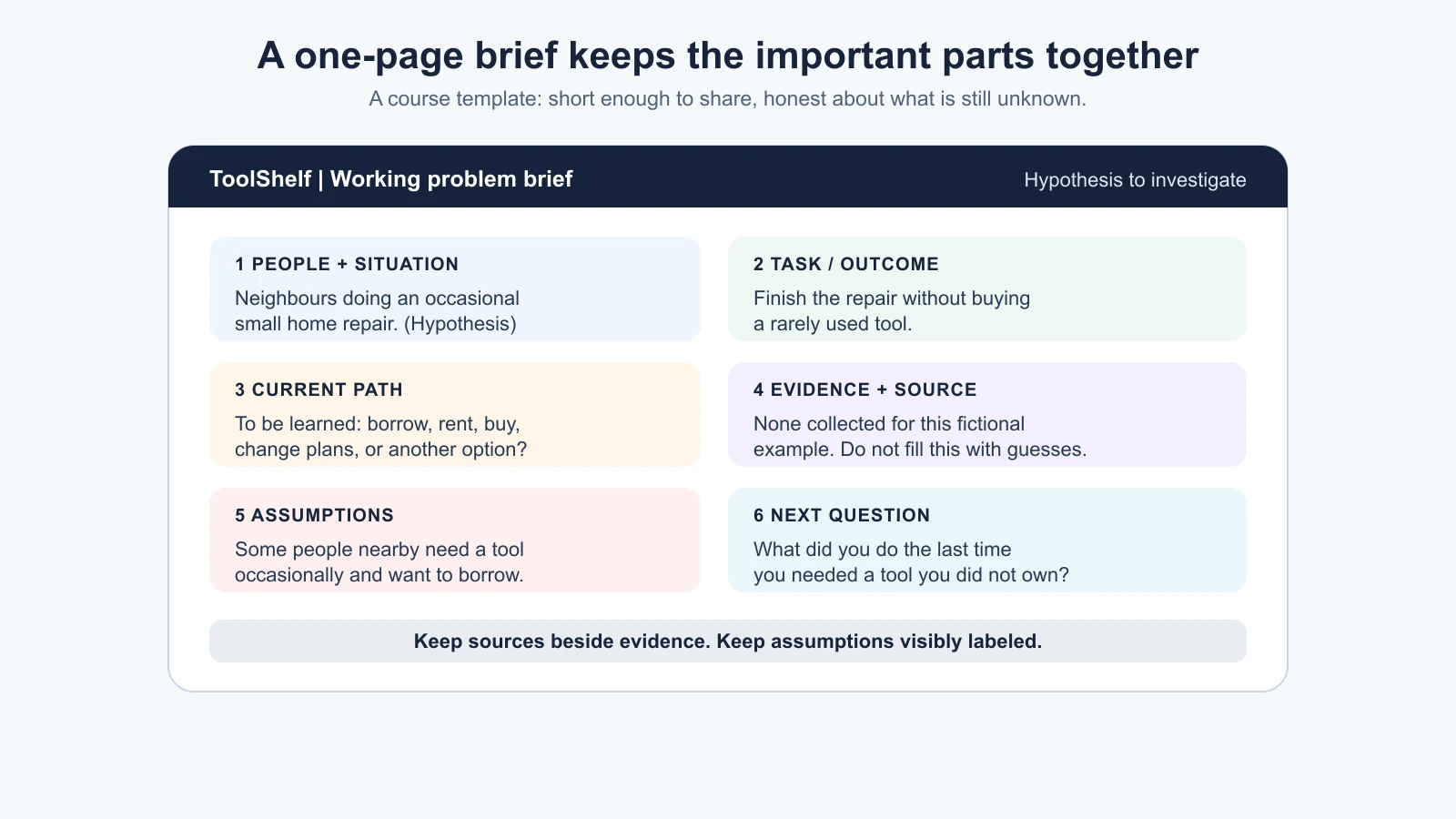
A problem brief is a short shared note, not a business plan. Keep it compact enough that a teammate, advisor, or likely user can read it and tell you what is unclear. A useful first brief can include:
- Working title: A neutral label for the opportunity, not a final brand name.
- People and context: Who may encounter the problem and when.
- Task or desired outcome: What they are trying to get done.
- Current path: What they do today, including non-digital workarounds.
- Evidence and source: What you have actually observed or learned.
- Assumptions: Beliefs that could change the product direction.
- Research question: The next question that would reduce a meaningful uncertainty.
- Out of scope for now: Nearby problems you are deliberately not solving in this first exploration.
The last item is not a permanent refusal. It stops the first discussion from expanding into every possible feature. For ToolShelf, delivery, payments, ratings, identity verification, and multiple neighbourhoods are open product decisions. We should not add them simply because an AI can suggest them or because they sound plausible.
Ask a person who has not been part of the idea to read the statement. Can they tell who the product might help, what those people are trying to do, and what is still unknown? If they only understand which features you want, rewrite it. If the audience is so broad that no one can tell whether they fit, narrow the situation. If you have hidden the uncertainty, make it visible.
Use AI as a drafting partner, not a source of user facts
An AI assistant can help you explore wording. You could provide a rough idea and ask it to separate possible users, tasks, assumptions, and questions. You can also ask it to point out where a statement assumes a solution or uses vague words like “easy,” “seamless,” or “everyone.”
Keep the prompt bounded. For example:
1I am exploring a possible service for neighbours who may want to lend tools.
2Do not invent user research or claim that this need is proven.
3Separate your response into:
41. possible user groups (as hypotheses)
52. tasks they may be trying to complete
63. assumptions in my idea
74. questions I could investigate
8Flag any sentence that assumes a specific feature is the answer.
The output can give you options to inspect, not evidence about real people. You decide which questions are relevant and then learn from actual sources. If you use notes from people, follow the consent and privacy expectations for that research; avoid pasting personal or confidential information into an external AI service unless you are allowed to do so and understand how that service handles it.
Read the AI's rewrite sentence by sentence. Did it quietly add a target audience, a market claim, or a feature? Did it turn “might” into “does”? Did it remove an important limitation? Correct those changes before sharing the brief. A clear document is only useful if it preserves the truth about how much you know.
Sources
- Understand users and their needs, GOV.UK Service Manual: understand the problem and context, use research, and test assumptions early.
- Learning about users and their needs, GOV.UK Service Manual: research current behavior and problems, distinguish evidence from assumptions, and write needs in user language.
- The problem-statement and one-page-brief formats in this lesson are teaching templates created for this course; they are not quoted official standards.
Mistakes beginners make
- Writing a feature as the problem. “We need an app” skips the task and the reason a person would use it.
- Starting with “everyone.” A broad audience makes it hard to find relevant people or choose a first outcome.
- Treating a guess as a finding. Mark assumptions clearly and keep the source beside any evidence.
- Inventing details to make the brief feel complete. An unanswered question is better than a made-up answer.
- Adding several problems to one statement. Keep one main situation and task in view; record related needs separately.
- Letting an AI rewrite certainty into a claim. Check that the draft preserves what is known, assumed, and unknown.
- Treating the first brief as a contract. Update it when evidence changes your understanding.
Recap and try it yourself
A problem statement describes a person, a situation, a task, and the friction or unanswered question around it. Keep the solution open while you learn. In a brief, separate evidence from assumptions, name the source of what you know, and write down the next question that could change your direction. AI can help organize and critique the draft, but it cannot create evidence about users by sounding confident.
Try it: write a one-sentence idea for a product you might build. Rewrite it as a problem statement using the template in this lesson. Then make a three-column evidence ledger: what you know, what you assume, and what you need to learn. Ask someone unfamiliar with the idea to explain the problem back to you. Next, you will investigate whether the problem is real before choosing what to build.