
AI Product Builders course · lesson 10 of 25
- 1The AI Product-Building Loop: From Idea to Improvement
- 2Define the Problem Before You Choose a Solution
- 3Check the Idea Before You Build
- 4App Anatomy for Non-Engineers: What Happens Behind a Screen
- 5Scope the First Version: Choose What to Build Now
- 6Choose a Tech Stack That Fits Your Constraints
- 7Choose a Prototype Tool for Your Product and Team
- 8Build a Clickable Prototype in One Focused Flow
- 9Test a Prototype with Real People
- 10Decide Whether to Keep, Change, or Stop
- 11Move from a Prototype to Real Code
- 12Work with an AI Coding Tool on One Clear Task
- 13Learn the Web Basics Behind Your App
- 14Connect a Database Without Losing Control of Your Data
- 15Tell a Small Fix from a Structural Change
- 16Run a Refinement Loop That Keeps the Product Useful
- 17Make an AI-Built Product Easier to Use
- 18Review and Check Changes Before They Reach the Team
- 19Test an AI-Built Product in Layers
- 20Work with a Team and Stakeholders
- 21Choose Where to Deploy Your Product
- 22Go Live: A Launch Checklist for Your Product
- 23Measure and Improve Your Product After Launch
- 24Add an AI Feature to Your Product Carefully
- 25Capstone: Take a Product Idea to Launch
After this lesson, you will be able to set decision criteria before a prototype test, distinguish a problem with the interface from a problem with the idea or audience, and write a decision note that explains what you will keep, change, or stop.
This lesson continues the fictional ToolShelf example from testing a prototype with real people. ToolShelf has no real participants or test findings. The scenarios below show how to reason from evidence you might collect in your own project. They are examples, not a report about actual users.
Make the decision before you fall in love with a result
A research round is useful when it changes what you do next. After people try a prototype, it is tempting to collect their comments, choose the most encouraging ones, and continue building. It is also tempting to hear one difficult session and abandon the idea immediately. Both reactions can overweigh a memorable moment.
Before the test, write down the question you want to answer and what different kinds of evidence might lead you to do. These are decision criteria: guide rails for interpreting the findings. They do not automate your judgment. They make it easier to notice when you are changing the rules to get the outcome you prefer.
For example, your question might be, “Can someone understand how to request a sample tool in this prototype?” A criterion could be, “If several participants cannot tell which dates they are entering, revise the wording and test that step again.” That is an interface decision. It does not answer whether neighbours need a tool-sharing service.
The lesson on testing the prototype with real people covered how to capture task behaviour, comments, and moderator help. Bring those notes into the decision. Keep the session IDs and observed actions near the summary so another person can see how you reached the conclusion.
Separate three different questions
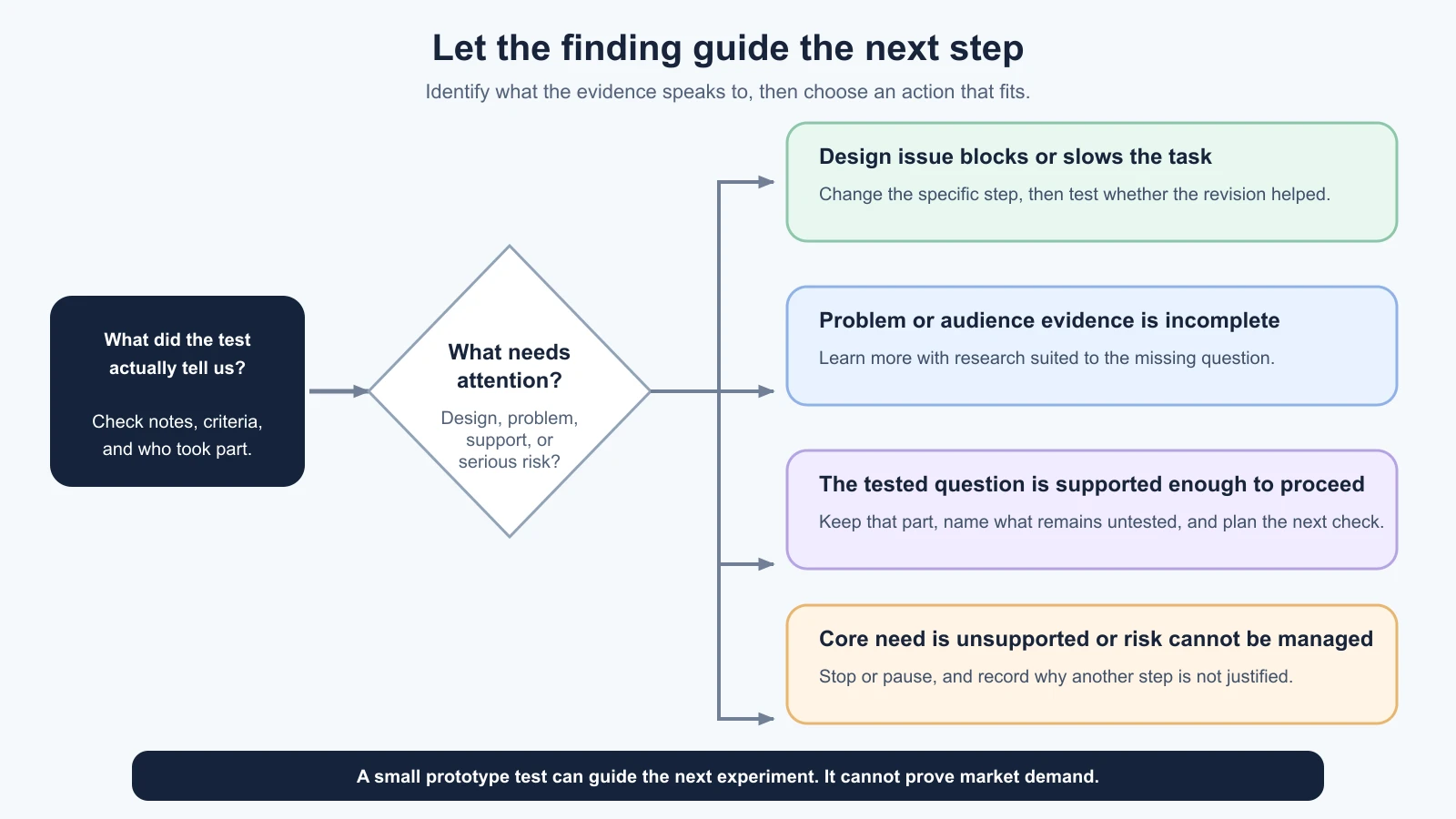
When a test goes poorly, first identify what kind of uncertainty the evidence speaks to. A prototype test can reveal that people struggle with an interface. It may suggest that an assumption about the product or audience needs more research. Those are different findings and need different next steps.
Is the design getting in the way?
People may not understand a label, see an important detail, or know what happens after they press a button. They may complete the task after you explain the screen. These are signs to examine the flow, content, or interaction. Fixing the design and testing again can be a sensible next step.
Do not treat every unexpected click as a failure. Check the task wording, the participant’s context, and what the prototype could actually do. A prototype may omit behavior that a real product would have, and a participant may reasonably respond to that gap. Record the limitation instead of blaming the person or claiming the whole concept failed.
Is the solution addressing the problem?
A clear interface can still support a product idea that does not solve an important problem. If people can complete the prototype task but describe no meaningful reason to take that action in real life, the test has not validated demand. Return to what you learned about the problem and current alternatives in checking the idea before you build. You may need interviews, observation, or another kind of evidence.
A usability session is not a market study. People completing a fictional request does not establish that an adequate supply of tools exists, that neighbours trust one another, or that anyone will adopt a service. Name those as unresolved assumptions and choose a way to investigate them.
Is this the right audience or situation?
A test can miss because the participant does not match the intended audience, because you selected a situation they rarely encounter, or because an important group was not included. That does not automatically mean the solution or problem should be discarded. Check who took part, who did not, and whether your target audience description is specific enough.
If different groups need different flows, choose whether to focus on one audience first or run additional research. Do not combine distinct groups into one average and assume that the result represents each of them.
Set criteria that lead to an action
Useful criteria are tied to a decision you can actually make. They use observable conditions when possible and preserve uncertainty when a small test cannot answer the question. Write criteria before sessions begin, while you are less attached to any one result.
A practical planning table might look like this:
| Question | Evidence to watch for | Possible response |
|---|---|---|
| Can a new person find the listing and start a sample request? | Where tasks finish, stop, or require moderator help | Keep the flow if it is understandable; revise the blocking step and retest if not |
| Does the request form communicate the dates clearly? | What participants enter and what they expect the dates to mean | Change labels or explanations if the task exposes ambiguity |
| Does the scenario reflect a real need? | Prior research about recent situations and existing alternatives | Gather problem evidence separately; a prototype task cannot settle it |
| Can the team safely build and operate the full service? | Data, trust, supply, moderation, and technical assumptions | Investigate feasibility before committing to production work |
Do not make the table look more precise than your evidence. You do not need to invent a pass percentage for a handful of qualitative sessions. If you set a numeric threshold, explain why it fits the decision and research design. A small exploratory round is better used to find barriers and questions than to estimate how many people in a population will behave the same way.
Criteria can also include access and safety. If a flow excludes someone who is meant to use it, or a prototype encourages a person to disclose private information unnecessarily, that deserves attention even if other participants complete the task. You do not need a majority vote before addressing an obvious risk or access barrier.
Choose keep, change, or stop
These three choices describe the next move, not a permanent verdict on the idea.
Keep means the current part of the approach is supported enough to continue to the next learning step. It does not mean the product is proven or finished. You might keep the problem statement while checking a technical assumption, or keep a flow that works while improving another part.
Change means the evidence suggests a specific adjustment or a new question. Change can be small, like rewriting a label, or larger, like narrowing the audience or revisiting the proposed solution. State what changes and which uncertainty the change is meant to address. Then decide what new evidence would tell you whether it helped.
Stop means pause or end this line of work because the likely value does not justify the next investment, a key assumption is not supported, or a risk cannot be managed with the resources available. Stopping is a valid product decision. It can protect time and attention for a more important problem. It does not mean that the research was wasted.
A fourth useful action is learn more before choosing. Use it when evidence is incomplete, sessions were not representative of the question, or observations point in different directions. Name the missing evidence and the smallest responsible way to get it. “We are not sure” is more useful than pretending a keep or stop decision is settled.
Do not let past effort make the choice
Time or money already spent cannot be recovered by continuing. In decision-making, this is called the sunk cost effect: giving past investment too much weight when deciding what to do now. The relevant question is what you expect to learn or gain from the next step compared with its cost and risk.
Try this wording in a team discussion: “If we had not built this prototype yet, would the evidence we have justify the next week of work?” It is not a perfect test, but it can reveal when the team is continuing mainly because it has already invested effort.
The reverse mistake is also possible. Stopping after a prototype test because the interface needs revision may throw away a problem worth solving. Ask whether the finding challenges the product’s core assumption or a fixable design detail. A rough prototype that confuses people may need a clearer design, not a funeral.
Do not hide a weak result inside a new feature list. If one person proposes a feature, record the need or friction they may be pointing to, then look for supporting task evidence and decide whether another test is worthwhile. Suggestions are questions to examine, not commitments.
Write a decision note others can inspect
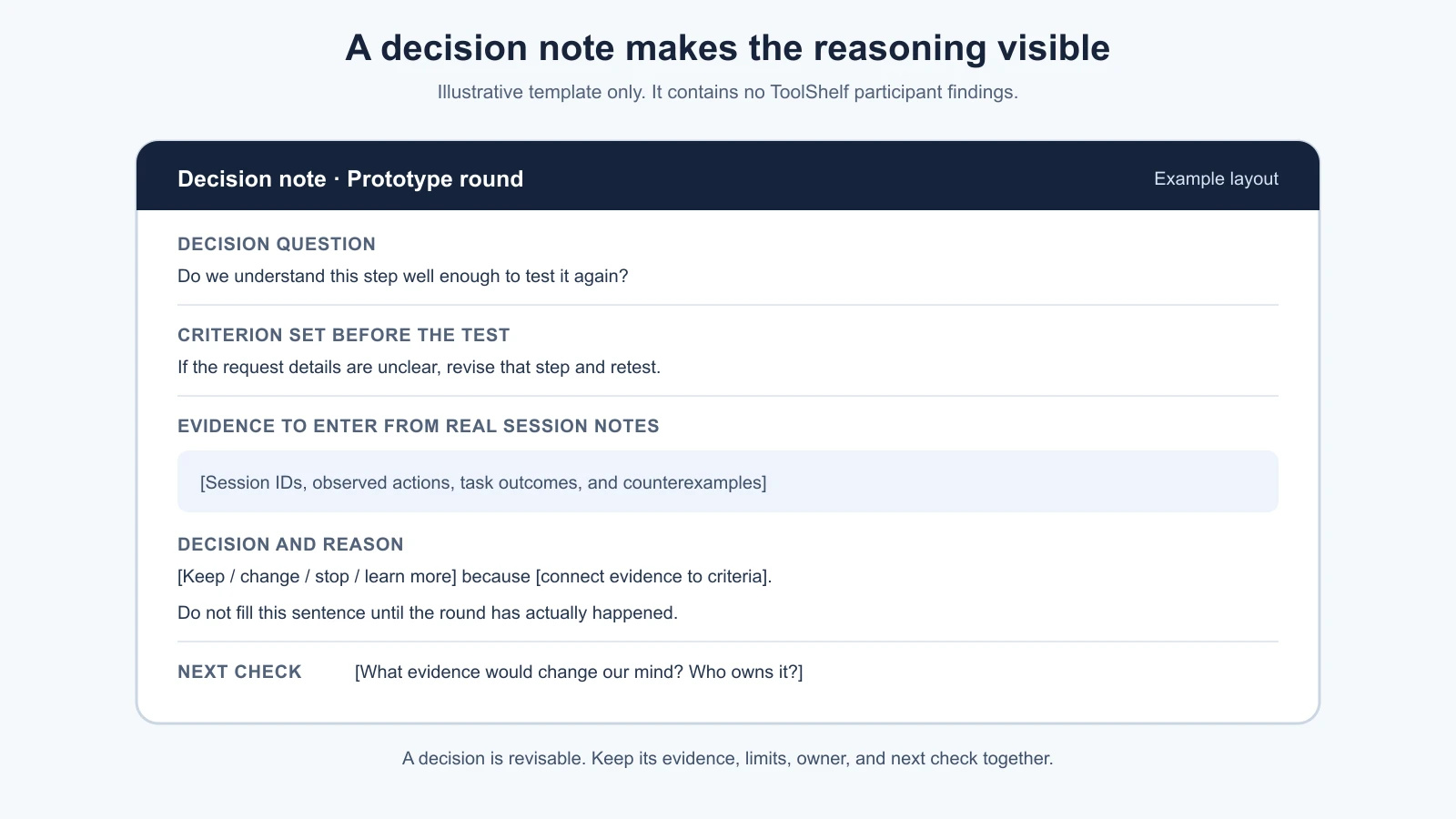
A decision note is a short record of the question, evidence, uncertainties, and next move. It lets a teammate who missed the sessions understand what you learned and challenge your reasoning. A useful note is honest about missing participants, prototype limitations, and findings that do not fit the main pattern.
Copy and adapt this template:
1# Decision note
2
3Project and prototype version:
4Date and decision owner:
5Research round and session IDs:
6
7## Decision question
8What decision are we making now?
9
10## Criteria set before the sessions
11What evidence would support keeping, changing, stopping, or learning more?
12
13## What we observed
14Describe actions and task outcomes. Link to approved notes.
15
16## What we think it means
17Separate interpretations from direct observations.
18
19## Limits and open questions
20Who or what was not covered? What could the prototype not test?
21
22## Decision
23Keep / change / stop / learn more:
24What is in scope for the next step:
25What is explicitly out of scope:
26
27## Why this is the next step
28How does the evidence connect to the decision?
29What other explanation did we consider?
30
31## Next check
32What evidence would change our mind?
33Who owns it and when will we review it?
Here is a hypothetical format example, not a ToolShelf result:
1Decision question: Do we understand the request form well enough to test it again?
2Evidence: [Session IDs] showed [observed action or task outcome].
3Limits: This round did not test whether people need the service.
4Decision: Change [specific form detail], then run another focused test.
5Reason: The current wording did not answer the test question consistently.
6Next check: Ask new participants to complete the same task without help.
The brackets must be replaced with findings from a real round. If you have not tested with people, leave the evidence blank and call the note a plan, not a result. Do not fill in a plausible story to make the example look complete.
A careful ToolShelf walkthrough
Suppose you are preparing to test the fictional ToolShelf prototype. Before the sessions, you might write criteria such as: “If people cannot tell which tool is being requested, revise the listing-to-request transition.” Another might be: “This round does not answer whether local neighbours have enough available tools; do not use task completion to make that claim.” Those criteria clarify what the test can and cannot decide.
After a real round, you would compare the observed sessions to those criteria. If the notes showed a consistent obstacle in the request flow, you could change that flow and run another small test. If the flow were clear but the problem research were thin, you might keep the prototype result and return to problem discovery. If evidence suggested that the situation rarely matters to the intended audience, you might revisit the audience or stop investing in this concept. These are conditional paths, not claims about people who tried ToolShelf.
A real decision could also be “learn more.” For instance, if one group found the flow useful and another could not use it with their access needs, do not average the difference away. Identify which audience the product is for, what barrier appeared, and whether the research included enough people and context to understand it. Then plan a focused follow-up.
The GOV.UK guide to analysing a research session recommends moving from observations to findings and then to actions such as changing a prototype or researching a new question. Its service context is specific, but this evidence-to-action sequence is useful for small product decisions. For an exploration phase, its guide to how alpha works also emphasizes testing risky assumptions with prototypes and deciding what is worth taking forward.
Share the decision and keep the loop open
Share the note with people who will build, fund, support, or be affected by the next step. Invite them to point out missing evidence and assumptions. Agreement is useful, but do not remove disagreement from the record if it changes the decision. Note what would make the team revisit it.
A decision is not a promise to keep going. If new evidence changes the picture, update the note and explain what changed. If you decide to continue, write the next learning question before opening an AI builder or coding tool. If you decide to stop, record the reason and any reusable learning, then close the work cleanly.
The next module moves from prototype toward real code. A keep decision does not mean the prototype is ready for real users or production. You will first consider what the prototype lacks, whether to stay in the builder or move to a code project, and what must be rebuilt or reviewed. A change or stop decision may mean returning to an earlier stage instead. The product loop allows both directions.
Further reading
- Analyse a research session, GOV.UK Service Manual.
- How the alpha phase works, GOV.UK Service Manual.
- Test the prototype with real people, for test scripts and evidence notes.
- Define the problem and scope the first version, for the statements and limits that inform the decision.
Mistakes beginners make
- Setting criteria after seeing the results. Write down what you are trying to learn before the session so you can spot a moving goalpost.
- Calling a confusing screen proof that no one needs the product. Separate an interface issue from a problem or audience question.
- Treating task completion as proof of demand. A prototype test shows what happened in that test; it does not establish adoption or market size.
- Continuing because of time already spent. Decide based on the next step’s value, cost, and risk.
- Stopping because one detail failed. Ask whether the evidence challenges a core assumption or points to a fixable design problem.
- Turning every suggestion into a feature. Find the underlying need and check it against the task evidence.
- Hiding uncertainty in a confident summary. Name what the test did not cover and what would change your mind.
- Writing a decision no one can revisit. Keep the evidence, limits, owner, and next check together in a short note.
Recap and try it yourself
Write the decision question and criteria before the next prototype test. When results arrive, separate design friction from evidence about the problem or audience. Choose to keep, change, stop, or learn more, and explain the decision with observations, limits, and a next check. Treat past effort as context, not a reason to continue. A stop decision is a useful result when it follows honestly from the evidence and the resources available.
Try it: take one product idea and write a decision note with the question, two criteria, what each possible result would lead you to do, and one assumption the test cannot answer. Leave the evidence section blank until real sessions happen. After the sessions, fill it from your notes and ask someone who did not run them whether the connection between evidence and decision is clear.