
AI Product Builders course · lesson 16 of 25
- 1The AI Product-Building Loop: From Idea to Improvement
- 2Define the Problem Before You Choose a Solution
- 3Check the Idea Before You Build
- 4App Anatomy for Non-Engineers: What Happens Behind a Screen
- 5Scope the First Version: Choose What to Build Now
- 6Choose a Tech Stack That Fits Your Constraints
- 7Choose a Prototype Tool for Your Product and Team
- 8Build a Clickable Prototype in One Focused Flow
- 9Test a Prototype with Real People
- 10Decide Whether to Keep, Change, or Stop
- 11Move from a Prototype to Real Code
- 12Work with an AI Coding Tool on One Clear Task
- 13Learn the Web Basics Behind Your App
- 14Connect a Database Without Losing Control of Your Data
- 15Tell a Small Fix from a Structural Change
- 16Run a Refinement Loop That Keeps the Product Useful
- 17Make an AI-Built Product Easier to Use
- 18Review and Check Changes Before They Reach the Team
- 19Test an AI-Built Product in Layers
- 20Work with a Team and Stakeholders
- 21Choose Where to Deploy Your Product
- 22Go Live: A Launch Checklist for Your Product
- 23Measure and Improve Your Product After Launch
- 24Add an AI Feature to Your Product Carefully
- 25Capstone: Take a Product Idea to Launch
After this lesson, you will be able to turn observations into a small, prioritized refinement backlog, choose one change for the next cycle, compare the result with what happened before, and keep a short changelog. You will also know when the right decision is to leave a working part alone.
We will keep using ToolShelf, the fictional neighbourhood tool-sharing idea. It has no real users or product data. Examples below show how to record and reason about evidence you might collect in your own project. They are not claims about a real ToolShelf test. This lesson follows choosing between targeted and structural changes: once you know what kind of change you are considering, use a small loop to decide whether it is worth doing.
Refinement means improving a real part of the experience
Refinement is the work of improving a product in response to what people need, what the team learns, and what the product must do reliably. It can include fixing a confusing step, making an important action easier to find, correcting an error, improving an access need, or removing a feature that creates more trouble than value.
Refinement is not a synonym for adding features or polishing the interface. A product may need clearer content, a more reliable save, a better empty state, a faster path through a task, or no change at all. A shiny new control is not progress if it does not help with a user need or a necessary product outcome.
The loop in this lesson is intentionally short:
- Observe a signal from a user, test, support request, product measure, or team review.
- Decide what the signal means, what you still do not know, and whether action is justified.
- Change one product behavior or one coherent part of a workflow.
- Check whether the result improved the intended experience and kept important behavior working.
- Record the result and decide what deserves attention next.
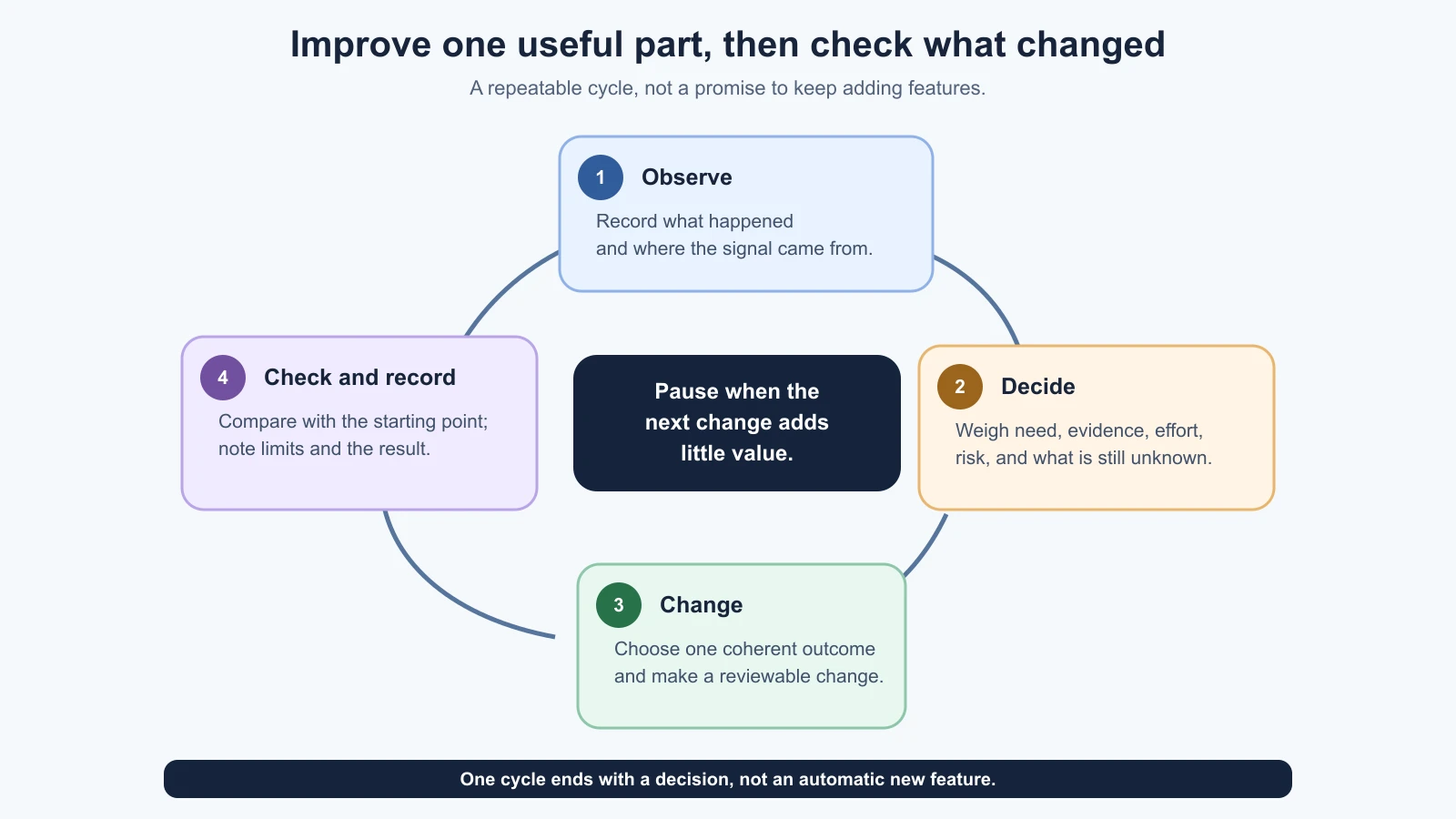
The loop can happen before launch with prototype sessions and a small development project. After launch, it can use real support requests or product measures too. The kind of evidence changes, but a useful change still starts with a question and ends with a check. For live operational concerns such as errors, backups, cost, and dependency maintenance, see Monitor and Maintain Your App. The product-level measurement routine after launch belongs in a later lesson.
Capture signals without turning each one into a feature
A signal is an observation that might point to a useful change. It can be a person hesitating in a prototype test, a repeated support question, a broken task, a screen reader issue, a failed save, or a pattern in a product measure. A suggestion such as “add a map” is not yet a clear signal. Ask what need or obstacle the suggestion points to and whether you have evidence for that interpretation.
Record the situation in plain language:
- What was the person trying to do?
- What did they expect to happen?
- What did they see or do instead?
- Where and when did it happen?
- What evidence do you have, and what is your interpretation?
- What remains uncertain?
For example, a hypothetical observation might be: “During a prototype task, a participant paused at the request button and asked whether pressing it would reserve the drill.” That is an observation, not yet proof that every person will be confused. A possible interpretation is that the next step is unclear. A possible change is to explain that the request goes to the owner and is not yet approved. The team should check whether the language matches the product rules before changing the interface.
Keep private research notes, account details, and personal data out of a broadly shared backlog. Use an anonymized summary or an approved reference to a restricted record. An AI tool can help group or rewrite notes only when your data-handling rules allow it. It should not turn a few comments into a claim about all users.
Do not mix the raw observation with the conclusion. “The user was confused” is an interpretation. “They paused, reread the label, then asked whether the request was confirmed” describes behavior that someone else can inspect. Keeping the two separate makes it easier to challenge your explanation and choose a useful next step.
Keep one backlog small enough to review
A refinement backlog is a prioritized list of possible improvements, problems, and questions that the team has not chosen to do yet. It is a place to keep useful options visible, not a promise to complete every item. A backlog grows stale if nobody reviews it, so keep only enough detail to make a good next decision.
Use this template for each item:
1Title:
2User or product need:
3Signal and evidence source:
4Current behavior:
5Desired behavior:
6Who is affected and how often, if known:
7Impact if left unchanged:
8Rough effort: small / medium / large / unknown
9Risk or dependency:
10How we would check the change:
11Status: needs evidence / ready to consider / selected / done / parked
12Owner and review date:
Use “unknown” freely. If you do not know how often a problem occurs, do not make up a frequency. If nobody has checked how the feature behaves with a keyboard, mark that as a question to investigate rather than writing “keyboard users cannot use it.” A backlog can contain investigation tasks as well as implementation tasks.
Here is an illustrative backlog for a fictional ToolShelf team. It is a teaching example, not a report of actual observations or a validated ranking:
| Item | Signal or evidence to gather | Possible user impact | Rough effort | Status |
|---|---|---|---|---|
| Clarify whether a request is confirmed | Prototype task notes suggest the next step may be ambiguous; review the notes and product rule | Could prevent someone mistaking a request for an approved booking | Small if the wording is local; confirm first | Needs evidence |
| Make date conflicts clear | Check the current rule and test an overlapping date case | Could prevent an unusable or conflicting request | Medium or unknown until code is inspected | Needs investigation |
| Add a map of nearby tools | No product evidence recorded yet | Unknown until the location need is understood | Large or unknown | Parked |
| Improve keyboard access to the request form | Run an accessibility check with keyboard and assistive technology | May affect whether some people can complete the core task | Unknown until checked | Needs evidence |
The status prevents the table from pretending that all four ideas are equally ready. “Needs evidence” says to learn more before building. “Parked” means the team decided not to spend time on it now; it can be reopened if new evidence appears. “Selected” means the team made a conscious choice for the current cycle, not that implementation is guaranteed to succeed.
Prioritize by impact, effort, and risk
You will usually have more candidate changes than time. Impact is the difference the change could make for people using the product or for an important product outcome. Effort is the work and coordination needed to make and verify it. These are estimates for comparison, not promises about outcomes or delivery dates.
Start with a few plain questions:
- Does the item affect a core user task or block someone from completing it?
- How strong is the evidence that the problem exists?
- How many relevant people or situations might it affect, if known?
- What happens if the team leaves it as it is?
- Is the effort small, medium, large, or unknown?
- Could the change introduce data, privacy, security, accessibility, or reliability risk?
- What is the smallest useful check after the change?
A small high-impact change with a clear signal is often a good next candidate. A large change with an uncertain benefit may first need research or a prototype. A low-effort detail is not automatically worth doing: even a one-line feature can distract from a more important obstacle. A security or accessibility problem may deserve prompt attention even if few reports have arrived, because the absence of reports does not mean the impact is small.
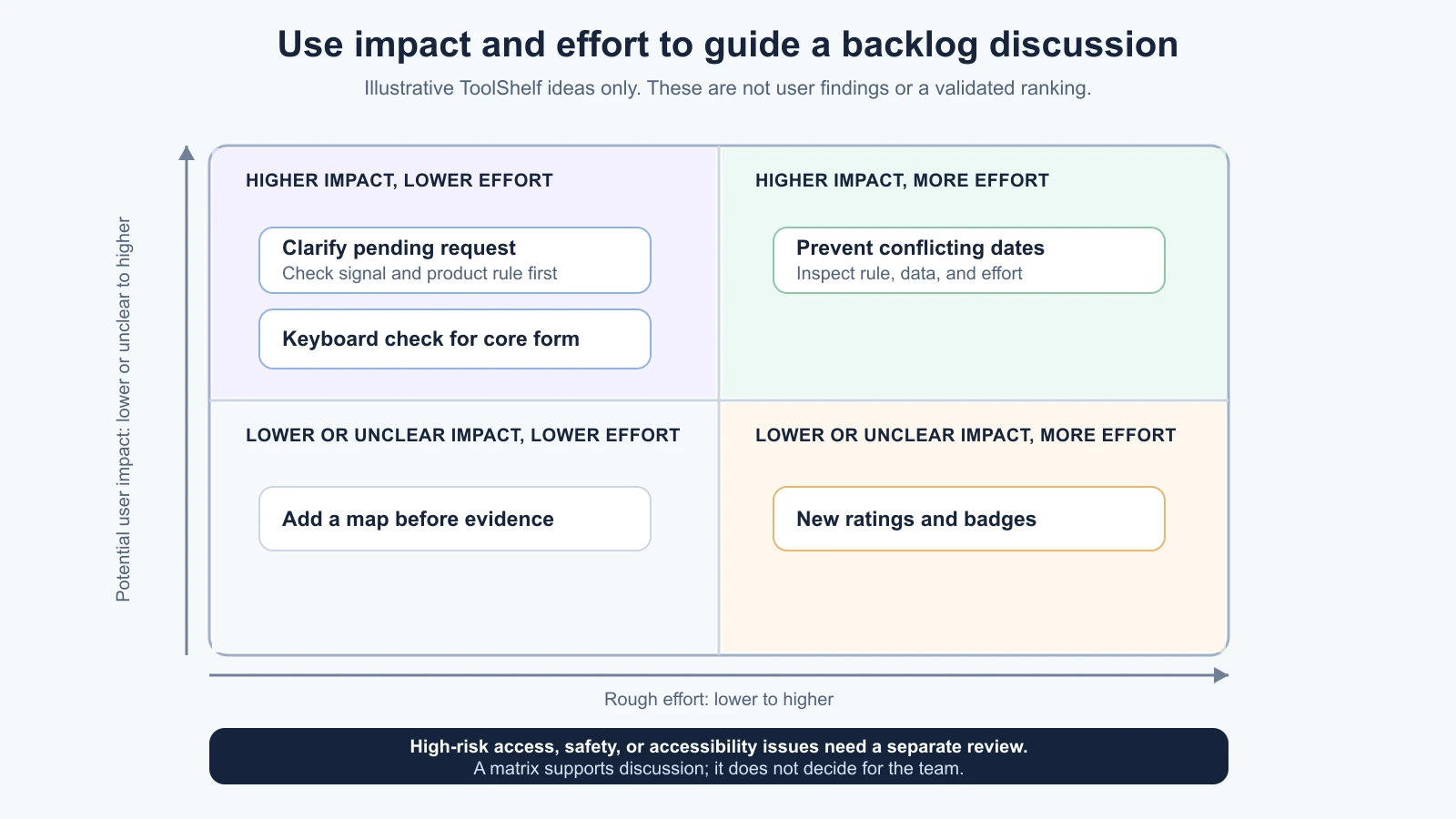
The impact-and-effort view is a discussion aid. It does not calculate the right answer. If people disagree about impact, write down what each person is assuming and what evidence could resolve it. If effort is unknown, ask an engineer or use a short, safe inspection task to learn more. Avoid assigning precise scores such as 7.3 for impact when the evidence only supports “high,” “medium,” or “unclear.”
The GOV.UK Service Manual advises teams to make prioritization decisions regularly and base them on evidence such as performance analysis, user research, and stakeholder input. Its context is public services, and it offers several possible methods rather than one universal scoring formula. For a small product team, a short, repeatable review with clear reasons may be enough.
Choose one coherent change for the next cycle
For each cycle, select one outcome you can explain. “Make requests easier” is too broad. “Tell requesters that sending a request does not confirm the booking” is more useful if the rule is settled and the interface currently hides it.
One change does not always mean one file. A coherent change can need several edits to complete a single behavior. It does mean that the change has one product purpose, a bounded scope, and a check that tells you whether that behavior works. If the coding agent adds a nearby feature or changes a second flow, stop and compare it with the chosen outcome.
Before implementation, write a short cycle brief:
1Cycle question:
2Signal and source:
3Current behavior:
4Intended change:
5What should remain unchanged:
6Expected user impact:
7Known risk or uncertainty:
8How we will check before and after:
9Decision owner:
Then use the change workflow from targeted and structural changes. A narrow item may need a small implementation request and focused check. A structural item needs an impact map and a plan. In either case, review the changes and run the checks that fit your project before treating the cycle as complete.
Do not ask the AI to make the backlog priority decision alone. It can help summarize approved evidence, identify dependencies, or compare candidate changes. It cannot know which user need matters most unless your team supplies that context, and it may overvalue work that is easy to code. Keep the product decision with the people accountable for the product.
Compare the result with the starting point
Before you change something, note how it works now and which observation or measure you will compare later. The check should match the reason for the change.
| Why you changed it | A useful comparison |
|---|---|
| People could not tell a request was pending | Ask a new person to complete the same task and describe what happens after sending it |
| A date conflict was accepted | Try a conflicting and a valid date range, and inspect both the visible response and stored result in a safe environment |
| The form was hard to use by keyboard | Navigate the same fields and action with a keyboard, then check focus order and visible feedback |
| A save failed in a test | Repeat the relevant save case and inspect the result or approved logs without exposing private data |
These checks are examples. Choose the actual method based on the product, risk, and people affected. A usability change may need another task session. A data rule needs valid and invalid cases. A performance improvement needs a measure of the relevant path. A passing automated test can help verify code behavior, but it does not establish that the feature is useful or understandable to people.
If you have an appropriate measure, compare equivalent periods, groups, or test conditions. Keep the limits in view: a small number of sessions can reveal a problem but may not estimate how common it is; a change in a metric may have another cause; and a quiet support inbox is not proof that nobody is struggling. Record what you checked, when, and what you can reasonably conclude.
If the result is unclear, the cycle still produced information. You might keep the change and gather more evidence, revise it, or revert it if it made the experience worse. Do not describe “we shipped it” as evidence that it helped. Use the next decision to close the loop.
Keep a changelog that explains meaningful changes
A changelog is a brief record of product changes over time. It helps the team connect a release or improvement to its reason and follow-up. It is not necessarily a list of every commit. Git history records code changes; a product changelog records the user-visible or operational meaning in language a teammate can understand.
For each meaningful refinement, record:
- Date and version or release, if applicable.
- What changed in the product.
- Which user need, evidence, or risk led to it.
- What was checked and the outcome.
- Any known limitation or follow-up question.
An entry might say: “Changed the request confirmation text so it says the owner must approve the request. Checked the updated wording in the sample flow; the date conflict rule remains a separate open item.” That is a format example, not a claim that ToolShelf was changed or tested.
Write changelog entries for product changes that someone may need to understand or revisit. Do not turn it into marketing copy or record private participant details. A public release note may use different language and omit internal information. Keep the decision record and private research notes in the right place, with access limited to people who need them.
Stop refining when the next change has little value
There is always another color, animation, layout, or option you could adjust. Refinement has no natural finish line, so set a stopping rule tied to the user's task and the product's risks.
You can pause when:
- The core task works for the intended people in the situations you have checked.
- Important access, safety, and data-handling requirements have an owner and a plan.
- The next proposed change has weak evidence or a small expected benefit compared with its effort.
- A new idea belongs in the backlog but does not justify interrupting the current work.
- The team needs more evidence before another implementation would be responsible.
Do not use “good enough” to excuse a known barrier in the core task, a security risk, an inaccessible interaction, or data loss. Conversely, do not keep polishing a low-impact detail just because the AI can generate another version. A product can be useful without being perfect, and a deliberate pause leaves room to work on a more valuable need.
For a small team, review the backlog at a regular cadence that fits the work, such as after a test round or before planning the next set of changes. Recheck parked items when new evidence appears, not just because they have been waiting a long time. The list is a tool for attention, not a queue that every idea must eventually leave.
Further reading
- Deciding on priorities, GOV.UK Service Manual. Its government-service setting is specific; it describes evidence-informed prioritization and more than one possible method.
- Iterate and improve frequently, GOV.UK Service Manual, on making improvements through a service's lifetime.
- Keep, change, or stop, for turning prototype evidence into a next decision.
- Targeted and structural changes, for mapping risk and planning implementation.
- Monitor and maintain your app, for live service operations and ongoing maintenance.
Mistakes beginners make
- Treating every suggestion as a requirement. Record the need behind it and look for evidence before building.
- Mixing observation with interpretation. Keep what happened separate from what you think caused it.
- Prioritizing by coding convenience alone. Consider user impact, evidence, risk, and effort together.
- Giving uncertain estimates a precise score. Use broad categories and name what is unknown.
- Combining several unrelated improvements in one cycle. Choose one coherent product outcome and check it clearly.
- Claiming success because a change shipped. Compare the result with the starting point and intended user need.
- Keeping a backlog that nobody reviews. Revisit it regularly and remove or park stale ideas.
- Polishing forever or stopping at a known barrier. Pause when the next improvement has little value, but keep core access, safety, and reliability needs visible.
Recap and try it yourself
Refinement is a short evidence-led loop: observe, decide, change, check, and record. Keep a backlog of needs and questions, then choose one coherent improvement by weighing user impact, evidence, effort, and risk. Compare the result with how things worked before. Write down meaningful changes in a changelog, and pause when further polish is less valuable than another need.
Try it: choose one signal from a prototype, a support request, or a task you observed. Write it as an observation without adding a cause. Add one backlog item with the affected user, potential impact, rough effort, uncertainty, and a check. Decide whether it is ready for one small cycle or needs more evidence first. If you implement it later, record the result without claiming more than your check established.