
AI Product Builders course · lesson 18 of 25
- 1The AI Product-Building Loop: From Idea to Improvement
- 2Define the Problem Before You Choose a Solution
- 3Check the Idea Before You Build
- 4App Anatomy for Non-Engineers: What Happens Behind a Screen
- 5Scope the First Version: Choose What to Build Now
- 6Choose a Tech Stack That Fits Your Constraints
- 7Choose a Prototype Tool for Your Product and Team
- 8Build a Clickable Prototype in One Focused Flow
- 9Test a Prototype with Real People
- 10Decide Whether to Keep, Change, or Stop
- 11Move from a Prototype to Real Code
- 12Work with an AI Coding Tool on One Clear Task
- 13Learn the Web Basics Behind Your App
- 14Connect a Database Without Losing Control of Your Data
- 15Tell a Small Fix from a Structural Change
- 16Run a Refinement Loop That Keeps the Product Useful
- 17Make an AI-Built Product Easier to Use
- 18Review and Check Changes Before They Reach the Team
- 19Test an AI-Built Product in Layers
- 20Work with a Team and Stakeholders
- 21Choose Where to Deploy Your Product
- 22Go Live: A Launch Checklist for Your Product
- 23Measure and Improve Your Product After Launch
- 24Add an AI Feature to Your Product Carefully
- 25Capstone: Take a Product Idea to Launch
After this lesson, you will be able to describe how a team proposes and reviews a code change, prepare a pull request or merge request that gives reviewers useful context, explain what continuous integration checks, and name a few ways to protect the project's main branch.
We will keep using ToolShelf, the fictional neighbourhood tool-sharing idea. It has no real repository, team, or code changes. Any branch names and review examples below are teaching examples, not reports of a real project. The previous refinement lesson helps you choose one product improvement. Here we will see how a team can review the implementation of that decision. For Git commands and diffs, use Version Control with AI.
Give shared work a review path
A repository is a project's files and their recorded history, commonly managed with Git. A branch is a named line of work where a contributor can make changes without immediately changing the team's shared version. The shared branch is often named main, though the name can differ. Teams treat it as a known, stable place to build on, so a proposed change should be reviewed before it joins that branch.
A pull request, often shortened to PR, proposes merging changes from one branch into another. GitLab calls the similar collaboration object a merge request, or MR. The request gives the team a place to explain the purpose, review the changed files, discuss questions, see automated check results, and decide whether to merge. The repository host may have different features and names, but the shared idea is to make the change visible before it becomes part of the main line.
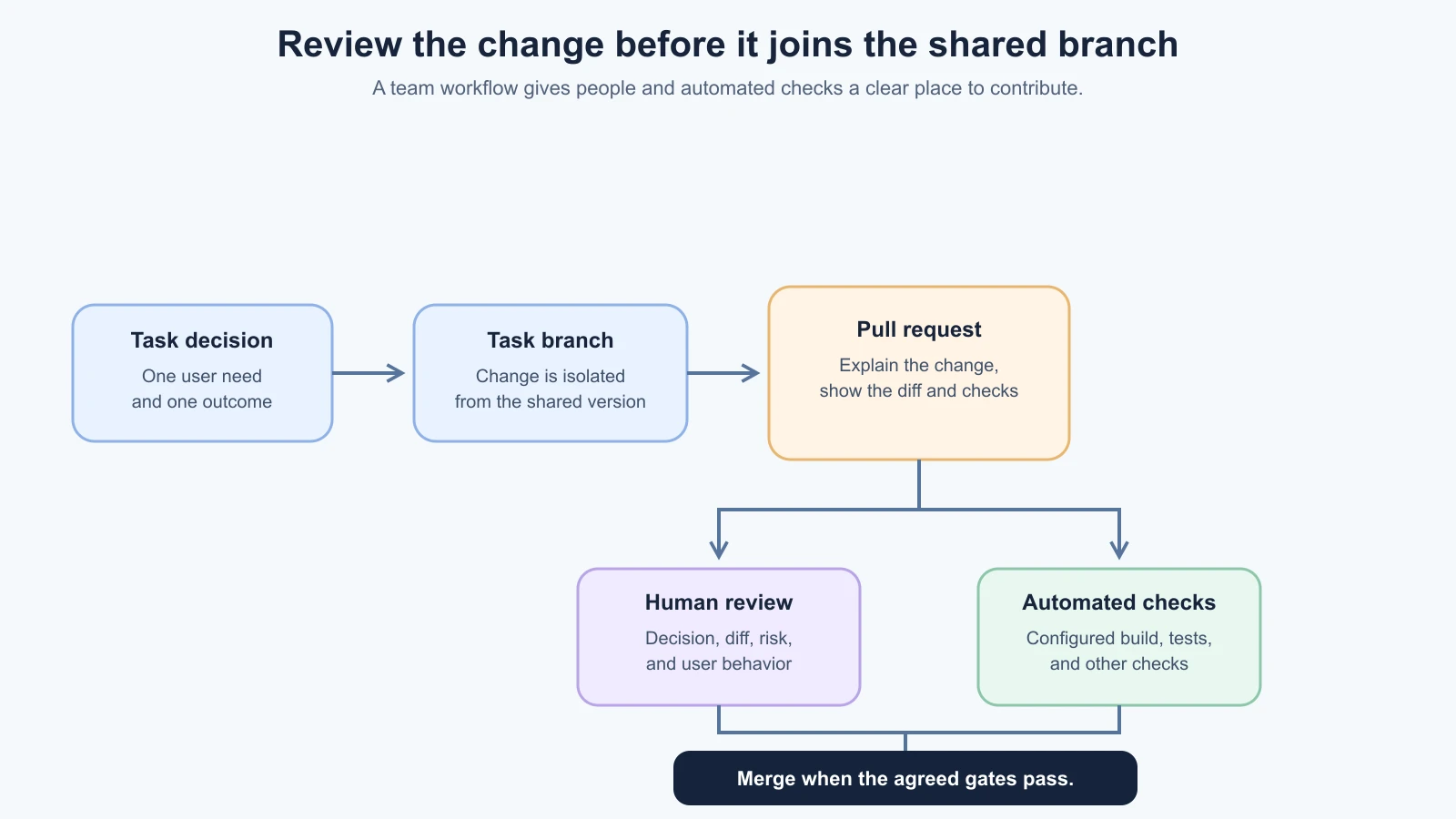
For a small ToolShelf example, suppose the product decision is to make the request form explain that sending a request does not reserve the tool. One contributor can change the text on a branch. The pull request explains the user need and names the screen. A reviewer checks that the wording matches the agreed borrowing rule and that the rest of the request flow still makes sense. Automated checks may verify that the project builds and its configured tests pass. The change joins main only after the team's review requirements are met.
This process gives teammates a chance to catch misunderstandings early. A reviewer can spot an unrelated file, an unapproved product decision, or a missing failure case. A branch also makes it easier to tell which changes belong to one task. It does not make the code correct by itself, and it is not a backup of production data.
Make the pull request easy to review
A reviewer needs to understand why the change exists, what it does, and how it was checked. A vague title such as “updates” forces the reviewer to reconstruct the task from the diff. A useful title might be “Explain when a tool request is confirmed.” The description should connect the code to the product decision and show what evidence supports accepting it.
Use this lightweight pull request template and adapt it to your team's process:
1## Why
2What user need, issue, or approved decision does this change address?
3
4## What changed
5Which user-visible behavior or project area changed?
6What is deliberately out of scope?
7
8## Review guide
9Which files or parts of the diff deserve a closer look?
10Does this affect data, access, privacy, integrations, or shared components?
11
12## Checks
13What automated checks ran? Include the command and actual result.
14What did someone check manually, and in which environment?
15What could not be checked yet?
16
17## Screenshots or preview
18Attach them if they help review a visible change. Remove private data.
19
20## Risks and follow-up
21Is there a migration, configuration change, or recovery concern?
22What remains open, and who owns the next step?
Do not fill the template with claims that did not happen. If no browser check ran, write “not checked” and explain why. A screenshot can show a visual result, but it cannot prove keyboard access, a server permission rule, or a successful database write. Link to the relevant task or product decision, and keep secrets and private user records out of the request.
For a simple copy change, this description might take only a few lines. A database migration, authentication change, or shared component update needs more detail about affected users and recovery. The goal is enough context for a good decision, not paperwork for its own sake.
Review the decision, the diff, and the check
A pull request review is not just proofreading. The author and reviewers look at different parts of the change:
| Review question | What to look for |
|---|---|
| Does it solve the agreed user need? | Match the behavior to the issue, scope, and product decision |
| Does the diff stay within the request? | Check each changed file and ask why it was involved |
| What could it affect? | Review data, access, shared components, dependencies, and integrations |
| Is there evidence it works? | Read the automated results and manual checks, including relevant failure cases |
| Is the next step clear? | Resolve questions, name limitations, and record any follow-up |
The author should be able to explain unfamiliar code the AI added. If a new package, database field, permission, or external service appears, ask why it is needed and whether it was part of the approved task. A fluent AI summary is not a substitute for the diff. If the reviewer cannot tell which part of the change affects the product, ask for a smaller request or a clearer explanation.
Review comments should describe the concern and the expected next action. “This is confusing” gives little help. “This text says the booking is confirmed, but the product decision says the owner still has to approve it. Can we change the wording and check the pending state?” points to the issue and the decision behind it.
An approval means the reviewer is satisfied with the change under the team's process. It does not mean the reviewer guarantees the software has no defects. For higher-risk work, route the review to someone with the relevant context, such as the person responsible for database access or accessibility. AI review can surface additional questions, but it should not count as the human approval a team requires.
Use CI to repeat the checks the team chose
Continuous integration, or CI, is the practice of automatically running configured checks as changes are shared. A pipeline is the sequence of jobs that runs those checks. A pipeline might install project dependencies, run a linter, execute automated tests, and build the app. The job can run when someone pushes a commit or opens or updates a PR, depending on how the project is configured.
The checks are written by the team. CI does not know the product's intention unless someone has encoded useful checks for it. A green result means the configured jobs passed on the code they ran. It does not establish that a person can understand the screen, that the test covers every important case, or that an AI-generated feature is the right product decision. Automated checks support human review; they do not replace it.
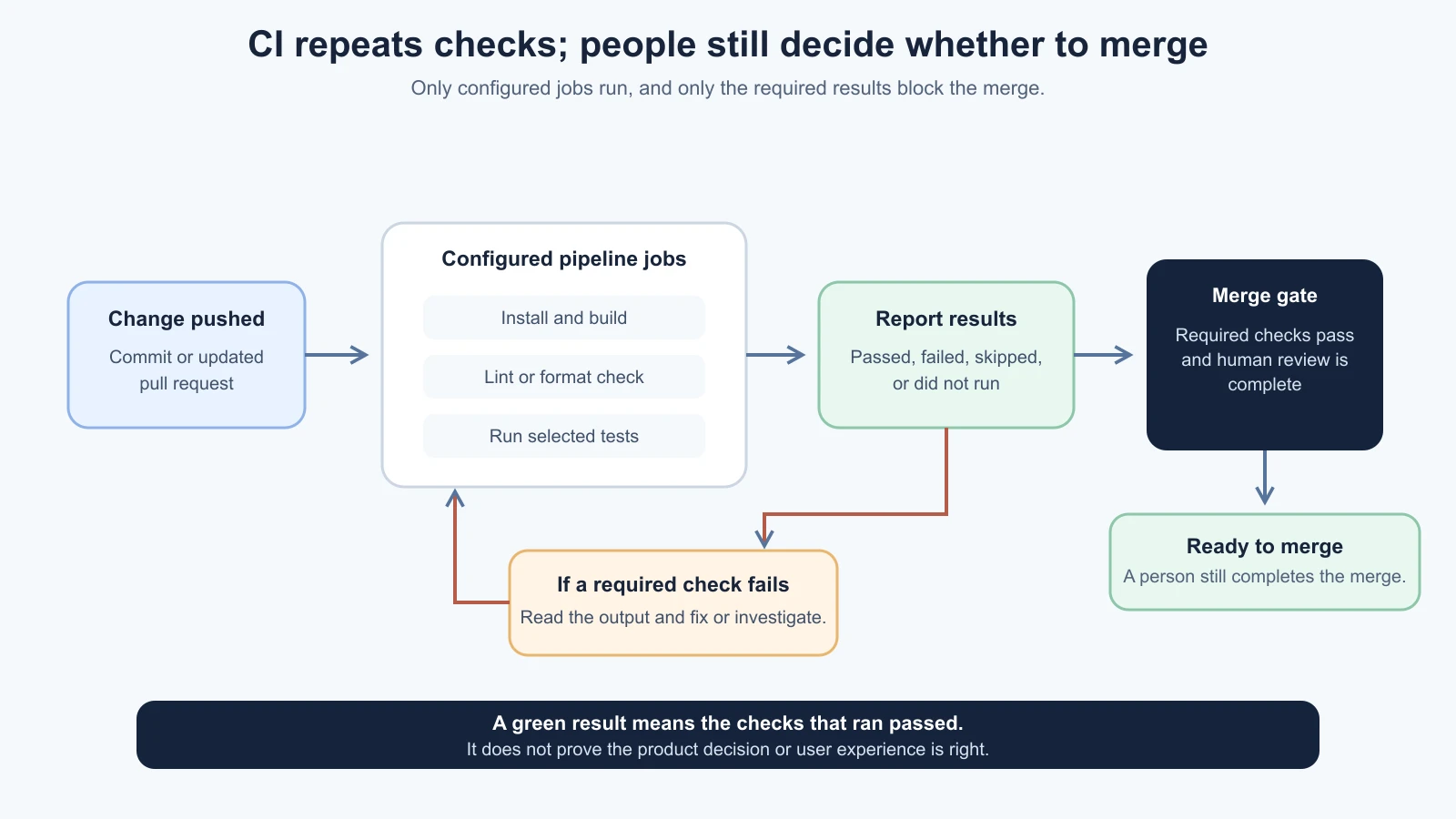
In a ToolShelf example, a CI job could run the project's existing tests and build after a contributor updates the request message. If the build fails because the text file has a syntax error, the check can catch it before merge. If the message says “Your tool is reserved” when the owner has not approved the request, a build may still pass. A reviewer needs the product rule and a check for the pending state to catch that mismatch.
When a check fails, read its name and output. Determine whether the failure relates to the proposed change, an unrelated existing issue, or a problem in the pipeline itself. Do not ignore a required failure just to merge faster. Fix it, document the blocker and ask the designated maintainer to decide what to do. A skipped or missing check can mean the pipeline did not run as expected, not that the change passed.
Teams can configure selected checks as required before a change merges into an important branch. The rule should match the risk and the actual project workflow. Requiring every slow job for every one-line documentation edit may make the process unhelpful. Requiring no checks on a branch that carries production code may leave obvious failures to users.
Compare the workflow tools by what they do
The service names overlap, but their primary workflows are not identical. GitHub, GitLab, and Azure DevOps each provide a place for hosted code review and automation tied to a repository. Bit Cloud describes a component-centered build and review platform with its own CI service. These descriptions reflect official documentation checked on 4 November 2026. Features, naming, and plans can change, so verify the current docs and your organization's setup before adopting a workflow.
| Service | Collaboration and review | CI or validation | A useful fit question |
|---|---|---|---|
| GitHub | Pull requests, file discussions, reviews, and protected branches | GitHub Actions runs workflows from repository events, such as a PR being opened or updated | Does the team already host the repo on GitHub and need checks around its pull requests? |
| GitLab | Merge requests with review discussions, approvals, and protected branches | GitLab CI/CD defines jobs and pipelines in .gitlab-ci.yml; merge request pipelines can run on MR updates when configured | Does the team use GitLab and want its repository review and pipeline workflow together? |
| Azure DevOps | Azure Repos pull requests, reviewers, and branch policies | Azure Pipelines can build changes; Azure Repos branch policies can require build validation before completing a PR | Does the organization already manage repositories, work items, and approvals in Azure DevOps? |
| Bit Cloud | Component-centered change requests, workspaces, previews, and review | Its Ripple CI runs component build and test work; its docs also describe using GitHub Actions, Azure DevOps, GitLab CI, Jenkins, or scripts instead | Does the team want software organized and checked as reusable components, and does that fit its existing source workflow? |
The names alone do not determine quality or suitability. A team using GitHub may still run builds in another service. An Azure DevOps repo can use branch policies to require a pipeline result. A GitLab merge request pipeline needs the relevant project rules configured. Bit Cloud is a different component-centered model, not just another label for a pull request host; its docs describe component change requests and Ripple CI, with external CI options too. Check current integration details and data handling before moving code or configuring credentials.
For more detail, the official documentation explains GitHub Actions workflows and protected branches, GitLab merge request pipelines and protected branches, and Azure branch policies. Bit Cloud's Quick Start, Ripple CI guide, and Cloud Workspaces page describe its component-oriented review and build workflow. These are vendor descriptions, not an independent evaluation.
Protect the main branch with a few deliberate rules
The team can set branch protection or branch policies on the shared branch. These settings can require a pull request, one or more approvals, passing status checks, resolved discussion, or a build validation before merge. They can also limit who may push directly or bypass a requirement. Exact options vary by platform and repository configuration.
For a small team, start by deciding which branch must stay usable and what it takes to merge there. A practical baseline for a branch that people rely on might include:
- Changes arrive through a PR or MR instead of an unreviewed direct push.
- At least one appropriate human reviewer checks the latest proposed changes.
- The project's core build or test checks pass.
- Blocking questions are resolved or have a clear decision owner.
- Only a small, named group can change or bypass the protection rules.
This is a starting point, not a universal policy. A practice repository with fictional data may need lighter controls than a product handling sensitive information. A one-person project can still use a branch and review their own change before merge, though that is not independent review. For a team, avoid setting a rule that nobody can satisfy, such as requiring an approval from someone who does not have access or is always the author. Review the branch rules when the team, risk, or release process changes.
The default or protected branch is not automatically safe because it is called main. The protection works only if the rules are enabled, the checks report accurately, and people cannot bypass them casually. Keep permissions narrow. If an automated job can access secrets or deploy, review which events can trigger it, especially when contributions come from outside the trusted team. CI executes code, so workflow permissions and credentials deserve the same care as application credentials. For secret-handling habits, see Security for Vibe Coders.
Give AI-assisted work the same review path
An AI coding agent can work on a branch, prepare a draft PR, or help respond to review comments if the tool and repository permissions allow it. Keep the task linked to the product decision, and make sure the agent cannot quietly merge its own changes or change branch protection. The exact capabilities depend on the tool, its setup, and repository access.
Ask the agent to include a factual summary with:
- What it changed and which files it touched.
- Which product behavior it intended to change and what should remain the same.
- Which commands or CI checks actually ran, including failures.
- What it could not verify, such as keyboard behavior or real user comprehension.
- Any new dependency, permission, secret, database change, or external connection.
- Questions a human reviewer should decide.
The person submitting the change still owns the explanation. If the AI cannot say why a file changed, inspect it before requesting review. If CI fails, read the output rather than asking the AI to report “all good.” If an external contributor or agent can change workflow files, do not expose production credentials to an untrusted workflow. Use repository permissions and platform guidance to decide what those jobs may read or write.
Work through one team change
Here is a fictional example of a small collaborative change for ToolShelf:
- A product decision says requesters need to know that the owner must approve a request.
- A contributor creates a branch and asks an AI coding tool to update only the confirmation text.
- The contributor opens a draft PR with the decision, changed screen, what stays the same, and a screenshot of fictional data.
- A reviewer checks the diff and confirms that the text does not promise that the tool is reserved.
- The configured CI jobs run. The PR records the actual result and any check that did not run.
- The reviewer asks one question about the pending state. The contributor answers, adjusts the wording, and requests review again.
- After the agreed review and required checks pass, someone with permission merges the PR into the protected branch.
This sequence demonstrates a workflow, not a claim that a real test or build passed. In an actual project, the PR should link to the real task, include the command output or check status, and identify anything that remains unverified. If the work requires data changes or a wider workflow, follow the structural-change review in targeted and structural changes instead of disguising it as copy.
Further reading
- About pull requests and managing protected branches, GitHub Docs.
- GitLab merge request pipelines and protected branches, GitLab Docs.
- Azure branch policies and build validation, Microsoft Learn.
- Bit Cloud Quick Start, Ripple CI, and Cloud Workspaces. Bit Cloud details checked 4 November 2026; verify current docs and repository integration.
- Version Control with AI, for Git commands and recovering changes, and Security for Vibe Coders, for repository and credential safety.
Mistakes beginners make
- Merging a change without its product reason. Link the pull request to the decision or task it implements.
- Treating an approval as a guarantee. Reviewers check the change and its evidence; they cannot prove the absence of every defect.
- Writing “tests passed” without saying what ran. Name the command or CI job and report failures or checks that did not run.
- Assuming CI knows whether the experience is useful. Automation checks only the behavior and quality rules the team configured.
- Letting a broad diff hide what matters. Keep one coherent change, explain the files, and ask for a smaller PR when needed.
- Allowing direct pushes to bypass the team's review path. Protect the shared branch according to its importance and risk.
- Making protection rules impossible to satisfy. Confirm that the right reviewers and checks are available to every change.
- Giving a workflow secrets it does not need. Review which events run CI and what each job can access.
- Assuming every platform uses the same collaboration model. Check the terms and current docs for the host and CI service your team actually uses.
Recap and try it yourself
A branch isolates proposed work, a PR or MR makes it available for discussion, a human reviewer checks the product decision and diff, and CI repeats configured automated checks. Branch protection can require review and successful checks before changes reach the shared branch. GitHub Actions, GitLab CI/CD, Azure Pipelines, and Bit Cloud support different workflows, so compare them by how your team stores, reviews, and validates code.
Try it: choose a small proposed change in a practice repository. Write a PR description with its user need, what changes, what stays the same, and how it would be checked. Ask an AI tool to list the files it expects to change and the review questions a teammate should ask, without editing. Then look at your repository host's settings and identify which human review and automated checks are required before its shared branch changes.