
Vibe Coding course · lesson 22 of 26
- 1What Is Vibe Coding? A Beginner's Guide
- 2The Vibe Coder Mindset: Build Small, Check Often
- 3Choosing Your Vibe Coding Tool: A Beginner's Guide
- 4Set Up Your Workspace for Vibe Coding
- 5Your First Vibe-Coded App in 30 Minutes
- 6From Idea to MVP: Plan a Small First Version
- 7Spec-Driven Development: Give AI a Clear Plan to Build From
- 8Mockups and Examples as Input: Show AI What You Mean
- 9Choose a Tech Stack: Pick Tools You Can Keep Using
- 10Prompts That Build Things: Give AI a Clear Task
- 11Context Documents: Give AI Lasting Project Instructions
- 12Managing Context and Sessions: Keep AI on the Right Task
- 13Set Standards Early and Review AI Output
- 14Build the Skeleton: Start the BookmarkBox App
- 15Add Data and a Database: Save Real Bookmarks
- 16Add Accounts Safely: Sign In and Protect Each User's Data
- 17Design and Polish: Improve the App One Pass at a Time
- 18Version Control with AI: Keep a Safe History of Your Work
- 19Debugging with AI: Find the Cause Before You Fix It
- 20Test by Default: Make Sure Each Feature Keeps Working
- 21Refactor and Keep Your Code Healthy
- 22Security for Vibe Coders: Protect Your App and Its Users
- 23Deploy Your App: Put BookmarkBox Online
- 24Monitor and Maintain Your App After Launch
- 25Where Vibe Coding Stops: Know When to Change Your Approach
- 26Capstone: Ship a Project from Idea to Production
An app can look finished and still expose private data or allow someone to change a record that is not theirs. Security is part of the feature, not a final polish step. You do not need to become a security specialist to build safer habits, but you should know what data and access your app handles and ask for help when the risk is beyond your experience.
In Refactor and keep your code healthy, you reviewed dependencies and preserved behavior while changing structure. This lesson adds a security lens to those habits, using BookmarkBox as an example.
Keep secrets out of code and chat
A secret is a credential that grants access, such as a database password, API key, signing key, or session token. If someone gets it, they may be able to use the service or data it protects.
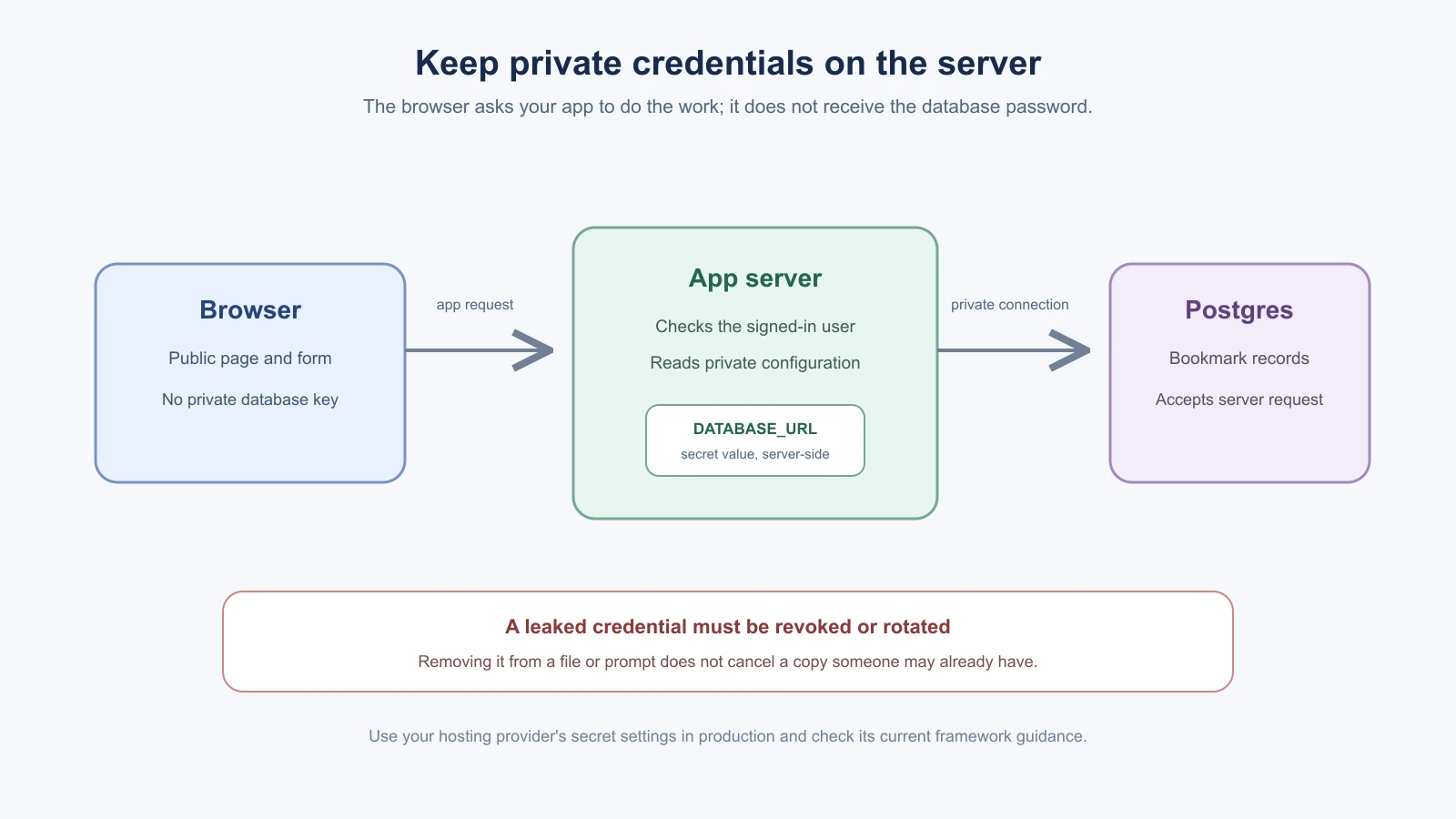
Do not paste secrets into source files, screenshots, public issues, or AI prompts. For local development, put private values in the project's environment configuration and keep that file out of Git. In production, use the hosting provider's secret settings. Only server-side code should read private credentials. A variable deliberately exposed to browser code, such as one with a framework's public prefix, is not a safe place for a secret. Check the current framework and hosting documentation for the exact rules.
For BookmarkBox, a database connection string belongs on the server. The browser needs to call the app, not connect directly to Postgres with a private password. A checked-in example file can show the variable name with a harmless placeholder, but never a real key.
If a real key is exposed, treat it as compromised. Revoke or rotate it with the service that issued it, update the app's secret store, and check where it may have been copied. Deleting the line or commit does not make an exposed credential safe again. OWASP's Secrets Management Cheat Sheet explains why secrets need limited access and a response plan.
Check who can read or change each record
Authentication answers “Who is signed in?” Authorization answers “What is this person allowed to do?” A page that hides a button is not an access rule. Someone can call the server endpoint directly or change an ID in a request.
BookmarkBox has private bookmarks, so every server-side read, edit and delete should check the signed-in user and the record's owner. When two test accounts exist, sign in as one and try to view or delete the other's bookmark. The second account should not receive or change that record. Keep the ownership check on the trusted server, close to the database operation. OWASP's current Broken Access Control guidance describes risks such as changing an identifier to access another person's data.
Treat input as untrusted
Anything a person submits can be empty, malformed or intentionally crafted. Validate it on the server before saving or using it. For example, BookmarkBox should validate the title length and that a URL uses an allowed web scheme. Validation should match the feature's needs; do not invent strict rules that reject ordinary, legitimate input.
Two common risks are:
- Injection: untrusted text is treated as part of a database query or system command. Use the framework's safe query APIs or parameterized queries. Do not build commands or SQL by concatenating user input.
- Cross-site scripting (XSS): untrusted text is interpreted as executable browser markup or script. Render a bookmark title as text and use the framework's normal escaping. Avoid inserting raw HTML from users unless you have a specific, reviewed sanitization approach.
Frameworks and database libraries help with safe defaults, but an AI can bypass them or introduce unsafe patterns. Ask it to identify where user input enters the app and show how that value is validated, stored and rendered. OWASP's Top 10 for 2025 lists broken access control, injection and software supply chain failures among its current major web application risk categories.
Review dependencies before they become part of your app
Every package adds code maintained by someone else. Before accepting a new dependency, ask what it does, whether the existing stack already handles the need, and whether the package is actively maintained. Review its name carefully so a misspelled package does not slip in. Use the project's lockfile and package manager as intended, and read install scripts or unexpected configuration changes when a tool adds them.
Dependency scanners can report known vulnerabilities, but a clean report does not prove the app is secure. A warning also needs context: which package is affected, whether your app uses the vulnerable part, and what update could change. For guidance on ongoing dependency review, see the plan in Monitor and maintain.
Limit what the AI coding tool can do
A coding agent may read and edit project files, run terminal commands, connect to services, or use browser and MCP tools. It can act with the access its environment provides. A prompt saying “be careful” does not remove filesystem or network permissions. OpenAI's sandbox security guidance makes this concrete: generated code can access files, credentials and network available to its environment.
Use the tool's permission prompts and sandbox settings. Keep the working folder limited to the project, review commands that delete files, install packages or send data over the network, and avoid giving a practice project access to personal documents or production credentials. Do not disable permission checks just to make an agent faster. If a task needs wider access, understand what it needs and grant only that scope for that task.
Prompt injection is another reason to keep boundaries. A web page, issue, or document the AI reads can contain text that tries to change the task or persuade the agent to reveal data or run a command. Treat external content as information to inspect, not as trusted instructions. The AI Agents lesson on prompt injection and tool sandboxing explains this in more depth. For Claude Code-specific review and sandbox details, see Code and security review and Sandboxing, secrets and dev containers.
Ask for a security review, then verify it
An AI can help you find questions to investigate, but its audit is not a security certification. It may miss a vulnerability, misunderstand framework behavior, or report a harmless pattern as dangerous. Ask it to inspect concrete files and trace how sensitive data moves. Then check each finding against the code and the framework's official docs.
For example:
1Review BookmarkBox for beginner-relevant security issues. Inspect only the authentication, bookmark API and database access files.
2
3Look for exposed secrets, missing server-side ownership checks, unsafe use of user input, and unnecessary dependencies. For each finding, show the file and code path, explain what a person could do, and suggest a focused fix. Separate verified issues from questions that need more context. Do not edit files or claim the app is secure just because no issue is found.
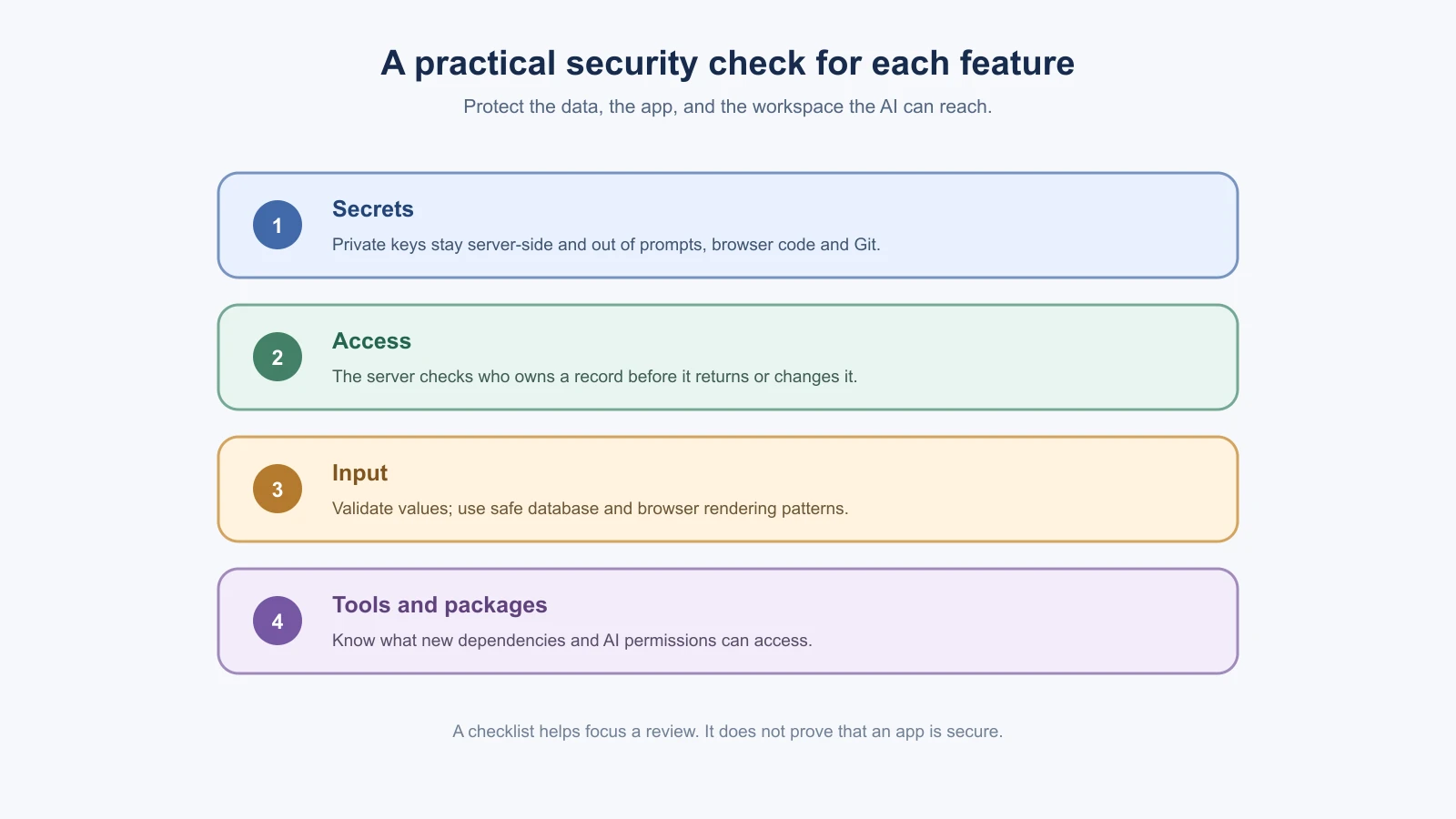
Use a checklist as a prompt for review, not as proof that every attack is covered:
- Are database and service credentials kept out of browser code and Git?
- Does the server check ownership on every read or change of private data?
- Is user input validated and safely stored or rendered?
- Did this feature add a package, permission or network connection? Why?
- Does the AI tool only have access it needs for this task?
- Did I test normal behavior and a case that should be denied?
Start with these habits every time you build. For payment data, health information, children, sensitive personal data, or a public app with real users, ask an experienced security professional to review the design before launch. Security failures can affect people beyond the developer, and a short AI audit cannot replace that expertise.
Mistakes beginners make
- Pasting real keys into prompts, chat or source files. Keep secrets in environment settings, and revoke or rotate any key that was exposed.
- Treating a hidden button as access control. The server must check the signed-in user and the record's owner on every read and change.
- Trusting input. Validate it on the server, use safe query methods, and render user text as text.
- Accepting packages without a look. Ask why a dependency is needed, and check its name and maintenance before it joins your app.
- Giving an AI tool wide access, or treating its audit as proof. Keep permissions narrow, verify each finding yourself, and ask an experienced reviewer to check high-risk apps.
Recap and try it yourself
Keep secrets out of code and chat, check ownership on the server, treat input as untrusted, review dependencies and limit what your AI tool can reach. A checklist helps you review, but it does not prove an app is secure, and sensitive data needs expert review.
Try it: list where each secret in a practice project lives, and confirm that none is in Git or in browser code. Then run the security review prompt from this lesson on one feature, and check one of its findings against the code. In Deploy your app, you will carry these habits into a hosted app.