
Claude Code writes code quickly, and fast code still needs a careful second look. This lesson covers two things that work together. First, how to have Claude review code, yours or its own, with the /code-review command. Second, how Claude Code protects you, and what you still have to do yourself. After this lesson you will know how to review a branch or pull request, how to choose between a report and automatic fixes, which security layers exist, and which habits keep you safe.
Why review AI-written code
Claude can make mistakes, as you have seen throughout this course. A change can read well and still contain a bug, miss an edge case or open a security hole. Two kinds of review help:
- A review by a fresh pair of eyes. The reviewer did not write the code and does not share the reasoning that produced it, so it is not talked into the same mistake.
- A review by you. You are responsible for what you approve and merge.
/code-review gives you the first. This lesson then shows how to make the second effective.
Run /code-review
Type this at the Claude Code prompt, in the session where you are working:
1/code-reviewClaude reviews the changes on your current branch, looks for correctness bugs, and reports what it found in your conversation. Depending on your model and effort level, it also looks for reuse, simplification and efficiency cleanups. /review is an alias that does the same thing.
Two facts make it comfortable to use:
- It runs as a background subagent (lesson 17) with its own context window, so it does not fill your conversation. You keep working, and the findings arrive when it finishes.
- It works on any plan. It uses your plan's usage or API billing the same way the rest of the session does.
By default, with no target, it reviews your branch's commits that are ahead of its upstream branch plus any uncommitted changes. If the branch has no upstream, it compares against main, or against the previous commit.
Choose what to review
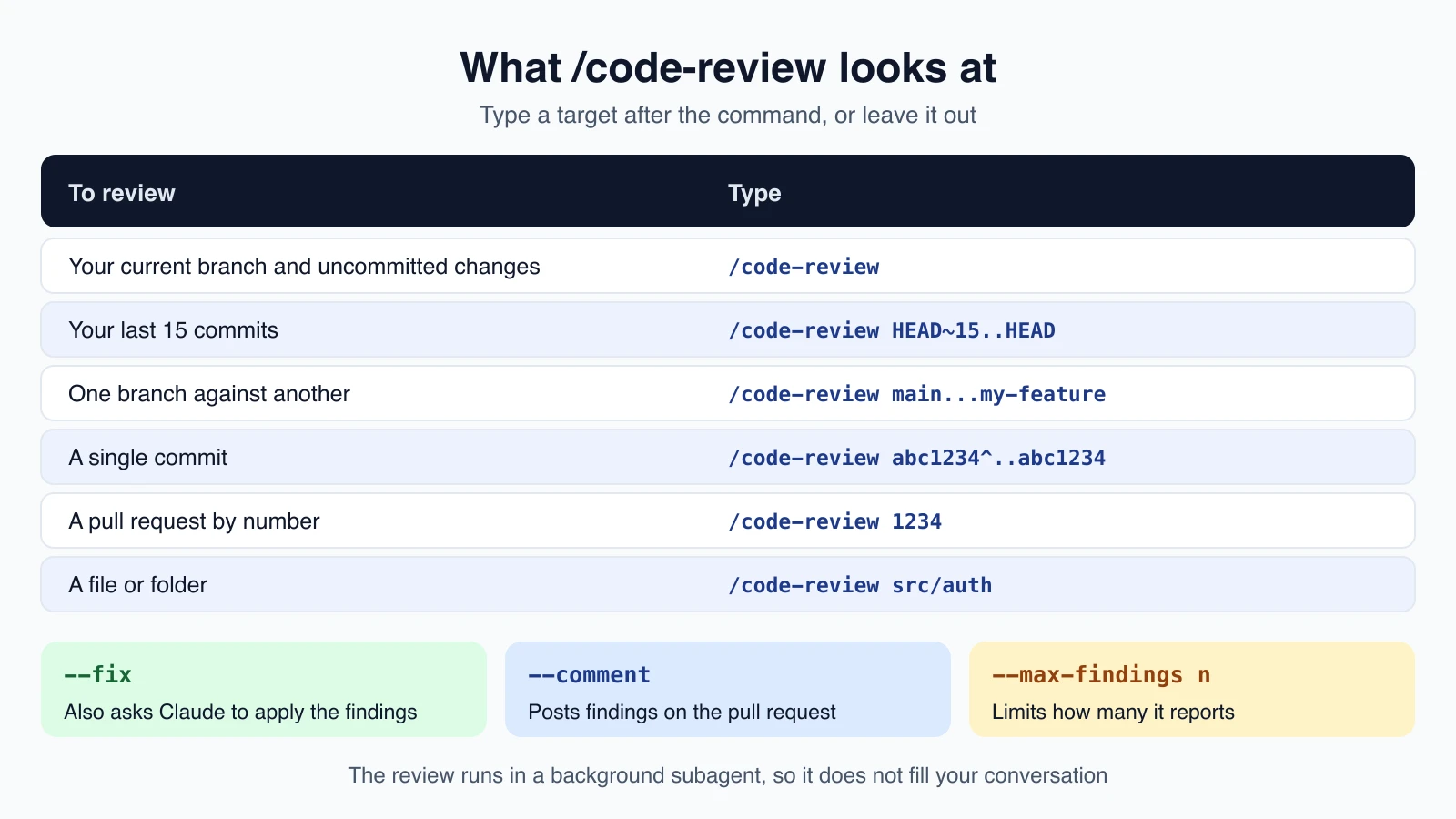
Type a target after the command:
| To review | Type |
|---|---|
| Your current branch and uncommitted changes | /code-review |
| Your last 15 commits | /code-review HEAD~15..HEAD |
| One branch against another | /code-review main...my-feature |
| A single commit | /code-review abc1234^..abc1234 |
| A pull request by number | /code-review 1234 |
| A file or folder | /code-review src/auth |
A revision range such as HEAD~15..HEAD is Git's way of naming a set of commits. abc1234 stands for a real commit's identifier.
Report or fix: the flags
- No flag. Claude reports findings only.
--fixalso asks Claude to apply the findings to your files after the review. Its edits go through your permission mode (lesson 8), so you may be asked to approve them.--commentposts the findings on a GitHub pull request as inline comments. For a GitLab merge request it posts a single note, using theglabcommand-line tool. Ifglabis not installed, the findings print in the terminal instead.--max-findings nreports up tonfindings,--max-findings allreports every one, and--max-findings defaultgoes back to the usual limit. This needs Claude Code 2.1.288 or later.
Effort and depth
You can name an effort level, such as /code-review high. At low, the review reports only the findings it is most confident about, so you see fewer false alarms. From medium up to max, it widens its coverage. If you do not type a level, Claude Code reuses the last one you typed and tells you so.
There is also ultra, a deeper review that runs in the cloud. /code-review ultra --fix runs it and then asks Claude to apply the findings when they arrive. It needs a claude.ai account and is not available on Amazon Bedrock, Google Cloud's Agent Platform or Microsoft Foundry. In those cases it falls back to a local review.
Check before you use --fix
Look at these points before you run a review, especially with --fix:
- Without
--fix, the review is a report only. With it, Claude also edits your files. - Rewind may not undo it. A background review's
--fixedits are made outside your session's checkpoints, so/rewind(lesson 9) restores only files Claude had already edited in your conversation. Use Git to revert the rest. Commit before you run--fix. - It follows your
CLAUDE.md. Add project rules there, such as "all API changes need a test". It does not readREVIEW.md, which configures a separate managed service.
A review aimed at your spec
If you have a written plan or spec, you can ask for a review against it, in your own words. This prompt checks work against a SPEC.md file:
1use a subagent to review the rate limiter diff against SPEC.md, check every requirement is implemented and the listed edge cases have tests, report gaps that affect correctness and skip styleKeep the words "skip style". A reviewer that is asked to find problems will always find something. If you fix every finding, you can end up with extra layers of abstraction and tests for cases that cannot happen.
Related review tools
/simplifyreviews for cleanup only and applies its fixes./verifyruns your app to confirm that a change works, which catches problems tests miss./security-reviewruns an on-demand security pass over the changes on your current branch. The next section shows where it fits.- GitHub Actions (lesson 23) can run a review on every pull request, and the managed Code Review service can review every pull request in an organization without a workflow file.
- Your own reviewer. You can write a reviewer subagent (lesson 17) or a skill (lesson 16), or add a skill named
code-reviewto replace the built-in one.
Claude can also start a review on its own when you ask in plain language, for example "review my changes". To stop that while keeping the command available to you, add this to a settings file:
1{
2  "skillOverrides": {
3    "code-review": "user-invocable-only"
4  }
5}
Security-focused review
Review for bugs and review for security overlap, and the official documentation describes security checks as a stack, from the earliest moment to the latest:
| Stage | Tool | What it covers |
|---|---|---|
| In your session | The security guidance plugin | Common vulnerabilities in code Claude writes, fixed in the same session |
| On demand, one pass | /security-review | A single security pass over the changes on your current branch, run when you ask |
| On demand, deep scan | The Claude Security plugin | A multi-agent scan of a whole repository or a diff, with findings reviewed independently |
| On a pull request | Code Review (Team and Enterprise) | A multi-agent review with full codebase context |
| In your CI | Your existing scanners | Language rules, dependency and supply-chain checks, and policy enforcement |
None of these replaces the others. /security-review covers only the changes on your current branch. To check code you already have, ask Claude in a session to review a specific file or folder for vulnerabilities, or use the deeper Claude Security plugin. Either way, the review reads the source in your checkout, not a running website.
The security guidance plugin
This plugin makes Claude review its own changes for vulnerabilities while it works, and fix what it finds in the same session. Install it from the official marketplace (lesson 20):
1/plugin install security-guidance@claude-plugins-officialOnce installed it runs by itself, with nothing to invoke. It checks at three points, each deeper than the last:
- On each file edit, a fast pattern match for risky calls such as
eval(,pickle,dangerouslySetInnerHTMLand edits under.github/workflows/. It uses no model, so it costs nothing. - At the end of each turn, a background review of everything that turn changed. It can catch authorization bypass, injection, server-side request forgery and weak cryptography. If it finds something, Claude is sent back to fix it.
- On each commit or push Claude makes, a deeper review that reads the surrounding code, such as callers and sanitizers, to decide whether a finding is real.
The reviews use a separate Claude call with fresh context and a security-only prompt, so the writer is not grading itself. They do not block writes or commits, and they can miss things. Treat the plugin as one layer, not a complete solution. It needs Python 3.7 or later and a Git repository, and its model-backed reviews use extra usage.
You can add your own rules. Put plain-language guidance, such as "do not log customer_id at INFO level", in .claude/claude-security-guidance.md. For deterministic checks, add patterns to .claude/security-patterns.yaml. If a rule must never be broken, pair the plugin with a hook that blocks the edit (lesson 18), because the plugin's guidance is a reviewer's checklist, not a wall.
To turn a layer off, set an environment variable such as ENABLE_STOP_REVIEW=0 for the end-of-turn review or SECURITY_GUIDANCE_DISABLE=1 to switch off the whole plugin.
How Claude Code protects you
Claude Code is designed with several layers of protection. None is perfect alone, and together they reduce risk a lot.
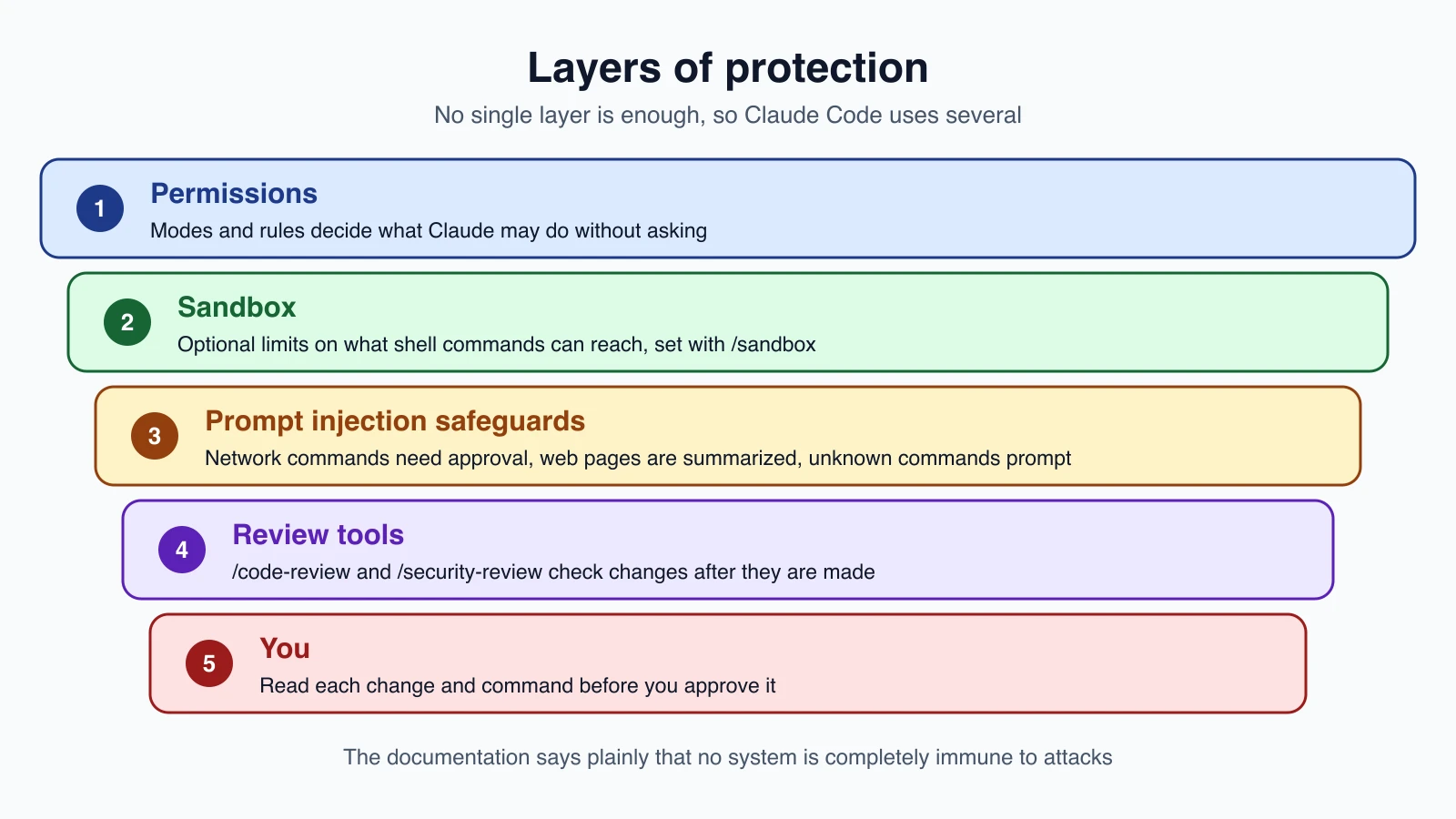
Permissions. As you learned in lesson 8, the permission mode and your rules decide what Claude can do without asking. In Manual mode, Claude Code starts read-only and asks before it edits files, runs tests or executes commands. Auto mode uses a separate classifier model to review actions instead of you.
The working-folder boundary. In Manual mode, Claude Code asks before its file tools read or write outside the folder where you started it. This boundary is a permission prompt. A shell command you approve can still write anywhere your user account can.
The sandbox. To limit shell commands at the operating system level, turn on the sandbox with /sandbox. It isolates what commands can reach on your files and network, and it can reduce permission prompts while keeping you safe.
Protection from prompt injection. Prompt injection is an attempt to trick an AI by hiding instructions in text it reads, such as a web page, an email or a code comment. Claude Code includes several safeguards:
- Commands that fetch web content, such as
curlandwget, are not auto-approved. In Manual mode they prompt like any other command. To stop them entirely, add a deny rule, for exampleBash(curl *). - For most web fetches, a separate model call summarizes the page, and Claude receives that summary instead of the raw page.
- In an interactive session, Claude Code asks you to trust a folder before it runs anything from it, and project MCP servers have their own approval prompt.
- In Manual mode, a command Claude Code cannot fully analyze prompts you, and a command that matches no rule needs your approval.
- Credentials are stored in the macOS Keychain when available. On Linux they are in a file readable only by you.
One caution from lesson 22: a non-interactive -p run shows neither trust prompt, so run it without --bare only in projects you trust.
Habits that keep you safe
The documentation lists practices for working with untrusted content. Follow them:
- Review suggested commands before you approve them.
- Avoid piping untrusted content directly to Claude.
- Verify proposed changes to critical files.
- Use virtual machines for scripts and tool calls, especially when talking to outside web services.
- Report suspicious behavior with
/feedback.
A few more that follow from this course:
- Keep secrets out of files Claude can read, and block them with deny rules such as
Read(./.env). - Use read-only credentials for databases and other servers (lesson 19).
- Commit before large changes, review the diff, and read pull requests before they go out (lesson 21).
- Audit your rules now and then with
/permissions. - Only add plugins and MCP servers from sources you trust (lessons 19 and 20).
For teams, use managed settings to enforce standards, share approved permission settings through version control, and consider a ConfigChange hook (lesson 18) to audit or block settings changes during sessions.
If you ever find a real security vulnerability in Claude Code itself, do not disclose it publicly. Report it through Anthropic's HackerOne program with detailed steps to reproduce it.
Mistakes beginners make
- Trusting the code because it looks tidy. Run the tests and read the diff.
- Running
--fixwithout a commit. Rewind may not undo a background fix. Commit first. - Asking only for problems and fixing every finding. Keep reviews focused, and use "skip style" for spec checks.
- Approving commands without reading them. The approval prompt is a safety layer only if you use it.
- Piping untrusted content straight into Claude. Treat outside text as possibly hostile.
- Assuming a protection means total safety. The documentation itself says no system is completely immune.
Quick recap
/code-reviewreviews your branch, a pull request, a commit range or a path, in a background subagent.- Use
--fixto apply findings,--commentto post them, and--max-findingsto control how many you see. - Commit before
--fix, because rewind may not undo a background review's edits. /security-reviewruns a security pass over your branch's changes, and the security guidance plugin checks Claude's code as it is written.- Claude Code layers permissions, an optional sandbox and prompt-injection safeguards, and you remain the last layer.
- Review commands before approving, avoid piping untrusted content, and keep secrets and credentials locked down.
Try it yourself
In your claude-practice folder, make a small change on a branch, such as adding a script with a deliberate mistake. Commit your earlier work, then run /code-review and read the findings. Run it again at /code-review low and compare how many findings you get. Finally, ask Claude to fix one issue by hand, and use git diff to read exactly what changed before you commit.
Next lesson: scheduled tasks and loops.