
Some jobs would flood your conversation with material you will never look at again: a hundred search results, a dozen files, a long log. A subagent takes that job off your hands. After this lesson you will know what subagents are, which ones Claude Code already has, how to ask for one, how to build your own, and how to decide when a subagent is the right tool.
What a subagent is
A subagent is a specialized helper that Claude can hand a task to. Each one runs in its own context window, with its own instructions, its own set of tools and its own permissions. It does the work independently and sends a short result back to your main conversation.
Remember the context window from lesson 6: Claude can only keep so much in mind at once. A subagent protects that space.
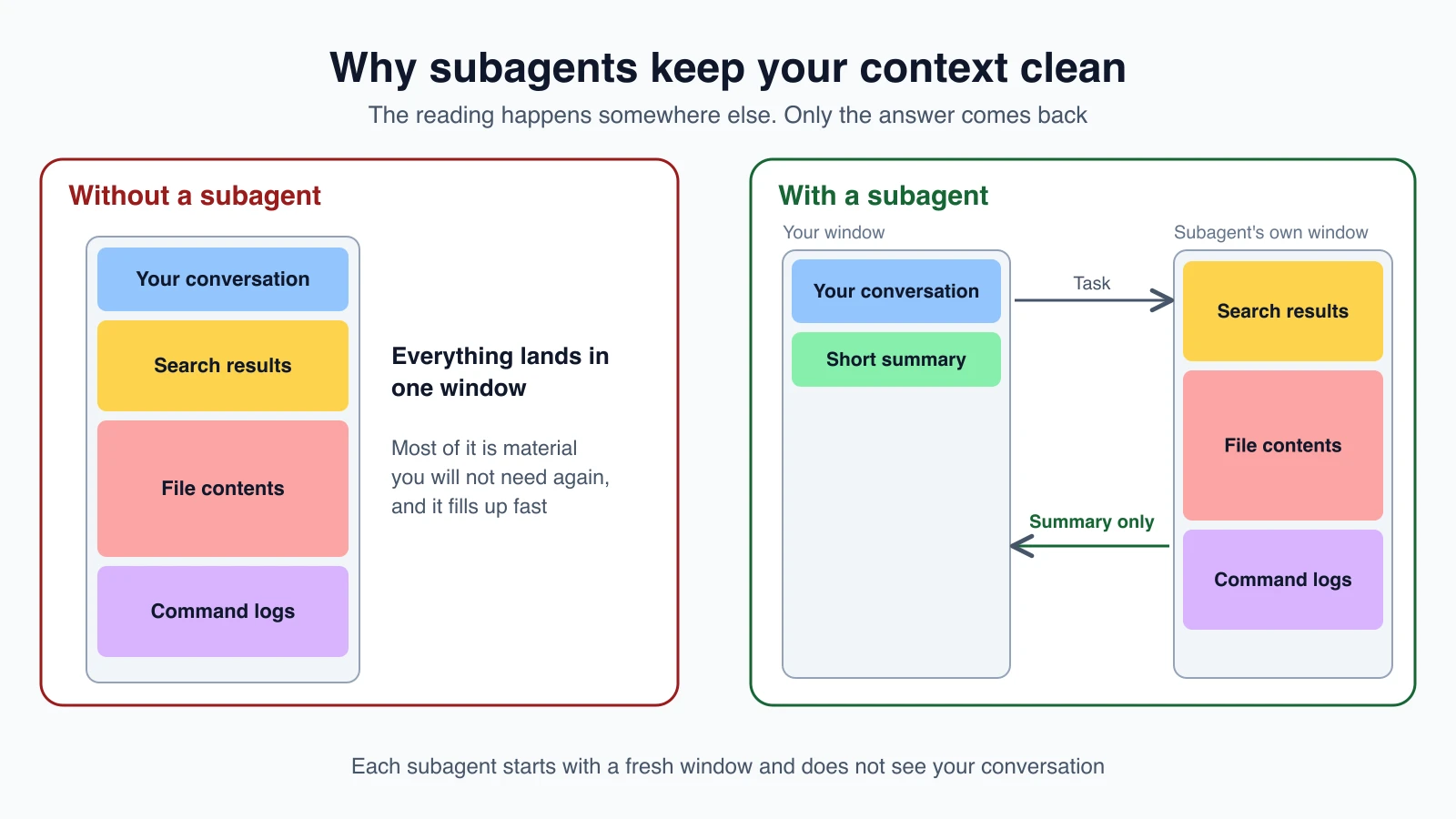
That is the main benefit. Subagents also let you:
- Limit what a helper can do by restricting its tools, for example a reviewer that can read but not edit.
- Reuse a setup across projects by saving the helper as a file.
- Focus behavior with a specific set of instructions.
- Control cost by routing simple work to a cheaper, faster model such as Haiku.
Subagent work counts toward the same usage limits as your main conversation, so they help with focus, not with free capacity.
The built-in subagents
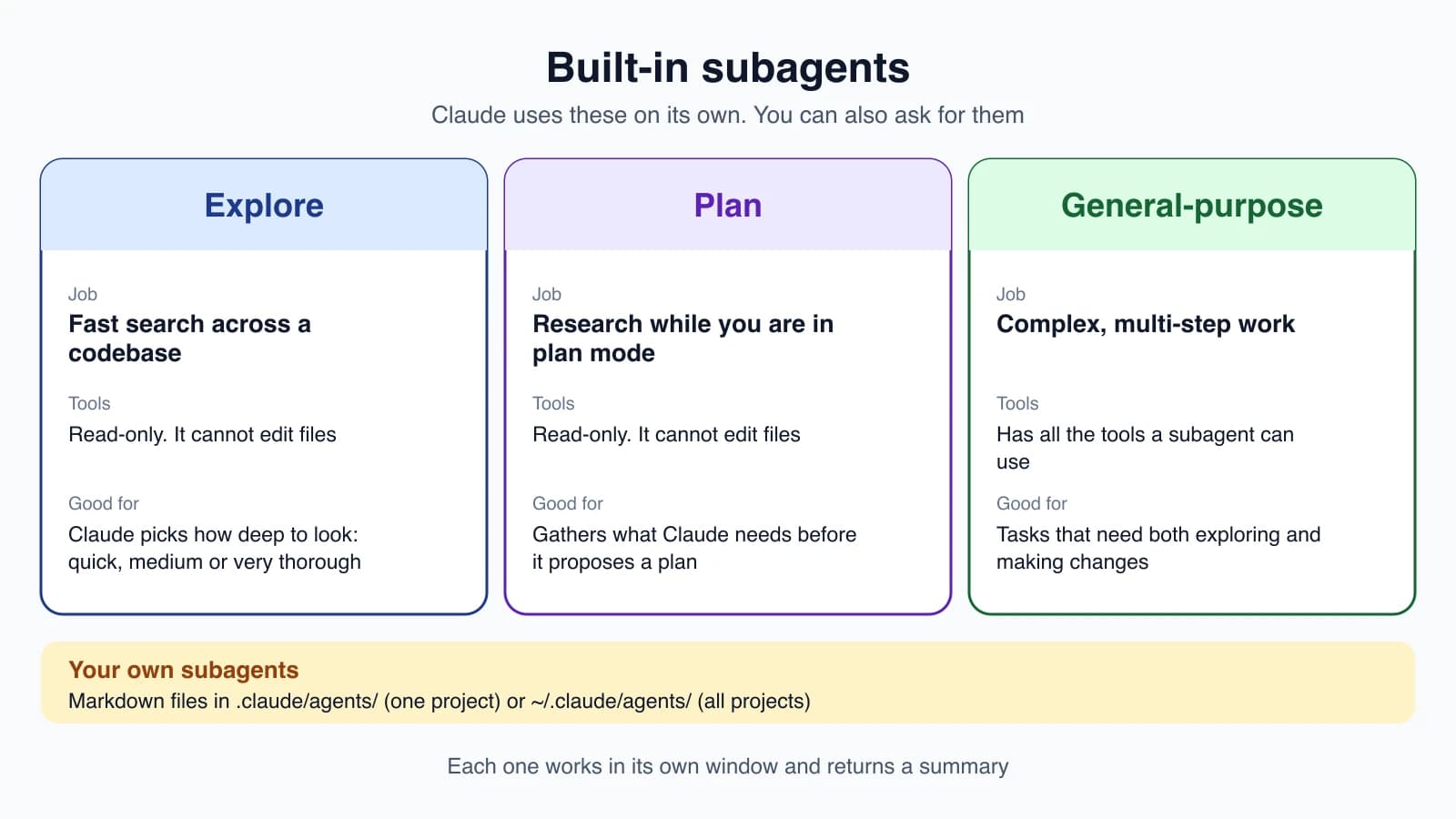
You can use a subagent without creating anything. Claude Code includes several.
| Subagent | Tools | What it is for |
|---|---|---|
| Explore | Read-only. It cannot edit files | Fast file discovery and code search. Claude picks a depth: quick, medium or very thorough |
| Plan | Read-only | Researching the codebase while you are in plan mode (lesson 7) |
| general-purpose | All tools available to subagents | Complex work that needs both exploring and making changes |
There are also a couple of small helpers that Claude Code uses for you, such as one for the /statusline command and one that answers questions about Claude Code's own features. Explore and Plan skip your CLAUDE.md files to stay fast and cheap.
Claude chooses these on its own, and you can ask for one directly:
1use a subagent to investigate how our auth system handles token refreshThe subagent reads many files in its own window and reports a summary, so your main conversation stays clean.
Create your own subagent
A custom subagent is a markdown file with a short header and instructions, much like a skill. You can write it yourself or ask Claude to write it. Save it in one of these places:
| Location | Reaches |
|---|---|
.claude/agents/ | This project. Commit it to share it |
~/.claude/agents/ | All your projects |
A plugin's agents/ folder | Wherever the plugin is enabled |
If two subagents share a name, the one from the higher-priority place wins: managed settings first, then the --agents flag, then project, then your personal folder, then plugins. Claude Code watches these folders, so new files take effect within seconds. Restart if you create the very first file in a new agents folder.
Here is an example, saved as ~/.claude/agents/code-improver.md:
1---
2name: code-improver
3description: Scans files and suggests improvements for readability, performance, and best practices. Use after writing or modifying code.
4tools: Read, Grep, Glob
5model: sonnet
6---
7
8You are a code improvement specialist. For each issue you find, explain
9the problem, show the current code, and provide an improved version.
The top part is the header. The part below is the helper's system prompt, the standing instructions it works from.
The header fields
Only name and description are required:
| Field | What it does |
|---|---|
name | A unique name. It cannot contain a colon |
description | When Claude should hand work to this helper. Claude reads it to decide |
tools | The tools it may use, as an allowlist. If you leave it out, it inherits all the tools available |
disallowedTools | Tools to take away from the list |
model | sonnet, opus, haiku, fable, a full model ID, or inherit to use your current model |
permissionMode | The permission mode it works under, such as plan or acceptEdits |
maxTurns | A cap on how many steps it may take |
skills | Skills to preload for it |
memory | A memory folder that persists between conversations |
isolation | worktree runs it in a temporary Git worktree |
Multi-word field names are written in camelCase, such as disallowedTools, and must match exactly. Claude Code ignores unknown fields without a warning, so check spelling.
Control its tools
Limiting tools is how you make a subagent safe. Two examples:
1---
2name: safe-researcher
3description: Research agent with restricted capabilities
4tools: Read, Grep, Glob, Bash
5---1---
2name: no-writes
3description: Inherits the available tools except file writes
4disallowedTools: Write, Edit
5---If you set both fields, the denylist is applied first, then the allowlist works from what remains. For finer control, such as allowing git status but blocking git push, use a hook (lesson 18).
Choose a model
If you do not set model, Claude Code picks in this order: the model Claude names when it delegates, then the model field in the file, then the CLAUDE_CODE_SUBAGENT_MODEL environment variable, then your main conversation's model. A cheap model such as haiku is a good match for simple lookups.
Ask for a subagent
There are three ways to call one:
- In plain words. "Use the code-improver agent to suggest improvements in this project."
- With an @-mention. Type
@and pick the subagent from the list, or type@agent-code-improver. Your whole message still goes to Claude, which writes the task for the subagent. - For a whole session. Start Claude Code with
claude --agent code-reviewerso the main conversation itself runs as that subagent. To make it the project default, set"agent": "code-reviewer"in.claude/settings.json.
Claude also delegates on its own when your request matches a subagent's description. If you want it to delegate eagerly, include a phrase such as "use proactively" in the description. Keep descriptions short, since they are loaded into context.
What a subagent can and cannot see
A subagent starts with a fresh context window. It does not see your conversation, the files Claude already read, or skills you already used. Claude writes it a delegation message that summarizes the task.
It does receive its own instructions, that delegation message, your CLAUDE.md files (except for Explore and Plan), and any skills listed in its skills field. It does not receive your conversation history, your output style, or the main conversation's auto memory.
That cold start is why a subagent suits self-contained jobs. If you need lots of back-and-forth, stay in the main conversation.
Foreground and background
A foreground subagent blocks your conversation until it finishes, and its permission prompts come to you. A background subagent runs while you keep working. Its permission prompts appear in your session, naming the subagent that is asking, and pressing Esc denies that one request without stopping it. Press Ctrl + B to move a running task into the background.
Limits worth knowing
- A subagent can start its own subagents, up to three layers below the main conversation. To stop a specific helper from doing it, leave
Agentout of itstoolslist. - By default, at most 20 subagents can run at once.
Subagent, main conversation or skill?
| Use | When |
|---|---|
| The main conversation | You need frequent back-and-forth, shared context across steps, or a quick targeted change |
| A subagent | The job produces a lot of output you will not need again, needs enforced tool limits, or is self-contained |
| A skill (lesson 16) | You want a reusable procedure that runs inside the main conversation |
For a quick question about something already in the conversation, /btw answers without tools and without adding to the history.
Mistakes beginners make
- Delegating a task that needs your context. A subagent starts cold. Give it a self-contained job.
- A vague description. Claude uses it to decide when to delegate. Say what the helper does and when to use it.
- Leaving tools wide open. A reviewer rarely needs to edit files. Use
toolsordisallowedTools. - Misspelling a header field. Unknown fields are ignored without a warning.
- Using a strong model for simple lookups. Set
model: haikufor cheap searches. - Expecting a subagent to remember the chat. It sees only the task Claude writes for it.
Quick recap
- A subagent works in its own window and returns a summary, which keeps your main conversation clean.
- Built-in helpers include Explore, Plan and general-purpose.
- Create your own as a markdown file in
.claude/agents/or~/.claude/agents/. - Limit tools with
toolsordisallowedTools, and pick a model withmodel. - Call one in plain words, with an @-mention, or with
claude --agent name. - Use a subagent for self-contained, output-heavy jobs, and stay in the main conversation for back-and-forth.
Try it yourself
In your claude-practice folder, create .claude/agents/page-reviewer.md with the name page-reviewer, tools Read, Grep, Glob, and a description such as "Checks HTML pages for missing titles and broken links. Use after adding or changing pages". Write two or three lines of instructions below the header. Then ask: "Use the page-reviewer agent to check every page in this folder". Notice that it can read but cannot change your files.
Next lesson: hooks.