
You have used built-in slash commands such as /clear and /compact. This lesson shows you how to create your own. A skill is a saved set of instructions that Claude can use whenever it is relevant, or that you can start by typing a slash command. After this lesson you will know when a skill is worth creating, how to write one, how to pass it information, and how to decide who is allowed to start it.
This is the first lesson of Module 4, where you extend what Claude Code can do.
What a skill is
A skill is a folder that contains a file named SKILL.md. The file holds instructions. Claude adds it to its toolkit and uses it when the task matches, or you invoke it directly with /skill-name.
Create a skill when:
- You keep pasting the same instructions, checklist or procedure into chat.
- A section of your
CLAUDE.mdhas grown from a fact into a multi-step procedure.
There is one important difference from CLAUDE.md. The text in CLAUDE.md is loaded into every session. A skill loads in stages: Claude always sees its short description, but the full instructions load only when the skill is used. A long release checklist in a skill costs almost nothing until you need it.
Where skills live
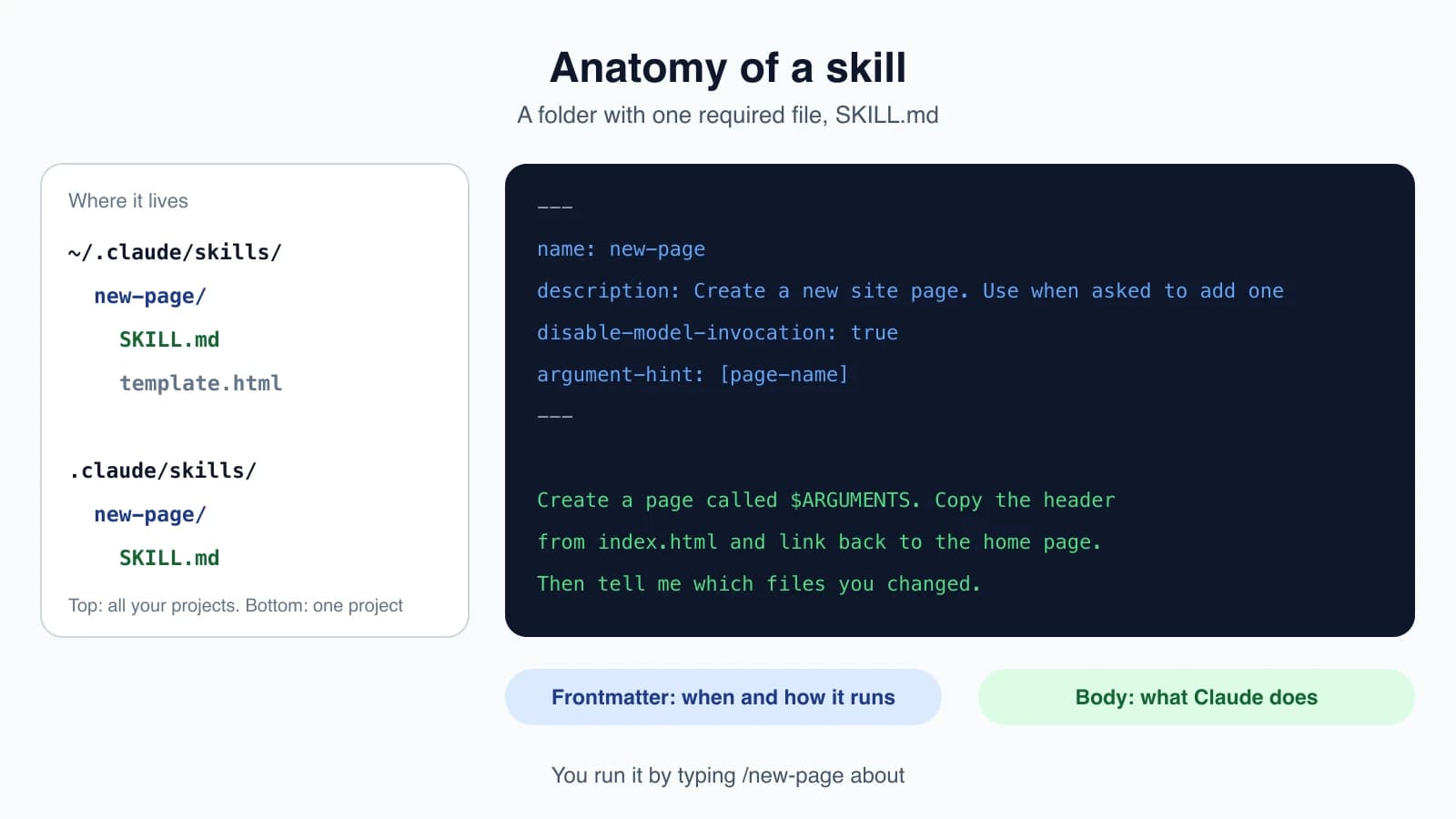
Where you save a skill decides which sessions can use it:
| Location | Path | Available in |
|---|---|---|
| Personal | ~/.claude/skills/<skill-name>/SKILL.md | All your projects on this computer |
| Project | .claude/skills/<skill-name>/SKILL.md | Sessions in this project. Commit it to share with your team |
| Plugin | <plugin>/skills/<skill-name>/SKILL.md | Wherever the plugin is enabled |
| Organization | A folder managed by your organization | Everyone it is deployed to |
If a personal skill and a project skill have the same name, the personal one wins, and an organization skill beats both. Plugin skills carry the plugin's name, so they never clash. Skills from plugins are covered in lesson 20.
Write your first skill
A SKILL.md file has two parts. The top is a short header, called frontmatter, between two lines of three dashes. Below it are the instructions in plain markdown.
Create a skill for the practice website. First make the folder:
1mkdir -p .claude/skills/new-pageThen save this as .claude/skills/new-page/SKILL.md:
1---
2name: new-page
3description: Create a new site page. Use when asked to add one
4disable-model-invocation: true
5argument-hint: [page-name]
6---
7
8Create a page called $ARGUMENTS. Copy the header
9from index.html and link back to the home page.
10Then tell me which files you changed.
Restart Claude Code if it does not appear, then run:
1/new-page aboutClaude receives the instructions with $ARGUMENTS replaced by about, and creates about.html. You have just made your own slash command.
The header fields
All fields are optional, but a few matter a lot:
| Field | What it does |
|---|---|
name | The command name. Defaults to the folder name |
description | What the skill does and when to use it. Claude reads this to decide when to load the skill on its own |
argument-hint | A hint shown in autocomplete, such as [page-name] |
disable-model-invocation | true stops Claude from starting the skill by itself |
user-invocable | false hides it from the / menu so only Claude uses it |
allowed-tools | Tools Claude may use without asking while the skill runs |
context | Set to fork to run the skill in a separate subagent |
Claude Code ignores field names it does not recognize and does not warn you, so check your spelling.
Write the description carefully. Put the main use first, since the listing is cut off after about 1,500 characters. Include the kinds of requests that should trigger it, such as "Use when the user asks what changed or wants a commit message".
Who can start a skill
There are two ways a skill gets used: you type /skill-name, or Claude loads it automatically because your request matches the description. Two header fields let you control that.
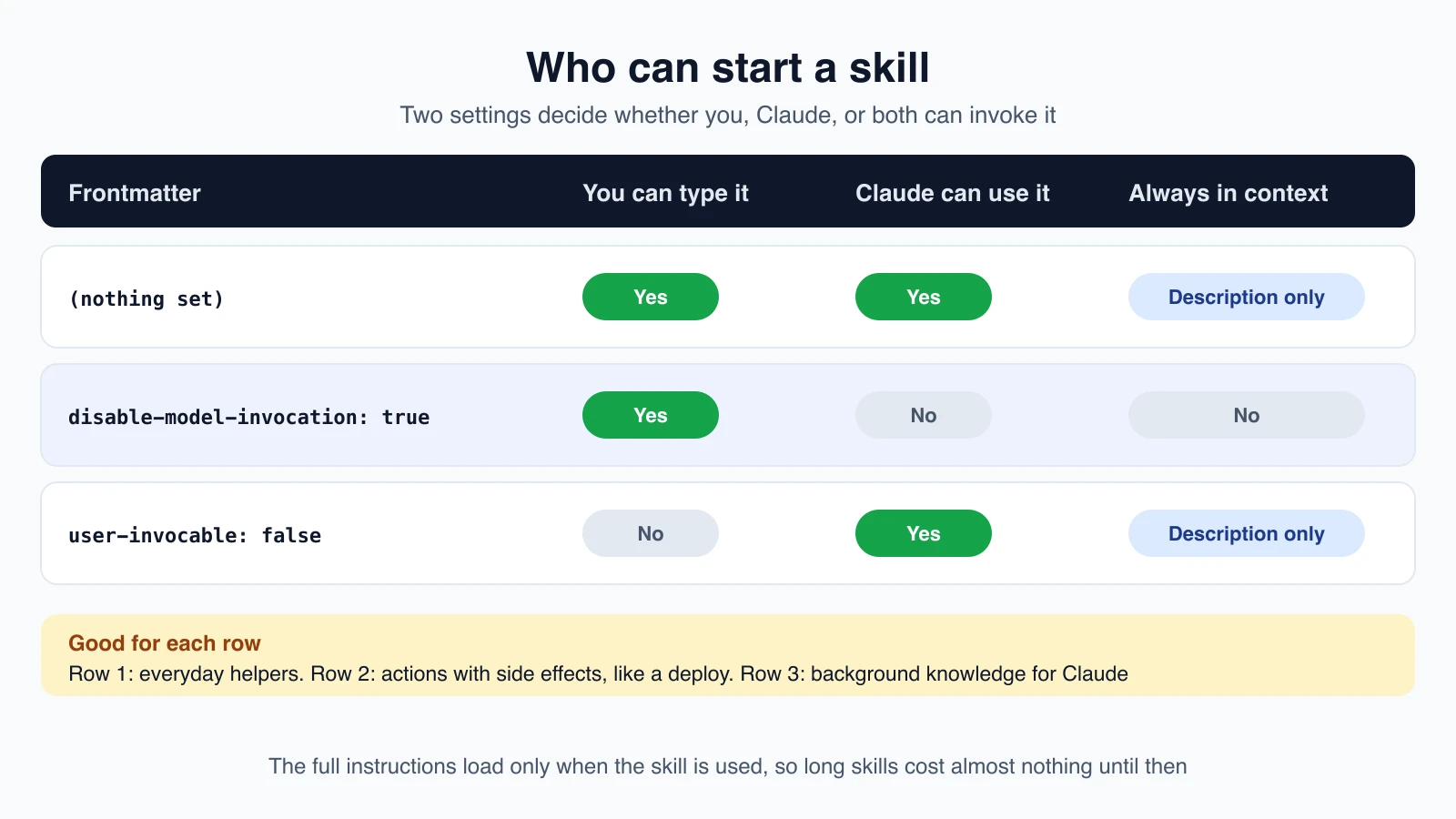
- Default. You and Claude can both start it. Its description is always in Claude's context.
disable-model-invocation: true. Only you can start it, and its description is not loaded. Use this for actions with side effects, such as a deploy. You do not want Claude deciding on its own that it is time to publish.user-invocable: false. Only Claude can use it, and it does not appear in the/menu. Use this for background knowledge, such as how an old system works.
Pass information with arguments
Whatever you type after the skill name becomes $ARGUMENTS. If you run /fix-issue 123 against this skill:
1---
2name: fix-issue
3description: Fix a GitHub issue
4disable-model-invocation: true
5---
6
7Fix GitHub issue $ARGUMENTS following our coding standards.
8
91. Read the issue description
102. Understand the requirements
113. Implement the fix
124. Write tests
135. Create a commit
Claude sees "Fix GitHub issue 123 following our coding standards." For several values, use positions that start at 0:
1Migrate the $0 component from $1 to $2.Running /migrate-component SearchBar JavaScript TypeScript fills in SearchBar, JavaScript and TypeScript. Put quotes around a value that has spaces. If you pass arguments to a skill with no placeholder, Claude Code adds them to the end so Claude still sees them.
Add live information with a shell command
A line that starts with an exclamation mark and a command in backticks runs that command before Claude sees the skill, and the output replaces the line. This skill always works on the real, current diff:
1---
2description: Summarizes uncommitted changes and flags anything risky. Use when the user asks what changed, wants a commit message, or asks to review their diff.
3---
4
5## Current changes
6
7!`git diff HEAD`
8
9## Instructions
10
11Summarize the changes above in two or three bullet points, then list any risks you notice such as missing error handling, hardcoded values, or tests that need updating. If the diff is empty, say there are no uncommitted changes.
Save it as ~/.claude/skills/summarize-changes/SKILL.md. Then either ask "What did I change?" and let Claude load it, or run /summarize-changes.
Keep big skills organized
A skill folder can hold more than SKILL.md:
1my-skill/
2├── SKILL.md      # Overview and navigation (required)
3├── reference.md  # Detailed notes, loaded when needed
4├── examples.md   # Examples, loaded when needed
5└── scripts/
6    └── helper.py # A script Claude can run
Mention each file in SKILL.md so Claude knows when to read it, and keep SKILL.md itself under about 500 lines. Once a skill loads, its text stays in the conversation, so write guidance that should apply for the whole task as standing instructions.
Run a skill in a subagent
Add context: fork to run the skill in an isolated helper, called a subagent, that does not see your conversation. The skill text becomes that helper's task, and the result comes back to you. This suits skills with a clear job, such as researching a folder, not skills that are only background guidance. Lesson 17 covers subagents.
Built-in skills
Claude Code ships with skills you start the same way, including /doctor, /code-review, /batch, /debug, /loop, /claude-api and /verify. If you create a skill with the same name as one of them, yours replaces it.
Older custom commands still work
Before skills, custom slash commands were single markdown files in .claude/commands/. They still work, and the two are now the same idea. A file at .claude/commands/deploy.md and a skill at .claude/skills/deploy/SKILL.md both create /deploy. Skills add extras: a folder for supporting files, control over who can start them, and automatic loading by Claude.
Skill, rule, CLAUDE.md or hook?
| You want | Use |
|---|---|
| A fact Claude should always know | CLAUDE.md (lesson 12) |
| A rule for one part of the code | A path-scoped rule (lesson 13) |
| A repeatable procedure, started by you or Claude | A skill |
| Something that must happen every time | A hook (lesson 18) |
Mistakes beginners make
- A vague description. Claude uses it to decide when to load the skill. "Helps with pages" is weak. "Create a new site page. Use when asked to add one" is strong.
- Letting Claude start a risky skill. Add
disable-model-invocation: truefor anything that deploys, deletes or sends. - Misspelling a header field. Unknown fields are ignored without a warning, so the skill quietly misbehaves.
- Putting a fact in a skill. Facts Claude should always know belong in
CLAUDE.md. Skills are for procedures. - Writing one huge skill. Split reference material into supporting files and keep
SKILL.mdshort. - Forgetting to restart. If a new skill does not appear, restart Claude Code and check the folder name and path.
Quick recap
- A skill is a folder with a
SKILL.mdfile. Claude sees its description always and loads the full text only when needed. - Save it in
~/.claude/skills/for all projects, or.claude/skills/for one project you share through Git. - The header sets the name, description and who can start it. The body holds the instructions.
$ARGUMENTSand$0,$1pass your input. A command in backticks after!adds live information.- Use
disable-model-invocation: truefor actions with side effects.
Try it yourself
In your claude-practice folder, create the new-page skill from this lesson. Run /new-page contact and open contact.html to check the result. Then create a second skill in ~/.claude/skills/ that summarizes changes, make an edit to a file, and ask Claude "what did I change?" to see it load on its own. If the practice folder is not a Git repository, run git init first.
Next lesson: subagents.