
Every Claude Code session starts with an empty memory. It does not remember yesterday's conversation, your team's rules, or the command that runs your tests. That is why CLAUDE.md exists. It is a plain text file where you write down what Claude should know at the start of every session. After this lesson you will know where the file goes, how Claude Code loads it, how to write one that Claude actually follows, and what to leave out.
What CLAUDE.md is
CLAUDE.md is a markdown file of instructions. A markdown file is just text with light formatting, such as # for headings and - for bullet points. You write it, and Claude Code reads it at the start of each session and keeps it in context.
Think of it as the note you would give a new teammate on their first day: how to run the project, what the conventions are, and what to avoid.
There are two ways Claude carries knowledge between sessions:
CLAUDE.mdfiles: instructions you write.- Auto memory: notes Claude writes for itself, based on your corrections and preferences. Lesson 13 covers it.
It is guidance, not a lock
One point to understand early. Claude treats CLAUDE.md as context, not as enforced settings. It usually follows what is written, and more specific, shorter instructions are followed more reliably. But Claude can decide that an instruction does not fit the situation. If something must never happen, use a permission deny rule from lesson 8, or a hook, which lesson 18 covers.
When to add something
Treat the file as the place for things you would otherwise explain again. Add a line when:
- Claude makes the same mistake a second time.
- A code review catches something Claude should have known about this project.
- You type the same correction into chat that you typed last session.
- A new teammate would need the same information to be productive.
Where the files live
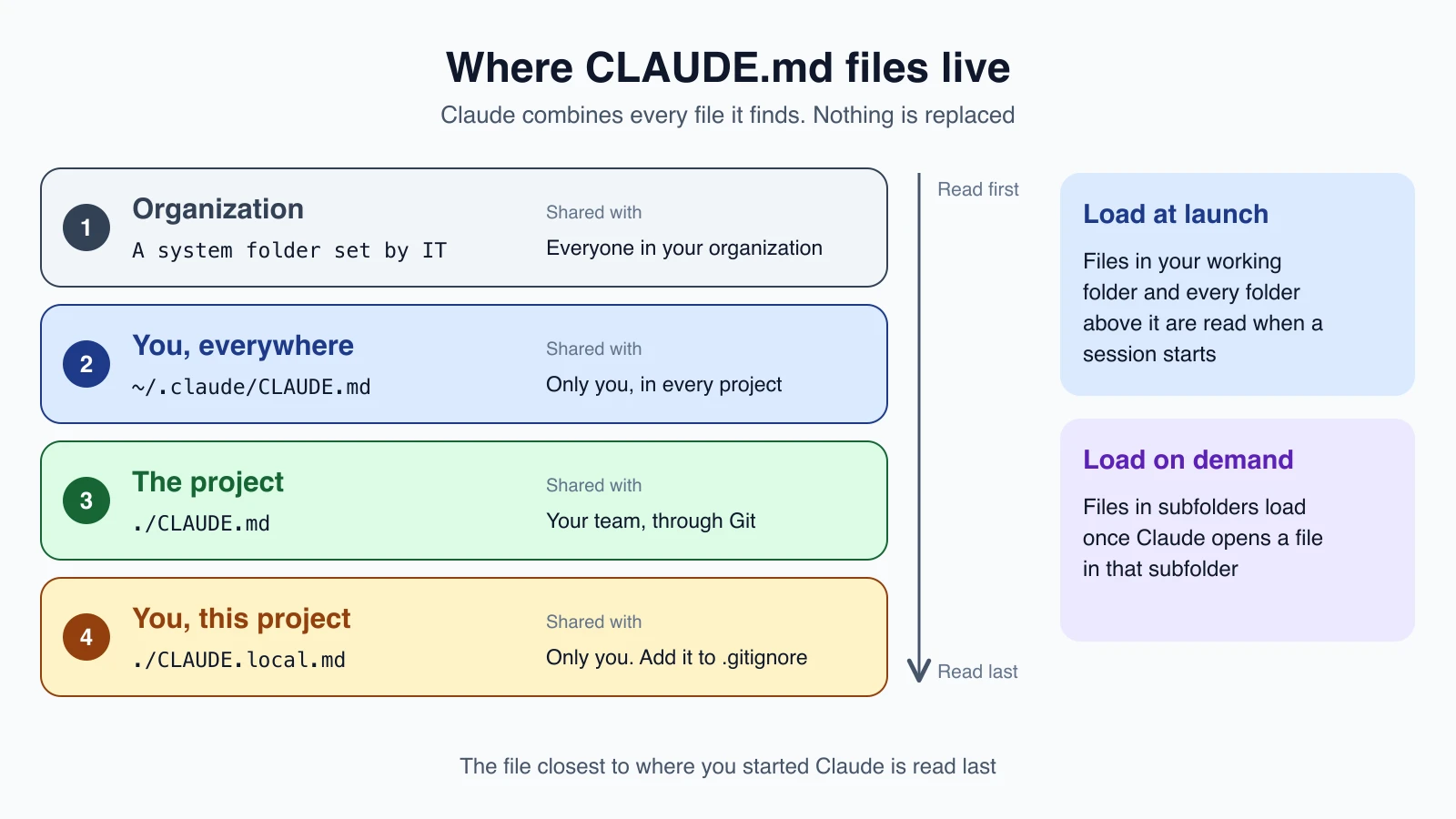
There are four places a CLAUDE.md can live, each with a different reach:
| Scope | Location | Shared with |
|---|---|---|
| Organization | A system folder managed by IT (for example /Library/Application Support/ClaudeCode/CLAUDE.md on macOS) | Everyone in the organization |
| User | ~/.claude/CLAUDE.md | Only you, in every project |
| Project | ./CLAUDE.md or ./.claude/CLAUDE.md | Your team, through Git |
| Local | ./CLAUDE.local.md | Only you, in this project |
In these paths, ~ means your home folder and . means the folder you are in. Most people start with just two: a project file for the team, and sometimes a personal file for their own habits. Add CLAUDE.local.md to your .gitignore so it never gets committed.
How Claude loads them
Claude does not pick one file and ignore the rest. It reads all the files it finds and combines them.
- At launch it loads
CLAUDE.mdfrom your current folder and every folder above it. Start Claude infoo/bar/and it readsfoo/bar/CLAUDE.mdandfoo/CLAUDE.md. - Files in subfolders load later, on demand, the first time Claude reads or edits a file in that subfolder.
- The order runs from the broadest file to the most specific, so instructions closest to where you started Claude are read last.
If two files give conflicting instructions, Claude may pick either one. Keep them consistent.
Create your first CLAUDE.md
You do not need to start from a blank page. Run this in your project:
1/initClaude analyzes your project and writes a starting CLAUDE.md with the build commands, test instructions and conventions it finds. If a file already exists, it suggests improvements instead of overwriting. Treat the result as a first draft. Your job is to remove anything obvious and add what Claude could not discover on its own.
To confirm it loaded, run /context and look under Memory files. To open and edit your memory files, run /memory.
Write instructions Claude follows
How you write affects how reliably Claude follows. Be concrete enough that someone could check whether the rule was followed.
| Vague | Concrete |
|---|---|
| Format code properly | Use 2-space indentation |
| Test your changes | Run npm test before committing |
| Keep files organized | API handlers live in src/api/handlers/ |
Three more guidelines:
- Keep it short. Aim for under 200 lines per file. Longer files use more of Claude's context and make it follow instructions less reliably.
- Use structure. Headings and bullets are easier to follow than dense paragraphs.
- Avoid contradictions. Review your files now and then. Run
/doctor prompt-auditand Claude will look for outdated, broken or conflicting instructions and propose fixes. It changes nothing until you ask.
What to include
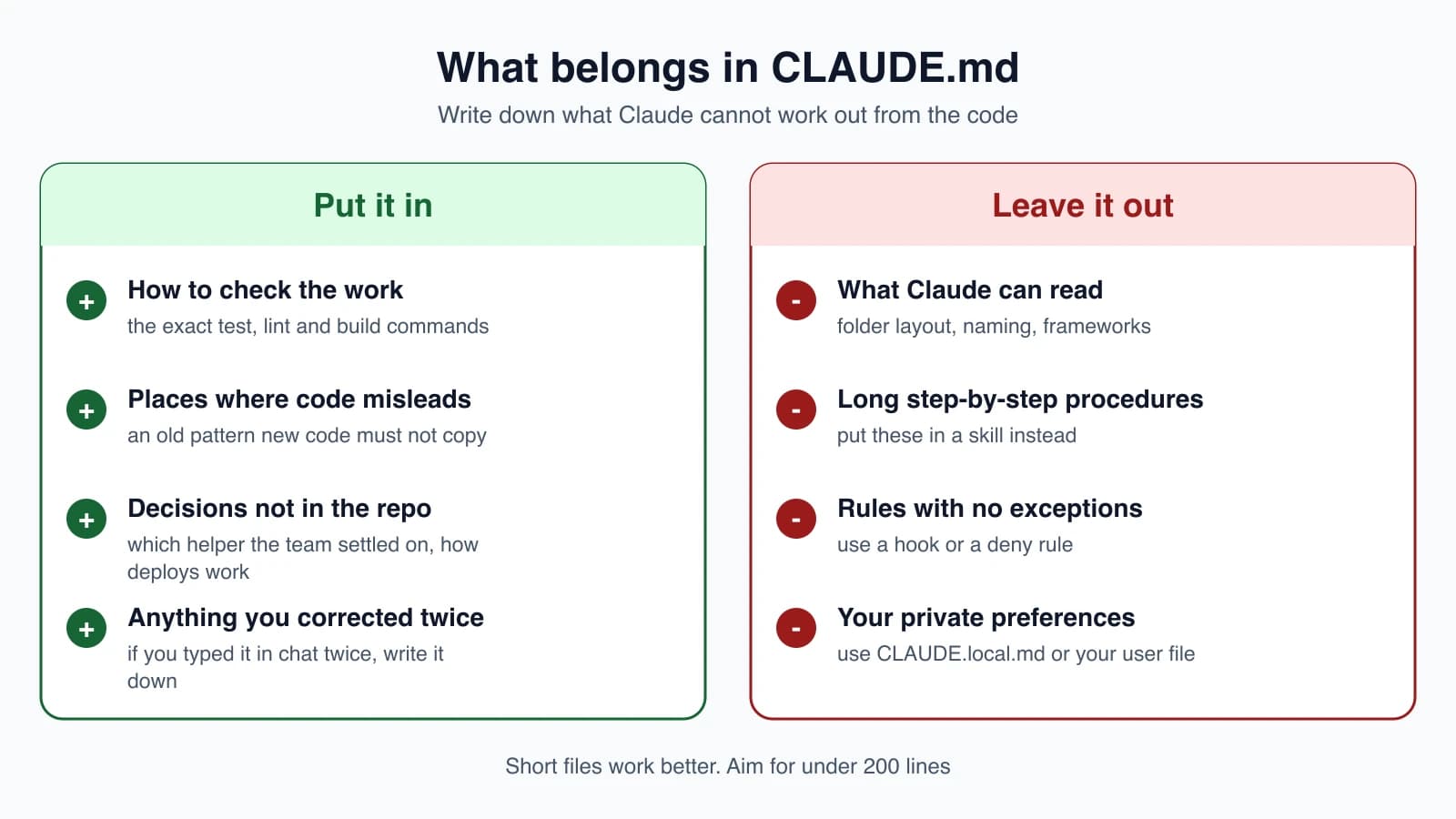
Claude reads your code very well, so do not repeat what it can see. Write down what it cannot find:
- How to check the work. The exact test, typecheck and lint commands, and how to run a single test file.
- Places where the code misleads. An old pattern that is everywhere but must not be copied, or a folder that looks unused and is not.
- Decisions that are not in the repo. Which helper the team settled on, how deploys work, what needs a review.
- Anything you have corrected twice.
A file that follows that test stays short. Here is an example for the practice website from earlier lessons:
1# Commands
2- Open the site: double-click index.html
3- Check links: open each page and click every link
4
5# Conventions
6- Every page uses the shared header from header.html
7- Use plain CSS in style.css, no frameworks
8
9# Gotchas
10- about.html is a copy of index.html. Change both when the header changes
And here is the same idea for a typical JavaScript project:
1# Commands
2- Install: pnpm install
3- Run one test file: pnpm vitest run path/to/file.test.ts
4- Typecheck: pnpm tsc --noEmit
5
6# Conventions
7- Use the error helpers in src/lib/errors.ts, never throw raw strings
8- src/legacy/ is still live but don't copy its patterns into new code
9
10# Gotchas
11- Integration tests need DATABASE_URL set, see .env.example
What to leave out
- Things Claude can read from the code, such as folder layout or the framework in use.
- Long step-by-step procedures, like a release checklist. Put those in a skill (lesson 16), which loads only when needed.
- Rules that only matter in one part of the project. Use a path-scoped rule, which lesson 13 covers.
- Rules with no exceptions. Use a hook or a deny rule.
- Your private preferences. Put those in
~/.claude/CLAUDE.mdorCLAUDE.local.md.
If you keep adding emphasis such as IMPORTANT to a line and Claude still misses it, the file has probably grown too long, or the line is a rule that belongs in a hook.
Import other files
A CLAUDE.md can pull in other files with the @ symbol followed by a path:
1See @README for the project overview and @package.json for available npm commands.
2
3# Additional Instructions
4- git workflow @docs/git-instructions.md
Relative paths are measured from the file that contains the import, not from where you started Claude. Imported files can import others, up to four levels deep. Two details matter:
- Imports help you organize a long file, but they do not reduce its cost. Imported files load into context together with the file that imports them.
- Text inside backticks or code blocks is not treated as an import. To mention a path without importing it, wrap it in backticks, such as
`@README`.
The first time a project imports a file from outside its own folder, Claude Code shows an approval dialog, so a file someone else committed cannot quietly pull in your private files.
Personal files
~/.claude/CLAUDE.mdholds habits you want in every project, such as how you like explanations written.CLAUDE.local.mdholds preferences for one project that you do not want to share, such as your test URLs. It loads next toCLAUDE.mdand is read after it. Keep it out of Git.
You can also write notes for human maintainers inside a CLAUDE.md as HTML comments, like <!-- why we keep this rule -->. They are removed before the text reaches Claude, so they cost nothing.
Mistakes beginners make
- Writing a very long file. Past about 200 lines, Claude follows it less reliably and it uses more context.
- Describing what the code already shows. Spend your lines on what Claude cannot see.
- Vague rules. "Write clean code" cannot be checked. "Use 2-space indentation" can.
- Contradicting instructions across files. Claude may pick one arbitrarily. Audit with
/doctor prompt-audit. - Expecting
CLAUDE.mdto enforce rules. It is guidance. Use hooks and deny rules for hard limits. - Committing private notes. Put personal details in
CLAUDE.local.mdand add it to.gitignore.
Quick recap
CLAUDE.mdgives Claude lasting instructions that load at the start of every session.- Files live at the organization, user, project and local level, and Claude combines them all.
- Run
/initfor a first draft,/memoryto edit, and/contextto confirm it loaded. - Be concrete, keep it under about 200 lines, and write only what Claude cannot read in the code.
- Use
@pathto import files,CLAUDE.local.mdfor private notes, and hooks for rules with no exceptions.
Try it yourself
In your claude-practice folder, run /init and read the file Claude creates. Delete one line that only repeats what is obvious, and add one real rule, such as "keep all pages in the same folder as index.html". Run /context and find the file under Memory files. Then type /exit, start a new session with claude, and ask "what are the rules for this project?" to see your file in action.
Next lesson: rules files and auto memory.