
These are the three jobs most developers hand to Claude Code first: finding bugs, cleaning up old code, and writing tests. They share one rhythm, and once you know it you can use it for almost any task. By the end of this lesson you will know what to tell Claude about a bug, how to refactor without breaking things, how to get tests worth keeping, and how to spot when a "fix" is hiding the problem.
This lesson finishes Module 2. It pulls together what you have learned about prompts, plans, permissions and context.
The rhythm: find, propose, apply, verify
Almost every recipe here follows the same four beats.
- Find. Ask Claude to locate the problem or the code in question.
- Propose. Ask for options or a plan before any change.
- Apply. Make one change.
- Verify. Run the code or the tests and read the result.
Skipping the second beat is the most common mistake. When you ask for a fix straight away, Claude chooses an approach for you. When you ask for a few ways first, you get to pick.
Debugging
A bug is a gap between what the code does and what you expected. Claude Code is good at closing it, because it can read the code, run it and look at the result. What it needs from you is the story of the bug.
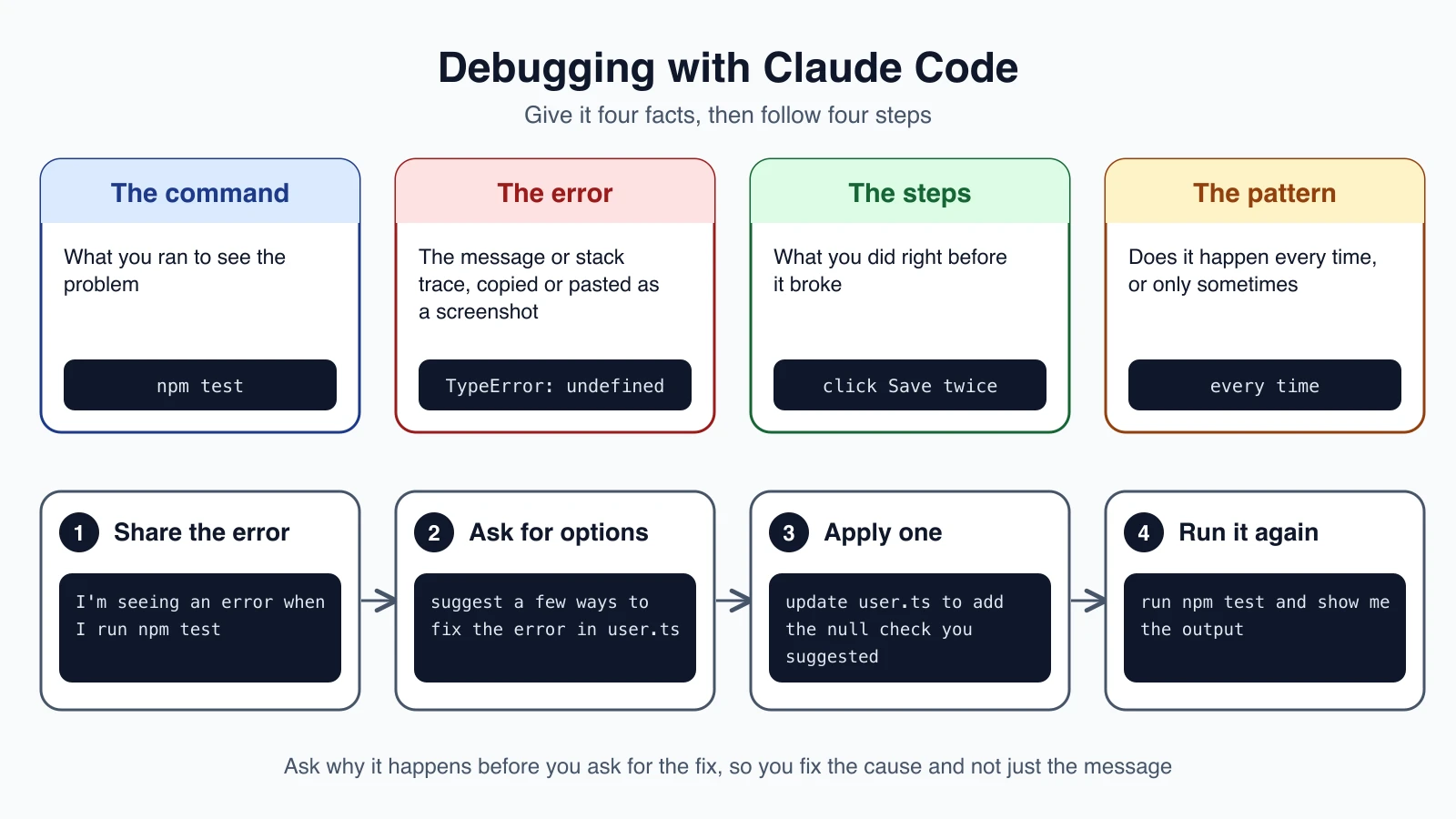
What to tell Claude
Four pieces of information make the biggest difference:
- The command you ran to see the problem, such as
npm test. Claude can then run it too and see the same failure. - The error, copied as text or pasted as a screenshot, including the stack trace if there is one. A stack trace is the list of function calls leading to the error, and it points Claude at the right file.
- The steps you took right before it broke.
- The pattern: does it happen every time, or only sometimes? An error that comes and goes needs a different hunt than one that is always there.
A debugging session
Start by sharing the error and letting Claude look:
1I'm seeing an error when I run npm testClaude will usually run the command itself, read the failure, and search for the cause. Then, instead of saying "fix it", ask for choices:
1suggest a few ways to fix the @ts-ignore in user.tsA @ts-ignore comment tells TypeScript to stop warning about a line. It hides a problem rather than solving it, so asking for alternatives is a good habit. When you have picked one, apply it:
1update user.ts to add the null check you suggestedFinally, verify:
1run npm test and show me the outputFix the cause, not the message
Some "fixes" make the error go away without solving anything. Wrapping code in a try-catch that swallows the error, adding a comment that silences a warning, or changing a test so it passes are all ways to hide a bug. Two prompts help:
1why does this happen? explain the root cause before changing any code1write a failing test that reproduces this bug, then fix it so the test passesThe second one comes from lesson 10. A test that fails before the fix and passes after it is proof that the bug is gone, and it stays in your project to stop the bug coming back.
Refactoring
To refactor is to change how code is written without changing what it does. You might replace an outdated pattern, split a huge function, or rename things so they make sense. The risk is that you quietly change the behavior along the way. The cure is to move in small steps and check each one.
The recipe
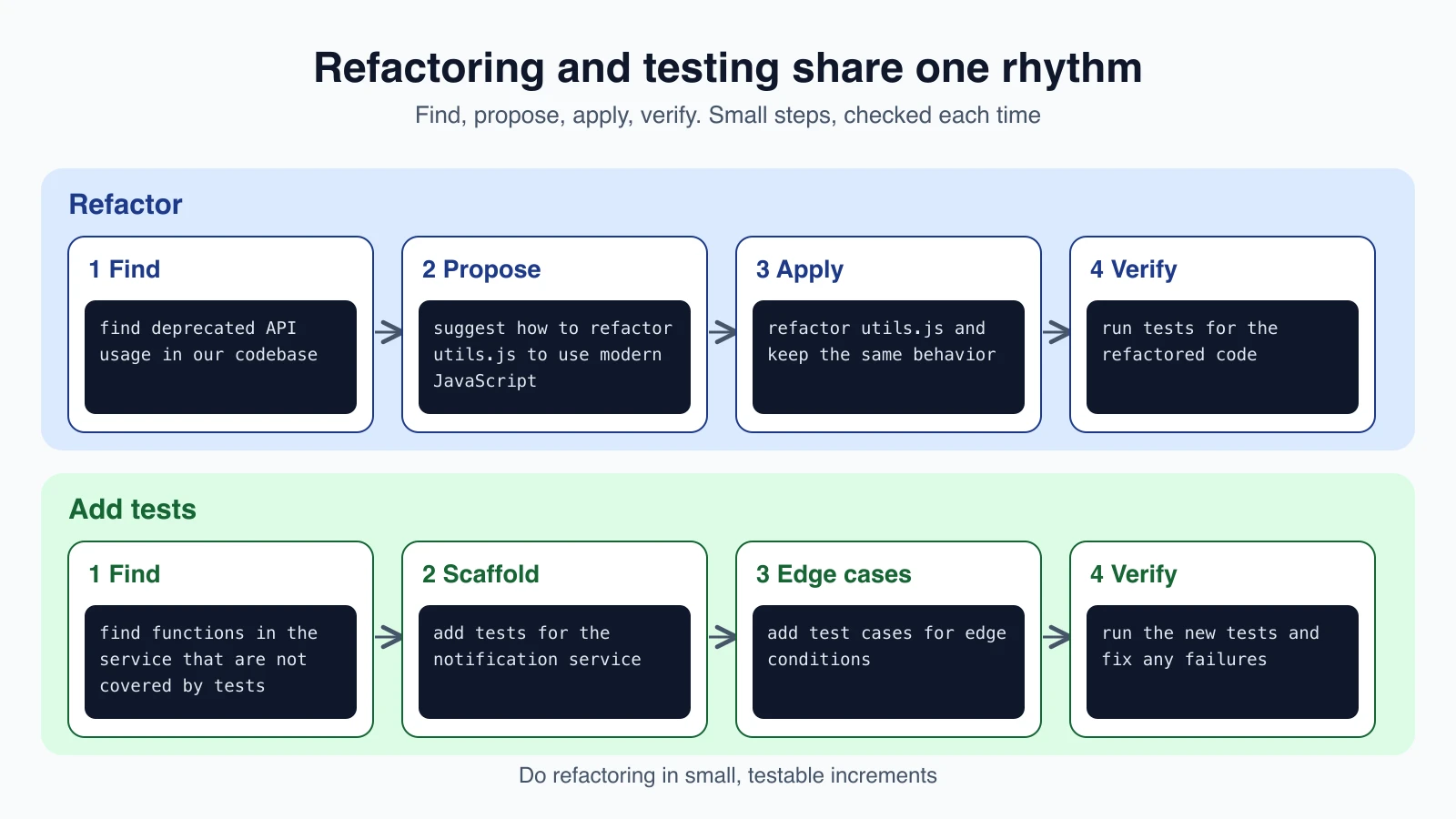
Start by finding what needs updating:
1find deprecated API usage in our codebaseAsk for a proposal:
1suggest how to refactor utils.js to use modern JavaScript featuresThen apply it with the behavior-preserving instruction spelled out:
1refactor utils.js to use ES2024 features while maintaining the same behaviorAnd verify:
1run tests for the refactored codeRules for safe refactoring
- Small, testable steps. Refactor one file or one function at a time, and run the tests after each.
- Have tests first. If the code has no tests, ask Claude to write them before the refactor, so you can see that behavior stays the same. Section three covers this.
- State what must not change. Say "keep the same behavior" or "stay backward compatible" out loud.
- Commit between steps. A Git commit after each good step gives you an easy place to return to. Lesson 9 explained why rewind alone is not a backup.
- Plan the big ones. For a refactor that touches many files, use plan mode from lesson 7 and review the plan first.
You can also ask Claude to explain why the new approach is better. That makes the change easier to review, and you learn something.
Writing tests
A test is a small program that runs your code with a known input and checks that the result is what you expect. Tests catch problems before your users do. Claude Code is good at writing them, because it reads your existing tests and copies their style, framework and the way they check results.
The recipe
Find what is not covered:
1find functions in NotificationsService.swift that are not covered by testsGenerate the first set:
1add tests for the notification serviceThen go beyond the obvious case:
1add test cases for edge conditions in the notification serviceAn edge case is an unusual input where code often breaks: an empty list, a zero, a missing value, a very large number. Claude can analyze your code paths and suggest error conditions, boundary values and unexpected inputs that are easy to overlook.
Finally, run them:
1run the new tests and fix any failuresBe specific about what behavior you want to check. "Write tests for login" is vague. "Write tests that cover a wrong password, an expired session and a locked account" tells Claude what matters.
Check the tests too
A test that always passes is worse than no test, because it gives you false confidence. After Claude writes tests, do a quick sanity check. Ask:
1temporarily break the function so it returns the wrong value, run the tests to confirm they fail, then restore itIf the tests do not fail when the code is broken, they are not testing anything useful. This is a good habit, and it takes one prompt.
Other everyday recipes
The same rhythm works for other chores.
Understand an unfamiliar project. Start broad and narrow down:
1give me an overview of this codebase1how is authentication handled?Find where something lives:
1trace the login process from front-end to databaseAdd documentation:
1add JSDoc comments to the undocumented functions in auth.jsOpen a pull request:
1create a prAlways read a generated pull request before you submit it. You can also ask Claude to point out risks in it.
Mistakes beginners make
- Saying "fix it" with no details. Share the command, the error, the steps and the pattern.
- Skipping the propose step. Ask for a few options, so the choice is yours.
- Accepting a fix that hides the error. Ask for the root cause, and ask for a failing test first.
- Refactoring without tests. You cannot tell whether behavior changed. Write tests first.
- Trusting generated tests blindly. Break the code on purpose and confirm the tests notice.
- Making one giant change. Small steps are easy to check and easy to undo.
Quick recap
- Every recipe follows find, propose, apply, verify.
- For bugs, share the command, the error, the steps and the pattern. Ask for the cause and a failing test, not just a fix.
- Refactor in small steps, keep the same behavior, and run tests after each one.
- For tests, name the behavior you care about, ask for edge cases, and check that the tests fail when the code is wrong.
- Commit between good steps, and use plan mode for large changes.
Try it yourself
In your practice folder, create a file called calc.js with this code. It has a hidden bug:
1function average(numbers) {
2  let total = 0;
3  for (const n of numbers) total += n;
4  return total / numbers.length;
5}
6
7module.exports = { average };
Start Claude Code and ask: "write tests for average in calc.js, including edge cases, run them, and tell me what fails". If you have Node.js installed, Claude can run them. Look at what it finds when the list is empty. Then ask for a few ways to handle that case, pick one, apply it, and run the tests again. Finish by asking Claude to break the function on purpose and show that your tests catch it.
Next lesson: CLAUDE.md, the file that gives Claude lasting instructions about your project.