
You have already met a few settings without calling them that: a default permission mode, an allow rule, a model, a memory switch. This lesson shows where all of them live. After it, you will know which settings file to edit, how to change a setting in two ways, what happens when two files disagree, and how to share the right settings with your team and keep the rest private.
Settings versus CLAUDE.md
Both change how Claude Code behaves, and they are easy to confuse. The difference is who obeys them.
CLAUDE.mdis read by Claude, which decides what to do with it. It is guidance.- Settings are read by Claude Code itself, which enforces them whatever Claude decides. A deny rule in settings blocks an action every time.
Settings are small JSON files. JSON is a text format made of keys and values inside curly braces, like {"model": "opus"}. They control things such as which model starts, what Claude may run without asking, which files it cannot read, and how the terminal looks.
The four settings files
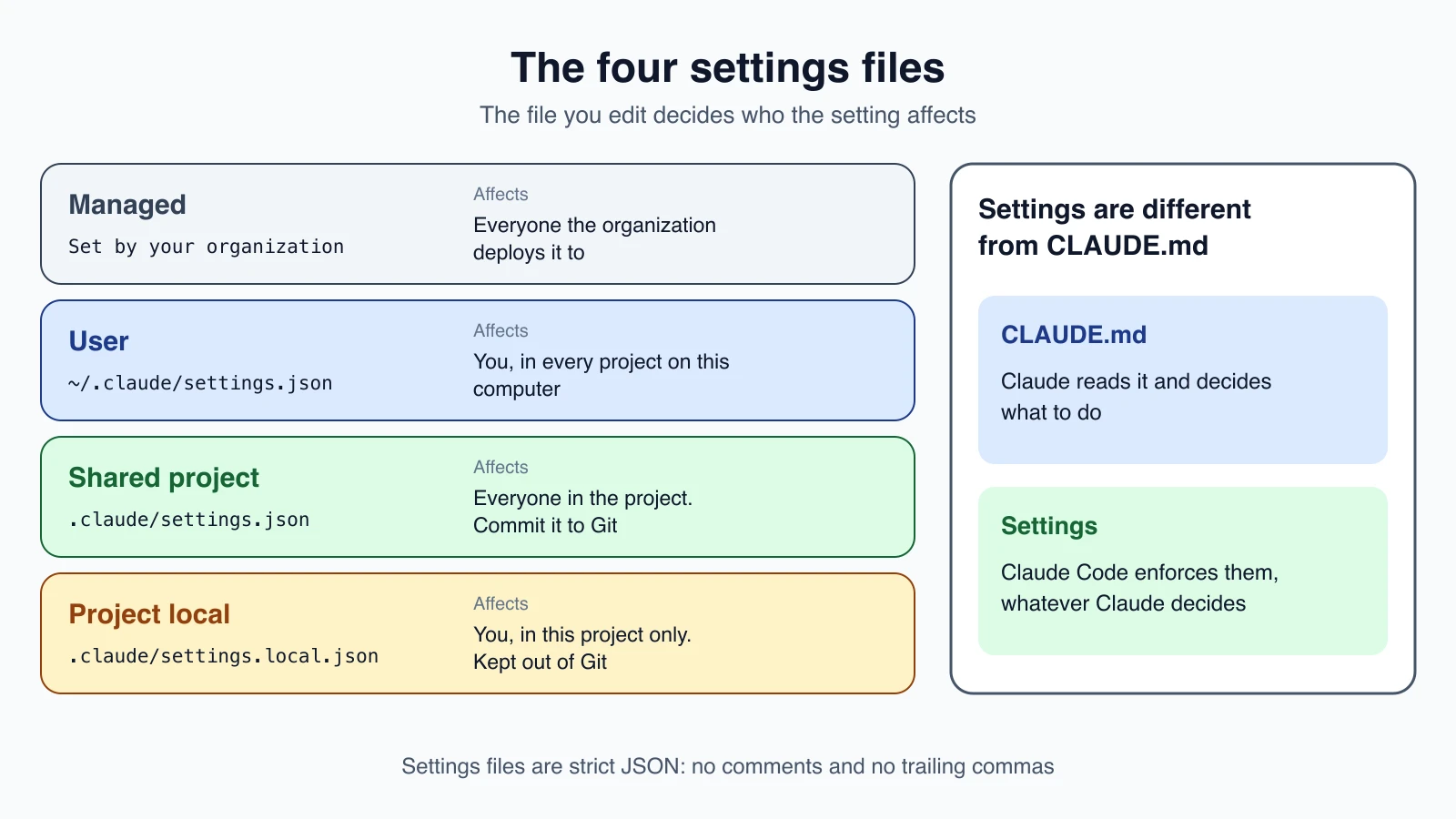
Claude Code reads settings from four places. The file a setting lives in decides who it affects.
| Scope | File | Who it affects |
|---|---|---|
| User | ~/.claude/settings.json | You, in every project on this computer |
| Shared project | .claude/settings.json | Everyone in the project. Commit it to Git |
| Project local | .claude/settings.local.json | You, in this one project only |
| Managed | Set by your organization | Everyone the organization deploys it to |
In these paths, ~ is your home folder, and a bare .claude is the .claude folder inside your project. On Windows, ~/.claude means %USERPROFILE%\.claude.
Installing Claude Code does not create any of these files. Claude Code creates ~/.claude/settings.json the first time you change an option in /config, and .claude/settings.local.json the first time you choose "Yes, and don't ask again" on a permission prompt. That second file is kept out of Git automatically. If you create it by hand, add it to .gitignore yourself.
There is also a fifth file, ~/.claude.json, which Claude Code writes for itself. It holds account details and MCP server setups. You do not need to edit it.
How to change a setting
With the /config menu
Run this inside Claude Code:
1/configIt opens a short list of personal options, such as theme, editor mode and verbose output. Pick one and Claude Code saves it for you. You can also set one directly:
1/config verbose=trueThe menu covers only common options, not every key.
By editing the file
For anything else, open the settings file in your editor. Settings files are strict JSON. A // comment or a trailing comma is an error. Here is a small user file that lets Claude run your lint and test commands without asking, and stops it reading .env files:
1{
2  "$schema": "https://json.schemastore.org/claude-code-settings.json",
3  "permissions": {
4    "allow": [
5      "Bash(npm run lint)",
6      "Bash(npm run test *)"
7    ],
8    "deny": [
9      "Read(./.env)",
10      "Read(./.env.*)"
11    ]
12  }
13}
The permissions rules use the syntax from lesson 8. The $schema line is optional. It points to a published description of the settings, which gives editors such as VS Code autocomplete and error checking.
Claude Code watches these files, so most edits apply to the running session without a restart. Run /status to confirm which files loaded. If you mistype the JSON, Claude Code tells you at the next start with a Settings Error, and claude doctor lists the details.
For one session only
To try a value without saving it, pass it when you start Claude Code:
1claude --settings '{"model": "claude-opus-5-5"}'That applies to this session and your files stay unchanged. Some settings also have their own flag, such as --model, and some have an environment variable, such as ANTHROPIC_MODEL.
Settings you already know
| Setting | What it does | Lesson |
|---|---|---|
permissions.allow, ask, deny | Rules for what Claude may do | 8 |
permissions.defaultMode | The mode a session starts in | 7 and 8 |
model | The starting model | 5 |
autoMemoryEnabled | Turns auto memory on or off | 13 |
autoUpdatesChannel | Follows the latest or stable release channel | 2 |
fastMode | Turns fast mode on | 5 |
Hooks, which lesson 18 covers, are configured here as well.
When two files disagree: precedence
If the same key is set in more than one place, Claude Code uses the value from the highest level.
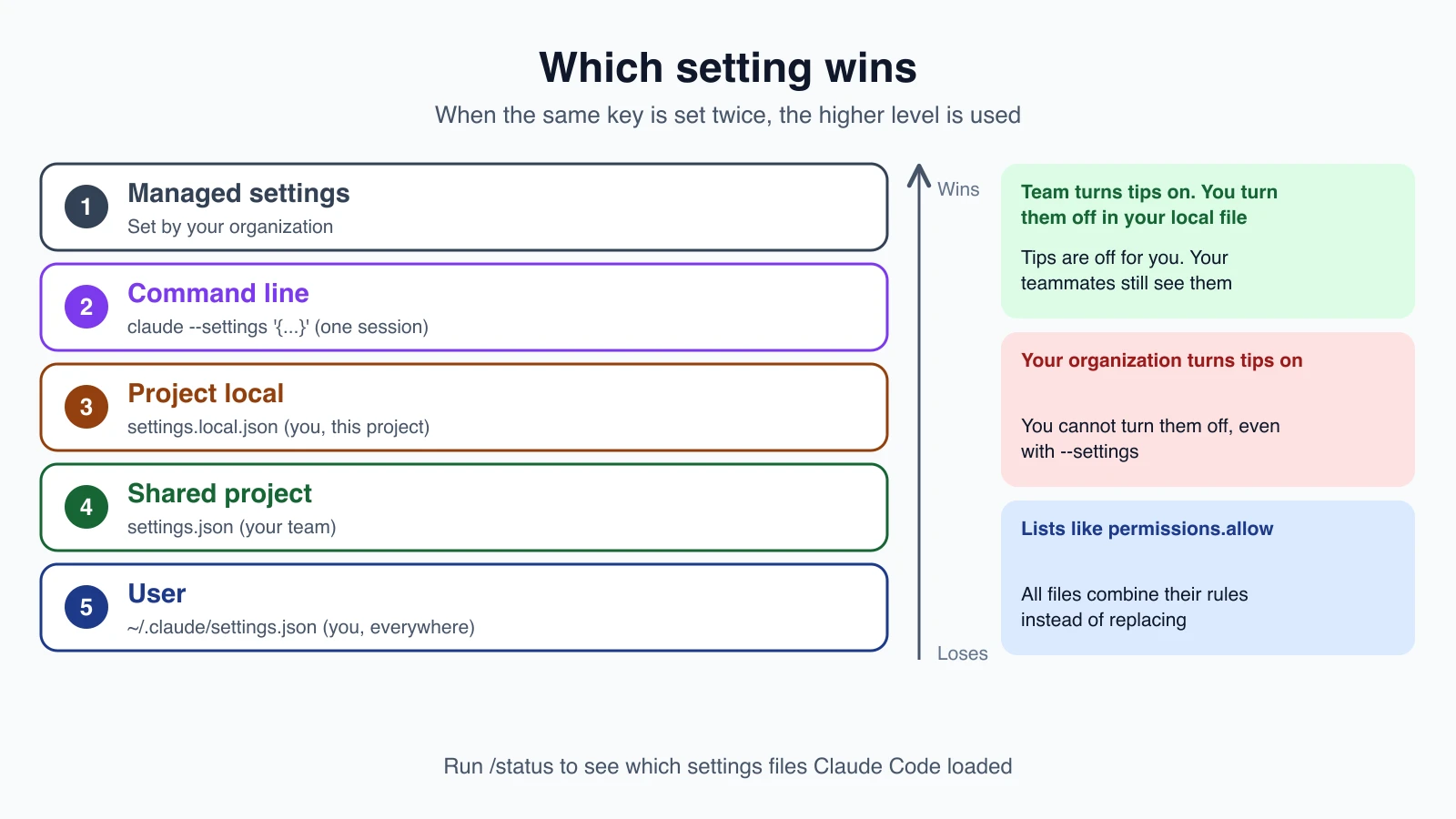
From highest to lowest:
- Managed settings from your organization. Nothing you set can override them.
- Command line, meaning
--settingsfor one session. - Project local, your personal file for this project.
- Shared project, the file your team commits.
- User, your personal file for every project.
Here is an example. Your team's .claude/settings.json sets a model, and you prefer another one. Put your choice in .claude/settings.local.json and only your sessions change. Your teammates are not affected, because that file stays on your computer.
Lists combine
Not every key is replaced. For lists such as permissions.allow, Claude Code combines the entries from every file instead of choosing one. Each file can add rules without removing another file's. Environment variables are not a level in this stack. Which one wins is decided key by key.
Sharing settings with your team
Commit .claude/settings.json so everyone who clones the project gets the same permissions, hooks and plugins. Each person can still override it in their own .claude/settings.local.json.
Some things wait for trust. permissions.allow rules, extra directories and most env values in a committed file apply only after each teammate trusts the folder. Until then they still see prompts. Deny and ask rules apply immediately.
One more safety rule. The auto and bypassPermissions modes are ignored when set as defaultMode in a project file. A repository you cloned cannot switch you into a hands-off mode. Set those in your user settings, or pass --permission-mode for one session.
Troubleshooting a setting that does not apply
When you set a key and nothing changes, work through these checks.
- Run
/status. It lists the settings files Claude Code loaded. If yours is missing, the file is in the wrong place or broken. - Look for a higher level. Another file,
--settingsor a managed source may set the same key above yours. - Check the JSON. A comment or a trailing comma makes Claude Code skip the file. Run
claude doctor. - Check whether the file can set that value. Some values do not take effect from project files, as with
autoabove. - Restart if a key is read only at startup. Most edits apply live, but a few keys are read once at the start of a session.
If your organization manages Claude Code, some settings are decided for you. /status names the managed source that applies.
Mistakes beginners make
- Putting personal settings in the shared file. Use
settings.local.jsonfor anything that is only yours, and commit only what the team should share. - Adding comments to the JSON. Settings files do not allow them.
- Expecting
CLAUDE.mdto act like a setting. A rule that must be enforced belongs in settings, as a deny rule or a hook. - Editing the wrong file. A setting in
.claude/settings.jsondoes nothing in other projects. For everywhere, use the user file. - Forgetting that lists merge. You cannot remove a teammate's allow rule from the shared file by leaving it out of yours.
- Changing a setting for one session and wondering why it vanished.
--settingslasts one session.
Quick recap
- Settings are JSON files that Claude Code enforces.
CLAUDE.mdis guidance that Claude reads. - The four files are user, shared project, project local and managed. The file decides who the setting affects.
- Change settings with
/config, by editing a file, or with--settingsfor one session. - Precedence from top: managed, command line, project local, shared project, user. Lists combine.
- Use
/statusto see what loaded andclaude doctorto find errors.
Try it yourself
In your claude-practice folder, create .claude/settings.local.json with {"permissions": {"deny": ["Read(./secret.txt)"]}}. Create a file called secret.txt with a line of text, start Claude Code, and ask it to read secret.txt to see the block. Run /status and find your local file in the Setting sources line. Then add .claude/settings.local.json to a .gitignore file if the folder is a Git repository.
Next lesson: output styles and the status line.