
In the last lesson you ran Claude Code from a script with claude -p. GitHub Actions is the natural next step for many teams: Claude Code runs inside your repository's own automation. Someone mentions @claude in a pull request, or a pull request opens, or the clock strikes nine, and Claude does a job and reports back. After this lesson you will know what the integration does, how to set it up, how to read a workflow file, how to keep it safe, and how to keep the cost under control.
What GitHub Actions is
GitHub Actions is GitHub's built-in automation. A workflow is a small file in your repository, in the .github/workflows/ folder, that says "when this happens, run these steps". The steps run on a temporary computer that GitHub provides, called a runner. Teams use workflows to run tests, build software and check pull requests. This kind of automation is often called CI, short for continuous integration.
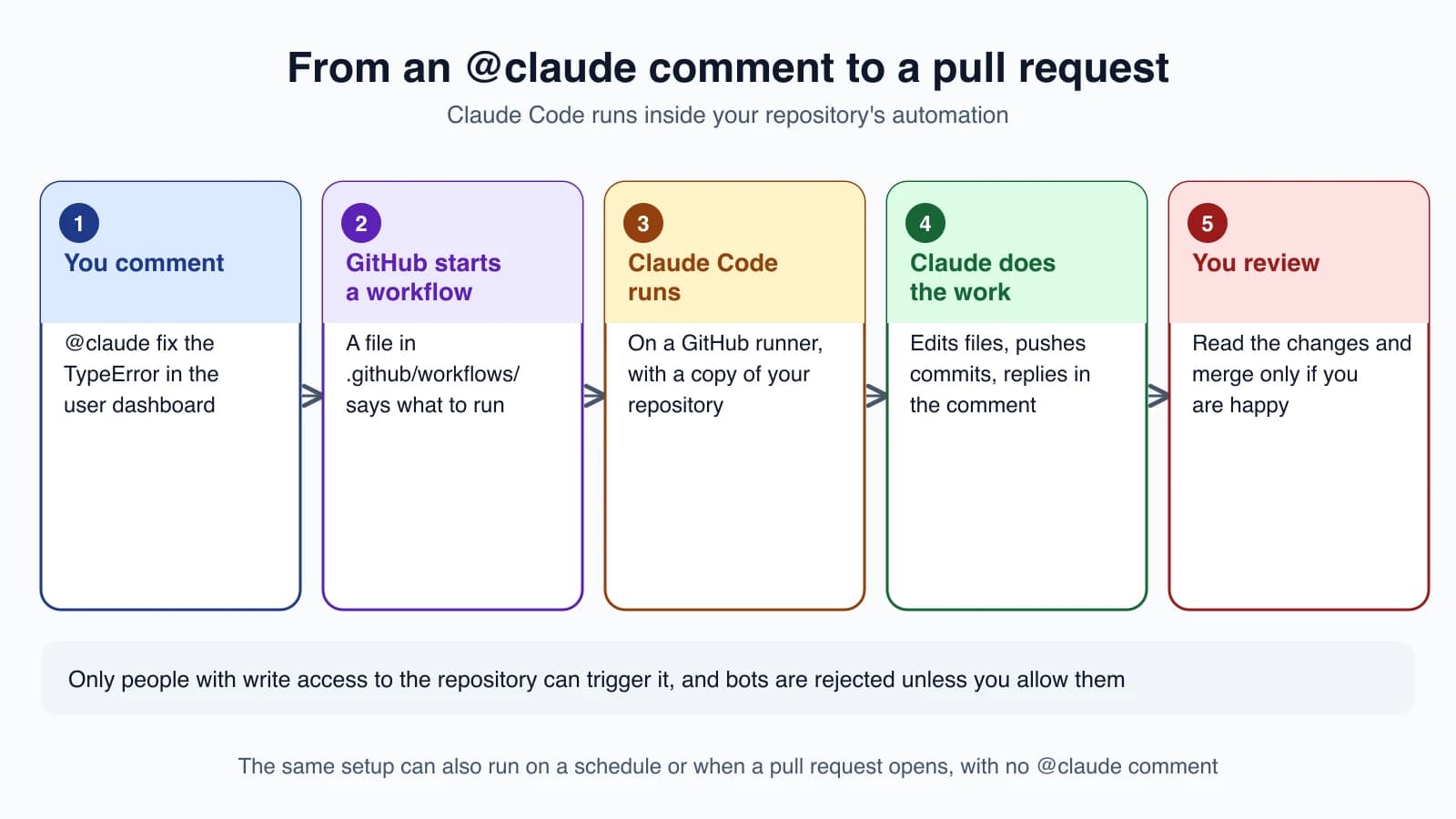
Claude Code GitHub Actions is a ready-made step, called anthropics/claude-code-action, that runs Claude Code inside a workflow. With it you can:
- Mention
@claudein a pull request or issue comment, and have Claude analyze code, make changes and push commits. - Turn an issue into a pull request.
- Review pull requests automatically.
- Run recurring jobs, such as a daily summary.
Set it up
You need admin access to the repository. There are two routes.
Quick setup
This works only for repositories on github.com. First install the GitHub command-line tool, gh, and sign in with gh auth login. Then open Claude Code in the repository and run:
1/install-github-appFollow the prompts. Claude Code installs the Claude GitHub App, saves a credential as a repository secret, and pushes a branch with the workflow files you choose, then opens GitHub with a pull request ready to create. Create and merge that pull request, and @claude starts working in the repository.
A secret is a value that GitHub stores for you and hides from the workflow's logs. The credential is saved as one of these:
ANTHROPIC_API_KEY, a key from the Claude Console.CLAUDE_CODE_OAUTH_TOKEN, a token tied to your Claude subscription, made withclaude setup-token.
You can press Esc to stop partway through. The closing message lists what already happened, such as a pushed branch or a saved secret.
Manual setup
Use this when you do not run Claude Code locally, when the command fails, or when you want full control:
- Install the Claude GitHub App on your repository.
- Add one of the two secrets above to the repository's settings.
- Copy the example workflow,
examples/claude.ymlfrom theclaude-code-actionrepository, into.github/workflows/.
To test, tag @claude in a comment on an issue or pull request.
What permissions you are granting
The workflow relies on three permissions of the app: Contents, Issues and Pull requests, each with read and write access. The Claude GitHub App is shared by several Claude features, so installing it grants a larger fixed set. GitHub does not let you accept only part of it. If your organization needs the smallest possible set, the documentation explains how to create a custom GitHub App with just those three.
Two ways it runs
The action decides how to behave from your workflow:
- Interactive mode. The workflow has no
prompt. Claude waits for the trigger phrase,@claudeby default, in a comment, a review or a new issue, then responds. Progress shows up as a comment. - Automation mode. The workflow has a
prompt. Claude runs on its own, with no mention needed, whenever the workflow's trigger fires. By default the result appears in the workflow's run log, unless the prompt tells Claude to post it.
Who can start it
Two checks run before Claude does anything. The person who triggered it must have write access to the repository, and bots are rejected unless you list them in allowed_bots, which stops bots triggering Claude in a loop.
Read a workflow file
Here is the workflow that answers @claude mentions:
1name: Claude Code
2on:
3  issue_comment:
4    types: [created]
5  pull_request_review_comment:
6    types: [created]
7jobs:
8  claude:
9    if: contains(github.event.comment.body, '@claude')
10    runs-on: ubuntu-latest
11    permissions:
12      contents: write
13      pull-requests: write
14      issues: write
15      id-token: write
16      actions: read
17    steps:
18      - uses: actions/checkout@v6
19        with:
20          fetch-depth: 1
21      - uses: anthropics/claude-code-action@v1
22        with:
23          anthropic_api_key: ${{ secrets.ANTHROPIC_API_KEY }}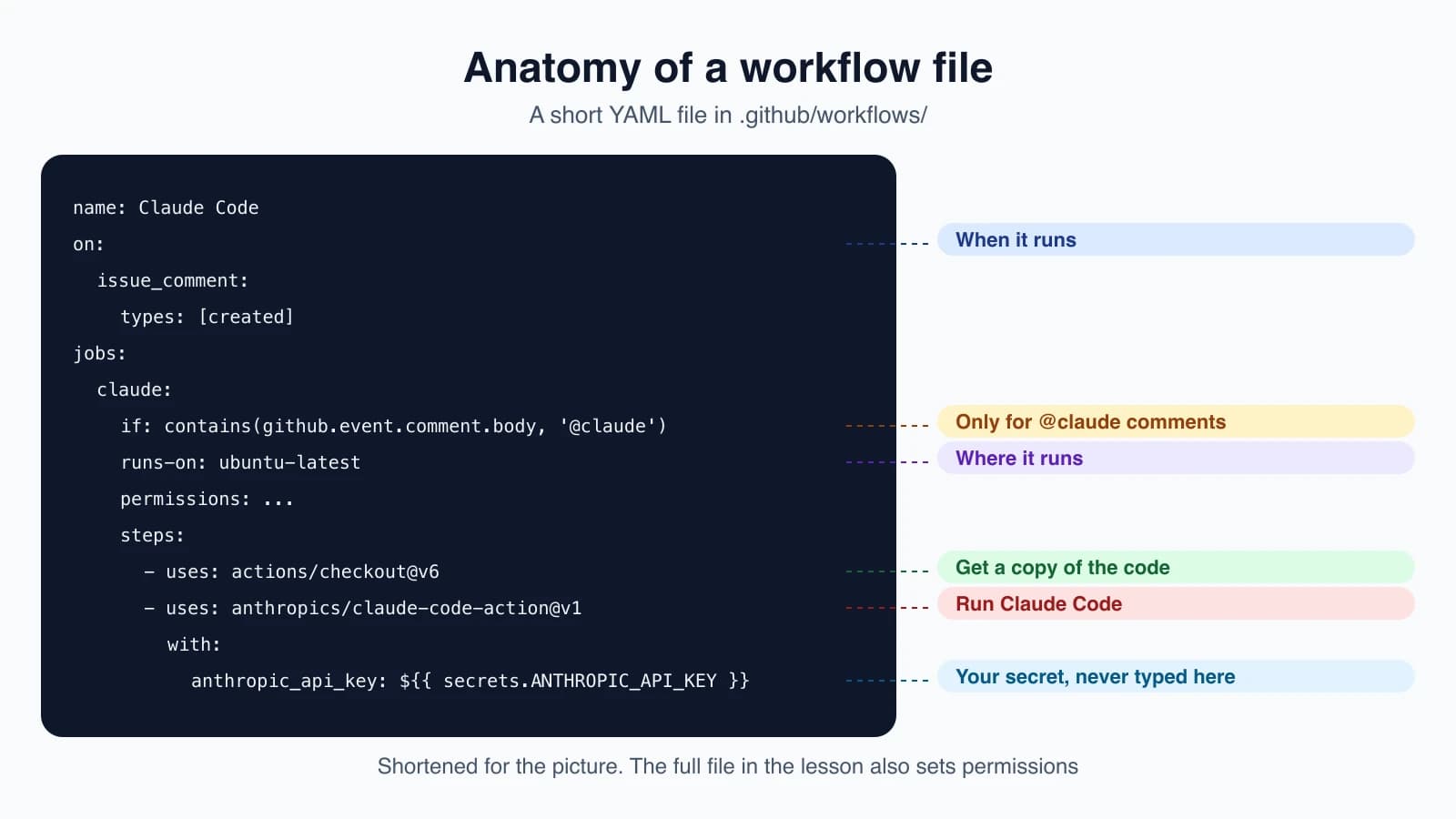
Read it in order:
onsays when the workflow starts: when a comment is created on an issue or a pull request review.ifskips the run unless the comment contains@claude, so runners do not start for ordinary comments.runs-onpicks the kind of computer.ubuntu-latestis a Linux runner.permissionssays what the workflow may do.id-token: writeis required for the action's default GitHub App sign-in, andactions: readlets Claude read CI results on pull requests.actions/checkoutputs a copy of your repository on the runner so Claude has files to work on.anthropics/claude-code-action@v1runs Claude Code. The API key comes fromsecrets, never from the file itself.
If you authenticate with a subscription token instead, replace the anthropic_api_key line with claude_code_oauth_token: ${{ secrets.CLAUDE_CODE_OAUTH_TOKEN }}.
With the workflow merged, comment on any issue or pull request:
1@claude implement this feature based on the issue description
2@claude how should I implement user authentication for this endpoint?
3@claude fix the TypeError in the user dashboard component
Claude replies in a comment and updates it as it works.
Review every pull request
A different workflow runs on pull request events and invokes a skill from a plugin (lessons 16 and 20). It installs the official code-review plugin and runs when a pull request opens, changes, reopens or becomes ready for review:
1name: Code Review
2on:
3  pull_request:
4    types: [opened, synchronize, ready_for_review, reopened]
5jobs:
6  review:
7    runs-on: ubuntu-latest
8    permissions:
9      contents: read
10      pull-requests: read
11      issues: read
12      id-token: write
13    steps:
14      - uses: actions/checkout@v6
15        with:
16          fetch-depth: 1
17      - uses: anthropics/claude-code-action@v1
18        with:
19          anthropic_api_key: ${{ secrets.ANTHROPIC_API_KEY }}
20          plugin_marketplaces: "https://github.com/anthropics/claude-plugins-official.git"
21          plugins: "code-review@claude-plugins-official"
22          prompt: "/code-review:code-review --comment ${{ github.repository }}/pull/${{ github.event.pull_request.number }}"
23          claude_args: '--allowedTools "mcp__github_inline_comment__create_inline_comment"'
The --comment argument makes Claude post its review on the pull request itself, as an inline comment for each problem or one summary comment when there are none. Without it, the findings appear only in the run log. Keep the claude_args line, because it is what starts the helper that posts inline comments. Claude skips draft and closed pull requests and ones that already have a Claude comment. On public repositories, GitHub withholds secrets from runs triggered by pull requests from forks, so this review runs only for branches in the same repository.
If you want automatic reviews without maintaining a file at all, the separate Code Review feature does that.
Run on a schedule
With a prompt, the action can run on any GitHub event, including a clock. This workflow writes a report to the run log at 09:00 UTC each day:
1name: Daily Report
2on:
3  schedule:
4    - cron: "0 9 * * *"
5jobs:
6  report:
7    runs-on: ubuntu-latest
8    permissions:
9      contents: read
10      issues: read
11      id-token: write
12    steps:
13      - uses: anthropics/claude-code-action@v1
14        with:
15          anthropic_api_key: ${{ secrets.ANTHROPIC_API_KEY }}
16          prompt: "Generate a summary of yesterday's commits and open issues"
17          claude_args: |
18            --model claude-opus-5-5
19            --allowedTools "mcp__github__list_commits,mcp__github__list_issues"
Notice claude_args. It passes ordinary Claude Code command-line options to the run, so everything from lesson 22 applies. With a plain-text prompt, Claude has no shell or GitHub access until you grant the tools it needs with --allowedTools. GitHub runs scheduled workflows only from the default branch, and in public repositories it turns the schedule off after 60 days without activity.
Pass options to Claude
The claude_args input accepts any Claude Code command-line argument:
1claude_args: "--max-turns 5 --model claude-sonnet-5 --mcp-config /path/to/config.json"Common ones are --max-turns to limit the number of steps, --model, --mcp-config, --allowedTools and --debug.
The other inputs you will use most are prompt, anthropic_api_key or claude_code_oauth_token, trigger_phrase (the default is @claude), plugins and plugin_marketplaces, settings, and github_token.
Stay safe
- Never put a key in a file. Store it as a GitHub secret and reference it as
${{ secrets.ANTHROPIC_API_KEY }}. A key committed to a repository should be treated as leaked. - Grant only the permissions the workflow needs. The review workflow above is read-only for contents and pull requests.
- Review what Claude changes before merging. It can push commits, so a person should read them.
- Write standards into
CLAUDE.md(lesson 12). Claude follows it when it works in your repository. - Mind who can trigger it. Only users with write access can, and bots are blocked by default.
- Plan for organizations. Install the app once at the organization level and store the secret as an organization secret. For a shared secret, use an API key rather than a subscription token, since the token belongs to one person's subscription.
Control costs
Each run uses two kinds of resources:
- GitHub Actions minutes, because the action runs on GitHub's runners.
- API tokens, based on the size of the prompt and response, the task and your codebase. A subscription token uses your subscription instead of API billing.
You can lower both:
- Write specific
@clauderequests so Claude needs fewer steps. - Use issue templates to give context up front.
- Keep
CLAUDE.mdshort, because Claude reads it on every run. - Set
--max-turnsinclaude_args. - Set timeouts on the workflow, and use GitHub's concurrency controls to limit parallel runs.
Other providers
By default the action calls the Claude API directly. To route through your own cloud account, set use_bedrock: "true" for Amazon Bedrock, use_vertex: "true" for Google Cloud's Agent Platform, or use_foundry: "true" for Microsoft Foundry. These sign in through your cloud's identity system, so you store no static cloud credentials in the repository.
When it does not work
Claude does not respond to @claude.
- Check that the GitHub App is installed and that workflows are enabled for the repository.
- Check that your API key or token is set in the repository's secrets.
- Make sure the comment contains
@claudeas a whole word, not/claudeor@claude-bot. - Make sure the commenting user has write access.
CI does not run on Claude's commits. GitHub does not trigger workflows for commits made with the default GITHUB_TOKEN. If you pass github_token: ${{ secrets.GITHUB_TOKEN }} to the action, remove it so the action signs in as the Claude GitHub App, and check that your CI workflow's triggers include the events Claude's pushes produce.
Authentication errors. Test the API key or token locally with claude before debugging the workflow.
To remove the integration, delete the workflow files, delete the secret, and uninstall the GitHub App if no other Claude feature uses it. Deleting a secret does not cancel the credential itself, so also delete the key in the Claude Console if you want to retire it.
If you use GitLab instead, Claude Code has a separate integration for GitLab CI/CD.
Mistakes beginners make
- Committing an API key. Use secrets, always.
- Leaving the
ifcondition out. Without it, runners start for every comment. - Granting broader permissions than needed. Start read-only and add what the job requires.
- Merging without reading. Claude can push commits, so review them like any teammate's work.
- Forgetting
claude_argsfor tools. A plain prompt has no shell or GitHub access until you allow tools. - Using the default token and wondering why CI does not run. Let the action sign in as the Claude GitHub App.
Quick recap
- Claude Code GitHub Actions runs Claude Code inside your repository's workflows through
anthropics/claude-code-action. - Set it up with
/install-github-app, or by hand with the GitHub App, a secret and a workflow file. - Without a
prompt, Claude answers@claudementions. With aprompt, it runs on any event, such as a pull request or a schedule. - Only users with write access can trigger it, and bots are blocked by default.
- Keep keys in secrets, give minimal permissions, review the changes, and cap cost with
--max-turnsand timeouts.
Try it yourself
If you have a GitHub repository where you are an admin and it is safe to experiment, open Claude Code there and run /install-github-app. Merge the workflow pull request it creates, then open an issue titled "Add a README section about setup" and comment @claude please draft this. Read what Claude does and review the pull request before merging. If you have no suitable repository, read the workflow files above line by line and explain in your own words what each section does.
Next lesson: code and security review workflows.