
Claude Code is powerful, and it is also metered. Every request uses tokens, and tokens are what you pay for or what count against your plan. This lesson explains where the cost comes from, how to see it, and the habits that keep it down without making Claude less useful. After it you will be able to read your usage, spot why a session got expensive, and choose the right lever to reduce it. This is the first lesson of Module 6, where you put everything into production practice.
How usage is measured
Claude Code charges by token consumption. A token is a small chunk of text, roughly a short word or part of one. How that shows up depends on how you use Claude Code:
- On a subscription such as Pro, Max, Ultra, Team or Enterprise, your usage draws from the plan's allowance, which resets over time. You see plan usage bars instead of a bill.
- With the Claude Console or an API key, you pay per token.
- Through a cloud provider such as Amazon Bedrock, your cloud account is billed per token.
Costs vary a lot between people. The documentation gives one reference point from enterprise deployments: an average of about $13 per developer per active day, and $150 to $250 per developer per month, with costs below $30 per active day for 90% of users. Your own number depends on the model, the size of your codebase and how you work, for example whether you run several sessions or automation.
Why cost follows context
Here is the idea that explains almost everything on this page. Claude Code sends the whole conversation with every request, not only your latest message. Each time Claude uses a tool, that sends another request carrying the tool results too.
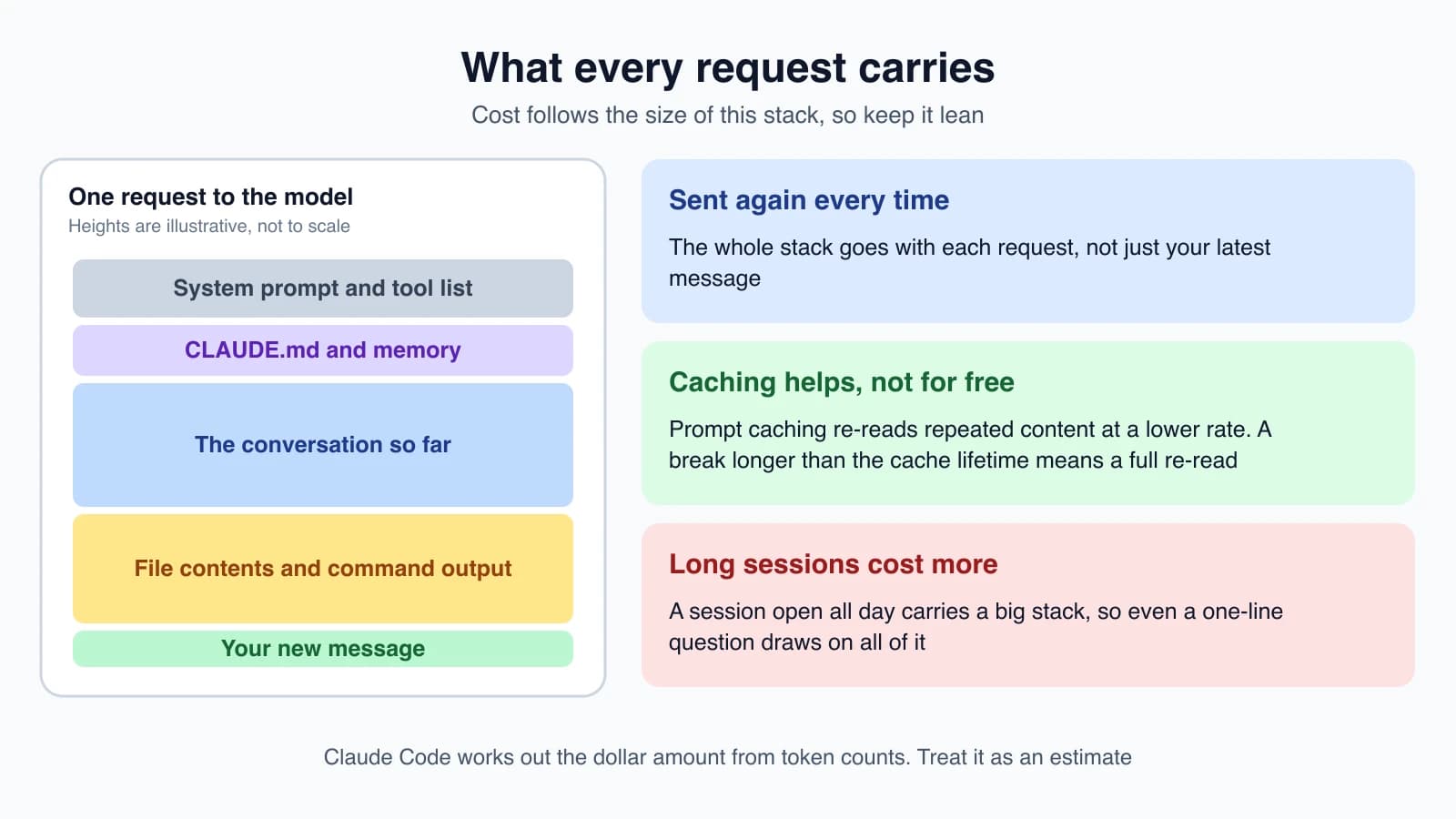
Two things soften this:
- Prompt caching lets Claude Code re-read repeated content, such as the system prompt, at a lower rate.
- Auto-compaction summarizes the conversation when it nears the limit (lesson 9).
They help, and they do not remove the effect. Token costs scale with context size, so the more context Claude processes, the more tokens you use.
Track your usage
/usage
Run this inside a session:
1/usageThe top of the screen is a Session block with the token use for this session:
1Total cost:            $0.55
2Total duration (API):  6m 20s
3Total duration (wall): 6h 33m 10s
4Total code changes:    0 lines added, 0 lines removed
5Usage by model:
6   claude-sonnet-4-6:  1.2k input, 5.3k output, 940.0k cache read, 50.0k cache write ($0.55)
Claude Code works out the dollar figure on your own computer from the token counts at list price, so treat it as an estimate. If your organization has contracted rates, an administrator can set them so the figure matches. The totals reset when you run /clear. /cost is an alias for /usage.
The session block is aimed at API users. On a subscription, /usage also shows plan usage bars and a breakdown of what counts against your limits. The breakdown attributes recent usage to skills, subagents, plugins and individual MCP servers as percentages. It also lists recommendations, one per row, such as trimming a large CLAUDE.md, switching effort levels or compacting before you step away. Press d or w to switch between the last 24 hours and the last 7 days. The figures are approximate and come from this computer's history, so usage from other devices is not included.
When the footer shows a hint like f to fix 2 of 3, press f to have Claude Code act on the recommendations it can. This needs Claude Code 2.1.305 or later. It runs /effort changes itself and prompts Claude to show you each other change before making it. Rows that say run followed by a command are for you to run yourself.
Other ways to see it
- The token count beside the spinner, as in
(10m 27s · ↓ 5.5k tokens), is a live count of the output the current turn has produced. It does not include what Claude Code sent to the model. - Your status line (lesson 15) can show cost and context use all the time. The status line gets
cost.total_cost_usdandcontext_window.used_percentage. /insightswrites an HTML report on how you work: what you work on, friction points such as misunderstood requests, and tips. It analyzes up to 200 recent sessions on this machine, and its own tokens count against your usage./usage-creditsmanages extra usage credits on a subscription, letting you keep working past the plan's limit.
Why a session gets expensive
A session open for hours can use far more than your activity suggests. The usual reasons:
- Long context. The full conversation goes with every request, so a one-line question late in a long session still draws on all of it.
- Cache misses. If you return after a break longer than the cache lifetime, the first message reprocesses your whole context.
- Scheduled tasks. A
/looptask (lesson 25) fires even while the session is idle, sending your full context each time. - Subagents and workflows. Each subagent sends its own requests on top of the main conversation.
- Compaction.
/compactreads the whole conversation it summarizes, so compacting a large context is itself a large request. When you want a fresh start,/clearcosts nothing. - Background features. Session recaps, idle compaction and prompt suggestions can use tokens while you are idle, and each can be turned off.
Habits that reduce usage
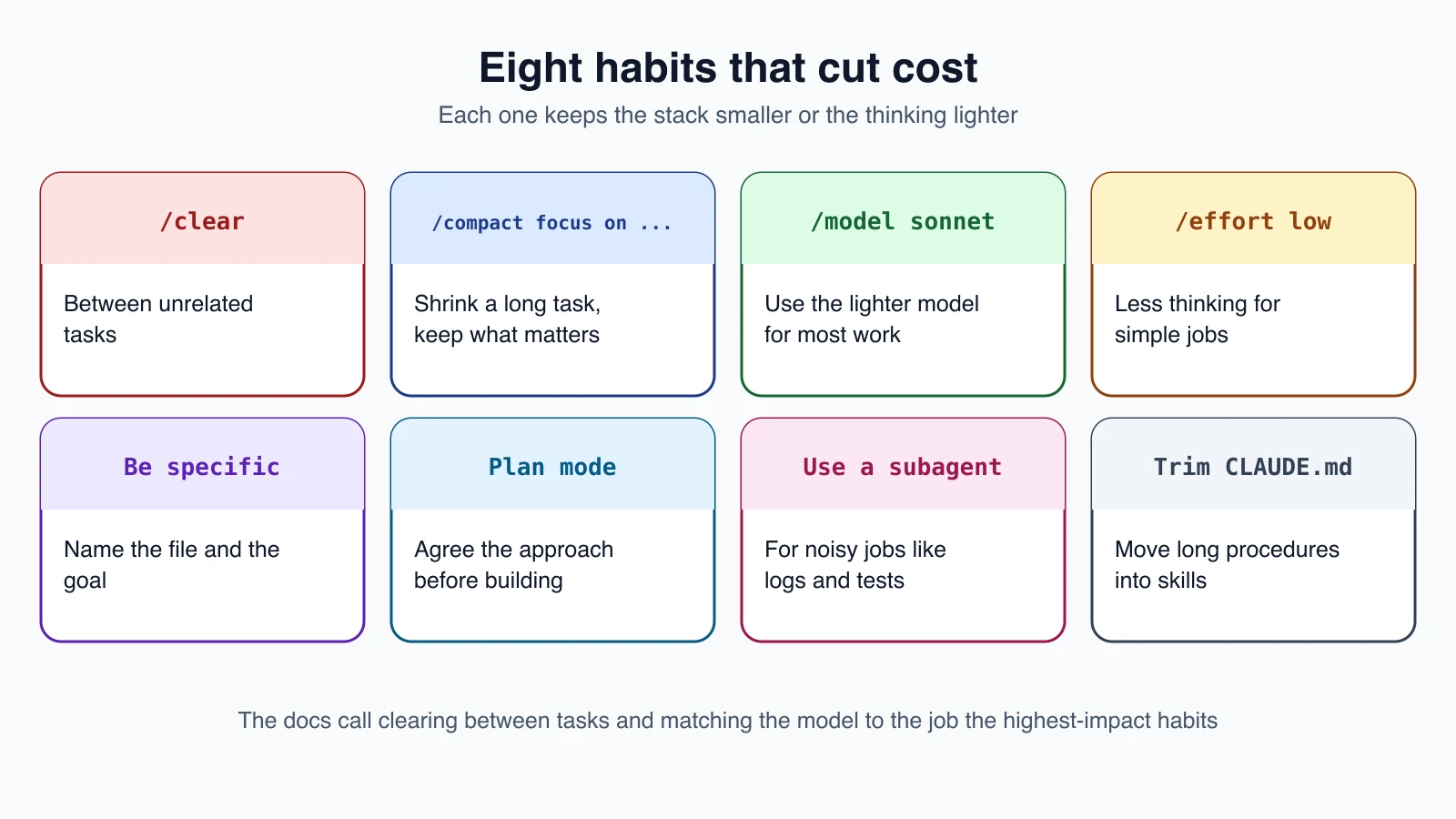
The documentation names two as the highest-impact habits: clearing between unrelated tasks and matching the model to the job.
Manage context
- Clear between tasks. Use
/clearwhen you switch to unrelated work. Stale context wastes tokens on every later message. Run/renamefirst so you can find the session again with/resume. - Compact with a focus.
/compact Focus on code samples and API usagetells Claude what to keep. You can also put standing instructions inCLAUDE.md:
1# Compact instructions
2
3When you are using compact, please focus on test output and code changes- Check what is using space with
/context, or show it continuously in your status line.
Choose the right model and effort
- Use Sonnet for most work. It handles most coding tasks well and costs less than Opus. Save Opus for complex architecture or multi-step reasoning. Switch with
/model. - Use
haikufor simple subagent tasks by settingmodel: haikuin the subagent file (lesson 17). - Lower the effort for simple jobs with
/effortor in/model(lesson 5). Thinking tokens are billed as output tokens, and the default budget can be tens of thousands per request. You cannot turn thinking off on Opus 5.5, Sonnet 5.5, Haiku 5.5 or the Fable models, so use the effort level there. On models with a fixed thinking budget, you can lower it withMAX_THINKING_TOKENS, for exampleMAX_THINKING_TOKENS=8000.
Keep extras lean
- Prefer command-line tools over MCP servers when they exist. Tools such as
gh,aws,gcloudandsentry-cliadd no per-tool listing to your context, and Claude can run them directly. - Disable servers you do not use. Run
/mcpto see them. MCP tool definitions are deferred by default, so only names and instructions load until a tool is used. - Install a code intelligence plugin for typed languages (lesson 20). Precise "go to definition" navigation replaces a search followed by reading several files.
- Trim
CLAUDE.mdand move procedures into skills.CLAUDE.mdloads every session, while a skill loads only when used (lessons 12 and 16). KeepCLAUDE.mdunder 200 lines. - Preprocess with hooks. A hook (lesson 18) can filter a 10,000-line log down to the error lines before Claude sees it, cutting tens of thousands of tokens to hundreds. The official documentation shows a
PreToolUsehook that filters test output to show only failures.
Work in a way that avoids waste
- Delegate noisy jobs to subagents. Running tests, fetching documentation or reading logs can flood your context. A subagent keeps that output in its own window and returns a summary. Its own requests still draw on your usage, so give it a smaller model.
- Write specific prompts. "Improve this codebase" triggers broad scanning. "Add input validation to the login function in
auth.ts" lets Claude work with minimal file reads (lesson 10). - Use plan mode (lesson 7) for complex tasks, to agree the approach before building and avoid expensive rework.
- Course-correct early. Press
Escthe moment Claude heads the wrong way, and use/rewindto return to a checkpoint. - Give verification targets and test in small steps, so mistakes are caught early.
Agent teams
Agent teams run several Claude Code instances at once, each with its own context window. They are disabled by default. Token use grows with the number of teammates and how long each runs. The documentation notes that teams use roughly seven times more tokens than a standard session when teammates run in plan mode. Keep teams small, keep tasks self-contained, and shut teammates down when their work is done.
If you are managing a team
How you see and cap spend depends on your setup:
- Claude for Teams or Enterprise. Each member draws from a seat allowance that resets on a rolling five-hour window and a weekly window. Admins see spend reports in the claude.ai admin console and can set spend limits for the organization, groups or individuals once usage credits are on.
- Claude Console (API). You manage cost through workspaces, with workspace spend limits and a cost dashboard.
- Amazon Bedrock, Google Cloud or Microsoft Foundry. Spend appears in your cloud billing console, and you can use OpenTelemetry or a gateway for per-user numbers.
Start with a small pilot group to find a baseline before a wider rollout.
If you hit a limit
- "You've hit your session limit" or "weekly limit" means a seat-based window on a subscription is used up. Switching models does not help, because it is shared. The message shows when the window resets. You can run
/usage-creditsto ask for usage beyond the allowance, or wait. - A model-specific limit, such as the Opus limit, can be worked around by switching to a model outside that family with
/model. - A spend limit message means usage credits reached a limit someone set. An admin can raise it.
- A context or auto-compact warning is not a usage limit. The conversation is close to the window, so compact it or clear it.
Mistakes beginners make
- Never clearing. One long session for many tasks is the most common cause of high usage.
- Using the strongest model and highest effort for everything. Match the settings to the job.
- Trusting the dollar figure as a bill. It is an estimate at list price.
- Leaving unused MCP servers and plugins on. They add to context and startup.
- Letting a loop run on a huge idle context. Each scheduled fire sends the whole context. Clear or cancel first.
- Compacting a huge context casually. The summary request itself is large. Clear when you can start fresh.
Quick recap
- Cost follows tokens, and tokens follow context size, because the whole conversation is sent with every request.
- Track usage with
/usage(also/cost), your status line and/insights. Dollar figures are estimates. - Long sessions, cache misses, scheduled tasks, subagents and compaction all add to usage.
- Clear between tasks, match the model and effort to the job, keep extras lean, and delegate noisy work to subagents.
- If you hit a limit, check which kind it is before choosing a fix.
Try it yourself
In your claude-practice folder, run /usage and note the total cost and the breakdown by model. Add a status line that shows context percentage and cost, using /statusline from lesson 15. Do a small task, then run /clear and /usage again to see the totals reset. Finally, find one habit from this lesson that you do not do yet, such as clearing between tasks, and use it for a day.
Next lesson: security, sandboxing and secrets.