
Vibe Coding course · lesson 21 of 26
- 1What Is Vibe Coding? A Beginner's Guide
- 2The Vibe Coder Mindset: Build Small, Check Often
- 3Choosing Your Vibe Coding Tool: A Beginner's Guide
- 4Set Up Your Workspace for Vibe Coding
- 5Your First Vibe-Coded App in 30 Minutes
- 6From Idea to MVP: Plan a Small First Version
- 7Spec-Driven Development: Give AI a Clear Plan to Build From
- 8Mockups and Examples as Input: Show AI What You Mean
- 9Choose a Tech Stack: Pick Tools You Can Keep Using
- 10Prompts That Build Things: Give AI a Clear Task
- 11Context Documents: Give AI Lasting Project Instructions
- 12Managing Context and Sessions: Keep AI on the Right Task
- 13Set Standards Early and Review AI Output
- 14Build the Skeleton: Start the BookmarkBox App
- 15Add Data and a Database: Save Real Bookmarks
- 16Add Accounts Safely: Sign In and Protect Each User's Data
- 17Design and Polish: Improve the App One Pass at a Time
- 18Version Control with AI: Keep a Safe History of Your Work
- 19Debugging with AI: Find the Cause Before You Fix It
- 20Test by Default: Make Sure Each Feature Keeps Working
- 21Refactor and Keep Your Code Healthy
- 22Security for Vibe Coders: Protect Your App and Its Users
- 23Deploy Your App: Put BookmarkBox Online
- 24Monitor and Maintain Your App After Launch
- 25Where Vibe Coding Stops: Know When to Change Your Approach
- 26Capstone: Ship a Project from Idea to Production
As an app grows, the quickest way to add a feature can leave behind a very long component, repeated logic, or an old package nobody needs. The code may still work, but the next change becomes harder to make safely. Refactoring is a way to improve the code's internal structure while keeping its visible behavior the same. The goal is to make future changes easier, not to make every file look clever. See Martin Fowler's definition of refactoring for more on the idea.
In Test by default, you learned to keep checks around the behavior your app needs. Those checks are especially useful when reorganizing code: they help tell you whether a cleanup accidentally changed how BookmarkBox works.
Notice friction before you clean up
You do not need a refactoring session just because a file has a certain number of lines. Look for repeated friction:
- A page handles the form, validation, database request, list rendering and error messages all in one place.
- The same URL validation rule appears in multiple places and a change must be copied carefully.
- You often have to read unrelated code to understand one button or function.
- A dependency is no longer used, or a package was added for something the project already supports.
- A change keeps breaking a different part of the app because responsibilities are tangled together.
These signs are prompts to inspect, not proof that code must be rewritten. A short component or repeated line may be clearer than a new abstraction. Ask what future task the proposed cleanup would make easier. If there is no concrete answer, leave it alone for now.
Split by responsibility, not by line count
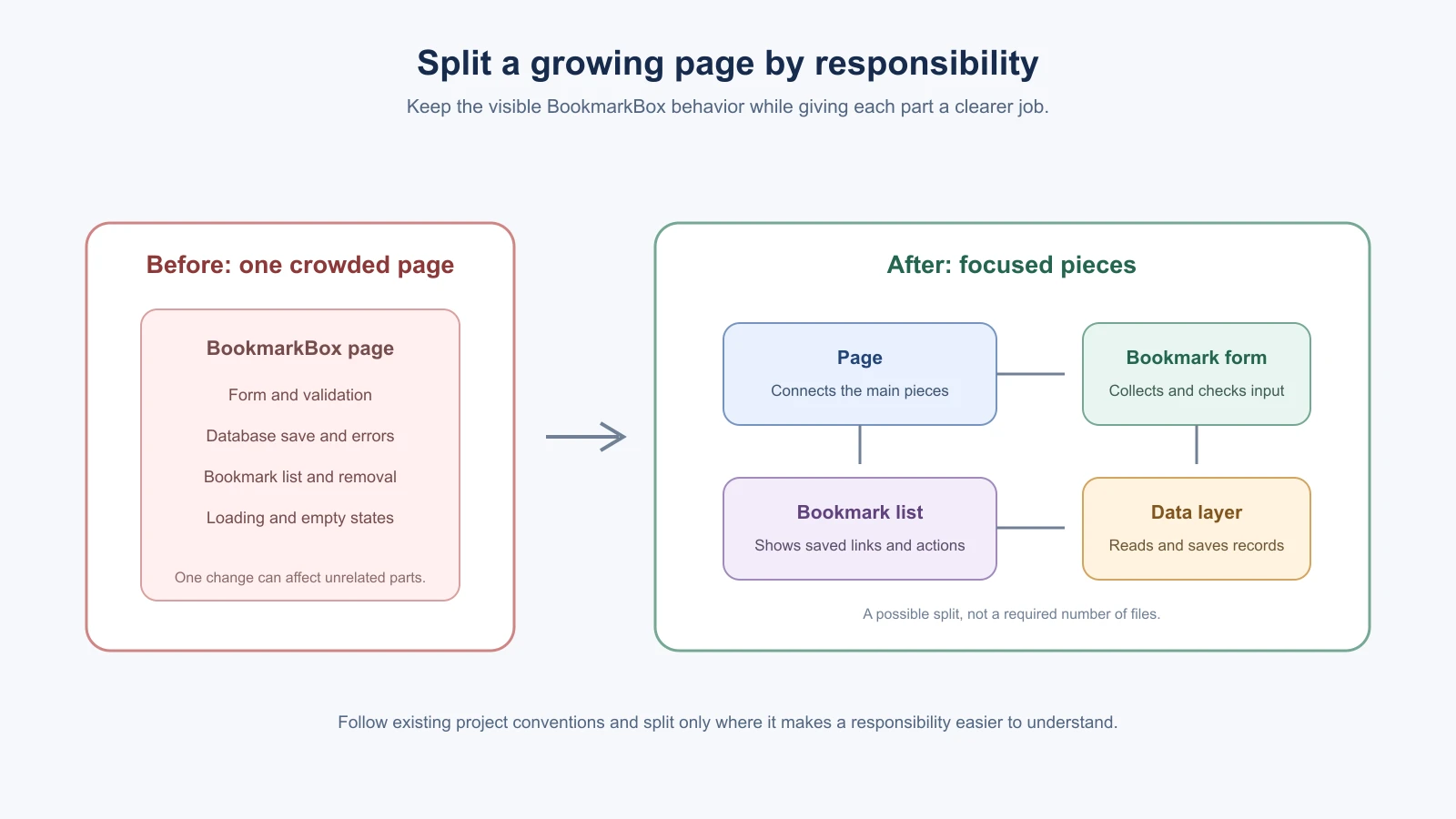
Suppose BookmarkBox's page has grown to handle a bookmark form, bookmark list, URL validation, loading states and database calls. A sensible split might put the form and list in focused components, and keep database work in the server-side data layer. Each piece now has a clearer job. The page can connect them without containing every detail.
Do not split mechanically. A component used once does not automatically need its own file, and a tiny utility file that contains one trivial line may add more navigation than clarity. Follow the structure already used in the project. Keep behavior and data ownership easy to trace: a save action should still be understandable from the form, through the server, to the saved record and back to the list.
Reduce duplication carefully
If the same rule is copied in several places, a future change can update one copy and miss the others. BookmarkBox might validate a web address in both the form and the server. The server still needs to check input because browser-side checks can be bypassed, but both places can use the same well-defined rule where the project structure allows it.
First compare the repeated code. Similar-looking blocks may have different responsibilities or may change for different reasons. Extract a shared function only when it gives the rule one clear home and makes callers easier to understand. Then update one caller at a time and run the checks that cover the rule.
Remove dead code and review packages
Dead code is code the app no longer uses, such as an abandoned component or an old function left behind after a redesign. Before removing it, ask the AI to find references and explain what makes it safe to delete. Check dynamic imports, route conventions and framework-specific files too; some code is used by convention rather than a visible import.
Dependencies deserve similar care. A dependency is an external package your project relies on. Before adding one, ask whether the existing framework or a package already installed can do the job. When reviewing the project, check which packages are direct dependencies, whether they are still used, and whether any update has a specific reason. Avoid updating everything during an unrelated refactor because a broad version change can introduce separate problems.
If the project uses npm, npm outdated can show packages with newer versions, and npm audit can report known security advisories in dependencies. These reports are starting points for review; they do not decide by themselves which update is safe or whether a package is unnecessary. Other package managers have their own commands, so use the project's documented tool. The npm update documentation and npm audit documentation explain what those commands report.
Make a small refactoring session
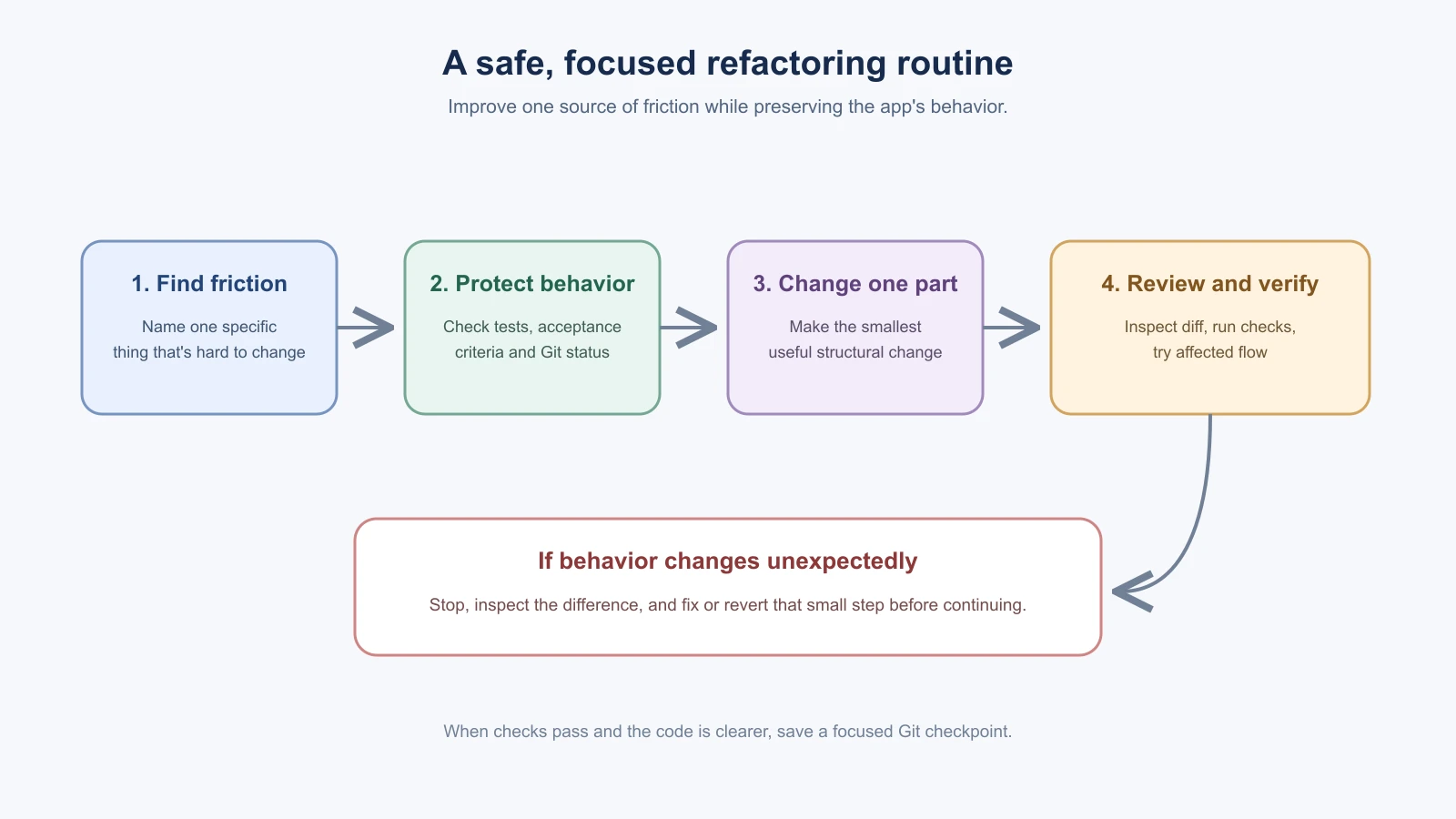
Refactoring works best as a sequence of small changes, each with a clear purpose. Pick one area that has caused friction, such as the BookmarkBox form, and use this routine:
- Check Git status and save or protect unrelated work.
- Describe the behavior that must stay the same, including relevant tests or acceptance checks.
- Ask the AI to propose a small structural change before editing.
- Make one change, inspect the diff, and run the relevant tests.
- Try the affected flow in the browser when the change touches a user journey.
- If the behavior changed unexpectedly, stop and fix or revert that step before continuing.
- Once the structure is clearer and checks pass, commit the focused change.
You do not have to reserve a large block of time or refactor every week by calendar. A short check after a few features is enough to notice growing friction. If nothing is getting harder to change, keep building. If you do schedule a cleanup, choose one concrete problem rather than asking the AI to “clean up the codebase.”
Give the AI a clear boundary
Try a request like this:
1I want to make the BookmarkBox bookmark form easier to maintain. Do not add or change user-facing behavior.
2
3First inspect the relevant files and tests. Explain one specific source of friction and propose the smallest refactor that would improve it. Wait before editing.
4
5After I review the plan, make one focused change. Show me the diff, explain how the responsibilities are clearer, and run the existing relevant checks. Do not add dependencies, rewrite unrelated files, or remove code unless you can show why it is unused.
The AI's plan is a proposal. Check that it preserves the current behavior and fits the project's patterns. If it proposes replacing a whole page, introducing a new framework or creating many tiny files, ask what concrete problem each change solves. Keep the scope small enough that you can review the result.
What healthy code feels like
A healthy codebase is not one with the fewest lines or the newest packages. It is one where you can find the code for a behavior, understand why it is there, make a focused change, and check that the app still works. Its tests cover important behavior, its dependencies have a reason to be present, and its structure matches the project's size.
Before a feature, you can ask: “What part of this app has become harder to change, and what is the smallest improvement that would help?” If you can name the friction, refactor that part in a safe checkpoint. If you cannot, keep the code understandable and move on. In Security for vibe coders, you will look more closely at protecting the app, its dependencies and the people who use it.
Signs a refactor went too far
Refactoring should leave you with simpler code and the same behavior. Stop and reconsider if you see any of these:
- The diff is much larger than the problem you named.
- New helper functions or layers appear that only one caller uses.
- Many tiny files replaced one readable file.
- A test failed and the AI changed the test instead of finding out why.
- The app behaves differently, even slightly, and nobody can say why.
When any of these happens, revert that step to your last checkpoint and try a smaller change.
Mistakes beginners make
- Refactoring because a file is long. Look for real friction, such as a repeated rule or tangled responsibilities, before you change anything.
- Asking the AI to "clean up the codebase". Pick one concrete problem and one small change.
- Refactoring without checks. State the behavior that must stay the same, and run the relevant tests before and after.
- Splitting code into many tiny files. Split by responsibility and follow the structure the project already uses.
- Updating every package during a cleanup. Keep dependency updates separate, and make each one for a reason.
Recap and try it yourself
Refactoring improves how the code is organized without changing what the app does. Notice friction, protect the current behavior with checks, make one small change, verify it and commit it.
Try it: find one place in a practice project that is hard to change and describe the friction in one sentence. Use the prompt in this lesson to ask for a plan before any edit, review the plan, then make one focused change, run the checks and commit. In Security for vibe coders, you will look at protecting the app, its dependencies and its users.