
Vibe Coding course · lesson 26 of 26
- 1What Is Vibe Coding? A Beginner's Guide
- 2The Vibe Coder Mindset: Build Small, Check Often
- 3Choosing Your Vibe Coding Tool: A Beginner's Guide
- 4Set Up Your Workspace for Vibe Coding
- 5Your First Vibe-Coded App in 30 Minutes
- 6From Idea to MVP: Plan a Small First Version
- 7Spec-Driven Development: Give AI a Clear Plan to Build From
- 8Mockups and Examples as Input: Show AI What You Mean
- 9Choose a Tech Stack: Pick Tools You Can Keep Using
- 10Prompts That Build Things: Give AI a Clear Task
- 11Context Documents: Give AI Lasting Project Instructions
- 12Managing Context and Sessions: Keep AI on the Right Task
- 13Set Standards Early and Review AI Output
- 14Build the Skeleton: Start the BookmarkBox App
- 15Add Data and a Database: Save Real Bookmarks
- 16Add Accounts Safely: Sign In and Protect Each User's Data
- 17Design and Polish: Improve the App One Pass at a Time
- 18Version Control with AI: Keep a Safe History of Your Work
- 19Debugging with AI: Find the Cause Before You Fix It
- 20Test by Default: Make Sure Each Feature Keeps Working
- 21Refactor and Keep Your Code Healthy
- 22Security for Vibe Coders: Protect Your App and Its Users
- 23Deploy Your App: Put BookmarkBox Online
- 24Monitor and Maintain Your App After Launch
- 25Where Vibe Coding Stops: Know When to Change Your Approach
- 26Capstone: Ship a Project from Idea to Production
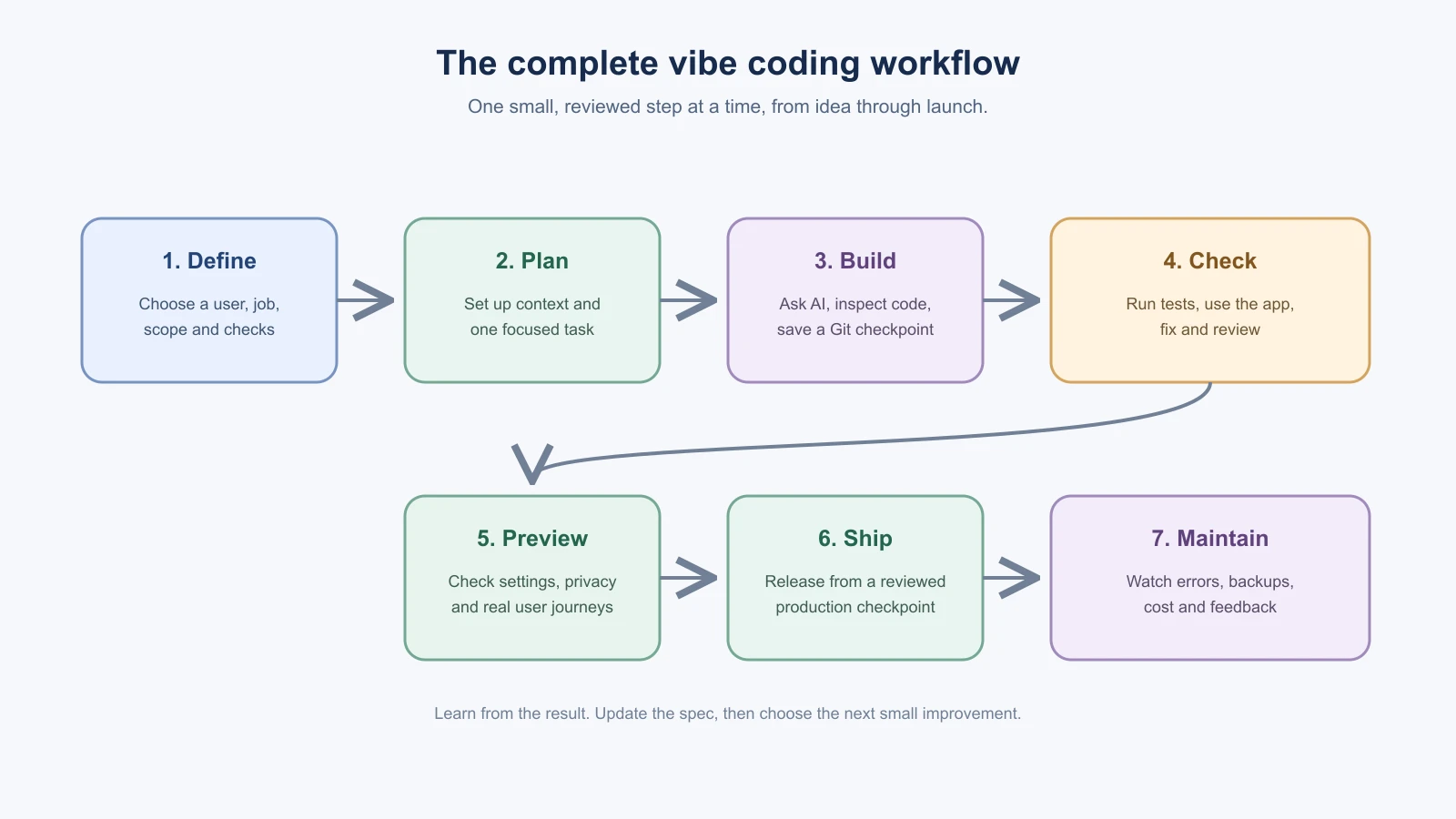
You have reached the point where the pieces fit together. In this capstone, you will take BookmarkBox from an idea to a deployed app by using the habits from the course: decide what to build, give the AI useful context, work in small steps, review the code, test behavior and protect the project as it grows.
You do not need to finish every possible feature to complete the capstone. The goal is a small app whose purpose you can explain, whose important behavior you can check, and whose deployment you know how to maintain. Use the walkthrough as a guide for BookmarkBox or adapt the same steps to a project of your own.
A reminder before you start
BookmarkBox is a guided project, so this capstone is a plan and a checklist, not a code listing to copy. Your tool will write its own code. You decide what to build, check each change against your spec, and keep the checkpoints. That is the skill the project is meant to practice.
1. Choose the smallest useful version
BookmarkBox helps someone save useful links and find them again. Its first useful version can let a signed-in person add a title and URL, see saved links, open them and remove them. Tags, shared folders, browser extensions and AI summaries can wait until the basic flow is useful.
Write down four things before asking for code:
- User: someone who saves useful pages while reading or researching.
- Problem: they want to find those pages again later.
- First version: save a link, view it, open it and remove it.
- Checks: a saved link remains after refresh, and one user cannot read or remove another user's link.
Your spec can be short. State the purpose, expected behavior, boundaries, stack and how you will tell whether it works. Add a sketch or example if the visual layout is hard to describe. When you change a decision, update the spec so it remains the current agreement.
2. Prepare the project and the AI
Create the Next.js project from the workspace setup lesson, run the starter app, and make a Git checkpoint. Give the AI the spec and project context file. Ask it to inspect the existing project and explain where the page, styling, server actions and database code belong before proposing a first task.
Keep the AI task narrow. For example:
1Read the BookmarkBox spec and project instructions. Inspect the current project and explain which files control the home page and shared layout.
2
3Propose a small plan for the first responsive BookmarkBox screen with a title, short explanation and empty list state. Do not add a database, sign-in or save behavior yet. Keep the current stack and follow existing project patterns. Wait for me to review the plan before editing.
Review the plan, then ask it to make that one change. Look at the changed-file list and diff, run the project and check the screen at a phone and desktop width. Ask about code you do not understand. Commit the working screen before moving on.
3. Add one useful feature at a time
Build BookmarkBox in small slices. A possible sequence is:
- Add and list sample bookmarks in the interface.
- Connect server-side create, read and delete operations to Postgres.
- Add sign-in with a maintained provider or library and filter every database operation by the signed-in owner.
- Improve layout, loading, empty and error states, and keyboard behavior.
For each slice, return to the spec and ask for one change with clear acceptance criteria. Ask for a plan first when the task touches several parts or changes data. Use temporary data for previews and keep private keys in environment settings, not source code or browser code.
After each useful step, inspect the diff, try the feature and run relevant project checks. Add a test for important rules and user journeys. If you find a bug, write a failing check for the behavior when that is practical, then fix the cause and confirm the check passes. Save focused Git commits when the result works.
4. Keep the project understandable
As the app grows, check whether a page has become hard to change, whether validation is repeated, or whether a feature has no test. Make one small refactor at a time and run the checks before and after it. Avoid broad rewrites and new packages without a clear reason.
When debugging, reproduce the problem, include the relevant error and code, and ask for likely causes before edits. Change one thing, repeat the original steps and make sure the expected behavior still works. If a few focused attempts do not help, summarize the evidence and start fresh or return to a known Git checkpoint without discarding unrelated work.
5. Prepare and test a preview
Before deployment, confirm your tests pass, the diff is reviewed and you understand any migration that changes the database. Push the project to Git and create a preview deployment on your host. Give the preview suitable test credentials and data; do not copy production secrets into it.
Try the app as a person would:
- Sign in and sign out.
- Add a bookmark with a valid title and URL.
- Refresh the page and confirm the bookmark remains.
- Remove one bookmark and confirm other records remain.
- Use two test accounts to check that each account sees only its own records.
- Try an empty or malformed value and read the error state.
- Check the page on a phone-sized screen and with a keyboard.
Review the host's build and runtime logs if something fails. A successful build is useful evidence, but it does not replace trying the deployed app.
6. Release and stay ready to recover
Set the production environment variables in the host's secure settings, using the right production database and authentication callback URLs. Review the provider's current instructions for your actual project and deploy from the reviewed production branch. Open the live domain and repeat the most important flows.
Keep a short note with the links to hosting, database and domain dashboards, where logs live, how to contact the providers, and how to restore a previous app deployment or database backup. Do not put passwords or tokens in that note. Remember that restoring app code does not automatically undo database changes.
After launch, review errors, uptime, backups, service usage, package advisories and user feedback. If something breaks, record what people saw, use logs to narrow the cause, and choose a safe recovery before making unrelated changes.
Your capstone checklist
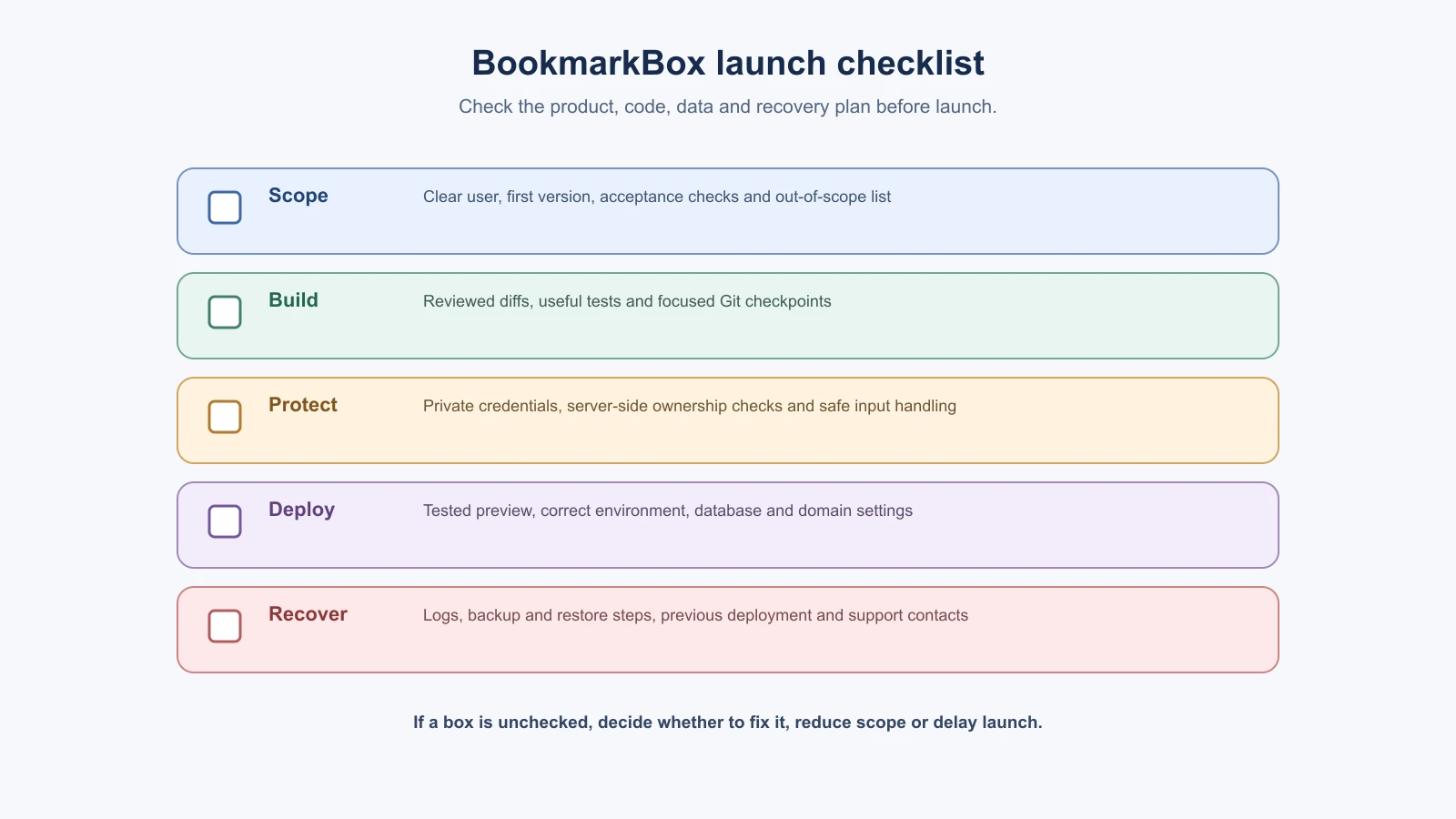
- I can explain who the app is for and what its first version does.
- The spec lists expected behavior, acceptance checks and what is out of scope.
- Project instructions and AI prompts give clear context and boundaries.
- I build one change at a time and review the diff before accepting it.
- Important behaviors have tests, and I try the main journeys in the app.
- Git has clear checkpoints I can return to.
- Secrets stay out of source control, browser code and prompts.
- The server checks account ownership for every private data operation.
- Preview and production use the intended configuration and data.
- I know where to see errors, check service usage and recover data or code.
- I know what needs expert review before the app handles higher-risk use.
You can complete this capstone with a smaller prototype if accounts or deployment are beyond your current scope. Be clear about what is unfinished and keep private or sensitive data out of it until the missing protections are in place.
Mistakes beginners make
- Trying to build everything at once. Keep version one small, and put later ideas in phases.
- Letting the spec go stale. When a decision changes, update the spec first so it stays the current agreement.
- Accepting large changes without reading the diff or running checks. Review each change and try the feature before you commit.
- Releasing before testing access rules and secrets. Use two test accounts, and check that no private value is in Git, browser code or a prompt.
- Treating launch as the end. Keep the monitoring and maintenance routine going after the app is live.
Recap and try it yourself
The capstone ties the course together: choose the smallest useful version, write a short spec and project context, build one slice at a time, review and test each change, preview before production, and keep looking after the app.
Try it: work through the capstone checklist for BookmarkBox or for a project of your own. For every box you cannot tick, write the next step that would fix it, or the reason it is out of scope for now. Then pick one topic from the list below for your next project.
Where to go next
Pick the topic that would help with your next project step:
- For a deeper coding assistant workflow, continue with Claude Code real project walkthroughs, or start with What is Claude Code?.
- To learn how agents use tools and context, start with What is an AI agent?, then explore Prompting for agents.
- For stronger coding prompts, return to Prompts that build things and the Claude Code prompting patterns lesson.
- If you plan to let an agent use tools or read untrusted content, study Prompt injection and tool sandboxing.
Keep the habit that matters most: stay responsible for the result. AI can help you think, build and investigate, while you decide what belongs in the product, review the changes and choose when the project needs more support.