
Vibe Coding course · lesson 12 of 26
- 1What Is Vibe Coding? A Beginner's Guide
- 2The Vibe Coder Mindset: Build Small, Check Often
- 3Choosing Your Vibe Coding Tool: A Beginner's Guide
- 4Set Up Your Workspace for Vibe Coding
- 5Your First Vibe-Coded App in 30 Minutes
- 6From Idea to MVP: Plan a Small First Version
- 7Spec-Driven Development: Give AI a Clear Plan to Build From
- 8Mockups and Examples as Input: Show AI What You Mean
- 9Choose a Tech Stack: Pick Tools You Can Keep Using
- 10Prompts That Build Things: Give AI a Clear Task
- 11Context Documents: Give AI Lasting Project Instructions
- 12Managing Context and Sessions: Keep AI on the Right Task
- 13Set Standards Early and Review AI Output
- 14Build the Skeleton: Start the BookmarkBox App
- 15Add Data and a Database: Save Real Bookmarks
- 16Add Accounts Safely: Sign In and Protect Each User's Data
- 17Design and Polish: Improve the App One Pass at a Time
- 18Version Control with AI: Keep a Safe History of Your Work
- 19Debugging with AI: Find the Cause Before You Fix It
- 20Test by Default: Make Sure Each Feature Keeps Working
- 21Refactor and Keep Your Code Healthy
- 22Security for Vibe Coders: Protect Your App and Its Users
- 23Deploy Your App: Put BookmarkBox Online
- 24Monitor and Maintain Your App After Launch
- 25Where Vibe Coding Stops: Know When to Change Your Approach
- 26Capstone: Ship a Project from Idea to Production
After this lesson, you will be able to decide when to keep using a coding conversation, when to start fresh, and what project state to save so work can continue later. A long conversation is not automatically a bad one; the goal is to keep the information relevant to the task in front of the AI.
In Context documents, you saved stable project guidance. This lesson covers the temporary context in a conversation: the current request, discussion, files and tool results the AI is using right now.
What is a context window?
A context window is the amount of information a model can consider for one response. Depending on the tool, it may include the current prompt, earlier messages, instructions, files and results from actions the AI took. The window has a limit, and each tool handles long conversations differently: it might summarize older messages, omit context, or ask you to start a new chat.
More context can help when a task depends on many connected files or a long document. But sending everything is not always useful. Old discussions about unrelated features compete with the current task for attention, and a large file or folder may be shortened before the model sees it. Check what your tool says it has included, and point it to the small set of files that matter.
Continue, compact or start fresh
Use the task to guide your choice:
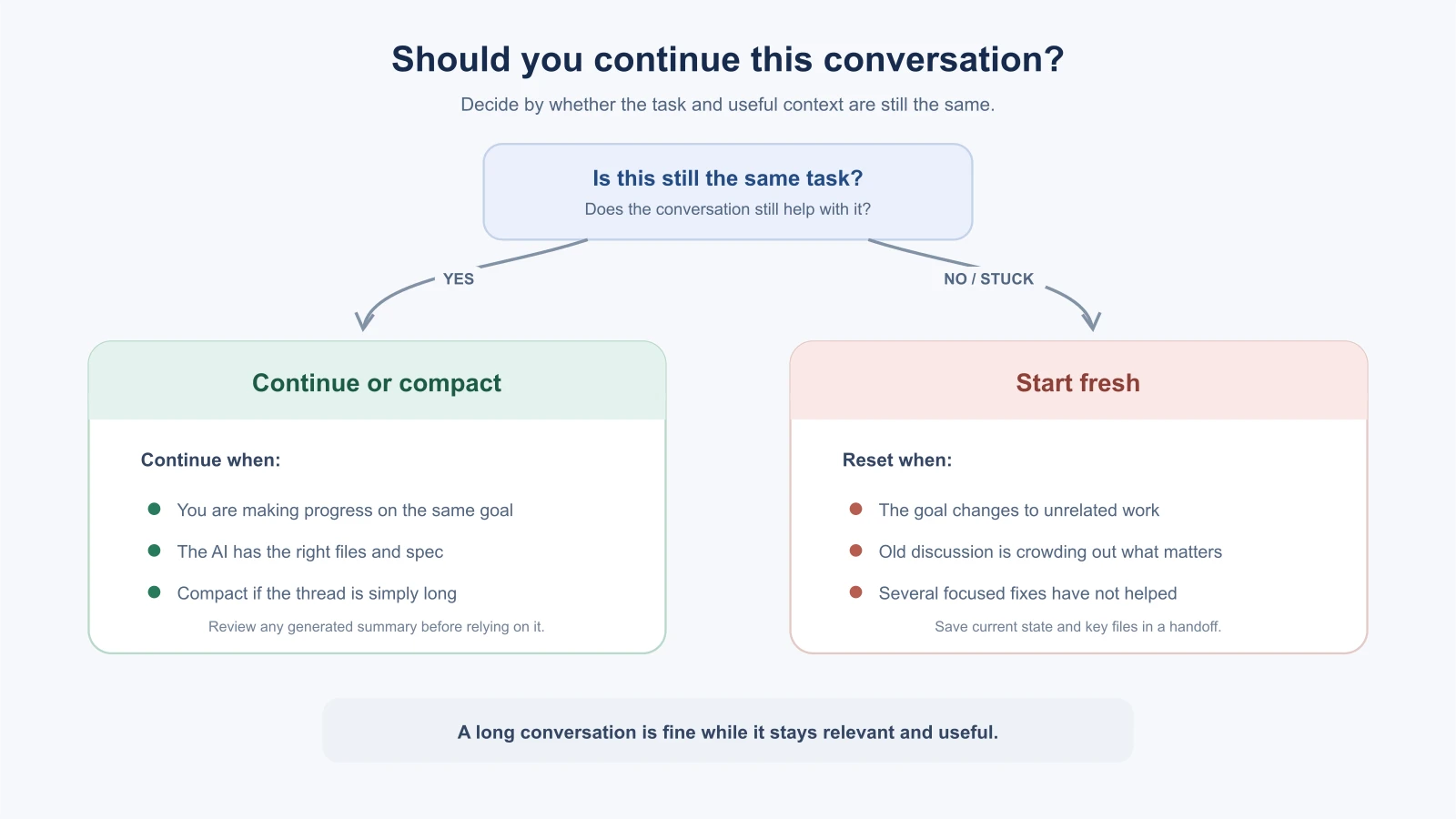
- Continue when the same feature is still moving forward and the AI is using the right requirements and files. A few follow-up messages can be efficient.
- Start a fresh session when you switch to an unrelated task, the chat is cluttered with old discussion, or the AI keeps repeating an assumption you have corrected. Bring forward the current spec, relevant files and a short progress note.
- Compact or summarize when the task is still the same but the conversation has become long. Review the summary and correct anything important before continuing.
As a practical rule of thumb, after three focused attempts that have not fixed the same problem, pause instead of sending a fourth version of the same request. Ask the AI to list what it tried, what evidence it has and what it still does not know. Then inspect the relevant files or start a new session with a concise problem statement. Three is a checkpoint, not a magic limit; if an attempt reveals genuinely new information, use it.
The Claude Code context lesson covers that tool's session commands. Other products use different controls. For example, Cursor documents summarizing older chat messages when a conversation grows. Check the current instructions for your own tool before relying on a specific command or behavior.
Keep one task in a session
A session is the conversation or work thread you use for a task. Give each session a clear purpose, such as “Add title validation to the bookmark form.” If you move from that feature to a separate deployment problem, start another session or clearly reset the context. This keeps unrelated decisions from leaking into the new request.
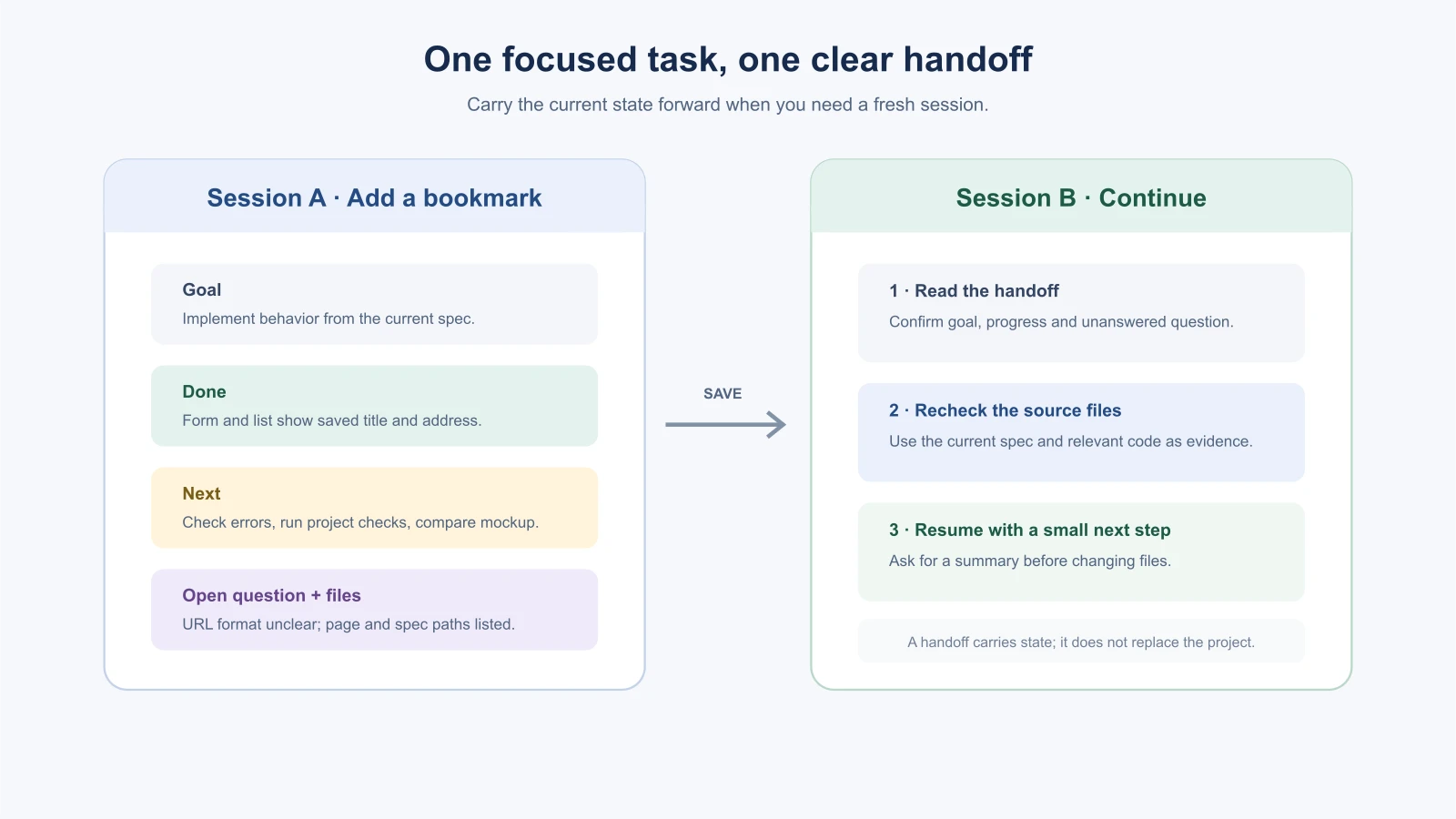
When work needs more than one sitting, save a short handoff in the project. For example, a progress.md file might say:
1# BookmarkBox progress
2
3## Goal
4Finish the Add and list a bookmark feature from `docs/add-bookmark.md`.
5
6## Done
7- The form and visible list are implemented.
8- Empty title and address show an error.
9
10## Next
11- Run the project's checks and compare the empty state with the mockup.
12
13## Open question
14- Should a URL without `https://` be accepted? The spec does not say yet.
15
16## Relevant files
17- `app/bookmarks/page.tsx`
18- `docs/add-bookmark.md`
Keep the handoff factual. Separate what is done from what is planned, and make unanswered questions visible. When the next session begins, ask the AI to read the handoff and source files and summarize its understanding before it edits.
Use long context and side tasks deliberately
Use a tool with a larger context window when the task truly needs a broad view, such as tracing how a data field moves across many parts of a codebase. Even then, be selective. Ask the AI to find relevant files, include the spec and key examples, and leave unrelated history out. A larger window gives more room; it does not make every old detail useful.
Some tools let you delegate a separate investigation to a subagent, another AI worker with its own task and context. This can help with an independent side job, such as asking one worker to find existing validation patterns while you plan the form change. Give it a narrow question and ask for file paths and evidence. Do not split a task that requires constant coordination, and review its findings yourself before using them. The AI Agents context engineering lesson explains context management for agents in more depth.
Signs a conversation has gone stale
You do not have to count messages. Watch for behavior that suggests the AI is no longer tracking the task well:
- It repeats a mistake you already corrected.
- It forgets a requirement from earlier in the chat, or contradicts something it said before.
- It edits files that have nothing to do with the current task.
- It refers to code that no longer exists, or to an earlier version of a file.
- Its answers get longer and vaguer while the problem stays the same.
None of these proves the context is the cause. A bad instruction or a hard problem can look the same. But when you see two or three of these at once, a fresh start with a short, accurate summary often does more than another round of corrections.
What to bring into a fresh session
A fresh session starts with an empty conversation, so give it what it needs and nothing more:
- The goal in one or two sentences.
- The source of truth: the spec, the acceptance checks, or the file that describes the feature.
- The current state: what works, what you tried, and what you saw. Include the exact error text if there is one.
- The relevant files, by path. Let the tool read them rather than pasting large amounts of code.
- The next small step you want to take.
A starter prompt for a new session might look like this:
1We are continuing work on BookmarkBox. Read `progress.md` and `docs/add-bookmark.md`, then read the files listed under "Relevant files".
2
3Summarize in your own words: the goal, what is already done, and the next step. Point out anything in the notes that conflicts with the code. Do not edit files until I confirm your summary is right.
Asking for a summary first lets you correct a misunderstanding before it turns into code.
A worked example: switching tasks
This is an illustrative scenario. In the morning you add title validation to the BookmarkBox form. The feature works, you review the diff and you commit it. In the afternoon, the deployed preview shows an error when you save a bookmark.
The deployment problem has little to do with validation, so continuing the same conversation would carry along a morning's worth of unrelated detail. Instead, you:
- Commit or stash the morning's work so nothing is left half done.
- Open a new session and describe the new problem: the steps, the expected and actual result, and the full error from the host's logs.
- Point it at the right files and the environment settings involved, without sharing secret values.
- Leave a one-line note in
progress.mdabout where you stopped on the validation feature, in case you return to it.
When the preview works again, you have two clean pieces of work with their own history, instead of one long thread you cannot summarize.
Length, cost and speed
Many tools send earlier parts of a conversation along with each new message. That means a very long session can be slower and can use more of your usage allowance than a short one. How this works depends on the tool and your plan, so check its documentation. The AI Agents lesson on cost and latency explains why the cost of a long conversation can grow with each step. Keeping each session focused is good for the quality of the answers and for your budget.
Mistakes beginners make
- Keeping every task in one chat. Start a clean session when the goal changes.
- Resetting without saving progress. Record what works, what remains and which files matter.
- Repeating a failed prompt indefinitely. Pause after several focused attempts and gather evidence.
- Pasting the whole repository into the prompt. Let the tool locate relevant files, then confirm it saw the right ones.
- Assuming a summary preserved every detail. Check the summary and reread important source files.
- Delegating a tangled task. Use side agents for work that can be completed and reviewed independently.
Recap and try it yourself
Keep a session focused on one task, continue while it is productive, and reset when the task changes or the conversation stops helping. Save durable guidance in a context document and temporary progress in a handoff note. Long context and subagents are useful when the task needs them, but focused inputs are easier to review.
Try it: take a feature you are building and write a handoff with its goal, one completed step, one next step, one open question and two relevant file paths. Start a new chat and ask the AI to summarize the handoff before continuing. In Set standards early and review the output, you will learn how to catch patterns in the AI's first changes before they spread.