
OpenClaw course · lesson 1 of 22
- 1What Is OpenClaw, and Is It Right for You?
- 2OpenClaw vs Claude Code: Which Tool Fits the Task?
- 3How OpenClaw Works: Gateway, Sessions, and Agents
- 4OpenClaw Context and Memory: What Carries Forward?
- 5OpenClaw Workspace Files: Shape Your Agent Safely
- 6Where Should OpenClaw Run? Local, VPS, or Isolated
- 7Install OpenClaw and Start Its Gateway Safely
- 8Choose an OpenClaw Model and Provider
- 9Add Your First OpenClaw Channel Safely
- 10Choose Another OpenClaw Chat Channel Carefully
- 11Control OpenClaw Sessions and Commands
- 12Separate OpenClaw Agents and Route Messages
- 13Schedule OpenClaw Checks with Heartbeats and Automations
- 14Secure OpenClaw Hooks and Webhooks
- 15Use and Create OpenClaw Skills
- 16Vet OpenClaw Skills and Plugins Before Installing
- 17Extend OpenClaw with Plugins and MCP
- 18Understand the OpenClaw Security Model
- 19Secure an OpenClaw Gateway with Ten Checks
- 20Back Up, Update, and Troubleshoot OpenClaw
- 21Control OpenClaw Costs and Improve Reliability
- 22Capstone: Build a Safe OpenClaw Personal Assistant
After this lesson, you should be able to explain what OpenClaw is, name a few things it can do, and decide whether running it fits your needs. You do not need to install anything yet. We will first look at what the product connects, what “self-hosted” means in practice, and what responsibility comes with giving an assistant ongoing access to messages and tools.
What OpenClaw does
OpenClaw is software for running an AI assistant through chat apps and other connected interfaces. Its central component is called the Gateway. A gateway is a long-running program that receives messages from connected channels, passes work to an agent, and sends the result back. A channel is a connection to an interface such as Telegram, Discord, Slack, WhatsApp, or the browser based Control UI. The available channels and how they are installed can change, so check the current OpenClaw channel documentation when you are ready to connect one.
An agent is a software system that can use a model and, when permitted, tools to carry out a task. A model interprets or generates text; a tool lets the agent do something outside that text, such as read a file, search the web, or run a scheduled task. The exact tools available depend on configuration. OpenClaw connects these pieces so a person can ask for work from a familiar messaging surface while the Gateway stays available on a computer or server.
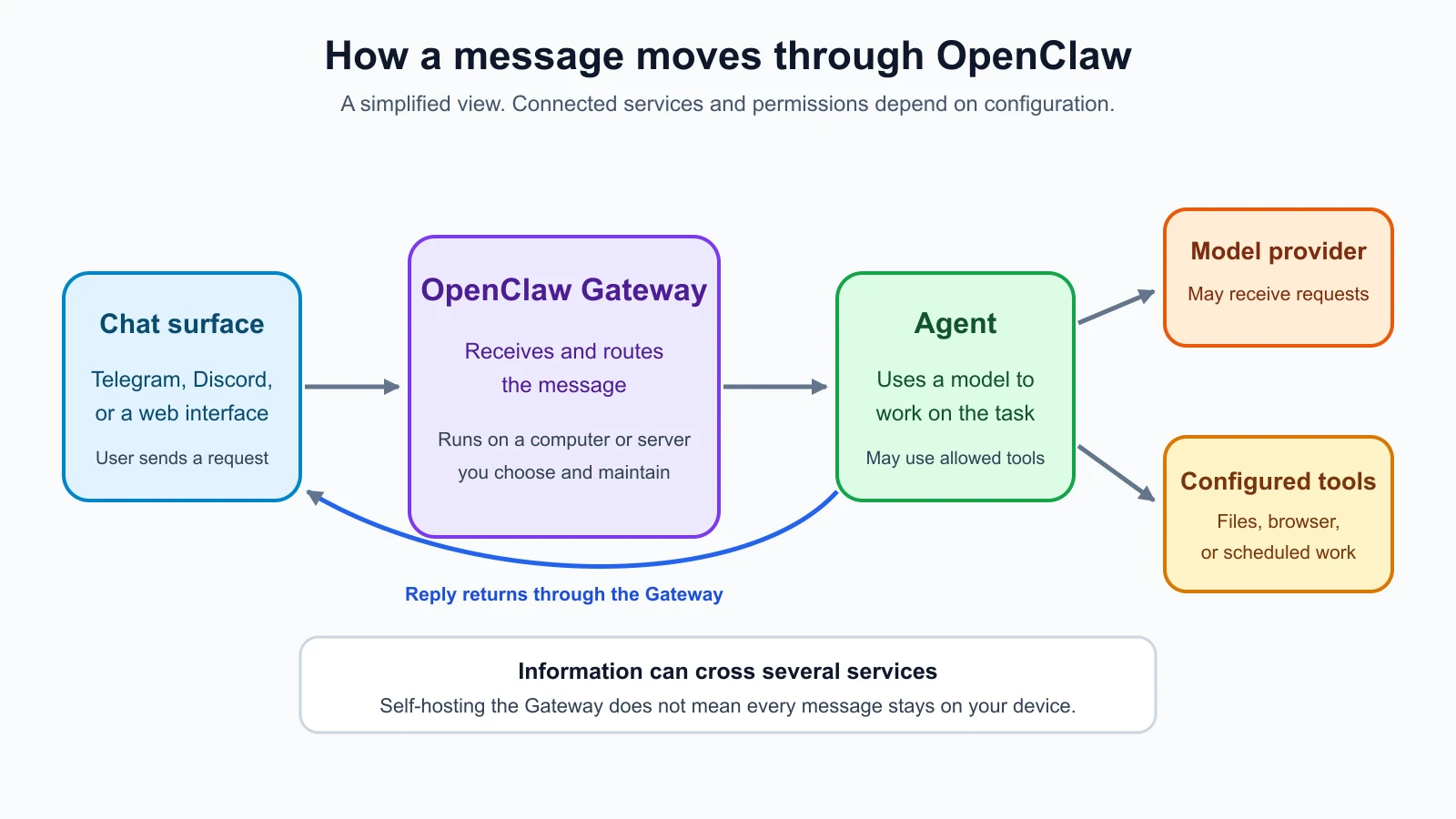
For example, imagine Mira, a fictional solo founder who wants a morning briefing. She could send a request from a new Telegram bot account. The Gateway receives it, the assistant gathers information from sources she has allowed, and it sends a summary back to that chat. She might also ask it to save a note or remind her about a task later. These are examples of possible workflows, not a claim that a particular integration is enabled by default. The behavior depends on the model, channel, permissions, and tools she configures.
The same general setup can be used for research, drafting, reminders, file organization, browser tasks, or coding related work. Some tasks only need a response. Others involve actions with consequences, such as changing a file, sending a message, or running a command. That distinction matters: an assistant that can act needs narrower permissions and closer supervision than one that only drafts text.
What “self-hosted” means
OpenClaw describes itself as a self-hosted assistant. In this context, self-hosted means you run its Gateway on hardware or infrastructure you control, such as your own computer or a server you manage. You choose how it is configured and which accounts and services to connect. OpenClaw’s documentation describes the Gateway as the point that coordinates connected channels, sessions, routing, and the agent runtime.
Self-hosted does not automatically mean that every part of a conversation stays on your device. A message may pass through the messaging platform you chose. If the agent uses a hosted AI model, the relevant request is sent to that model provider. A connected tool may also reach another service. Each service has its own data handling terms and settings. Before connecting real accounts or personal information, find out which systems receive the data and what each one retains.
It also does not mean that the software is isolated from the rest of your computer. If you give the Gateway access to files, a browser, or a command running tool, it may be able to use those capabilities according to its configuration. The machine account that runs the Gateway, the network it can reach, and the permissions you grant all affect the possible impact of a mistake. Later lessons build the setup in an isolated environment and add access only when there is a clear reason.
OpenClaw is open source and its official documentation identifies the project as MIT licensed and developed by the OpenClaw Foundation. Open source means the source code is available for people to inspect and modify under its license. That can make it easier to examine how a project works, but it does not mean that every plugin is safe, every configuration is secure, or that someone else will operate it for you. You still need to choose what to install, keep it updated, and protect your accounts and machine.
How it differs from a regular chat assistant
A typical hosted chat assistant is ready to use in a website or app managed by its provider. You send a prompt and receive a response inside that service. OpenClaw is something you run and configure. It can connect a Gateway to several chat surfaces, maintain sessions, and use tools or scheduled work when those capabilities are enabled.
That added flexibility brings added setup and maintenance. You are responsible for the Gateway host, its configuration, credentials, connected channels, backups, and updates. A hosted service may hide some of that operational work, while giving you less control over how the system is assembled. Neither option is automatically right for everyone. The useful question is which trade-offs fit the job and your ability to operate the system.
OpenClaw is also different from a coding assistant that works directly inside a development environment. A coding assistant is usually focused on helping with a project in an editor or terminal. OpenClaw is a coordination layer you can keep running and reach through channels. The official FAQ describes it as an assistant and coordination layer rather than an IDE replacement. If your main need is to edit a codebase in a focused session, a coding tool may be simpler. If you want one assistant to receive tasks across devices, keep ongoing sessions, or coordinate scheduled work, OpenClaw may be worth evaluating.
The boundaries are not absolute. OpenClaw can support coding related tasks when configured with suitable tools. A coding assistant may also have memory or automation features. Compare the actual setup you are considering rather than relying on product labels. Lesson 2 will make this distinction more concrete.
The trade-offs to consider
Before deciding, consider the work involved as well as the features.
You control more of the setup. You choose the machine, configuration, model provider, channels, and tools. This can be useful when you want a setup tailored to your workflow. It also means you have more decisions to make and more parts to maintain.
The assistant can be available across channels. One Gateway can connect multiple configured chat surfaces. That can make it convenient to start a task from a phone and receive the result where you already work. Each extra channel creates another account, credential, and access path to manage.
The system can act, not just answer. Tools and automation can make an assistant useful for recurring or multi-step tasks. They also increase the importance of permission boundaries. A sensible starting point is to let an assistant draft or summarize, then require your review before it sends messages, changes important files, or takes an external action.
Costs have more than one source. A hosted model provider may charge for usage. Messaging platforms, server hosting, storage, or other services may have their own costs. A local model can change the provider cost and data path, but it also uses your hardware and may have different capability or performance limits. Prices and supported model options change, so compare current provider terms when selecting a setup. This course will not assume that “self-hosted” means “free.”
You take on operational work. The Gateway needs to run, credentials need protection, and updates need attention. If a channel stops connecting or a machine restarts, you may need to diagnose the issue. A setup that is convenient when healthy can become another service you are responsible for keeping healthy.
You need to understand the trust boundary. A trust boundary is a point where data or control passes between systems that may have different permissions or owners. In this case, that can include the chat platform, Gateway, model provider, plugins, and tools. For example, a message sent from Telegram may be processed by your Gateway and then sent to a model provider. If the assistant can also read files, there is another boundary to consider. Knowing these paths helps you decide what data to share and what access to allow.
Who may find it useful
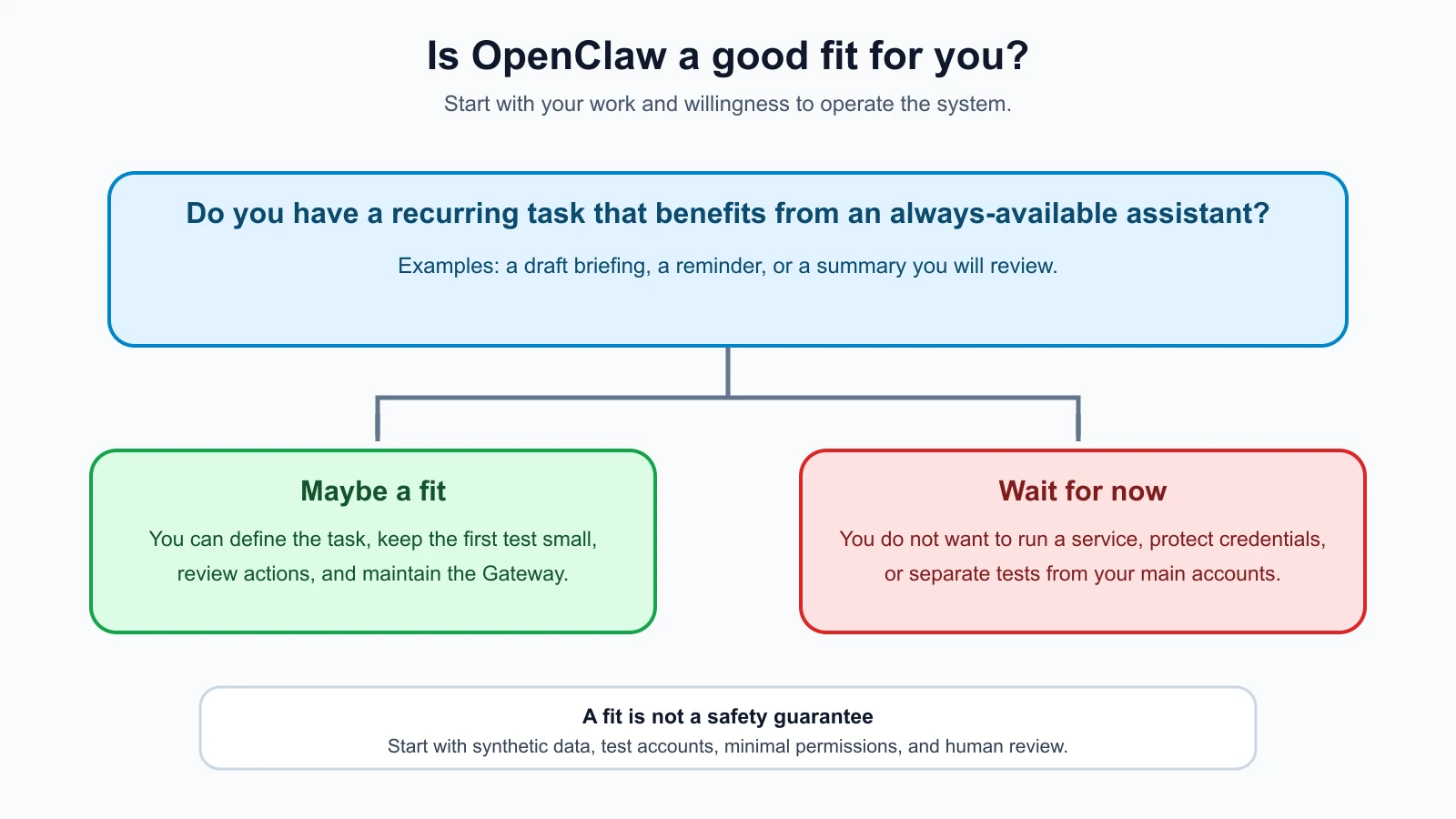
OpenClaw may fit a technically comfortable person who has a recurring workflow, wants to reach an assistant through more than one interface, and is willing to maintain the system. It may also fit a team that can define who is allowed to use a shared Gateway and what each person can access. The product supports multiple usage patterns, but a shared Gateway should be treated as a shared trust boundary. The official FAQ cautions that people who do not trust one another should not share a single Gateway.
Mira’s morning briefing is a modest example: she has a specific task, she can start with synthetic or low sensitivity information, and she can review the result before acting on it. A useful first project should be similarly limited. A reminder, a summary of public material, or a draft that stays in a private test chat is easier to evaluate than an assistant that can send email, modify business records, and browse arbitrary sites on its own.
You may not need OpenClaw if you only ask occasional questions, do not want to run or maintain a service, or would rather use a managed assistant with a simpler setup. You should also wait if you cannot yet separate a test environment from your main accounts, do not know how to protect API credentials, or would be uncomfortable investigating a service that stops working. That is not a permanent barrier. You can learn the basics of accounts, networking, and command line use first, then revisit the choice.
This course is for readers who are comfortable learning those basics and want to proceed carefully. It is not a promise that a novice can install the system safely by following one checklist. Every deployment is different, and later lessons will point out decisions that depend on the host, provider, and channel.
A safe way to think about the first project
For this course, Mira and her assistant are fictional. The examples will use placeholders and synthetic information. No real messaging account, private inbox, work channel, or production credential is part of the scenario. When hands-on setup begins, the plan is to use an isolated environment, a new bot account, and test credentials with a spend limit. That separation reduces the consequences of a configuration mistake, though it cannot remove every risk.
Keep the first goal small enough to check. Write down what the assistant should do, what it must not do, which data it needs, and what you will inspect before accepting its output. If the result is a draft, review it. If a task could change an account or send something to another person, keep a confirmation step under your control. Avoid connecting a broad set of tools just because they are available.
The course will treat community skills and plugins as code from other people. A plugin extends the product by adding capabilities, while a skill describes a procedure an agent can follow. Both can affect what the system does, so later lessons will show how to inspect them before use. We will not rely on a named community skill as a shortcut, and the example scanner later in the course will be described as a review aid, not a malware detector.
What this lesson does not establish
This lesson explains the product at a high level. It does not establish that a particular model is best, that a specific channel is safe for every reader, or that a feature will behave the same way in a future release. OpenClaw changes quickly. Commands, supported channels, model providers, configuration names, and security defaults must be checked against official documentation when you use them. The feature overview is useful for orientation, not a substitute for current setup instructions.
The project’s own description is also not an independent security assessment. “Self-hosted,” “open source,” and “local-first” describe aspects of how software is distributed or operated. They are not a guarantee that data never leaves your machine or that a deployment is secure. Evaluate the exact path your information takes and the permissions the assistant receives.
Mistakes beginners make
- Assuming self-hosted means private by default. Check whether your channel, model provider, or tools receive the data you send.
- Connecting main accounts at the start. Learn with an isolated setup, a new bot account, synthetic information, and test credentials.
- Giving the assistant every available tool. Begin with the smallest set of permissions that can complete the first task.
- Treating a strange answer as harmless because it is only text. Consider what connected tools the assistant could use next and keep review steps for consequential actions.
- Choosing a project because the feature list is long. Start from a repeated task you can describe and verify.
- Expecting a checklist to guarantee safety. A checklist helps you notice important controls; it cannot account for every host, provider, configuration, or future change.
Recap and try it yourself
OpenClaw is an assistant you run through a Gateway that connects chat surfaces to an agent and its configured tools. It can support messaging, ongoing sessions, and automation, but the exact behavior depends on the setup. Running the Gateway yourself gives you control over more choices and responsibility for more of the system. Data may still pass through chat platforms, model providers, and connected tools.
Before installing anything, write a short fit check for one task you might want help with:
- What repeated task would you delegate or prepare a draft for?
- Which information would the assistant need, and which information should stay out of the test?
- What systems could receive the information?
- What action should always wait for your review?
- Are you willing to maintain the Gateway and its credentials?
If you cannot answer those questions yet, keep researching and wait before connecting accounts. Next, compare OpenClaw with coding agents and other agent tools so you can choose the right kind of system for the work.
Sources, checked 7 November 2026: OpenClaw documentation overview, OpenClaw FAQ: What is OpenClaw?, OpenClaw features, and the roadmap.sh OpenClaw roadmap. Product features and documentation may change.