
OpenClaw course · lesson 17 of 22
- 1What Is OpenClaw, and Is It Right for You?
- 2OpenClaw vs Claude Code: Which Tool Fits the Task?
- 3How OpenClaw Works: Gateway, Sessions, and Agents
- 4OpenClaw Context and Memory: What Carries Forward?
- 5OpenClaw Workspace Files: Shape Your Agent Safely
- 6Where Should OpenClaw Run? Local, VPS, or Isolated
- 7Install OpenClaw and Start Its Gateway Safely
- 8Choose an OpenClaw Model and Provider
- 9Add Your First OpenClaw Channel Safely
- 10Choose Another OpenClaw Chat Channel Carefully
- 11Control OpenClaw Sessions and Commands
- 12Separate OpenClaw Agents and Route Messages
- 13Schedule OpenClaw Checks with Heartbeats and Automations
- 14Secure OpenClaw Hooks and Webhooks
- 15Use and Create OpenClaw Skills
- 16Vet OpenClaw Skills and Plugins Before Installing
- 17Extend OpenClaw with Plugins and MCP
- 18Understand the OpenClaw Security Model
- 19Secure an OpenClaw Gateway with Ten Checks
- 20Back Up, Update, and Troubleshoot OpenClaw
- 21Control OpenClaw Costs and Improve Reliability
- 22Capstone: Build a Safe OpenClaw Personal Assistant
Mira wants her fictional assistant to look up entries in a read-only project catalog. She could write instructions for a tool she already has, install a Gateway plugin that adds a new capability, or connect a separate program through MCP. Those choices have different trust boundaries. In this lesson, you will learn what each option does, how to decide between them, and how to review a plugin or MCP server before it reaches an agent.
OpenClaw's official plugin, plugin installation, MCP, and extension configuration docs were checked on 7 November 2026. These interfaces change quickly. Plugin APIs are currently marked experimental in the building guide. Command examples below reflect the docs checked on that date and were not executed against an OpenClaw instance.
Choose the extension that solves the actual gap
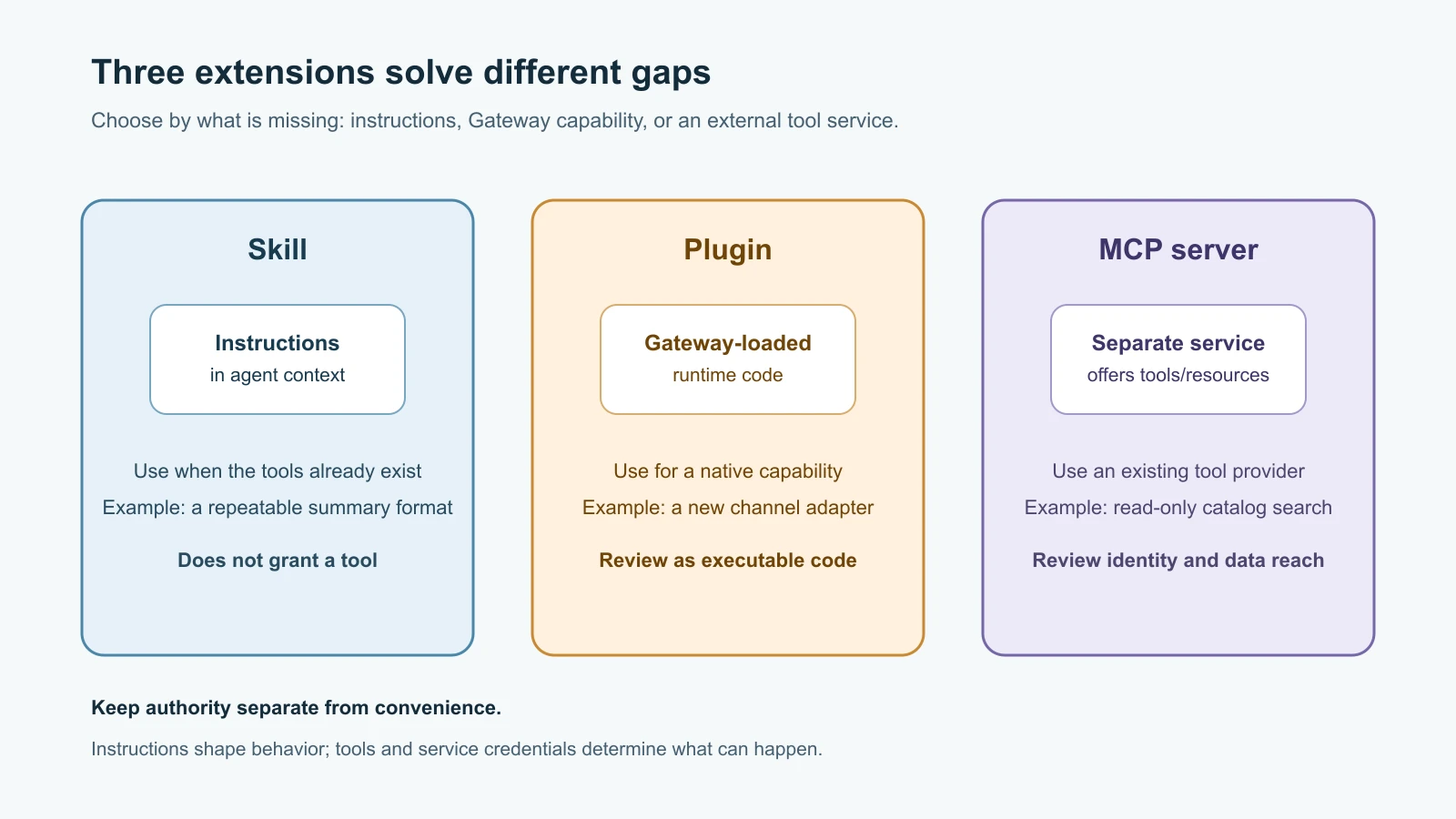
A skill is a set of instructions loaded into an agent's context. Use one when the agent already has the right tools and needs a repeatable workflow, a format, or guidance about when to call a tool. A skill does not add a tool or grant access. Lesson Use and create OpenClaw skills shows a simple example.
A plugin is an OpenClaw extension package. A native plugin can add a tool, channel, model provider, hook, media provider, or other Gateway capability. Its runtime code is loaded into OpenClaw, so install it as executable software. Choose a plugin when OpenClaw needs a capability that the built-in tools do not provide, or when a packaged integration should own Gateway-specific setup and behavior.
MCP, the Model Context Protocol, lets one program expose tools, resources, or prompts for another program to use. When OpenClaw connects to a third-party MCP server, that server provides capabilities that OpenClaw can make available to an agent. The server may run as a local process using standard input and output (stdio), or as a remote service using an HTTP transport. Choose MCP when a separate service already provides the integration and you want OpenClaw to connect to that service's published tools.
| Need | Likely fit | What changes |
|---|---|---|
| A standard process for summarizing text with an existing tool | Skill | Agent instructions and context |
| A new chat channel or model provider owned by OpenClaw | Plugin | Gateway runtime capabilities and possibly credentials |
| A separately operated project catalog exposing read-only search | MCP server | A connection plus server-provided tools and their access |
| A custom tool tightly integrated with Gateway lifecycle or hooks | Plugin | Executable code loaded by OpenClaw |
| Reuse an existing third-party service that speaks MCP | MCP server | A new external trust and data boundary |
These are practical defaults, not rigid categories. Some plugins bundle skills or connect to MCP. Ask what is missing first. Do not add a plugin merely to store instructions, and do not connect an MCP server if an existing, restricted tool already solves the task.
Understand the trust boundary
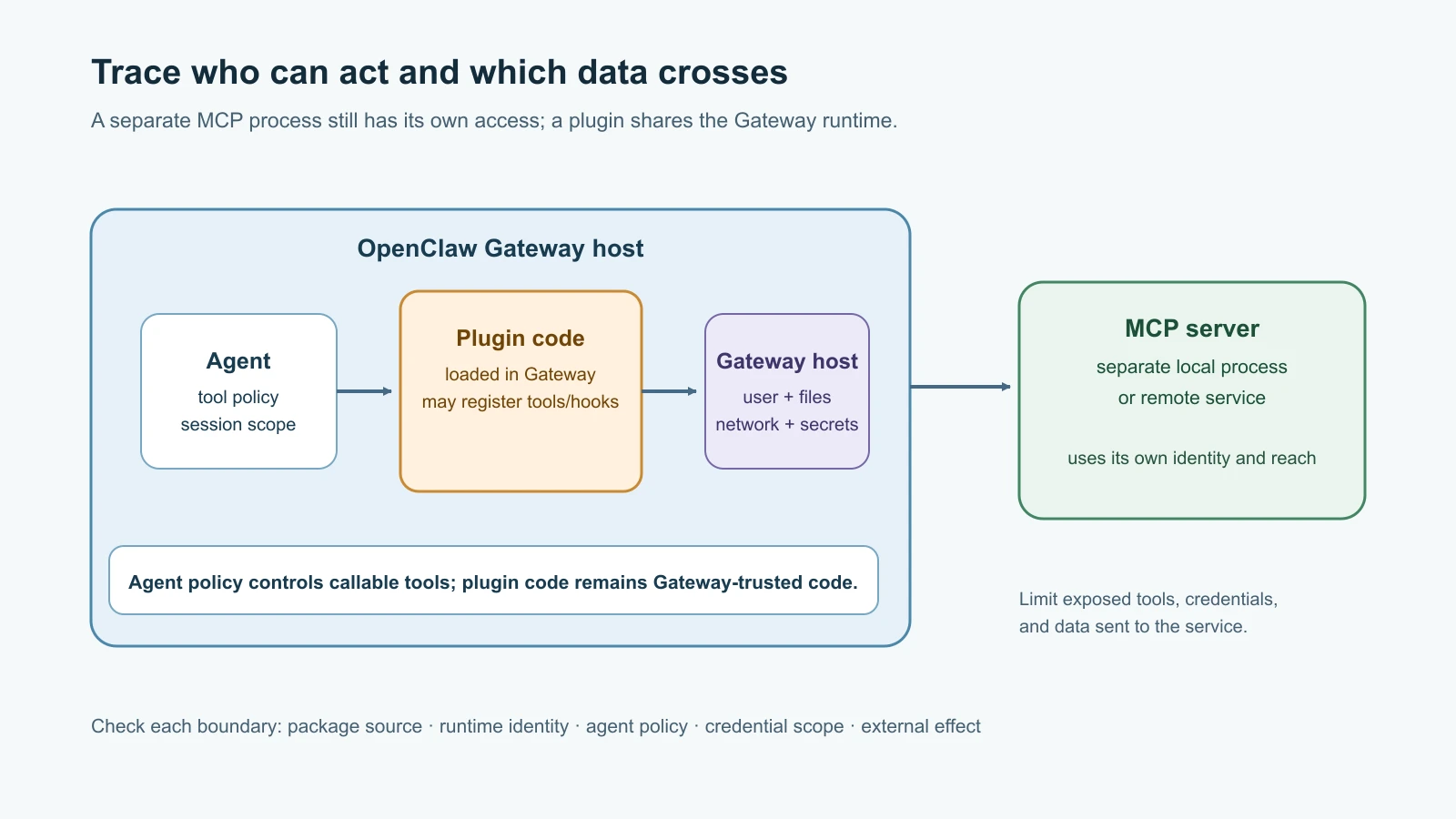
A plugin runs as part of the Gateway runtime. Its code can act through the capabilities and operating-system access available to that process. A plugin may register hooks that run around model or tool activity, channels that receive messages, or tools the agent can call. Some sensitive hook behavior requires additional explicit configuration, but a plugin's presence still means executable code has been installed into the Gateway. Review the source and manifest, pin compatible versions, and keep the Gateway host's privileges narrow.
An MCP server is a separate program or service, but its tools can still cause effects outside OpenClaw. A local stdio server runs on the Gateway host under the Gateway process identity, with the command, arguments, working directory, environment, files, and network access available to that process. A remote server receives whatever data and credentials the configured connection sends, and its own identity may reach other systems. The separation can help organize components; it does not automatically sandbox the server.
OpenClaw stores managed MCP definitions under mcp.servers. The tools advertised by a server go through OpenClaw's regular tool profiles and policies; connecting a server does not silently bypass those controls. However, the available tool list gets larger, and the agent may receive server-provided usage instructions. A compromised server can lie about a tool's purpose or return untrusted text. Treat results from the server as data to evaluate, not as trusted instructions.
MCP instructions can affect model context. OpenClaw's current docs say it includes server usage guidance for the embedded agent and caps each server's included guidance at 2,000 characters, adding a truncation marker when needed. That limit controls prompt size; it does not validate the guidance. Read the server's instructions and understand how the model will see them.
There are two directions that are easy to confuse. With openclaw mcp add, OpenClaw acts as a client and connects to an external server so its agent can use that server's tools. With openclaw mcp serve, OpenClaw acts as the server and exposes its Gateway conversations to an external MCP client. The second direction can expose conversation access outside OpenClaw and deserves its own access review. This lesson focuses on connecting a third-party server to OpenClaw.
Install a plugin from a deliberate source
The plugin installer supports several source types. Current examples include ClawHub, npm, Git, and local development directories. OpenClaw's ClawHub quickstart explicitly documents the clawhub: source prefix for release builds through version 2026.10.4, while newer main or development builds may use ClawHub as the default source for package names. Because an unprefixed package can be interpreted differently across releases, the explicit source form is the clearest example for a ClawHub plugin:
1openclaw plugins search "project catalog"
2openclaw plugins install clawhub:<publisher>/<plugin-name>
The package name here is a placeholder, not a recommendation. Before installing, read the listing, selected version, scan information, permissions, and plugin instructions. Confirm the source rather than assuming npm or ClawHub will be chosen implicitly. For a package you intentionally want from npm, the docs show an explicit npm: source. Arbitrary Git, local, archive, or marketplace sources may prompt for review; a noninteractive --force option is an explicit operator confirmation, not a security bypass. Never use it just to silence an unfamiliar warning.
Installing a package and enabling its behavior are separate decisions in some flows. The current plugin CLI supports --no-enable to record an installation without turning on a plugin where that option applies. The plugin may still require configuration before it can run. Use the listing and inspect commands to see the installation and runtime state. Disable or remove an extension using the matching documented command if it is not needed; record the source and version so you know what to review later.
Capability consent is another checkpoint. Depending on the plugin source, OpenClaw may show declared tools, hooks, channels, providers, and other capabilities. Read that list and compare it with the plugin's stated task. A tool that can send messages or modify records carries more risk than a read-only lookup. A channel plugin may receive incoming content. A model provider may handle data sent for inference. Keep only the plugin capabilities you need and scope them to the intended agent.
Creating a plugin is software development
If the capability must live inside OpenClaw, a native plugin has a manifest named openclaw.plugin.json and a runtime module. The manifest identifies the plugin, describes its configuration schema, and declares capabilities such as tools. It lets OpenClaw validate configuration and inspect plugin metadata without first executing the runtime code. The runtime implements the behavior using the plugin SDK.
The official build guide currently describes the plugin APIs as experimental and asks developers to pin a host version and test each compatible version. It shows TypeScript ES modules and a package with openclaw compatibility metadata. A tool plugin should declare the tools it registers in its manifest and should request the narrowest useful capability. Keep configuration schemas strict, credentials out of source files, and optional or side-effecting tools disabled until an operator opts in.
The smallest safe design is usually a focused tool with a narrow input schema and a predictable result. Avoid a generic “run any command” tool or broad Gateway hooks if a single read-only lookup would do. Use typed arguments, validate them in the runtime, handle network and provider failures explicitly, set timeouts, and avoid writing secrets or full private payloads to logs. Test the package against the exact OpenClaw version and install shape it will use. A local source-checkout test does not necessarily prove that a published package includes built files and runtime dependencies.
Do not make a plugin on a production Gateway just to learn the SDK. Develop in a disposable checkout or isolated environment, with fake credentials and minimal tools. Publishing is a separate step using the ClawHub CLI. Publishing can make code available to other operators, so review the package contents and metadata before release. The Building plugins guide, Plugin manifest reference, and Plugin SDK setup are the current entry points for implementation details.
Connect an MCP server with the smallest useful tool set
Mira's read-only catalog service has an HTTP endpoint and offers search, read_record, and update_record. She only needs search and read. The OpenClaw MCP CLI supports adding a remote server and selecting exposed tools with an include filter. A representative configuration command from the current docs looks like this:
1openclaw mcp add project-catalog \
2  --url https://mcp.example.com/mcp \
3  --transport streamable-http \
4  --include 'search,read_*'
This is a configuration change; it was not run for this lesson. For local stdio, OpenClaw starts a process with the configured command, arguments, and working directory. Review exactly what that command launches, where it came from, and what the Gateway process can access. For a remote server, check the endpoint owner, HTTPS certificate validation, authentication method, OAuth scopes, and what request data the service receives. Do not put a real bearer token in a command copied into shell history or course notes.
Use a tool filter to expose only the needed server operations. A filter is a useful reduction, but it does not change what the MCP service itself can do with its own credentials. Also use OpenClaw's agent tool profile, global tool policy, and per-session controls to determine which tools are actually callable. For Mira, the update_record tool should remain unavailable to the read-only assistant. Give the MCP connection read-only credentials too, if the service supports them; defense in depth means both the remote identity and the agent policy restrict writes.
Check saved configuration before making a live connection. The current docs distinguish config-only commands such as openclaw mcp status --verbose and openclaw mcp doctor from openclaw mcp probe, which opens a live MCP connection to list advertised capabilities. Use a probe only when you intend to contact the server and are authorized to do so. Afterward, compare the actual tool list with the expected list; if tools are missing, inspect the include or exclude filter. Do not turn on every tool just because it appears in the server's catalog.
MCP may use OAuth or configured authorization headers for remote servers. Use the narrowest supported scope and understand whether a credential belongs to the operator or each requester. A shared credential means the server sees the operator's authority for every agent using that connection. Per-requester credentials can provide a tighter boundary when supported and correctly configured. Store credentials through the supported OpenClaw configuration or login path, not in a prompt, skill file, source repository, or screenshot. Confirm that the server uses the expected identity before passing private records.
Review the extension as a complete route
An extension has more than one boundary. For a plugin, follow package source → installer and manifest → Gateway runtime → registered capability → agent policy → external effect. For MCP, follow server source and identity → configured transport and credentials → advertised tool → OpenClaw filtering and policy → agent call → service effect. Ask at every step what data crosses and which identity is used.
Use a short review record: who owns the package or server, what exact version or endpoint is in use, which tools and resources are exposed, what credentials are attached, which agent can call them, whether any operations write or contact others, what scan or consent findings were shown, and how to disable the integration. Test with a disposable agent and fake data. Monitor the first calls, then decide whether the integration belongs in a long-running assistant.
For a small extension decision, use this sequence:
- Confirm that a capability is truly missing; a skill may be enough if only the workflow is missing.
- Choose a plugin for Gateway-native code and lifecycle behavior, or MCP for a separately operated tool service.
- Identify the source, owner, version, endpoint, credentials, and effects before adding it.
- Limit the plugin capabilities or MCP tools and credentials to the task.
- Test in an isolated environment, inspect runtime and tool inventory, and write down the disable or removal step.
Mistakes beginners make
- Installing a plugin when the agent only needs clearer instructions.
- Assuming a plugin is a harmless configuration file. Native plugins include executable runtime code.
- Using an unprefixed package name without confirming which source the installed OpenClaw release selects.
- Treating
clawhub:or an official-looking publisher name as proof that every capability is appropriate. - Connecting an MCP server and exposing all its tools because they are available.
- Forgetting a local stdio MCP server runs on the Gateway host and inherits the process user's access.
- Confusing OpenClaw as an MCP client with
openclaw mcp serve, which exposes OpenClaw conversations to another client. - Treating
mcp statusandmcp probeas equivalent; the latter makes a live connection. - Giving a shared MCP connection credentials that are broader than the least-privilege agent needs.
- Testing a new plugin or server against real accounts and private data first.
Recap and try it yourself
Use a skill for instructions, a plugin for new Gateway-native capability, and MCP when OpenClaw should connect to a separate tool server. Plugins run as code in the Gateway environment. MCP separates the server process, but the server and its credentials can still reach data and systems. Review source, version, identity, capabilities, tools, and effects; apply least privilege at both the server and agent; and test in isolation before relying on the connection.
Try this on paper with Mira's project catalog. Decide whether she needs a skill, plugin, or MCP server. Name the one or two tools she needs, the credential scope, the data the service will receive, which agent may call it, and what action must stay unavailable. Then mark which step is config-only and which would open a live connection. Do not install a package or contact a real server for this exercise.
For general MCP concepts, see MCP for AI agents. For another product's server setup and trust boundaries, compare MCP servers in Claude Code. For OpenClaw's earlier skill workflow, revisit Use and create OpenClaw skills.