
OpenClaw course · lesson 10 of 22
- 1What Is OpenClaw, and Is It Right for You?
- 2OpenClaw vs Claude Code: Which Tool Fits the Task?
- 3How OpenClaw Works: Gateway, Sessions, and Agents
- 4OpenClaw Context and Memory: What Carries Forward?
- 5OpenClaw Workspace Files: Shape Your Agent Safely
- 6Where Should OpenClaw Run? Local, VPS, or Isolated
- 7Install OpenClaw and Start Its Gateway Safely
- 8Choose an OpenClaw Model and Provider
- 9Add Your First OpenClaw Channel Safely
- 10Choose Another OpenClaw Chat Channel Carefully
- 11Control OpenClaw Sessions and Commands
- 12Separate OpenClaw Agents and Route Messages
- 13Schedule OpenClaw Checks with Heartbeats and Automations
- 14Secure OpenClaw Hooks and Webhooks
- 15Use and Create OpenClaw Skills
- 16Vet OpenClaw Skills and Plugins Before Installing
- 17Extend OpenClaw with Plugins and MCP
- 18Understand the OpenClaw Security Model
- 19Secure an OpenClaw Gateway with Ten Checks
- 20Back Up, Update, and Troubleshoot OpenClaw
- 21Control OpenClaw Costs and Improve Reliability
- 22Capstone: Build a Safe OpenClaw Personal Assistant
Lesson 9 connected Mira's test Gateway to a new Telegram bot and limited direct messages to her own account. Now she wants to decide whether Slack, Discord, WhatsApp, Signal, or iMessage would fit a different use. The right choice depends on more than which app she already has open. Each channel has a different account model, setup footprint, group behavior, and set of platform rules.
This lesson compares the paths and helps you decide what to investigate. It does not ask you to connect five accounts. Keep using the isolated Gateway and test model from earlier lessons, and choose at most one channel for a later, deliberate setup. Never use a work workspace, personal message history, or other people's data for a first experiment.
The OpenClaw channel details below were checked against the official docs on 7 November 2026. Platform terms can change independently, so follow the current official policies linked near the end before using a channel. The platform notes here are an orientation, not legal advice.
First compare the connection model
OpenClaw connects through a channel adapter that runs on or alongside its Gateway. The adapter may authenticate as a bot application, a linked messaging account, or a local Mac process. That distinction affects what the agent can see and what the host must be allowed to do.
| Channel | What OpenClaw connects as | Setup shape | First risk to understand |
|---|---|---|---|
| Slack | A workspace app/bot | Create and install a Slack app, select API scopes, configure its tokens | Workspace approval and requested message/file scopes |
| Discord | A bot application | Create an app, enable needed intents, invite it to a server | Server permissions, member/channel reach, and mention behavior |
| A linked WhatsApp account session | Link a number using the supported login flow | Personal-account automation and account/session exposure | |
| Signal | A Signal device managed through signal-cli | Install the channel plugin and link or register a dedicated number | The bridge process and linked device are part of the trust boundary |
| iMessage | A Mac's Messages database and imsg process | Install the plugin and grant macOS permissions in the signed-in user context | Local access to message history and permission to send through Messages |
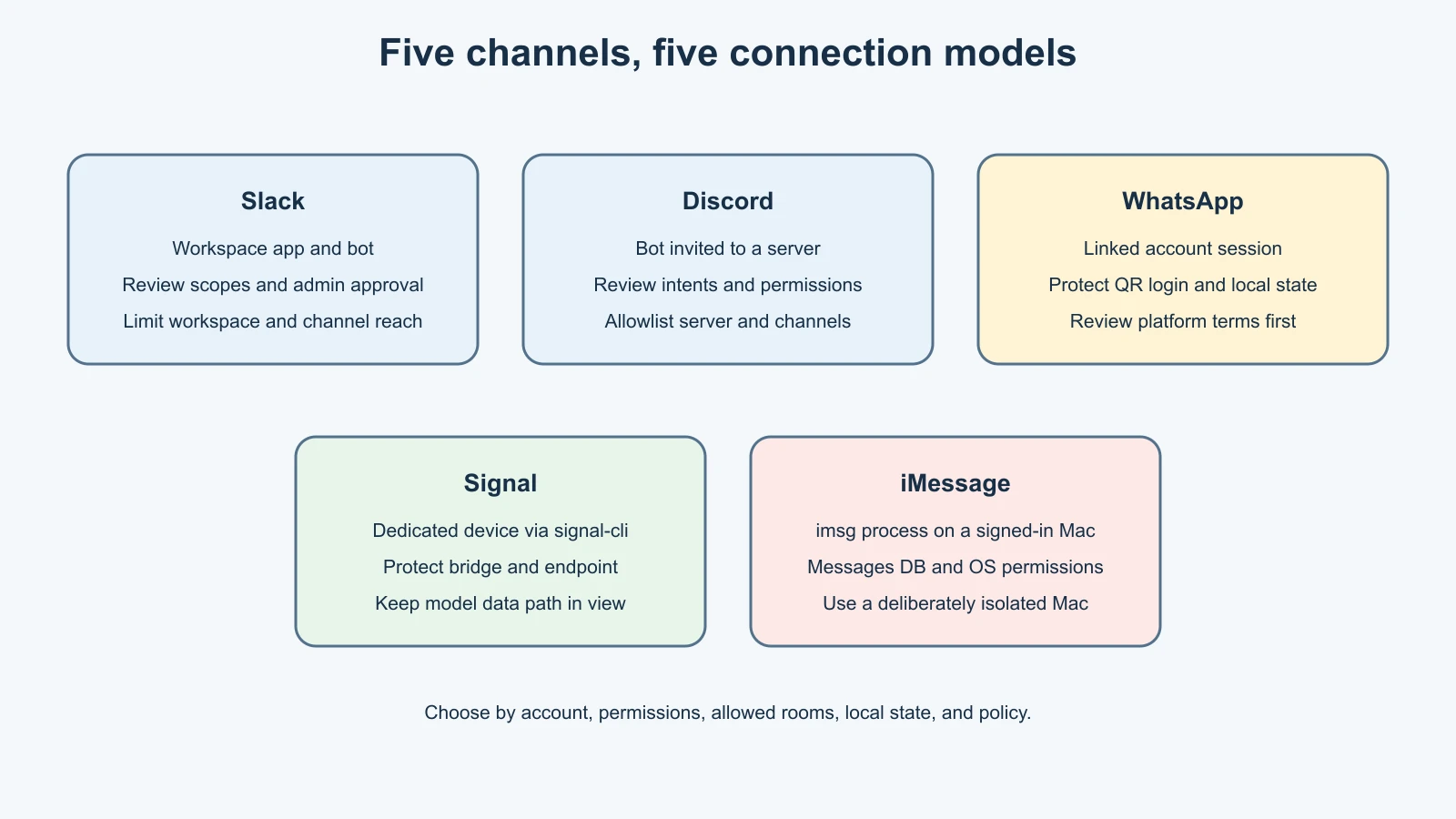
The table is a starting point, not a security ranking. A tightly scoped bot in a private server may be safer for a particular use than a broadly authorized private-message account. A local Mac bridge can avoid a cloud bot service while still having powerful access to personal messages. Evaluate the concrete account and permissions rather than assuming one brand is inherently safe.
Slack: an app inside a workspace
OpenClaw's Slack channel uses a Slack app and bot identity in a workspace. The current setup guide has a Socket Mode path, app manifests, and bot scopes. The app may need message history, channel information, and write permissions depending on what you want it to do. Select only a manifest and scopes that match the intended use, and ask the workspace administrator before adding an app to a company workspace.
Slack can be a good fit when a team has explicitly approved a bot for a small test workspace or a private channel. The channel policy can restrict which channels are enabled and which users may trigger it. Group messages are mention-gated by default in OpenClaw's current Slack access guide, but a mention rule is an activation rule, not a data boundary: the bot still needs only the channel membership and scopes it requires. A bot invited to a channel may have access to channel content within the permissions it holds.
The setup can involve both a bot token and an app-level token for Socket Mode. These are secrets. Store them through a supported secret mechanism that reaches the background Gateway, never in a lesson note, repository, or command pasted into chat. Token permissions and OAuth scopes are separate from OpenClaw's sender allowlist. Review both layers.
If you are considering a workplace test, do not use a production workspace just because you can install apps there. Ask who can approve the app, what data the bot will receive, how long logs or memory may retain it, and how to remove the app and revoke its tokens. Slack's API terms and platform usage guidelines apply to API apps; read the current versions with your workspace's own policies.
Discord: a bot invited to a server
OpenClaw's Discord connection is a bot application using Discord's Gateway. You create an application, configure its bot, choose intents, and invite it to a server. Keep the requested server permissions as small as possible. A bot that can view channels and read message history has more reach than one added only to a dedicated test channel.
OpenClaw's current Discord guide recommends a private server for a first setup. In guild channels, replies require an explicit bot mention by default. The access-control rules can allowlist a server, individual channels, users, or roles. Configure a private test server and one channel first; do not start with a large community server. If the app does not receive Discord's privileged Message Content Intent, the documented fallback can operate on direct messages and explicitly mentioned guild messages, with mention gating kept on.
Discord DMs also have a pairing policy by default in OpenClaw. Pair your own test account and verify that the bot cannot respond in a server or channel that you did not allow. Server admission and sender admission are separate checks: a member might be allowed to use the bot only in a specific server channel, while another server should remain outside its route.
Read the current Discord Developer Policy and Community Guidelines before deploying a bot. In particular, pay attention to what data the application receives, stores, and processes. Discord's current policy includes restrictions on collecting and using API data; do not assume that operating your own bot exempts you from developer requirements.
WhatsApp: a linked account session
The OpenClaw WhatsApp channel uses a linked WhatsApp session rather than a conventional bot account in the same sense as Slack or Discord. Setup involves a QR login flow and persists account state on the Gateway host. OpenClaw recommends a separate number for many setups, while also documenting personal-number configurations. This is a meaningful difference: a linked account may bring conversations and contact context associated with that account into the system.
Do not scan a QR code with your everyday WhatsApp account for a first experiment. If you choose to evaluate this channel, review exactly which account is being linked, who may message it, whether group messages are enabled, and how the local session state is protected. Use the pairing default or a narrow sender allowlist. Keep group policy allowlisted and require a mention in any group you deliberately add.
Platform terms deserve particular care here. WhatsApp's consumer Terms of Service restrict certain automated or non-personal use unless authorized. The official WhatsApp Terms and responsible-use guidance should be read before connecting an account. Do not infer that a technical login path means every automation pattern is permitted. If the intended use is business messaging, check the applicable official business product and policies instead of repurposing a personal account.
After a test, logging out or removing the channel stops the linked session from being used by OpenClaw, but you should still review device-linked sessions in WhatsApp and the Gateway's retained state. If the account or session may be exposed, unlink it through WhatsApp's official controls and inspect backups. A QR code can authorize a session; treat the pairing screen and resulting session state as sensitive.
Signal: a linked device through a bridge
OpenClaw's Signal integration uses the signal-cli program through a channel plugin. The Gateway talks to a Signal device through that bridge. The official guide recommends using a separate number for a bot. It notes that a personal Signal account connected as the bot may ignore its own messages as a loop-prevention measure, so a dedicated number is a more suitable test identity.
This setup has extra moving parts: the plugin, the Signal account/device, and the daemon or process that receives messages. Keep that bridge on the same isolated host or a private network, and do not expose an unauthenticated service endpoint publicly. A local service boundary is not automatically secure if unrelated local processes or users can connect to it.
Signal DMs use pairing by default; groups have their own group policy and sender controls. Use a dedicated number, pair only your test sender, and leave groups disabled or allowlisted until you have a clear use. Signal's encryption properties do not mean an AI agent's processing is end-to-end encrypted in the same way as a conversation between two Signal clients. OpenClaw must receive the message to act on it, and the configured model provider may receive relevant context. The Signal privacy policy explains Signal's service; separately review the model provider and the local Gateway's storage.
The important question is not whether Signal encrypts messages in transit between its users. It is what happens after the linked device delivers a message to OpenClaw, which local processes can read it, and where the model request goes. Keep the first test to a harmless message with tools disabled.
iMessage: a Mac with Messages access
OpenClaw's iMessage channel uses the imsg command-line bridge on a Mac signed in to Messages. The Gateway process needs access to the Messages database. macOS may require Full Disk Access for reading and Automation permission for sending through Messages. These are sensitive permissions because they grant access to real message history or the ability to send as the signed-in user.
This channel is only a sensible choice if you deliberately want to operate a Messages account from a Mac that you control. For a first test, use an isolated macOS environment or a dedicated account with no personal messages. Read the permission prompts carefully, and do not grant broad disk or automation access on your everyday Mac just to see whether the plugin works. If a remote Gateway uses an SSH wrapper to reach a Messages Mac, that adds network credentials, another host, and a second process boundary to secure.
The iMessage channel defaults to pairing for DMs. Keep that policy and a narrow sender allowlist, and avoid group actions while learning. Some advanced functions in the current OpenClaw guide require extra private API behavior and system changes; do not disable operating-system protections to unlock them. Basic channel setup should not require weakening system integrity protections.
Before proceeding, ask whether you are comfortable with the Gateway process being able to read message history on that Mac. If not, choose a channel designed around a dedicated test bot instead. Revoke macOS permissions and remove the channel when you finish. Review the official iMessage setup guide for the current platform requirements.
Direct messages and groups expose different surfaces
In a direct message, the agent receives messages from the sender admitted by the channel policy. In a group, it may encounter text from many people, files, links, bot mentions, and replies. Some content may be visible to the channel adapter even when it does not activate a response. A mention gate helps control when the agent responds; it does not guarantee that other group content is unavailable to the Gateway or absent from context.
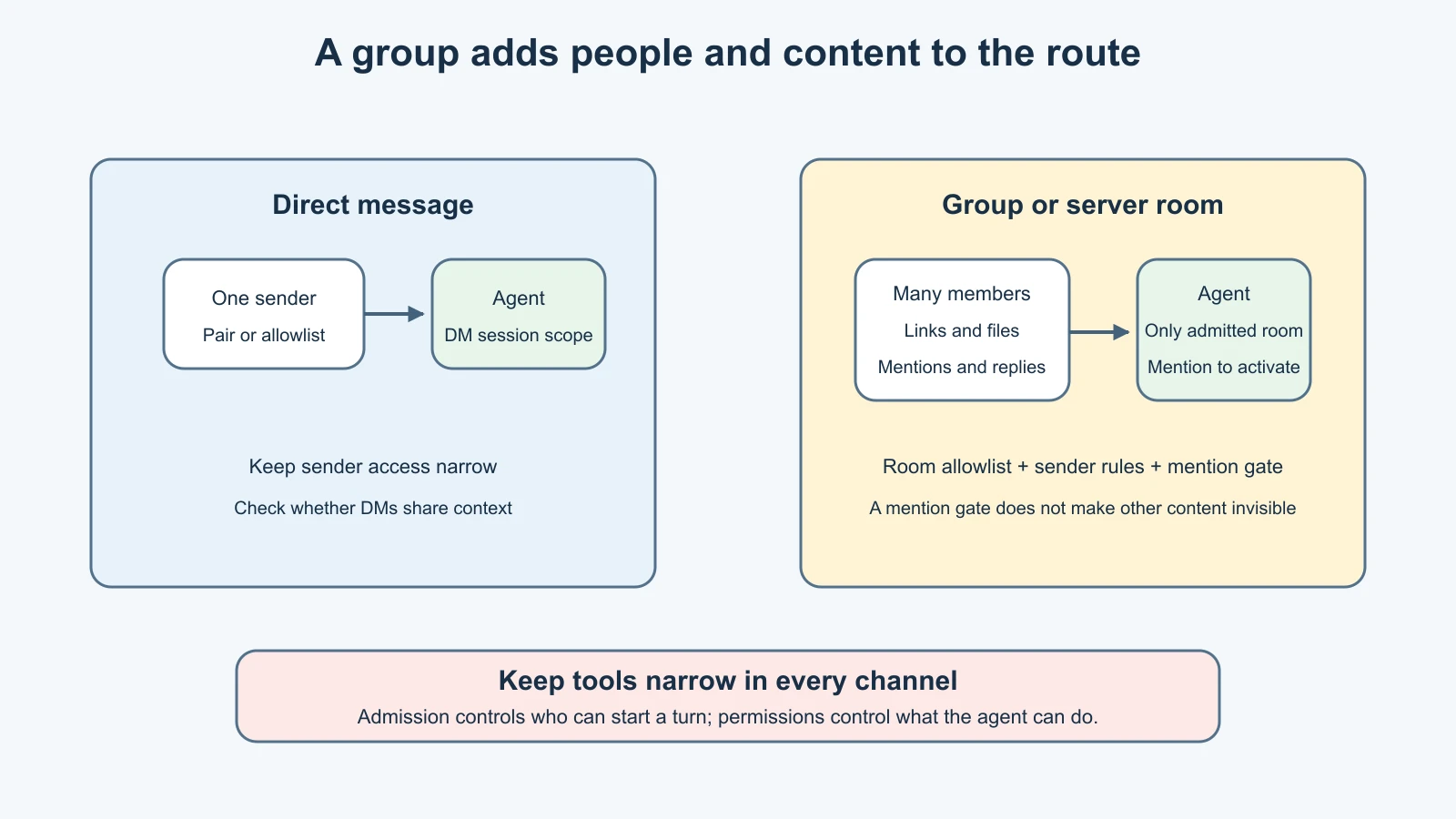
Start with a direct message from one approved test account. If you later need a group, choose a private room with a known membership list, allowlist that exact room, and require an explicit mention. Allow only the sender IDs or roles required. Keep any tools available in that room no more powerful than necessary. Do not treat a private invite link as a lasting security control; membership can change.
The default DM scope also matters. OpenClaw's session.dmScope defaults to main, so direct messages from different channels can share one rolling context. A Slack DM and a Signal DM could therefore share conversation context unless the scope is changed. For multiple users, shared accounts, or trust levels, review the session-isolation settings from the channel routing documentation before adding participants.
Compare the five before choosing
| If you need… | A channel to investigate | Check before proceeding |
|---|---|---|
| A team-approved assistant in a controlled test workspace | Slack | Workspace approval, app scopes, channel membership, retention rules |
| A bot in a dedicated private community/server | Discord | Server and channel allowlists, least bot permissions, mention gate, message-content intent |
| A familiar phone chat for an isolated personal test | Telegram, from the prior lesson | A new bot account, pairing, explicit sender ID, shared DM scope |
| A dedicated number connected through a local bridge | Signal | Number availability, bridge exposure, device registration, provider data path |
| A Mac-native personal messaging workflow | iMessage | Mac isolation, Messages database access, Full Disk Access, Automation permission |
| An existing WhatsApp account connection | WhatsApp, only after policy review | Consumer/business terms, linked-device state, account separation, group controls |
This table suggests what to investigate, not which service is automatically right. A Slack test workspace may be ideal for an approved team experiment, while Signal on a dedicated number may fit a separate-device test. WhatsApp or iMessage can be poor first choices if they require access to a primary personal account or message archive. A new Telegram bot remains the simplest way Mira can continue learning without exposing an existing personal inbox.
For each candidate, write down the identity OpenClaw will use, which people and rooms it can receive messages from, what permissions the channel requires, where credentials and message state live, and how to unlink or revoke access. If you cannot answer one of those questions from the official docs, pause before connecting it.
Mistakes beginners make
Thinking every channel is a bot
Slack and Discord use bot applications. WhatsApp is commonly connected as a linked account. Signal uses a device bridge, and iMessage relies on a Mac process with local permissions. The account model changes the data and host risks.
Adding the bot to every room it might need
Start with one private test surface. A mention requirement does not make all other content invisible, and membership may expose history or files to the adapter. Add another room only when you can name its purpose and allowed members.
Granting every requested permission
Review OAuth scopes, intents, server permissions, and macOS privacy prompts. Some capabilities need additional access, but that does not mean the test needs them. Enable only what the first exercise requires.
Reading encryption claims as a privacy guarantee
End-to-end encryption between people does not describe what happens after an authorized client, bridge, or linked account delivers a message to your Gateway. Check the Gateway host, local storage, and model provider as separate destinations.
Treating technical support as platform approval
The fact that OpenClaw can connect a channel does not mean every automation pattern complies with platform terms or workplace rules. Read the current official policies and obtain workspace or account-owner approval where needed.
Recap and try it yourself
Slack and Discord connect through bot applications with workspace or server permissions. WhatsApp links an account session. Signal connects a device through signal-cli. iMessage gives a Mac process access to Messages and may require sensitive operating-system permissions. For all five, sender pairing, room allowlists, and mention rules reduce exposure, but they do not replace tool restrictions, session isolation, or a review of where message content is processed.
Try this on paper: choose one of the five channels for Mira's fictional morning reminder. List the account identity, required permissions, allowed senders, allowed rooms, whether a mention is required, the local data it can read, the provider that processes a message, and the steps to unlink it. Then name one reason to choose a different channel. Do not create an account or grant permissions as part of this exercise.
For the message route from chat to agent and back, revisit How OpenClaw works. For a cautious first bot setup, see Add your first OpenClaw channel.
Sources, checked 7 November 2026
- OpenClaw, Slack setup and Slack access control
- OpenClaw, Discord setup and Discord access control
- OpenClaw, WhatsApp
- OpenClaw, Signal
- OpenClaw, iMessage setup
- OpenClaw, Channel routing and Group controls
- Slack, API Terms and platform usage guidelines
- Discord, Developer Policy and Community Guidelines
- WhatsApp, Terms of Service and responsible-use guidance
- Signal, Terms and privacy policy