
OpenClaw course · lesson 8 of 22
- 1What Is OpenClaw, and Is It Right for You?
- 2OpenClaw vs Claude Code: Which Tool Fits the Task?
- 3How OpenClaw Works: Gateway, Sessions, and Agents
- 4OpenClaw Context and Memory: What Carries Forward?
- 5OpenClaw Workspace Files: Shape Your Agent Safely
- 6Where Should OpenClaw Run? Local, VPS, or Isolated
- 7Install OpenClaw and Start Its Gateway Safely
- 8Choose an OpenClaw Model and Provider
- 9Add Your First OpenClaw Channel Safely
- 10Choose Another OpenClaw Chat Channel Carefully
- 11Control OpenClaw Sessions and Commands
- 12Separate OpenClaw Agents and Route Messages
- 13Schedule OpenClaw Checks with Heartbeats and Automations
- 14Secure OpenClaw Hooks and Webhooks
- 15Use and Create OpenClaw Skills
- 16Vet OpenClaw Skills and Plugins Before Installing
- 17Extend OpenClaw with Plugins and MCP
- 18Understand the OpenClaw Security Model
- 19Secure an OpenClaw Gateway with Ten Checks
- 20Back Up, Update, and Troubleshoot OpenClaw
- 21Control OpenClaw Costs and Improve Reliability
- 22Capstone: Build a Safe OpenClaw Personal Assistant
OpenClaw's Gateway coordinates messages and tools, but a model provider supplies the model that interprets each request. Choosing one affects cost, privacy, available capabilities, and how you authenticate. A model that produces fluent text is not automatically the best choice for an agent that can read files or call tools.
Mira, our fictional learner, has installed OpenClaw in a test environment. She wants to try one small task before connecting a messaging account. She is choosing between a hosted API from OpenAI, Anthropic, or Google, and a model served locally with Ollama. We will walk through the trade-offs and show how to set one default without exposing a real key.
Provider names, model catalogs, prices, and sign-in options change often. The commands and provider details in this lesson were checked against OpenClaw's official docs on 7 November 2026. Model names are deliberately treated as catalog choices rather than promises; check the current list for your account when you set yours.
Provider, model, and route
A provider is the service or local runtime that answers model requests. A model is the particular model selected from that provider. A route is how OpenClaw sends a request and authenticates it. One provider can offer multiple models and more than one authentication route.
For example, OpenClaw's provider ID for Google Gemini is google. OpenAI API keys and ChatGPT/Codex sign-in both use the provider ID openai, but they can have different model access and billing behavior. Ollama can serve a model on the Gateway machine, on a private LAN host, or through its own cloud service. Always check the provider/model pair in the model catalog rather than guessing from the product name.
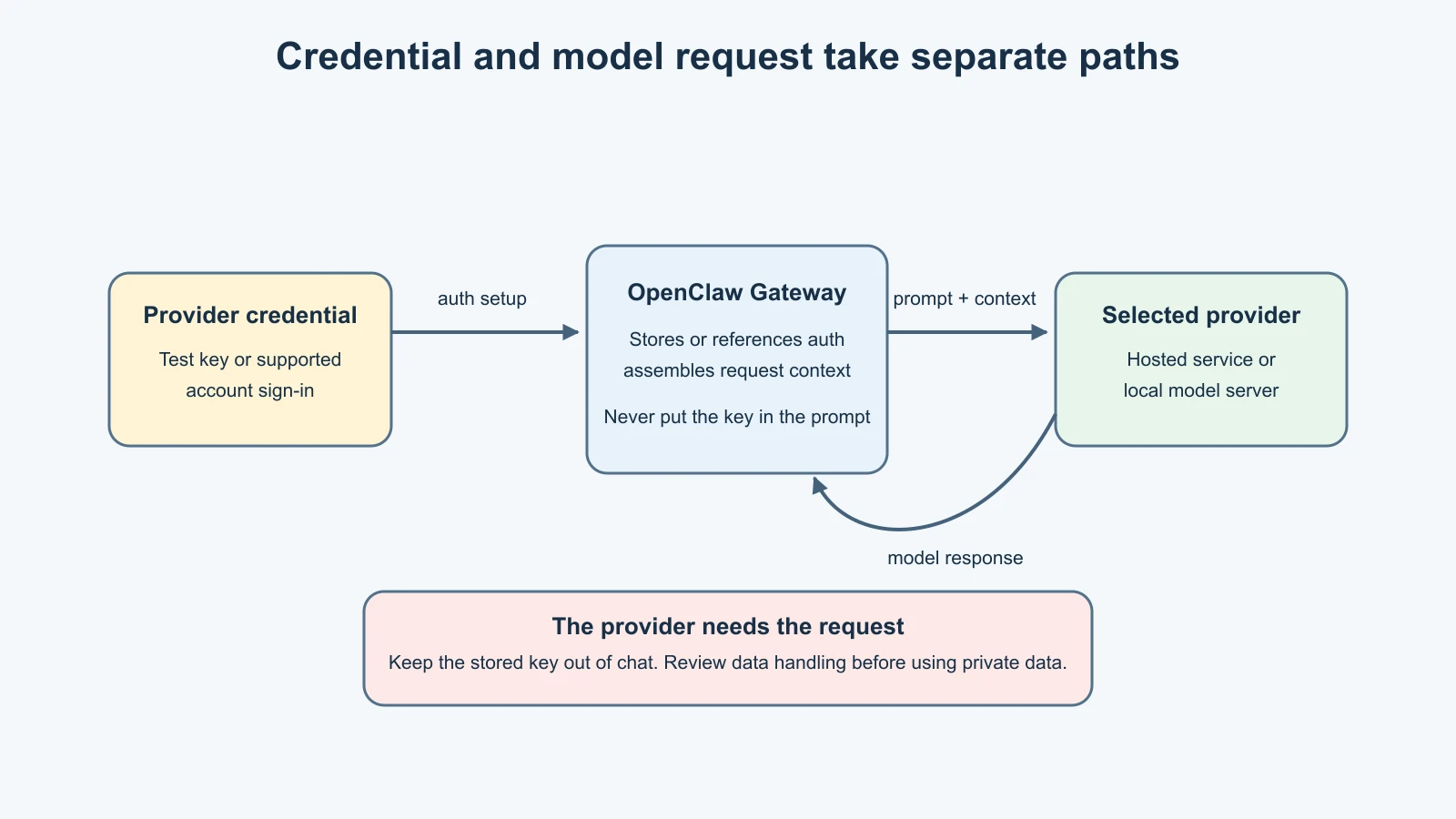
The model provider receives the context required for the current request, which may include conversation text, instructions, relevant memory, attachments, and tool results. The Gateway location does not determine where model processing happens. A local Gateway can send requests to a hosted provider; a remote Gateway can call a local model server if the network is configured to reach it.
The four common options
| Option | Authentication path | Where inference happens | Main trade-off |
|---|---|---|---|
| OpenAI | Platform API key or supported ChatGPT/Codex sign-in | OpenAI service for hosted routes | API billing and subscription access are separate routes with different eligibility |
| Anthropic | API key, Claude CLI reuse, or supported setup-token route | Anthropic service for hosted routes | API key is predictable for an always-on Gateway; subscription and token policies can change |
| Google Gemini | AI Studio API key, or Vertex AI for managed Google Cloud setups | Google service for hosted routes | Check the account's current model access, quota, and billing setup |
| Ollama | Local model server, private LAN server, or separate Ollama Cloud provider | Local only for a local model; remote for LAN or cloud models | More control over inference location, with hardware, speed, and model capability limits to manage |
This table is an orientation, not a ranking. OpenAI, Anthropic, and Google each have hosted services and provider-side account policies. Ollama can serve local models, but a model ID labelled cloud is not local inference. Some providers also support additional runtimes or account types that are outside this beginner setup.
Decide based on the task and risk
Start with the task you want the agent to perform. For a one-off text summary with no tools, a smaller or faster model may be enough. For work that includes file access, external content, or tool calls, reasoning quality and reliable instruction following matter more. OpenClaw's onboarding guidance recommends choosing the strongest latest-generation model available when an agent will run tools or process webhook and hook content, while keeping tool policy strict.
That recommendation does not mean that a stronger model is safe by itself. A model can misunderstand a request or be influenced by hostile content. Limit its tools, start read-only, and require confirmation for actions that matter. The model is one layer in a secure setup, not a substitute for permissions.
Mira begins with a harmless local test: summarize a short fictional note through the Control UI. She needs enough quality to follow the request, but she does not need file-system or messaging tools enabled yet. She can then test any tool-enabled behavior separately with a narrow test folder and explicit policy.
Choose a hosted provider
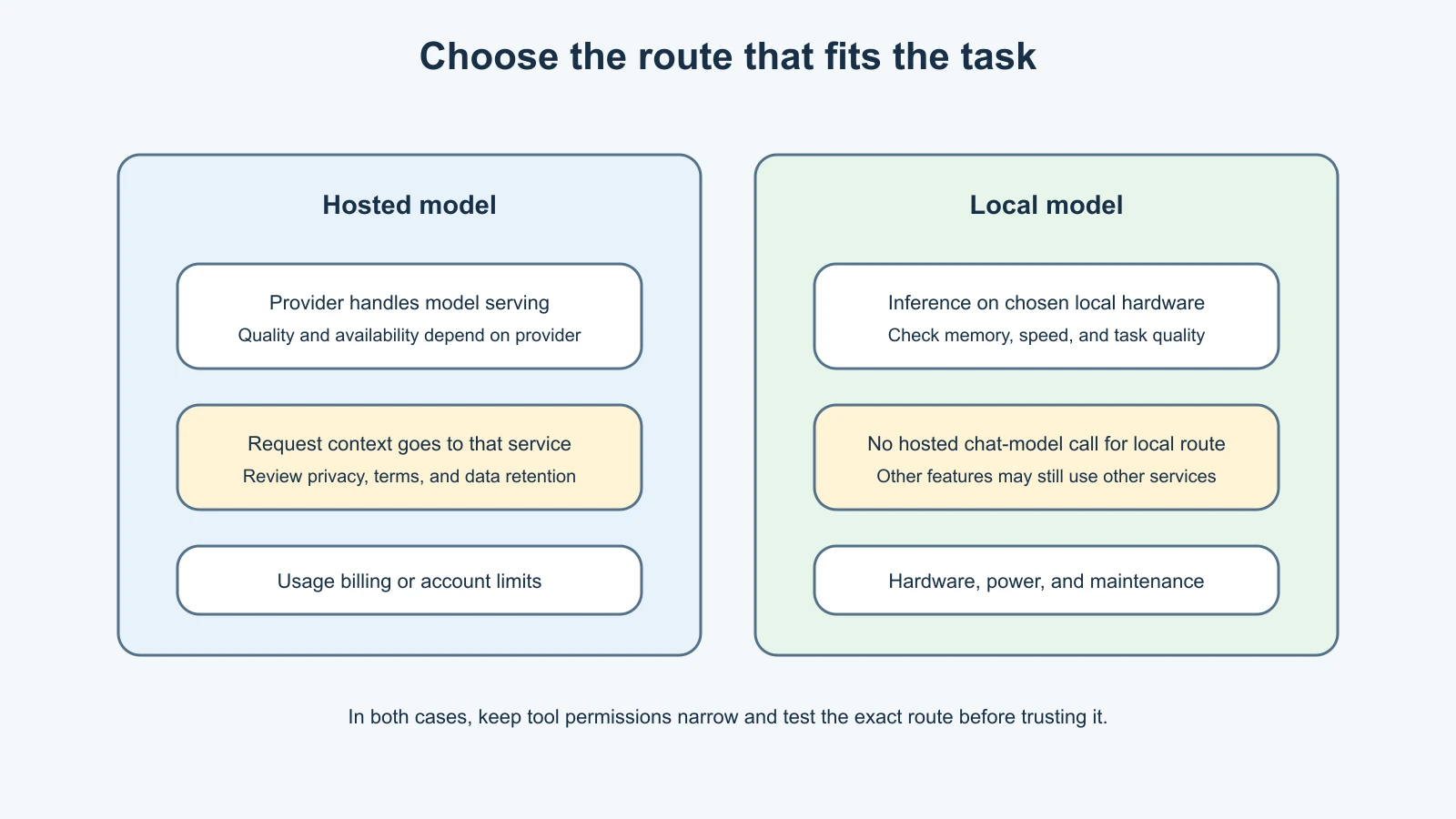
A hosted provider is usually the simplest way to begin if you have a test API key and can accept that the request context goes to that provider. OpenAI, Anthropic, and Google provide their own access and billing arrangements. An API key is usually billed separately from a consumer subscription, so do not assume a ChatGPT or Claude subscription automatically covers API requests.
Use the provider's current official console to create a key. Set usage alerts or a spending limit where available, and verify whether the limit blocks requests or only sends a notification. Create a key for this test installation, grant only the provider scopes required, and revoke it when the test is over. Do not reuse a production or work key.
OpenClaw's guided onboarding can add a provider credential and verify a real completion before saving the route. For example, the current docs show these provider selections:
1# OpenAI Platform API key
2openclaw onboard --auth-choice openai-api-key
3
4# Gemini API key
5openclaw onboard --auth-choice gemini-api-key
6
7# Anthropic: start the guided wizard and choose its API-key option
8openclaw onboard
These commands do not contain a secret. The interactive flow asks for the credential. If you are using an already configured Gateway, confirm the command is targeting the intended host and agent before you enter any key. For a remote Gateway, provider authentication must be configured on the Gateway host or through its supported Control UI; configuring your laptop's local environment does not automatically transfer a key to a remote machine.
Anthropic also documents Claude CLI reuse and setup-token authentication. For an always-on host, OpenClaw describes an API key as the predictable option with explicit provider-side billing. Subscription behavior and third-party usage policies can change, so check the current provider terms before relying on a subscription route. Never copy a Claude CLI token into a config file or chat.
For OpenAI, a Platform API key and ChatGPT/Codex sign-in share the provider ID but are not interchangeable. They may expose different model catalogs, capabilities, or billing. The direct API key follows Platform usage billing; a supported subscription route follows the account's eligible subscription access. Verify which route is active instead of assuming the provider label tells the whole story.
For Google, the usual Gemini path uses an AI Studio API key. Google Cloud users can use the separate Vertex route and its application credentials. Do not mix those credentials or model names without following the route-specific documentation.
Choose Ollama or another local model server
Ollama can serve a model on the same machine as OpenClaw or on a private network host. When it is truly local, model inference happens on that machine rather than a hosted model provider. This can reduce the need to send request text to a hosted model service, but it does not make the whole system private automatically. The Gateway still receives messages, and other features such as embeddings or web search may use separate providers.
Local inference trades provider usage charges for hardware use and maintenance. Model speed depends on memory, processor, GPU, model size, context length, and other work on the host. A smaller local model may be less reliable at multi-step tasks or tool calls than the strongest hosted options. OpenClaw's local-model guidance notes that local models do not provide hosted providers' safety filters. Keep tool access narrow and evaluate behavior before enabling write or messaging tools.
With a local Ollama server running on the Gateway host, the current setup path is:
1openclaw onboard --auth-choice ollamaThe wizard can discover installed models and ask for a model selection. It should not silently download a large model without showing the choice; read any download prompt and check its size and storage impact. The current docs use ollama for the local provider and ollama-cloud for cloud-only access. A hosted Ollama model is not the same as local-only inference.
For a model served on another machine, use a private network endpoint and follow the current Ollama setup guide. Do not expose an unauthenticated model server on the public internet. Keep in mind that local memory embeddings may use a different provider from the chat model; review both choices.
Keep credentials out of commands and files
The safest beginner route is to enter a test credential into OpenClaw's guided provider setup on the Gateway host. OpenClaw can store provider credentials in its auth store so the background service can use them. Do not put a real value into the example commands, shell history, terminal recordings, workspace files, screenshots, or chat.
OpenClaw also supports provider environment variables such as OPENAI_API_KEY, ANTHROPIC_API_KEY, and GEMINI_API_KEY. An environment variable is useful only if the Gateway process can read it. A value exported in one terminal may not be available to a LaunchAgent or systemd service. The official authentication guide describes the service environment and supported secret-reference options. If you use an environment file, keep it private, restrict access to it, and keep it outside version control and shared folders.
Avoid passing the literal key as a command-line argument. Arguments may be saved in shell history or visible to local process inspection. Avoid hard-coding the value in openclaw.json or a workspace file. The configured model provider can see request content, but it should never receive your provider key as part of the prompt.
One more distinction: model-provider credentials authorize inference; the Gateway token or password authorizes clients to connect to the Gateway. They solve different problems. Keep them separate and never paste either one into chat.
Pick and verify the default model
During onboarding, choose a model offered by the configured provider. Model availability can differ by account, region, or current catalog. If you need to see the published choices later, the current CLI supports:
1openclaw models list --provider <provider-id>For example, replace <provider-id> with openai, anthropic, google, or ollama. The command shows catalog information; it does not prove that the account can successfully make a request. A catalog can be stale or unavailable even when a configured route works.
To change the global default model, use the documented model reference format:
1openclaw models set <provider>/<model-id>Use the exact provider and model ID shown by the current model list. This changes the default for agents that inherit the global default. In a multi-agent setup, agent-specific settings can override it. Lesson 12 covers that configuration.
After selecting a model, inspect the configured default and available authentication:
1openclaw models statusStatus helps you see the chosen model and credential source, but without an explicit probe it does not send a test request. Onboarding performs a live completion check when it verifies a selected route. You can also send a harmless prompt in the Control UI and observe whether it returns a response. This may consume a small amount of provider usage, so keep it simple and stay within your test budget.
OpenClaw's models status --probe sends real requests and may consume tokens or trigger rate limits. It also requires exclusive ownership of the configured state directory, so the docs instruct you to stop a running Gateway first. It is not needed for the basic setup in this lesson. Review the current CLI documentation before using it.
Watch cost and reliability
Model cost depends on the provider's current rates, input and output size, selected model, caching, and account plan. Rates and plan limits change, so check the provider's official pricing and usage dashboard. Set alerts or spending limits for the test account, and inspect whether the limit is a hard stop or a notification.
Keep the first test small: one short prompt, no large file, and no loop that repeatedly calls a tool. If you later use scheduled tasks or long conversations, track their usage separately. Lesson 21 covers deeper cost and reliability controls.
Provider reliability also differs. A hosted provider may enforce quotas, rate limits, or temporary outages. A local model may be unavailable when its server stops, runs out of memory, or is too slow. A fallback model can improve availability but may create additional charges and different behavior. Do not add fallbacks until you can explain when each one may be selected.
A simple choice for Mira
Mira compares the choices against her needs. She wants an easy first test with strong instruction following and has a separate test API key with a spending alert. She chooses one hosted provider, adds the key through the guided flow, and selects a current model from that provider's list. She leaves tools and messaging channels disabled, checks the saved model status, and asks it to summarize a short fictional note.
Later, she can compare Ollama on a spare machine if keeping inference local is more important than speed or capability. She will need to check whether the model handles her task well and whether her hardware can run it comfortably. She does not need to decide on a permanent provider before completing the first safe test.
Mistakes beginners make
Assuming a subscription covers API calls
An API key, a provider subscription login, and Gateway authentication are different credentials and billing paths. Read the current provider and OpenClaw docs for the route you select.
Pasting a key into a command or source file
Command arguments can end up in shell history, and source files can be committed or synced. Use the provider setup prompt or a supported secret reference, and use a disposable key for learning.
Assuming a local Gateway means local inference
The host running OpenClaw and the host running the model can be different. Check the selected provider and endpoint to know where text is processed.
Choosing a model by name alone
Model names and account access change. Use the current catalog and test the exact route. A label such as “latest” can move to a new model later.
Enabling tools because the model seems capable
Capability does not replace permissions. Keep tools disabled or read-only until the model and policy have been tested on harmless input.
Forgetting the provider environment of a daemon
A key in your interactive shell may not reach the background Gateway. Use the supported auth store or a secret reference visible to the service, then verify status from the Gateway host.
Recap and try it yourself
The provider supplies inference; the model is the selected option within that provider; the route determines authentication and how requests are sent. OpenAI, Anthropic, and Google offer hosted routes with provider-side billing and policies. Ollama can serve local models, but remote or cloud model choices are not local inference. The Gateway host and model host are separate decisions.
Use one test credential, enter it through the supported setup flow, select a model from the current provider catalog, inspect openclaw models status, and make only a harmless small test request. Keep tool access narrow and check where prompts and embeddings are processed. Review current provider pricing and whether limits are alerts or hard caps before connecting a real account.
Try this on paper: choose a hosted route and a local route for the same fictional task. For each, write down where the prompt goes, how the credential is stored, what could cost money, what happens when the provider is unavailable, and what minimum test would tell you whether the route is good enough. Keep real keys and private data out of the exercise.
For a general discussion of capability, latency, context size, and cost when choosing a model for agents, see Choosing and configuring a model.
Sources, checked 7 November 2026
- OpenClaw, Provider authentication
- OpenClaw, CLI onboarding
- OpenClaw, Models CLI
- OpenClaw, OpenAI setup
- OpenClaw, Anthropic provider
- OpenClaw, Google Gemini provider
- OpenClaw, Ollama setup
- OpenClaw, Local models
- WriterDock, Choosing and configuring a model