
OpenClaw course · lesson 12 of 22
- 1What Is OpenClaw, and Is It Right for You?
- 2OpenClaw vs Claude Code: Which Tool Fits the Task?
- 3How OpenClaw Works: Gateway, Sessions, and Agents
- 4OpenClaw Context and Memory: What Carries Forward?
- 5OpenClaw Workspace Files: Shape Your Agent Safely
- 6Where Should OpenClaw Run? Local, VPS, or Isolated
- 7Install OpenClaw and Start Its Gateway Safely
- 8Choose an OpenClaw Model and Provider
- 9Add Your First OpenClaw Channel Safely
- 10Choose Another OpenClaw Chat Channel Carefully
- 11Control OpenClaw Sessions and Commands
- 12Separate OpenClaw Agents and Route Messages
- 13Schedule OpenClaw Checks with Heartbeats and Automations
- 14Secure OpenClaw Hooks and Webhooks
- 15Use and Create OpenClaw Skills
- 16Vet OpenClaw Skills and Plugins Before Installing
- 17Extend OpenClaw with Plugins and MCP
- 18Understand the OpenClaw Security Model
- 19Secure an OpenClaw Gateway with Ten Checks
- 20Back Up, Update, and Troubleshoot OpenClaw
- 21Control OpenClaw Costs and Improve Reliability
- 22Capstone: Build a Safe OpenClaw Personal Assistant
Mira's Telegram assistant now handles personal reminders. She is considering adding a second agent for research notes. The temptation is to create another agent and assume that it cannot see anything belonging to the first. Before she does, she needs to understand what OpenClaw actually separates, how a message is routed, and which permissions still need to be configured.
This lesson explains when multiple agents help, how workspaces and session stores differ, and how routing bindings select an agent for an incoming message. Our examples use fictional home and research agents. They show the shape of a design, not commands to run against a live Gateway. OpenClaw's configuration and routing docs were checked on 7 November 2026; confirm the current schema before applying any change.
What an agent is
In OpenClaw, an agent is a configured assistant scope with its own identity and working state. A configured agent can have a workspace, bootstrap files such as AGENTS.md and SOUL.md, model preferences, authentication profiles, and a session store. An agent ID is the stable name used to identify that scope, such as home or research.
A workspace is the directory an agent uses for its files and working context. An agent directory holds agent-specific state such as authentication profiles and model registry data. The agent's session store holds conversation history and routing state. These can be configured separately, so do not assume that setting a workspace path moves every part of the agent's state there.
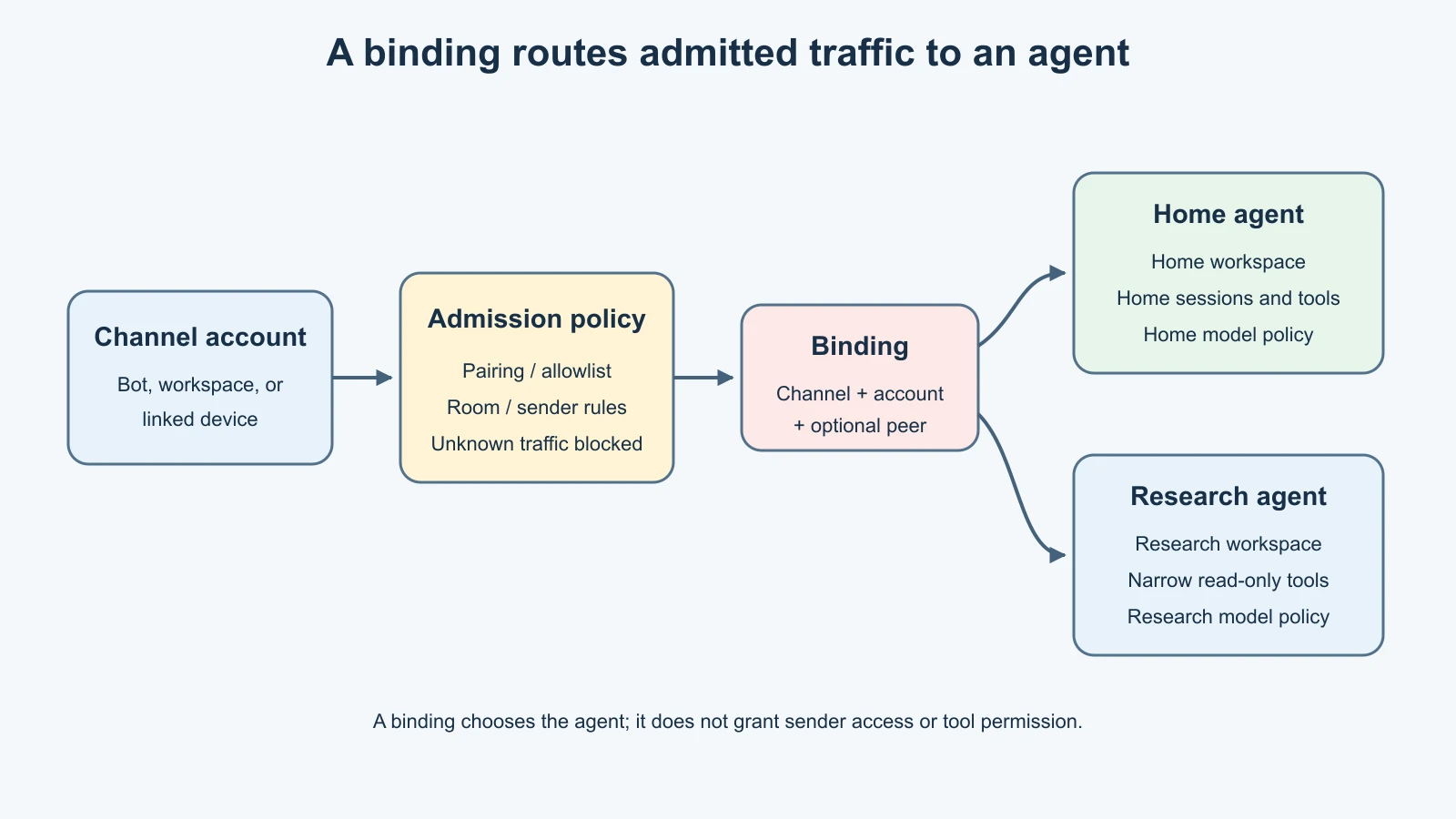
An OpenClaw binding is a rule that maps part of the inbound message stream to an agent. It can match a channel, a particular channel account, a peer such as a direct chat or group, or channel-specific identifiers such as a Discord guild or Slack team. The message must first pass that channel's own admission rules. A binding chooses which agent handles an admitted message; it does not create an account, approve a sender, or grant tools.
When one agent is enough
Start with one agent if the same person uses the assistant for related work and wants one memory and conversation history. A single agent is easier to configure, monitor, back up, and explain. It also reduces the chance that a message reaches an unexpected workspace because a routing rule was too broad.
Multiple agents are useful when a stable boundary needs a different setup. For example, a personal assistant and a research notebook may need different system instructions, memory files, model choices, or available tools. A team support inbox may need its own channel account and workspace, while a private home assistant remains separate. Those are durable operating differences, not merely different topics in a conversation.
Do not create an agent for every small task. If the only difference is that Mira wants to discuss a recipe today, /new creates a fresh conversation session without introducing another agent configuration. Sessions and agents solve different problems: a new session separates conversation history; a second agent can define a different workspace and policy surface.
Separate the state on purpose
In a multi-agent setup, give each agent an explicit workspace path. Use descriptive directories that are not nested inside one another and keep secrets out of both workspaces. Give each agent its own instructions and memory policy. If Mira's research agent should not carry over personal reminders, it should not load the home workspace or use the same memory files by convention.
OpenClaw also maintains agent-specific state and session stores. This helps keep model profiles and conversation history scoped to the selected agent. It does not automatically make two agents separate operating-system users, separate servers, or separate security principals. The Gateway process still manages both. They may still share provider credentials through an explicit auth-inheritance policy or common configuration, and an administrator of the Gateway can inspect both.
The workspace alone is not a sandbox. If an agent has a filesystem tool or shell tool that can reach outside its workspace, it may still reach other host files unless sandbox and tool policy prevent that access. Separate workspaces make organization and prompt context clearer; actual access restrictions come from tools, sandbox settings, the operating system, and network controls.
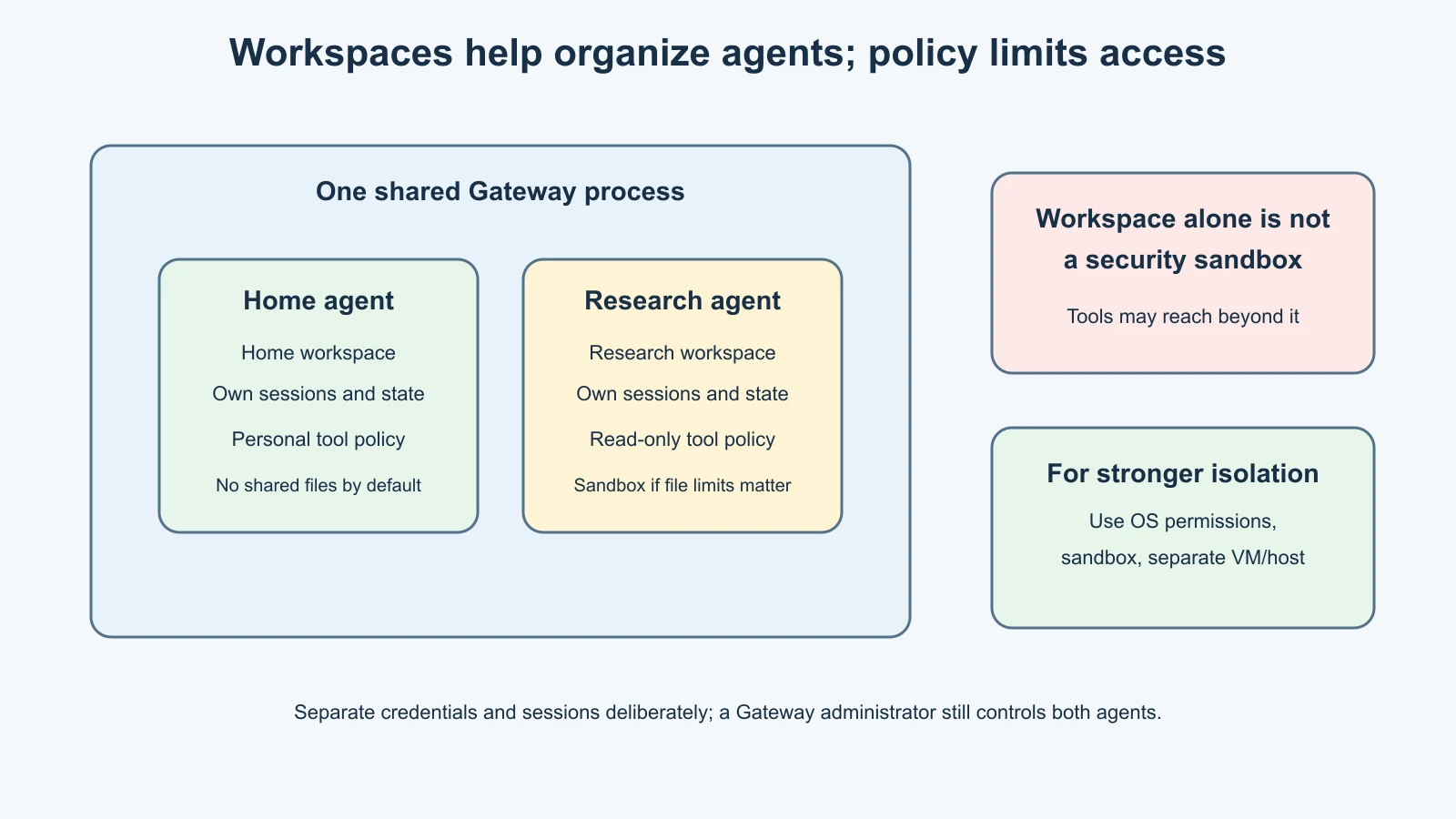
For a low-risk split, Mira's home agent can keep its personal assistant files while research gets a blank workspace and read-only tools for a small set of notes. She should explicitly allow the tools each agent needs and deny tools it does not. If research needs no filesystem access, do not give it a read tool just because a workspace exists. If it needs to read a folder, make that folder boundary enforceable with a sandbox or operating-system permissions.
Tool policy and sandboxing
OpenClaw allows per-agent tool policy. A profile, allowlist, and denylist can narrow the available tools for an agent. For example, a read-only profile can permit reading and session inspection while denying file writes, shell execution, and browser access. A messaging-only profile can omit filesystem and process tools entirely. The policy must agree with the tools exposed by the configured runtime.
Sandbox settings are a separate control. The sandbox can constrain where tools run and what workspace access they have. It has its own mode and scope. A configuration that enables a sandbox for non-main sessions may leave the main session outside it; read the policy carefully rather than assuming every agent is contained. Network access may also need to be restricted independently.
Do not claim that an agent is “read-only” just because its prompt says not to write files. Enforce that behavior in tool configuration and, where file access matters, in the sandbox or host permissions. Also remember that a deny in one applicable policy layer can block a tool even when another layer allows it. Test the resulting tool list with /tools and a harmless task before depending on the policy.
For genuinely untrusted code or a high-risk separation, separate agents inside one Gateway may not be enough. Use a different VM or host and separate Gateway state. A shared Gateway is a shared operational trust domain: it coordinates channel connections, configuration, plugins, and service lifecycle.
How routing selects an agent
When a message arrives, OpenClaw first has to know which channel and account received it. Channel-specific pairing, allowlists, and group rules decide whether that message is admitted. If admitted, routing evaluates bindings and chooses an agent. The selected agent owns the resulting session.
The current documentation describes a fixed specificity order: a peer-specific match is evaluated before broader channel or account matches; account-level matches are more specific than a channel-wide wildcard. When multiple bindings match at the same tier, the first matching rule in configuration order wins. A rule that names both a group and an account requires both details to match. Start with unambiguous rules and place specific exceptions before broad fallbacks so a later operator can see the intent.
Here is a simplified configuration sketch. IDs and paths are fictional, and the snippet illustrates the relationship between agents and routing rather than a full ready-to-paste file:
1{
2  agents: {
3    ownership: "explicit",
4    defaults: {
5      systemAgent: { agentId: "home" },
6    },
7    entries: {
8      home: {
9        workspace: "~/.openclaw/workspace-home",
10        tools: { profile: "minimal" },
11      },
12      research: {
13        workspace: "~/.openclaw/workspace-research",
14        tools: {
15          allow: ["read", "sessions_list", "session_status"],
16          deny: ["write", "edit", "exec", "process"],
17        },
18      },
19    },
20  },
21  bindings: [
22    {
23      agentId: "research",
24      match: {
25        channel: "telegram",
26        accountId: "research-bot",
27      },
28    },
29    {
30      agentId: "home",
31      match: {
32        channel: "telegram",
33        accountId: "home-bot",
34      },
35    },
36  ],
37}
This example uses two Telegram bot accounts so the boundary is easy to reason about: each account has a single named destination. A binding does not itself configure those accounts or secure their tokens. Each Telegram account still needs its own token handling, sender admission policy, group policy, and service setup. Keep the bots in direct-message pairing mode while testing.
If you instead match a group peer, use the exact peer kind and ID documented for that channel. Avoid a broad wildcard until the specific rules have been tested. If no binding matches in a multi-agent fleet, OpenClaw may use a configured fallback owner or leave the message unassigned; it does not simply choose whichever agent appears first in the file. Explicit ownership makes that behavior easier to reason about.
Agent routing is not sender access
Consider a private Discord support bot. The Discord channel policy decides whether the server, channel, and sender are allowed. A routing binding can then send that admitted channel to the support agent. Giving a channel a binding does not make an unauthorized user eligible to talk to it. Likewise, pairing a sender does not determine which agent should receive a message.
Keep three questions separate:
- Admission: Is this account, sender, group, or channel allowed to reach OpenClaw?
- Routing: Which agent handles this admitted message?
- Capability: What can that agent read, change, or send?
Mira can allow her own sender ID on each bot, route each bot to a different agent, and still give the research agent a smaller tool policy. That is easier to review than using one broad account and asking the model to decide which persona should answer.
Sessions also matter. Direct messages may share a main session within the selected agent by default. Routing home and research messages to different agents gives them separate agent-owned stores, but two channels routed to the same agent may still share DM context. If the same agent serves several users, review session.dmScope and set an appropriate per-sender scope. Group sessions have their own routing and scope controls.
How to plan before configuring
Before adding an agent, Mira writes down:
- Its purpose and who is allowed to contact it.
- The channel account, group, or peer that will route to it.
- The workspace and memory files it may read.
- The tools it needs, and the tools it must never have.
- The model and credentials it will use, including any shared auth inheritance.
- Whether a sandbox, separate OS account, VM, or Gateway is needed.
- How she will verify the selected agent and roll back the binding.
If two agents need identical instructions, tools, memory, and access, a second agent may add complexity without improving safety. If they differ in trust level, explicitly represent that difference in the routing and capability policy.
For a first experiment, create the second workspace without connecting a new account. Review its files and test its tool policy in the Control UI or a local non-sensitive test. Later, when you configure a channel, add one binding and verify it before broadening access. The official CLI has agent inventory and binding inspection commands, but their exact use depends on the local Gateway state and whether it is running. Check current help before applying changes; this lesson does not ask you to run them.
Verify routing without guessing
After a deliberate configuration change, check the agent roster and active bindings, then inspect channel health. Send a harmless test message from an allowed test sender on each configured account. Confirm which agent responded, what workspace it identifies, which model it reports, and what tools are available. Check a sender or channel that should be denied only with an explicitly arranged test; do not invite an unknown person to probe a real account.
Keep logs and status output private. They can include channel identifiers, paths, and other operational metadata. If the response comes from the wrong agent, stop before sending more context. Review binding order, account IDs, and the configured fallback owner. Do not try to fix an ambiguous route by adding * everywhere.
Routing changes normally hot-reload under the default hybrid configuration, but a Gateway configured with reload disabled may require a restart. Check the runtime's confirmation and the live bindings after the change. Do not assume that a config file edit has applied just because the file saved.
Mistakes beginners make
Assuming a second workspace is a security sandbox
It separates files and prompts, but does not automatically limit what the process or tools can access. Configure tool and sandbox policy or use an OS-level boundary.
Assuming a binding grants access
Bindings select an agent only after the channel policy admits a message. Keep pairing, sender allowlists, and room allowlists in place.
Forgetting fallback routing
Broad account or channel rules may catch messages that a specific rule did not match. Inspect explicit system-agent ownership and every fallback before enabling traffic.
Giving every agent the same tools
Each agent should receive only the tools its purpose requires. A research summarizer may not need shell, write, or outbound messaging tools.
Sharing credentials without noticing
Per-agent auth profiles can still inherit from a chosen agent or use shared configuration. Decide which agent owns provider credentials and avoid accidental credential sharing across trust levels.
Creating agents for temporary topics
Use a new session for a clean conversation. Reserve another agent for a lasting difference in workspace, model, memory, or capability policy.
Recap and try it yourself
An agent is a workspace and operating scope, not just a persona label. Multiple agents can hold separate workspaces, state, and session stores, while one Gateway still manages them together. A routing binding selects an agent for an admitted message; it does not grant channel access or tools. Keep admission, routing, and capability as separate configuration decisions, and use sandbox or operating-system boundaries when filesystem isolation matters.
Try this on paper: create a two-row design for Mira's home and research agents. For each, name the workspace, one channel account, allowed senders, permitted tools, forbidden tools, model credential owner, and sandbox boundary. Add one sentence describing what should happen when an incoming message matches no binding. Keep the example fictional and do not apply it to a live Gateway.
For a general treatment of agent orchestration patterns, see Orchestrator and worker agent systems. For channel message flow, revisit How OpenClaw works.
Sources, checked 7 November 2026
- OpenClaw, Multi-agent routing
- OpenClaw, Agent bindings
- OpenClaw, Per-agent entries and multi-agent routing
- OpenClaw, Agents configuration
- OpenClaw, Agent workspace
- OpenClaw, Agent CLI
- OpenClaw, Channel routing
- WriterDock, Orchestrator and worker agent systems