
OpenClaw course · lesson 3 of 22
- 1What Is OpenClaw, and Is It Right for You?
- 2OpenClaw vs Claude Code: Which Tool Fits the Task?
- 3How OpenClaw Works: Gateway, Sessions, and Agents
- 4OpenClaw Context and Memory: What Carries Forward?
- 5OpenClaw Workspace Files: Shape Your Agent Safely
- 6Where Should OpenClaw Run? Local, VPS, or Isolated
- 7Install OpenClaw and Start Its Gateway Safely
- 8Choose an OpenClaw Model and Provider
- 9Add Your First OpenClaw Channel Safely
- 10Choose Another OpenClaw Chat Channel Carefully
- 11Control OpenClaw Sessions and Commands
- 12Separate OpenClaw Agents and Route Messages
- 13Schedule OpenClaw Checks with Heartbeats and Automations
- 14Secure OpenClaw Hooks and Webhooks
- 15Use and Create OpenClaw Skills
- 16Vet OpenClaw Skills and Plugins Before Installing
- 17Extend OpenClaw with Plugins and MCP
- 18Understand the OpenClaw Security Model
- 19Secure an OpenClaw Gateway with Ten Checks
- 20Back Up, Update, and Troubleshoot OpenClaw
- 21Control OpenClaw Costs and Improve Reliability
- 22Capstone: Build a Safe OpenClaw Personal Assistant
OpenClaw can look like one assistant in a chat window. Underneath, several parts cooperate: a channel receives a message, a Gateway routes it, a session gives it conversational context, and an agent decides what to do. If the agent needs a tool, the tool runs and its result returns to the agent before the reply goes back to the channel.
That description sounds like a list of components. It becomes much easier to understand when we follow one ordinary request from beginning to end. We will use Mira, a fictional user, who asks her assistant to summarize a note she has already saved in its workspace. The example stays conceptual: no account, installation, or real personal data is involved.
By the end, you should be able to distinguish the Gateway from an agent, a session from memory, and a model response from a tool action. These distinctions help you understand what OpenClaw is doing when a message arrives, where context comes from, and why a tool call deserves careful permissions.
The parts in one picture
OpenClaw's Gateway is the long-running service that connects messaging surfaces and coordinates work. A channel is the route through which a person or system communicates, such as a chat app or the web interface. An agent is the configured assistant that handles a request. A session is the conversation context associated with that interaction.
Those names refer to different responsibilities. A chat app does not itself run the agent. The Gateway does not make every decision on the agent's behalf. A session is not a separate AI model. The model helps the agent interpret context and choose a next step; the surrounding runtime manages the flow and any enabled tools.
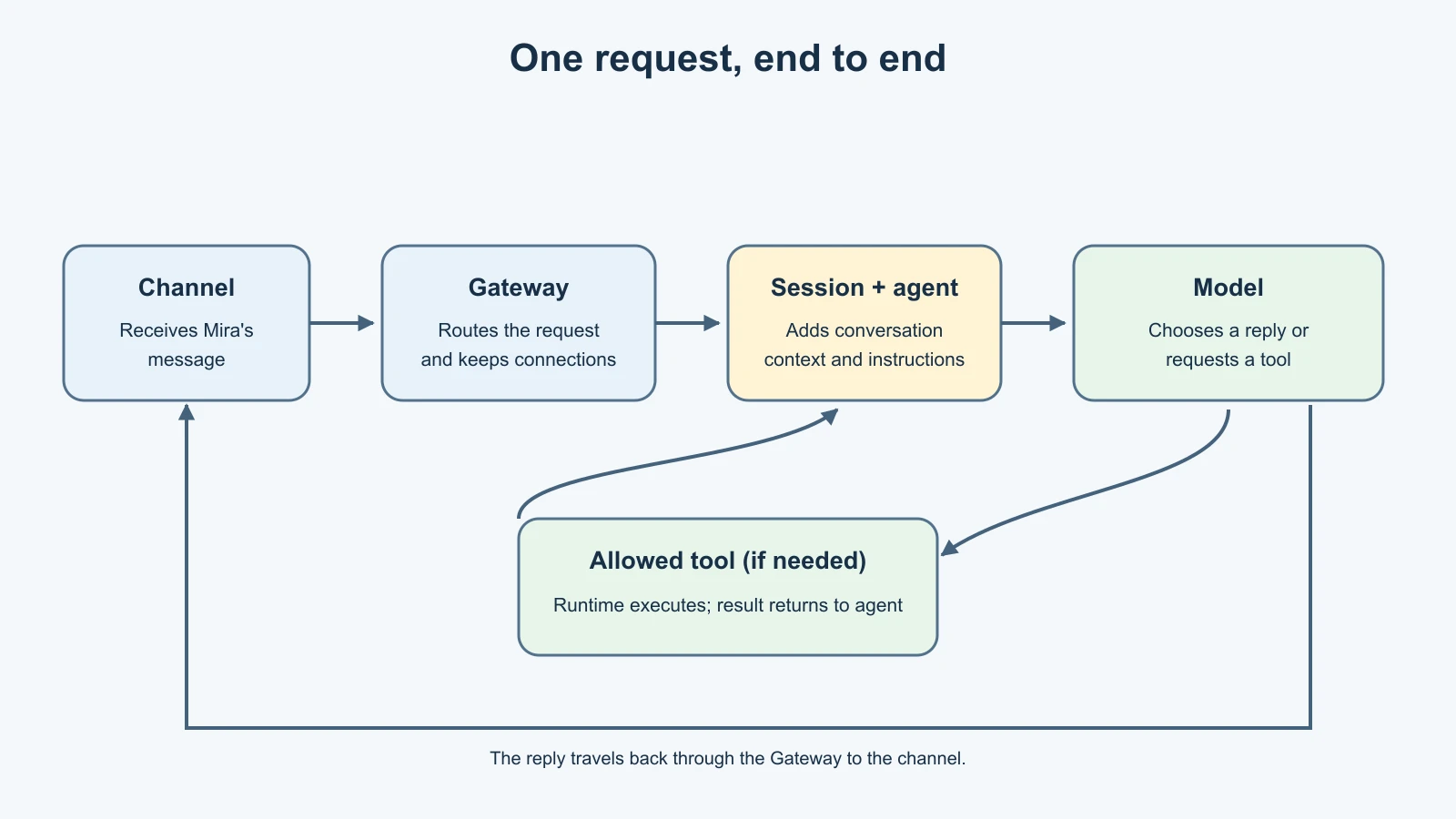
The diagram is a simplified map, not a promise that every deployment has the same channels or enabled tools. OpenClaw's Gateway architecture documentation describes the Gateway as the process that owns messaging connections and coordinates clients and agents. The exact arrangement depends on how an operator configures it.
Step 1: A channel receives a message
Mira sends: “Can you summarize the project note I saved yesterday?” She sends it through a chat surface connected to OpenClaw. The channel is the entry point. It transports her message and the information needed to associate it with the right conversation.
The channel is not the whole assistant. It is more like a doorway into the system. OpenClaw supports multiple channel integrations, but which ones are available depends on configuration and the current product version. A message arriving through one channel does not mean the channel can directly access every file, tool, or other conversation.
This separation is useful when you think about privacy and troubleshooting. If a message never appears in the assistant, the problem might be with the connection or channel routing. If it appears but the answer is wrong, the cause could be missing context, agent configuration, model behavior, or a tool result. “The chat app is broken” and “the assistant reasoned incorrectly” are different diagnoses.
Step 2: The Gateway routes the work
The Gateway is OpenClaw's central, long-running coordinator. It maintains the configured connections to messaging surfaces and routes incoming work to the appropriate agent and session. It also coordinates other clients that connect to it, depending on the setup.
Think of it as a small reception desk that also keeps the building's communication lines open. The reception desk receives a request and passes it to the right room. It does not write the report itself, and it does not make every room share the same private notebook.
For Mira, the Gateway receives her message from the connected channel and determines which configured agent should handle it. It also associates the message with the conversation context OpenClaw should use. If the system has multiple agents or routing rules, that selection can depend on the configuration. The important point is that the Gateway is coordinating the path, while the agent handles the task.
The Gateway's central role also explains why it matters operationally. If it is stopped or cannot reach a configured channel, those connections may not deliver messages. It is a service to operate and secure, not just a label for the AI model. The official architecture overview describes this service boundary and the connected clients at a higher level.
Step 3: A session supplies conversational context
Before Mira's request can be answered, the agent needs to know what “the project note” refers to. The session supplies the conversation history OpenClaw associates with the current interaction. If Mira already named the project in the conversation, that earlier exchange may clarify what she means.
A session is a thread of interaction, not the same thing as durable memory. Conversation history helps with continuity in that thread. Memory is information deliberately recorded or otherwise made available for use beyond a single exchange. A file in an agent's workspace is yet another thing: it is an available resource, not automatically a remembered fact.
Different channels and conversation types can be configured to share or separate context. OpenClaw documents a main session model for direct messages, with group conversations handled separately by default in the described configuration. Operators can change behavior, so do not assume that every message from every channel is always isolated or always combined. The main session documentation explains the current default and its configuration context.
This distinction matters in practice. If an assistant seems to “remember” something, ask where the information came from: the current message, earlier session history, a memory file, workspace content, or a tool result. That question is more useful than treating memory as a mysterious quality of the model.
Step 4: The agent prepares a turn
The agent runtime gathers the context needed for a turn and gives it to the model along with the task instructions and available capabilities. This can include relevant conversation history, agent configuration, and tool descriptions. The model receives a prompt assembled by the runtime; it does not independently browse every channel or file on the machine.
In our example, Mira asks for a note saved yesterday. The agent may recognize that it needs to find the note before it can summarize it. What resources it can inspect depends on the agent's setup and permissions. The agent's workspace can provide a working directory and contextual files, but a workspace does not grant unlimited access to a computer.
OpenClaw's agent runtime documentation describes the runtime as handling prompt assembly, the model loop, and tool wiring. Different configured agents can have their own workspace and session store. That gives an operator a way to separate responsibilities and context, though the details depend on configuration.
This is one place where broad claims can mislead. “The agent can read files” is incomplete. Which files? Through which tool? With which permissions? In which workspace? A careful explanation answers those questions before promising what an assistant can do.
Step 5: The model chooses a next step
The model considers the request and the context presented to it. It might decide it has enough information to answer directly. Or it might request a tool action, such as searching an allowed workspace for a note matching Mira's description.
The model's decision is not the same as performing the action. A tool call is a structured request passed to a runtime. The runtime checks and executes it according to the tools and permissions available to that agent. A model can suggest an action that the configured system refuses, or it can choose a poor action that returns no useful result.
This separation is an important safety boundary. Natural-language instructions alone are not a reliable permission system. An operator should grant only the access needed for the task and make sensitive actions require appropriate controls. OpenClaw's tool policies and runtime configuration determine what can actually happen; the model's fluency does not expand those permissions by itself.
Step 6: A tool may return a result
Suppose the agent is allowed to search Mira's fictional workspace and finds one matching note. The runtime executes the permitted search and returns its result to the agent. The model can then use that result as new context and draft a summary.
Tools make an assistant useful because they connect model reasoning to actions and information. They also create risks: a file may contain misleading instructions, a search may expose more than intended, or a write-capable tool may change data. A tool's name is not enough to judge its risk. Consider what it can read or change, where it can act, whether it can affect other people, and how mistakes can be reversed.
For Mira's simple summary, a read-only search is enough. The agent should not need to send a message to someone else, delete files, or change project settings. A useful design principle is to match the permission to the task instead of enabling every capability “just in case.”
Step 7: The agent forms and sends the reply
After receiving the tool result, the model produces a response. The runtime gathers the completed turn and sends the reply back through the Gateway, which delivers it to the originating channel. Mira sees a summary in the conversation where she asked.
Some interfaces can show progress or intermediate status while work is happening. The exact display depends on the channel and configuration. The conceptual flow remains: the system accepts a request, works through the turn, and returns a response. A response that looks immediate may still have required several internal steps.
If the tool found no note, the agent should say what it could not locate and ask a focused follow-up. It should not invent a summary. If the tool returned several plausible notes, it should identify the ambiguity rather than silently picking one when the choice matters. A dependable assistant makes uncertainty visible when its context is incomplete.
The agent loop repeats when needed
One turn does not always mean one model call. The agent may ask for a tool, receive a result, reason about that result, and request another permitted action before it can answer. This cycle is commonly called an agent loop.
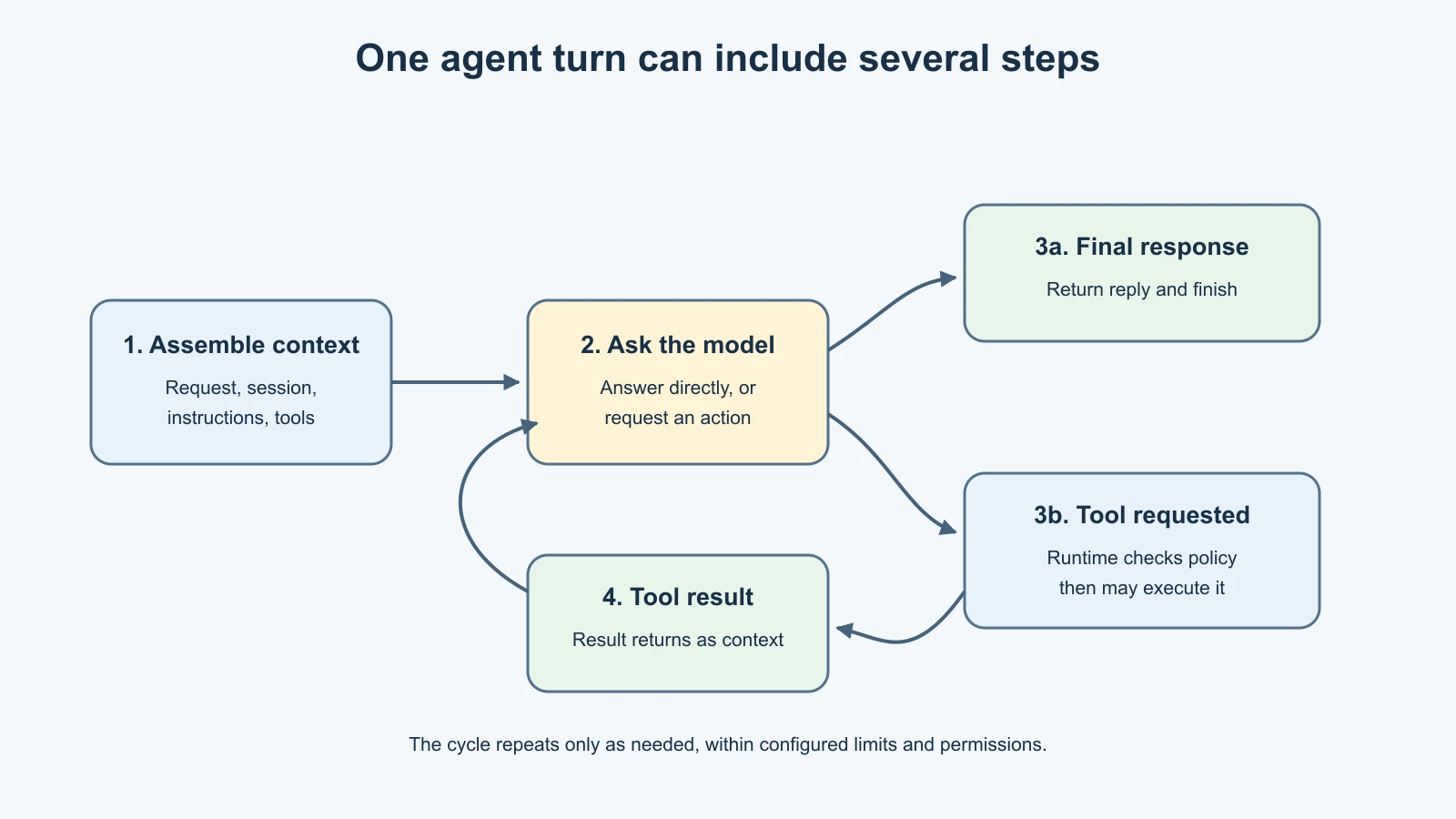
The loop stops when the runtime reaches a final response or another configured stopping condition. It is not an invitation for the model to act forever. OpenClaw's agent loop documentation describes the sequence of context assembly, model inference, tool execution, streaming, and persistence. The implementation details can change, but the model/tool/result cycle is the key idea for learners.
This model also helps with debugging. A poor answer may come from an incomplete prompt, the wrong session, an incorrect model decision, an unsuitable tool, or a misleading tool result. Looking at the stages gives you questions to investigate instead of blaming “the AI” as one indivisible part.
Where proactive work fits
Not every action begins with a new message from a person. OpenClaw can be configured for scheduled or otherwise triggered work. In those cases, an automation starts a run and the Gateway and agent flow still coordinate the work. The request may come from a timer or event rather than a chat message.
That does not mean the assistant is constantly thinking in the background. A configured trigger starts work under defined conditions. For example, an operator might schedule a periodic check and send a result to a designated destination. The details and safeguards belong to the automation configuration, which we will cover separately. OpenClaw's cron job guide explains one such trigger mechanism.
What persists, and where?
OpenClaw needs to keep some state so that its Gateway can reconnect, sessions can continue, and configured agents can use their workspaces. The specific files and locations depend on the installation and configuration. Session history, workspace files, configuration, and logs serve different purposes and should not be casually treated as one shared memory store.
That separation has practical consequences. Backing up a workspace may not back up every session. Deleting a chat message may not remove a separate memory file. Moving a configuration file may affect how the Gateway starts. Before changing or sharing data, identify which kind of data it is and what process uses it. The storage locations reference documents the current state and workspace locations.
For this lesson, remember the categories rather than memorizing paths: configuration tells the system how to run; session data supports conversation continuity; workspace files support agent work; logs help an operator understand system activity. Later lessons will look at workspace and memory behavior more closely.
Mistakes beginners make
Treating the Gateway as the model
The Gateway coordinates connections and work. The model generates language and proposes next steps inside an agent run. Keeping those jobs separate makes both setup and troubleshooting clearer.
Assuming every channel shares one conversation
Context depends on session rules and configuration. Direct messages, groups, and separate users may be routed differently. Check the actual session behavior before assuming a message can see another conversation.
Calling session history “memory”
A thread can contain earlier messages, but that does not mean every fact persists everywhere. Ask whether the information came from the current turn, session history, an explicit memory source, workspace content, or a tool.
Assuming a tool call already happened
A model can request a tool action; the runtime still has to execute it under its policy. A proposed action, an approved action, and a completed action are separate states.
Giving tools more access than the task needs
An assistant that summarizes a note needs less authority than one that can edit files or send messages. Start from the task and grant only the capabilities required to complete it.
Expecting a single model call to finish every task
Some requests need several tool and reasoning steps. When a result is confusing, inspect the whole path rather than assuming the first model response was the final answer.
Recap and try it yourself
An OpenClaw request commonly travels from a channel to the Gateway, into an agent session, through a model and possibly one or more tools, and back through the Gateway to the channel. The Gateway coordinates; the session supplies conversation context; the agent runtime assembles a turn and manages tools; the model interprets context and proposes the next step.
Sessions, memory, workspace files, and configuration are related but distinct. Tools act only within the capabilities and permissions provided by the runtime. Some work can begin from a configured trigger instead of a new chat message.
Try this with a request you might give an assistant, such as “Find the meeting note and list the decisions.” Write down what each stage would need:
- Which channel delivers the request?
- Which agent and session should handle it?
- What context would clarify “the meeting note”?
- Which read-only tool could find it, and what should that tool be allowed to access?
- What should the assistant say if it finds two notes or none?
This small exercise turns “the assistant does it” into a flow you can inspect and secure. In the next lesson, we will look more closely at how OpenClaw handles memory and information across interactions.
Sources, checked 7 November 2026
- OpenClaw, Gateway architecture
- OpenClaw, Agent runtime
- OpenClaw, Agent loop
- OpenClaw, Main session
- OpenClaw, Storage locations
- OpenClaw, How cron jobs work
- WriterDock, The agent loop for a general introduction to agent loops.