
OpenClaw course · lesson 2 of 22
- 1What Is OpenClaw, and Is It Right for You?
- 2OpenClaw vs Claude Code: Which Tool Fits the Task?
- 3How OpenClaw Works: Gateway, Sessions, and Agents
- 4OpenClaw Context and Memory: What Carries Forward?
- 5OpenClaw Workspace Files: Shape Your Agent Safely
- 6Where Should OpenClaw Run? Local, VPS, or Isolated
- 7Install OpenClaw and Start Its Gateway Safely
- 8Choose an OpenClaw Model and Provider
- 9Add Your First OpenClaw Channel Safely
- 10Choose Another OpenClaw Chat Channel Carefully
- 11Control OpenClaw Sessions and Commands
- 12Separate OpenClaw Agents and Route Messages
- 13Schedule OpenClaw Checks with Heartbeats and Automations
- 14Secure OpenClaw Hooks and Webhooks
- 15Use and Create OpenClaw Skills
- 16Vet OpenClaw Skills and Plugins Before Installing
- 17Extend OpenClaw with Plugins and MCP
- 18Understand the OpenClaw Security Model
- 19Secure an OpenClaw Gateway with Ten Checks
- 20Back Up, Update, and Troubleshoot OpenClaw
- 21Control OpenClaw Costs and Improve Reliability
- 22Capstone: Build a Safe OpenClaw Personal Assistant
After this lesson, you should be able to choose between OpenClaw, a coding agent such as Claude Code, and an agent framework for a specific task. The names can sound similar because all three involve AI agents. The practical difference is what kind of work each is organized to do, where it runs, and who has to keep it running.
Start with the task
Imagine Mira wants three things: a weekday morning briefing in a chat app, help changing a function in a software project, and a custom assistant that follows rules her team has written in code. These are three different jobs. The first may suit OpenClaw, the second may suit a coding agent, and the third may call for an agent framework. She does not need to pick one tool for every job.
An AI agent is a system that uses a model to work toward a goal and may use tools along the way. A model is software trained to interpret input or produce output. A coding agent is designed to help with software development tasks, such as reading a project, editing files, or running commands. An agent framework is a collection of reusable code developers use to build their own agent application. OpenClaw is an assistant gateway that connects messaging channels and other interfaces to an agent runtime and its configured capabilities.
These categories overlap. A coding agent may run in a web interface as well as in a terminal. An assistant gateway may support coding tasks. A framework can be used to build an assistant. Use the categories as a way to begin a comparison, then inspect the actual features and permissions of the version you plan to use.
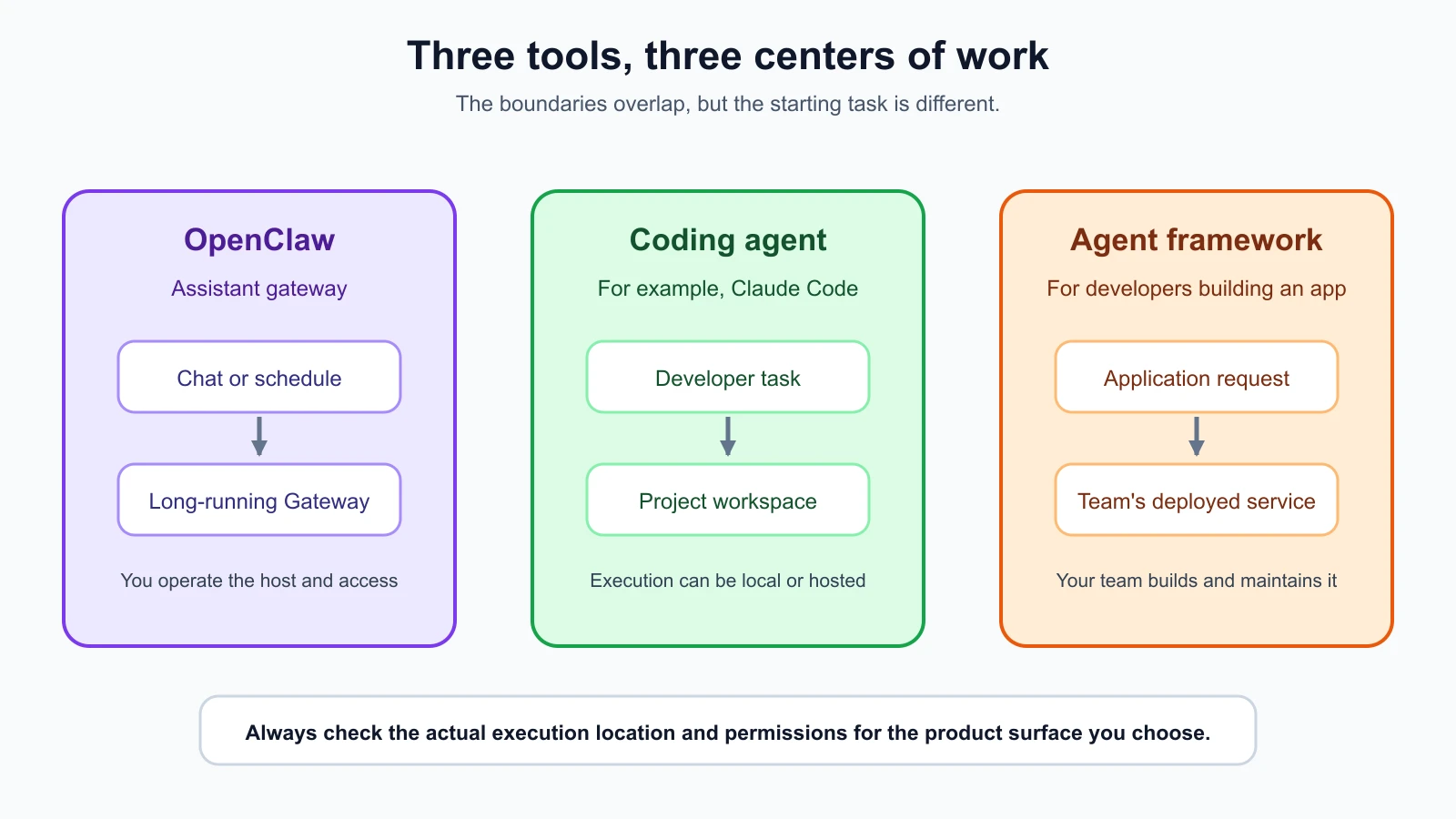
What each tool is centered on
OpenClaw: an assistant you operate
OpenClaw is organized around a long-running Gateway, a program that connects chat surfaces to an assistant. You can send a request from a configured chat app or another supported interface. Depending on its setup, the assistant may reply, use permitted tools, or run scheduled work. The Gateway remains available so you can reach it without starting a fresh coding session for every request.
That can fit Mira’s briefing. She wants to send requests from her phone and have a summary delivered in a chat. She might later add a reminder or a scheduled job. The useful part is the persistent connection and ongoing availability, not a built-in guarantee that a message is correct or safe to act on.
OpenClaw is software Mira operates on a computer or server she chooses. She is responsible for its setup, credentials, connected accounts, updates, and access rules. A message can pass through a chat provider and a model provider as well as her Gateway. “Runs on my server” therefore describes where one part runs. It does not mean the whole workflow is offline or that every connected service stores data the same way.
Claude Code: a coding agent for project work
Claude Code is an agentic coding tool from Anthropic. Its documentation describes it as a tool that reads a codebase, edits files, runs commands, and connects with development tools. It is available through several surfaces, including a terminal, IDE extensions, desktop app, and browser. Those surfaces can differ in where the task executes and what project access it has, so “Claude Code runs locally” is not a safe blanket statement.
If Mira is working on a website and a test fails, she can use Claude Code to inspect the project, identify the code involved, propose or make a change, and run checks. Her focus is the project and the requested code task. She can review the change before relying on it. The precise approval and isolation options depend on the surface and configuration she uses.
Claude Code can support more than one narrow edit. It can work across files, use development tools, and in some surfaces handle tasks away from the local terminal. That makes it more capable than autocomplete, but the task remains centered on software work. For a fuller introduction, see What Claude Code is and how it works.
An agent framework: a way to build your own agent
A framework is for someone building an agent product or workflow. It provides code and structures for parts such as tool calls, conversation state, model connections, or delegation. You write the application around it and decide how the pieces should behave.
If Mira’s team needs a custom assistant inside its own product, with a defined interface and an integration with its internal systems, developers might use a framework or a model provider’s software development kit. They would also own application behavior, deployment, testing, monitoring, and access control. A framework does not automatically supply a secure, finished assistant. It supplies building blocks, and the team still has to assemble and operate the product.
Framework choices vary in what they include. Some focus on connecting model calls and tools. Others provide more structure for long-running workflows, state, or multiple agents. More structure can save implementation time, but it can also add concepts and make it harder to see what the application is doing. The AI agent frameworks comparison explains those trade-offs in more depth.
Compare the working shape
| Question | OpenClaw | Coding agent | Agent framework |
|---|---|---|---|
| What is it for? | Reach an assistant through connected channels and ongoing workflows | Complete software tasks in a project | Build a custom agent application |
| What usually starts work? | A chat message, interface action, or configured schedule | A task from the developer in a coding surface | A request to the application your team builds |
| Where does it run? | A Gateway on a machine or server you operate | Depends on the surface: local project environment or a hosted task environment | In the application and infrastructure your team deploys |
| Who configures access? | The Gateway operator | The user, organization, and product surface | The developers and operators of the application |
| Who maintains it? | The person or team operating the Gateway | The provider and user, depending on execution surface | The team that builds and deploys the application |
This table describes common patterns, not fixed product limits. Products add surfaces and capabilities over time. A model provider, for example, may offer both a coding agent and tools for building custom agents. Check the current documentation for the exact version and surface rather than applying one row to every configuration.
Choose by trigger and environment
The trigger is what starts a task. A message arriving in Telegram is a different trigger from a developer asking an agent to change a file. A scheduled event is different again. Ask who or what starts the task and whether it should start only after a person requests it.
The execution environment is where the task actually runs and what it can reach. It might be your laptop, a project workspace, a hosted computer, or a server you administer. Knowing the interface alone is not enough. An agent accessed from a phone might still be working on a server. A browser based coding tool may run the task in a provider managed environment. Check whether files and commands run locally or remotely, and what network access is allowed.
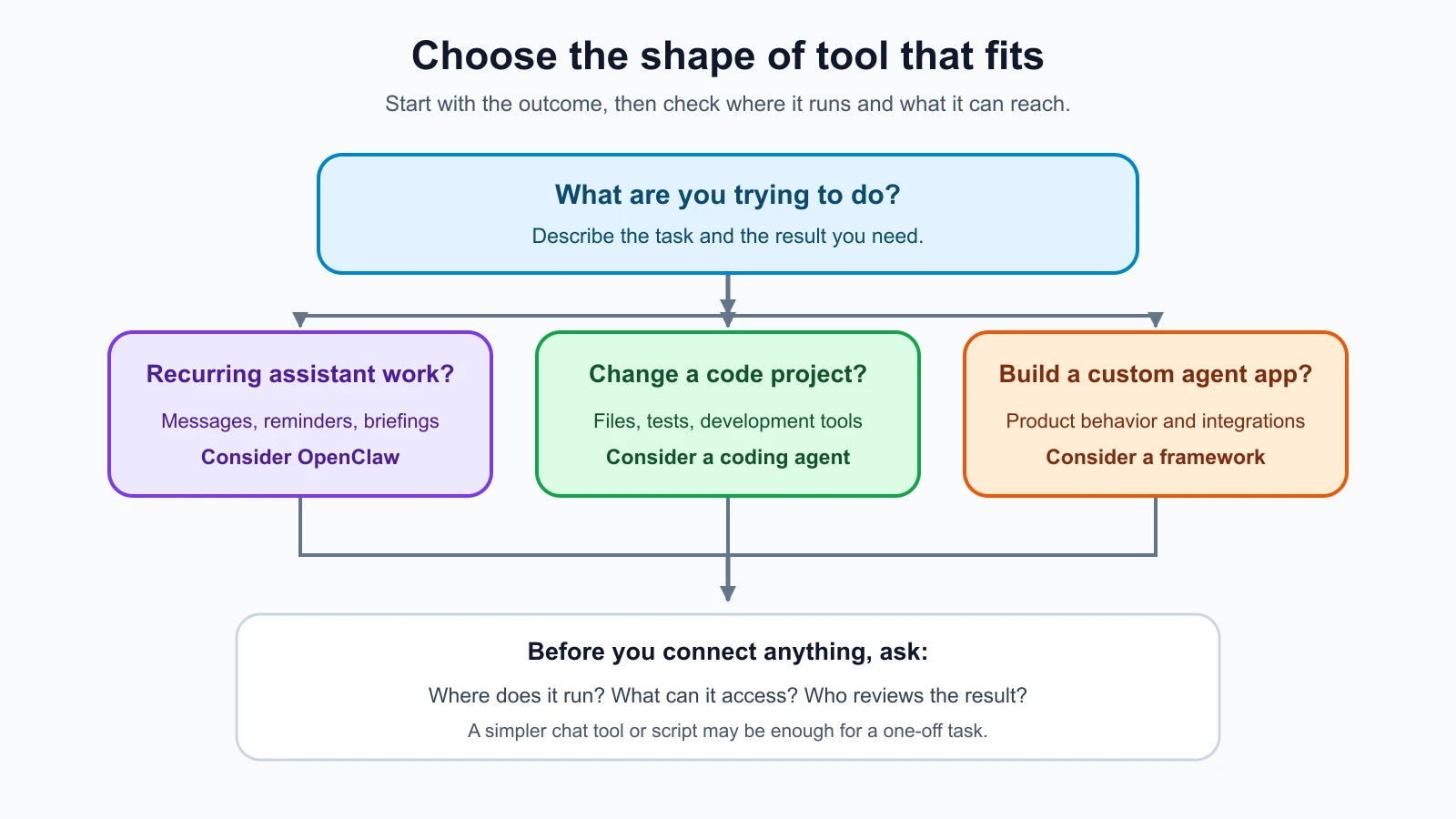
Use these questions to narrow the choice:
- Is the task a recurring personal workflow? If you want a briefing, reminder, or message based assistant that stays available, consider OpenClaw. Keep the first workflow small and review its output.
- Does the work require changing a software project? A coding agent is a natural starting point. Give it access to only the repository and tools it needs, then inspect the diff and run the checks yourself.
- Are you building an agent feature for other people to use? Consider a framework or provider SDK when you need to define the product behavior in your own application. Plan for the code, testing, deployment, and operations your team will own.
- Could a simpler tool do the job? A regular chat assistant, a script, or a scheduled task may be enough. Do not introduce a long-running service or an agent framework unless its capabilities solve a real need.
For Mira, the briefing and code change can use different tools. She could use OpenClaw for a private test chat that returns a draft briefing, and Claude Code for a specific change in her website repository. If her team later builds a customer facing assistant into its product, it can evaluate frameworks then. She should not connect OpenClaw to the repository simply because it can be configured with coding capabilities.
Permissions and review are separate decisions
An agent’s product category does not tell you how much access it has. Permissions are the rules that determine which files, commands, accounts, or services a tool can use. OpenClaw’s permissions depend on the Gateway host, channels, agent settings, and enabled tools. A coding agent’s access depends on its surface, configuration, and execution environment. A framework’s access comes from the application code and infrastructure its developers provide.
For each option, ask:
- Which files or accounts can it read?
- Can it write, delete, send, purchase, or publish?
- Which network services can it contact?
- Does a person approve consequential actions?
- Where can the task and its history be stored?
- How will you stop work that is running or revoke access?
An approval prompt can help, but it is only one control. It does not answer whether the agent can read sensitive files, whether a cloud task receives a copy of a repository, or whether an external tool has broader access than the task needs. Later lessons in this course focus on OpenClaw’s trust boundaries, channel access, and permissions. For a coding tool, inspect that product’s current safety and permission documentation before granting project access.
Compare the cost and maintenance shape
Do not compare tools using a single “free or paid” label. A workflow can have costs from model usage, subscriptions, hosting, chat services, and maintenance time. The amounts and billing rules change, so this lesson avoids price claims. Before choosing, check the current provider terms and estimate the workload you actually expect.
OpenClaw may have a low software purchase cost while still requiring a server, a model provider, connected services, and someone to maintain it. If it runs on a computer you already own, that computer still needs to remain available for the assistant to respond. A hosted server may keep the Gateway available but adds an infrastructure account and another system to secure.
A coding agent may be included in a subscription, billed through API usage, or offered across more than one surface. A hosted task environment can reduce the need to keep your own machine running, but it changes where the task executes and which services receive the repository or task context. Check those details before using private or company code.
With a framework, the framework itself may be only one part of the cost. The deployed application may need model calls, storage, hosting, monitoring, and engineering time. A small prototype and an always-on service for customers have different operational needs. Estimate the latter before treating the framework as the whole solution.
A practical decision record
Before trying a tool, write down a short decision record. This helps you compare the need with what you are about to expose.
| Prompt | Example answer for Mira’s briefing |
|---|---|
| Task | Prepare a short morning summary from a small set of public sources |
| Trigger | Mira asks for it in a test chat |
| Environment | An isolated Gateway on a test machine |
| Information allowed | Public links and synthetic preferences |
| Actions not allowed | Sending messages or changing accounts |
| Review | Mira checks the draft before using it |
| Stop and revoke | Disable the test channel and remove its credential |
This is a planning example, not a verified OpenClaw configuration. It states the behavior Mira wants before she chooses settings. A later lesson will cover where to run OpenClaw and how to limit the damage if a setup is misconfigured.
Mistakes beginners make
- Choosing by product name instead of task. Write down what starts the work and what result you expect before comparing tools.
- Assuming every coding agent runs on your computer. Check whether the chosen surface runs locally or in a hosted environment.
- Assuming an agent framework is a ready made assistant. A framework is a set of building blocks; your team still owns the application and its operation.
- Equating an approval prompt with full safety. Review permissions, data flow, isolation, and stop controls as separate questions.
- Connecting unrelated tools to one workflow. Give each task only the integrations it needs.
- Comparing prices without maintenance. Include hosting, provider usage, credentials, updates, and the time needed to operate the system.
Recap and try it yourself
OpenClaw is centered on an assistant Gateway that can stay available across connected channels. A coding agent is centered on software tasks, though its execution location depends on the surface. An agent framework is a set of building blocks for developers creating an agent application. These categories overlap, so choose by task, trigger, execution environment, permissions, and who will maintain the setup.
Pick one task you might use an agent for and fill in these five lines:
- The task and the result you want.
- What or who should trigger it.
- Where it should run and which data it needs.
- What it must not be allowed to do.
- Who will review the result and maintain the system.
Then compare whether a chat assistant, coding agent, framework, or ordinary script fits that task. If you cannot tell where the work runs or what it can access, pause and find that information before connecting accounts or code. Next, you will look inside OpenClaw itself: the Gateway, agents, channels, and one request as it moves through the system.
Sources, checked 7 November 2026: OpenClaw FAQ: What is OpenClaw?, OpenClaw Gateway architecture, Claude Code overview, and WriterDock’s AI agent frameworks comparison. Surface availability, access controls, and billing can change; check current documentation before setup.