
OpenClaw course · lesson 21 of 22
- 1What Is OpenClaw, and Is It Right for You?
- 2OpenClaw vs Claude Code: Which Tool Fits the Task?
- 3How OpenClaw Works: Gateway, Sessions, and Agents
- 4OpenClaw Context and Memory: What Carries Forward?
- 5OpenClaw Workspace Files: Shape Your Agent Safely
- 6Where Should OpenClaw Run? Local, VPS, or Isolated
- 7Install OpenClaw and Start Its Gateway Safely
- 8Choose an OpenClaw Model and Provider
- 9Add Your First OpenClaw Channel Safely
- 10Choose Another OpenClaw Chat Channel Carefully
- 11Control OpenClaw Sessions and Commands
- 12Separate OpenClaw Agents and Route Messages
- 13Schedule OpenClaw Checks with Heartbeats and Automations
- 14Secure OpenClaw Hooks and Webhooks
- 15Use and Create OpenClaw Skills
- 16Vet OpenClaw Skills and Plugins Before Installing
- 17Extend OpenClaw with Plugins and MCP
- 18Understand the OpenClaw Security Model
- 19Secure an OpenClaw Gateway with Ten Checks
- 20Back Up, Update, and Troubleshoot OpenClaw
- 21Control OpenClaw Costs and Improve Reliability
- 22Capstone: Build a Safe OpenClaw Personal Assistant
Mira's fictional assistant sends a morning summary and answers questions in one chat. A month later, she sees more model usage than expected and a few missed summaries. She wants to know which work consumes tokens, which settings affect the bill, and how to make the routine dependable. This lesson builds a practical budget and reliability review without assuming that every model, provider, or account bills the same way.
OpenClaw's usage tracking, thinking, fast mode, cron, heartbeat, logging, and model-failover documentation was checked on 7 November 2026. Provider prices, account plans, command behavior, and model support change. Verify current OpenClaw and provider docs before setting a budget or changing a live assistant. Examples use fictional activity and do not describe a real bill.
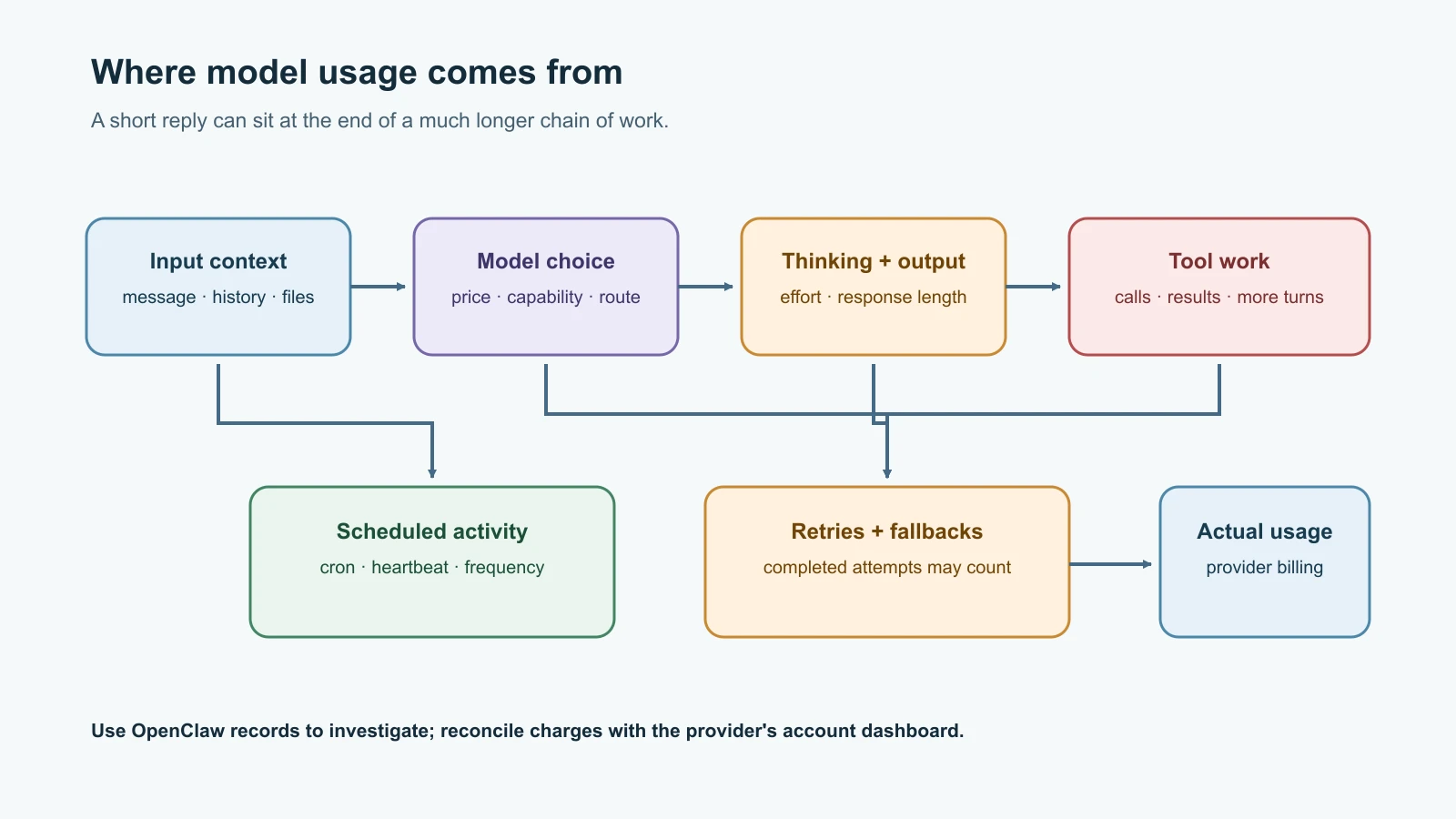
Find the work behind the bill
An agent's model usage is not limited to the sentence it sends back. A turn can include the incoming message, system instructions, workspace files, relevant conversation history, tool results, and model-generated reasoning or output. If the agent calls a tool and then interprets its result, the work may require more model calls. A long session can accumulate context. Scheduled jobs and heartbeats can generate calls even when nobody is chatting.
The final reply is therefore a poor way to estimate the cost of the whole turn. Look at recorded usage and the provider's billing dashboard. Model prices, cached input rates, output rates, subscription entitlements, and treatment of tool or reasoning tokens differ by provider and route. OpenClaw's local cost information can be an estimate when it uses local model pricing; it is not a replacement for the provider's invoice.
Start with what OpenClaw can show in the current session:
1/status
2/usage full
/status can show session model, context use, last response input/output tokens, and recorded cost when available. /usage full adds a compact per-response footer with model, reasoning, fast/slow mode, context, and cost fields when available. Use /usage tokens for token and cache details without a cost estimate. /usage cost prints a local cost summary from session logs. Some usage values may be missing, and the cost summary depends on recorded data and local pricing. Compare it with the provider's official dashboard for actual account usage.
These commands answer different questions. Session usage helps explain an individual interaction; provider usage helps reconcile charges, limits, and billing windows. Do not paste sensitive prompts or credentials into a billing ticket just to explain a spike. A timestamp, model identifier, token count, and redacted error are usually safer evidence.
Make the budget real
Pick a budget that covers both routine activity and a short incident. A simple worksheet might track a monthly target, an alert level, the provider-side hard limit if available, and who receives the alert. Provider dashboards and API controls differ. Some “limits” only send notifications; others block new requests. Confirm which kind you have and what time period it covers.
Do not treat a model fallback as a budget cap. A fallback can keep a task available when the primary provider is busy or rate-limited, but the alternate route may have different pricing and usage rules. For every configured model, note the provider, authentication route, current price source, and account limit. If the bill would be surprising, narrow the task or disable the schedule until you understand the usage.
Mira writes a monthly control sheet:
| Item | Her fictional decision | Review question |
|---|---|---|
| Monthly target | A small test budget | Is this spend acceptable if the summary runs every day? |
| Provider alert | Alert before the target | Is it an alert only or a hard stop? |
| Primary model | A capable, moderately priced option | Does it handle this task reliably? |
| Fallback | None for the first week | Could a fallback increase cost or change data handling? |
| Scheduled work | One morning run | What happens if the job retries or runs late? |
| Owner | Mira | Who checks usage and failures each month? |
It is a planning example, not an estimate of current model prices. Check the chosen provider's official pricing and usage page when filling in the numbers.
Choose a model for the task
Use a model that meets the task's quality bar without paying for capabilities the task does not need. A short formatting or classification job may work with a smaller or faster model. A complex task that must reason over conflicting evidence may justify a stronger model. Test with representative, non-sensitive examples before switching a scheduled workflow.
Consider more than the price per token. A cheaper model that needs repeated retries, returns unusable output, or triggers a human to redo the task can cost more overall. A more capable model can also produce longer responses. Keep the task instructions focused, avoid attaching irrelevant files, and ask for the amount of output the user needs.
For a scheduled summary, set a useful output boundary: selected sources, a time window, a maximum number of items, and a short format. Do not ask it to reread every historical conversation if the summary only needs today's updates. Where the workflow allows it, filter or summarize data before sending it to the model, while preserving information needed for accuracy.
Use thinking and reasoning deliberately
OpenClaw supports request-level thinking choices through directives such as /think low, /think medium, or /think high when the selected model and route support them. The /reasoning setting controls whether reasoning content is shown, not whether model reasoning is used. Provider support and defaults differ, so a requested level may map differently or be unsupported.
More reasoning can improve some hard tasks but may use more tokens or take longer. It is not a reliable cost-saving control to set every session to the lowest level: if answers become wrong and require repeated correction, total work can rise. Start with the model's normal behavior, then test a lower level on routine work and compare correctness, output usage, and latency. Reserve higher effort for tasks that demonstrate a need for it.
Similarly, /fast on is a speed or service-tier control for supported model routes. It does not mean “use fewer tokens” or “spend less.” Depending on provider, model, account, and route, it may carry different price or quota implications, have no effect, or not be available. /fast can report the effective OpenClaw policy, but it cannot guarantee that the provider honored a tier or that the response was faster. Check provider documentation and actual usage before enabling it broadly.
Bound heartbeats and scheduled jobs
Every recurring job has a cost and a failure mode. A heartbeat that wakes an agent frequently can create repeated model calls even when there is nothing useful to report. A cron task can overlap with other work, process a large context, or repeatedly send a message if its schedule or failure handling is poorly designed.
For each heartbeat or cron job, write down its purpose, interval, active hours, model, input sources, expected output, delivery channel, and an owner. Ask whether it needs a model call every time. Make the interval no more frequent than the task requires. Heartbeat instructions should clearly say when there is nothing to report, and the agent should avoid producing noise just to appear active. Disable a job that no longer has a named owner or useful purpose.
Review jobs with the current commands for your installed version, commonly:
1openclaw cron list
2openclaw cron status
Use openclaw cron runs or the documented run-history command to investigate recent executions. Confirm exact syntax with openclaw cron --help and the cron documentation. Heartbeats are managed through the heartbeat configuration and have their own current guide. Do not assume cron list alone shows every reason the model may run: examine heartbeat activity and interactive usage too.
Put limits around the work itself. Choose a bounded time window, cap the number of records, use a concise output format, and prevent a failed delivery from triggering an endless “try again” cycle. If the job can take an external action, design a way to avoid sending duplicates when you retry. Pause it while investigating a usage spike.
Handle rate limits without making them worse
A rate limit means the provider or route is temporarily restricting requests. It may happen because of a request-per-minute limit, token throughput, a shared account quota, or an exhausted billing window. The provider error and its reset time are more useful than repeatedly sending the same request.
OpenClaw has retry and model-fallback behavior for eligible failures. This can improve reliability, but every completed model candidate may contribute usage, and a fallback can have a different price. Repeatedly starting new turns while a provider is throttling can add more load and make the situation harder to diagnose. Wait for the stated cooldown, inspect the failure, and let the configured recovery policy work. Do not create a cron loop that retries immediately.
Use fallbacks only when you understand their order, access, model quality, cost, and data destination. Test that the alternate model can perform the task, and tell downstream users when the answer may come from another model if that matters. If a fallback costs more or sends data to another provider, it is a deliberate policy choice that needs review.
Keep an eye on reliability
Usage is one signal; task completion is another. Record whether the Gateway is healthy, a scheduled run started and finished, the channel delivered its result, and the provider returned a useful response. A successful model call does not prove that a message reached its destination. Likewise, a status page can show a healthy process while one channel is disconnected.
Use OpenClaw status and logs to find patterns rather than relying on a single failure message:
1openclaw status
2openclaw channels status --probe
3openclaw logs --follow
Commands may vary by release. Check the current logging guide and the documentation for the command installed on your host. Look for repeating rate-limit or authentication errors, failed cron runs, Gateway restarts, fallback transitions, and channel delivery errors. Logs can include private content; redact before sharing and keep only what is needed to diagnose the issue.
For a monthly review, compare provider dashboard totals with OpenClaw's local usage, list recurring jobs and their owners, note failed or retried work, and confirm alerts and hard caps still behave as expected. Investigate a material change before raising the budget. It may come from longer conversations, new workspace files, a more expensive model, an extra fallback, a schedule that became frequent, or a job that stopped terminating.
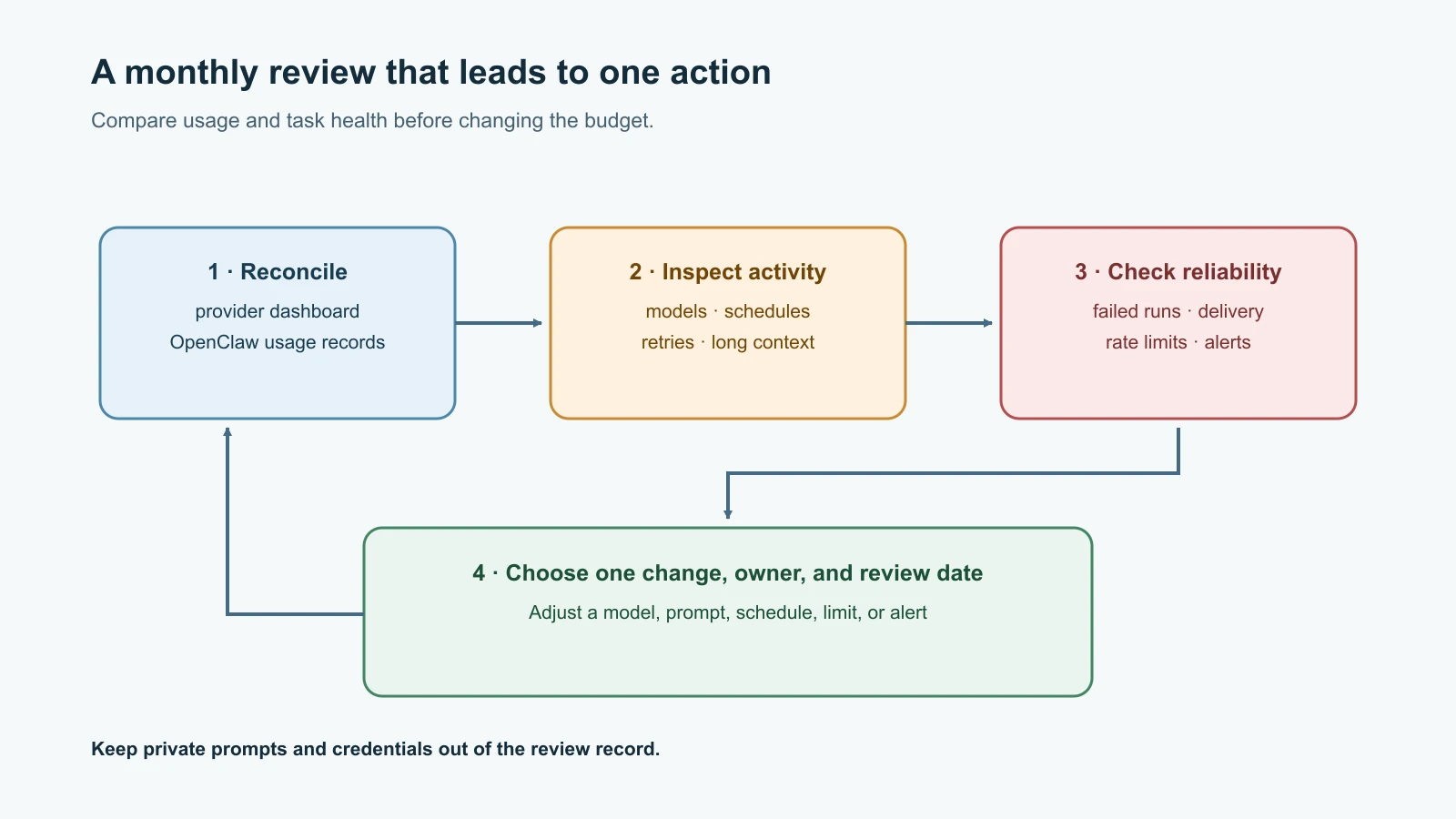
A practical monthly budget review
Mira's review takes a few minutes:
- Compare provider-reported usage with the budget and the previous month.
- Check which model and route were used, including fallbacks.
- Review
/usage costand relevant session records as local diagnostic estimates. - Inspect heartbeat and cron schedules, recent runs, and delivery failures.
- Find repeating rate limits, retries, long contexts, or unexpected output.
- Decide one change, assign an owner, and review its effect next month.
Do not change multiple cost settings together unless there is an urgent reason. Otherwise, you will not know which change affected quality or reliability. Keep a record of the model, task, schedule, relevant provider dashboard window, and what changed. Do not store private prompts or secret values in the review.
Mistakes beginners make
- Assuming
/usage costis an exact copy of the provider's invoice. - Treating a spending notification as a hard stop without checking.
- Leaving an expensive fallback enabled without reviewing its price and data destination.
- Enabling fast mode to reduce cost even though it is a speed tier.
- Setting thinking to “off” or “low” for every task without checking result quality or model support.
- Running a heartbeat frequently when no timely action is needed.
- Retrying a rate-limited job immediately in a loop.
- Letting cron run with an unbounded input window or output size.
- Counting a successful model response as successful message delivery.
- Ignoring logs until a usage spike becomes a surprise bill.
- Changing model, prompt, and schedule together, then being unable to explain the result.
Recap and try it yourself
Use /status, /usage full, /usage tokens, and /usage cost to understand different parts of OpenClaw activity, then compare estimates with the provider dashboard. Set alerts and hard limits in the provider account where available, and verify what each control actually does. Match model capability and thinking effort to the task, remember that fast mode is not a cost switch, and keep recurring jobs bounded and owned. When rate-limited, avoid immediate retry loops; inspect logs and use deliberate fallback behavior. Review both usage and successful delivery every month.
Try it yourself on paper: design a weekly digest with one schedule. Specify the source window, maximum items, model choice criteria, output length, delivery channel, budget alert, and what happens after a rate limit or failed send. Add a way to prevent duplicate delivery and name who will review usage. Use fictional prices and credentials, and do not connect a live provider for the exercise.
For a deeper comparison of model capability, price, and latency, read Agent cost and latency. For code-agent usage practices, see Claude Code cost and token efficiency. The final OpenClaw capstone brings cost limits and operational checks into a safe assistant build.