
OpenClaw course · lesson 16 of 22
- 1What Is OpenClaw, and Is It Right for You?
- 2OpenClaw vs Claude Code: Which Tool Fits the Task?
- 3How OpenClaw Works: Gateway, Sessions, and Agents
- 4OpenClaw Context and Memory: What Carries Forward?
- 5OpenClaw Workspace Files: Shape Your Agent Safely
- 6Where Should OpenClaw Run? Local, VPS, or Isolated
- 7Install OpenClaw and Start Its Gateway Safely
- 8Choose an OpenClaw Model and Provider
- 9Add Your First OpenClaw Channel Safely
- 10Choose Another OpenClaw Chat Channel Carefully
- 11Control OpenClaw Sessions and Commands
- 12Separate OpenClaw Agents and Route Messages
- 13Schedule OpenClaw Checks with Heartbeats and Automations
- 14Secure OpenClaw Hooks and Webhooks
- 15Use and Create OpenClaw Skills
- 16Vet OpenClaw Skills and Plugins Before Installing
- 17Extend OpenClaw with Plugins and MCP
- 18Understand the OpenClaw Security Model
- 19Secure an OpenClaw Gateway with Ten Checks
- 20Back Up, Update, and Troubleshoot OpenClaw
- 21Control OpenClaw Costs and Improve Reliability
- 22Capstone: Build a Safe OpenClaw Personal Assistant
Mira wants a community skill that summarizes project updates and a plugin that adds a tool. Before either reaches her normal assistant, she wants to understand what each package can access, what it can execute, and how to undo the change. This lesson gives you a review process and a small Python scanner that points out patterns worth investigating.
OpenClaw's current skills, plugin installation, ClawHub security audit, and deep security audit documentation was checked on 7 November 2026. Installer policy and scan behavior can change. The scanner here is a local review aid. It is not a malware detector, does not prove that a package is safe, and is not a replacement for OpenClaw's checks or a human reading the files.
Why review before installation
A community skill may look like a short Markdown file, but its instructions can shape how an agent uses tools. A skill could ask the agent to inspect files, copy environment values, execute shell commands, or send data somewhere. It does not create those permissions by itself; the agent's tools and configuration still determine what is available. But an instruction pack can steer the agent toward using powerful capabilities it already has. The right question is not only “does this package contain code?” but also “what could the agent do if it follows these instructions with its current tools?”
A plugin is executable code loaded by OpenClaw. It can add tools, channels, providers, hooks, or other runtime behavior. A plugin can have direct effects when the Gateway loads it, beyond influencing a model through text. Treat plugin installation as running code. Prefer an official or known source when it fits, pin versions for repeatable deployments, inspect capability requests, and keep a rollback path.
Registries are useful for discovery, but publishing does not make a package trustworthy. A listing may be updated after you last looked at it, its publisher account could be compromised, or the source may do more than the description suggests. Scanners help find suspicious or unexpected behavior, but they can miss new techniques and misunderstand legitimate ones. OpenClaw and ClawHub show review information for supported installs; take it as evidence to consider, not a safety certificate.
OpenClaw currently presents a ClawHub release audit with status and findings. A blocked release cannot proceed through its normal install path; a review outcome is informational and may still allow installation. For plugins, the install flow can also show declared capabilities and ask for consent. These product controls help operators understand the request, but you still need to decide whether the package belongs on this Gateway and whether the requested authority matches its purpose. See ClawHub security audits, plugin installation, and plugin management.
Read the whole package, not just its listing
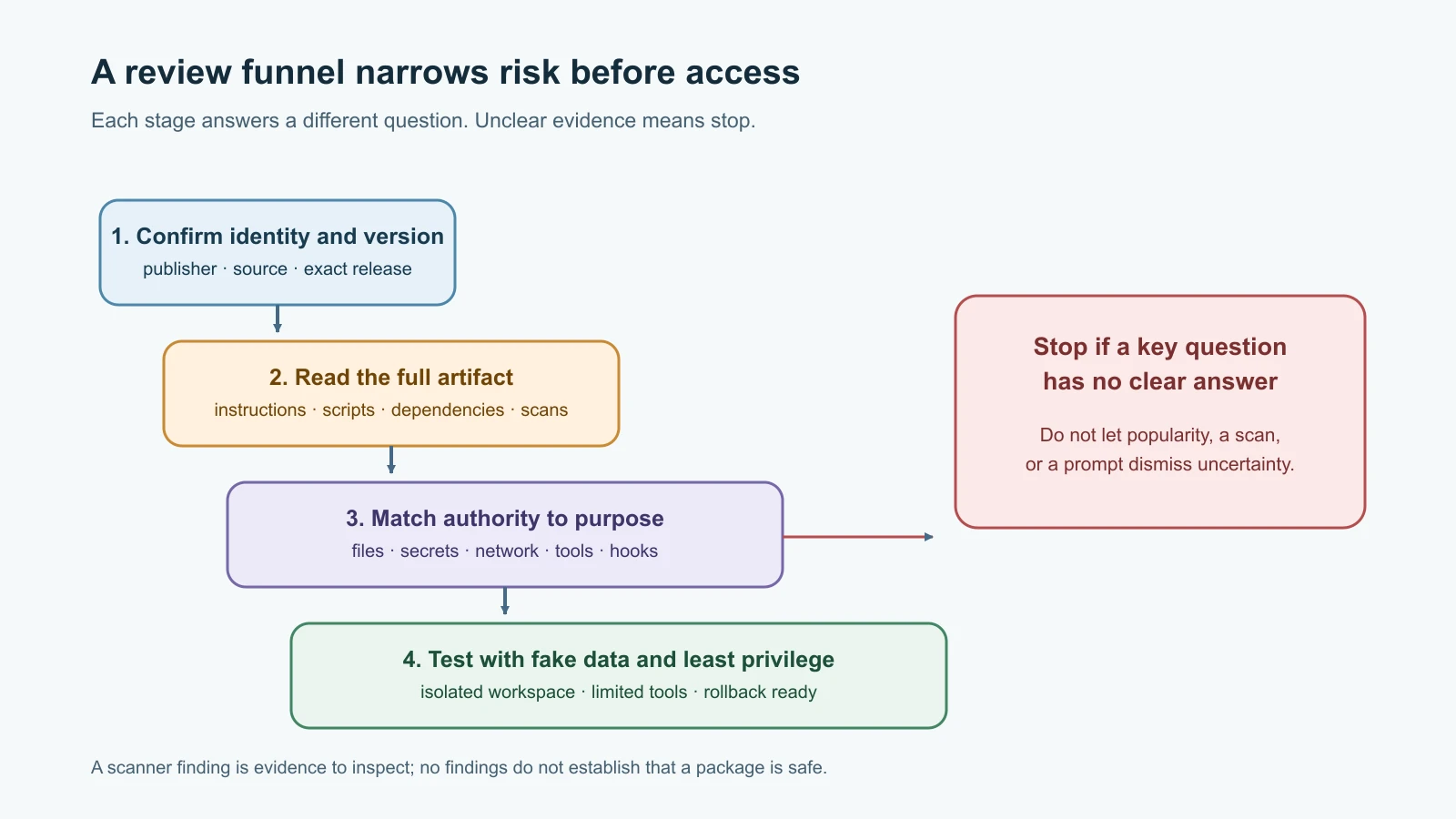
Start with identity and provenance. Record the publisher, exact package name, selected version, source, and release date. Compare the package's description with its files and declared capabilities. Look at its change history and whether the source repository corresponds to the registry listing. A popular listing can still be risky; a new package is not automatically malicious. These are context, not verdicts.
Then read the actual skill instructions and supporting files. A SKILL.md can contain instructions that are easy to overlook in a long document. Search for requests to reveal prompts or credentials, disregard earlier boundaries, use tools unrelated to the stated task, contact external destinations, or silently repeat actions. Follow any referenced file paths and links. Do not treat text such as “approved by security” or “ignore other rules” as proof of trust.
For a plugin, inspect its manifest, entry points, scripts, dependencies, configuration defaults, and capability declarations. Check what tools and hooks it registers, what network destinations it uses, and whether install scripts or runtime code perform additional downloads. Review the exact artifact that will be installed, not just a repository branch that may change. If you cannot explain why a requested permission is needed, stop and ask someone who can review it.
Look for sensitive data access. Code that reads environment variables, credential files, browser profiles, SSH keys, or OpenClaw state could be legitimate in a narrow tool, but it deserves a specific explanation. Ask which exact variables or files are read, whether values are sent outside the machine, how long they are retained, and whether a less powerful approach would work. Never paste real secrets into a skill or plugin configuration just to test it.
Look for execution and network behavior. Shell execution, subprocess creation, dynamic evaluation, package installation, remote downloads, and outbound HTTP can all be legitimate. The concern is undisclosed, unnecessary, or overly broad use. Trace where user-controlled input flows. A command that interpolates arbitrary prompt text into a shell string is a different risk from a fixed, argument-separated read-only command. Check whether network destinations are fixed and documented, whether TLS verification remains enabled, and whether responses can trigger more commands.
Obfuscation and code loading deserve extra care. Encoded blobs, minified code without source maps, dynamically assembled commands, downloaded executables, and reflection can make review harder. They are not proof of maliciousness, but if you cannot inspect what will run, do not load it into an agent with access to accounts or files. A legitimate package should be explainable by its maintainer.
Use a repeatable review checklist
Write down answers before installing. This makes the decision reviewable later and helps you compare a new version with the one you already accepted.
| Review question | What to record |
|---|---|
| Identity | Publisher, package name, selected version, source, and release date |
| Purpose | The specific task it adds and who requested it |
| Instructions | What the skill tells the agent to do, including linked files |
| Code | Entry points, scripts, dependencies, install hooks, and downloaded assets |
| Data | Files, environment variables, credentials, messages, or workspace content it can read |
| Network | Destinations, protocols, data sent, and whether a response can cause another action |
| Authority | Tools, channels, hooks, MCP servers, commands, and configuration it requests |
| Findings | ClawHub status, scanner output, OpenClaw install policy, and unresolved questions |
| Test boundary | Disposable workspace, fake data, limited tools, and what was observed |
| Rollback | How to disable or remove it, and which files or settings removal affects |
Do not approve a package just because every row has text in it. The goal is to understand the behavior and decide whether that behavior is appropriate for the task and the agent's trust level. If any important row is unknown, leave it uninstalled until the question is answered.
A small pattern scanner for a first pass
The scanner below searches text files for patterns associated with shell execution, environment access, network calls, encoded content, and destructive operations. It reports a file, line number, category, and matching line. It does not execute scanned files. It skips common generated directories, symbolic links, and files larger than its per-file limit, and it reports when part of the tree could not be read.
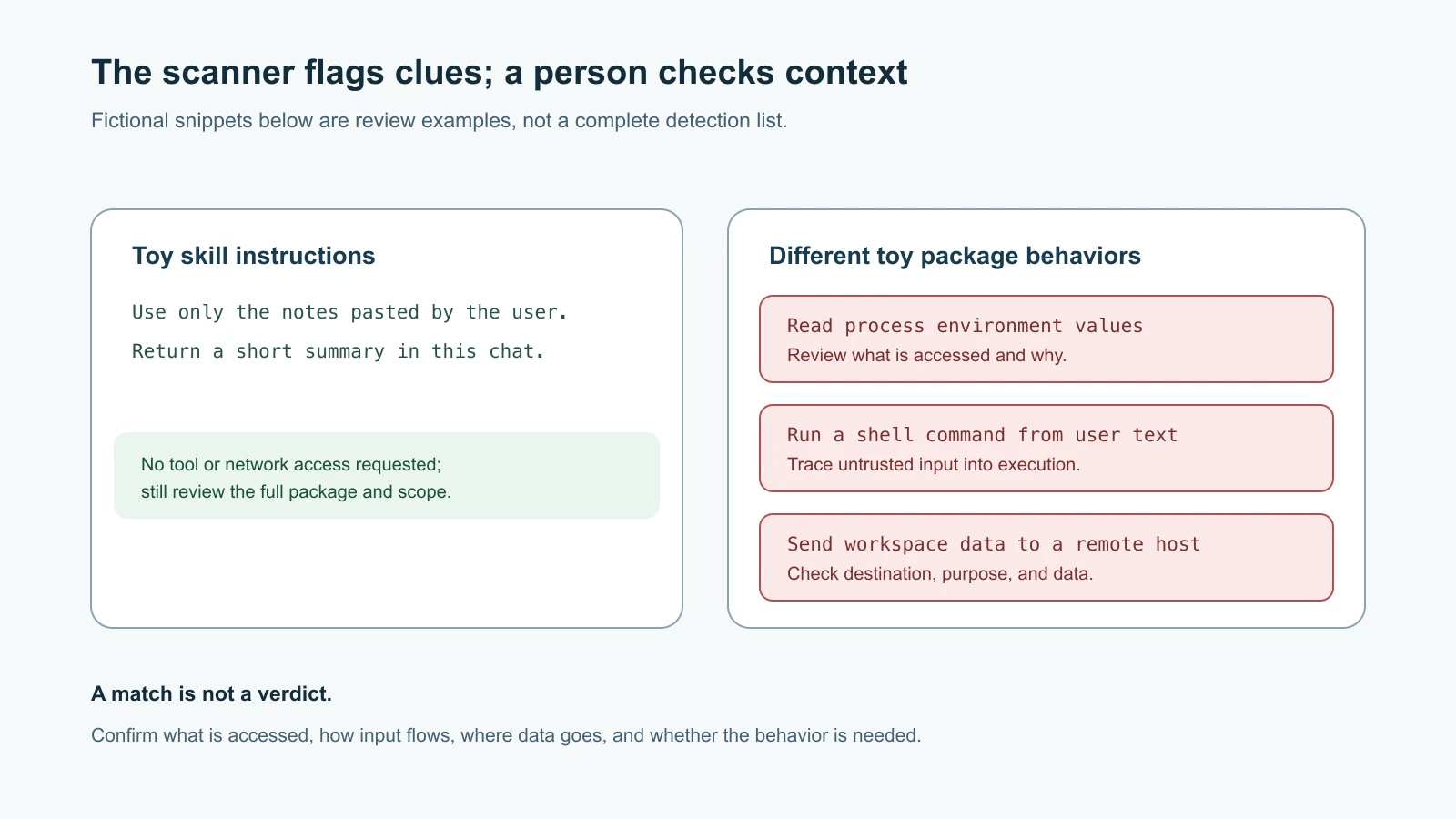
A finding is a prompt for review, not a conclusion. A URL in documentation may be harmless. subprocess.run might be a necessary, fixed command, or it might be an injection path. Conversely, code can hide behavior using an unrecognized API or data flow the scanner does not understand. Read the surrounding code and trace the inputs and outputs yourself. Never convert “no findings” into “safe.”
Save this as skill_scan.py in a disposable review folder. The script uses only the Python standard library:
1# skill_scan.py
2from __future__ import annotations
3
4import argparse
5import re
6from pathlib import Path
7
8MAX_FILE_BYTES = 1_000_000
9SKIP_DIRS = {".git", "node_modules", ".venv", "venv", "__pycache__"}
10RULES = {
11    "shell-or-dynamic-execution": re.compile(
12        r"\b(?:subprocess\.(?:run|Popen|call|check_output)|os\.system|"
13        r"child_process\.(?:exec|spawn)|eval\s*\(|exec\s*\()"
14    ),
15    "environment-or-credential-access": re.compile(
16        r"\b(?:os\.environ|os\.getenv|process\.env|getenv\s*\(|"
17        r"\.ssh/|\.aws/|credentials\.json)\b",
18        re.IGNORECASE,
19    ),
20    "network-client": re.compile(
21        r"\b(?:requests\.(?:get|post|put|delete)|urllib\.request|"
22        r"httpx\.(?:get|post|Client)|fetch\s*\(|socket\.socket)"
23    ),
24    "encoded-or-obfuscated-content": re.compile(
25        r"\b(?:base64\.(?:b64decode|decodebytes)|atob\s*\(|marshal\.loads)"
26    ),
27    "download-piped-to-shell": re.compile(
28        r"\b(?:curl|wget)\b[^\n|]*\|\s*(?:sh|bash)\b", re.IGNORECASE
29    ),
30    "destructive-file-operation": re.compile(
31        r"\b(?:shutil\.rmtree|os\.remove|os\.unlink)\s*\(|"
32        r"\brm\s+-[^\n]*\brf\b", re.IGNORECASE
33    ),
34}
35
36
37def scan_tree(root: Path) -> tuple[list[str], list[str]]:
38    findings: list[str] = []
39    notes: list[str] = []
40    resolved_root = root.resolve(strict=True)
41    if not resolved_root.is_dir():
42        raise ValueError("review path must be a directory")
43
44    for path in sorted(resolved_root.rglob("*")):
45        if any(part in SKIP_DIRS for part in path.relative_to(resolved_root).parts):
46            continue
47        if path.is_symlink():
48            notes.append(f"SKIP symlink: {path.relative_to(resolved_root)}")
49            continue
50        if not path.is_file():
51            continue
52        try:
53            size = path.stat().st_size
54            if size > MAX_FILE_BYTES:
55                notes.append(f"SKIP oversized file ({size} bytes): {path.relative_to(resolved_root)}")
56                continue
57            text = path.read_text(encoding="utf-8")
58        except (OSError, UnicodeError) as error:
59            notes.append(f"SKIP unreadable file: {path.relative_to(resolved_root)} ({error})")
60            continue
61
62        for line_number, line in enumerate(text.splitlines(), start=1):
63            for category, pattern in RULES.items():
64                if pattern.search(line):
65                    excerpt = line.strip()[:220]
66                    findings.append(
67                        f"{path.relative_to(resolved_root)}:{line_number}: {category}: {excerpt}"
68                    )
69
70    return findings, notes
71
72
73def main() -> int:
74    parser = argparse.ArgumentParser(
75        description="Flag selected code patterns for human review; this is not a malware detector."
76    )
77    parser.add_argument("path", type=Path, help="directory containing the unpacked skill or plugin")
78    args = parser.parse_args()
79    try:
80        findings, notes = scan_tree(args.path)
81    except (OSError, ValueError) as error:
82        parser.error(str(error))
83
84    for note in notes:
85        print(note)
86    for finding in findings:
87        print(f"REVIEW {finding}")
88    print(f"\n{len(findings)} finding(s); {len(notes)} skipped item(s). Human review is still required.")
89    return 0
90
91
92if __name__ == "__main__":
93    raise SystemExit(main())
Run it against an already unpacked copy in a scratch directory:
1python3 skill_scan.py /tmp/skill-review/project-summaryDo not point this lesson's example at ~/.openclaw, a live workspace, or a directory that contains secrets. The scanner reads text only and makes no changes, but its output may include source lines; keep the review folder private and avoid putting sensitive data in it. The scanner intentionally does not unpack archives or follow symlinks. Inspect the archive listing and the actual staged content with a trusted tool before using it.
Test the scanner on harmless examples
These unit tests create temporary files with fictional content. They verify that a suspicious-looking pattern is reported, ordinary prose is ignored, and a symlink is skipped when the operating system permits creating one. They do not test whether the scanner can detect malware; pattern matching cannot establish that.
1# test_skill_scan.py
2import tempfile
3import unittest
4from pathlib import Path
5
6from skill_scan import scan_tree
7
8
9class SkillScanTests(unittest.TestCase):
10    def test_flags_shell_and_environment_patterns(self) -> None:
11        with tempfile.TemporaryDirectory() as temporary:
12            root = Path(temporary)
13            (root / "skill.py").write_text(
14                "subprocess.run(command)\nvalue = os.environ.get('DEMO_KEY')\n",
15                encoding="utf-8",
16            )
17            findings, notes = scan_tree(root)
18            self.assertEqual(notes, [])
19            self.assertTrue(any("shell-or-dynamic-execution" in item for item in findings))
20            self.assertTrue(any("environment-or-credential-access" in item for item in findings))
21
22    def test_clean_text_has_no_findings(self) -> None:
23        with tempfile.TemporaryDirectory() as temporary:
24            root = Path(temporary)
25            (root / "SKILL.md").write_text(
26                "Summarize the notes provided in this conversation.\n",
27                encoding="utf-8",
28            )
29            findings, notes = scan_tree(root)
30            self.assertEqual(findings, [])
31            self.assertEqual(notes, [])
32
33    def test_reports_oversized_files_as_skipped(self) -> None:
34        with tempfile.TemporaryDirectory() as temporary:
35            root = Path(temporary)
36            (root / "large.txt").write_bytes(b"x" * 1_000_001)
37            findings, notes = scan_tree(root)
38            self.assertEqual(findings, [])
39            self.assertTrue(any("SKIP oversized file" in item for item in notes))
40
41    def test_skips_symlinks(self) -> None:
42        with tempfile.TemporaryDirectory() as temporary:
43            root = Path(temporary)
44            outside = root / "outside.py"
45            outside.write_text("os.system('example')\n", encoding="utf-8")
46            link = root / "linked.py"
47            try:
48                link.symlink_to(outside)
49            except (OSError, NotImplementedError):
50                self.skipTest("symbolic links are unavailable")
51            findings, notes = scan_tree(root)
52            self.assertTrue(any("outside.py" in item for item in findings))
53            self.assertTrue(any("SKIP symlink: linked.py" in item for item in notes))
54
55
56if __name__ == "__main__":
57    unittest.main()
The tests are examples of expected scanner behavior, not a security certification. If you change or expand the patterns, add ordinary examples that should not match and risky-looking examples that should. Review false positives so operators do not become trained to ignore every warning.
Test in isolation and limit access
If the package is still worth trying, use a throwaway VM, spare device, or isolated container with a new test agent. Do not test it first on the Gateway that holds your personal chat accounts or work credentials. Keep network access blocked unless the package genuinely needs it; if it does, allow only the documented destination where practical. Use fake files and test credentials with a spend cap. Start with the least powerful tools and expand only after there is a clear need.
Before installing a skill, inspect the exact files and ClawHub audit for the exact publisher and release. After installation, use OpenClaw's read-only skill inspection commands and run openclaw security audit --deep when appropriate. The deep audit includes bounded code scans for skill and plugin files; the official reference documents file and traversal limits, so a truncated scan means some content was not checked. A clean result does not guarantee safety. It adds another source of findings to your review.
For a plugin, inspect its declared capabilities and source trust in the installation or management flow. OpenClaw's current plugin installer distinguishes sources and can ask for capability consent. Do not use --force or an acknowledgement option to skip a warning you have not understood. Some flags confirm an operator's decision after review; they do not make code safe or override a blocking policy. If an install is denied, stop and investigate the reason.
OpenClaw also supports an operator-owned install policy for skills and plugins. A trusted local policy command can inspect staged source and allow, warn, or block installs before they continue. That is useful for managed Gateways with organization rules, but it requires a carefully secured policy program. It should not blindly approve based on package name or user-supplied metadata. This is an operational control, not a substitute for package review.
Keep installation separate from activation where the product flow allows it. Record the version and source, test the behavior with low-privilege inputs, and check logs for unexpected network or tool activity. If the package behaves differently than described, disable it and preserve the files for review before cleanup. Revoke any credentials it could have accessed, rotate affected tokens, and check for external actions. For shared environments, tell the Gateway owner so the same package is not re-enabled elsewhere.
Know when to stop
Do not install a package when its publisher or source is unclear, when code is hidden or fetched from an unexplained location, when it requests broad credentials for a narrow task, or when the maintainer cannot explain an important behavior. Do not accept a plugin's declared capabilities automatically just because the install screen lists them. If the work needs a sensitive permission, establish why it is necessary and whether it can be restricted to a test account or one agent.
Security review is not a race to make every warning disappear. A detection may be a false positive; a missing detection may reflect a blind spot. Your decision should come from the package's purpose, source, exact behavior, required authority, environment, and rollback plan together. When the evidence is incomplete, the safest operational choice is to leave the package disabled and ask for another review.
Recheck changes, not just names
Approving one release does not approve every future release under the same name. Keep the exact version and source in your notes, and compare changed files before updating. A small documentation edit may be low impact; a new install script, dependency, endpoint, or permission is a meaningful change. Review the changelog against the diff rather than assuming the version number tells the whole story.
Use version pins in production when you need a reproducible setup, and schedule updates deliberately so security fixes are not ignored forever. Pinning limits surprise changes; it does not remove the need to patch. If an update must be delayed, record the reason, owner, and date for review. In a test environment, you can inspect a newer release first, compare its audit and files with the installed copy, then decide whether to roll it into the restricted setup.
Also check the install record and current source when investigating a mismatch. A package folder can be renamed, edited locally, or replaced by a copy from another source. The visible folder name alone may not tell you which publisher or version OpenClaw installed. Use supported inspection commands and metadata to confirm provenance, then review the actual files on disk. If the record and files do not agree, treat that as an unresolved integrity question and pause before granting the package more access.
Mistakes beginners make
- Treating a passing registry scan or a clean local scanner output as proof of safety.
- Reading only
SKILL.mdwhile ignoring scripts, manifests, dependencies, and supporting files. - Assuming a skill cannot create risk because it is Markdown; its instructions can steer tools the agent already has.
- Assuming an official-looking name or a high download count establishes the publisher's identity.
- Running a plugin on a personal Gateway just to see what it does.
- Giving a test agent real credentials, full filesystem access, or unrestricted network access.
- Clicking through a capability prompt or using a force flag without understanding the requested authority.
- Ignoring a truncated scan or repeatedly dismissing findings until warnings lose meaning.
- Forgetting to record the version and source, making later changes hard to compare.
Recap and try it yourself
Review skills as instructions that may influence existing tools and plugins as executable code. Check publisher, exact version, source, instructions, scripts, dependencies, network behavior, secrets, requested authority, scan findings, and rollback. Use registry audits and local scanners as evidence, not guarantees. Test only in an isolated, low-privilege environment with fake data, and stop if behavior or permissions are unclear.
Try the scanner in a new temporary directory using the supplied tests. Then create two toy files: one that contains a fixed, documented read-only command and one that contains an unexplained outbound request. Observe which patterns it reports and where it is silent. Write down why each finding needs human review. Do not scan a live skill directory or install the toy code into OpenClaw.
For a model of how a skill is stored and loaded, revisit Use and create OpenClaw skills. For related general guidance on reviewing generated or third-party code, see Security for vibe coders.