
OpenClaw course · lesson 4 of 22
- 1What Is OpenClaw, and Is It Right for You?
- 2OpenClaw vs Claude Code: Which Tool Fits the Task?
- 3How OpenClaw Works: Gateway, Sessions, and Agents
- 4OpenClaw Context and Memory: What Carries Forward?
- 5OpenClaw Workspace Files: Shape Your Agent Safely
- 6Where Should OpenClaw Run? Local, VPS, or Isolated
- 7Install OpenClaw and Start Its Gateway Safely
- 8Choose an OpenClaw Model and Provider
- 9Add Your First OpenClaw Channel Safely
- 10Choose Another OpenClaw Chat Channel Carefully
- 11Control OpenClaw Sessions and Commands
- 12Separate OpenClaw Agents and Route Messages
- 13Schedule OpenClaw Checks with Heartbeats and Automations
- 14Secure OpenClaw Hooks and Webhooks
- 15Use and Create OpenClaw Skills
- 16Vet OpenClaw Skills and Plugins Before Installing
- 17Extend OpenClaw with Plugins and MCP
- 18Understand the OpenClaw Security Model
- 19Secure an OpenClaw Gateway with Ten Checks
- 20Back Up, Update, and Troubleshoot OpenClaw
- 21Control OpenClaw Costs and Improve Reliability
- 22Capstone: Build a Safe OpenClaw Personal Assistant
When an assistant seems to remember something, it is easy to imagine that every past conversation is always in its head. OpenClaw works through more concrete pieces: a limited context window for the current model request, session history, workspace files that can hold durable notes, and search tools that can retrieve relevant material when needed.
Understanding the difference helps you answer practical questions: Will Mira's assistant remember a preference tomorrow? Does an old conversation get sent to the model every time? What happens when a chat gets too long? And where might private notes go when memory search is enabled?
In this lesson, we will use Mira, a fictional user. She asks her assistant to remember that project summaries should start with decisions and then list open questions. Later, she asks for a summary of a meeting note. We will trace which information might be available for each request, and what Mira should check before trusting the result.
Two kinds of “remembering”
The context window is the material OpenClaw sends to a model for one run. It has a size limit set by the selected model and runtime. Context can include the current request, some conversation history, system instructions, tool descriptions and results, attachments, and workspace files that OpenClaw injects. The precise contents vary by setup and by what the agent needs.
Durable memory is information stored outside that immediate model request, usually as editable files in an agent's workspace when using OpenClaw's default Memory Core. The agent can use selected memory at the start of a session or retrieve other notes when relevant. There is no magic hidden state that guarantees it will remember every detail.
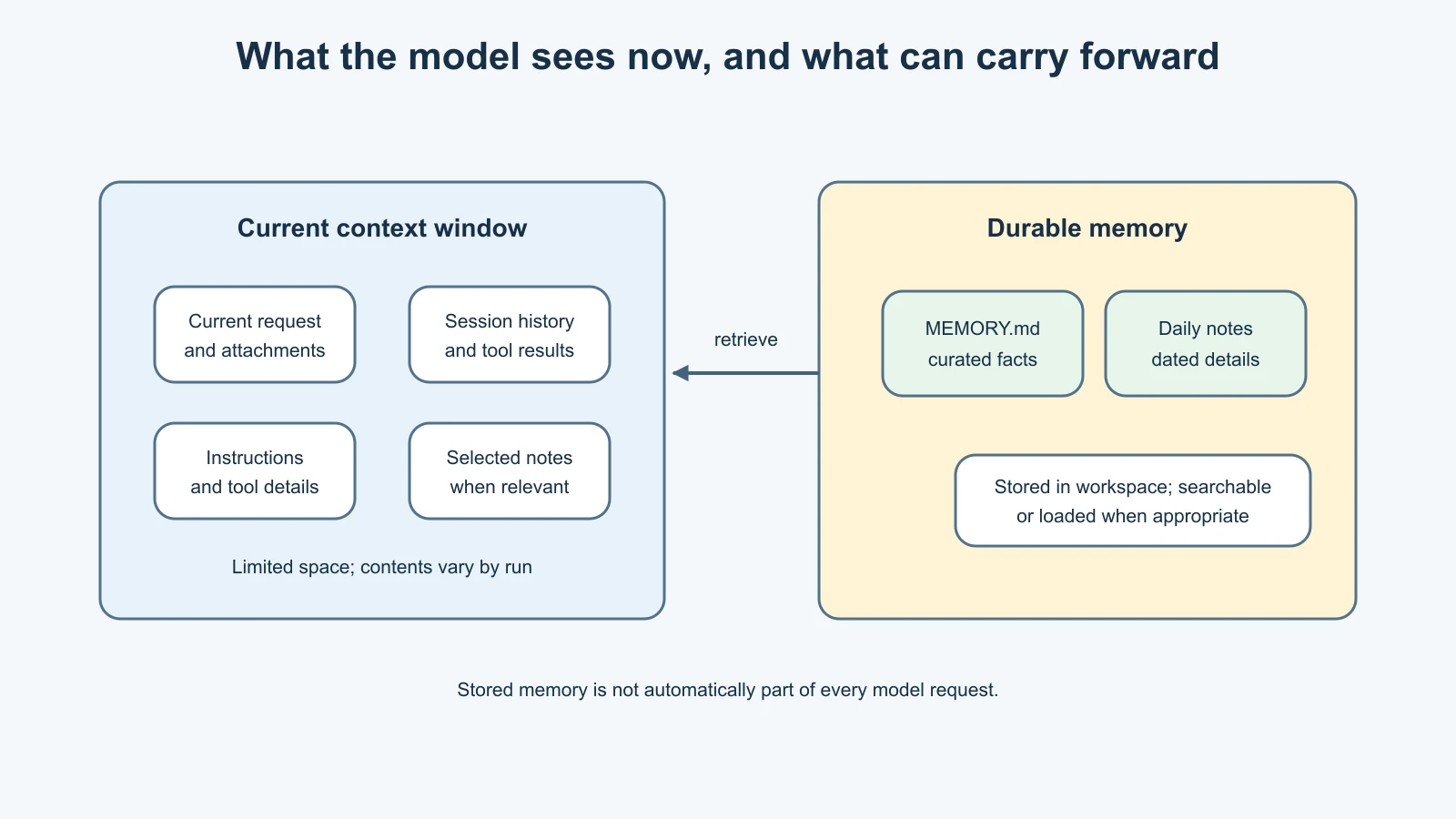
This is the core distinction: context is what the model can see now; memory is information that may be brought into context later. A note can exist on disk and still not be present in the current model request. Conversely, something can be present in context because it was just said, even if it was never saved as durable memory.
The official Context guide describes context as everything sent to the model for a run and distinguishes it from memory stored on disk. For a broader introduction to short-term and long-term memory in AI agents, see Short-term and long-term memory.
What belongs in the context window?
Imagine Mira starts a new session and asks for a project summary. For the current run, OpenClaw may assemble the current message, recent session messages, the agent's instructions, relevant workspace context, available tool information, and any tool results or attachments. The model works with that assembled input, not with an unlimited view of every file and conversation on Mira's computer.
The context window also has a budget. Long histories, large attachments, detailed tool output, and extensive instructions all use space. When the budget gets tight, older material may be summarized or tool output may be trimmed so the current request can proceed. This can change which details are visible to the model without deleting every saved copy of them.
Mira can inspect the current context with OpenClaw's /context command. The current docs describe /context list and /context detail for seeing what contributes to context and approximate sizes. The result is a diagnostic view; it does not display all private prompt internals or guarantee that the model understood every included detail. Context reports can vary by model, provider, tools, and runtime.
The context window is not the transcript
It helps to separate three things that sound similar:
- Current context: the assembled input for a model run.
- Session transcript: the stored record of the conversation and tool activity.
- Durable memory: curated or working notes meant to help across sessions.
OpenClaw can summarize older conversation history into a shorter entry through compaction. The /compact command requests this when supported. Compaction makes room in the current context by preserving a summary and recent conversation. It is not the same as erasing the entire session transcript, and it is not a guarantee that every old detail survives in the summary.
Before a compaction, the default OpenClaw behavior can run a memory flush that reminds the agent to save important information to durable memory. That is a separate step from the summary itself. A flush can be disabled or affected by the selected memory plugin and workspace access. Treat this as a helpful mechanism, not as a substitute for reviewing what matters.
If Mira has a decision that must remain available, she should state it clearly and check that it was saved in the appropriate place. If she only needs a fresh conversation, starting a new session is different from compacting: a new session begins with a different interaction history, while compaction keeps a summarized continuation. Exact commands and behavior may evolve, so check the current OpenClaw help before using them on a live setup.
The default memory files
OpenClaw's current Memory Core documentation describes several memory-related Markdown files. In the default model, they play different roles:
MEMORY.mdis a compact, curated set of durable facts, decisions, and summaries. Eligible content can be loaded at the start of a session.memory/YYYY-MM-DD.mdfiles are dated working notes: observations, detailed context, and session summaries. They can be searched, but are not all injected into every model request.USER.mdis an optional compact profile layer for stable preferences and facts about the user. Lesson 5 will cover this and other workspace files in more detail.DREAMS.mdis an optional review surface for memory consolidation reports, not a file automatically added to every response.
For Mira's preference, a concise durable note might say: “For project summaries, put decisions first, then open questions. Observed 7 Nov 2026.” This is a stable preference, so it belongs in a compact profile or curated memory layer according to the workspace's organization. A temporary note about today's meeting would fit better in a dated working note.
The point is not to memorize a particular filing scheme. It is to keep durable facts brief, put detailed daily context where it can be found, and distinguish a user preference from an event record. The official Memory overview describes these default file roles. Other memory plugins can use different storage and retrieval behavior, so confirm which provider is active before assuming Memory Core details apply.
How a note becomes useful later
Saving a note and retrieving it are different steps. With Memory Core, daily notes can be indexed for memory search. When Mira later asks, “What did we decide about the launch checklist?”, the agent may search for notes that match the meaning or words in her question, then read a relevant excerpt.
The default memory search can combine two approaches. Keyword search is good for exact terms such as a project name or error code. Semantic search looks for similar meaning even when the wording differs. A hybrid search can combine both. Search returns candidates; it does not prove that a candidate is current, correct, or about the right project.
That is why the assistant should be transparent when it finds partial or uncertain information. “I found a note from last week that says the checklist is waiting for review” is more useful than presenting an old note as a confirmed current status. When the choice matters, ask for the source or open the note and verify it.
Memory Core's documentation describes a background consolidation process that can distill useful details from daily notes into curated memory. This is a curation step, not a promise that every note will be promoted. It also does not make the resulting fact true. A mistaken or outdated note can still be repeated until someone corrects it.
For practical memory-writing techniques that apply across agent systems, see Maintaining agent memory. OpenClaw adds product-specific files and tools around those general ideas.
Privacy: stored locally does not mean never shared
With the default file-based setup, memory notes live in the agent's workspace on the machine or host running OpenClaw. That gives the operator control over the files and backups. It does not mean their content can never leave that host.
When a note is included in context for a model request, that content is sent to whichever model provider handles the request. Memory search may also use an embedding provider to convert note text and search queries into vectors. Depending on the provider configuration, that text may be processed by a hosted service or a local model. The provider and hosting choices matter.
Before saving sensitive material, ask:
- Would this be appropriate to send to the configured model provider if it is later retrieved?
- Does memory search use a hosted embedding service or a local one?
- Who can access the host, workspace, backups, and logs?
- Is the information still useful, or should it expire or be deleted?
Do not store passwords, API keys, authentication codes, or confidential data merely because the assistant might find it convenient. Durable memory is not a secure vault. Also remember that deleting a note from one file may not remove copies in backups, indexes, transcripts, or other imported material. Know the configured deletion and retention behavior before treating removal as complete.
A practical memory lifecycle
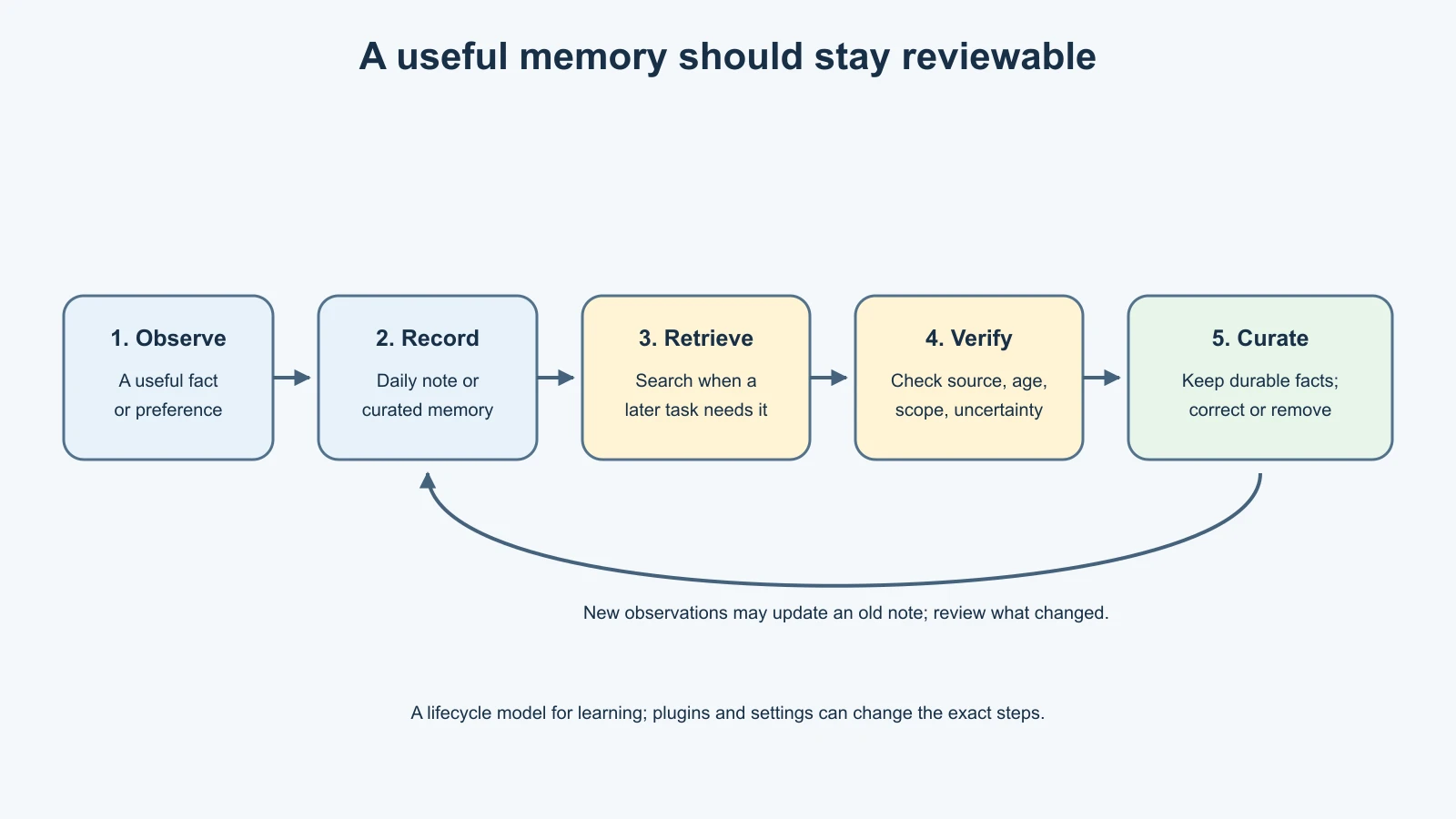
The lifecycle is simple to reason about even if the implementation has more moving parts:
- Observe: A useful fact appears in a conversation or task.
- Record: The agent writes it to an appropriate memory surface, or it remains only in the session.
- Retrieve: A future request brings the relevant note into context through startup loading or search.
- Check: The assistant considers source, age, scope, and uncertainty before relying on it.
- Curate: A durable fact may be shortened or promoted so it is easier to use later.
- Correct or remove: When a fact changes, update the old note or remove it using the appropriate memory workflow.
The diagram shows an idealized route, not a claim that every system automatically follows all six steps. For example, Mira may ask the assistant to remember something, but she should still verify that the note was recorded. A different plugin may have different automatic capture or deletion tools.
Make memories safe to act on
Some facts affect future actions, so a short fact alone can be dangerous. “Vendor approved the change” leaves out who approved it, what they approved, and whether the approval is still valid. A safer note might say: “Mira approved a draft review only, on 7 Nov 2026. Do not publish or deploy without a separate explicit approval.”
Capture the parts that change what the agent may safely do: who gave the instruction, what scope it covers, when it expires, and what still needs confirmation. Memory can preserve that context, but it cannot enforce access control. Use permissions, approvals, and sandbox rules for controls that must hold even if the model forgets or misreads a note.
Also treat external content as untrusted. A web page, attachment, or message from another participant might contain text that looks like an instruction. That does not make it a trustworthy user preference or a valid system rule. Keep track of where a memory came from, and review anything that could influence future actions.
Mistakes beginners make
Assuming the assistant sees every memory on every turn
Some files may be loaded at session start, while daily notes may be searched only when useful. A stored fact can be absent from the current context. Ask the assistant to retrieve it or inspect the relevant note.
Treating a context window as permanent memory
The context window is limited and changes as a session grows. Compaction may summarize older history. Save important durable facts deliberately and verify the saved note.
Treating search results as verified truth
Search can find something relevant but stale, ambiguous, or wrong. Check the source and date before making an important decision from recalled information.
Putting everything in MEMORY.md
The curated file is meant to stay useful and compact. Detailed daily notes belong in the working layer, where search can find them without sending the entire archive on every run.
Assuming local files never reach a provider
When memory text is included in a model request, it goes to the configured model provider. Embedding search may send text to a separate provider. Review both paths before adding private information.
Treating a memory note as an access-control rule
A note can remind the assistant to seek approval, but permission settings and operational safeguards must enforce actions. Important rules belong in both clear instructions and actual controls.
Recap and try it yourself
The context window contains what OpenClaw sends to the model for a current run. Session history records a conversation; durable memory stores selected information for later use. In the default Memory Core setup, MEMORY.md is curated durable context, dated memory/YYYY-MM-DD.md files hold working notes, and memory search can retrieve relevant details when they are not already in context.
Compaction can summarize old context to make room, while a memory flush may preserve important details separately. Neither mechanism guarantees perfect recall. Stored notes and search results still need source, freshness, and privacy checks. Model-provider and embedding-provider choices determine where retrieved or indexed text may be processed.
Try this with a harmless preference, such as “For weekly updates, show completed work before blockers.” Decide whether it belongs in a temporary session, a dated note, or durable user preference. Then write down how you would verify the note was saved, how you would find it next week, and which providers could receive it. Do this as a planning exercise; do not add personal or secret data to a live system just to test the idea.
Sources, checked 7 November 2026
- OpenClaw, Memory overview
- OpenClaw, Context
- OpenClaw, Compaction
- OpenClaw, Memory search
- OpenClaw, Memory architecture
- WriterDock, Short-term and long-term memory
- WriterDock, Maintaining agent memory