
AI Product Builders course · lesson 24 of 25
- 1The AI Product-Building Loop: From Idea to Improvement
- 2Define the Problem Before You Choose a Solution
- 3Check the Idea Before You Build
- 4App Anatomy for Non-Engineers: What Happens Behind a Screen
- 5Scope the First Version: Choose What to Build Now
- 6Choose a Tech Stack That Fits Your Constraints
- 7Choose a Prototype Tool for Your Product and Team
- 8Build a Clickable Prototype in One Focused Flow
- 9Test a Prototype with Real People
- 10Decide Whether to Keep, Change, or Stop
- 11Move from a Prototype to Real Code
- 12Work with an AI Coding Tool on One Clear Task
- 13Learn the Web Basics Behind Your App
- 14Connect a Database Without Losing Control of Your Data
- 15Tell a Small Fix from a Structural Change
- 16Run a Refinement Loop That Keeps the Product Useful
- 17Make an AI-Built Product Easier to Use
- 18Review and Check Changes Before They Reach the Team
- 19Test an AI-Built Product in Layers
- 20Work with a Team and Stakeholders
- 21Choose Where to Deploy Your Product
- 22Go Live: A Launch Checklist for Your Product
- 23Measure and Improve Your Product After Launch
- 24Add an AI Feature to Your Product Carefully
- 25Capstone: Take a Product Idea to Launch
After this lesson, you will be able to decide whether an AI feature is useful for a specific product task, describe its boundaries, plan a first evaluation, and give users a clear way to review or continue without it.
This is an extension to the product-building loop. It is about adding AI to a product, not using an AI coding assistant to build one. We will use ToolShelf, the fictional neighbourhood tool-sharing service. It has no real users, model, costs, or test results. Its examples are design exercises, not evidence from a live product. If you are still deciding what belongs in version one, start with scoping the first version. For a broader way to turn observations into product decisions, see the refinement loop.
Ask whether the task needs AI
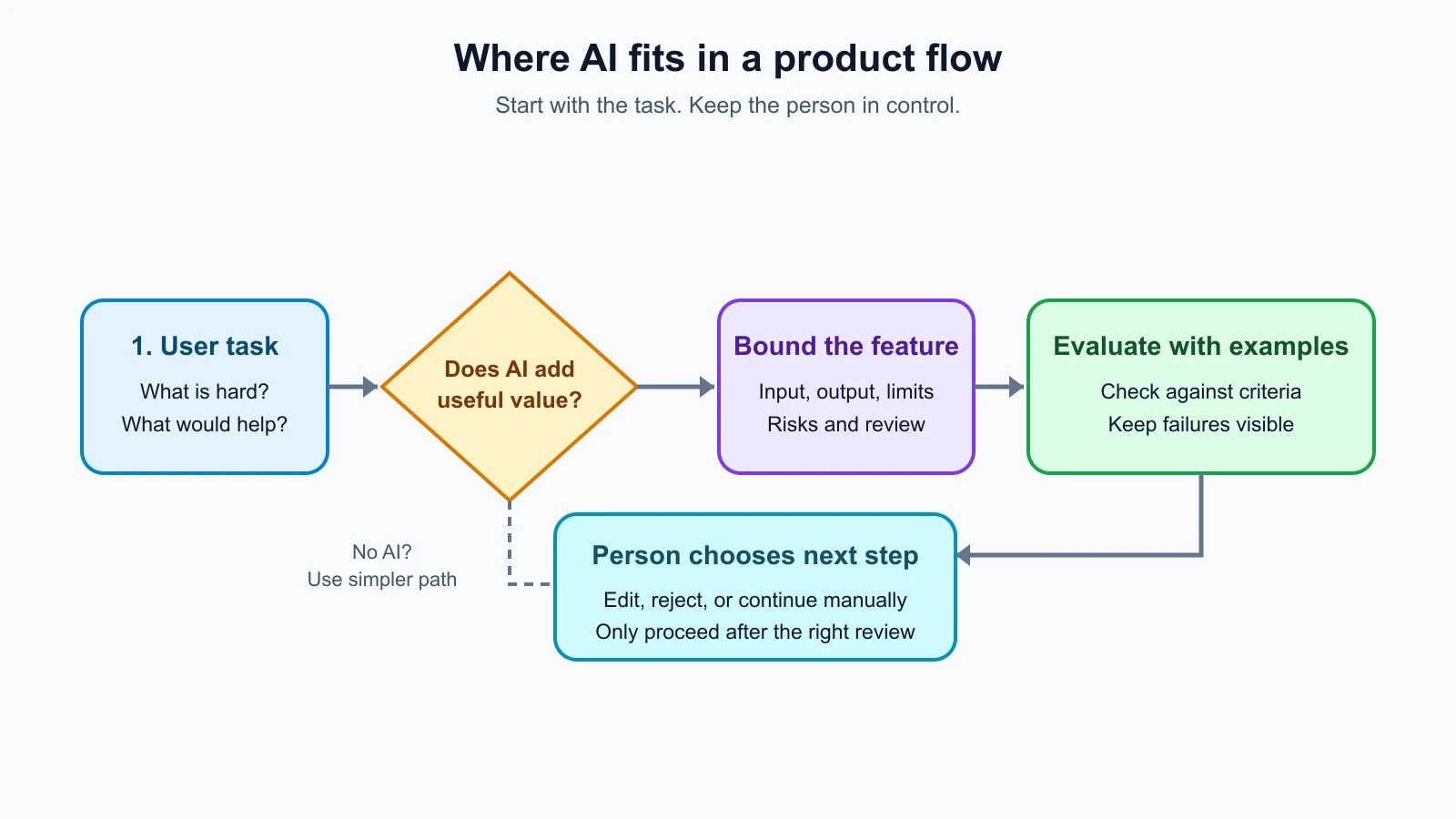
“Could we add AI here?” is easy to ask. A more useful first question is: “What is hard for the person doing this task, and what is the simplest way to make it easier?” Sometimes the answer is a clearer label, a filter, a saved preference, a search box, a fixed rule, or no change. A language model is not automatically an improvement just because a task contains text.
AI may be worth exploring when a task involves language that varies from person to person, when people need help turning rough notes into a useful first draft, or when finding patterns in unstructured information would save meaningful effort. It is usually a poor fit when the task needs a guaranteed exact answer, when a rule can be stated and implemented directly, or when an error could cause serious harm and no suitable review process exists.
For example, ToolShelf could use ordinary filters for tool category, availability, and distance. Those are structured choices with clear rules. It might consider helping an owner turn their own notes into a readable listing description. That task involves language and could benefit from a draft. The feature would not decide whether a drill is safe, whether a listing is accurate, or whether an item is available. Those facts must come from the owner and the product's ordinary data.
Compare the AI idea with simpler options before committing:
| Option | What it does well | What to ask |
|---|---|---|
| Clearer interface | Helps people understand an existing step | Is the difficulty caused by confusing wording or layout? |
| Search or filters | Finds known items using explicit fields | Can the person describe what they need with available fields? |
| Fixed rules | Applies consistent conditions, such as whether a field is required | Can the rule be written precisely and tested? |
| AI assistance | Works with varied language and can create a flexible draft | Can a person check the output, and is the time saved worth the added risk and operating work? |
The product decision should name the user benefit and the cost of being wrong. “Add an AI description generator” is a feature request. “Help an owner turn notes into a draft they can check, so they do not have to start from a blank page” describes a possible benefit. You still need to find out whether people want that help. If a simpler editor or a few example prompts solve the problem, use that instead.
Define a small, bounded first feature
A useful first design states who uses the feature, at what point, what information it receives, what it may return, and what happens next. These boundaries keep a promising idea from quietly becoming a system that makes decisions users did not expect.
For the fictional ToolShelf example, a first feature might be:
- Person and moment: An owner is writing a listing and has entered the tool name, condition, and a few notes.
- Input: Only the information the owner chose to provide for this draft.
- Output: A short description draft in plain language.
- Allowed: Reorganize the supplied details, correct spelling, and suggest a neutral sentence structure.
- Not allowed: Add facts about safety, maintenance, availability, included accessories, price, or suitability that the owner did not provide.
- Next step: Show the result as a draft. The owner can edit it, discard it, or write from scratch.
- Fallback: Keep the ordinary listing form available if generation is unavailable, slow, unwanted, or unhelpful.
This feature assists with wording. It does not make or publish a listing on the owner's behalf. That distinction matters because a fluent sentence can sound verified even when it contains a made-up detail. A person should be able to see which text was generated and review it before it affects another user.
Write the boundaries in product language, not only in a prompt. The interface should make it clear what information the feature uses and what the person should check. The server should limit what data is sent and where the response can go. The product should never treat generated language as trusted facts simply because the model returned it. If the output will trigger an action, change a record, contact someone, or affect access, add an explicit approval step and test that the step cannot be bypassed.
Map the risks before you build
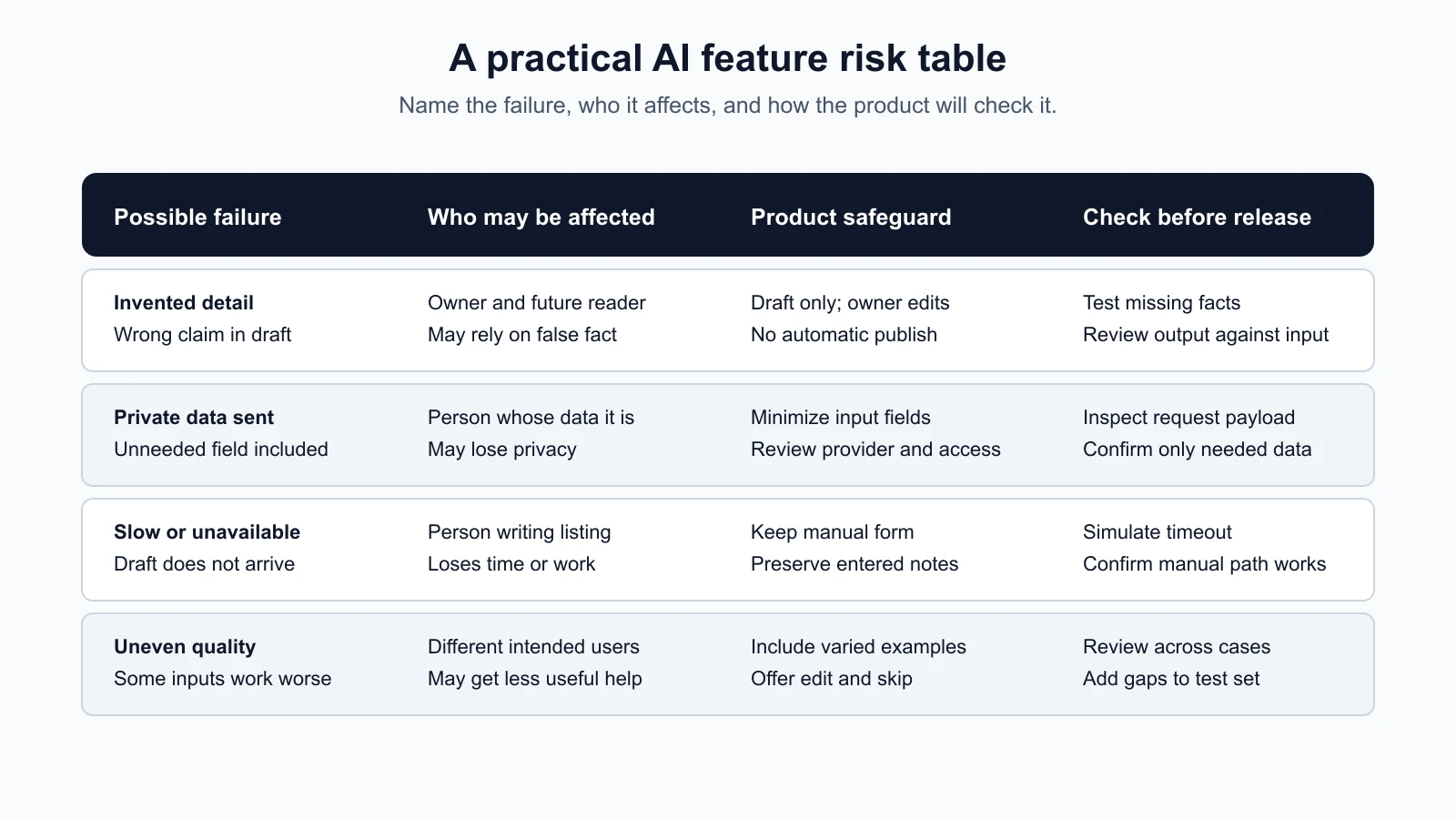
Risk is not one score that applies to every AI feature. A drafting assistant for a low-stakes description has different consequences from a system that gives medical instructions, ranks job applicants, or approves financial transactions. Consider what can go wrong for the people affected, how likely the team thinks it is, how difficult it would be to notice, and what safeguard could reduce the impact. For consequential or regulated uses, get appropriate expert help before deciding that a lightweight product check is enough.
| Risk to consider | ToolShelf draft example | Product question or safeguard |
|---|---|---|
| Unsupported detail | The draft says a tool includes a case when no one entered that fact | Can the owner compare the draft with their supplied details and remove it before saving? |
| Missing or distorted detail | A warning about a damaged handle disappears during rewriting | Which details must remain, and how will representative examples test that? |
| Privacy | Private account or message data is sent when only listing notes are needed | What is the minimum input, who processes it, and what notice and choices apply? |
| Delay or outage | The person waits for a draft that never arrives | Can they cancel or continue with the ordinary form? |
| Usage cost | Repeated retries or long inputs create unexpected service use | What limits, usage monitoring, and owner are needed? |
| Unequal usefulness | The feature handles some writing styles or languages less well | Which intended users and writing conditions need to be included in evaluation? |
| Misleading presentation | A generated draft looks like a confirmed product fact | Is AI assistance labeled, and is editing visibly expected? |
The table is a starting point, not a complete safety review. The NIST Generative AI Profile describes risk management across the design, development, use, and evaluation of generative AI systems. A small team does not need to reproduce a large framework to benefit from its central lesson: consider the system in its real context, including its users, data, operation, and possible harms. If a feature touches sensitive personal information, legal rights, money, health, or safety, involve qualified privacy, security, legal, or domain experts as appropriate. This lesson is general product awareness, not legal, financial, or professional advice.
Decide what a good result means before testing
An AI feature can produce different answers to similar inputs. Looking at one impressive example does not show whether it behaves acceptably across the situations people will encounter. Before implementation, describe the task and write down what a passing result must do. These criteria make it easier to notice when a change makes the feature worse, even if its output still sounds polished.
For the ToolShelf description draft, a first set of criteria could ask:
- Does the result preserve the facts the owner supplied?
- Does it avoid inventing condition, safety, availability, price, or included items?
- Is it easy to understand and edit?
- Does it leave out sensitive details that are not needed in a public listing?
- If the input is too vague, does it ask for more information or give a restrained draft instead of pretending to know?
- If the service fails, can the owner still complete the listing manually?
Turn these questions into a small, saved set of realistic test cases. Include ordinary examples, incomplete notes, conflicting details, unusually long input, spelling mistakes, and requests that try to make the feature add unsupported claims. Use made-up data for early tests. If you later need real user examples, decide how to obtain and handle them appropriately, remove details that are not needed, and follow the product's privacy and consent requirements.
For each case, save the input, the expected constraints, the generated output, and a human review. A reviewer can mark factual preservation, unsupported claims, clarity, and whether the fallback worked. Some checks can be automated, such as whether required fields are present or the result exceeds a length limit. Human review is still useful for meaning and context. Do not treat a model's self-reported confidence as proof that its answer is correct.
An evaluation set is a practical sample, not a guarantee. Include cases from the people and situations the feature is meant to serve, and add new cases when testing, support, or research reveals a gap. Keep especially important edge cases in the set so they can be rerun after changing the model, instructions, interface, or data source. OpenAI's guide to model evaluations describes defining expected behavior and using test data to assess model output. The same basic discipline applies regardless of provider: state the task, retain examples, review results against criteria, and repeat after meaningful changes.
If you want to go deeper on building and comparing test cases for a prompt-based feature, the Prompt Engineering lessons on success criteria and test cases and comparing prompts with graders show a repeatable method, and the AI Agents lesson on evaluating AI agents covers multi-step features that use tools.
Do not make up a pass rate before running the evaluation. If this were a real ToolShelf feature, the team would first run the cases, record what happened, investigate failures, and decide whether the remaining issues are acceptable for this use. A result that fails a critical boundary should not be averaged away by many good stylistic answers. The risk and consequences determine which failures are release blockers.
Plan the fallback as part of the feature
A fallback is the useful path available when the AI output is unavailable, delayed, rejected, or not good enough. It should exist in the product design from the beginning, rather than appearing later as a generic error message.
For a drafting helper, the fallback is straightforward: let the owner edit the original notes in the normal form. Offer a clear way to skip generation, keep the input if a retry is chosen, and avoid replacing a human's text without consent. If a request takes too long, explain that the draft is still pending or let the person continue manually. Provide a retry only when it will not create a confusing duplicate or repeated action.
Fallback design changes with the task. A support assistant might hand the conversation to a person with the user's permission and enough context to continue. A search helper might show ordinary search results. A feature that cannot safely continue without an accurate answer may need to stop and direct the user to a qualified person or trusted source. Do not invent a fallback that gives the same uncertain answer in a different screen.
Consider who is responsible when the feature fails. Someone needs to notice provider errors, unusual usage, or a rise in user reports. The fallback should not require the user to understand technical details like model timeouts. A calm message and a working next step are more helpful than a raw error code.
Explain AI's role to the person using it
People should be able to tell when AI has helped produce content or a recommendation, what they can do with it, and what still needs their judgment. A short label such as “AI-generated draft” can establish authorship. Nearby text can explain that the draft uses the details they entered and should be checked before saving. The exact wording depends on the feature and its stakes, but avoid implying that the output is verified when it is not.
Make the controls visible and understandable. A person should be able to edit, reject, retry, or continue without the feature when those options make sense. Do not use a decorative “AI” badge as a substitute for explaining data use or limits. If the feature sends information to an outside provider, explain the relevant data handling in the product's appropriate privacy information and check the provider terms and settings before using real user data.
For ToolShelf, the draft could appear in an editable field with a clear label and the buttons “Use this draft,” “Try again,” and “Write it myself.” The owner remains responsible for checking the facts before saving. The generated copy should not look identical to an already verified listing until the owner reviews and confirms it. A user who does not want AI assistance should still be able to make a listing.
Account for delay and operating cost
An AI feature can introduce a wait and a bill each time it is used. These are product qualities, not backend details to leave until after launch. People need a response soon enough for the task, and the team needs to understand how usage grows with the number of requests, input size, output size, retries, and any other services involved.
Before release, estimate use with transparent assumptions rather than a made-up fixed cost. For example, write down the expected number of requests in a typical user journey, which input fields are sent, the maximum output length, and what happens after a failure. Then identify how the team will observe actual usage, set an appropriate budget or usage limit, and decide who responds to an alert. Provider pricing and data terms change, so check current official documentation for the specific service and account before making a commitment. Do not put sensitive content into monitoring just to estimate volume.
Latency is the time a person waits for the feature to respond. Measure it in the context of the actual user task, including slow responses and failures, rather than testing only a fast request on a developer's computer. The product can show a brief progress state, allow cancellation where safe, and preserve the person's work. If generating a draft takes longer than writing one manually, the feature may not help. If an interaction can run in the background, explain its state and let the user choose whether to wait.
For a deeper look at where model costs and delays come from, see agent cost and latency and the Prompt Engineering lesson on prompts in production. If the feature reads text that people or documents supply, the lesson on prompt injection and safe prompting explains how to keep that text from steering the model.
Set limits that match the feature: reasonable input and output sizes, bounded retries, and a route to continue when a limit or provider error is reached. A team may also choose to release to a small group first, observe problems, and widen access only after the feature meets its checks. The refinement loop and post-launch measurement guide provide a product routine for learning from actual use without treating a single metric as the whole story.
Mistakes beginners make
- Adding AI because the roadmap mentions it. Begin with a user difficulty and compare simpler approaches before designing a model feature.
- Treating fluent language as verified information. A clear sentence may still contain a false detail. Define what the system may say and test for unsupported claims.
- Testing only a showcase example. Save varied, realistic cases and rerun them after significant changes.
- Calling a feature safe because a human can review it. Review only helps when it is visible, possible, and happens before a consequential action.
- Sending more data than the task needs. Decide what information is necessary, who handles it, and what users should know before connecting real data.
- Forgetting the wait, bill, and outage path. Plan usage limits, observation, and a manual route while the feature is still being scoped.
- Making the AI path mandatory. If the feature is optional assistance, let people skip it and complete the underlying task.
Recap and try it yourself
An AI feature earns its place by helping a person with a real task better than a simpler option. Define its input, output, allowed behavior, prohibited behavior, review step, and fallback. Map the risks in the context where the feature will be used. Write evaluation criteria before looking at outputs, save a varied set of examples, and review important failures rather than hiding them in an average. Make the AI's role clear, keep the person's work available, and account for privacy, delay, and usage cost as part of product design.
Try the exercise on a feature idea from your own product:
- Write the user and the moment where they need help.
- Name one non-AI option, such as a clearer form, filter, search, or fixed rule.
- Describe the AI input and output, plus three things it must never decide or invent.
- List at least five realistic test cases and the criteria you will use to review them.
- Write the fallback and the label the user will see.
- Note what usage, privacy, and delay questions need answers before real data or a provider is involved.
If you cannot explain the user benefit, the limits, and the path when the feature fails, the next useful step is more discovery, not more AI.