
AI Product Builders course · lesson 14 of 25
- 1The AI Product-Building Loop: From Idea to Improvement
- 2Define the Problem Before You Choose a Solution
- 3Check the Idea Before You Build
- 4App Anatomy for Non-Engineers: What Happens Behind a Screen
- 5Scope the First Version: Choose What to Build Now
- 6Choose a Tech Stack That Fits Your Constraints
- 7Choose a Prototype Tool for Your Product and Team
- 8Build a Clickable Prototype in One Focused Flow
- 9Test a Prototype with Real People
- 10Decide Whether to Keep, Change, or Stop
- 11Move from a Prototype to Real Code
- 12Work with an AI Coding Tool on One Clear Task
- 13Learn the Web Basics Behind Your App
- 14Connect a Database Without Losing Control of Your Data
- 15Tell a Small Fix from a Structural Change
- 16Run a Refinement Loop That Keeps the Product Useful
- 17Make an AI-Built Product Easier to Use
- 18Review and Check Changes Before They Reach the Team
- 19Test an AI-Built Product in Layers
- 20Work with a Team and Stakeholders
- 21Choose Where to Deploy Your Product
- 22Go Live: A Launch Checklist for Your Product
- 23Measure and Improve Your Product After Launch
- 24Add an AI Feature to Your Product Carefully
- 25Capstone: Take a Product Idea to Launch
After this lesson, you will be able to describe what a database stores, choose whether a feature's data is a better fit for related tables or documents, and review the important parts of a proposed database connection. You will also know what to ask about credentials, user access, and backups before anyone puts real data into a new app.
We will keep using ToolShelf, the fictional neighbourhood tool-sharing idea from earlier lessons. It has no real database or users. The examples show a way to think through a data design, not a report about a working product. For the web parts that appear around a database, see App anatomy for non-engineers. If you have not yet, learn the web basics behind your app to recognize browser and server code.
Start with the information the feature must remember
A database is an organized system for saving information so an application can find and change it later. A page can show a temporary list held in memory, but that list can disappear when the page reloads. A database provides persistent storage, subject to the service, configuration, and backup policy you choose.
Start with the product task, not a database brand. Imagine ToolShelf's first coded slice needs to show a tool and allow a neighbour to request a date range. Write down what must be remembered for that task to work: a tool's name and availability, who owns it, the requested dates, and the current status of the request. Do not add payment details, identity documents, chat history, or ratings just because a generated schema suggests them. Each extra kind of data creates more work to explain, protect, retain, and eventually delete.
Before connecting a database, answer a few product questions:
- What does this feature need to read and save?
- Which records relate to each other?
- Who should be allowed to see, create, change, or remove each record?
- Does the app need a history of changes, or only the current value?
- Is any information sensitive, regulated, or unnecessary to keep?
- How much data loss and downtime could the people using the product tolerate?
Those answers shape the data model and the access rules. The database choice matters, but it cannot decide the product's rules for you.
Tables and documents are two ways to organize data
In a relational database, data is organized into tables. A table has named columns, and each row is one record. A column has a type, such as text, a date, or a number. PostgreSQL and MySQL are examples of relational database systems. You can connect related rows using IDs and define rules such as “each request must refer to an existing tool.” The database can reject changes that violate rules you have established.
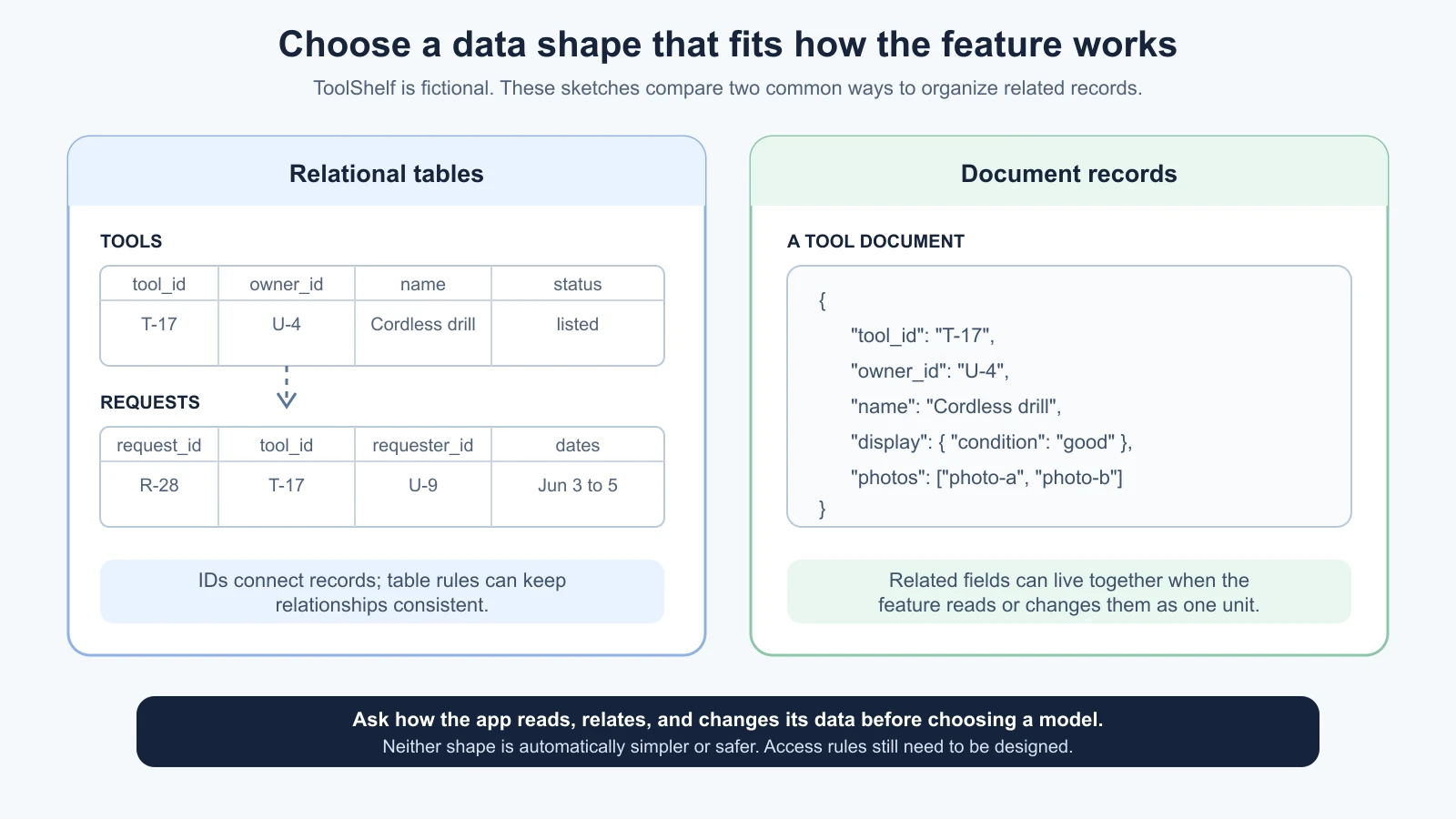
For example, a relational design for the fictional request flow could contain:
- A
toolstable, with one row per listed tool and an owner ID. - A
requeststable, with one row per borrowing request, a tool ID, a requester ID, dates, and a status. - A
userstable or an identity record managed by the app's authentication provider.
The IDs connect the records. A request does not need to copy the tool's full name, description, and owner details into its own row. It can refer to the tool's ID, and the app can look up the related information when it needs to display it. The connection between related records is often called a relationship. A foreign key is a database rule that can require one row's ID to match a row in another table.
MongoDB is a document database. It stores records as documents made from fields and values, with the option to group nested objects or lists inside a document. A ToolShelf tool document might keep its name, description, and a small set of display details together. A request could be a separate document that refers to the tool and people involved. Alternatively, if a piece of related information is always read and changed as one unit, it might be embedded inside its parent document.
Neither style is automatically more modern or easier. Tables can make relationships and consistency rules explicit. Documents can make a natural group of related fields convenient to retrieve together. Each can be designed badly. A document store can still have relationships; a relational database can still store structured values in a column. Choose based on how the app uses and changes the information, the guarantees it needs, and the team's ability to operate it.
An AI tool may propose one because its examples or starter template use it. Ask it to explain the choice against the feature's read and write patterns. Do not choose a document database just because its flexible shape sounds like “no schema,” and do not choose tables only because a spreadsheet is familiar. Both need a model and clear rules.
Sketch the model before you create the database
A data model is a description of the records an app needs and how they relate. It can be a short table, a diagram, or a written list. You can use plain language to review the proposal without writing SQL or database code.
For the illustrative ToolShelf request flow, a first sketch might be:
| Record | Important fields | Relationship or rule to ask about |
|---|---|---|
| Tool | ID, owner ID, name, availability | Each tool has an owner; its name is required |
| Request | ID, tool ID, requester ID, start date, end date, status | Each request refers to a tool and a requester; the end date must not be earlier than the start date |
| User | Identity provider's user ID, display name if needed | The app should store only profile details the feature uses |
This is a product sketch, not a complete schema. For example, it does not define how two approved requests can avoid overlapping dates, whether owners can request their own tools, or how long declined requests remain. Those are product rules. Ask the team to decide them before asking an AI to encode them. The database can enforce some rules, while application code may need to check others.
You may see the word schema used in two related ways. In a relational database, it can mean the defined structure of tables, columns, types, and constraints. In a product discussion, people may use “data schema” more broadly to mean the shape of records the app expects, including document structures. When an AI uses the term, ask which files or database objects it means.
Use a compact review prompt before allowing code or a hosted project to change:
1We need data for this feature: [describe the user task and what must persist].
2
3Before editing or connecting anything:
41. List each record type and the fields the feature actually needs.
52. Show how the records relate, and which rules should always be true.
63. Explain whether related tables or documents fit the read and write patterns better.
74. Identify personal or sensitive data and suggest what can be omitted.
85. Name which access checks belong in the app, the database, or both.
96. List the files, migrations, provider settings, and secrets a connection would require.
107. Check current official documentation for any provider-specific step.
11
12Do not create a database, expose credentials, install a package, or edit files.
13Mark unresolved product decisions instead of guessing.
Review each proposed field against the feature. Ask why it is needed, who uses it, and how it will be protected. Reject fields the product has not decided to collect. Keep a note of the agreed model so later prompts do not quietly add new tables or data.
Understand how the app reaches the database
The app needs a path between its user interface and the saved data. A common pattern is for the browser to send a request to server-side application code, which then uses a database client to read or change records. The server returns only the information the screen needs. The database connection string, which often includes a username, host, database name, and password, is a credential and must stay private.
Some managed services provide a browser-facing data API instead of requiring the browser to connect with a database password. Supabase, for example, offers a Postgres database and a Data API. A public or publishable key is designed to identify a client component, but it does not identify the signed-in person or grant safe access by itself. If an app exposes tables through a client-facing API, its permissions and Row Level Security policies must limit which operations and records are available. A privileged secret key or direct database password belongs only in a trusted server environment. Check the provider's current key guidance before wiring anything into a page.
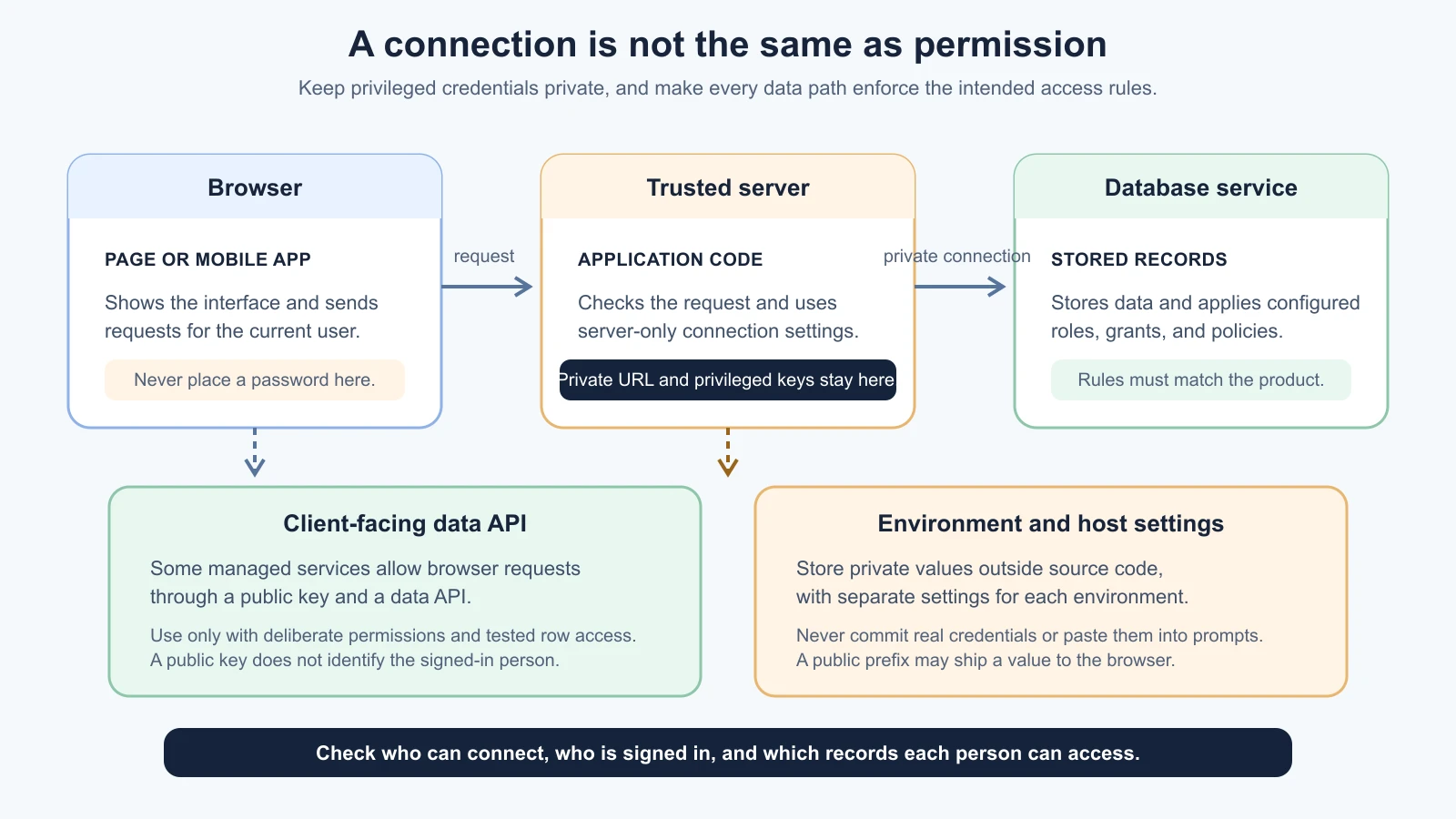
An environment variable is a setting supplied separately from source code. A project may read a local development value from a private environment file, and a host may store a different value for preview and production. The exact file names and prefixes depend on the framework. A variable with a public prefix may be shipped to the browser, so never put a password or privileged key there. Keep private values out of Git, screenshots, logs, and AI chats. A checked-in sample file can show a placeholder name, but not a working credential.
Access is a separate question from connection. Authentication identifies who is making a request. Authorization decides what that person may do. A database password can let an application connect, but it does not by itself ensure that one signed-in person cannot read another person's private request. The app's server logic, database permissions, and where applicable row-level policies must match the product's rules.
For example, a ToolShelf owner may need to read requests for their tools, while a requester may need to read their own requests. A rule that checks only whether a person has signed in does not distinguish those cases. Ask for the access rule in plain language, then ask how it is applied to reads, inserts, updates, and deletes. If data is exposed through an API, ask what protects each table and each operation. Provider documentation describes product-specific options; it does not know your intended sharing rules.
The full implementation pattern varies. A server-only database connection is common, but services can safely support browser-facing requests with a public key when the exposed data and access policies are deliberately configured. Do not assume that “it uses Supabase” means it is secure, or that every direct browser API is automatically unsafe. Review where each credential runs and what permissions apply to each route.
Choose a managed service with the operational details in view
You may hear PostgreSQL called Postgres. It is an open-source relational database, and managed products can run it for you. MySQL is another relational database system. Supabase provides a managed Postgres database with related services. MongoDB Atlas is a managed service for MongoDB deployments. These are examples, not a ranking or a recommendation for every project.
With a managed database, the provider handles some operating work, such as running the service and offering setup or backup controls. You still own the data model, permissions, credentials, retention choices, and recovery plan. A provider dashboard can make it easy to create a table or cluster; that does not decide what should be private or whether the app's code can reach it safely.
Before choosing, check the current official documentation for:
- Supported database versions, regions, and connection methods.
- How credentials and application keys work, including which ones are safe for browser code.
- Network access rules and how the app's hosting environment reaches the service.
- The backup schedule, retention period, and whether backups include files stored in a separate storage product.
- Restore steps, permissions required, expected downtime, and any cost or plan limits.
- How to export your data and what happens if you pause or close the project.
These details change. A plan name or backup promise you read in an old tutorial may no longer match the provider's current service. Read the current provider pages before choosing a plan or adding production data.
Backups only matter if you can restore them
A backup is a copy of data kept so the service can recover after accidental deletion, a failed change, or another data loss. A restore returns a database to a saved state or point in time. Backups reduce risk, but they do not guarantee that every mistake can be undone. The retention period may be short, a backup may not cover uploaded files, and restoring an older copy can overwrite newer changes.
Ask what loss the product could tolerate. If an hour of new requests disappearing would be unacceptable, a daily backup may not meet the need. If an app stores photos outside the database, check whether those files have a separate backup and restore process. Know who is allowed to start a restore and what happens to the live app while it runs.
For ToolShelf, imagine the team creates a test project first. It adds fictional records, takes or checks a backup using the provider's documented process, then restores into a separate test environment. It verifies that the expected records can be read and that the app can connect afterward. This exercise does not prove every production recovery scenario, but it answers a more useful question than “does the dashboard say backups are enabled?”
Never test a restore against the only copy of valuable data. Do not paste a production database URL into an AI prompt or sample script. If a migration removes fields or rewrites records, review it, try it on a disposable development database, and make sure the recovery path is known before it reaches production. For a real service with sensitive or important records, get an experienced engineer to review the model, access rules, migration, and recovery plan.
Make the first connection a small, reviewable step
Once the model and access rules are clear, ask the coding tool to inspect the existing project and outline a small implementation plan. The plan should name the provider, code paths, migration or schema changes, environment variable names without values, access controls, and checks. It should say which environment it will touch. Do not let a tool guess that production is the right target.
Use a development database with fictional data. Create one record, read it back through the app, update it, and remove it if the feature needs that operation. Check what each user role can and cannot see. Review the migration before it runs and inspect the diff afterward. The exact commands and tests depend on the project, so use its current documentation and the chosen provider's official guide.
If using Supabase, its current docs explain that a project provides a Postgres database, how to connect through different methods, and how row-level policies control exposed data. If using MongoDB Atlas, its docs describe how to get a deployment connection string, configure database access, and manage backup and restore. These are provider-specific instructions; compare them with your app framework and hosting setup.
Keep a short decision record with the database choice, the reason it fits, the data each feature stores, who can access it, where credentials live, and how recovery works. A future AI coding session can use that record as a boundary instead of inventing a second database or duplicating user data.
Further reading
We checked these links on 4 November 2026. Provider features, plan limits and backup options change, so confirm them in the current documentation before you rely on them.
- PostgreSQL tutorial, for relational database concepts, tables, queries, and relationships.
- MongoDB data modeling introduction, for how application access patterns shape a document model.
- Supabase database overview, connection guide, API key guidance, and Row Level Security. Provider details checked 4 November 2026.
- Supabase database backups, for current backup coverage and restore options. Check plan details again before relying on them.
- MongoDB Atlas connect to a deployment and back up and restore data. Check current deployment and plan details before use.
- Add data and a database, for a hands-on Postgres example, and Security for Vibe Coders, for a broader review of credentials and user access.
Mistakes beginners make
- Choosing a database before listing the data and product rules. Start with the records the feature needs and how people use them.
- Treating tables and documents as a quality ranking. Both can work; judge the model by the app's relationships, access patterns, and consistency needs.
- Letting the AI invent fields or collect extra personal data. Ask why each field exists and whether the feature can work without it.
- Confusing a public client key with a private database credential. Check the provider's current guidance and the access policies applied to data reachable from a browser.
- Assuming sign-in automatically protects each record. Check that authorization rules also limit which rows each person can read or change.
- Putting secrets in browser code, Git, or prompts. Keep privileged values in server or hosting settings, and rotate anything exposed.
- Assuming a managed service means backups are handled for every kind of data. Confirm what is backed up, how long it is kept, and how a restore affects the app.
- Trusting a backup without practicing recovery. Restore a test copy and check the result before real data depends on the process.
Recap and try it yourself
A database keeps application data available beyond one page view. Relational systems such as PostgreSQL and MySQL organize records in related tables; MongoDB stores records as documents that can include nested data. Choose based on the feature's data and access patterns. Keep database passwords and privileged keys out of browser code, Git, and prompts. Decide who can read or change each record, then check the app and database enforce those rules. Finally, confirm what is backed up and practice restoring a test copy.
Try it: choose one feature in your own project and sketch the records it needs. Draw how those records relate, mark any sensitive fields, and write one sentence describing who should be able to read or change each record. Ask an AI tool to review the sketch without editing or connecting anything. Check each suggestion against the feature, then find the provider's official pages for credentials, access controls, backups, and restore steps.