
AI Product Builders course · lesson 15 of 25
- 1The AI Product-Building Loop: From Idea to Improvement
- 2Define the Problem Before You Choose a Solution
- 3Check the Idea Before You Build
- 4App Anatomy for Non-Engineers: What Happens Behind a Screen
- 5Scope the First Version: Choose What to Build Now
- 6Choose a Tech Stack That Fits Your Constraints
- 7Choose a Prototype Tool for Your Product and Team
- 8Build a Clickable Prototype in One Focused Flow
- 9Test a Prototype with Real People
- 10Decide Whether to Keep, Change, or Stop
- 11Move from a Prototype to Real Code
- 12Work with an AI Coding Tool on One Clear Task
- 13Learn the Web Basics Behind Your App
- 14Connect a Database Without Losing Control of Your Data
- 15Tell a Small Fix from a Structural Change
- 16Run a Refinement Loop That Keeps the Product Useful
- 17Make an AI-Built Product Easier to Use
- 18Review and Check Changes Before They Reach the Team
- 19Test an AI-Built Product in Layers
- 20Work with a Team and Stakeholders
- 21Choose Where to Deploy Your Product
- 22Go Live: A Launch Checklist for Your Product
- 23Measure and Improve Your Product After Launch
- 24Add an AI Feature to Your Product Carefully
- 25Capstone: Take a Product Idea to Launch
After this lesson, you will be able to tell when a requested improvement is a focused change or a structural one, ask an AI coding tool to map its impact before editing, and choose a safer sequence for the work. You will also know what “rollback” can and cannot undo.
We will keep using ToolShelf, the fictional neighbourhood tool-sharing idea. It has no real application or users. Examples describe decisions a product team might make, not verified behavior from a working app. This lesson builds on working with an AI coding tool on one clear task and connecting a database. For the hands-on Git workflow, see Version Control with AI. For Claude Code's product-specific planning controls, see Claude Code Plan Mode.
Classify the change by reach, not by how short the prompt is
A targeted change has a narrow boundary. It usually changes one behavior or a small, known part of the product, and you can describe how to check it. For example, ToolShelf might need a clearer label on the sample request button. If the button's wording is defined in one place, that may be a focused copy change.
A structural change affects how several parts of the product fit together. It may touch a shared component, data model, authentication or access rules, an outside service, a public API, or a workflow used by many screens. Adding availability calendars that must connect tool records, block overlapping requests, and appear on both the owner and requester screens is structural even if the prompt is only one sentence.
The number of words in a request is a poor measure of its size. “Add team sharing” sounds brief but raises questions about invitations, roles, visibility, ownership, notifications, and what happens when someone leaves. A longer request to change the wording on one screen may still be tightly bounded. Judge the change by the paths it touches, the decisions it requires, and the cost of a mistake.
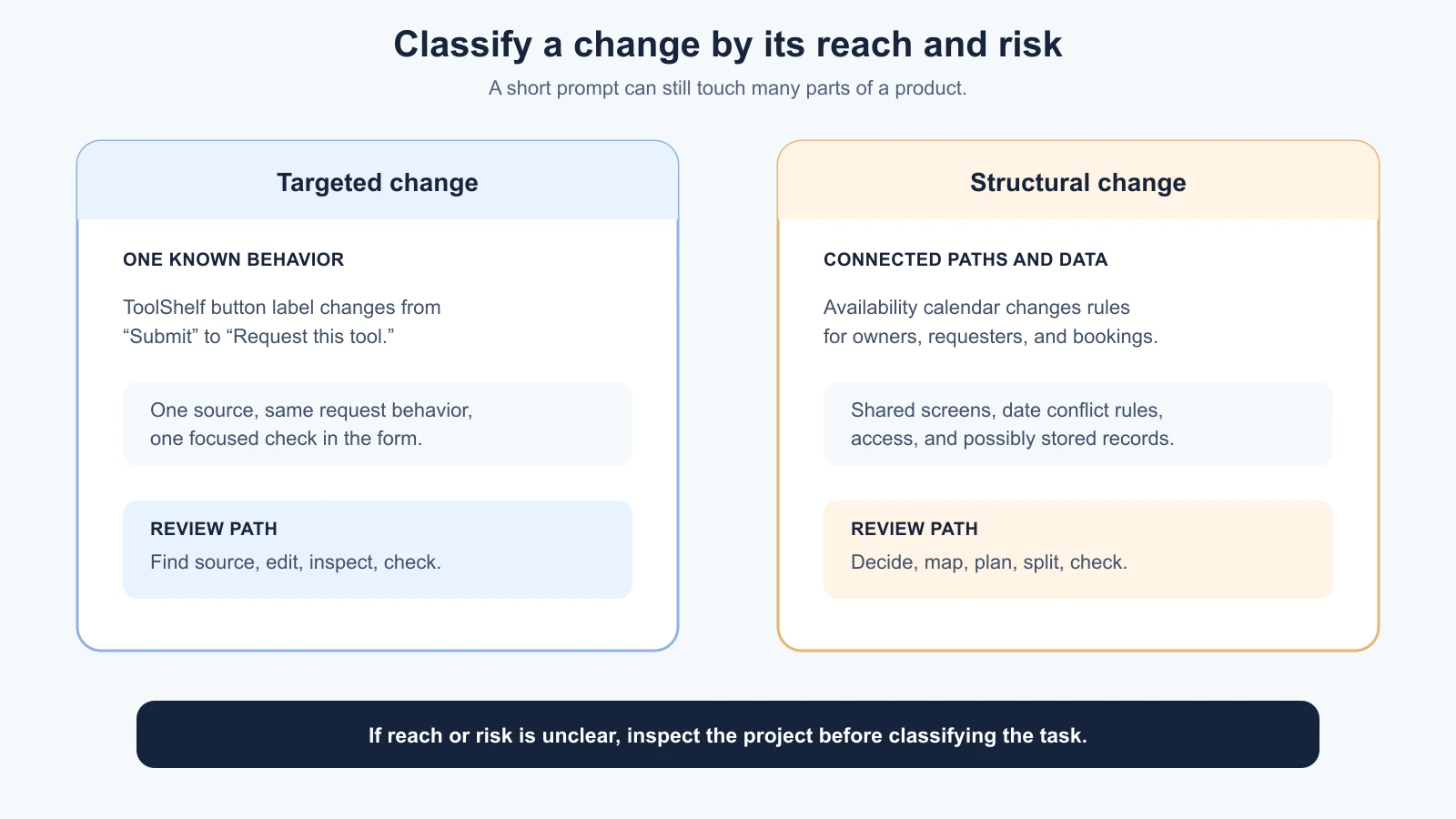
Use a quick screen before you ask for implementation:
| Question | Usually targeted | Usually structural |
|---|---|---|
| How many user paths are affected? | One known state or action | Several screens, roles, or workflows |
| What parts of the app might change? | One local component or copy value | Shared components, data, permissions, or external services |
| Is the product decision settled? | Yes, wording or behavior is clear | No, important rules still need a decision |
| What happens if it fails? | Easy to notice and reverse | Could affect existing records, access, or other features |
| Can one person verify it quickly? | A focused check covers the request | Several roles, data cases, or connected systems need checks |
This is a guide, not a scoring system. One “structural” answer is enough to pause and inspect. If you do not know which files or user journeys are affected, treat the size as unknown until the tool explores the project. Do not assume the AI knows the codebase just because it can read the prompt.
A small change still needs a product boundary
Imagine people reviewing a ToolShelf request find the button label “Submit” unclear. The product decision is already made: the button sends the request to the owner, and the team wants the label to say “Request this tool.” That is a bounded change if the wording is isolated and does not change what the button does.
Before asking for the edit, record:
- User and moment: a neighbour on the request form, before sending a borrowing request.
- Current problem: the label does not explain what happens after the click.
- Desired result: show “Request this tool.”
- Boundary: change the button wording only; leave validation and request behavior alone.
- Check: open the form, confirm the new label, submit a sample request, and verify the same flow still runs.
The check is not an invitation to assert that ToolShelf passed. It is what someone would do after the change exists. The prompt can now ask the tool to find the label's source, make the smallest edit, report the file, and wait for review. If it discovers that several screens share the label or that the click behavior is tied to the same code, that is new evidence. Reclassify before accepting extra work.
Targeted does not mean “skip all review.” A tiny change can still break a shared navigation menu, change a message in the wrong context, or accidentally alter behavior. Keep the boundary and the check explicit, then review the diff and result as described in the coding tool workflow.
Plan structural changes before they spread
Now imagine the product decision is to add an availability calendar. The feature would affect more than a calendar screen. A safe plan has to ask how availability relates to tool records, how requests reserve dates, how overlapping dates are prevented, what the owner sees, what the requester sees, and what existing requests should do. The team may also need to decide who can edit the schedule and whether old records need conversion.
Those are product and data rules. An AI coding tool can find code paths and suggest implementation steps, but it should not invent the answers. Resolve the product decisions first. A plan built on an unresolved rule will merely make the wrong assumption look organized.
For a structural change, ask the tool to inspect and report before editing. A useful plan names:
- User paths: the screens, roles, and actions involved.
- Project areas: the likely components, server routes, database schema, and tests.
- Existing behavior: what currently happens and what must remain true.
- Data changes: new fields or records, migration needs, old records affected, and recovery options.
- Access rules: who can read and change the new or updated records.
- Dependencies and services: anything new the feature would add or call.
- Implementation slices: small steps with an observable result after each.
- Checks: the cases that demonstrate intended behavior and the cases that should be rejected.
- Risks and unknowns: assumptions, hard-to-undo work, and decisions for a human.
Here is a planning prompt for the illustrative ToolShelf calendar:
1We have decided that a tool owner can set unavailable date ranges, and a requester should not be able to request dates that conflict with an existing approved booking.
2
3Inspect the project and propose a plan only. Do not edit files, run migrations, or change data.
4
5Report:
6- The user paths and current code or data areas involved, with file paths as evidence.
7- Product rules the code does not yet define. Mark them as questions, not guesses.
8- Any schema, access-control, or existing-record changes this may require.
9- A sequence of small implementation slices, each with a visible result and a check.
10- How to test allowed and blocked date ranges, including owner and requester roles.
11- The changes that would be difficult to undo and a safe recovery option.
12
13Do not add notifications, payments, or other features. If the product rule is unclear, stop and ask.
Review the plan as a proposal, not a promise. Check whether it names the right product paths, calls out the data migration, and includes cases that should be denied. Ask the tool to point to code evidence for its estimate and to separate verified project facts from assumptions. Planning controls differ by coding tool; some offer a specific plan mode, while others can be asked to inspect and wait. Use the tool's current documentation for its behavior and permissions.
The detailed mechanics of Git branches and commits belong in the Vibe Coding version control guide. At a product level, a branch is a separate work area that can keep a larger change away from the stable line while you review it. It does not copy or protect a live database. Before a risky migration or service change, identify the actual data backup and restore plan as well.
Split the work into steps you can see
Once the plan is clear and approved, do not ask for every layer to be built in one long pass. Break the work into small steps that each leave a visible, reviewable result. For the ToolShelf calendar, one possible sequence is:
- Show a read-only calendar using fictional sample availability, with no database changes.
- Let an owner add and remove an unavailable date range in a development environment.
- Check that a requester can see unavailable dates but cannot edit them.
- Prevent a conflicting request and confirm that a valid date range still works.
- Migrate any required existing records only after reviewing the migration and recovery plan.
The order may differ after inspection. The important part is to separate UI display, data writes, access rules, and existing-data changes where possible. After each slice, compare the result with the product decision, inspect the changed files, and check the behavior it claims to handle. If the AI discovers that a step needs a new service or a broader data model, pause and update the plan before proceeding.
A checkpoint is a known state you can return to or compare against. In code, this might be a reviewed commit before the next slice. In product work, it can also be a saved decision note and a test result. A checkpoint is only useful if it is clear what it contains and whether it is safe to restore. A branch can isolate code changes, but it is not a backup of production data, secrets, or uploaded files.
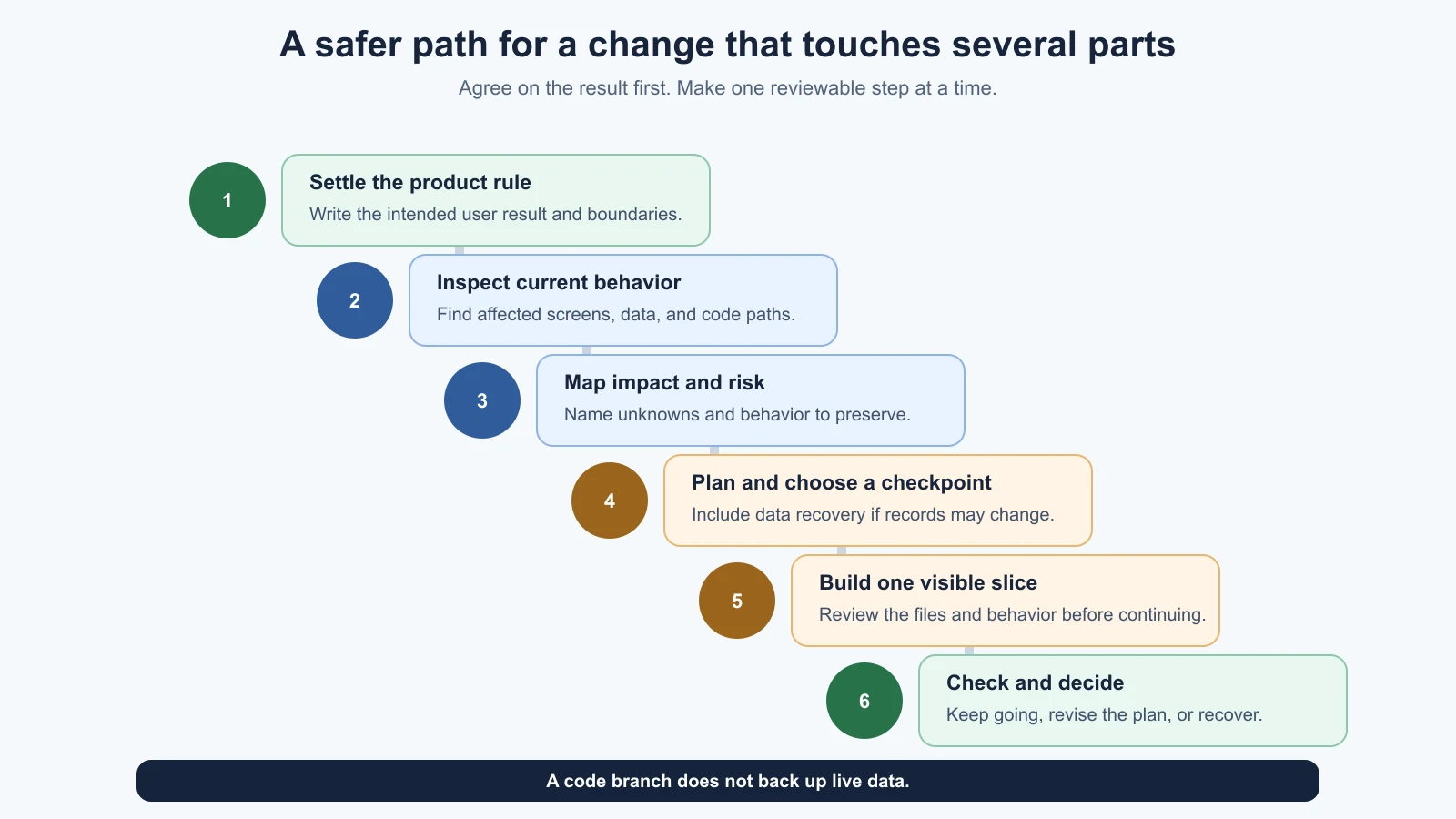
Keep the definition of done small for each slice. “Calendar added” is vague. “An owner can add one unavailable range in the development project, and a requester sees that range as unavailable without gaining edit access” is something a reviewer can check. If it does not work, stop at that slice rather than layering more changes on top of an unknown state.
Estimate impact without pretending to know the exact effort
An AI can help find the scope of a change. It cannot reliably know the full implementation cost from a one-line request, especially before inspecting the repository and clarifying product decisions. Ask for a map of affected pieces, dependencies, unknowns, and checks. Treat an estimate such as “easy” or “one hour” as a guess until the work is inspected and split.
You can ask the tool to report impact in categories:
| Area | Ask what might change |
|---|---|
| Screens and components | Is the change local or shared across pages? |
| Data | Does it add, transform, or remove stored records? |
| Access | Does it affect authentication, ownership, or permissions? |
| Integrations | Does it add an API, package, or provider setting? |
| Existing behavior | Which current flows or records could be affected? |
| Verification | What needs a manual, automated, or role-based check? |
| Recovery | What can be reverted in code, and what data needs a restore plan? |
This map helps you decide whether to proceed, narrow the request, ask a developer, or revisit the product decision. It is more useful than an unsupported estimate because it shows where uncertainty sits. A change that touches only one component might still be high impact if it controls access to private data. A change across several files might be low risk if each edit is well understood and easy to verify. Reach and consequence both matter.
Decide how to recover before the risky part
Rollback means returning a system or feature to an earlier working state after a change causes trouble. For ordinary application code, a reviewed commit or a new commit that reverses a change may help. Git's official documentation describes revert as creating a new commit that reverses earlier changes, which preserves the history of the original change. Follow the team's workflow and review recovery commands carefully.
Code rollback does not reverse every effect. A database migration may have deleted or transformed data. A sent email cannot be unsent. A new external service may have received records. A permission change may already have exposed information. Before these steps, plan the recovery for the affected system, not only for the code. For database changes, use the process in Connect a Database: review the migration, test with non-production data, and know what backup can be restored before touching valuable records.
Write a short recovery note before a risky step:
- What exact change would we stop or undo?
- Which code checkpoint is known to work?
- Could this change write, delete, expose, or transform existing data?
- Is there a tested backup, and what would restore affect?
- Who can decide to pause or roll back?
- What should users see while the change is paused or reversed?
If the answers are unknown, the plan is not ready for production data. Reduce the change, test it in a separate environment, or ask a developer with the right experience to review it.
Keep a change brief the AI can follow
Before a coding session, record enough for someone else to understand the change:
1Product outcome:
2User and situation:
3Evidence or decision behind this change:
4What changes:
5What stays the same:
6Affected paths, roles, and data:
7Checks for the expected result:
8Checks for behavior that must remain unchanged:
9Risks and unanswered questions:
10Checkpoint and recovery plan:
This is not a second product specification. It is a compact handoff between the product decision and implementation. For a small fix, the brief can be a few lines. For structural work, it should link to the approved decision and data model. If the plan or code starts expanding beyond the brief, stop and decide whether the scope needs a new approval from the team. Do not let adjacent ideas slip into the task just because the AI noticed them.
Further reading
- Version Control with AI, for branches, diffs, commits, and safe Git recovery.
- Claude Code Plan Mode, for that tool's plan-before-edit workflow. Other coding tools may use different controls.
- Git revert documentation, for how a revert creates a new commit that reverses an earlier commit.
- Connect a Database, for modeling, credentials, access rules, and data recovery.
Mistakes beginners make
- Judging the task by the prompt length. A brief request can affect many systems; map the paths and data first.
- Letting an unresolved product rule become an implementation guess. Ask the product owner before the tool encodes it.
- Using a plan as proof of the effort or outcome. It is a proposal based on what the tool has inspected so far.
- Making several risky changes in one pass. Split the work into steps with visible results and checks.
- Treating a branch as a backup. A branch isolates code work; it does not protect live records or uploaded files.
- Assuming a code revert undoes database changes. Data may need a separate recovery plan, and a restore can overwrite newer records.
- Skipping checks because the edit looks small. Check the requested behavior and anything the change was meant to leave alone.
- Accepting adjacent features the AI added. Compare the diff and plan with the agreed boundary before continuing.
Recap and try it yourself
A targeted change stays within a known behavior and has a focused check. A structural change crosses shared screens, data, permissions, or services and needs product decisions, an impact map, and a plan before edits. Ask the coding tool to show its evidence, risks, and unknowns. Split larger work into reviewable steps, use checkpoints, and plan separately for code recovery and data recovery.
Try it: pick one proposed improvement to your app. Write who it helps, what changes, what must stay the same, and how you would check it. Then ask an AI coding tool to classify its likely reach and list files, data, access rules, dependencies, unknowns, and rollback concerns without editing. Compare the answer with your product decision and revise the task boundary before implementation.