
AI Product Builders course · lesson 25 of 25
- 1The AI Product-Building Loop: From Idea to Improvement
- 2Define the Problem Before You Choose a Solution
- 3Check the Idea Before You Build
- 4App Anatomy for Non-Engineers: What Happens Behind a Screen
- 5Scope the First Version: Choose What to Build Now
- 6Choose a Tech Stack That Fits Your Constraints
- 7Choose a Prototype Tool for Your Product and Team
- 8Build a Clickable Prototype in One Focused Flow
- 9Test a Prototype with Real People
- 10Decide Whether to Keep, Change, or Stop
- 11Move from a Prototype to Real Code
- 12Work with an AI Coding Tool on One Clear Task
- 13Learn the Web Basics Behind Your App
- 14Connect a Database Without Losing Control of Your Data
- 15Tell a Small Fix from a Structural Change
- 16Run a Refinement Loop That Keeps the Product Useful
- 17Make an AI-Built Product Easier to Use
- 18Review and Check Changes Before They Reach the Team
- 19Test an AI-Built Product in Layers
- 20Work with a Team and Stakeholders
- 21Choose Where to Deploy Your Product
- 22Go Live: A Launch Checklist for Your Product
- 23Measure and Improve Your Product After Launch
- 24Add an AI Feature to Your Product Carefully
- 25Capstone: Take a Product Idea to Launch
After this lesson, you will be able to take one product idea through a complete first lap: frame the problem, check your assumptions, scope and prototype a small solution, decide what to build, plan quality and collaboration, prepare a launch, and record what you learned. You will finish with a one-page lap summary you can reuse on your own idea.
This capstone brings together the course's earlier work. It is not a claim that a product can be researched, built, and launched in a fixed amount of time. The right pace depends on the people, risks, evidence, and responsibilities involved. We will use ToolShelf, the fictional neighbourhood tool-sharing service, to show the shape of the work. There are no real ToolShelf users, interviews, costs, deployments, or results in this example. The records are templates and decisions to consider, not invented evidence.
You do not need to complete every activity in one sitting. The goal is to make each decision visible and carry evidence forward, so that building does not race ahead of what you know.
One lap, several decisions
A product lap begins with a user problem and ends with a release decision and new questions. The stages connect, but they are not a conveyor belt. Research can change the problem. A prototype can show that the proposed flow is confusing. A security or accessibility review can reveal that a release needs more work. A responsible team can pause, narrow the idea, or stop.
The diagram shows the artifacts that help you carry context from one stage to the next. They are lightweight records, not paperwork for its own sake. Write enough that another person, including your future self, can understand what you decided and why.
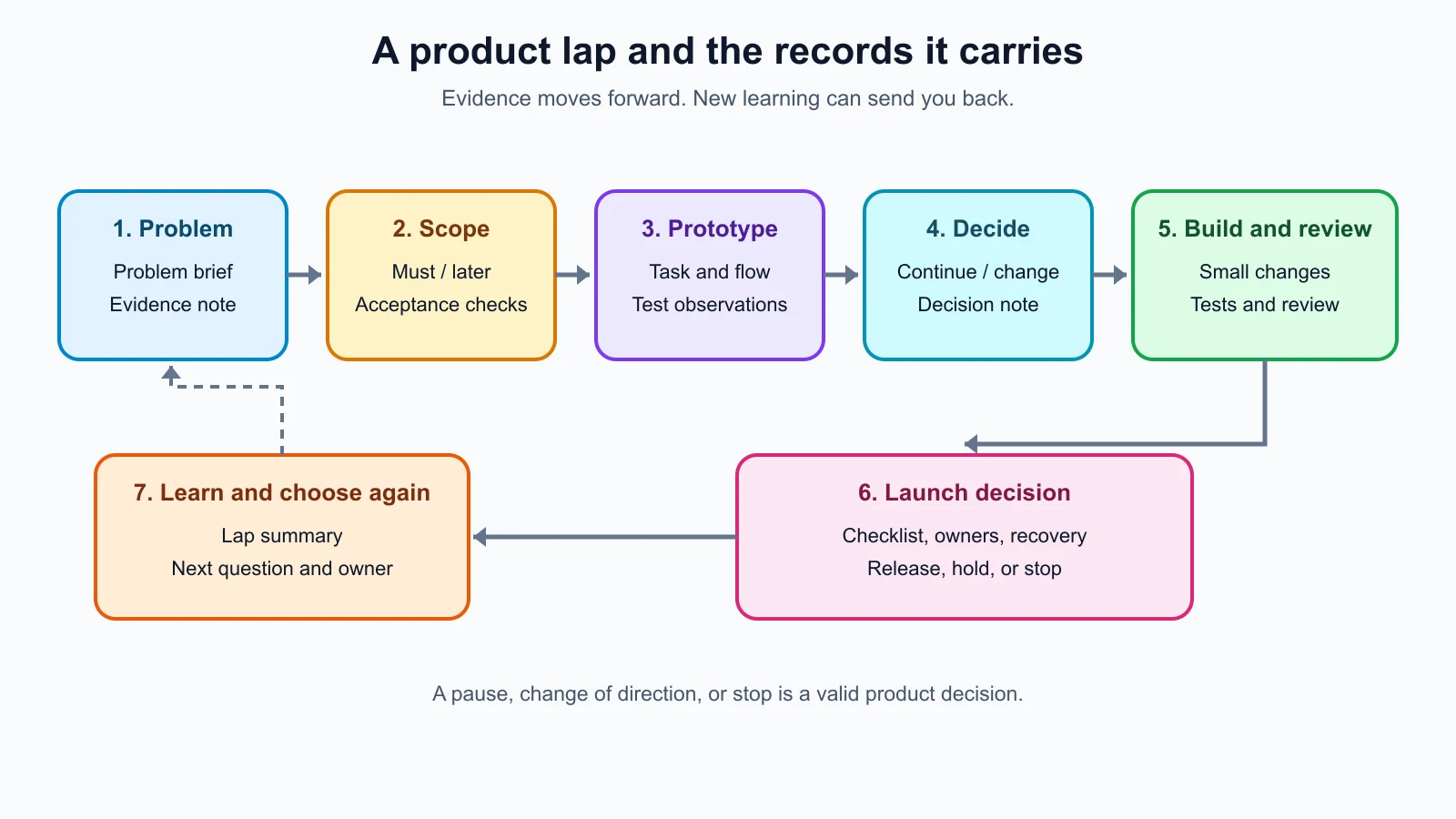
Each artifact answers a different question:
| Artifact | Question it helps answer |
|---|---|
| Problem brief | Who has a problem, in what situation, and what do we know so far? |
| Evidence note | What did we observe, and which assumptions remain untested? |
| Scope and acceptance checks | What is the smallest useful version, and how will we recognize that it works? |
| Prototype test note | Can intended users understand the proposed flow? |
| Build and review record | What changed, who checked it, and what still needs attention? |
| Launch checklist | Is the product ready for the people who will use it, and who responds if it fails? |
| Lap summary | What did we learn, decide, and leave for the next cycle? |
The lessons on defining the problem, checking the idea before you build, scoping the first version, and building a clickable prototype explain the early steps in more depth. This capstone gives them a shared thread.
Start with a problem you can investigate
Suppose the ToolShelf idea is “make an app where neighbours can share anything.” It is too broad to test or build as a first version. Narrow the audience, situation, and task before choosing screens or tools. A provisional problem statement might be:
People in one neighbourhood who need an occasional tool may not know which nearby neighbour is willing to lend one or how to ask about borrowing it.
This is still a hypothesis. It does not say that neighbours definitely have this problem or that an app is the right answer. A useful brief keeps evidence, interpretation, and open questions separate:
| Field | ToolShelf working note |
|---|---|
| Intended people | Neighbours considering borrowing or lending an occasional-use tool |
| Situation | Someone needs a tool for a task and is considering where to get it |
| Current alternatives | To investigate: buy, rent, borrow from someone they already know, or change the task |
| Evidence collected | None in this fictional example |
| Assumptions | People want to borrow locally; owners are willing to list tools; a request flow feels acceptable |
| Questions | What makes a listing trustworthy? What information is needed before asking? What safety expectations apply? |
| Risk to examine | A listing or description could imply a tool is safe or available when that has not been confirmed |
Do not let an AI-generated persona, market summary, or interview script turn into evidence. AI can help you prepare neutral questions or organize notes you are allowed to share. The observations still need to come from real people and real behavior. The lesson on testing an idea before building covers interview preparation, alternatives, and how to keep AI from inventing findings.
Next, identify which unanswered question could change the product decision. If owners are unwilling to make listings, a polished borrower search page will not solve the central problem. If people already have a simple trusted way to borrow, the product may need a different purpose. Choose a small research activity that can help answer the highest-impact question, then record what happened without exaggerating what a small sample can establish.
For ToolShelf, a real team might talk with people who have recently needed or lent a tool, observe how they handled it, and ask what information they needed to decide. This is an activity to run, not a claim about results. If the evidence does not support the initial idea, revise the brief before moving ahead.
Scope the smallest useful test
Assume for the exercise that the team has enough real evidence to explore one neighborhood and one borrowing request flow. That assumption is part of the example, not a report that research occurred. The first version might let an owner create a listing, let a borrower find a listing, and let the borrower send a request. It would not coordinate payment, delivery, identity verification, disputes, or every neighborhood.
Write down the boundary in a must, should, and later list:
- Must: show a listing with owner-provided details; let a borrower send a request; clearly show that the owner still needs to respond.
- Should: make listing availability easy to update; show a clear empty state when there are no listings.
- Later: payments, delivery scheduling, ratings, automatic safety judgments, and expansion to more neighborhoods.
The word “later” does not mean a feature is approved for a future release. It means the team has chosen not to solve it in this lap. Some ideas may be removed entirely after learning more.
Add acceptance checks that describe observable behavior. For example: a borrower can open a listing, understand the owner-provided details, submit a request, and see a confirmation that does not imply approval. An owner can see the incoming request and decide what to do. The checks should include the unsuccessful path too: missing information, unavailable listing, failed request, and no listings to show.
Then make a prototype of the main flow. It can use sample data and a few screens; the point is to learn whether people understand the interaction, not to pretend that a real request has been sent. Ask participants to complete a task and observe where they hesitate or make a different interpretation than you expected. Do not lead them toward the answer you hoped for.
Keep a short record of the test setup, the task, what participants did, and what remains uncertain. In a real project, follow appropriate consent and privacy practices, especially before recording or sharing personal information. Do not write fictitious quotes or success percentages to make the example feel complete. The prototype testing lesson explains how to run and record those sessions.
Make a decision before you build
The prototype and research do not automatically say “continue.” Summarize the evidence and choose among keeping the direction, changing it, or stopping. In our fictional example, we have no test results to interpret, so the honest decision is “not decided.” A real team might use a decision note like this:
1Decision: Continue / Change / Stop / Not decided
2Date and people involved:
3Question this decision addresses:
4Evidence considered:
5What the evidence supports:
6What is still uncertain:
7Risks or constraints:
8Decision and reason:
9Next action, owner, and check-in:
Write the criteria before reviewing results where possible. That makes it harder to explain away a disappointing result after the fact. Consider whether the user problem remains important, whether the proposed flow addresses it, what risks remain, and what you can responsibly learn next. Money or time already spent is not evidence that a product should continue.
If you continue, carry only the accepted scope and the unresolved questions into the build. If you change direction, update the problem brief and prototype. If you stop, record what you learned so the work can inform another idea. For more on this choice, see keep, change, or stop.
Build in reviewable slices
Once the decision supports building, turn the scope into small tasks with checks. You might first create the listing view with sample data, then implement request submission, then add owner review. A coding assistant or app builder can help with implementation, explain unfamiliar parts, or draft test cases. You remain responsible for whether the behavior matches the product decision and whether the generated change is safe to keep.
Choose a stack and hosting path that fit your constraints, such as team skills, data needs, budget, and the level of operation you can own. Keep accounts, source files, and important product decisions accessible to the people who must maintain them. The lessons on choosing a tech stack, moving from prototype to real code, and working with an AI coding tool cover those choices in detail.
Before accepting a slice, check it against the acceptance conditions. Test the expected path and important failure states. Ask someone else to review changes when possible, and keep the review focused: what changed, which behavior is affected, what was checked, and what remains unknown? AI-generated tests can help, but check that they actually fail when the relevant behavior is wrong. The testing an AI-built product lesson explains layered checks, while change management and CI covers shared review and automated checks.
Keep the same user task in view as the product grows. A technically passing test is not proof that people understand the flow. Make sure the product communicates listing details and request status clearly, works with the relevant devices and access needs, and preserves a way to get help. Where personal information, safety, or legal obligations are involved, seek appropriate qualified advice rather than treating a course checklist as a complete review.
Prepare and make a launch decision
“Launch” can mean a limited release to an agreed group, not necessarily a public announcement. Before making the product available, check the conditions that matter for this product and name who owns them. The launch checklist from going live is the detailed guide. At minimum, the team should know:
- where the product is hosted and how the intended users reach it;
- what data it collects, who can access it, and how users get support;
- what checks were completed and what known issues remain;
- how to pause or roll back a broken release, and how important data can be restored;
- who watches the service and responds to reports after release;
- what success question the team will revisit, and when.
Do not mark a checklist complete when an item is merely planned. Record the evidence for important checks and who confirmed them. A launch decision can be “ready for limited release,” “hold until these issues are resolved,” or “stop.” If a known issue affects user safety, privacy, access, or a core task, weigh it by its actual consequence instead of hiding it among minor polish items.
After release, gather only the product signals that can answer a defined question. Pair measures with support reports and user conversations when useful, and avoid collecting personal information without a clear need. ToolShelf might ask whether borrowers can tell that a request is pending, but the fictional example has no users or data to answer that question. The real team would define the measure, collect evidence responsibly, and record its limits. See measuring and improving after launch for a weekly product review.
Carry learning into the next lap
A first release creates new questions. Perhaps owners need a clearer way to manage availability, or borrowers misunderstand whether a request has been approved. These are possible questions, not fictional findings. For each signal, record what happened, where it came from, how confident you are in the interpretation, and what additional evidence would help.
Then choose one next step. It might be a product change, a support improvement, another research session, a technical fix, or no change. Prioritize by user impact and risk, not by which idea is most exciting to build. Change one coherent part at a time when that makes the outcome easier to check. Keep a brief changelog so the next person can see what moved and why.
If an idea involves adding AI to the product, first ask whether the user task needs it, specify what it may and may not do, evaluate it with realistic cases, and preserve an appropriate manual path. The lesson on adding AI features to a product covers that extension. It is separate from using AI tools to help build the product itself.
The next lap might revisit the problem, the audience, the scope, or the operating model. It does not have to add another feature. A good process makes it possible to learn that the current product is useful as it is, needs a different direction, or should end.
Your one-page lap summary
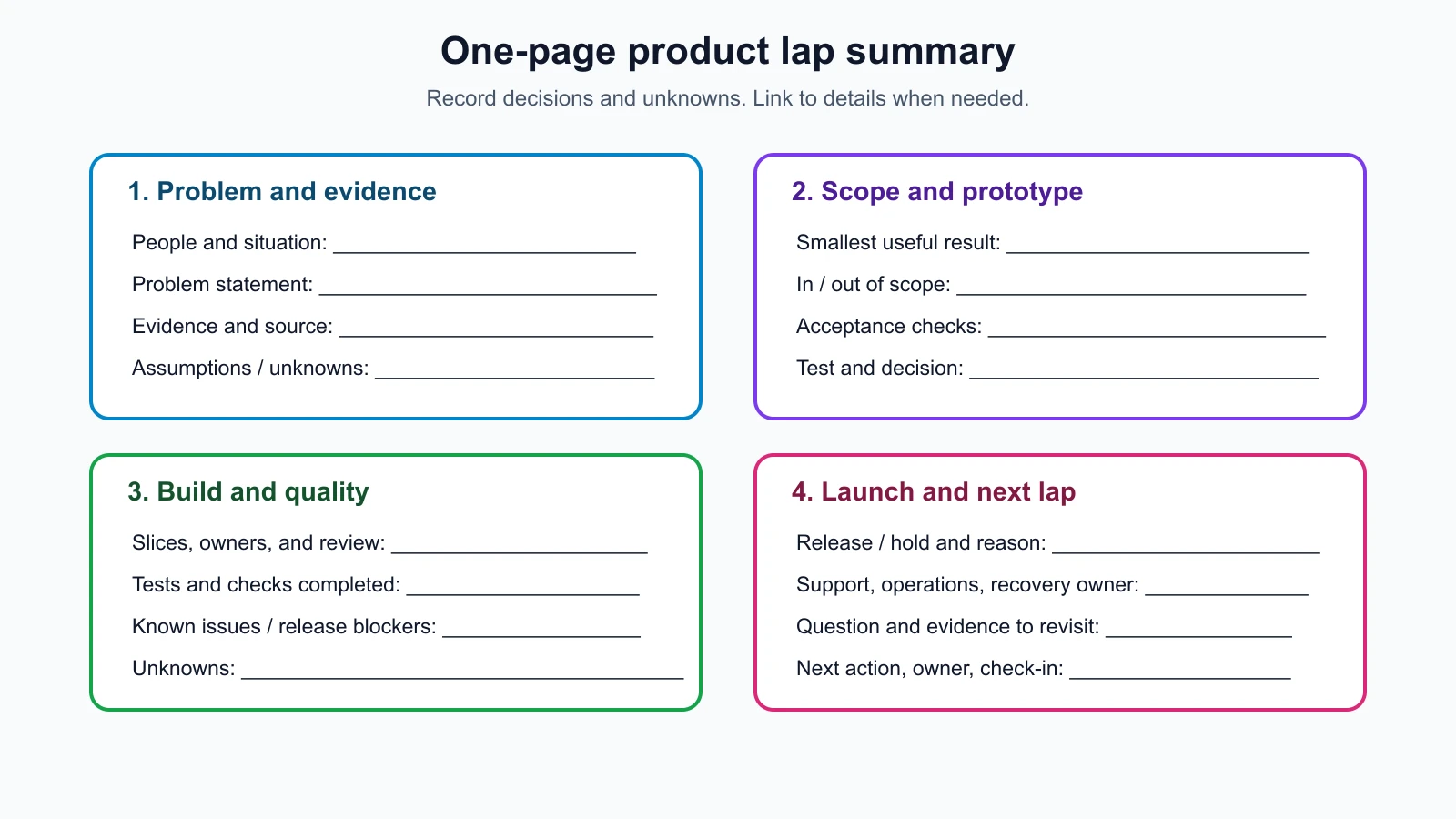
Copy this template into your project notes. Keep it short enough to review, and link to detailed research or technical records when they exist. Use “not checked” or “unknown” rather than filling gaps with guesses.
1# Product lap summary
2
3## Problem and people
4- Intended people and situation:
5- Problem statement:
6- Evidence collected (source and date):
7- Assumptions and open questions:
8
9## Scope and prototype
10- Smallest useful result:
11- In scope:
12- Out of scope for this lap:
13- Acceptance checks:
14- Prototype task and what we observed:
15- Decision: continue, change, stop, or not decided
16- Reason and evidence:
17
18## Build and quality
19- Build slices and owners:
20- Tests and review completed:
21- Accessibility, privacy, security, or domain checks needed:
22- Known issues and release blockers:
23
24## Launch and learning
25- Release group and date, or why we are holding:
26- Support and operational owner:
27- Recovery or pause plan:
28- Product question to revisit:
29- Evidence source and privacy limits:
30- Next decision, owner, and check-in:
The template is intentionally not pre-filled with imaginary test results. For the fictional ToolShelf case, we can write down the problem hypothesis and proposed scope, but the evidence, prototype observations, build checks, launch readiness, and next product decision remain unknown. That is a more useful model than a polished story that pretends the work already happened.
Mistakes beginners make
- Treating the capstone as a promise to launch. The right outcome may be to change direction, gather more evidence, hold release, or stop.
- Filling unknown fields with plausible stories. Record what you actually know and leave the rest open.
- Building every idea discovered during research. Carry one supported user need into a small scope and save unrelated requests for later review.
- Skipping the decision between prototype and build. A clickable flow is a learning tool. Review the evidence before investing in implementation.
- Calling a feature ready because it works once. Check realistic success and failure paths, review accessibility and risk, and state what remains untested.
- Treating launch as the final stage. A release gives you new evidence and responsibilities. Decide who will listen, respond, and make the next product choice.
- Measuring without a question. Select signals that can change a decision, and explain their limits.
Recap and try it yourself
A first product lap connects a testable problem to evidence, a deliberately small scope, a prototype, a decision, reviewable build work, launch readiness, and learning after release. Keep the records short and honest. Distinguish evidence from assumptions, check important behavior before release, and give each operational or user-facing responsibility an owner. The next lap should follow what you learn, not a need to keep adding features.
For your own idea, fill in the one-page summary. Start with the problem and people, then add only the evidence and decisions you actually have. Mark unknowns plainly. Choose one assumption to investigate next and one small prototype task that could help. You do not need to build or launch anything to complete this exercise; a clear next decision is a useful result.