
AI Product Builders course · lesson 9 of 25
- 1The AI Product-Building Loop: From Idea to Improvement
- 2Define the Problem Before You Choose a Solution
- 3Check the Idea Before You Build
- 4App Anatomy for Non-Engineers: What Happens Behind a Screen
- 5Scope the First Version: Choose What to Build Now
- 6Choose a Tech Stack That Fits Your Constraints
- 7Choose a Prototype Tool for Your Product and Team
- 8Build a Clickable Prototype in One Focused Flow
- 9Test a Prototype with Real People
- 10Decide Whether to Keep, Change, or Stop
- 11Move from a Prototype to Real Code
- 12Work with an AI Coding Tool on One Clear Task
- 13Learn the Web Basics Behind Your App
- 14Connect a Database Without Losing Control of Your Data
- 15Tell a Small Fix from a Structural Change
- 16Run a Refinement Loop That Keeps the Product Useful
- 17Make an AI-Built Product Easier to Use
- 18Review and Check Changes Before They Reach the Team
- 19Test an AI-Built Product in Layers
- 20Work with a Team and Stakeholders
- 21Choose Where to Deploy Your Product
- 22Go Live: A Launch Checklist for Your Product
- 23Measure and Improve Your Product After Launch
- 24Add an AI Feature to Your Product Carefully
- 25Capstone: Take a Product Idea to Launch
After this lesson, you will be able to run a short usability test of a prototype, give participants tasks without teaching them the interface, take notes that separate observation from interpretation, and identify which problems deserve attention first.
This lesson continues with ToolShelf, the fictional neighbourhood tool-sharing idea from building a clickable prototype. No ToolShelf participants have been recruited and no test results exist. The example shows how to plan and record a real test of your own prototype without pretending that a fictional product has evidence.
A usability test watches a task
A usability test is a research session where you ask a person to try specific tasks with a product or prototype while you observe. You are testing whether the design makes sense for the task, not whether the person is smart or careful. If someone cannot find a button, that is useful information about the design.
This is different from asking, “Do you like this?” or “Would you use this app?” Those questions invite opinions about a product someone has not used in real life. A person may want to be encouraging, may guess how they would behave later, or may like the idea while finding the actual flow confusing. Opinions can help you understand reactions, but task behaviour shows where the interface supports or blocks a particular job.
It is also different from the discovery interviews in checking an idea before you build. In discovery, you ask about a recent real situation and the person’s current alternatives. In a prototype test, you give a clear scenario and watch the person try a task. Do not use a prototype test to claim that the underlying problem is common or that a business will succeed. It tells you about the experience you showed, with the people who took part.
The GOV.UK Service Manual describes moderated usability testing as observing participants complete specific tasks. Its guidance is written for government services, but the method is useful for a small product team too. A short test can reveal confusing labels, missing information, unclear next steps, and unexpected paths. It cannot tell you everything about a whole audience.
Choose one question before you recruit
Start with a decision you could make after the sessions. For ToolShelf, a focused question might be: “Can a neighbour find a sample drill listing and understand what information is needed to make a borrowing request?” That question is narrow enough to test with the three-screen prototype from the last lesson.
Avoid trying to test the whole product at once. “Is ToolShelf useful?” combines the problem, audience, business model, trust, local supply, and interface. A person clicking through a prototype cannot answer all of those. Pick one or two uncertain parts of the flow, then write tasks that give you a chance to observe them.
Before you schedule sessions, check the prototype itself:
- The preview opens on a device or screen size that makes sense for the participant.
- Sample names, listings, dates, and outcomes are visibly fictional.
- No real request can be sent, account created, payment made, or personal record changed.
- The task can be attempted without you explaining the intended answer.
- You know how to reset the prototype between sessions and remove access when testing is over.
- Any accessibility needs, language needs, or assistive technology relevant to the test can be accommodated.
If you are testing a design on a person’s own device, ask first and explain what the session involves. Do not ask someone to sign into a personal account or expose private messages simply to make a prototype test feel realistic.
Recruit people who fit the task
Look for people who resemble the intended users for the question you are testing. If the task is about neighbours borrowing tools for occasional repairs, recruit people who have some connection to that situation. Do not recruit only colleagues who helped build the prototype or friends who already know how you expect it to work. Their familiarity can make the flow look clearer than it is for a new person.
The Service Manual says teams usually need four to eight participants in a qualitative research round, including usability testing. Five is a reasonable planning target for a first small round when you have one user group and a focused question. It is not a magic number, a guarantee that every problem will appear, or a representative survey. A small round helps you spot important issues to investigate. If your audience has distinct groups or access needs, you may need to plan separate sessions or additional rounds rather than assuming five people cover everyone.
Tell people what the session is about in plain language. Avoid recruiting copy that teaches the flow or suggests that you want praise. For example: “I’m testing an early prototype of a tool-borrowing service. I’d like you to try a few tasks and tell me what you’re thinking. We’re testing the design, not you. The prototype uses sample listings and does not contact anyone.”
Give participants enough information to decide whether they want to take part. Explain the time, format, any observers, any recording, and whether there is an incentive. Participation should be voluntary. If someone declines or changes their mind, thank them and move on without pressure.
Write tasks, not opinions
A task describes a goal in a situation. It gives a participant a reason to use the interface without telling them which buttons to press. A good task is short, neutral, and possible to attempt in the prototype.
For ToolShelf, this is a task:
You need a drill for a small repair this weekend. Use the prototype to find an option and ask to borrow it for Saturday.
This is not a good task:
Tap “Cordless drill,” select Saturday in the date picker, then press “Review sample request.”
The second version gives away the route and actions you hoped to observe. If the participant follows it, you learn little about whether the labels and layout make sense.
Tasks should not hide information the person needs. If a task needs a date, say the date. If it needs a reason, describe the situation simply. Do not make the participant guess your research objective. And if your scenario uses fictional data, say so before the person begins.
Prepare a small number of tasks. One main task is often enough for a prototype with one flow. If you add another task, make sure it answers a different question and does not depend on a success state that the prototype cannot show. Too many tasks can tire people and make the session harder to interpret.
Try each task yourself, then ask a colleague who did not design the screen to read it. If they can infer the intended button from your wording, rewrite it. GOV.UK’s moderated usability testing guide recommends giving clear, neutral instructions and using a consistent discussion guide so sessions can be compared.
Use a script to stay neutral
A test script is a short guide that helps you explain the session, read tasks consistently, and remember what to ask. It should not become a speech that pressures someone to finish or praise the design. Keep it in front of you and speak naturally.
Here is a copy-ready template. Adjust the consent and data sections to the requirements of your organisation and location.
1# Prototype test script
2
3Project and prototype version:
4Date and session ID:
5Research question:
6Participant criteria:
7Moderator:
8Note-taker or observers:
9
10## Welcome
11Thanks for taking part. We are testing the prototype, not you.
12There are no right or wrong answers. Please say what you are
13expecting or thinking as you go, if that feels comfortable.
14You can pause or stop at any time.
15
16## Consent and data
17Purpose of this session:
18What notes we will take:
19Who may see the notes:
20Whether anyone else is observing:
21Whether we would like to record, and why:
22How long the data will be kept and how it will be removed:
23How the participant can withdraw:
24Ask what they agree to before taking notes or recording.
25
26## Task 1
27Read the scenario exactly as written:
28[Goal and context, without naming interface controls]
29
30Neutral prompts if needed:
31- What are you looking for now?
32- What would you expect to happen?
33- What are you thinking as you decide?
34
35## Task 2 (optional)
36[Second goal, if it answers a separate question]
37
38## Close
39What, if anything, felt unclear?
40Was anything different from what you expected?
41Is there anything you want to ask before we finish?
42Thank them. Remind them how to contact you about their data.
The script has blanks because you must use the real terms, data practices, and withdrawal process for your project. Do not promise deletion on request unless you have a way to locate and remove the relevant data. The GOV.UK consent guidance is a useful checklist, but it does not replace the rules your organisation or local jurisdiction requires.
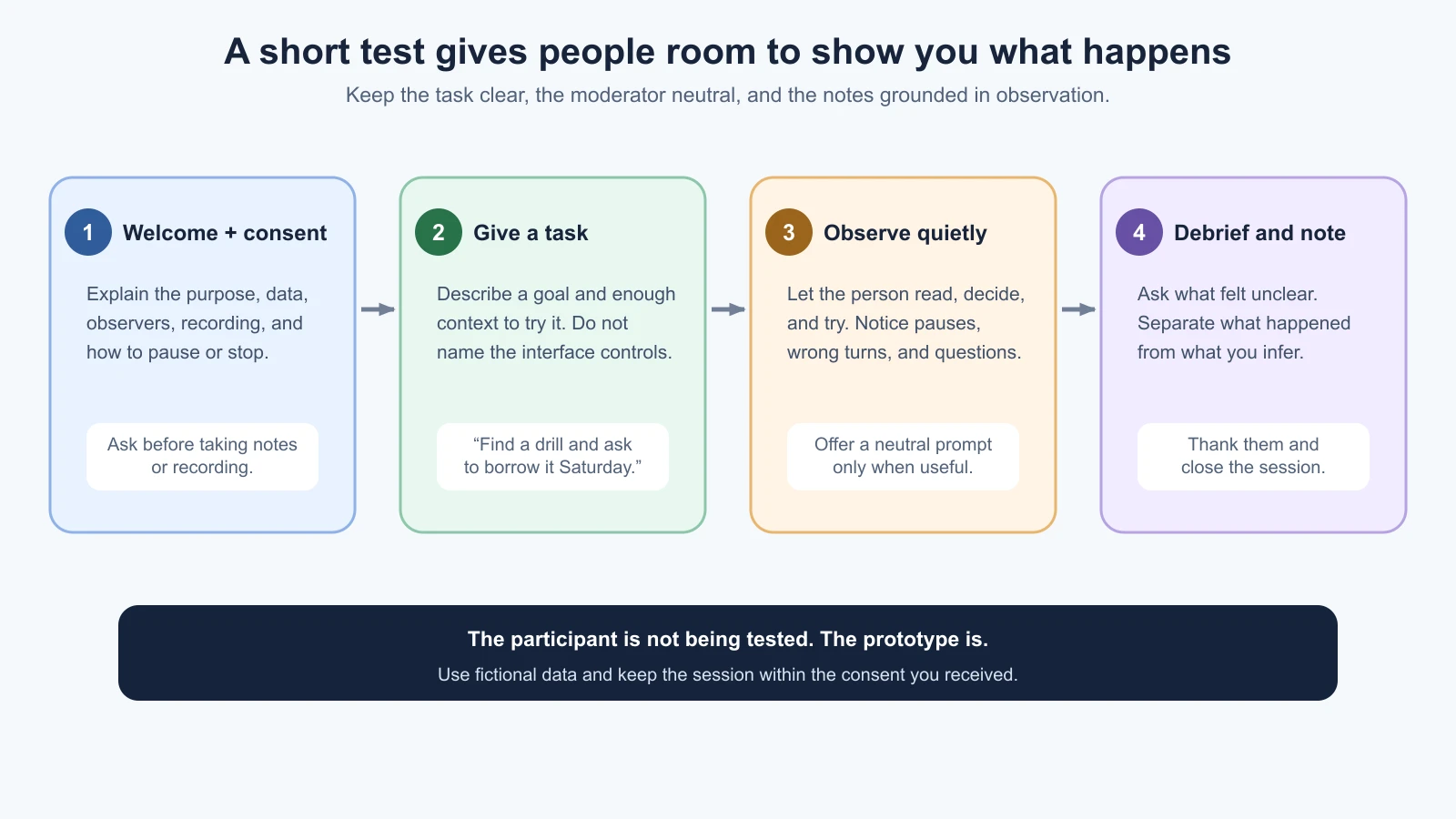
Observe without rescuing
Participants often worry that they are making mistakes. At the start, remind them that you are testing the design, not grading them. Then let them try. When you jump in to point out the right label, you may help them finish while hiding the exact confusion you needed to see.
Give the person time to read, look around, and decide. A pause is not automatically a problem; they may be thinking. Notice what happens around the pause: do they reread a label, move between screens, ask what a word means, choose an unexpected control, or abandon the task? Record the action and the context before deciding what it means.
You can invite someone to think aloud by asking them to share what they are looking for, expecting, or wondering. Avoid asking for a constant explanation if that makes the task unnatural or tiring. If they go quiet, a neutral prompt such as “What are you looking for now?” can help. Do not ask, “Did you see the big green button?” or “Wouldn’t you expect to request it here?” Those questions reveal your preferred answer.
If someone asks for help, first ask what they would do if you were not there. If they still cannot proceed, you can give a neutral prompt or move on. Make a note that help was given and where; do not treat a task completed with moderator instruction as an independent completion.
A moderator can run the session while another person takes notes. The note-taker can capture details without making the participant feel watched by a large group. Keep observers quiet and explain who they are before the session. If you are working alone, take brief notes during the task and expand them immediately afterward. Do not pretend that memory is a complete record.
Record what happened, then interpret it
A useful note has a session identifier, task, observed action, and result. Use a structure like “[action], paused at [label], then asked [question]” and replace the brackets only with what actually happened. Avoid labels such as “confused user” unless you also record the behaviour that led you to that interpretation.
Keep observation and interpretation in separate columns:
| Session | Task | Observation | Interpretation or question |
|---|---|---|---|
| P__ | Find and request a sample drill | What the participant did or said, in sequence | What this may suggest; what is still uncertain |
This is a blank template, not a ToolShelf result. Do not fill it with invented participant behaviour. If you write an exact quote, make sure you captured it accurately and have permission to use it in the way you plan. A paraphrase should not be placed in quotation marks.
A small note template can include more context:
1Session ID: P__     Task: ____     Prototype version: ____
2
3What I saw or heard:
4What the participant did next:
5Task outcome: completed / partly completed / not completed
6Help given, if any:
7Possible design issue:
8Confidence or open question:
9
10Keep identifying details out of working notes unless needed and
11covered by the consent and data plan.
GOV.UK guidance on recording research sessions says to get informed consent before taking notes or recording and recommends recording observations rather than personal interpretations. Screen or audio recording can help you review a session, but it also creates additional data to manage. Use it only if it serves a clear purpose, participants understand it, and you can keep it securely and delete it as promised.
Ask for informed consent and protect the notes
Before the session, tell the participant who is doing the research, why, what you will collect, how you will use it, who may see it, and how long you will keep it. Explain whether there are observers and whether you want audio, video, or screen recording. Ask for permission before recording. Someone can agree to a test but decline recording; you can often take notes instead.
Participation is voluntary. Explain how a person can pause, stop, or withdraw, and what will happen to data already collected. Keep evidence of the consent you receive in a way that you can connect to the relevant session. If you use a research platform, transcription service, or AI tool, explain any processing that participants need to know about and check that your consent and data plan cover it.
Store notes, consent records, and recordings with access limited to people who need them. Remove names and other identifying details from analysis copies when they are unnecessary. Keep information only for the period you explained, and follow your organisation’s data-handling requirements. These are practical research habits, not a complete legal checklist. Get qualified guidance for sensitive data, children, vulnerable participants, or requirements you do not understand.
If you use AI to organise notes, check first that the tool and your consent allow it. Remove identifying details where possible. Give it a narrow job, such as grouping de-identified observations while preserving uncertainty. Do not ask it to invent missing details or decide what participants meant. Check every summary against the original notes; the model’s fluent wording does not make an interpretation true.
Turn session notes into a ranked problem list
After a session, write up notes while the details are fresh. Then compare observations across sessions. Group similar issues, but keep differences and counterexamples visible. A problem seen once may still matter if it blocks an essential task or affects a person with an access need. A repeated small issue may deserve attention too. Do not turn a handful of sessions into percentages that imply population-level certainty.
For each candidate problem, write:
- Evidence: what people did, said, or could not find, with session IDs.
- Impact: how the issue affected the task or confidence.
- Pattern: how many sessions showed it and any important differences. Treat this as a count in this round, not a population estimate.
- Next step: fix, investigate, or leave as-is for now.
You can use a simple ranking aid. First put any blocker to the main task near the top. Then consider issues that make a required step difficult, cause a wrong expectation, or affect an important user group. Keep cosmetic preferences and feature requests lower unless they connect to a real task or barrier. This is a course template for organizing evidence, not a validated scoring formula.
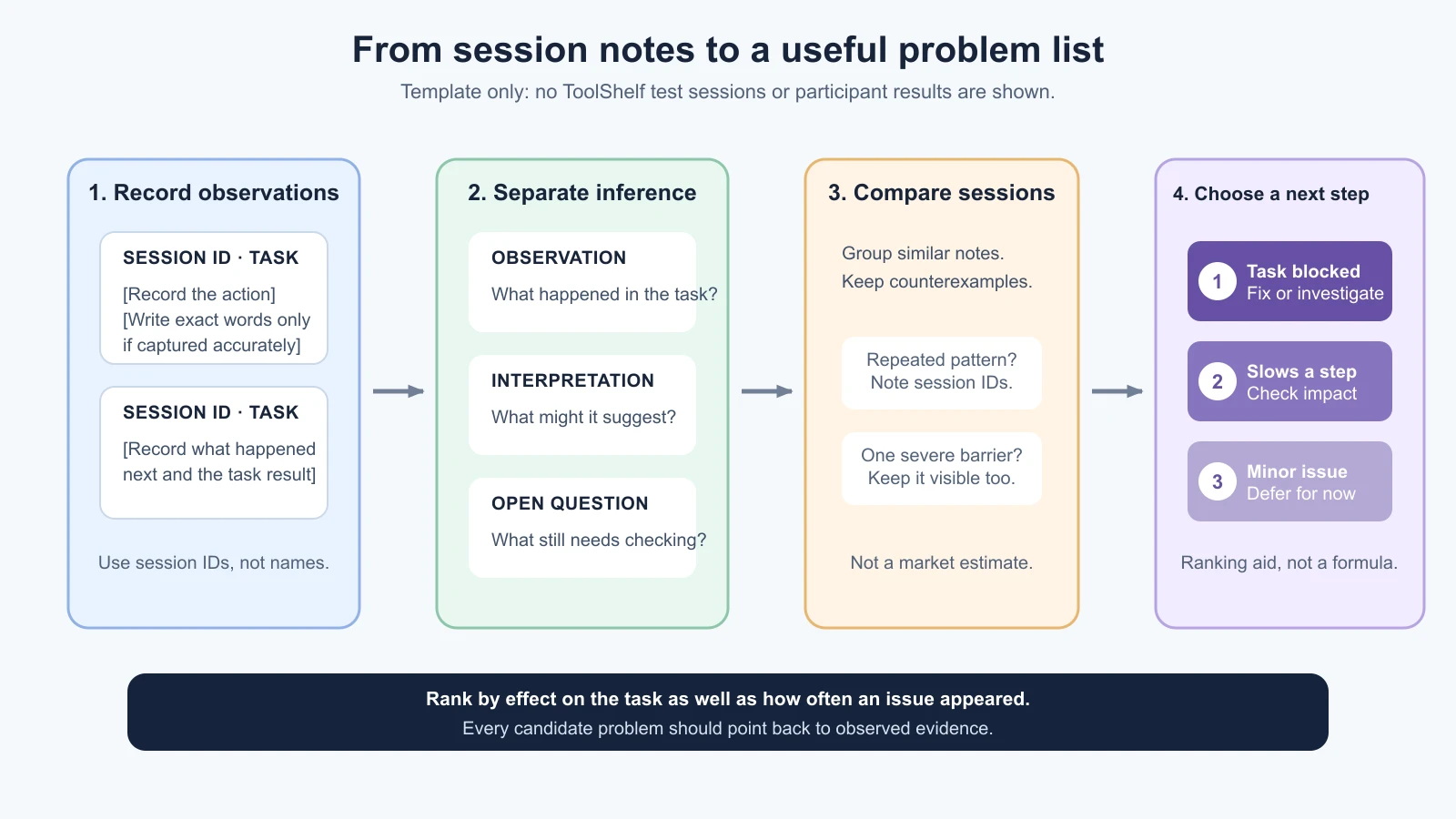
| Rank | Problem statement | Evidence from this round | Impact | Next step |
|---|---|---|---|---|
| 1 | [Describe the obstacle without blaming the participant] | [Session IDs and observed actions] | Blocks / slows / minor | Fix / investigate / defer |
| 2 | [Describe another issue] | [Evidence and counterexamples] | Blocks / slows / minor | Fix / investigate / defer |
Do not write “users hate the date picker” if one person paused. Write what happened, how the task was affected, and what you need to check next. Avoid making a design change just because someone suggested a feature. Their suggestion may point to a need; look at the task and evidence before deciding how to address it.
Share the list with the people responsible for the next product decision. Keep links to the notes or session records only where access is appropriate. The next lesson will use this evidence to decide whether to keep the current direction, change part of it, or stop. For now, your outcome is a clear record of what you observed and a short list of issues that deserve a decision.
Further reading
- Using moderated usability testing, GOV.UK Service Manual.
- Plan user research for your service, including participant numbers for qualitative rounds.
- Getting informed consent for user research.
- Taking notes and recording user research sessions.
- Check the idea before you build, for discovery interviews and early evidence about the problem.
Mistakes beginners make
- Asking for approval instead of observing a task. Give someone a goal and watch how the interface supports it.
- Explaining the screen before the person tries it. A rescue can hide where the design needs work.
- Writing tasks that name the buttons. Keep the task neutral so the participant can find a path independently.
- Treating five sessions as proof about a market. A small qualitative round identifies issues to investigate; it does not estimate how common a need is.
- Recording without explaining it. Get informed consent for the data you collect and make the choice clear.
- Writing conclusions as observations. Capture what happened first, then label your interpretation as uncertain.
- Ranking only by frequency. A single barrier can block an important task or affect an underrepresented group.
- Making every suggested feature. A suggestion is a clue to explore, not an automatic requirement.
Recap and try it yourself
Choose one question about the prototype, recruit people who fit the task, and give them neutral goals rather than interface instructions. Explain the session and data use, ask informed consent before note-taking or recording, then observe without rushing to help. Write concrete observations separately from interpretations. Compare sessions carefully, preserve counterexamples, and rank problems by their effect on the task as well as their recurrence.
Try it: write one task for your prototype and read it to someone who did not design it. Create a short welcome and consent script, an observation table, and a plan for how notes or recordings will be stored and removed. Run a small round with people who fit your intended audience. Record what actually happened, including where a task was completed, needed help, or stopped. Do not invent results if you have not run the sessions. Use the resulting problem list in the next lesson to choose what to do.