
AI Product Builders course · lesson 11 of 25
- 1The AI Product-Building Loop: From Idea to Improvement
- 2Define the Problem Before You Choose a Solution
- 3Check the Idea Before You Build
- 4App Anatomy for Non-Engineers: What Happens Behind a Screen
- 5Scope the First Version: Choose What to Build Now
- 6Choose a Tech Stack That Fits Your Constraints
- 7Choose a Prototype Tool for Your Product and Team
- 8Build a Clickable Prototype in One Focused Flow
- 9Test a Prototype with Real People
- 10Decide Whether to Keep, Change, or Stop
- 11Move from a Prototype to Real Code
- 12Work with an AI Coding Tool on One Clear Task
- 13Learn the Web Basics Behind Your App
- 14Connect a Database Without Losing Control of Your Data
- 15Tell a Small Fix from a Structural Change
- 16Run a Refinement Loop That Keeps the Product Useful
- 17Make an AI-Built Product Easier to Use
- 18Review and Check Changes Before They Reach the Team
- 19Test an AI-Built Product in Layers
- 20Work with a Team and Stakeholders
- 21Choose Where to Deploy Your Product
- 22Go Live: A Launch Checklist for Your Product
- 23Measure and Improve Your Product After Launch
- 24Add an AI Feature to Your Product Carefully
- 25Capstone: Take a Product Idea to Launch
After this lesson, you will be able to decide whether to continue in a prototype tool, export its code, or rebuild from your product documents. You will also be able to identify which parts of a prototype need more work before real people depend on them, and prepare a handoff that keeps your team in control of the project.
We will continue with ToolShelf, the fictional neighbourhood tool-sharing idea. The prototype from the previous module has a sample listing, a request form, and a demonstration result. It has not been validated as a service and has no real users, accounts, or bookings. This lesson is a planning example, not a claim that ToolShelf was built in any particular tool.
A prototype can look finished before it is ready
A clickable flow can help you test an idea without having a production system behind it. It may use made-up data, a button that only changes screens, or a database that was created for convenience. A polished preview can hide those limits from the person who built it and from someone who sees a shared link.
Before moving toward real code, make an inventory of what your prototype actually does. Check its visible screens, interactions, data, sign-in, integrations, hosting, and access controls. Do not infer that something is safe or complete because a builder generated it, a preview opens, or the tool offers a publish button.
A production product is the version people are expected to rely on for real tasks and real information. It needs more than a realistic appearance. The precise requirements depend on the product, its data, its users, and the team that will operate it. A prototype is not automatically insecure or useless; it is simply built to answer a different question. Treat the production gaps as work to investigate rather than defects to assume away.
In ToolShelf, the sample “request” only shows a demonstration state. A real service would need to decide whether users have accounts, how owners receive requests, what availability means, what happens when plans change, how abusive listings are handled, what data is stored, and who supports a dispute. The three-screen prototype cannot answer those operational and technical questions by itself.
Choose among stay, export, or rebuild
There are three common paths. None is automatically best. Choose based on what the next stage needs, what the current tool can support, and what your team can maintain.
Stay in the builder for now
Continuing in the current tool can make sense when it gives you a clear path to the next learning step, the team understands the data and access settings, and the work can be managed without a costly lock-in you cannot accept. You may be able to build a more realistic but still limited pilot inside the builder.
Staying is not the same as deciding to use the tool forever. Write down what you need to verify before real users or sensitive data are involved: who controls the workspace, which account owns the project, where information is stored, what deployment exposes, what permissions exist, how backups work, and how you could leave later. Check the current official docs for the tool, because export, collaboration, publishing, and plan details change.
Export or sync the project
Exporting gives you a copy of source code or project files. Syncing connects the project to a repository so changes can be tracked there. A repository is a versioned home for project files and their history. It helps people see what changed and return to an earlier version, but it does not automatically deploy the code or transfer every service the app depends on.
This path may fit when the generated code is understandable enough for the next team, the framework and dependencies fit the constraints, and the app builder supports a handoff your team can operate. Check whether export includes the files you need, how future changes are shared, whether one side can overwrite the other, and what happens to connected databases, authentication, file storage, or deployment. A code download may not include data, secrets, service configuration, or a working production setup.
Rebuild from the product decisions
Sometimes the prototype is useful as a visual reference, but the generated project is too difficult to maintain or relies on services the team cannot use. In that case, rebuild the confirmed flow in a codebase the team can understand and operate. Use the scope, prototype, research findings, and decisions as the specification. Do not treat generated source code as the only record of what the product should do.
A rebuild can take longer than export, so it needs a reason. The code may be hard to review, the architecture may not meet data or hosting constraints, or the code export may not include the services you need. Compare the cost and uncertainty of rebuilding with the work to make the current project maintainable. A visual reference can preserve layout and language decisions while the implementation changes.
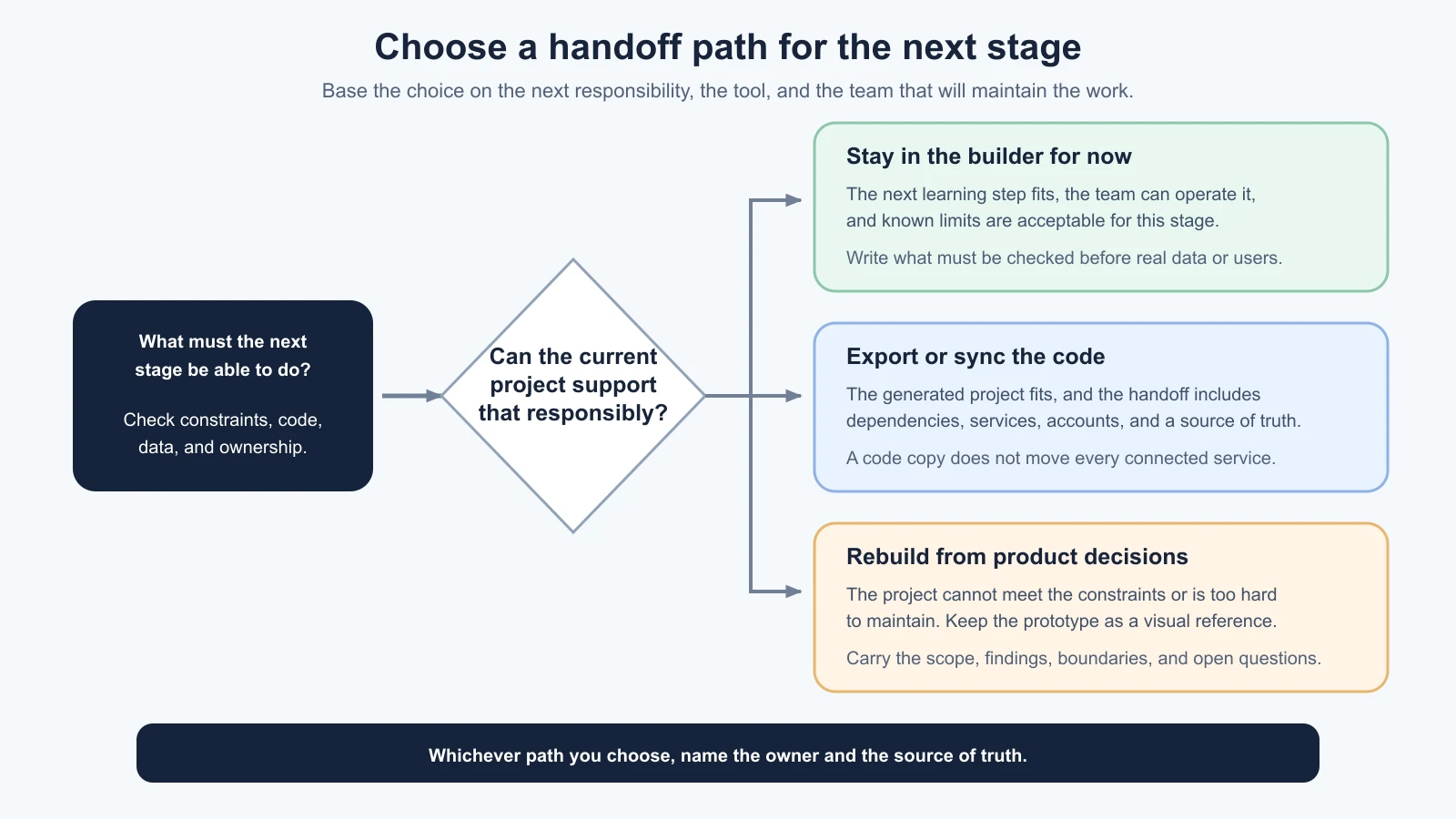
Base the choice on the next responsibility
It helps to ask, “What must the team be able to do in the next stage?” Perhaps you need a real account flow, a database with access rules, a payment provider, audit logs, localization, or an accessible interaction tested with assistive technology. Perhaps the next stage is still a private learning pilot, and none of those integrations should be added yet.
List the requirements that matter now and the ones that can wait. Link each requirement to a product need, a technical constraint, a safety issue, or an agreed decision. Avoid choosing a new framework because it is popular or because an AI tool suggested it. Return to the constraints in the tech stack lesson and the tool checks in choosing a prototype tool.
For ToolShelf, a next step might be a limited internal pilot with sample data while the team learns how the request flow should work. Or it might be a planning spike to check what accounts, availability, and owner notifications require. Neither path requires importing real household addresses into a prototype. If a later stage handles real people or property data, make the data and privacy decisions before collecting it.
Make a prototype-gap inventory
A gap inventory compares what the prototype currently does with what the next stage requires. Mark each area as “known enough,” “needs work,” “not needed yet,” or “unknown.” That last category matters. An unexamined assumption should not quietly become a production plan.
| Area | What to inspect | Question for the next stage |
|---|---|---|
| User flow | Screens, labels, errors, empty states, keyboard and mobile behavior | Which tasks must work, including failure paths? |
| Data | Sample versus real records, storage, retention, export and deletion | What information is necessary, and who may access it? |
| Identity and permissions | Sign-in, account recovery, roles, access checks | Who can see or change each record? |
| Integrations | Email, maps, payments, AI services, webhooks | Which are required, approved, and replaceable? |
| Operations | Support, moderation, backups, monitoring, incident response | Who responds when something goes wrong? |
| Code and dependencies | Framework, generated files, packages, updates, maintainability | Can the team review, change, and update this project? |
| Ownership and cost | Accounts, workspace, domain, billing, subscription and usage | Who controls each asset, and what does continued use cost? |
| Testing | Existing checks, expected behavior, accessibility and reliability | How will the team detect a regression before release? |
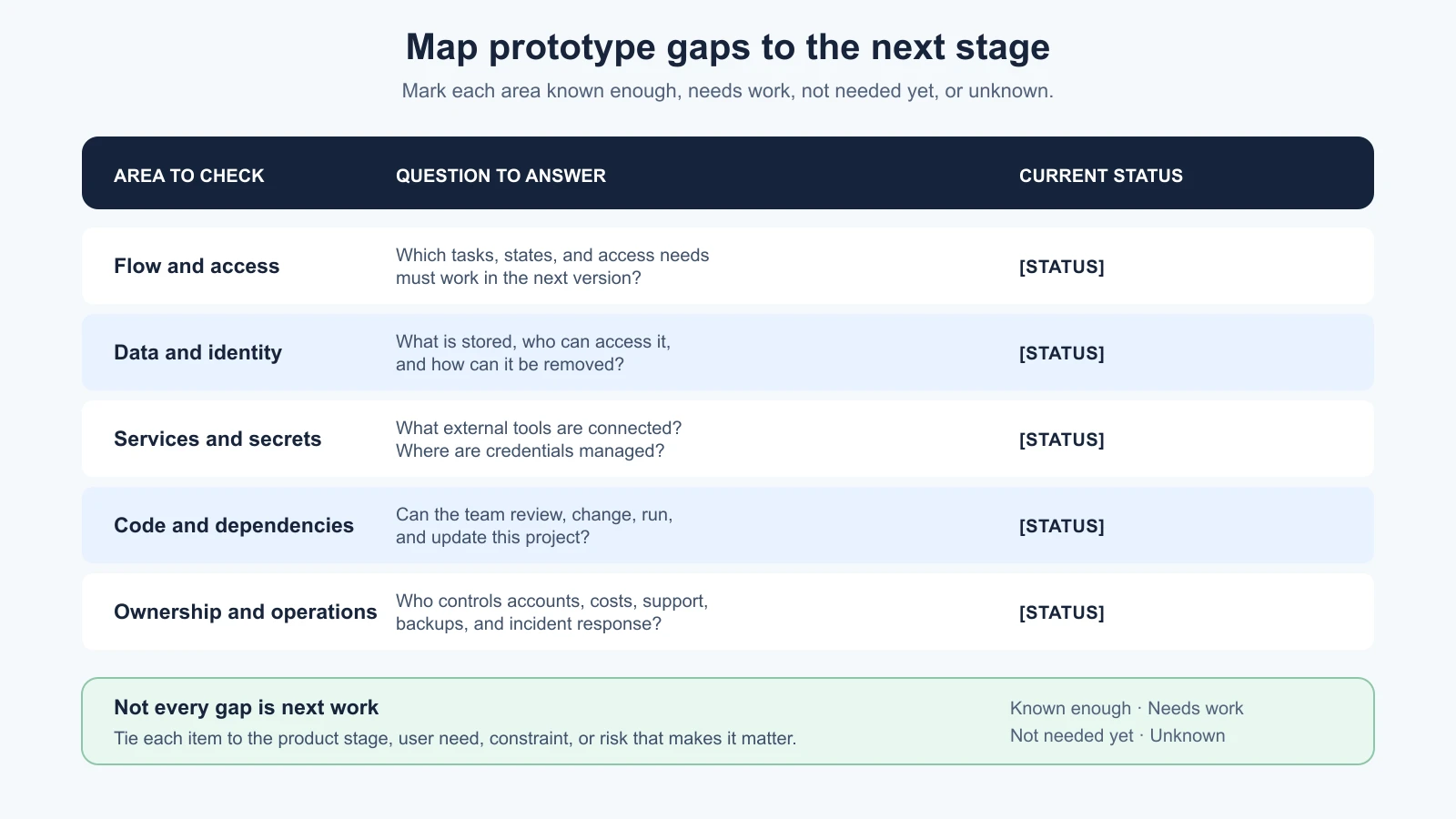
The table is not a universal launch checklist. A private prototype may not need a production identity system. A product collecting health records would require careful, qualified planning before any real data was used. Match the investigation to the risk and stage instead of treating every row as “build now.”
A good inventory also names what is deliberately excluded. For the ToolShelf prototype, real payments, addresses, owner messages, and live bookings remain out of scope. That boundary prevents a handoff from turning sample data into a half-built live service by accident.
Keep the product decisions when the code changes
A handoff is more than giving someone a repository link. It transfers the reasons behind the product: who it is for, what job it supports, what evidence exists, what remains uncertain, and which parts are intentionally out of scope. If the team only receives a folder of generated code, it may recreate the same assumptions in a new framework.
Collect these items before changing tools or owners:
- The latest problem statement and intended audience.
- The scope document, including must-have behavior and non-goals.
- The clickable prototype, with sample-only states clearly labeled.
- Research notes or summaries the team is allowed to access, with consent and privacy limits respected.
- The decision note from deciding to keep, change or stop, including the next question and unresolved risks.
- A list of flows, screens, and edge cases that the prototype supports or leaves out.
- The current tool, framework, dependencies, and anything the team needs to run the project.
- Ownership of the repository, app-builder workspace, domain, cloud accounts, and billing contacts.
- A list of integrations, data stores, secrets, and external services, without placing secret values in the handoff document.
- A contact or owner for each next decision.
Ownership includes both technical access and the ability to keep paying for, changing, or shutting down the service. A personal account can become a bottleneck when its owner leaves. Decide who should control shared accounts and recovery methods. Avoid placing credentials in a shared document; transfer them using your organization’s approved secret-management process.
If code is connected to a repository, decide which copy is the source of truth. If two systems can both edit the same files, write down which changes flow in each direction and who resolves conflicts. Before the first handoff change, make a backup or a versioned checkpoint that can be restored. Confirm that the team can access the project with their own accounts rather than relying on one person’s session.
Make a handoff note before the first build task
Use this template to agree what is moving forward. It is meant to be completed by the product owner and the person or team accepting the work. Do not paste API keys, passwords, personal participant data, or confidential material into a document that is not approved for it.
1# Prototype to code handoff
2
3Project and date:
4Product owner:
5Receiving team or developer:
6
7## Product decisions
8Problem and intended audience:
9Main user task:
10Evidence gathered and where it is stored:
11Decision from the last review:
12Open questions and assumptions:
13Must-have behavior:
14Out of scope:
15
16## Prototype and files
17Prototype link or file location:
18Tool and workspace owner:
19Repository or export location:
20Source of truth for changes:
21Framework and dependencies, if known:
22Steps to open or run the project:
23
24## Data and services
25Sample data versus real data:
26Data stores and integrations:
27Secrets location, never the secret values:
28Access and account owners:
29Known data, privacy, or regional requirements:
30
31## Gaps and next work
32Known limitations:
33Unknowns to investigate before real use:
34First small implementation task:
35How the work will be reviewed:
36Checkpoint or rollback plan:
37Decision owner and next review date:
Check the note aloud with the receiving person. Can they explain the user task, the first implementation task, and the boundary of what not to build? If not, clarify the product decisions before asking an AI coding tool to generate a large solution. The Vibe Coding guide to your first Vibe Coded app covers the coding session itself; this lesson is about preserving product context across that transition.
Ask AI to inspect the handoff, not decide the product
An AI assistant can help list files, identify a framework, explain an unfamiliar configuration, or turn an inventory into questions. It cannot grant your team permission to use a service, decide whether a design meets a legal requirement, or prove that generated code is safe because it ran once.
A bounded handoff prompt could be:
1Review this prototype project and the product handoff note.
2
3Do not edit files or add features.
4
5Summarize:
61. The framework and project structure you can identify.
72. External services and data stores referenced by the files.
83. Setup steps or dependencies that appear necessary.
94. Risks, unknowns, and claims you cannot verify from the project.
105. Questions the product owner should answer before implementation.
11
12Do not print secret values, copy personal data, or assume a preview
13is production-ready. Cite the file or configuration that supports
14each observation. Mark guesses as guesses.
Review its response against the actual files, tool documentation, and people who own the product decisions. A generated inventory can miss a service or misunderstand a configuration. Do not give an AI agent broad write or deployment access just because it is helping with a handoff. The next lesson will cover a deliberate working session with a coding tool.
Keep a decision record when the path changes
If you stay in the builder, record why it meets the next requirement and what must be checked before the stage after that. If you export, note what moved and what remained attached to the old service. If you rebuild, keep the old prototype as a reference until the new flow has been compared with the scope and evidence. Mark obsolete previews clearly and remove access when the project no longer needs them.
The right path can change as you learn. A prototype tool that worked for a quick flow may not be a good home for the operational product. A code export that looked portable may reveal a dependency the team cannot support. Treat those discoveries as new information. Update the decision note rather than hiding the mismatch or continuing because migration has already started.
Further reading
- Choose a prototype tool, for checking workflow fit, sharing, code access, data location, and costs.
- Build a clickable prototype, for keeping the scope small and sample data clearly fictional.
- Tech stack and constraints, for connecting the handoff to your team and operational needs.
- Keep, change, or stop, for the evidence and decision note that should inform the next stage.
- Your First Vibe-Coded App, for working carefully with an AI coding agent inside a project.
Mistakes beginners make
- Treating a polished preview as a production service. Inventory the behavior, data, access, and operations behind the screens.
- Exporting code and assuming the whole app moved. Check databases, authentication, files, integrations, deployment, and billing separately.
- Rebuilding without the product reasoning. Carry the scope, evidence, limits, and decisions with the code handoff.
- Keeping two editable copies without a source of truth. Agree where changes live and how they move before both sides are modified.
- Moving real data into a prototype to make it feel complete. Use sample data until a proper data plan is ready.
- Leaving the project under one person’s account. Name the owners of the repository, workspace, domain, and service accounts.
- Asking AI to “make it production-ready.” Define the requirements and review concrete changes; a broad label cannot replace them.
- Building every prototype gap immediately. Prioritize what the next learning or operating stage actually requires.
Recap and try it yourself
Choose among staying in the builder, exporting or syncing, and rebuilding from product decisions. Base the choice on the next responsibility, the team’s ability to maintain it, and the data and operational risks. Inventory the gaps, identify the true owners of code and accounts, and hand off the user task, evidence, boundaries, and open questions. A repository or code export can help a team take control, but it does not transfer every service or make the product ready for real use.
Try it: take your prototype and complete the gap inventory. Mark each area known enough, needs work, not needed yet, or unknown. Choose one path and write down why. Fill in the handoff template, then ask a teammate to explain what they would do first and what they must not assume. Keep real user data and credentials out of the exercise.