
AI Product Builders course · lesson 5 of 25
- 1The AI Product-Building Loop: From Idea to Improvement
- 2Define the Problem Before You Choose a Solution
- 3Check the Idea Before You Build
- 4App Anatomy for Non-Engineers: What Happens Behind a Screen
- 5Scope the First Version: Choose What to Build Now
- 6Choose a Tech Stack That Fits Your Constraints
- 7Choose a Prototype Tool for Your Product and Team
- 8Build a Clickable Prototype in One Focused Flow
- 9Test a Prototype with Real People
- 10Decide Whether to Keep, Change, or Stop
- 11Move from a Prototype to Real Code
- 12Work with an AI Coding Tool on One Clear Task
- 13Learn the Web Basics Behind Your App
- 14Connect a Database Without Losing Control of Your Data
- 15Tell a Small Fix from a Structural Change
- 16Run a Refinement Loop That Keeps the Product Useful
- 17Make an AI-Built Product Easier to Use
- 18Review and Check Changes Before They Reach the Team
- 19Test an AI-Built Product in Layers
- 20Work with a Team and Stakeholders
- 21Choose Where to Deploy Your Product
- 22Go Live: A Launch Checklist for Your Product
- 23Measure and Improve Your Product After Launch
- 24Add an AI Feature to Your Product Carefully
- 25Capstone: Take a Product Idea to Launch
After this lesson, you will be able to choose one job for a first product version, decide which features are essential to complete it, and write down what can wait. A good scope is small enough to build and check, but complete enough to help someone do the job it promises.
We will keep using ToolShelf, the fictional neighbourhood tool-sharing service from earlier lessons. It has no real users, research results, or product metrics. Its example scope shows how to make the decision; it is not evidence that neighbours want this service.
What “first version” means
People often use MVP, short for minimum viable product, to mean an early version of a product. The phrase can be useful, but it is also easy to misunderstand. “Minimum” does not mean careless, broken, or stripped of the checks needed to protect people. “Viable” means the version can deliver a useful outcome for a particular user in a particular situation.
For this course, think of a first version as the smallest useful version that lets an intended user finish one bounded job, with the essential quality and safety checks in place. This is a practical working definition, not a universal formula. A service that handles private records may need access controls in its first version. A tool that displays public information might not need accounts at all.
The point is not to ship the fewest screens. It is to make a deliberate boundary around one complete slice of the user’s work. A sign-up page by itself is small, but it may not help anyone accomplish the job. A focused flow that covers the necessary steps can be more useful even if it contains several screens.
GOV.UK’s Service Standard advises teams to scope services around how users think and what they need to do, avoiding a scope that is too narrow or too broad. It also cautions against trying to fix everything at once and encourages incremental improvement. That guidance is written for government services, but the underlying scoping questions are useful in many product settings.
Start with one user job
Before listing features, describe one job in words the intended user might recognize. A user job here means the outcome someone is trying to reach, not a screen they need to visit or an implementation task for the team.
For ToolShelf, “build a lending marketplace” is too broad to guide a first release. It could include listings, messaging, deposits, delivery, identity checks, disputes, reviews, and many kinds of inventory. A clearer job is: “A neighbour who needs a tool can find an available listing and ask its owner to borrow it.”
That sentence gives the team something to test. Can the person find an item? Can they make a clear request? Can the owner respond? It also exposes an important boundary: in this first version, the product coordinates a request. It does not promise to arrange pickup, guarantee that an item will be lent, or manage a dispute.
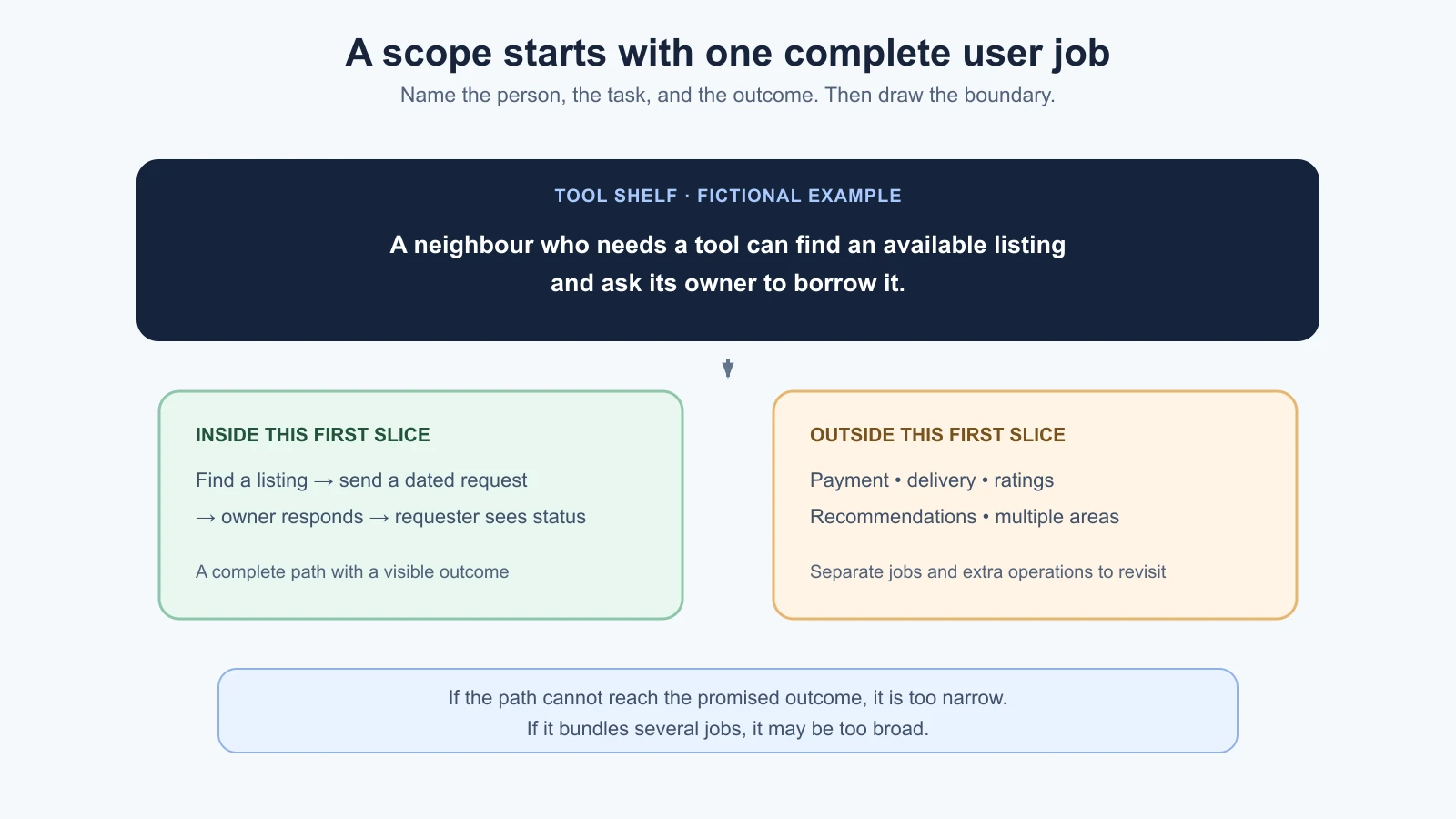
Try writing your job sentence with this simple pattern:
[A specific person] can [complete one task] so they can [reach a useful outcome].
For example: “A volunteer coordinator can see which shifts still need coverage so they can contact the right people.” You may not need to put this exact sentence in the interface. It is a planning aid that helps you notice when a feature idea has drifted away from the job.
Use the evidence you gathered in the previous lesson to choose the job. If you have only an assumption, label it as one. A scope is a plan, not proof that the idea is wanted. Keep the connection to your problem brief visible; if you cannot explain how the first version responds to the problem, revisit the problem before adding features.
Sort features by what the job needs
Once the job is clear, make three lists: must, should, and later. These are practical categories for making a scope decision. They are not an official scoring system, and a feature does not become essential because several people suggested it.
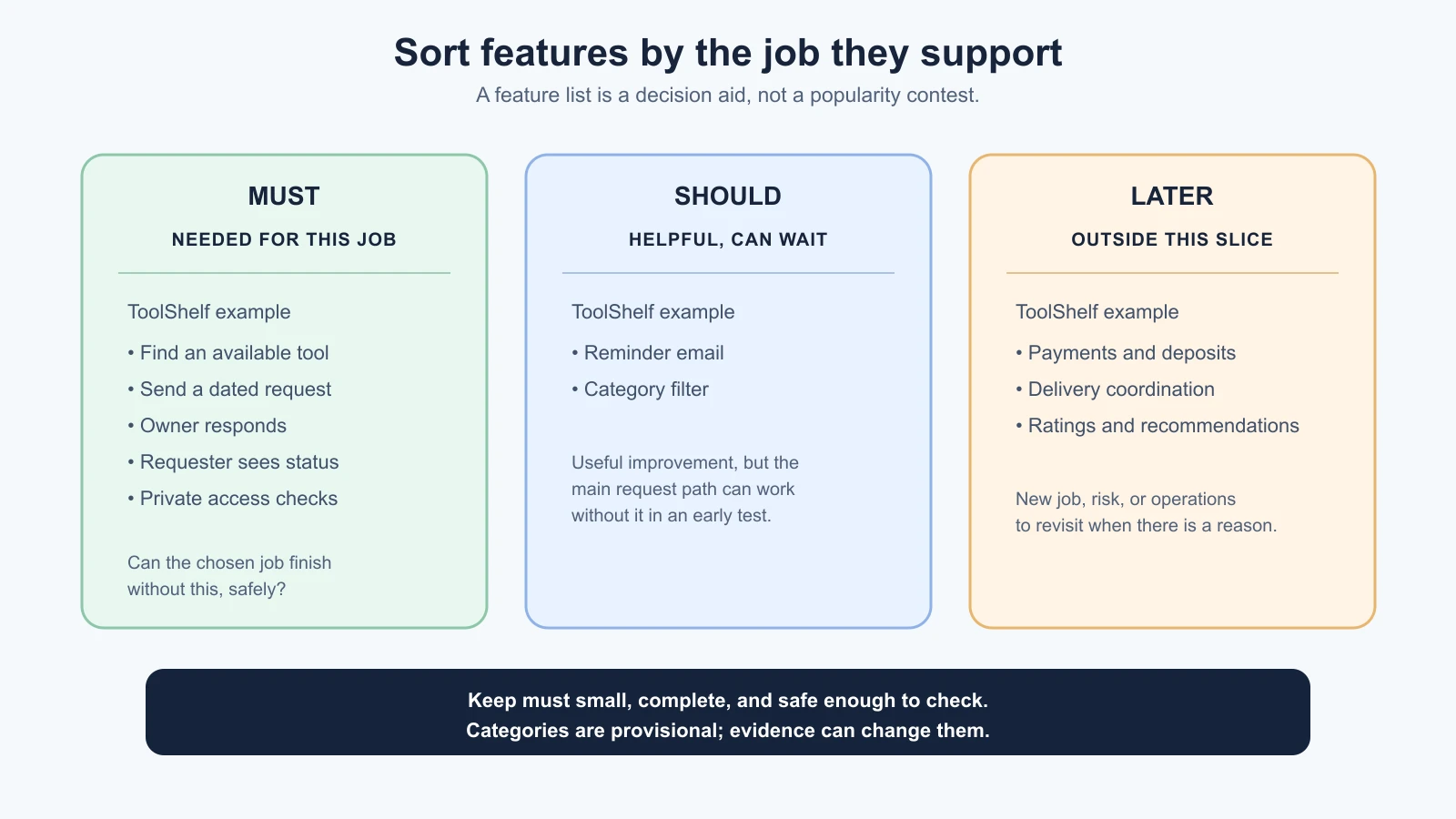
Must: needed to complete the job
A feature belongs in must when the user cannot complete the chosen job without it, or when it provides a necessary quality, privacy, or safety condition for that job. A must item should have a clear reason tied to the user journey.
For the ToolShelf borrowing request, the fictional first-version must list might include:
- A small set of tool listings that the owner has made available.
- A detail view that gives enough information to decide whether to ask about an item.
- A request form that captures the item and proposed borrowing dates.
- A way for the owner to accept or decline the request.
- A status the requester can check after sending the request.
- Sign-in and permission checks so a private request is visible only to the people involved.
- A clear result when the request is submitted, rejected, or cannot be saved.
These items describe one complete path, including basic safeguards and outcomes. Whether each is truly essential would need to be checked with the people and context for a real product. The example does not claim that the flow has been tested.
Should: helpful, but the job still works without it
A should feature improves the experience but is not needed to complete the chosen job in the first release. Keep this list short and use it only when you can name a concrete benefit.
In ToolShelf, a reminder email might be useful if an owner has not responded. A category filter could help once there are enough listings to make browsing difficult. Neither is required to send and answer one borrowing request in a small first test. If you add either, you also need to consider its failure states and any additional data or services it needs.
“Should” is not a promise that the feature will be built next. It is a candidate for a later decision. When time is tight, a should item may wait without changing what the first version is for.
Later: outside this first slice
Put features in later when they extend the product, serve a different job, or bring enough extra cost or risk that you do not want them in the first slice. Later ideas are not bad ideas. They simply do not have to be decided or built now.
For ToolShelf, later might include payments or deposits, arranging delivery, ratings, public comments, recommendations, a dispute process, and multiple neighbourhoods. Some could become important if the product develops. For now, each would introduce a new set of questions: payment handling, logistics, moderation, recommendation quality, support, or broader operations.
Do not use “later” to hide a missing step that makes the chosen job impossible. If an owner must respond before the requester can know what happened, that response and status belong in the complete path, even if the response is manual. Conversely, do not pull in a complex feature just because it would make the product feel more finished.
Check that the slice is complete, not just small
A useful first version has a start, an outcome, and a way to tell whether the main path worked. Write down the user’s starting point, the actions they take, and the end state they should reach. Include a normal failure or rejection when it matters.
The ToolShelf request path might be:
- A signed-in neighbour opens a listing that is available to request.
- They choose proposed dates and send a request.
- The owner sees the request and accepts or declines it.
- The requester sees the current status.
Now write checks that someone can observe rather than goals that sound encouraging:
- A requester can submit a request for a listed item with valid dates.
- The owner can find that request and record an accept or decline decision.
- The requester can see the recorded status.
- A different signed-in user cannot open the private request by changing its address or identifier.
- If saving fails, the app does not show a false success message.
These are example acceptance checks, not a complete security review or a claim that ToolShelf has passed them. For a real product, add checks that reflect the real data, risks, devices, and user needs. A checkable scope makes it easier to review AI-generated work later because the team can compare behavior with an agreed result.
Ask whether the slice is too narrow: can the intended user actually reach the promised outcome? Ask whether it is too broad: does it bundle another job or introduce significant operations that are not needed yet? The GOV.UK guide to getting the scope of a transaction right describes both failure directions: an overly broad transaction can obscure the task, while a too-narrow one can fail to give the user the outcome they need.
Name the non-goals
A non-goal is an explicit statement about something the current version will not do. It makes a boundary visible so that a team, collaborator, or AI coding tool does not quietly assume a bigger product.
ToolShelf’s first-version non-goals could say:
- It will not collect payments or deposits.
- It will not schedule or guarantee pickup and return.
- It will not include public reviews, comments, or recommendations.
- It will not launch across multiple neighbourhoods in this first test.
- It will not promise a lending outcome; an owner may decline.
The last boundary matters because product language can promise more than the flow delivers. If ToolShelf only records a request, calling it a guaranteed reservation would set the wrong expectation. Clear non-goals help align interface copy, support expectations, and implementation.
Non-goals are not permanent refusals. If later evidence shows that a deferred feature is necessary, update the scope deliberately. Record what changed, why it changed, and what new work or risk comes with it.
Handle feature suggestions from AI without losing the boundary
AI tools are good at generating ideas. Ask for “features for a neighbourhood tool-sharing app” and you may receive chat, maps, payments, delivery, reviews, reputation scores, recommendations, reminders, and an admin dashboard. A long list can look like a plan even though it has not been checked against a user job, evidence, cost, or risk.
Treat suggestions as candidates. Put each one through the same questions:
- Which user and job does this support?
- Is it needed for the user to finish the chosen first-version path?
- What happens if it is missing in this first test?
- What extra data, service, moderation, support, or failure cases does it introduce?
- What evidence would make us move it into the first version?
You can ask an AI assistant to help with the analysis while keeping the decision with the product owner. For example:
1Our first-version job is: [paste one sentence].
2Our must items are: [paste list].
3Our non-goals are: [paste list].
4
5Review these proposed features: [paste candidates].
6For each feature, explain which part of the job it supports, whether
7the job can be completed without it, and any new data, safety, cost,
8or operational questions it introduces. Recommend must, should, or
9later, and state your reasoning. Do not add features or treat your
10recommendations as user research. Flag uncertainties for a person to check.
Then inspect the reasoning. The model may infer a need that no one has established, or overlook a necessary condition. Use the output to prompt discussion, not to let the tool decide scope.
If an idea appears during a build, add it to the later list before changing the implementation. First ask whether it is a defect in the agreed job, a necessary quality check, or a new feature. Fixing a broken must item is different from widening the product. Keeping that distinction reduces scope creep, the gradual expansion of work beyond the original boundary.
A one-page scope document
Write the decision down in a form someone else can understand. This course template is meant to be short enough to revisit. It is not a contract or a substitute for detailed design, technical planning, or research.
1# First-version scope
2
3Product / version:
4Owner and date:
5
6## Intended user and situation
7[Who is trying to do what, and when?]
8
9## One job this version supports
10[One sentence describing a complete user outcome.]
11
12## Start and finish of the main path
13- Starts when:
14- The user can:
15- Finishes when:
16- If something goes wrong:
17
18## Must
19- [Necessary step or quality condition, with reason]
20
21## Should
22- [Useful improvement that can wait without breaking the job]
23
24## Later
25- [Candidate feature or separate job to revisit]
26
27## Non-goals for this version
28- [What this version does not promise or handle]
29
30## Acceptance checks
31- [Observable behavior someone can verify]
32
33## Quality and safety guardrails
34- [Privacy, access, reliability, accessibility, or other relevant checks]
35
36## Assumptions and open questions
37- [What is not yet known, and how it might change the scope]
Keep each must item tied to the job or a guardrail. If the document has a long must list, group related details into one user-facing capability and inspect whether it actually needs all of them. Do not make a target number of features the measure of a good scope. The right boundary depends on the task and risks.
A practical “done” test
Before handing the scope to a designer, builder, or coding assistant, read it aloud and answer these questions:
- Can I name the person and situation without describing everyone?
- Does one sentence explain the job in everyday language?
- Can I trace a start-to-finish path that reaches the promised outcome?
- Does every must item support that path or a necessary quality condition?
- Are optional ideas and non-goals visible?
- Can another person check whether the main path works?
- Have I marked assumptions rather than writing them as facts?
- Is there an unanswered safety, privacy, or operational issue that should change the boundary?
If the path ends before the user gets the outcome, the scope may be too narrow. If one version is trying to serve several unrelated jobs, it may be too broad. Revise the boundary until you can explain both what it does and what it does not do.
The next step is to turn the scope into a buildable specification, with enough context and acceptance checks for implementation. The Vibe Coding guide to spec-driven development covers that handoff. This lesson stays focused on the product decision: what the first version is for.
Sources
- Solve a whole problem for users, GOV.UK Service Manual: scope around user needs, avoid oversized services, and improve incrementally. It is a government service standard, used here as a useful scoping reference rather than a universal product rule.
- Getting the scope of your transaction right, GOV.UK Service Manual: consider both overly broad and overly narrow scopes, and connect a task to the user’s wider journey.
- The must/should/later categories, ToolShelf example, and scope template in this lesson are course teaching aids, not formats prescribed by these sources.
Mistakes beginners make
- Calling any small feature an MVP. A single screen may be small and still leave the user unable to finish the job.
- Treating “minimum” as permission to skip safeguards. Keep the essential privacy, access, reliability, and safety checks that the task needs.
- Putting every popular suggestion in must. A suggestion needs a reason tied to the chosen job or a guardrail.
- Confusing a complete slice with a complete business. A first version can finish one useful task without solving every adjacent problem.
- Making non-goals vague. State what the product will not promise or handle so expectations stay clear.
- Letting AI recommendations become requirements. AI can sort candidates, but it cannot supply missing user evidence or own the decision.
- Never revisiting the scope. A boundary can change when evidence changes; record the reason and consequences when it does.
Recap and try it yourself
A useful first version completes one bounded user job and includes the checks needed for that job. Write the job first, sort features into must, should, and later, state non-goals, and define observable acceptance checks. Use AI to examine candidates and reveal unanswered questions, not to invent evidence or decide what users need.
Try it: choose an idea you are considering and write one user-job sentence. List no more than the essential steps needed to reach the outcome, then add any privacy or safety conditions the job requires. Put other ideas under should or later, write three non-goals, and create two checks someone could perform. Ask an AI tool to challenge the boundary; mark each useful suggestion as an assumption to investigate or a change you deliberately accept. Next, we will choose a technology stack that fits the scope and the constraints.