
AI Product Builders course · lesson 21 of 25
- 1The AI Product-Building Loop: From Idea to Improvement
- 2Define the Problem Before You Choose a Solution
- 3Check the Idea Before You Build
- 4App Anatomy for Non-Engineers: What Happens Behind a Screen
- 5Scope the First Version: Choose What to Build Now
- 6Choose a Tech Stack That Fits Your Constraints
- 7Choose a Prototype Tool for Your Product and Team
- 8Build a Clickable Prototype in One Focused Flow
- 9Test a Prototype with Real People
- 10Decide Whether to Keep, Change, or Stop
- 11Move from a Prototype to Real Code
- 12Work with an AI Coding Tool on One Clear Task
- 13Learn the Web Basics Behind Your App
- 14Connect a Database Without Losing Control of Your Data
- 15Tell a Small Fix from a Structural Change
- 16Run a Refinement Loop That Keeps the Product Useful
- 17Make an AI-Built Product Easier to Use
- 18Review and Check Changes Before They Reach the Team
- 19Test an AI-Built Product in Layers
- 20Work with a Team and Stakeholders
- 21Choose Where to Deploy Your Product
- 22Go Live: A Launch Checklist for Your Product
- 23Measure and Improve Your Product After Launch
- 24Add an AI Feature to Your Product Carefully
- 25Capstone: Take a Product Idea to Launch
After this lesson, you will be able to compare a cloud provider, a serverless platform, and a platform-as-a-service host by how much your team operates, what drives the bill, where the app and data run, and how hard it may be to move later. You will leave with a short decision table for one product, not a ranking of providers.
We will keep using ToolShelf, the fictional tool-sharing product. It has no real hosting account, traffic, or costs. The examples are planning aids, not recommendations for a real deployment. The earlier tech stack and constraints lesson helped identify what the product and team need. This lesson uses those needs to choose a place to run the app. For a practical deployment walkthrough, see Deploy Your App.
What it means to choose a deployment home
Deployment means placing a built application on infrastructure that can serve it to users. The provider runs the computers and network. Depending on the service, your team may also configure the operating system, runtime, database, scaling, monitoring, backups, and recovery. A host that handles more of those tasks can reduce setup and routine work, but your team still needs to understand what it operates and what the provider handles.
An app may use more than one service. A website can serve static files from a content delivery network, run server-side code in a function or container, and store information in a database hosted elsewhere. Choosing “where the app goes” therefore means mapping its parts and dependencies, not just choosing one brand name.
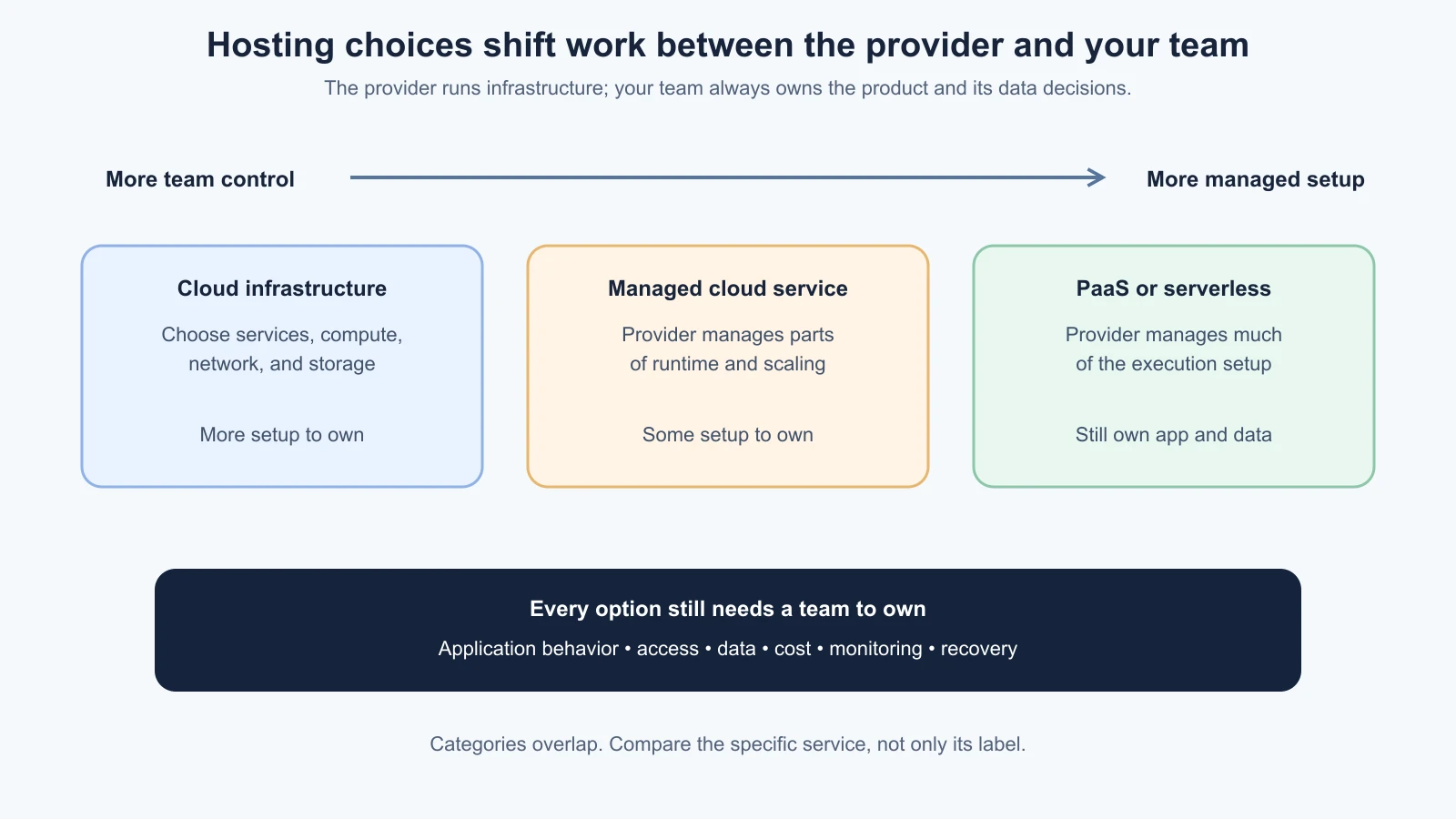
Three broad approaches help you compare the work:
- Cloud provider services: AWS, Microsoft Azure, and Google Cloud offer infrastructure and managed services at different levels. You can choose relatively guided products or configure lower-level compute, networking, and storage. The team has many options, but must understand the services it combines.
- Serverless platforms: services such as Vercel Functions, Cloudflare Workers, and Google Cloud Run let you deploy code without managing a server for each app in the traditional way. The provider manages much of the execution infrastructure, while your team still manages code, configuration, data, access, runtime limits, and costs. “Serverless” does not mean that no servers exist or that there is no operations work.
- Platform as a service (PaaS): Render, Railway, and DigitalOcean App Platform provide a managed path for deploying application services from source code or containers. The platform handles more of the build and runtime setup than a raw virtual machine. You still choose regions and service sizes, configure connected services, watch usage, and plan for the platform's specific limits.
These labels are useful but not perfectly separate. A cloud provider may offer PaaS and serverless products. A deployment platform can rely on cloud infrastructure underneath. Compare the actual service you would use, not only the category in a marketing page.
Compare the work your team must own
Before comparing monthly prices, list the work needed to keep the app reliable and safe. A managed service may handle the host operating system, runtime patching, or scaling. It does not automatically decide whether the request flow is correct, whether a database backup can be restored, or whether an exposed secret is safe.
For each candidate, find out who owns:
- Building the app and selecting a compatible runtime or container.
- Applying operating system, runtime, and dependency security updates.
- Setting environment variables and access permissions.
- Connecting the database, file storage, email, and authentication service.
- Scaling when traffic or background work increases.
- Checking logs, alerts, and health when the app is unavailable.
- Backing up data and practicing a restore.
- Handling a failed deployment and returning to a known working version.
A service can make a task easier without taking full responsibility for it. A managed database may handle backups, but your team still needs to know its retention, export, access rules, and restore steps. A platform may redeploy a service from Git, but you remain responsible for code review and for understanding any migration that runs during deployment.
For a product with one small team, reducing operational work may matter more than fine-grained infrastructure control. A team that already has cloud operations skills, existing contracts, or required integrations may prefer a larger cloud provider. Neither condition guarantees that the choice is suitable. Check the application framework, services, data flow, region, and team skills together.
Estimate the cost shape, not a provider headline
Hosting costs can include compute, storage, databases, build minutes, requests, bandwidth, logs, support, domains, backups, and paid add-ons. A free allowance or a low starting price does not show what a production workload will cost. Provider prices, plan names, included usage, and limits change. The official pricing pages and calculators were checked on 4 November 2026; use the current pages for a real estimate and enter your expected workload.
The bill often follows one or more of these patterns:
| Cost shape | What can drive it | Questions to estimate |
|---|---|---|
| Reserved or always-on capacity | A VM or service runs continuously, even when few users visit | What instance size and count stay on? Are preview and background services also running? |
| Metered compute | CPU, memory, instance time, or function execution | What does the app do per request? Does it wait on another service? What resources are provisioned while waiting? |
| Request or usage volume | Requests, function invocations, jobs, and database operations | What volume is plausible, and what happens during a spike or retry loop? |
| Storage and transfer | Database size, file uploads, backups, logs, and outbound data | How quickly does data grow? Does data leave the provider or region? |
| Managed extras | Database, identity, analytics, network, support, or security products | Which capabilities are separate billable services? Which are included at the selected tier? |
A fixed monthly VM can be easier to predict while it runs continuously, but it may incur a cost when idle. Usage-based compute can fit intermittent work, yet the bill depends on runtime behavior and other services. “Pay per request” does not mean the whole application is request-only: a database, storage bucket, network transfer, and logs may have separate charges. Check how previews, test databases, and unused services affect the estimate too.
Set a budget and usage alerts where the provider supports them. Understand whether a cap merely sends a warning or can pause workloads. A hard stop might prevent extra charges but also make the app unavailable. Make this trade explicit. For cost-sensitive products, record who watches usage and what action they take if it grows faster than expected.
Check where requests and data will run
A region is a provider's geographic area for running services and storing data. A data residency requirement may specify where particular information must be stored or processed. These are related but not identical questions. A product might store a database in one region while serving static files globally, sending logs to another service, or calling an external API in a different location. Understand the complete data path before making a residency claim.
For performance, place the app's dynamic compute reasonably close to the database it calls, not only close to the person viewing the page. If the application makes several round trips to a distant database, a function running close to the user may still feel slow. For data location, verify the regions supported by the exact app, database, backup, log, and identity services you plan to use. The provider brand alone does not guarantee that every related service runs in the region you need.
For ToolShelf, imagine that the team has neighbours in one city and uses a managed database in a particular region. It could shortlist an app host with compute near that database and confirm where backups are stored. If the app later serves several countries, the team can revisit latency and data flow. This is a fictional decision exercise, not a claim about actual ToolShelf users or an approved data location.
If law, contract, or company policy constrains data location, ask a qualified privacy or security specialist to translate the requirement into specific services and data flows. This lesson is not legal advice. Also check network egress, database availability, and any cross-region traffic charges. Moving only the web service does not move the data or all its copies.
Understand portability before you depend on a host
Portability is how practical it is to run the app and its data somewhere else. Source code access is only one piece. A project can be easy to export but difficult to move if it depends on proprietary database behavior, identity services, storage APIs, scheduled jobs, or configuration that exists only in one dashboard.
Check the exit path in parts:
- Code and runtime: Can you get the code or container image? Does the other host support the framework features and runtime it uses?
- Data: Can you export a complete database and files in a usable format? Have you tested importing or restoring them somewhere else?
- Identity: Can accounts and credentials move, or will users need a migration or reset?
- Configuration: Can you describe environment settings, domains, network rules, and deployment steps outside a provider dashboard?
- Operations: Can another person deploy, monitor, restore, and troubleshoot the system using available documentation?
- Exit cost: What downtime, engineering time, rework, contract changes, or user communication would a move require?
You do not need to build for every possible future host. That can slow down a first release without addressing a real risk. Decide which dependencies are acceptable and write down how you would leave if the business, region, cost, or product needs change. A small restore or export exercise can test an assumption much better than “we can migrate later.”
Compare representative services neutrally
The providers below are examples named in the roadmap. This table describes common differences in the decision, not every feature or plan. The documented service shapes, regions, and billing models can change, and each provider has multiple products. Do not treat “AWS,” “Azure,” or “Google Cloud” as a single hosting option. Choose a specific service, then read its current documentation.
| Approach and examples | What the provider may manage | What the team still needs to check | Cost and portability questions |
|---|---|---|---|
| Cloud provider: AWS, Azure, Google Cloud | Choices range from virtual machines with broad control to managed app or container services | Which service and runtime fit? Who patches, configures networking, restores data, and monitors it? | Which resources stay running? What do data transfer, managed databases, logs, and regional differences add? Can the app use standard runtimes and exportable data? |
| Serverless: Vercel, Cloudflare, Google Cloud Run | Function or container execution, scaling, and some deployment steps | Which code paths and framework features are supported? Where does compute run relative to the database? What execution limits apply? | Is billing based on requests, active compute, provisioned memory, or combinations? How do storage and network charges behave? Can you move code and data? |
| PaaS: Render, Railway, DigitalOcean App Platform | Build, deploy, service runtime, and some scaling tasks | Which service types, regions, persistent storage options, and team controls are available? How do database, worker, and static components fit? | Is there an always-on component, a usage meter, or both? How are bandwidth, replicas, databases, and previews charged? What must be recreated or migrated to change regions or hosts? |
The examples in a category do not have identical capabilities. For example, Google's Cloud Run is a regional managed container service with costs based on resource use and configuration. Azure App Service ties app compute and plan features to an App Service plan and region. AWS offers several levels such as Lightsail, Elastic Beanstalk, and EC2, with different balances of fixed pricing, managed deployment, and control. Vercel Functions run server-side code in configured regions with usage-based billing details. Cloudflare Workers has its own runtime limits and placement options. Render, Railway, and DigitalOcean App Platform each have distinct service models, region choices, and billing units. Use the links below to compare the service you actually plan to use.
Fill in a decision table
Start with requirements that are mandatory. If an option cannot run your app's required feature or meet an approved data-location constraint, do not rescue it with a high score in an unrelated category. Then compare the remaining choices with the team that will build and operate the product.
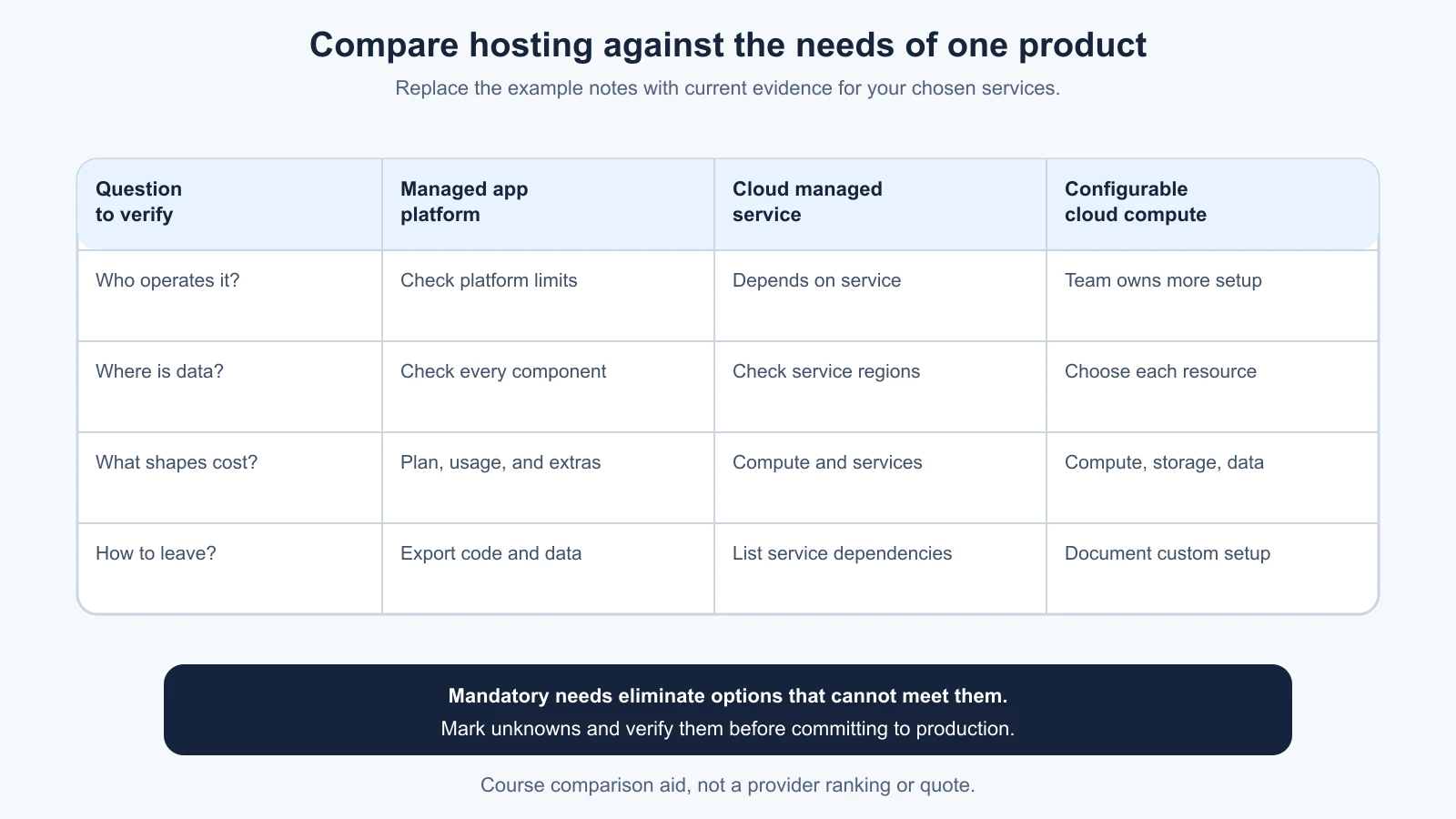
Here is a fictional ToolShelf shortlist. It leaves provider-specific facts blank because those facts must be checked for the actual project and date:
| Question | Managed application platform | Cloud provider managed service | More configurable cloud compute |
|---|---|---|---|
| Does it support the app's required runtime and background work? | Verify service and runtime limits | Verify selected service and framework features | Team configures compatible runtime or container |
| Who handles operating system and runtime work? | Check platform responsibility and exclusions | Depends on the selected managed service | Team owns more configuration and maintenance |
| Can compute be close to the chosen database? | Check the exact regions for both services | Check regional availability and network path | Select compatible compute and data regions |
| What shapes the bill? | Instance size, running time, databases, bandwidth, and plan terms | Metered resources and separately priced services | Compute, storage, network, and additional services |
| Can the team estimate and limit spend? | Check usage view, alerts, and limits | Use current calculator and budget controls | Model each resource and configure alerts or controls |
| What is the exit path? | Export code and data; list platform-specific services | Identify service dependencies and export formats | More control, but document the custom setup and recovery |
| Who can operate it next month? | Name an owner for deploys and platform limits | Name someone who understands the chosen cloud services | Confirm the team has the required infrastructure skills |
This table is a comparison aid, not a benchmark. Replace each entry with evidence from official documentation, a small proof of deployment, and the team's real constraints. If you use an AI assistant to fill a first draft, ask it to include a source and “not yet verified” for any claim it cannot support. Read the source yourself before treating the row as settled.
Copy and adapt this decision note:
1# Deployment decision
2Product and decision owner:
3Date and review date:
4
5## Product needs
6- Main application runtime and framework features:
7- User locations and expected traffic pattern:
8- Data and approved regions:
9- Availability, recovery, and support needs:
10
11## Team constraints
12- Skills available to build and operate it:
13- Existing provider accounts or required integrations:
14- Monthly budget boundary and alert owner:
15
16## Options reviewed
17| Specific service | Evidence and current docs | Gaps or costs to verify | Owner |
18| --- | --- | --- | --- |
19|  |  |  |  |
20
21## Decision
22Chosen service and why it meets the must-have needs:
23What the provider manages:
24What our team still owns:
25
26## Data and exit plan
27Where app, database, backups, logs, and files run:
28How we export and restore code and data:
29What would make us revisit this choice:
Keep the choice provisional until the app has been deployed to a non-production environment and the team has checked the main behavior, data connection, and actual usage view. A small deployment can reveal a missing runtime feature or an unexpected platform-specific dependency before users rely on it. Before going live, the team will also need a launch-readiness checklist for domain, secrets, data, and recovery.
Current provider documentation
The following official documentation was checked on 4 November 2026. Product names, service features, regions, plan terms, and prices change. These links are starting points for verification, not a complete evaluation:
- AWS decision guide for Lightsail, Elastic Beanstalk, or EC2 compares managed deployment with more configurable compute. Use the AWS Pricing Calculator with a selected region and workload.
- Azure App Service plans explains how plan resources, operating system, region, and pricing tier shape the service. Azure's cost guide points to regional cost estimation.
- Google Cloud Run overview describes its container runtime; its locations guide explains regional deployment considerations, and pricing describes usage and region-based pricing.
- Vercel Functions describes server-side execution and regions; check current function pricing and limits.
- Cloudflare Workers platform links to current runtime limits and pricing; its placement guide describes execution placement.
- Render service types, regions, and compute plans show how services, location, and instance resources fit together.
- Railway regions, pricing plans, and cost control explain current regional choices, usage charges, and controls.
- DigitalOcean App Platform documentation describes its managed app components. Check its current pricing and region availability for the required service type.
Mistakes beginners make
- Choosing by brand before naming a service. AWS, Azure, and Google Cloud each contain options with very different operating responsibilities.
- Assuming managed means no work. The team still owns application behavior, data access, configuration, cost review, and recovery decisions.
- Treating serverless as automatically free or simpler. Check runtime limits, service dependencies, and how requests, compute, storage, and transfer are billed.
- Comparing only the advertised monthly price. Include databases, backups, bandwidth, logs, previews, support, and staff time.
- Picking a region based only on user distance. Check where the database and other dependencies run, and which services process or store the data.
- Assuming a service can move regions without effort. Verify provider procedures and plan how to move persistent data and configuration.
- Calling source-code access a complete exit plan. Include data, identity, files, environment settings, and the people who can operate the replacement.
- Trying to support every possible host from day one. Record the dependencies that matter and make a practical migration plan for the risks you actually have.
- Using an AI comparison without reading the citations. Check the exact current service, region, pricing unit, and limit in its official documentation.
Recap and try it yourself
Choose a deployment home by comparing the service your app needs, the work your team must operate, the cost model, region and data path, and the exit effort. Cloud providers, serverless platforms, and PaaS hosts can overlap, so compare specific services. Verify current features and pricing with official documentation, then test the choice with a small non-production deployment.
Try it: use your first-version scope and list one must-have runtime feature, one operating constraint, one budget boundary, one region or data-location need, and one portability concern. Fill in the decision table for one cloud service, one serverless service, and one PaaS service. Mark anything you could not verify, then name the smallest safe deployment experiment that would resolve the most important unknown.