
Vibe Coding course · lesson 15 of 26
- 1What Is Vibe Coding? A Beginner's Guide
- 2The Vibe Coder Mindset: Build Small, Check Often
- 3Choosing Your Vibe Coding Tool: A Beginner's Guide
- 4Set Up Your Workspace for Vibe Coding
- 5Your First Vibe-Coded App in 30 Minutes
- 6From Idea to MVP: Plan a Small First Version
- 7Spec-Driven Development: Give AI a Clear Plan to Build From
- 8Mockups and Examples as Input: Show AI What You Mean
- 9Choose a Tech Stack: Pick Tools You Can Keep Using
- 10Prompts That Build Things: Give AI a Clear Task
- 11Context Documents: Give AI Lasting Project Instructions
- 12Managing Context and Sessions: Keep AI on the Right Task
- 13Set Standards Early and Review AI Output
- 14Build the Skeleton: Start the BookmarkBox App
- 15Add Data and a Database: Save Real Bookmarks
- 16Add Accounts Safely: Sign In and Protect Each User's Data
- 17Design and Polish: Improve the App One Pass at a Time
- 18Version Control with AI: Keep a Safe History of Your Work
- 19Debugging with AI: Find the Cause Before You Fix It
- 20Test by Default: Make Sure Each Feature Keeps Working
- 21Refactor and Keep Your Code Healthy
- 22Security for Vibe Coders: Protect Your App and Its Users
- 23Deploy Your App: Put BookmarkBox Online
- 24Monitor and Maintain Your App After Launch
- 25Where Vibe Coding Stops: Know When to Change Your Approach
- 26Capstone: Ship a Project from Idea to Production
After this lesson, you will be able to describe how BookmarkBox sends data to a database, review a simple table design and keep its connection details out of browser code. We will replace the temporary placeholder list with bookmarks that remain after the app restarts.
In Build the skeleton, you created the first BookmarkBox page. Now we will give saved links a persistent home. We will use Postgres, as planned in Choose a tech stack, and add accounts in the next lesson.
What does a database do?
A database stores information so an app can find and change it later. Unlike a temporary list kept only in a page's memory, database records remain after you refresh or restart the app.
Postgres is a relational database. It organizes information in tables, which are a bit like spreadsheets: each row is one record, and each column stores one kind of value. A database schema describes the tables, columns, types and rules. For BookmarkBox's first data step, one table can hold saved links:
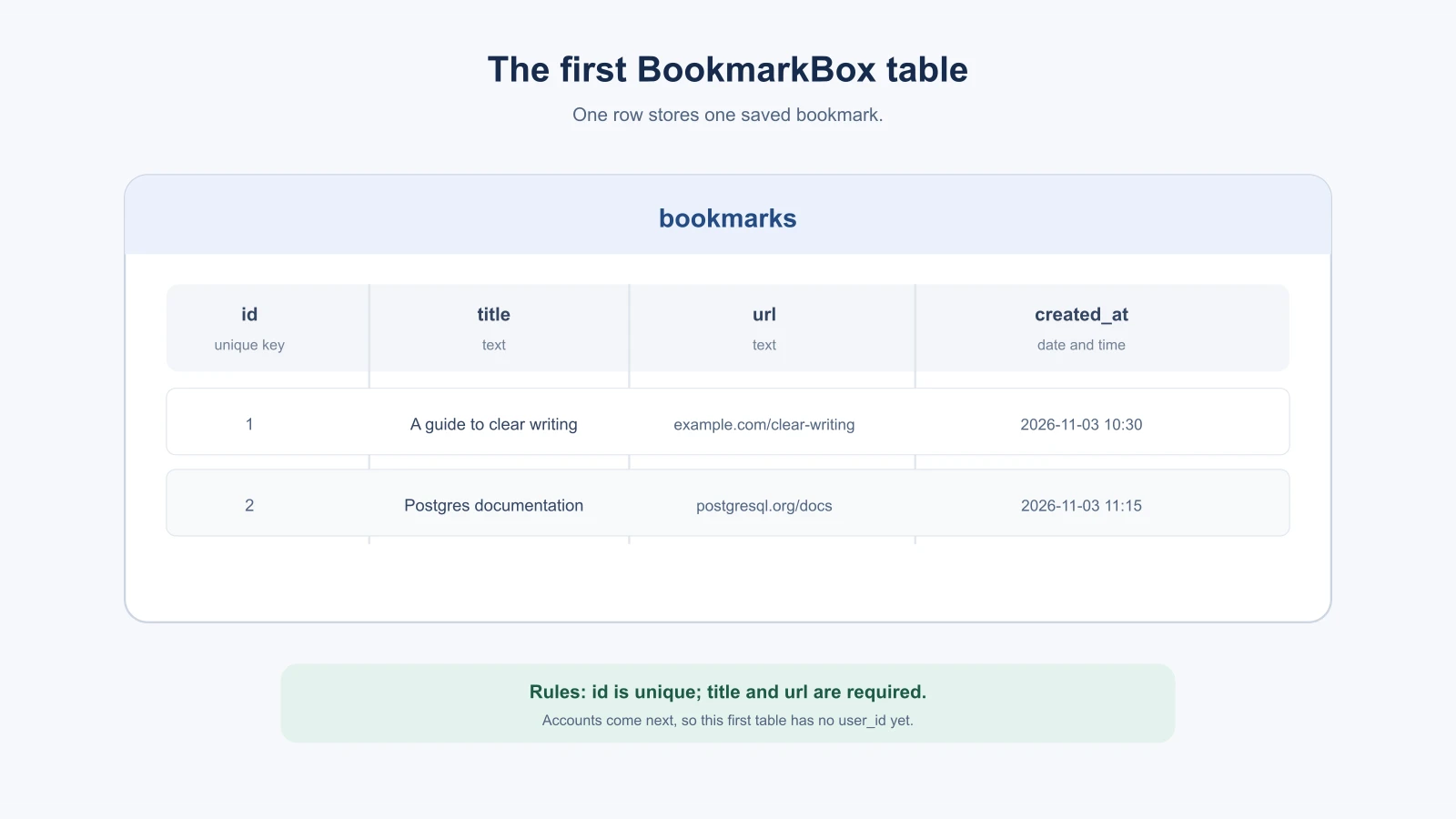
| Column | Example | Purpose |
|---|---|---|
id | 42 | A unique value the app can use to refer to this bookmark |
title | A guide to clear writing | The label shown in the list |
url | https://example.com/clear-writing | The address to open |
created_at | A date and time | When the bookmark was added |
An ID is a unique identifier for a record. The table can require a title and URL, and the database can fill in the ID and creation time. We have not added a user_id column yet because the app does not have accounts. The next lesson will connect bookmarks to their owner so different people can have private lists.
Create, read, update and delete
You will often hear database work summarized as CRUD: create, read, update and delete.
- Create: Save a new bookmark from the form.
- Read: Load saved bookmarks to show in the list.
- Update: Change an existing bookmark, such as its title.
- Delete: Remove a bookmark the person no longer wants.
The first BookmarkBox feature needs create, read and delete. The plan includes update as a useful database operation, though it does not need to be a new screen in this first slice. Ask the AI to explain how each operation maps to the form or control in your app. For example, a delete button should identify which record to remove, not simply empty the whole table.
Keep the database on the server
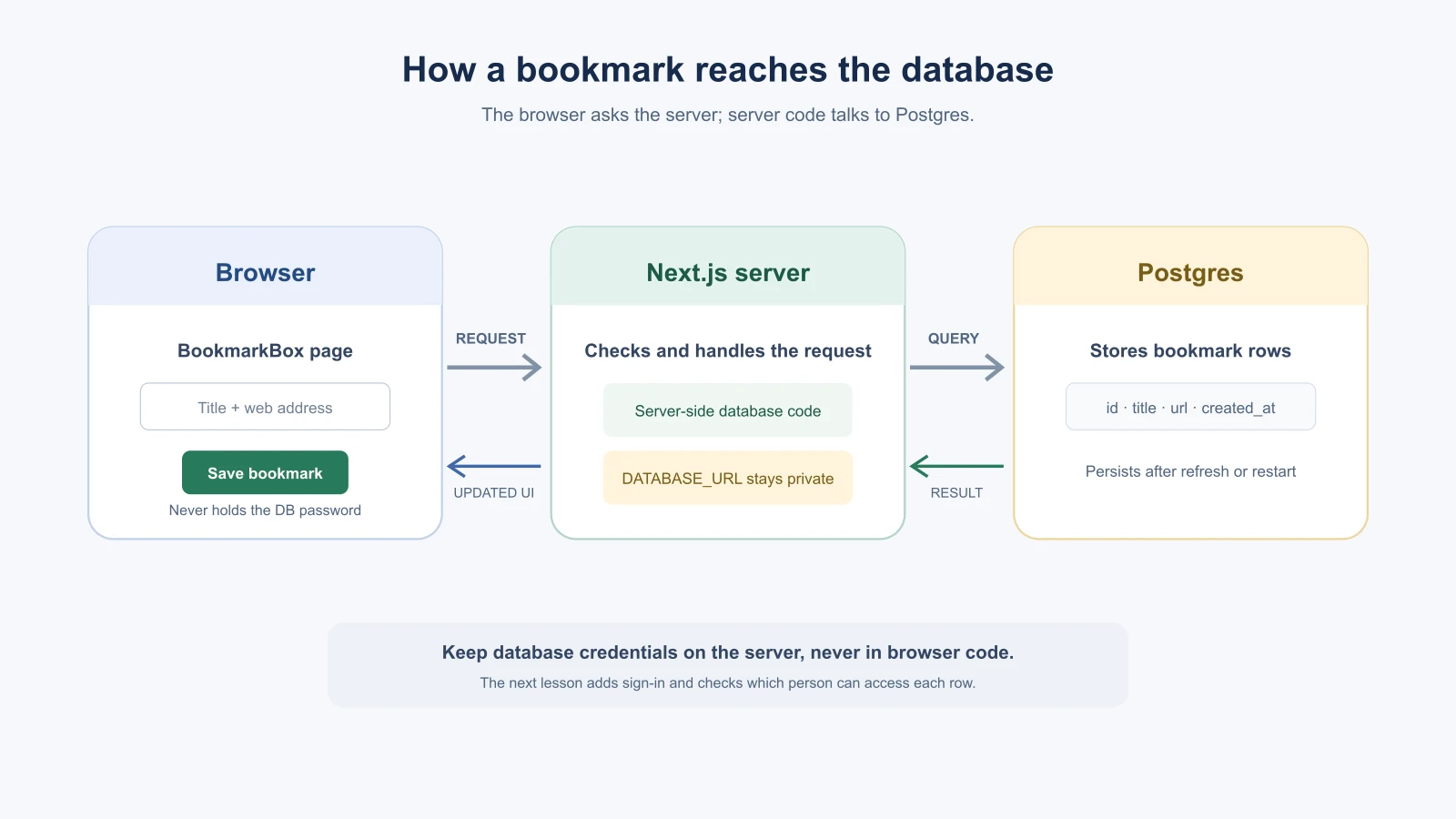
The browser should send a request to your Next.js app. Server-side code uses the database client to make the change, then returns the information the page needs. The database password and connection string belong on the server; do not connect to Postgres directly from a browser component.
An environment variable is a value supplied to the app outside its source code. The database connection is commonly stored in a variable named DATABASE_URL. In local development it may live in .env.local; a hosting provider can store a separate value for development, preview and production. Keep the real value private and out of Git. Next.js documents that its starter template ignores .env files and that variables prefixed with NEXT_PUBLIC_ are bundled for the browser. Never name the database password NEXT_PUBLIC_DATABASE_URL.
Vercel currently connects Postgres through Marketplace providers such as Neon, Supabase or AWS Aurora, which can add connection variables to a project. The old Vercel Postgres product is no longer available for new projects. (Vercel Postgres integrations, Next.js environment variables). The provider and database tooling can change, so check current setup instructions when you connect one.
Ask AI to inspect before it connects
There are several ways to connect a Next.js app to Postgres, including a database client or an ORM (object-relational mapper), a library that lets code work with database records through typed models and operations. The course has chosen Postgres but not a specific ORM. Ask the AI to inspect the existing project, compare a small number of suitable options using current official docs, and explain the tradeoffs before installing anything.
Use a prompt like this:
1Read the BookmarkBox spec and project instructions. Inspect the current Next.js project and explain how its server-side code is organized.
2
3We need to store bookmarks in Postgres. Propose a simple schema with an ID, title, URL and creation time. Accounts are out of scope for this step, so do not add user authentication or a user ID yet.
4
5Before editing, recommend a database client or ORM that fits this existing project. Check current official documentation and explain the files, packages, environment variables and schema changes it would require. Do not install packages, create a database or edit files until I review the plan.
Review the proposal. Check that the AI has not introduced a second database, guessed at credentials or added authentication early. Once you approve the approach, implement one operation at a time and read the diff after each step.
Add sample records and check the behavior
Seed data is a small set of example records used to populate a database during development. Add a few fictional bookmarks so you can see how the list looks with short and long titles. Keep sample data separate from real records, and make sure reset or seed commands cannot erase a database you care about.
Check the feature against its spec: save a valid bookmark and confirm it appears; refresh the page and confirm it remains; try missing values and confirm the app gives a clear message; remove one record and confirm only that bookmark disappears. A focused automated test can check that a bookmark created through the app is returned by the read operation. Ask the AI to show what the test proves and run the project's documented checks when you build this feature.
Next.js supports database reads in server-rendered components and server-side mutations through server functions. Its docs also remind you to authenticate and authorize data access. For this lesson, keep the app local or in a private preview; the next lesson adds accounts and per-person ownership. See the official Next.js data fetching and data mutation guides for the current patterns.
Reading a schema the AI proposes
When an AI proposes a database design, it may show it as SQL, the language many databases use. You do not need to write SQL to review it. Here is an illustrative version of the BookmarkBox table. Your tool may write it differently.
1CREATE TABLE bookmarks (
2  id         BIGINT GENERATED ALWAYS AS IDENTITY PRIMARY KEY,
3  title      TEXT NOT NULL,
4  url        TEXT NOT NULL,
5  created_at TIMESTAMPTZ NOT NULL DEFAULT now()
6);
Read it line by line:
CREATE TABLE bookmarksmakes a table namedbookmarks.id ... PRIMARY KEYis a unique number the database assigns to each row.GENERATED ALWAYS AS IDENTITYmeans the database fills it in for you.title TEXT NOT NULLis a text column that cannot be left empty.url TEXT NOT NULLis the same for the address.created_at TIMESTAMPTZ NOT NULL DEFAULT now()stores the date and time with a time zone, and fills in the current time when a row is added.
Compare each line with the spec. Does the table store only what this feature needs? Are the required fields marked as required? Is there anything surprising, such as a column for a feature you did not plan? Ask the AI to explain any line you cannot match to the spec.
Migrations in plain language
A migration is a saved, ordered change to the structure of a database. Instead of changing tables by hand, you write the change as a file, and a tool applies it. The same change can then be applied to your local database, a test database and the production database in the same way.
Different libraries handle migrations differently, so use the instructions for the tool your project chooses. A few habits apply to all of them:
- Ask to see the migration before it runs. Read what it changes.
- Try it on a local or test database first.
- Be careful with changes that remove data, such as dropping a column.
- Take a backup before changing a production database, and know how you would restore it.
A migration that goes wrong on a real database can be hard to undo, so this is one place to slow down and ask an experienced developer to look.
Mistakes beginners make
- Keeping data only in page state. It disappears when the page reloads; use the database for persistent records.
- Putting a database password in client code. Keep connection values server-side and out of committed files.
- Adding columns for features that are not planned yet. Start with the data this feature actually needs.
- Trusting the AI's schema without review. Ask what each column and rule does, and compare it to the spec.
- Using real user data as seed data. Use fictional examples while developing.
- Deleting rows too broadly. Verify an update or delete targets the intended record.
Recap and try it yourself
A database table stores records in rows with defined columns. The app should read and change those records on the server, using a private connection value supplied through the environment. Start with a small schema, inspect the AI's proposal and check each operation against the feature spec.
Try it: draw a table for one feature in your own app. Give it three columns, one unique ID and one rule that should always be true. Ask an AI to explain the schema and suggest sample records without changing your project. In Add accounts safely, you will connect each bookmark to the person who owns it.