
This is the last lesson, and it has no new commands. Instead it puts everything you have learned to work on three jobs that fill most developers' weeks: building a feature, fixing a bug, and migrating a lot of code from an old pattern to a new one. For each, you will see the order of the steps, the prompts to type, and the check that tells you the job is really done. The project in these examples is an imagined web app, so swap in your own file names.
The rhythm behind every task
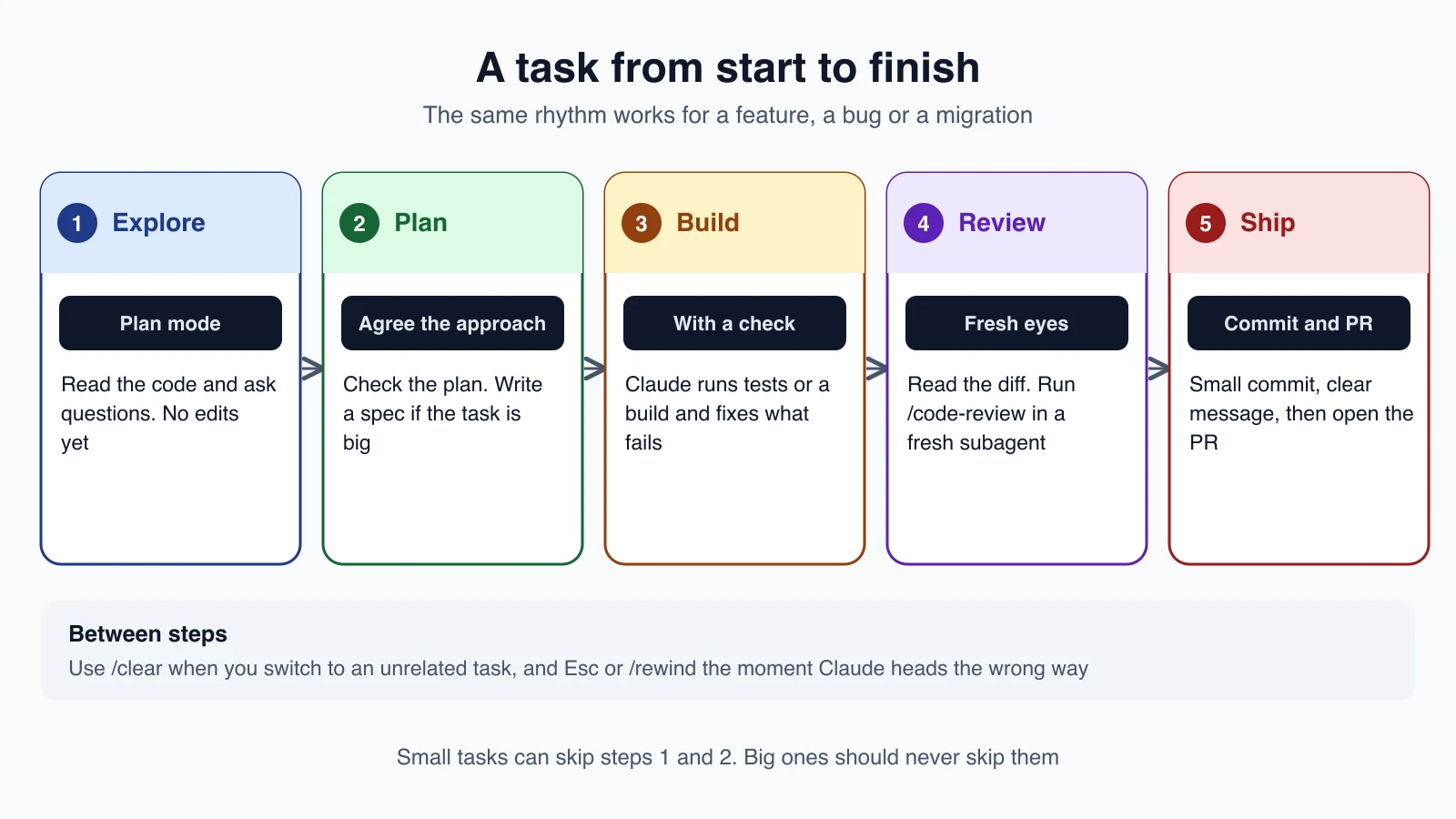
The official best-practices guide boils good sessions down to a few ideas, and all three walkthroughs use them:
- Tell Claude what it cannot see. Your conventions, your preferences between two approaches, the command that runs the tests.
- Give it a check to run. Something that answers pass or fail, so Claude can fix its own mistakes without you watching. Ask for evidence, meaning the command it ran and its output.
- Look before you build. Use plan mode (lesson 7) when the change touches several files, when you are unsure of the approach, or when the code is unfamiliar. For a small fix you could describe in one sentence, just do it.
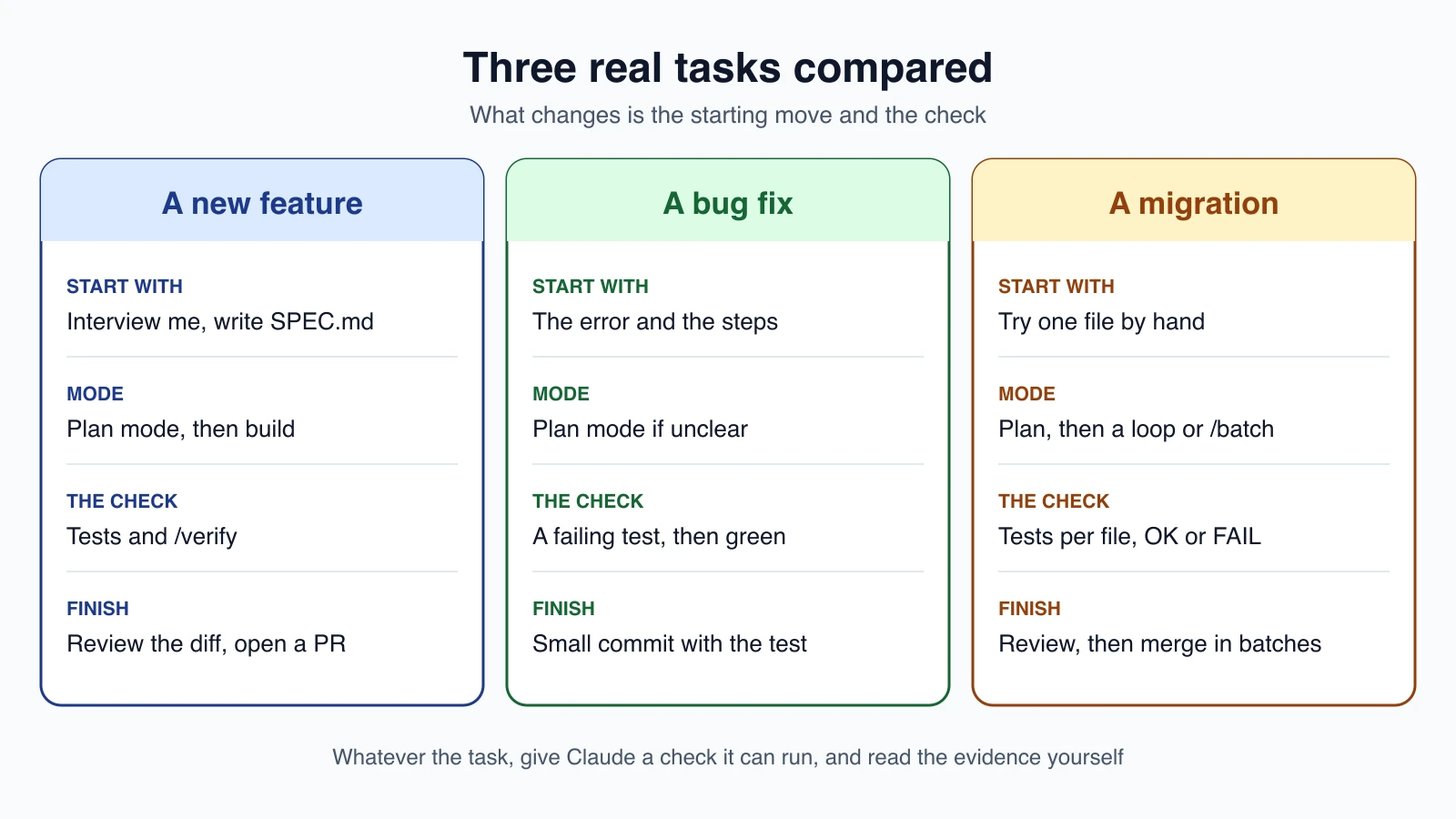
The three tasks differ mainly in how they start and what the check is.
Walkthrough 1: build a feature
The job. Add rate limiting to your public API. You have only a rough idea of what you want.
Step 1: let Claude interview you
When you do not know what you want yet, you do not need to work it all out before you type. Ask Claude to question you:
1I want to add rate limiting to the public API but haven't thought it through yet. Interview me until you could write the spec, then write it to SPEC.md.Claude comes back with questions about the parts you have not decided: limits per user or per key, what happens to requests over the limit, what is out of scope. Answer them. When the answers add up, it writes SPEC.md.
Step 2: start fresh and plan
Run /clear, or start a new session, so the build begins with a clean context and a written definition of done. Then switch to plan mode with Shift + Tab:
1Read @SPEC.md and the existing middleware in @src/middleware. Propose a plan to build the rate limiter. Follow the patterns already used there. List the files you will change and the tests you will add.Read the plan properly. This is the cheapest moment to fix a wrong turn, because nothing has been edited yet. Reply with changes until the plan is right, then approve it.
Step 3: build with a check
Name the check in your prompt, so Claude can loop on its own:
1Implement the plan. After each step run the middleware tests, and keep going until they pass. Show me the test output at the end.If your project has a standard command for tests, it is worth having in CLAUDE.md (lesson 12), so you never have to type it.
Step 4: see it working
Tests can pass while the feature is still broken. Run /verify, which has Claude build and run the app and look at the result, or try it yourself. Then ask for a review from something that did not write the code:
1/code-reviewBecause /code-review runs in a fresh subagent (lesson 24), it is not swayed by the reasoning that produced the code. If you wrote a spec, check against it, and ask for gaps that affect correctness while skipping style.
Step 5: ship
1commit this in small logical commits, then create a pr that links the specRead the pull request description before you submit it, and ask Claude to point out the risks (lesson 21).
Walkthrough 2: fix a bug
The job. Users report that logging in fails after the session times out.
Step 1: describe the symptom, not your guess
Compare two ways of asking. "Fix the login bug" leaves Claude to guess. This version gives it the symptom, the likely area, and a way to know it worked:
1users report login fails after the session times out. look at token refresh in src/auth/, write a failing test that reproduces it, then fix itThe key phrase is "write a failing test that reproduces it". A test that fails for the right reason proves Claude has found the real problem, and the same test proves the fix afterward.
Step 2: when the cause is unclear, go slower
If you cannot say where the bug lives, do not let Claude start editing. Use plan mode, or send the investigation to a subagent so your main conversation stays clean:
1use a subagent to investigate how our auth system handles token refresh, and report what you findTell Claude the command that reproduces the problem, the exact error, and whether it happens every time or only sometimes. For a bug in code you did not write, or a flaky test, raise the effort with /effort high (lesson 5).
Step 3: read the evidence
Expect to see the failing test, a small change, and the test passing. Before you accept it, check that the new test would really have failed without the fix. Ask for the output:
1show me the test failing on the old code and passing nowStep 4: ship it small
A bug fix should be a small commit that includes the test. If Claude changed other things along the way, ask it to take them out. Small fixes are easy to review and easy to revert.
Walkthrough 3: run a migration
The job. Move 120 files from an old logging helper to a new one. This is repetitive work with the same change in each file, which is exactly where Claude Code saves the most time, and where a careless approach goes wrong at scale.
Step 1: plan and try one file by hand
Use plan mode to find every file that uses the old helper and propose the approach. Then do one file together and look at it closely:
1find every file that uses the old logger. Then migrate src/billing/invoice.ts to the new logger API, run its tests, and show me the diff.Get this one file exactly right. Everything that follows copies its pattern.
Step 2: choose how to fan out
You have three options, from lightest to heaviest:
| Option | Use it when |
|---|---|
| Keep going in one session | A few files, in small batches |
| A script that runs Claude on each file | Many files, with the same change in each |
/batch | A big mechanical change across the codebase |
For the script, put the file names in a list and run Claude non-interactively (lesson 22). This is the pattern from the official guide:
1for file in $(cat files.txt); do
2  claude --bare -p "Migrate $file to the new logger API and commit. Reply OK or FAIL." \
3    --allowedTools "Read,Edit,Bash(git add *),Bash(git commit *)" \
4    --permission-mode dontAsk \
5    --max-turns 20
6done
Notice the guardrails: a short list of pre-approved tools, dontAsk so anything else is refused, a turn limit, and a plain OK or FAIL answer you can scan. The guide's advice is to try it on three files first, see what goes wrong, fix the prompt, then run the rest.
For one large mechanical change, you can type something like this:
1/batch migrate every handler to the v2 response helpersIt splits the work into 5 to 30 units and shows you the plan. After you approve it, each unit runs in its own worktree and opens its own pull request (lesson 21).
Step 4: verify in batches
Run the full test suite after every batch, not only at the end. When a batch fails, you know which files caused it. Use /code-review on a sample, and merge in groups. Anything that touches production, such as a database migration, deserves a person's approval at the end, because that step is hard to undo.
A checklist for any task
Before you call a job done, run through this list:
- Did I tell Claude what it could not see, such as conventions and the test command?
- Was there a check Claude could run, and did I read the output rather than only "all tests pass"?
- Did I use plan mode for anything big or unfamiliar?
- Did someone other than the author look at the diff, whether
/code-reviewor a person? - Is the commit small, with a clear message?
- Did I
/clearbefore starting something unrelated?
What to do next
You now have the full toolbox. A few suggestions for what comes after this course:
- Make your project setup a habit. A short
CLAUDE.md, a.claude/settings.jsonwith your permission rules, and one or two skills for jobs you repeat (lessons 12, 14 and 16). - Grow slowly. Add a hook, a subagent or an MCP server only when you feel a real need for it.
- Keep the official documentation open. Claude Code changes quickly, and the documentation is the source of truth. Claude can also answer questions about itself, so ask it.
- Review before you trust. However good the results get, you are still the one who approves the merge.
Mistakes beginners make
- Starting big tasks with no plan. Ten minutes in plan mode saves an hour of rework.
- Having no check. Without something that passes or fails, you are the test suite.
- Trusting "all tests pass" on its own. Ask to see the command and its output.
- Letting one session do everything. Clear between unrelated tasks, and use a fresh session to build from a spec.
- Running a migration on every file at once. Try one file, then three, then the rest.
- Writing a fix with no test. The failing test is what proves the bug is gone.
Quick recap
- Every task follows one rhythm: explore, plan, build with a check, review, then ship.
- For a feature, let Claude interview you into a
SPEC.md, plan, then build against tests and/verify. - For a bug, give the symptom, ask for a failing test first, then a small fix.
- For a migration, perfect one file, try three, then fan out with a script or
/batch, with limits and tests. - Whatever you do, give Claude a check to run, read the evidence, and approve the merge yourself.
Try it yourself
Pick a small real task in one of your own projects, for example a bug you have been putting off. Use the bug-fix walkthrough: describe the symptom, ask for a failing test first, let Claude fix it, then read the diff and the test output before you commit. Finally, write down one habit from this course that you will keep, such as planning before big changes or clearing between tasks.
That is the end of the course. You now know how Claude Code works, how to set it up, how to extend it, how to run it safely and at scale, and how to apply it to real work. Keep building.