
Prompt Engineering course · lesson 4 of 26
- 1What Is Prompt Engineering? A Practical Beginner's Guide
- 2How a Model Reads Your Prompt: Tokens and Context
- 3Choosing a Model and Reading Its Documentation
- 4Controlling Model Output: Sampling and Limits
- 5Your First Prompt Workflow: Test One Change at a Time
- 6Be Clear and Direct: Give the Model a Usable Task
- 7System, Role, and Context Prompts: Give Instructions Their Place
- 8Zero-Shot, One-Shot, and Few-Shot Prompting
- 9Structure Prompts with Delimiters, Tags, and Templates
- 10Structured Output: Get Answers You Can Parse and Check
- 11Prompting with Long Documents and Large Context
- 12Prompt Recipes for Ten Common Jobs
- 13Chain-of-Thought Prompts and Thinking Models
- 14Step-Back Prompting and Prompt Chaining
- 15Self-Consistency, Tree of Thoughts, and ReAct
- 16Self-Evaluation and Reliability Checks
- 17Define Success and Build Test Cases
- 18Compare Prompts with Graders
- 19Debug a Failing Prompt
- 20Automatic Prompt Engineering
- 21Version and Document Your Prompts
- 22Hallucinations and Grounding
- 23Bias and Debiasing Prompts
- 24Prompt Injection and Safe Prompting
- 25Prompts in Production
- 26Capstone: Build and Test a Prompt Library
By the end of this lesson, you will be able to explain the most common generation settings, choose a sensible first adjustment, and check whether a model supports that setting. We will focus on what the controls do, not on memorizing provider-specific numbers.
In How a model reads your prompt, we saw that a model generates one token at a time. Sampling controls influence how it chooses each next token. Output limits restrict how much it can generate or tell it when to stop. These settings can change the shape and length of an answer. They cannot supply missing facts or guarantee correctness.
Temperature changes how varied the next choice can be
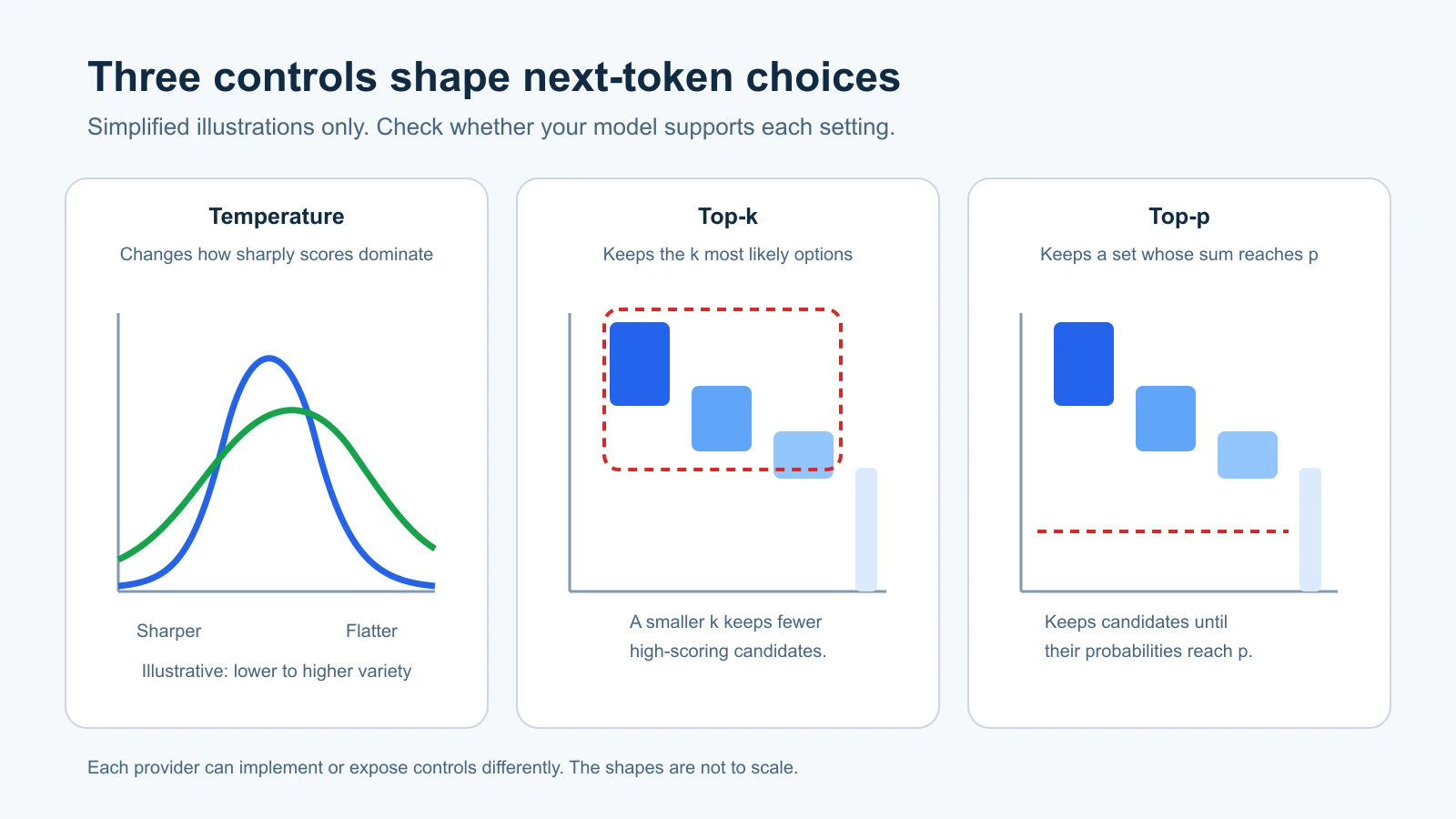
At each step, a model assigns scores to possible next tokens. A temperature setting changes how strongly those scores shape the final selection. In broad terms, lower temperature makes high-scoring choices dominate more, while higher temperature permits more variety among plausible choices.
Imagine asking for a subject line for a routine delivery update. A lower setting may make repeated attempts more similar. A higher setting may produce a wider range of wording. The setting does not decide whether the delivery information is true, and it does not turn a weak prompt into a strong one. It changes token selection, not the facts behind the task.
The picture below is a simplified illustration of how a distribution can look sharper or flatter. It is not a measured graph from a particular model, and a setting such as 0.2 does not have identical behavior across providers. Some models do not let you set temperature at all.
Temperature zero is sometimes described as deterministic. Do not treat it as a promise that the same request always returns identical text. Providers warn that outputs may still vary, and some models reject temperature values other than their default. For example, Anthropic’s Claude Opus 5.5 migration guide tells developers to omit temperature, top-p, and top-k, and says requests that set them return an error on its newest models. Google’s notes for Gemini 3.6 Flash and Gemini 3.5 Flash-Lite say those three settings are deprecated and ignored, and that a future generation may return an HTTP 400 error instead. OpenAI recommends changing either temperature or top-p for its Responses API models, rather than adjusting both together. Check the current guidance for your exact model and endpoint before experimenting.
For many tasks, the best first move is to leave the sampling defaults alone and improve the prompt or evaluation examples. If the task is creative and you want more variety, test a supported sampling change on several inputs. If the task needs a narrow response, clear instructions and an explicit format may help more than lowering temperature.
Top-k and top-p limit the candidate set
Top-k keeps only the k highest-scoring token choices available at each generation step. If k is 5, the model samples from at most five candidates after applying the relevant scoring. A smaller k narrows the options; a larger one leaves more room for alternatives. Providers may omit top-k or use it differently, so verify the model’s parameter reference.
Top-p, also called nucleus sampling, keeps the smallest group of candidates whose cumulative probability reaches a chosen threshold. At top_p 0.9, for example, the set includes candidates until their probabilities together reach about 90 percent. The set can contain only a few candidates when one option is much more likely than the rest, or many candidates when probability is spread out.
Top-k uses a count of candidates; top-p uses their combined probability. Both can narrow possible next tokens. They are not interchangeable, and provider documentation may recommend changing only one sampling control at a time. OpenAI’s guidance says to alter temperature or top-p, not both. Google says its newest Gemini models ignore these fields, and Anthropic’s newest Claude models do not accept them. As of 4 November 2026, then, these controls matter mostly for older models and for other providers.
If your API does not support a control, leaving it out is usually the right choice. Do not copy a value from another provider’s example and assume the same number will mean the same thing on your model.
Token limits control length, not quality
A maximum output token setting puts a ceiling on how many tokens the model may generate for a response. Providers use different names, such as max_output_tokens, maxOutputTokens, or max_tokens. The limit helps prevent unexpectedly long responses and can bound resource use. Set it too low and the model may stop in the middle of a sentence, an item, or a structured response.
The output-token count may include more than the visible words. Some reasoning models use tokens internally before producing the text you see, and those tokens can count toward the request’s output limit. If you ask for a 500-word report, allow enough room for the model’s total generation, not just the final visible text. Check the provider’s definition for the model and API you use.
The token cap is separate from the context window, which limits the combined amount of input and output the model can process for a request. A long prompt can leave less room for a response. A larger output cap cannot make the model’s context window larger. For more detail, revisit How a model reads your prompt.
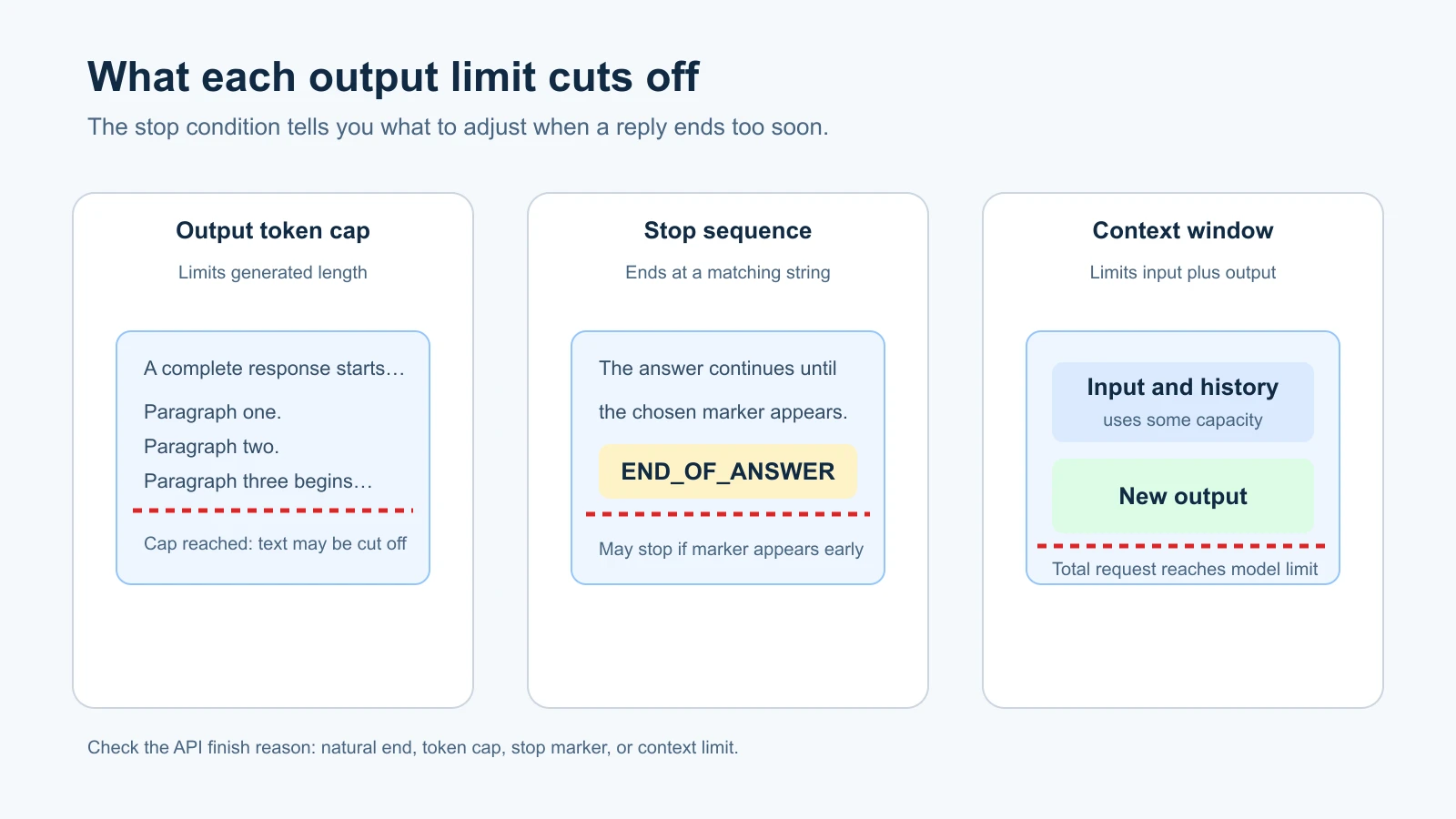
If an answer ends abruptly, inspect the response metadata or finish reason when the API provides it. The model may have reached the token cap, hit a stop sequence, or ended naturally. These outcomes call for different fixes. Raise the output cap if the answer was cut short by the cap and the longer reply is useful. Rewrite or remove a stop sequence if it ended the answer too early. If the model ended naturally, clarify what sections or details the answer needs.
Stop sequences tell generation to end at a marker
A stop sequence is a text string that tells an API to stop generating when the model produces that string. The sequence itself is usually omitted from the returned text. It can help with a controlled format or a completion task where the answer should end at a known boundary.
For example, an application that asks the model to complete only the value after Answer: might use a marker that follows the value. But stop strings can cause accidental truncation. If you choose a common word such as END, the model could include it naturally before it has finished. Use a marker that fits the task, and test it against outputs where the marker could appear as ordinary content.
Stop-sequence support and limits vary. Anthropic’s Messages API accepts custom stop_sequences and reports when one ended generation. Google’s Gemini API uses stopSequences. OpenAI’s newer Responses API has different controls from its Chat Completions and legacy Completions endpoints, so check the exact endpoint instead of assuming a stop field is available everywhere.
Repetition penalties change the odds of reused words
Some APIs provide frequency and presence penalties. A frequency penalty discourages tokens in proportion to how often they have appeared. A presence penalty discourages a token once it has appeared at least once. The intent is to make repetition or topic reuse less likely, but they can also make the output awkward or push it away from important terms.
These names do not guarantee the same behavior across providers. OpenAI documents frequency and presence penalties in some APIs, including Chat Completions and legacy Completions. Google’s Gemini generation configuration also lists both, with descriptions of their effects. Anthropic’s Messages API does not expose these settings. Support can also differ between models and API versions within one provider.
Do not reach for a penalty because a response repeated a phrase once. First check whether the prompt asks for repeated sections, whether the input contains repeated material, or whether the answer format encourages repetition. If repetition is a persistent problem, test a small supported penalty change on real examples and look for new failures, such as a summary that avoids repeating a product name it needs to mention.
Which provider supports which setting?
There is no single parameter list shared by every language model. The table gives a high-level snapshot of official documentation checked on 3 November 2026. It is not a compatibility guarantee. Some settings are endpoint-specific, model-specific, or discouraged even when the API accepts them.
| Control | OpenAI | Google Gemini | Anthropic Claude |
|---|---|---|---|
| Temperature | Available on Responses API models that support it; documented range and restrictions are model-dependent | Older Gemini models accept it; Gemini 3.6 Flash and 3.5 Flash-Lite ignore it (deprecated) | Older models accepted it; Claude Opus 5.5 does not accept it and returns an error |
| Top-p | Available on Responses API models that support it; OpenAI recommends changing this or temperature, not both | Older Gemini models accept it; Gemini 3.6 Flash and 3.5 Flash-Lite ignore it (deprecated) | Older models accepted it; Claude Opus 5.5 does not accept it and returns an error |
| Top-k | Not a general Responses API sampling field | Older Gemini models accept it; Gemini 3.6 Flash and 3.5 Flash-Lite ignore it (deprecated) | Older models accepted it; Claude Opus 5.5 does not accept it and returns an error |
| Output cap | max_output_tokens in Responses | maxOutputTokens | max_tokens |
| Stop sequence | Endpoint-dependent; check the reference for Responses, Chat Completions, or legacy Completions | stopSequences | stop_sequences |
| Frequency and presence penalties | Documented for Chat Completions and legacy Completions; not general Responses fields | Listed in generation configuration | Not exposed in the Messages API |
This snapshot draws on the OpenAI Responses API reference, OpenAI’s advanced usage guide, Google’s generation configuration reference, Gemini 3.6 notes, and the Claude Opus 5.5 migration guide. We checked them on 4 November 2026. These pages can change. Look up your model ID and endpoint before relying on a parameter, especially after upgrading a model.
A simple way to experiment
When a task seems to need a different response, try this order:
- Check the prompt. Is the requested task, audience, and output format clear?
- Check whether the model’s current documentation supports the control you want to change.
- Keep a small set of representative inputs and note what a successful answer must include.
- Change one setting while keeping the prompt and examples fixed.
- Compare several outputs and note improvements as well as new problems.
For a creative naming task, you might compare the default with one higher supported temperature and look at the range of names. For an extraction task, start with the default and make the prompt specify the fields and what to do when one is absent. In both cases, choose values from the current documentation and judge them against the task, not by whether the number looks familiar.
This is an experiment, not a search for one perfect setting. If the model’s behavior is already suitable, leave the defaults alone. If a setting changes the output but does not improve the checks you care about, change it back.
Mistakes beginners make
- Treating temperature as an accuracy dial. It changes sampling behavior; it does not add facts or verify an answer.
- Changing temperature and top-p together. If the result changes, you will not know which setting caused it. Some providers recommend changing one at a time.
- Assuming a low temperature guarantees identical answers. Providers can still return variation, and some models do not accept temperature settings.
- Setting the token cap too low. The response may stop before it is complete, including before a structured object closes.
- Using an ordinary phrase as a stop sequence. The model may produce it as part of a normal answer and stop too soon.
- Copying settings between providers. Parameter names and support can differ by model and endpoint.
Recap and try it yourself
Temperature, top-k, and top-p influence which next tokens are available or likely. Token caps limit response length, stop sequences end generation at a marker, and repetition penalties can discourage reused terms. Every provider exposes a different set of controls, and some current models recommend leaving sampling defaults unchanged.
Try it: choose a low-stakes prompt you use for writing or brainstorming. Write two checks for a useful response, confirm which sampling controls the model supports, and compare its default output with one supported change. Keep the prompt and examples the same. In the next lesson, we will build a repeatable first prompt workflow.