
Prompt Engineering course · lesson 2 of 26
- 1What Is Prompt Engineering? A Practical Beginner's Guide
- 2How a Model Reads Your Prompt: Tokens and Context
- 3Choosing a Model and Reading Its Documentation
- 4Controlling Model Output: Sampling and Limits
- 5Your First Prompt Workflow: Test One Change at a Time
- 6Be Clear and Direct: Give the Model a Usable Task
- 7System, Role, and Context Prompts: Give Instructions Their Place
- 8Zero-Shot, One-Shot, and Few-Shot Prompting
- 9Structure Prompts with Delimiters, Tags, and Templates
- 10Structured Output: Get Answers You Can Parse and Check
- 11Prompting with Long Documents and Large Context
- 12Prompt Recipes for Ten Common Jobs
- 13Chain-of-Thought Prompts and Thinking Models
- 14Step-Back Prompting and Prompt Chaining
- 15Self-Consistency, Tree of Thoughts, and ReAct
- 16Self-Evaluation and Reliability Checks
- 17Define Success and Build Test Cases
- 18Compare Prompts with Graders
- 19Debug a Failing Prompt
- 20Automatic Prompt Engineering
- 21Version and Document Your Prompts
- 22Hallucinations and Grounding
- 23Bias and Debiasing Prompts
- 24Prompt Injection and Safe Prompting
- 25Prompts in Production
- 26Capstone: Build and Test a Prompt Library
By the end of this lesson, you will be able to explain what happens between sending a prompt and receiving a reply. You will learn what tokens and context windows are, how a language model generates text, and why the same request can lead to different answers. No coding or math is required.
In What Is Prompt Engineering?, we treated a prompt as a request with a task, useful information, and sometimes examples. Now we will look under that surface. This is a practical picture, not a tour of the model’s internal mathematics.
Text is broken into tokens
When you type a sentence, a language model does not usually process it as whole words the way you see them on screen. The text is first divided into smaller pieces called tokens. A token might represent a common word, part of a longer word, punctuation, a space attached to a word, or a piece of another kind of input.
For example, a tokenizer might split “Prompt engineering helps” into pieces resembling Prompt, engineering, and helps. This is only an illustration. Token boundaries depend on the model’s tokenizer, the component that turns text into the units the model uses. A rare name, a code snippet, or a word in another language may be split differently from familiar English text. Different model families can use different tokenizers, so a token count from one model may not match another.
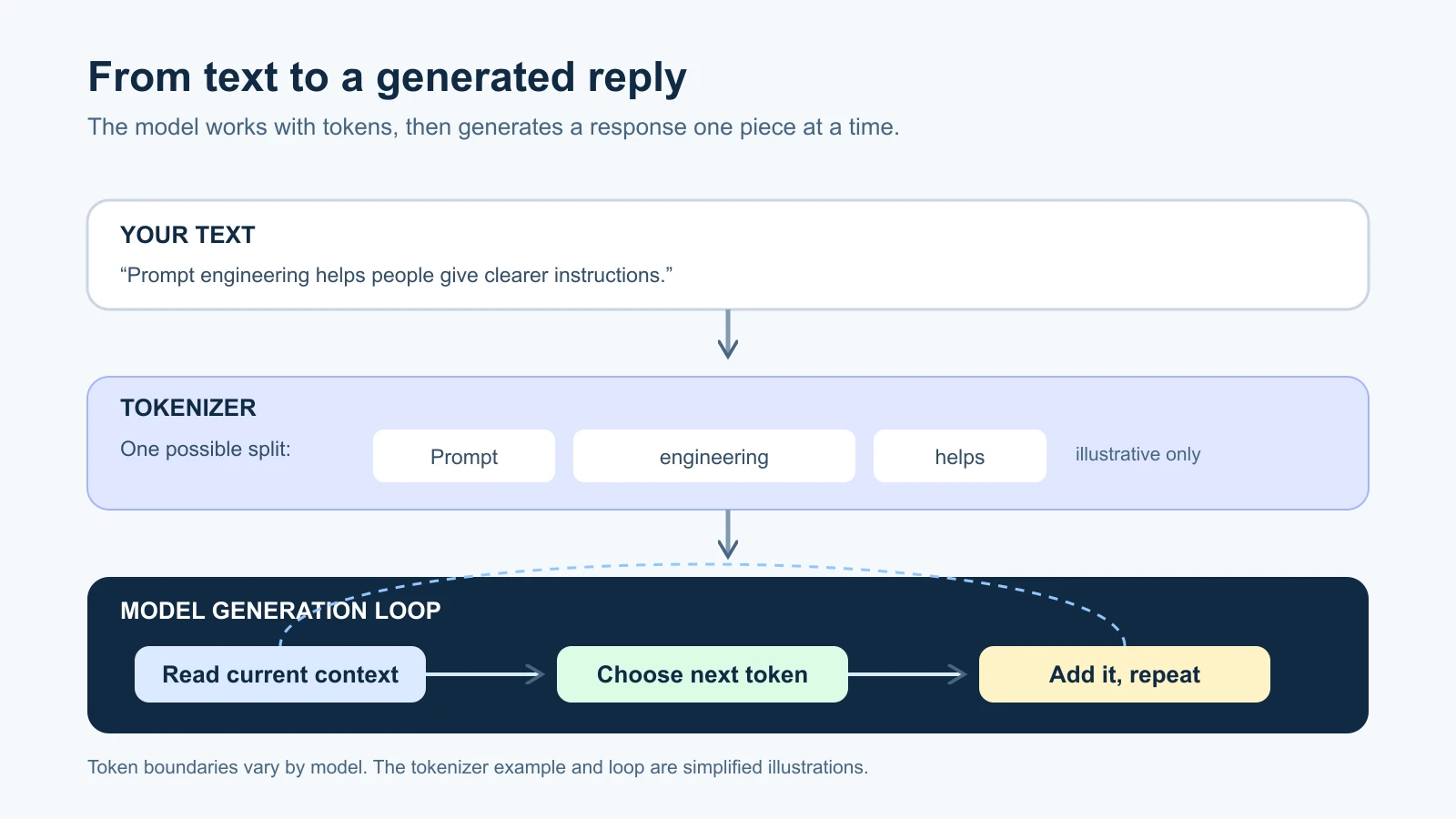
Tokens matter because models count their input and output in these units. In an API, token counts can affect request limits and billing. In a chat product, you may not see tokens at all, but the product still has to fit the conversation and its reply within limits. Images, audio, video, and documents can also contribute to a request’s token use, though the way each format is represented varies by model and API.
Do not rely on a fixed “words equal tokens” conversion when precision matters. Anthropic’s glossary notes that even tokenization can change between model generations. The reliable approach is to use the tokenizer or token-counting feature for the model you plan to use. OpenAI and Google provide their own ways to inspect or count tokens as well. Check the provider’s current token documentation, context-window guide, or Gemini token guide for the specific product you use.
A model generates one piece at a time
A language model is a system trained to recognize patterns in language and generate text from them. A simplified way to picture generation is: the model takes the current input, estimates which next token is likely to fit, adds a token to the response, and repeats the process. It continues until it reaches a stopping point, such as a completed response or an output limit.
The first choice influences the next one. If the model starts a reply with “Hi,” the following token is more likely to continue a greeting than to begin a table of invoice totals. The process repeats until the answer is complete. This is why a model can continue a partial sentence, follow a format you demonstrate, or produce a natural-sounding paragraph from an instruction.
The diagram uses a short sentence to show the loop. Its token choices are illustrative, not a trace from a particular model. Real systems use numerical calculations over many possible tokens, with details that differ by architecture and service. You do not need to understand those calculations to write or test prompts.
In the API, generation settings can influence how the model chooses among likely next tokens. For example, temperature can change how much variety is allowed in token selection on systems that expose it. The settings available and their effects vary by model. We will cover those controls in Controlling the output: sampling and limits.
Why the same prompt can get different answers
Some variation is expected. A model may have multiple plausible ways to continue the same prompt. A writing request could lead to two equally reasonable introductions. Generation settings, model updates, service implementation, and even tiny changes to the input can affect which path the response follows.
This does not mean every output is random or unusable. It means a single successful answer is weak evidence that a prompt will work consistently. If you are trying a prompt for a task that will happen once, inspect the answer and decide whether it meets your need. If you plan to use the prompt many times, try it against a set of different inputs and check the results against the same requirements. The lesson on your first prompt workflow will give you a simple way to compare runs.
For example, ask a model to classify a note as “urgent” or “not urgent.” If you test only a note that says “The office is closed tomorrow,” you have not checked how the prompt handles a vague request, a message with no deadline, or text that contains conflicting information. The missing cases may reveal that your instructions need clearer definitions or that the application needs a human review step.
The context window is the model’s working space
A context window is the amount of information a model can use while handling a request and generating its response. Think of it as a workspace with a size limit. Depending on the system, it can include the current prompt, earlier conversation messages, system or developer instructions, retrieved documents, tool descriptions and results, and the response being generated.
The model cannot refer to text that the application leaves out of the current context. In a chat product, the service decides how conversation history is managed. In an API application, the developer may send prior messages again, use a provider’s conversation state, or summarize older content. From the reader’s point of view, the important question is what information the model actually receives for this turn.
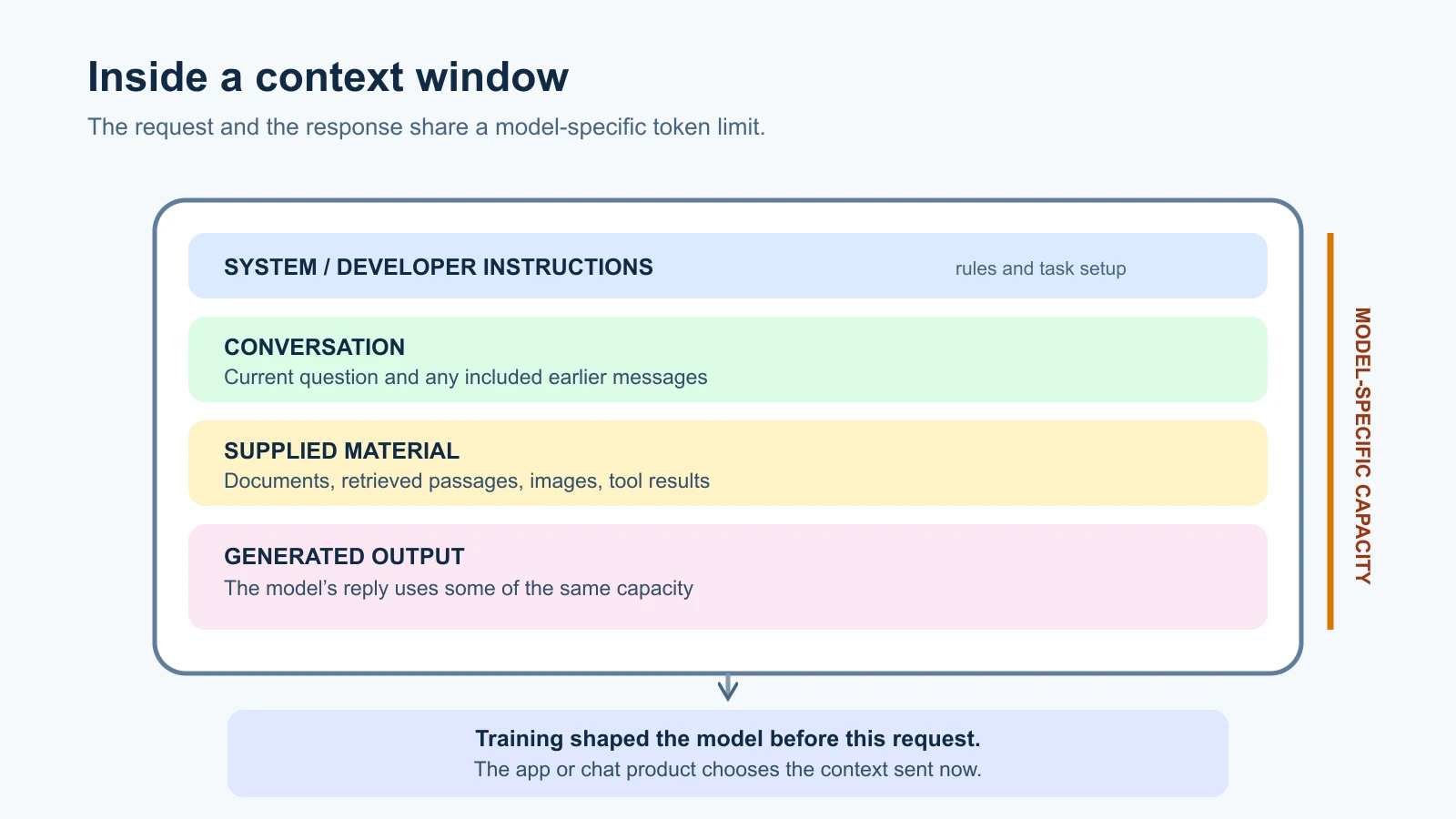
Context windows have limits, and their sizes differ by model. If a request is too large, a service may reject it, shorten or manage the input, or stop generation when it reaches a limit. The exact behavior depends on the provider and model. Look up the current model documentation when designing an application with long documents or conversations.
A larger context window lets a system accept more information in one request. It does not guarantee that every detail will receive equal attention or that the answer will be accurate. A long document may contain repetition, irrelevant sections, or instructions that compete with the task. Good prompts still need relevant context, and important claims still need checking.
The context window is also different from the data used to train the model. A model may have learned patterns from a large training collection, but it does not automatically have access to every private document, recent event, or fact mentioned in that collection. To answer from a company policy, for example, you need to provide that policy or use a system that retrieves it for the request. For a more technical account of tokens, context and embeddings, see How LLMs work for agent builders.
Weights, parameters, and the prompt
During training, a model adjusts many internal numerical values, called weights, based on examples. The weights hold learned patterns that help the model predict and generate text. They are part of the trained model, not a notebook of facts the model can search like a person looking through files.
The word parameter can mean two related but different things, depending on the conversation. In machine learning, a model’s parameters are the learned numerical values in its weights. In an API guide, “parameters” often means request settings such as maximum output length or temperature. When you read documentation, check which meaning the page uses.
Your prompt usually does not rewrite the model’s learned weights. It supplies information for the current request and guides the model’s response. Fine-tuning, introduced in the previous lesson, is a training process that can change how a model behaves. A regular prompt is temporary input. The model may respond to it, but that does not mean the model has permanently learned the instruction for future conversations.
Why a fluent answer can still be wrong
Because the model generates a likely continuation, it can produce a response that reads smoothly even when the underlying facts are incomplete or mistaken. A model does not automatically verify every sentence against a trusted database. The output may be plausible without being supported by the information it received.
People often call a confident but unsupported or false model response a hallucination. The term describes the failure; it does not explain every cause. A model may lack current information, misunderstand the request, receive a poor source, or produce a plausible continuation where it should have admitted uncertainty. Google’s factuality guidance advises evaluation and verification because generative models can produce inaccurate information.
Consider asking, “What was the total on the receipt I uploaded?” If the receipt is blurry or the total is missing, a model may still offer a number. A clearer prompt can ask it to quote the line it used and say when the total is unreadable. That helps you inspect its answer, but it is not proof that the quote or calculation is correct. For important amounts, compare the result with the receipt or use software designed for the calculation.
For recent facts, retrieve a current source and ask the model to ground its answer in that source. For numbers, run a calculation or check it independently. For decisions that affect people, use a suitable review process. Prompting can make the task clearer and the output easier to inspect; it cannot turn an unsupported claim into a verified fact.
A practical way to use this model
When an answer is weak, think about what the model could see and what it was asked to do. If it missed an important detail, check whether that detail was included in the current context. If it responded in the wrong shape, state the format and test it with several examples. If it answered a current question from old knowledge, supply or retrieve an up-to-date source. If the answer varies across attempts, define the checks that matter and compare more than one run.
These questions keep prompt work grounded in the actual problem. They also help you distinguish a prompt issue from a source, model, or application issue. You will use that habit throughout the course as we move from simple chat requests to prompts that are tested and reused.
Mistakes beginners make
- Treating a token as a word. A token can be a word, part of a word, punctuation, or another unit. Counts vary by tokenizer.
- Assuming the model sees the entire conversation forever. The product or API decides what history and context are included for the current request.
- Confusing the context window with training data. One is current working input; the other shaped the model before you sent your prompt.
- Assuming a fluent answer has been checked. The model can produce polished text without verifying its factual claims.
- Treating one good run as a repeatable result. Test more than one relevant input before relying on a prompt for repeated work.
Recap and try it yourself
Models process input as tokens and generate a response piece by piece. A context window limits how much information can be used in one request, while trained weights hold patterns learned before the prompt was sent. Generation settings can affect how a response is produced. These mechanisms explain why a model may vary between runs and why its fluent answers still need checking.
Try it: take a short request you use often and write down what information the model needs, what answer would count as successful, and one case that could trip it up. Run the prompt on several examples and compare the results against those checks. Keep the outputs; you will use this habit in Your first prompt workflow.