
AI Red Teaming course · lesson 17 of 26
- 1What Is AI Red Teaming?
- 2Ethics, Authorization, and Rules of Engagement
- 3AI and Machine Learning Basics for Red Teamers
- 4Security Principles and AI Threat Modeling
- 5Build a Safe AI Red Team Test Lab
- 6Jailbreaks and Safety Filter Bypasses
- 7Prompt Injection: Direct and Indirect
- 8Code Injection and Tool Abuse
- 9System Prompt and Data Leakage
- 10Countermeasures for Prompt Attacks
- 11Data Poisoning and Backdoors
- 12Adversarial Examples
- 13Model Extraction and Weight Theft
- 14Model Inversion and Privacy Leaks
- 15Model Manipulation and the AI Supply Chain
- 16AI Infrastructure, Deserialization, and Remote Code Execution
- 17API Authentication and Authorization
- 18Black, Grey, and White Box Testing
- 19Manual, Automated, and Continuous AI Testing
- 20AI Red Teaming Tools, Frameworks, and Datasets
- 21Write Your Own AI Security Test Harness
- 22Report AI Security Findings and Track Fixes
- 23Defense in Depth for AI Systems
- 24Red Teaming LLM Applications and Agents
- 25Disclosure, Law, Careers, and What's Next
- 26Capstone: Red Team a Practice App
After this lesson, you will be able to distinguish authentication from authorization, test tenant boundaries in an AI API with approved accounts, and review controls for tokens, tools, quotas, and usage costs. The examples use fictional HelpDesk Bot records and a controlled test plan; do not probe an endpoint unless you own it or have written permission.
An AI feature often sits behind an API, or application programming interface: a defined way for software to send requests and receive responses. That API may accept a question, retrieve customer documents, call a model provider, and invoke tools. A request can be perfectly well formed and still come from the wrong identity or ask for data that identity should not see. The security check must cover the full request path, including the model's retrieval and tool calls.
OWASP's API Security Top 10 names broken authentication, broken object-level authorization, broken function-level authorization, and unrestricted resource consumption among API risks. Those categories apply to AI endpoints too. A chatbot that leaks another tenant's support case has an access-control problem even if the model generated the response in natural language.
Authentication and authorization answer different questions
Authentication asks: “Who or what is making this request?” A user may prove identity with a session, a passkey, or an access token. A service may authenticate with a workload identity, a certificate, or another approved credential. Authentication establishes an identity to use in later decisions; it does not mean the identity can access every feature or record.
Authorization asks: “Is this identity allowed to perform this action on this resource right now?” A valid user may read their own support case but not another customer's case. A service account may retrieve an approved model but not change user roles. An administrator may manage settings but still should not receive raw secrets through a chat response. Authorization is about the action, the resource, and the current context.
Think about the difference this way: a badge at the door identifies you; a room access list determines which rooms you may enter. If a service accepts an authenticated person but forgets to check the specific room or record, authentication worked and authorization failed. The distinction matters because teams sometimes add a login screen and assume data access is now protected.
Identities, tokens, and API keys
An access token is a credential presented with a request to show that the caller has authenticated. Treat it like a temporary password: keep it out of URLs, logs, source code, model prompts, and screenshots. Use encrypted transport such as HTTPS so credentials and data are not sent in clear text. Set lifetimes and scopes appropriate to the application, and make sure expired or revoked credentials stop working.
An API key is often used to identify an application or project and account for its usage. A key does not automatically identify the human currently using the application, and possession of the key should not grant broad access to every customer record. If a browser or mobile app contains a key, users may be able to extract it. Use server-side credentials for sensitive operations and bind user-level permissions to a trusted identity or session.
Avoid embedding long-lived secrets in client code, notebooks, container images, or system prompts. Put service credentials in an approved secret manager and grant only the minimum access required. Rotate or revoke a credential when it is exposed, and review logs for unusual use. OWASP's REST Security Cheat Sheet advises against sending API keys and tokens in URLs because URLs can be captured in server logs and other systems.
Tokens also need validation. The server should verify the expected issuer, audience, signature, expiry, and allowed use according to the authentication system. Do not trust identity or role fields supplied in ordinary request parameters. A client should not be able to change tenant_id, role, or user_id in a JSON body and thereby become another person. The server derives identity from the authenticated context and checks the requested action against stored policy.
Authorization must follow the request to its data
Broken object-level authorization, often abbreviated BOLA, occurs when an API checks that a caller can use an endpoint but does not check whether that caller may access the particular object named in the request. An object could be a support ticket, document, conversation, upload, or saved assistant result. An identifier is a locator, not a permission. Changing an identifier should never be enough to cross an account boundary.
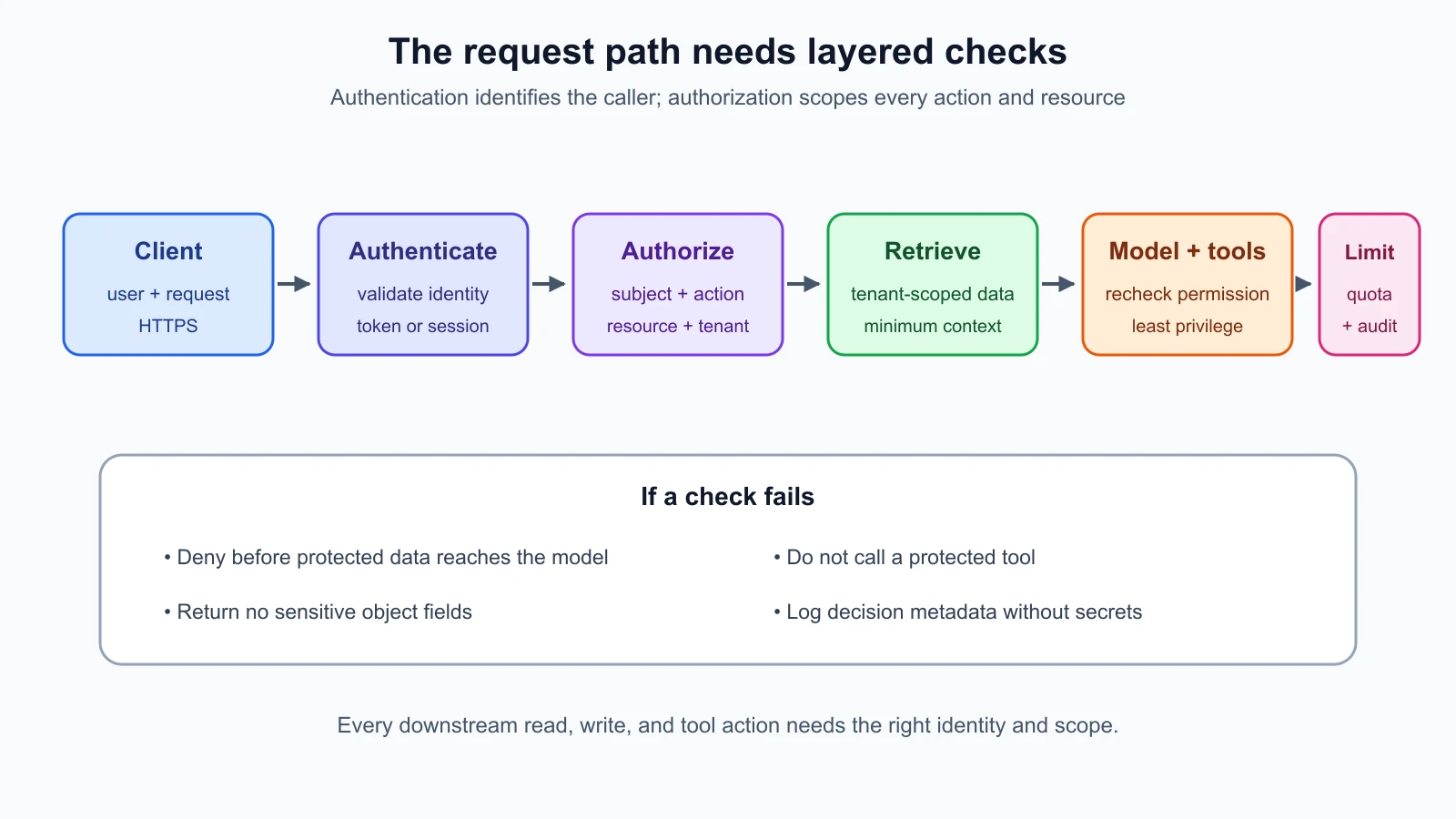
In an AI application, an API may authorize the request to /chat but later fetch documents from a vector index, cache, or database. If that retrieval step ignores tenant ownership, the model may receive another customer's content. A final answer can reveal that content directly, summarize it, or use it to guide a tool. Filtering the final output does not correct a retrieval authorization failure. Each data source must enforce its own access rules, and the application should pass only the records the user is permitted to access.
Authorization should apply to every path that reads or changes an object: direct lookup, list, search, export, attachment download, conversation history, feedback, deletion, and administrative operations. Also check derived resources such as cached answers, generated reports, embeddings, and background jobs. A cached response should be scoped to the identity or tenant and the relevant permission state; otherwise, a previous authorized result might be served to a different user.
For AI tools, apply authorization again when the tool is called. The model's decision to invoke a tool is not proof that the user is allowed to use it. A tool that reads a case, sends a message, updates a ticket, or queries a database needs a server-side check on the authenticated user, the action, and the specific resource. Lesson 8 introduced over-permissive tools; this lesson checks who may reach each tool and what it can do on their behalf.
Run a safe tenant-boundary test
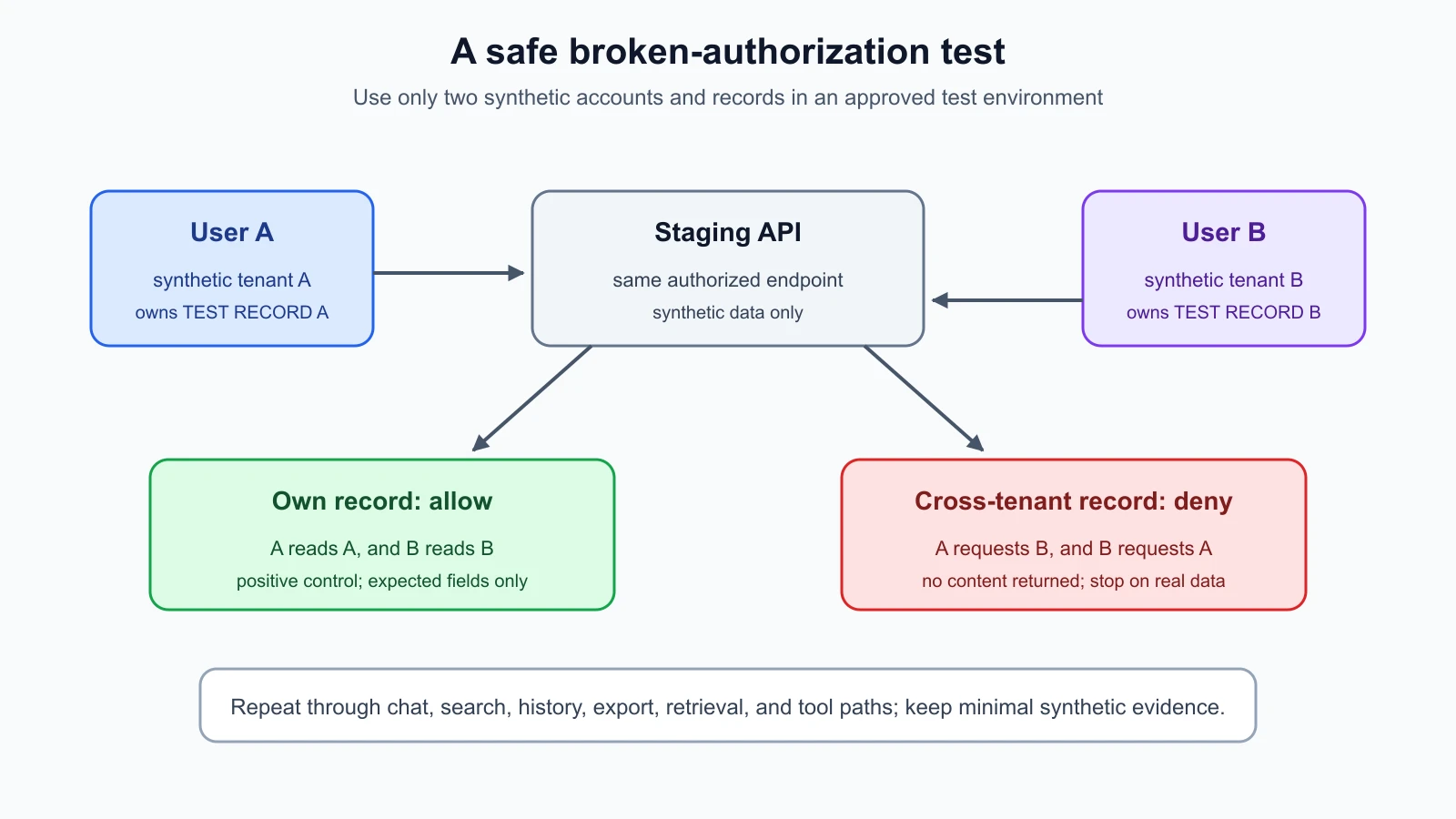
Use a staging environment or a purpose-built local target that you are authorized to test. Create two synthetic test accounts, User A and User B, in separate test tenants. Place one fake support case in each tenant using invented text such as “TEST RECORD A: blue umbrella” and “TEST RECORD B: orange bicycle.” Do not copy a real customer's record into the fixture.
Write down which actions each test account should be able to perform. For example, a user may read and ask questions about their own case, but should not read, search, export, update, or retrieve another tenant's case. Use the normal interface to learn which request is generated, then replay only the request against the same test system using the two test identities. Keep the requests small and avoid guessing identifiers belonging to real users.
Start with positive controls: User A can read their own fake case, and User B can read their own fake case. These prove that the test setup is functioning. Then, as User A, request User B's known synthetic case ID using the same authorized endpoint. Repeat the inverse from User B to User A. A secure result denies the operation or returns a response that reveals no protected content. A generic not-found response can be appropriate, but the exact response policy should be consistent and should not disclose whether a sensitive object exists.
Repeat the boundary check through every relevant AI path. Ask the assistant about the caller's own fake record, then about the other test account's record. Check retrieval, chat history, search, attachments, summaries, and any tools that read or modify cases. Confirm that the model never receives the other tenant's document in its context; reviewing only the final chat response can miss data that was retrieved but not repeated verbatim. Use application logs or a test trace with synthetic content to confirm which documents were supplied.
Stop if a response contains anything that appears to belong to a real person or a system outside the test tenant. Do not continue probing to collect more evidence. Preserve the minimal request ID and timestamp, follow the rules of engagement, and notify the system owner. This is an authorized check of two planted records, not permission to enumerate customer identifiers or test another provider's public API.
Check function and property permissions
Function-level authorization controls which operations a role may perform. A normal support user might ask questions and view their own cases, while only a designated support manager can reassign a queue or change configuration. Test that a low-privilege account cannot call administrative functions by directly invoking a route hidden from the user interface. Hiding a button in the front end is not a server-side permission check.
Property-level authorization controls which fields a user may read or change. A response might contain a harmless case status along with private internal notes, customer email, billing fields, or an admin-only flag. Check the response schema and confirm that each caller receives only the fields required for the task. On updates, ensure the server does not accept protected fields such as tenant ownership, role, or escalation state just because they appear in a request body.
AI responses can make this harder to notice. A model may combine several fields into a natural-language summary, so the test should include data the user can read and data the user cannot read. Ask a narrowly scoped question about the synthetic protected field and check the trace to see whether unauthorized context reached the model. Do not rely on the model to decide whether a field is secret; data access must be controlled before it enters the model context.
Rate limits, quotas, and cost controls
An API request consumes resources. An AI request can consume network bandwidth, server capacity, retrieval work, model tokens, GPU time, or paid provider usage. A public or weakly protected endpoint may be abused to exhaust capacity or create unexpected bills. OWASP labels this risk unrestricted resource consumption and notes that requests can consume CPU, memory, storage, bandwidth, and paid external services.
Use limits that fit the service: requests per identity and tenant, maximum input size, maximum output tokens, concurrent requests, file size, retrieval scope, and a budget or alert for provider spend. Apply limits to expensive paths such as repeated long generations or large batch processing. Use backoff and queueing where appropriate, and return a clear throttling response when a limit is reached. A 429 Too Many Requests response is one common signal that a client is being rate limited.
Rate limiting is not a substitute for authentication or authorization. If the endpoint returns another tenant's data, a low request rate still leaks it. If a service key is stolen, an aggregate quota may slow misuse but does not make the key safe. Pair usage limits with identity, resource-level permission checks, anomaly monitoring, and a way to revoke exposed credentials.
Set a safe test budget before exercising quotas. Use a staging account and a small number of requests to verify the configured threshold, reset interval, and error response. Do not flood an endpoint or try to create a denial of service. Check whether limits apply consistently across API versions, tools, file uploads, and alternate routes, and whether one tenant can consume the shared capacity needed by another.
Review the complete request path
The first diagram shows a typical path: secure transport, authentication, authorization, tenant-scoped retrieval, model and tool permissions, usage limits, response, and audit event. Real systems may arrange these steps differently, but the checks should remain explicit. The gateway can authenticate identity and enforce coarse quotas; the application and data layer still need to check each resource and action. Do not assume a check at the edge automatically protects downstream services.
For every hop, write down which identity is being used. A user request may be forwarded to a model provider using a service credential, while retrieval uses an internal service account. The application must preserve the user's authorization context when it fetches tenant data. A broadly privileged service account should not erase the user's narrower permissions. If one component cannot make a user-specific decision, define and test the compensating control at the component that can.
Logs should help answer who made a request, which operation ran, which policy decision was made, and what resource identifiers were involved. Avoid logging bearer tokens, full prompts, or private documents. Use test IDs and synthetic text during the exercise. Alert on repeated denials, unusual access patterns, unexpected administrative calls, and usage spikes, while tuning alerts to avoid exposing sensitive content in the alert itself.
A practical HelpDesk Bot test matrix
For the fictional HelpDesk Bot, the test matrix has two synthetic tenants, a regular user in each, and one support manager. The user can access their own ticket and ask the assistant to summarize it. The manager can reassign tickets in the test queue. Neither user can access the other tenant's ticket, hidden internal notes, or manager-only action. The team uses a staging API key with a small quota and synthetic records only.
Test each identity across actions, not just pages. A user may be blocked from opening another ticket in the interface but still access it through chat history, an export route, or a tool call. Confirm that list and search results are tenant-filtered, direct reads check ownership, and updates reject protected fields. Confirm the manager's allowed action works on the test queue and is denied outside the manager's permitted scope. This tests both deny and allow cases so a broken fixture does not make every request look secure.
When a check fails, record the endpoint or tool, the test identity, the synthetic resource, the expected result, the observed result, a request ID, and the smallest safe evidence. Note whether the protected record reached the model at all. Do not include actual personal data in the report. Lesson 22 covers reporting findings; clear evidence lets the owner fix the server-side check and retest the same case.
OWASP's Authorization Cheat Sheet recommends deny-by-default decisions and validating permissions on every request. Its API Broken Object Level Authorization testing guide describes checking that the caller is authorized for each object. Treat this as a repeatable test pattern for an approved target, not a reason to try identifiers on an unknown service.
For general secure application coding context, see Security for Vibe Coders. This lesson focuses on the API red-team check: identify a test identity, choose an owned resource, state the expected permission, exercise the allowed and denied path, and capture minimal evidence.
Fixes that hold across endpoints
Define authorization policy centrally enough that routes do not each invent their own checks, but make the decision with the actual subject, action, resource, and relevant tenant context. Deny by default when a policy is missing or an authorization service fails. Check permission on every request and at the data access layer. Apply the same rules to AI retrieval, background jobs, caches, exports, and tool actions.
Derive tenant and user identity from the authenticated server context, not from a client-controlled field. Query only records within the permitted scope. Filter sensitive properties before serialization and avoid giving the model data it does not need. Use scoped service identities between components and avoid shared credentials with broad access.
For cost and availability, set per-user and per-tenant quotas, request-size bounds, concurrency limits, and provider spending alerts. Monitor denials and unusual usage, and make credential revocation practical. Add automated authorization tests to the regression suite for both permitted and denied access. A change to one route, retrieval index, or tool should not silently remove the tenant boundary.
Mistakes beginners make
- Treating a valid login or API key as proof that every requested action is allowed.
- Assuming a hard-to-guess record ID is an authorization control.
- Testing only the web page and ignoring chat, search, export, history, or tool routes.
- Checking the final answer but not whether unauthorized data reached the model context.
- Trusting a client-supplied
user_id,role, ortenant_idfield. - Hiding an admin button in the interface without denying the underlying API action.
- Forgetting field-level permissions and returning internal notes or hidden flags.
- Relying on rate limits to fix an access-control flaw.
- Running high-volume quota tests against production without an agreed budget.
- Logging access tokens or real private prompts as evidence.
Recap and try it yourself
Authentication identifies a user or service; authorization checks whether it may perform a specific action on a particular resource. Test both identity and tenant boundaries across every API, retrieval, history, and tool path. Use synthetic accounts and records, verify positive and negative cases, and stop if real private data appears. Protect credentials, apply server-side checks on every request, scope data before it reaches the model, and control request size, concurrency, and cost. Rate limits help availability and spending, but do not grant or remove data permissions.
Try a tabletop test for a fictional support API. Create a two-user permission matrix with one record per user and three actions: read, search, and update. Mark each expected allow or deny result. Add one assistant retrieval action and one manager-only tool action. For each denied case, state what safe evidence you would keep. Use only invented IDs and data; do not send these checks to a system without authorization.