
MLOps course · lesson 16 of 24
- 1What Is MLOps? From Notebooks to Reliable Production
- 2MLOps Principles and Maturity: From Manual to Automated
- 3ML Fundamentals for MLOps: Splits, Leakage, and Metrics
- 4A Reproducible ML Project: Layout, Seeds, and Data Code
- 5Data Engineering Basics for ML: Ingestion, SQL, and Skew
- 6Pipeline Orchestration: Apache Airflow and Kubeflow
- 7Batch vs Streaming: Spark, Kafka, and Flink
- 8Data Versioning and Lineage: DVC and Beyond
- 9Data Validation and Quality in ML Pipelines
- 10Experiment Tracking with MLflow
- 11Reproducible Training Pipelines
- 12Model Evaluation and Validation Gates
- 13Model Registry and Versioning
- 14CI/CD for Machine Learning
- 15Containers and Kubernetes for ML
- 16Infrastructure as Code: Terraform and Ansible
- 17Cloud ML Platforms: AWS, Azure, GCP, and Self-Built
- 18Model Serving Patterns: Batch, Online, and Streaming
- 19Inference Engineering Basics: Latency, Batching, and Cost
- 20Monitoring and Observability for ML Models
- 21Drift Detection and Retraining for ML Models
- 22Explainable AI: LIME, SHAP, and Model Interpretability
- 23Edge AI Deployment: Jetson, TFLite, and Mobile ML
- 24Capstone: An End-to-End MLOps Pipeline
In early-stage machine learning teams, infrastructure is almost always provisioned by clicking buttons in a web console. A developer logs into the Amazon Web Services or Google Cloud console, creates an S3 bucket for training data, launches an EC2 GPU instance for model exploration, opens port 8000 in a security group, and manually SSHes into the server to install NVIDIA drivers.
This manual practice, commonly referred to as ClickOps, is a primary source of operational failure in production MLOps.
Nobody documents which exact security group rules were opened. The staging and production environments drift apart because someone forgot to enable bucket encryption in production. Worst of all, developers forget to terminate expensive GPU instances on Friday evening, returning on Monday morning to discover thousands of dollars in surprise cloud charges.
Production machine learning requires infrastructure that is deterministic, reproducible, and version-controlled. That discipline is Infrastructure as Code (IaC).
In this lesson, you will learn how to manage machine learning platforms using Terraform for cloud resource provisioning and Ansible for server configuration. You will explore declarative execution graphs, state locking mechanics, cost guards, secret management, and operational templates for automated cloud infrastructure.
The StayWell figures in this lesson (rates, scores, counts and prices) are made up for illustration. They show how to read the numbers, not what real systems achieve.
The ClickOps anti-pattern in machine learning
ClickOps fails in machine learning for three reasons:
- Environmental Divergence: When infrastructure is created manually, no two environments are identical. The development S3 bucket has versioning disabled, while the production bucket has versioning enabled. An IAM policy attached to a developer role grants administrative privileges, masking access permission bugs that cause automated retraining pipelines to crash in production.
- Runaway Compute Costs: Machine learning compute is expensive. An on-demand GPU instance (such as an AWS
g5.12xlargeequipped with four NVIDIA A10G GPUs) costs over five dollars per hour. If an engineer forgets to terminate an experimental training instance before going on vacation, that single oversight costs thousands of dollars a month. - Disaster Recovery Impossibility: If a cloud region experiences an outage or an administrative account is compromised, recreating a complex mesh of VPCs, Kubernetes clusters, metadata databases, and storage buckets from memory takes days of stressful, error-prone manual clicking.
Infrastructure as Code treats servers, networks, buckets, and security roles exactly like application source code. Infrastructure definitions are written in text files, reviewed in pull requests, tested in continuous integration pipelines, and versioned in Git.
Declarative versus procedural infrastructure
Tooling for Infrastructure as Code falls into two distinct philosophies: declarative and procedural.
Declarative infrastructure (Terraform)
In a declarative paradigm, you declare what the desired end state should look like, not how to achieve it.
You write an HCL (HashiCorp Configuration Language) block stating that an S3 bucket named staywell-mlops-artifacts must exist, must have server-side encryption enabled, and must enforce versioning. When you execute the engine, Terraform queries the cloud provider API, compares real-world infrastructure against your declared configuration, calculates the difference (diff), and generates a physical execution plan to bring reality into alignment with your code.
Declarative tools are inherently idempotent: running terraform apply ten times against an unchanged infrastructure specification performs zero modifications after the first run.
Procedural configuration (Bash scripts)
In a procedural or imperative paradigm, you write step-by-step instructions specifying how to perform changes:
1# Imperative script: fragile and prone to partial failure
2aws s3 mb s3://staywell-mlops-artifacts
3aws s3api put-bucket-versioning --bucket staywell-mlops-artifacts --versioning-configuration Status=Enabled
If the first command succeeds but network connectivity drops during the second command, re-running the script throws an error because the bucket already exists. Imperative scripts require extensive defensive programming to handle partial failures, state tracking, and rollback logic.
Terraform core architecture: plan, review, and apply
HashiCorp Terraform is the industry standard open-source framework for declarative multi-cloud infrastructure provisioning.
The official Terraform Documentation (verified on 4 November 2026) describes Terraform as an infrastructure as code tool that lets you build, change, and version cloud and on-premises resources safely and efficiently.
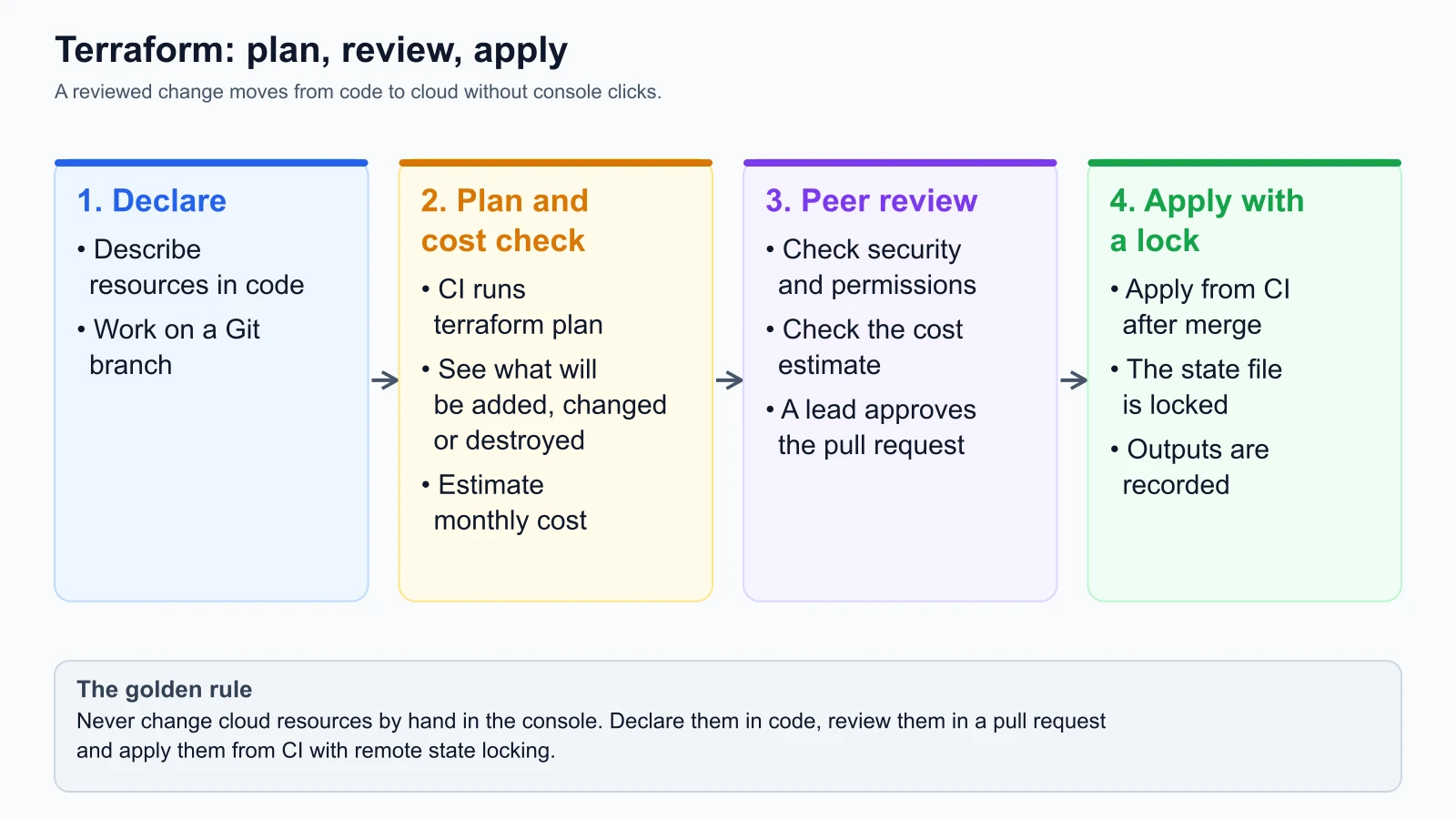
A disciplined Terraform workflow for MLOps operates in four continuous stages:
1. Declarative definition
Engineers define cloud infrastructure in .tf files using HCL. Resources include:
- S3 or Google Cloud Storage buckets for training datasets and model artifacts
- Relational databases (Amazon RDS PostgreSQL) for the MLflow tracking backend
- Kubernetes clusters (Amazon EKS or Google GKE) for inference and training pods
- AWS Identity and Access Management (IAM) least-privilege roles for automated CI/CD runners
2. Execution plan generation (terraform plan)
Before making any changes in the cloud, Terraform inspects the real-world state and outputs an explicit diff:
+indicates resources that will be created~indicates resources that will be modified in place-indicates resources that will be destroyed
In continuous integration pipelines, automated tools like Infracost analyze the generated plan diff and compute the predicted monthly financial impact before code is merged.
3. Peer review and budget guardrails
The generated plan and Infracost financial breakdown are posted as a comment on the pull request. Team leads verify:
- Does this pull request destroy any existing storage buckets containing historical models?
- Does the predicted monthly cost fit within the project's allocated cloud budget?
- Are security group ingress rules restricted to internal VPC subnets?
4. Controlled application (terraform apply) with state locking
Once the pull request merges to the main branch, an automated continuous delivery runner executes terraform apply.
Terraform records the mapping between declared resources and physical cloud IDs in a State File (terraform.tfstate). In production teams, this state file is never stored locally on a developer laptop. It is stored in a secure remote backend (such as an encrypted Amazon S3 bucket) paired with a distributed database lock (such as Amazon DynamoDB).
State locking ensures that if two automated workflows trigger simultaneously, the second runner waits for the first runner to release the lock, preventing concurrent executions from corrupting cloud state.
Dividing roles: Terraform versus Ansible
A common point of confusion is understanding where Terraform ends and Ansible begins.
Both tools manage infrastructure, but they operate at different layers of the technology stack:
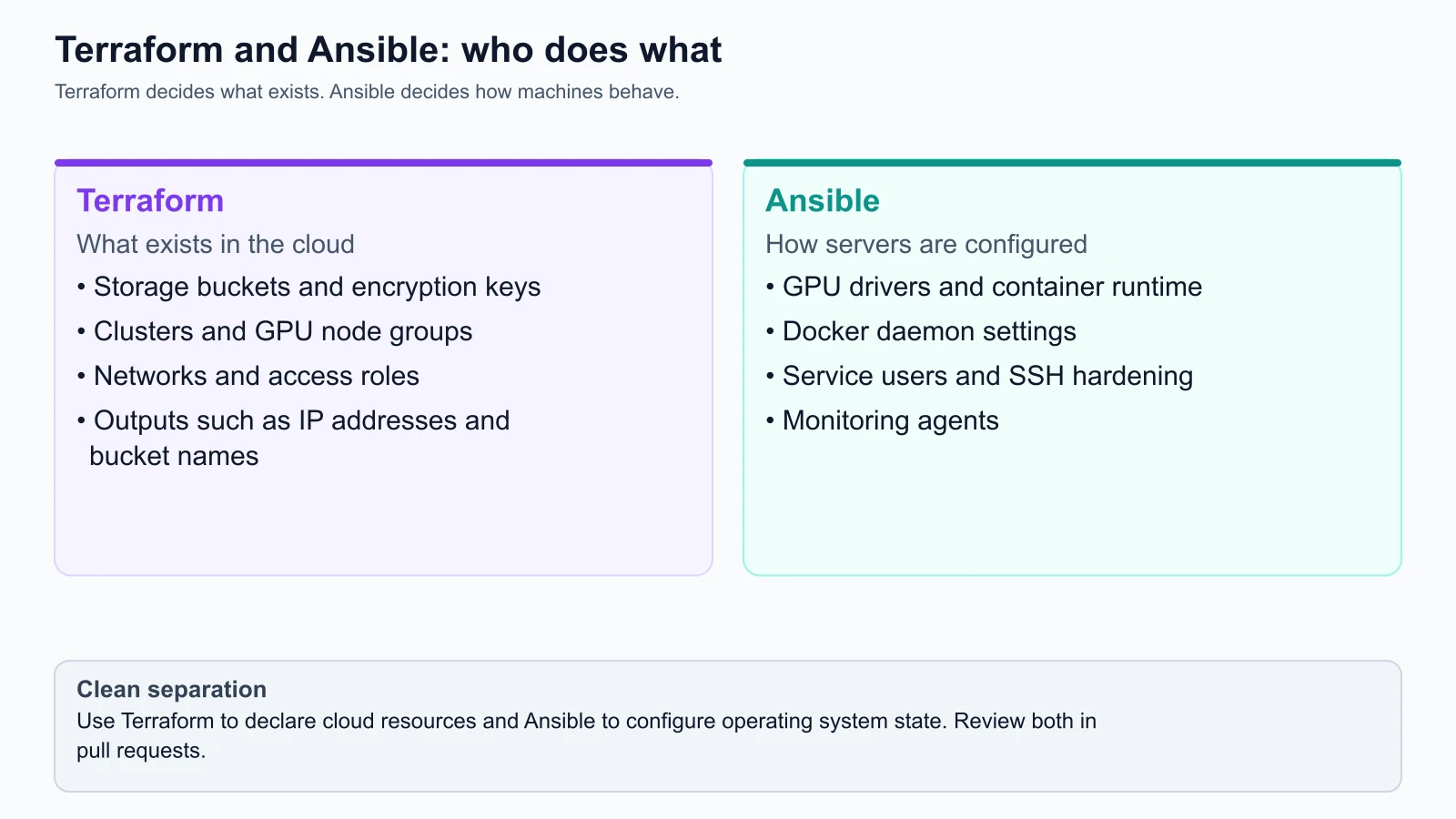
Terraform: Day 0 and Day 1 cloud provisioning
Terraform specializes in cloud topology: creating the virtual machines, networks, buckets, and managed services. It answers the question: What resources exist in our cloud environment?
- Provisions VPC subnets and routing tables
- Allocates S3 artifact and feature buckets
- Provisions EKS Kubernetes clusters and GPU node groups
- Generates IAM roles and security groups
- Outputs instance IP addresses and storage endpoints
Ansible: Day 1 and Day 2 operating system configuration
The official Ansible Documentation (verified on 4 November 2026) defines Ansible as an IT automation engine that automates cloud provisioning, configuration management, application deployment, and intra-service orchestration.
Ansible connects to already provisioned virtual instances over SSH (without requiring an agent daemon on worker nodes) to configure the host operating system. It answers the question: How do operating systems inside our servers behave?
- Installs NVIDIA CUDA drivers and the NVIDIA Container Toolkit on GPU instances
- Configures Docker daemon storage drivers and logging endpoints
- Creates non-root system users (
mluserwith UID10001) and locks down root access - Deploys Prometheus Node Exporter daemons for telemetry monitoring
The integration pattern
In modern MLOps pipelines, Terraform provisions cloud resources and outputs instance IP addresses to a dynamic inventory file. Ansible consumes that inventory and executes playbooks to configure system software idempotently across all provisioned nodes.
Cost guards and automated teardown for GPU instances
Machine learning teams frequently accumulate cloud debt through abandoned training instances. Unlike standard web servers that run continuously, ML training instances are ephemeral: they should exist only for the duration of a training run.
To enforce financial discipline, implement three cost guard mechanisms:
1. Pre-merge cost checks with Infracost
The official Infracost Documentation (verified on 4 November 2026) explains how Infracost integrates with CI/CD to detect cloud cost surges before infrastructure merges.
Infracost evaluates Terraform plans in pull requests. If an engineer accidentally modifies an EKS node group from cost-effective CPU instances to expensive GPU instances (p3.8xlarge), Infracost posts an alert:
1<!-- Automated Infracost Pull Request Comment -->
2### Infracost Monthly Cloud Estimate
3- Projected Monthly Cost: $9,450.00 (+$7,800.00 / +472%)
4- Violation: Surpasses team monthly change threshold ($500.00)
5- Action: MERGE BLOCKED pending Platform Director approval
2. Auto-terminating spot instances for training
Configure training jobs to run on ephemeral Cloud Spot instances (AWS Spot or GCP Preemptible VMs), which offer discounts between 60% and 90% compared to on-demand pricing. Ensure training pipelines save periodic checkpoints to S3 so that if a spot instance is reclaimed, training resumes from the latest checkpoint without lost compute.
3. Automated reaper daemons
Deploy lightweight serverless functions (such as AWS Lambda on a two-hour cron schedule) that inspect active EC2 instances tagged environment: training. If CPU and GPU utilization remain below 5% for more than sixty consecutive minutes, the lambda function terminates the instance automatically, protecting teams from runaway bills caused by forgotten servers.
Managing secrets and environments
Hardcoding API keys, database passwords, or cloud credentials in Terraform or Ansible files is a critical security vulnerability. Even in private repositories, commit histories permanently preserve plaintext secrets.
Adopt these secret management standards:
- Environment Variable Injection: Pass cloud authentication keys via runtime environment variables (
AWS_ACCESS_KEY_ID,AWS_SECRET_ACCESS_KEY) managed by GitHub Actions Secrets or HashiCorp Vault. - Encrypted Variable Vaults: When storing sensitive configuration values inside repositories, encrypt the files using Ansible Vault (
ansible-vault encrypt vars/secrets.yml). Decryption keys are injected dynamically during pipeline execution. - Environment Separation: Maintain strict directory isolation for infrastructure tiers:
environments/dev/: Ephemeral instances, loose retention policies, minimal sizes.environments/staging/: Mirrors production configuration for integration validation.environments/prod/: Locked state backends, multi-region replication, strict deletion protection on all S3 data lakes.
Never share state files or IAM credentials across development and production environments.
Operational template: Terraform S3 artifact lake
Here is an example Terraform configuration that provisions an encrypted, versioned artifact bucket for StayWell with lifecycle expiration rules. The AWS provider constraint (~> 6.0) matches the provider's current major version as of 5 November 2026 (release 6.72). I did not run it, because it needs Terraform and an AWS account; run terraform plan and read the output before any apply:
1# StayWell MLOps Artifact Storage Infrastructure
2# File: terraform/modules/s3_artifacts/main.tf
3# Reference: HashiCorp Terraform AWS Provider (from the docs, not run)
4
5terraform {
6  required_version = ">= 1.9.0"
7  required_providers {
8    aws = {
9      source  = "hashicorp/aws"
10      version = "~> 6.0"
11    }
12  }
13}
14
15variable "environment" {
16  type        = string
17  description = "Target deployment tier (dev, staging, prod)"
18}
19
20variable "project_name" {
21  type        = string
22  default     = "staywell-mlops"
23}
24
25# Provision dedicated S3 bucket for model artifacts and DVC data
26resource "aws_s3_bucket" "mlops_artifacts" {
27  bucket = "${var.project_name}-${var.environment}-artifacts"
28
29  # Prevent accidental bucket deletion in production
30  lifecycle {
31    prevent_destroy = true
32  }
33
34  tags = {
35    Project     = var.project_name
36    Environment = var.environment
37    ManagedBy   = "Terraform"
38  }
39}
40
41# Enforce bucket versioning for data lineage and rollback safety
42resource "aws_s3_bucket_versioning" "artifacts_versioning" {
43  bucket = aws_s3_bucket.mlops_artifacts.id
44
45  versioning_configuration {
46    status = "Enabled"
47  }
48}
49
50# Enforce server-side encryption at rest using AWS KMS
51resource "aws_s3_bucket_server_side_encryption_configuration" "artifacts_encryption" {
52  bucket = aws_s3_bucket.mlops_artifacts.id
53
54  rule {
55    apply_server_side_encryption_by_default {
56      sse_algorithm = "aws:kms"
57    }
58  }
59}
60
61# Block all public network access to proprietary datasets and models
62resource "aws_s3_bucket_public_access_block" "artifacts_public_block" {
63  bucket = aws_s3_bucket.mlops_artifacts.id
64
65  block_public_acls       = true
66  block_public_policy     = true
67  ignore_public_acls      = true
68  restrict_public_buckets = true
69}
70
71# Lifecycle policy: Transition old candidate runs to cheaper storage tiers
72resource "aws_s3_bucket_lifecycle_configuration" "artifacts_retention" {
73  bucket = aws_s3_bucket.mlops_artifacts.id
74
75  rule {
76    id     = "archive-stale-exploration-runs"
77    status = "Enabled"
78
79    filter {
80      prefix = "experiments/exploration/"
81    }
82
83    # Transition exploration runs to Glacier Flexible Retrieval after 90 days
84    transition {
85      days          = 90
86      storage_class = "GLACIER"
87    }
88
89    # Permanently delete un-promoted exploration artifacts after 180 days
90    expiration {
91      days = 180
92    }
93  }
94}
95
96output "artifact_bucket_name" {
97  value       = aws_s3_bucket.mlops_artifacts.id
98  description = "Name of provisioned MLOps artifact bucket"
99}
Operational template: Ansible GPU node configuration
Here is the production Ansible playbook used by StayWell to configure newly provisioned GPU worker instances with the NVIDIA Container Toolkit and non-root system users:
1# StayWell GPU Node Configuration Playbook
2# File: ansible/playbooks/configure_gpu_nodes.yml
3# Reference: Ansible Community General Collection (from the docs, not run)
4
5- name: Configure GPU Training and Inference Worker Nodes
6  hosts: gpu_workers
7  become: true
8  vars:
9    ml_user: mluser
10    ml_uid: 10001
11    docker_version: "5:27.3.1-1~debian.12~bookworm"
12
13  tasks:
14    - name: Update apt package cache and install prerequisites
15      ansible.builtin.apt:
16        update_cache: true
17        cache_valid_time: 3600
18        pkg:
19          - curl
20          - gnupg
21          - ca-certificates
22          - software-properties-common
23
24    - name: Add NVIDIA Container Toolkit GPG repository key
25      ansible.builtin.apt_key:
26        url: https://nvidia.github.io/libnvidia-container/gpgkey
27        state: present
28
29    - name: Add NVIDIA Container Toolkit APT repository
30      ansible.builtin.apt_repository:
31        repo: "deb [signed-by=/etc/apt/keyrings/nvidia-container-toolkit.gpg] https://nvidia.github.io/libnvidia-container/stable/deb/$(ARCH) /"
32        state: present
33        filename: nvidia-container-toolkit
34
35    - name: Install Docker Engine and NVIDIA Container Toolkit
36      ansible.builtin.apt:
37        update_cache: true
38        pkg:
39          - docker-ce
40          - docker-ce-cli
41          - containerd.io
42          - nvidia-container-toolkit
43
44    - name: Configure Docker daemon to use NVIDIA runtime as default
45      ansible.builtin.command:
46        cmd: nvidia-ctk runtime configure --runtime=docker
47      register: ctk_config
48      changed_when: ctk_config.rc == 0
49
50    - name: Restart Docker service to apply GPU runtime
51      ansible.builtin.systemd:
52        name: docker
53        state: restarted
54        enabled: true
55
56    - name: Create non-root system user for ML model execution
57      ansible.builtin.user:
58        name: "{{ ml_user }}"
59        uid: "{{ ml_uid }}"
60        shell: /bin/bash
61        create_home: true
62        groups: docker
63        append: true
64
65    - name: Verify NVIDIA GPU device detection inside Docker container
66      ansible.builtin.command:
67        cmd: docker run --rm --gpus all nvidia/cuda:12.6.0-base-ubuntu22.04 nvidia-smi
68      register: gpu_test
69      changed_when: false
70
71    - name: Confirm GPU hardware status
72      ansible.builtin.debug:
73        msg: "GPU Worker configuration successful. Hardware verified."
Mistakes beginners make
1. Committing sensitive state files to Git
Developers often run terraform init and terraform apply locally, committing the resulting terraform.tfstate file to their Git repository. Terraform state files contain unencrypted plaintext values of all provisioned cloud resources, including database passwords, secret keys, and internal VPC CIDR blocks.
Fix: Add *.tfstate and *.tfstate.backup to .gitignore immediately. Always configure a secure remote backend (such as an encrypted Amazon S3 bucket with server-side KMS encryption and IAM access restrictions) paired with DynamoDB state locking.
2. Blindly running terraform apply without reviewing plans
Teams frequently configure automated CI/CD runners to execute terraform apply -auto-approve directly on every branch push. If a subtle rename of an S3 bucket or database resource causes Terraform to schedule a destructive replacement (- / +), the production data lake or metadata database is wiped out in seconds.
Fix: Always generate and inspect terraform plan outputs during pull request reviews. Enforce lifecycle { prevent_destroy = true } on all production databases and storage buckets to prevent accidental deletion.
3. Using Ansible for cloud topology provisioning
Some teams attempt to use Ansible playbooks to create cloud VPCs, subnets, and Kubernetes clusters using procedural cloud modules. When playbooks fail halfway through execution, tracking which cloud resources were partially created and cleaning them up becomes chaotic.
Fix: Strictly separate responsibilities. Use Terraform for declarative cloud topology provisioning (networks, clusters, buckets), and use Ansible exclusively for host operating system and software configuration.
4. Overlooking cloud cost estimates in pull requests
Engineers frequently spin up large multi-GPU node groups for deep learning experiments without calculating ongoing financial costs. Without budget guardrails, idle instances run up thousands of dollars before finance notices on the monthly cloud invoice.
Fix: Integrate automated cost estimation tools (like Infracost) into your continuous integration pull request workflows. Set up automated cloud budget alerts that notify engineering leads when spending exceeds daily or weekly thresholds.
Recap and try it yourself
In this lesson, you explored how to manage machine learning infrastructure through code:
- The ClickOps anti-pattern leads to environmental divergence, runaway GPU compute charges, and impossible disaster recovery.
- Declarative tools like Terraform state the desired end state and compute execution diffs idempotently, whereas procedural bash scripts execute fragile sequential commands.
- The Terraform lifecycle follows an auditable loop: write declarative HCL, generate an execution plan with cost estimates, conduct peer reviews, and apply changes with remote state locking.
- Terraform specializes in Day 0 and Day 1 cloud topology (buckets, clusters, IAM), while Ansible specializes in Day 1 and Day 2 operating system configuration (CUDA drivers, system users, monitoring daemons).
- Pre-merge cost guards (such as Infracost) and automated idle instance reapers protect organizations from unexpected cloud expenses.
Try it yourself
To practice Infrastructure as Code concepts on your local machine:
- Install Terraform locally: Download the Terraform binary or install it via Homebrew (
brew install terraform). Runterraform versionto verify your installation. - Provision a local state file: In a test directory, write a simple
main.tffile that uses thelocal_fileprovider to manage a text configuration file on your disk. - Execute the plan and apply cycle: Run
terraform initto initialize providers,terraform planto inspect the generated execution diff, andterraform applyto create the local resource. - Test state drift detection: Manually edit the generated text file outside of Terraform using a text editor. Re-run
terraform planand observe how Terraform detects state drift and proposes restoring the file to match your declared code.